<?xml version="1.0" encoding="UTF-8"?>
<feed xmlns="http://www.w3.org/2005/Atom" xmlns:dc="http://purl.org/dc/elements/1.1/" xmlns:thr="http://purl.org/syndication/thread/1.0">
    <title>Getting Started with Online Services &amp; Databases</title>
    <subtitle>Posts from Getting Started with Online Services &amp; Databases category</subtitle>
    <link href="https://blogs.tpl.ca/category/database-guides/" />
    <link rel="self" href="https://blogs.tpl.ca/feed/atom-category/database-guides/" />
    <id>https://blogs.tpl.ca/category/database-guides/</id>
    <updated>2026-07-16T15:56:45Z</updated>
    <generator uri="https://wordpress.org/" version="7.0.2">WordPress</generator>

        <entry>
        <title>Getting Started with Ancestry Library Edition</title>
        <link href="https://blogs.tpl.ca/database-guides/2026/07/getting-started-with-ancestry-library-edition/" />
        <id>https://blogs.tpl.ca/database-guides/2026/07/getting-started-with-ancestry-library-edition/</id>
        <updated>2026-07-16T15:56:45Z</updated>
        <published>2026-07-09T11:00:00Z</published>
        <category term="database-guides" label="Getting Started with Online Services &amp; Databases" />
        <author>
            <name>Information Services Team</name>
        </author>
        <content type="xhtml" xml:lang="en-CA" xml:base="https://blogs.tpl.ca/">
<div xmlns="http://www.w3.org/1999/xhtml">
<p class="wp-block-paragraph"><strong>Ancestry Library Edition</strong> is a database of genealogical records and resources.   It includes vital records (birth, marriage and death), census records, church records, immigration records (birth/death registrations), land and tax records, wills, selected military records, voting lists, and much more.   In addition to the substantial collection of U.S. and Canadian records, it also includes UK and other international records. </p>


<p class="wp-block-paragraph">The information you will be able to find in this e-resource will vary depending on where and when your ancestors lived, whether or not Ancestry has collected the relevant record collections and if the individual records survived long enough to be preserved.</p>


<h3 class="wp-block-heading">How to Access Ancestry Library Edition</h3>


<p class="wp-block-paragraph">Access Ancestry Library Edition on a library computer or when signed into the library&#8217;s wireless network on a personal device.   Access to this online service from outside library branches is not permitted.</p>


<ol class="wp-block-list">
<li>Go to <a href="https://tpl.ca/resource/ancestry-library-edition/">Ancestry Library Edition</a> or <a href="https://tpl.ca/resource/ancestry-library-edition/">https://tpl.ca/resource/ancestry-library-edition/</a></li>


<li>Select <strong>Ancestry Library Edition &gt;&gt;</strong> (the title)</li>
</ol>


<figure class="wp-block-image size-full"><img loading="lazy" width="429" height="41" src="https://blogs.tpl.ca/wp-content/uploads/2019/12/Screenshot-of-the-access-point-to-Ancestry-with-arrow-pointing-to-the-title.png" alt="Screenshot of the access point to Ancestry with arrow pointing to the title." class="wp-image-77236" /></figure>


<ol start="3" class="wp-block-list">
<li>Start searching.</li>
</ol>


<p class="wp-block-paragraph"><strong>Please note:</strong> <br />If you are having trouble accessing Ancestry Library Edition using the  Safari browser on an Apple device, you will need to turn off <a href="https://support.apple.com/en-ca/guide/iphone/iphb01fc3c85/26/ios/26#iph313b54b9d">iCloud Private Relay</a> to  temporarily allow the website to see the IP address used by your device. Another option is to use a different web browser such as Chrome or Firefox.</p>


<h3 class="wp-block-heading">Searching Ancestry Library Edition</h3>


<h4 class="wp-block-heading">General Search</h4>


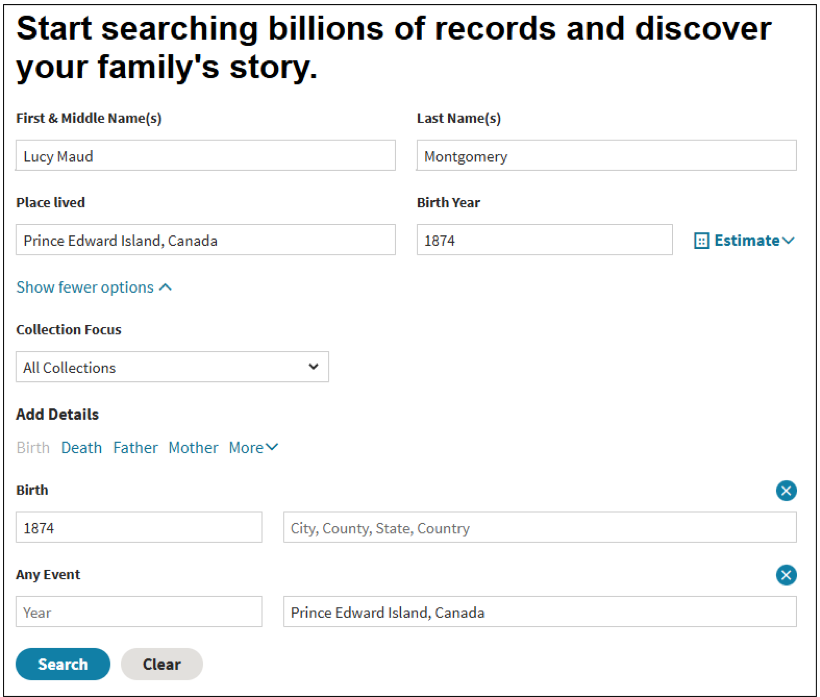
<p class="wp-block-paragraph">A general search on Ancestry does not limit the search to any one particular record set. Let’s use a general search to find records for Canadian author Lucy Maud Montgomery.</p>


<ul class="wp-block-list">
<li>In the search boxes for <strong>First &amp; Middle Name(s)</strong> and <strong>Last Name(s)</strong>, type in “Lucy Maud” and “Montgomery” respectively.</li>


<li>In the search box for <strong>Place lived</strong>, type in “Prince Edward Island, Canada”</li>


<li>In the search box for <strong>Birth Year</strong>, type in “1874”</li>


<li>Click on the <strong>Search</strong> button.</li>
</ul>


<figure class="wp-block-image size-full"><img loading="lazy" width="820" height="697" src="https://blogs.tpl.ca/wp-content/uploads/2019/12/Screenshot-of-the-basic-search-screen.png" alt="Screenshot of the basic search screen" class="wp-image-77239" /></figure>


<h4 class="wp-block-heading">Search results</h4>


<p class="wp-block-paragraph">The search results are organized into three tabs &#8211;  People, Records and Photos. Not all search results will pertain to the person we are researching.  </p>


<p class="wp-block-paragraph">In the records tab, the essential information for each record is displayed. To see more information, select the title (1901 Census of Canada) or <strong>View records</strong>.  </p>


<figure class="wp-block-image size-full"><img loading="lazy" width="854" height="262" src="https://blogs.tpl.ca/wp-content/uploads/2019/12/screenshot-showing-the-search-result-listing-the-1901-census-record.png" alt="screenshot showing the search result listing the 1901 census record" class="wp-image-77241" /></figure>


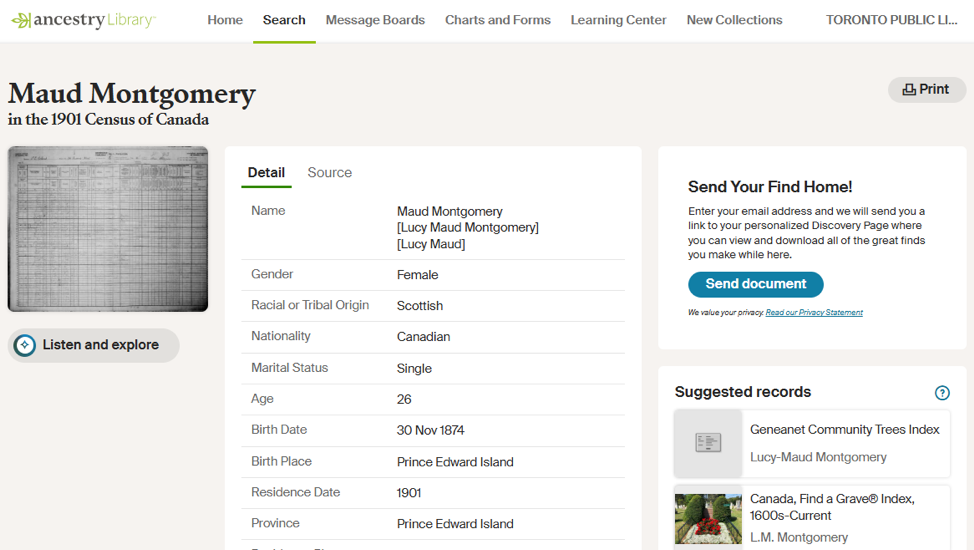
<p class="wp-block-paragraph">Ancestry provides any additional information transcribed from the record in the detail page.</p>


<figure class="wp-block-image size-full"><img loading="lazy" width="974" height="550" src="https://blogs.tpl.ca/wp-content/uploads/2019/12/screenshot-of-the-detail-page-for-the-1901-census-record-for-L-M-Montgomery.png" alt="screenshot of the detail page for the 1901 census record for L M Montgomery" class="wp-image-77243" /></figure>


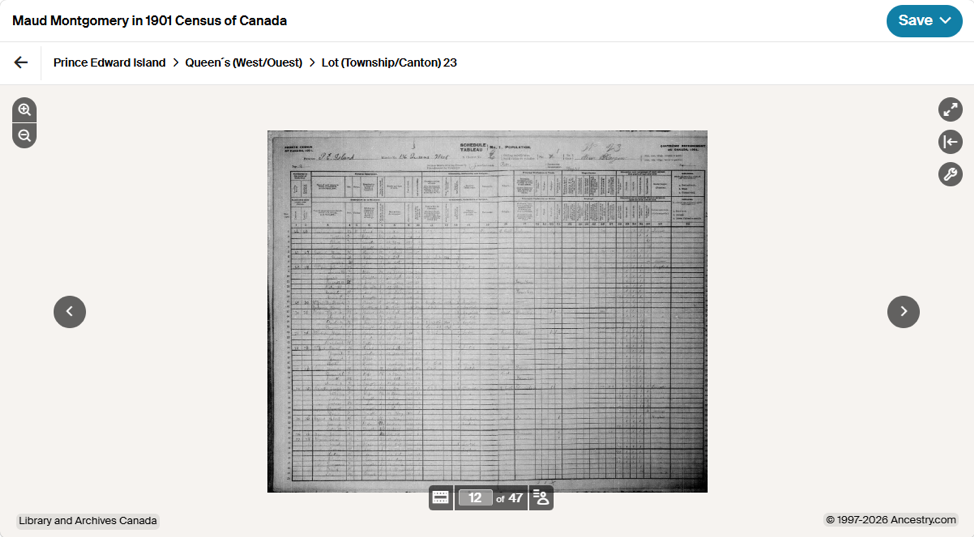
<p class="wp-block-paragraph">Select the thumbnail on the left side to view the image of the record.  </p>


<figure class="wp-block-image size-full"><img loading="lazy" width="974" height="537" src="https://blogs.tpl.ca/wp-content/uploads/2019/12/screenshot-of-the-image-of-the-1901-Census-in-the-image-viewer.png" alt="screenshot of the image of the 1901 Census in the image viewer" class="wp-image-77245" /></figure>


<h4 class="wp-block-heading"><strong>Using the Image Viewer</strong></h4>


<ol class="wp-block-list">
<li>Use the magnifying glass icons in the upper left corner to zoom in and out of the image.  </li>


<li>In the upper right corner are more tools.  They are full screen, the information panel and tool menu. Select the tool menu to see options for printing, downloading and changing the image display (rotate, flip).</li>


<li>Use the arrows to the sides of the images to view other images on this filmstrip.</li>


<li>Below the image, select the <strong>Toggle filmstrip</strong> icon to display the filmstrip for this record. The numbers indicate the number of the current image and the total number of images available.</li>


<li>Select <strong>Toggle index panel</strong> to see a list of other people included in this record.</li>
</ol>


<h4 class="wp-block-heading"><strong>Saving records</strong></h4>


<ol class="wp-block-list">
<li>Click the <strong>Save</strong> button at the top right</li>


<li>Select <strong>Send image home</strong> or <strong>Save to this computer</strong>. </li>
</ol>


<p class="wp-block-paragraph"><strong>Send image home</strong> requires providing Ancestry Library Edition with your email address. The service will send an email with a link to your personal Discovery Page where you can view and download the saved records. </p>


<p class="wp-block-paragraph">If you select <strong>Save to this computer</strong> on a library computer, please use Save As and save to a USB drive.  Another option is to select Download under the tool menu.</p>


<h3 class="wp-block-heading"><strong>Help</strong></h3>


<ul class="wp-block-list">
<li><a href="https://support.ancestry.com/s/article/Searching-on-Ancestry-at-a-Library-or-School?language=en_US">Searching on Ancestry at a Library or School</a> by Ancestry Library Edition.</li>


<li><a href="https://tpl.ca/downloads-ebooks/history-genealogy/">Local History &amp; Genealogy</a> for information on the other resources and services available from Toronto Public Library.</li>


<li>Visit the Humanities and Social Sciences Department of the <a href="https://tpl.ca/locations/TRL/?_gl=1*20h0th*_ga*MTMxOTI5NDU5MS4xNzc4Njc4ODEw*_ga_G99DMMNG39*czE3ODM2Mjk0ODMkbzEyNSRnMSR0MTc4MzYyOTYxMyRqMTMkbDAkaDA.*_gcl_au*MTY2MjYxMzI0Ny4xNzgwNDA1NTYy*_ga_VGX2640F9T*czE3ODM2Mjk0ODMkbzEyOSRnMSR0MTc4MzYyOTYxMyRqOSRsMCRoMA..">Toronto Reference Library</a> or the Society and Recreation Department of the <a href="https://tpl.ca/locations/CL/?_gl=1*1x9jypw*_ga*MTMxOTI5NDU5MS4xNzc4Njc4ODEw*_ga_G99DMMNG39*czE3ODM2Mjk0ODMkbzEyNSRnMSR0MTc4MzYyOTU2NiRqNjAkbDAkaDA.*_gcl_au*MTY2MjYxMzI0Ny4xNzgwNDA1NTYy*_ga_VGX2640F9T*czE3ODM2Mjk0ODMkbzEyOSRnMSR0MTc4MzYyOTU2NiRqNTYkbDAkaDA.">North York Central Library</a> and ask staff for assistance.</li>


<li>Schedule a <a href="https://tpl.ca/using-the-library/services/book-a-librarian/">Book a Librarian</a> appointment at a local branch.</li>


<li><a href="https://tpl.ca/contact/">Contact us</a> with your questions.</li>
</ul>


<p class="wp-block-paragraph"></p>
</div>
</content>
        <summary>Ancestry Library Edition is a database of genealogical records and resources.   It includes vital records (birth, marriage and death), census records, church records, immigration records (birth/death registrations), land and tax records, wills, selected military records, voting lists, and much more.   In addition to the substantial collection of U.S. and Canadian records, it also includes UK and...</summary>
    </entry>
        <entry>
        <title>Getting Started with Mango Languages</title>
        <link href="https://blogs.tpl.ca/database-guides/2026/07/getting-started-with-mango-languages/" />
        <id>https://blogs.tpl.ca/database-guides/2026/07/getting-started-with-mango-languages/</id>
        <updated>2026-07-07T18:22:48Z</updated>
        <published>2026-07-02T11:43:00Z</published>
        <category term="database-guides" label="Getting Started with Online Services &amp; Databases" />
        <author>
            <name>Information Services Team</name>
        </author>
        <content type="xhtml" xml:lang="en-CA" xml:base="https://blogs.tpl.ca/">
<div xmlns="http://www.w3.org/1999/xhtml">
<p class="wp-block-paragraph"><span style="background-color: #ffffff"><strong>Mango Languages</strong> is a language learning resource offering courses in more than 70 languages as well as English-language courses for non-English speakers in their own language. Interactive exercises incorporate culture notes, vocabulary and grammar.</span></p>


<h3 class="wp-block-heading"><span style="background-color: #ffffff">How to access Mango Languages</span></h3>


<ol class="wp-block-list">
<li>Go to <a href="https://tpl.ca/resource/mango-languages/">Mango Languages</a> or <a href="https://tpl.ca/resource/mango-languages/">https://tpl.ca/resource/mango-languages/</a></li>


<li>Select <strong>Mango Languages &gt;&gt;</strong> (the title)<span style="background-color: #ffffff"> &#160; &#160; &#160;</span></li>
</ol>


<figure class="wp-block-image size-full"><img loading="lazy" width="499" height="77" src="https://blogs.tpl.ca/wp-content/uploads/2019/08/mango-arrow.png" alt="" class="wp-image-77218" /></figure>


<ol start="3" class="wp-block-list">
<li>Enter your username or your 14-digit library card number (no spaces) and PIN/Password. Select <strong>Log in</strong>.&#160;</li>
</ol>


<h3 class="wp-block-heading">How to use Mango Languages</h3>


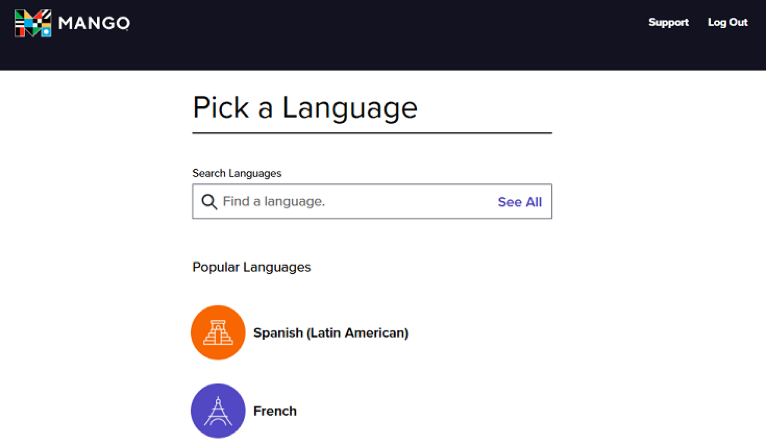
<p class="wp-block-paragraph">Get started by selecting a language course. Pick a language from the list of popular languages, select See All to view the full list of language learning courses, or search for a language by name.&#160;</p>


<figure class="wp-block-image size-full"><img loading="lazy" width="766" height="445" src="https://blogs.tpl.ca/wp-content/uploads/2019/08/mango-pick-a-language.png" alt="" class="wp-image-77220" /></figure>


<h3 class="wp-block-heading">Create a Profile</h3>


<p class="wp-block-paragraph"><span style="background-color: #ffffff">Although you can use Mango Languages as a guest user, creating your own profile is recommended.&#160; A personal profile is required to track your progress in a course and to use the Mango Languages app.&#160;<br /></span></p>


<h4 class="wp-block-heading">From within any of the language learning courses:</h4>


<ol class="wp-block-list">
<li>Select&#160;<strong>Guest User</strong>&#160;at the top right and then select&#160;<strong>Create a Profile</strong>.</li>


<li>On the <em>Create Your Profile</em> page, enter your email address and a password of your choice.&#160; Select <strong>Sign Up</strong>.</li>
</ol>


<h4 class="wp-block-heading">From the Pick a Language page:</h4>


<ol class="wp-block-list">
<li>Select <strong>Log Out</strong> to log out as a guest user.</li>


<li>On the <em>Toronto Public Library Log In</em> page, select <strong>Sign Up </strong>(located after <em>Don’t have a profile?</em>)</li>


<li>On the <em>Create Your Profile</em> page, enter your email address and a password of your choice.&#160; Select <strong>Sign Up</strong>.</li>
</ol>


<h3 class="wp-block-heading">Language Learning Courses</h3>


<p class="wp-block-paragraph">Language learning content is organized into four sections: Learn, Vocabulary, Explore, and Tools. &#160;Not all language courses will offer all four sections of content.</p>


<figure class="wp-block-image size-full"><img loading="lazy" width="604" height="114" src="https://blogs.tpl.ca/wp-content/uploads/2019/08/mango-french.png" alt="" class="wp-image-77224" /></figure>


<h4 class="wp-block-heading"><strong>Learn</strong></h4>


<p class="wp-block-paragraph"><span style="background-color: #ffffff"></span>Learn is the core section of the language course material.&#160; The main units offer lessons on conversations, reading and listening as well as recaps and quizzes. Some courses also offer specialty units.&#160; These focus on specific topics such as cultural events or unique cultural aspects of a language.</p>


<p class="wp-block-paragraph">Many courses have a placement test to help you find out where to start. If one is available, the link will be available just above the main units.<span style="background-color: #ffffff"><br /></span></p>


<h4 class="wp-block-heading"><strong>Vocabulary</strong></h4>


<p class="wp-block-paragraph"><span style="background-color: #ffffff">Use the vocabulary exercises in this section to practice the vocabulary available in a chapter, unit or in the full course.&#160;&#160;</span></p>


<h4 class="wp-block-heading"><strong>Explore</strong></h4>


<p class="wp-block-paragraph">The&#160;Explore&#160;tab connects you with features that will stretch your language skills and expand your cultural horizons.</p>


<h4 class="wp-block-heading"><strong>Tools</strong></h4>


<p class="wp-block-paragraph">Use the Translate tool to translate a word, a phrase or a sentence from one language to another.</p>


<h3 class="wp-block-heading">Start Learning with Mango Languages</h3>


<figure class="wp-block-image size-full"><img loading="lazy" width="974" height="510" src="https://blogs.tpl.ca/wp-content/uploads/2019/08/mango-learn.png" alt="" class="wp-image-77227" /></figure>


<ol class="wp-block-list">
<li>Select <strong>Unit 1</strong> and then select <strong>Start Learning</strong>.</li>


<li>The course will begin with a tutorial introducing Mango Language courses.&#160; Select the arrows to move through the Tutorial, or select Skip Tutorial.</li>


<li>Review the Conversational and Grammar Goals for the chapter.&#160; Select <strong>Start</strong> to begin the first lesson in the chapter.</li>


<li>You can stop a lesson and exit to select a different lesson from Chapter 1, a different chapter or different unit.</li>
</ol>


<h3 class="wp-block-heading">Tips for using Mango Languages</h3>


<ul class="wp-block-list">
<li>When in a lesson, select Course Settings in the upper right-hand corner (gear icon) to make changes to the volume, narrator, closed captions, quiz timer and interactive quiz slides.</li>


<li>When in a lesson, select the keyboard guide in the upper right hand corner (three arrows icon) to learn how to navigate with your keyboard instead of computer mouse.</li>


<li>Select any unit to view the number of chapters and lessons available.</li>


<li>Select Goals to view the conversational and grammar for that chapter.</li>


<li>To select a different language, select the icon associated with the current language, or the name of the language itself.&#160; In the slide-out window,&#160;search for a new language&#160;or scroll down the list of languages available.</li>
</ul>


<h3 class="wp-block-heading">Mobile App</h3>


<p class="wp-block-paragraph">The Mango Languages app is available for both <a href="https://apps.apple.com/us/app/mango-languages-learning/id443516516">iOS</a> or <a href="https://play.google.com/store/apps/details?id=com.mango.android">Android</a> devices.</p>


<h3 class="wp-block-heading">Create a Mango Languages profile through their website before opening the Mango Languages app (recommended)</h3>


<ol class="wp-block-list">
<li>Start by creating a profile through the Mango Languages website (see <em>How to Access Mango Languages</em> and <em>Create a Profile</em> above)</li>


<li>Download and install the Mango Languages app.</li>


<li>Open the Mango Languages app and select <strong>Login</strong>.</li>


<li>Sign in with the email address and password used to create your profile.</li>
</ol>


<h3 class="wp-block-heading">Create a profile through the Mango Languages app</h3>


<ol class="wp-block-list">
<li>Download and install the Mango Languages app.</li>


<li>Open the app and select <strong>Get Started Free</strong> (not Sign Up)</li>


<li>Use the arrows to move through the tutorial or select Skip.</li>


<li>Pick a language that you would like to learn.&#160;</li>


<li>A screen will display containing information about personal plans.&#160; Scroll down to find the<strong> Search for Free Mango </strong>option. Select <strong>Search</strong></li>


<li>Create your profile by entering your email address and a password of your choice and select <strong>Sign Up</strong>.</li>


<li>In the search box on the <em>Search for Access</em> screen, search for ‘Toronto Public Library’.</li>


<li>Select <strong>Toronto Public Library, Toronto, ON</strong> (don’t select Toronto, KS).</li>


<li>On the <em>Unlock Access to </em>Mango screen, select <strong>Continue</strong>.</li>


<li>Enter your TPL username or library card number and PIN.&#160; Select <strong>Log In</strong>.</li>


<li>On the <em>Success!</em> screen, select <strong>Continue</strong> to start learning through the Mango Languages app.</li>
</ol>


<h3 class="wp-block-heading">Help with Mango Languages</h3>


<ul class="wp-block-list">
<li>Select <a href="https://support.mangolanguages.com/hc/en-us">Support</a> in the Mango Languages website app or go to: <a href="https://support.mangolanguages.com/hc/en-us">https://support.mangolanguages.com/hc/en-us</a></li>


<li>Schedule a <a href="https://tpl.ca/using-the-library/services/book-a-librarian/">Book a Librarian</a> appointment at a local branch.</li>


<li><a href="https://tpl.ca/contact/">Contact us</a>&#160;with your questions.</li>
</ul>
</div>
</content>
        <summary>Mango Languages is a language learning resource offering courses in more than 70 languages as well as English-language courses for non-English speakers in their own language. Interactive exercises incorporate culture notes, vocabulary and grammar. How to access Mango Languages Go to Mango Languages or https://tpl.ca/resource/mango-languages/ Select Mango Languages &gt;&gt; (the title)       Enter your...</summary>
    </entry>
        <entry>
        <title>Getting Started with Medici.tv</title>
        <link href="https://blogs.tpl.ca/database-guides/2026/06/getting-started-with-medicitv/" />
        <id>https://blogs.tpl.ca/database-guides/2026/06/getting-started-with-medicitv/</id>
        <updated>2026-07-06T17:27:07Z</updated>
        <published>2026-06-30T11:39:43Z</published>
        <category term="database-guides" label="Getting Started with Online Services &amp; Databases" />
        <author>
            <name>Information Services Team</name>
        </author>
        <content type="xhtml" xml:lang="en-CA" xml:base="https://blogs.tpl.ca/">
<div xmlns="http://www.w3.org/1999/xhtml">
<p class="wp-block-paragraph">Medici.tv is a streaming video collection of live and on-demand classical and jazz music concerts, operas and ballets. Medici.tv also includes access to master classes by leading musicians and music documentaries. Medici.tv is available in English, French, Spanish and Russian.</p>


<h3 class="wp-block-heading">How to access medici.tv</h3>


<ol class="wp-block-list">
<li>Go to <a href="https://tpl.ca/resource/medici-tv/">Medici.tv</a> or <a href="https://tpl.ca/resource/medici-tv/">https://tpl.ca/resource/medici-tv/</a></li>


<li>Select <strong>Medici.tv&gt;&gt;</strong> (the title)</li>
</ol>


<figure class="wp-block-image size-full"><img loading="lazy" width="320" height="37" src="https://blogs.tpl.ca/wp-content/uploads/2022/08/medici-arrow.png" alt="" class="wp-image-77184" /></figure>


<ol start="3" class="wp-block-list">
<li>Enter your username or your 14-digit library card number (no spaces) and PIN/Password.&#160; Select <strong>Log in</strong>.</li>
</ol>


<h3 class="wp-block-heading">Browse or search medici.tv</h3>


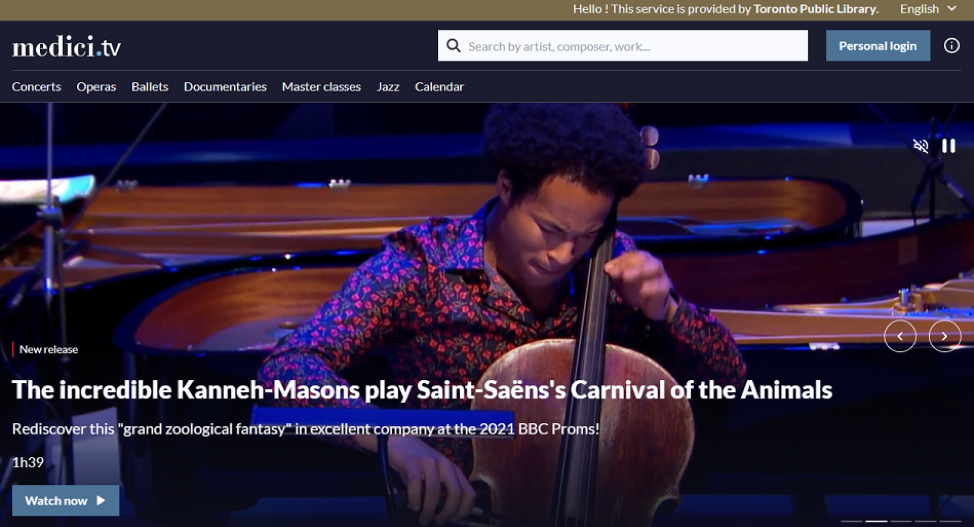
<p class="wp-block-paragraph">Browse the homepage or one of the categories (concerts, operas, ballets, documentaries, master classes or jazz). Select the magnifying glass to search by artist, composer or works.</p>


<figure class="wp-block-image size-full"><img loading="lazy" width="974" height="527" src="https://blogs.tpl.ca/wp-content/uploads/2022/08/medici-browse.png" alt="Screen shot of homepage of medici.tv" class="wp-image-77185" /></figure>


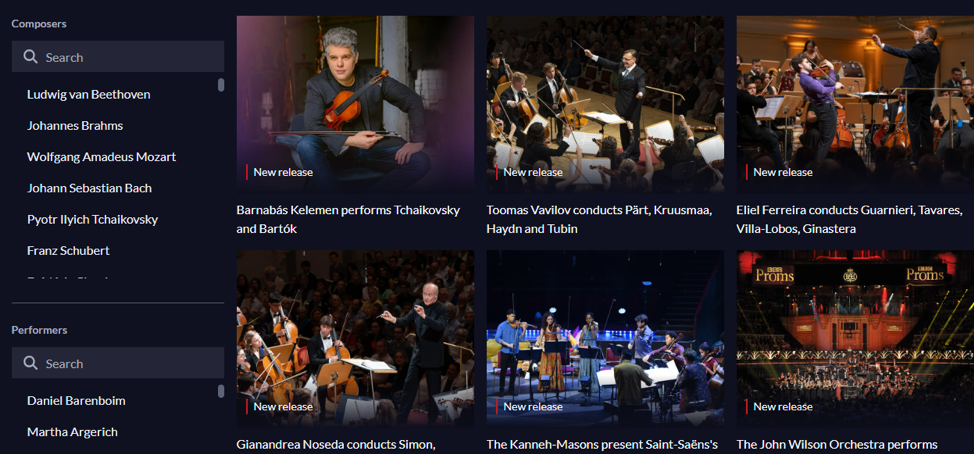
<p class="wp-block-paragraph">When browsing, use the filters on the left side to refine results by various preferences such as composers, performers, periods, instruments or directors. Options vary by category.&#160;&#160;</p>


<figure class="wp-block-image size-full"><img loading="lazy" width="974" height="454" src="https://blogs.tpl.ca/wp-content/uploads/2022/08/medici-category.png" alt="screen shot of concerts section showing the filters Composers and Performers" class="wp-image-77187" /></figure>


<h3 class="wp-block-heading"><strong>Upcoming events</strong></h3>


<p class="wp-block-paragraph">Scroll down the homepage to find the upcoming events.&#160; This is a list of recently recorded and upcoming live events streamed from concert halls, opera houses, festivals, and competitions. You can add event reminders to your calendar (Google, iCal or Outlook) or enter your email address to receive an email reminder.&#160;&#160;</p>


<h3 class="wp-block-heading"><strong>How to watch Medici.tv streaming video</strong></h3>


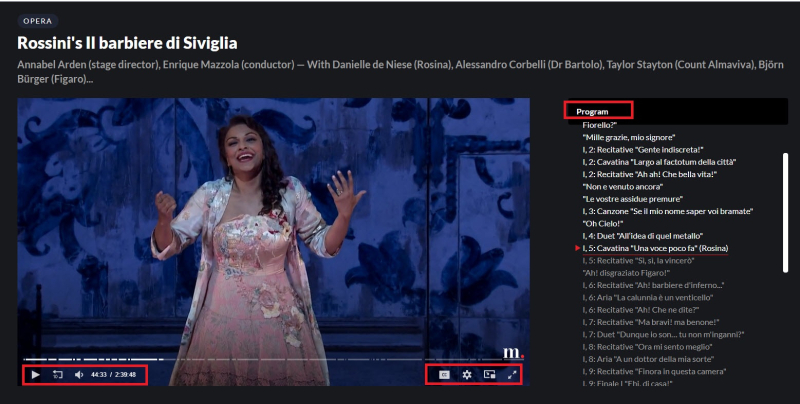
<p class="wp-block-paragraph">Select any performance to start watching, listening and enjoying.&#160; Play/pause, rewind 10 seconds and change the volume are all available in the toolbar at the bottom of the video player. Use the options on the end of the toolbar to access settings, picture in picture and full screen mode.&#160;</p>


<p class="wp-block-paragraph">Subtitles are available for some performances, documentaries and master classes. If available, click on the Close Captioning [CC] icon in the toolbar to see the list of subtitle language options.&#160;</p>


<p class="wp-block-paragraph">Navigate through different sections of the performance using the program list on the right.</p>


<figure class="wp-block-image size-large"><img src="https://blogs.tpl.ca/wp-content/uploads/2025/08/6a0148c875aa3d970c02c8d3ae8cd5200d-800wi.jpg" alt="" /></figure>


<h3 class="wp-block-heading"><strong>Create a medici.tv account.</strong></h3>


<p class="wp-block-paragraph">A medici.tv account is optional, but recommended.&#160; The personal account will allow you to save your favourite concert, documentary or master class videos, view your list of previously viewed videos and subscribe to the weekly newsletter.&#160; A personal account is required to use the <em>medici.tv for libraries</em> mobile app.</p>


<p class="wp-block-paragraph">To create an account, select&#160;<strong>Personal</strong> <strong>login</strong>&#160;then <strong>Sign in</strong>. Enter a valid email address and create a password of your choice. &#160;</p>


<h3 class="wp-block-heading"><strong>medici.tv for libraries app</strong></h3>


<p class="wp-block-paragraph">The <em>medici.tv for libraries</em> app is available for both&#160;<a href="https://play.google.com/store/apps/details?id=com.appmedici.tvedu"><strong>Android</strong></a>&#160;and&#160;<a href="https://apps.apple.com/us/app/medici-tv-edu/id1200334923"><strong>iOS</strong></a>&#160;devices.&#160;&#160;Use the app to cast the streaming video to your television.</p>


<ol class="wp-block-list">
<li>Start by accessing <a href="https://tpl.ca/resource/medici-tv/">medici.tv</a> through the library’s website, as explained above.</li>


<li>Create a medici.tv personal account, as explained above.</li>


<li>Download and install the&#160;<em>medici.tv for libraries</em> app&#160;to your mobile device.&#160; The <em>medici.tv for libraries</em> app is different than the <em>medici.tv</em> app used by individual subscribers.&#160;</li>


<li>Sign into the app with your medici.tv account.&#160; Select a performance to get started.</li>
</ol>


<p class="wp-block-paragraph">Customers using the <em>medici.tv for libraries</em> app will need to sign into their medici.tv personal account through the library’s website every 180 days.&#160;This will reconnect your TPL access with your medici.tv account.</p>


<h3 class="wp-block-heading"><strong>Help with medici.tv</strong></h3>


<ul class="wp-block-list">
<li>Visit the&#160;<a href="https://medicitv.zendesk.com/hc/en-us/categories/201061465-medici-tv-for-libraries-edu-medici-tv"><strong>medici.tv Help Center</strong></a>&#160;for FAQs or submit a&#160;<a href="https://medicitv.zendesk.com/hc/en-us/requests/new"><strong>support request</strong></a>.</li>


<li>Schedule a <a href="https://tpl.ca/using-the-library/services/book-a-librarian/">Book a Librarian</a> appointment at a local branch.</li>


<li><a href="https://tpl.ca/contact/"><strong>Contact us</strong></a> with your questions.</li>
</ul>
</div>
</content>
        <summary>Medici.tv is a streaming video collection of live and on-demand classical and jazz music concerts, operas and ballets. Medici.tv also includes access to master classes by leading musicians and music documentaries. Medici.tv is available in English, French, Spanish and Russian. How to access medici.tv Go to Medici.tv or https://tpl.ca/resource/medici-tv/ Select Medici.tv&gt;&gt; (the title) Enter your...</summary>
    </entry>
        <entry>
        <title>Getting Started with LawDepot</title>
        <link href="https://blogs.tpl.ca/database-guides/2026/05/getting-started-with-lawdepot/" />
        <id>https://blogs.tpl.ca/database-guides/2026/05/getting-started-with-lawdepot/</id>
        <updated>2026-05-14T18:24:45Z</updated>
        <published>2026-05-14T18:21:22Z</published>
        <category term="database-guides" label="Getting Started with Online Services &amp; Databases" />
        <author>
            <name>DXstaff-sa</name>
        </author>
        <content type="xhtml" xml:lang="en-CA" xml:base="https://blogs.tpl.ca/">
<div xmlns="http://www.w3.org/1999/xhtml">
<p class="wp-block-paragraph"><a href="https://tpl.ca/resource/lawdepot">LawDepot</a> offers do-it-yourself legal forms relating to wills, power of attorney, loan agreements, bills of sale, residential lease agreements, landlord/tenant notices, employment and other business contracts, marriage &amp; family law and more.</p>


<p class="wp-block-paragraph">All forms, contracts and agreements are created by a team of lawyers and are updated regularly. The documents are based on Canadian provincial and federal laws.</p>


<p class="wp-block-paragraph">Some documents and services offered by LawDepot are excluded from public library subscriptions. The services not available are:</p>


<ul class="wp-block-list">
<li>Business incorporation in all regions &#8211; federal and provincial</li>


<li>Business Name Search (NUANS report)</li>


<li>Corporate Services</li>


<li>Corporate Supplies</li>


<li>Talk to a Lawyer</li>
</ul>


<h2 class="wp-block-heading">LawDepot and Your Privacy</h2>


<p class="wp-block-paragraph">LawDepot is a third-party service that is governed by its own <a href="https://www.lawdepot.ca/terms/">Terms of Use,</a> <a href="https://www.lawdepot.ca/disclaimer/">Legal Disclaimer</a>, <a href="https://www.lawdepot.ca/privacy/">Privacy Policy</a>, and <a href="https://www.lawdepot.ca/editorial-policy/">Editorial Policy</a>. We advise you to review these documents before using this service.</p>


<p class="wp-block-paragraph">Toronto Public Library does not collect, use, or disclose any personal information as part of a TPL customer’s use of LawDepot. Any privacy questions around use of this service should be directed to <a href="https://www.lawdepot.ca/help/">LawDepot</a>.</p>


<h2 class="wp-block-heading">How to Access LawDepot</h2>


<p class="wp-block-paragraph">When you sign into LawDepot through the library, a LawDepot account is created that is linked to your library card number. Personal accounts cannot be used with the Library&#8217;s subscription.</p>


<h3 class="wp-block-heading">On mobile devices:</h3>


<p class="wp-block-paragraph">Access LawDepot through OverDrive&#8217;s <a href="https://meet.libbyapp.com/">Libby</a> app. If you are new to Libby, <a href="https://meet.libbyapp.com/">download the app</a> and follow the prompts to sign into Libby with your <a href="https://tpl.ca/help/your-library-card/">Toronto Public Library card</a>. More information on this process is available at <a href="https://help.libbyapp.com/en-us/index.htm">Libby Help</a>.</p>


<ol class="wp-block-list">
<li>Launch the Libby app on your mobile device.</li>


<li>In the Library section of the app, scroll down to the Extras section.</li>


<li>Select on <strong>LawDepot</strong>.</li>


<li>Select <strong>Get</strong>, then select <strong>Open</strong>.</li>


<li>A browser will launch and open the LawDepot OverDrive Extras webpage. Select on Get Access then select <strong>Continue to LawDepot</strong>.</li>


<li>A 30-day LawDepot pass will be assigned to your Libby account. The LawDepot Canada website will open and sign in using the LawDepot account linked to your library card. If this is your first time using LawDepot, the account will be created during this process.</li>


<li>The active LawDepot pass is available under Extras in the Shelf of your Libby app. Select the pass to return to LawDepot anytime during the borrowing period.</li>
</ol>


<h3 class="wp-block-heading">On computers:</h3>


<ol class="wp-block-list">
<li>Go to <a href="https://tpl.ca/resource/lawdepot">LawDepot</a> or <a href="https://tpl.ca/resource/lawdepot">https://tpl.ca/resource/lawdepot</a></li>


<li>Select <strong>LawDepot&gt;&gt;</strong> (the title)<br /><img loading="lazy" width="250" height="34" class="wp-image-77089" style="width: 250px" src="https://blogs.tpl.ca/wp-content/uploads/2026/05/Picture1.png" alt="Screen capture of link" /></li>


<li>On the <a href="https://toronto.overdrive.com/extras/lawdepot">LawDepot OverDrive Extras </a>webpage, click on <strong>Get a pass</strong>.</li>


<li>Sign in with your Toronto Public Library card.</li>


<li>Read the pop-up message and the select <strong>Continue to LawDepot</strong>.</li>


<li>A 30-day LawDepot pass will be checked out to your OverDrive account. The LawDepot Canada website will open and sign in using the LawDepot account link to your library card. If this is your first time using LawDepot, the account will be created during this process.</li>


<li>Repeat the process to return to LawDepot anytime during the borrowing period.</li>
</ol>


<h2 class="wp-block-heading">Using LawDepot</h2>


<p class="wp-block-paragraph">There are no limits on the number of documents that can be created with a LawDepot pass. However, some documents and services are not included in public library subscriptions.</p>


<ol class="wp-block-list">
<li>Start by selecting New Document on the homepage. Use a keyword to search all documents. Alternatively, choose the type of document from the menu. Select More&gt;&gt; to see the full list.<br /><img loading="lazy" width="600" height="253" class="wp-image-77090" style="width: 600px" src="https://blogs.tpl.ca/wp-content/uploads/2026/05/Picture1-1.png" alt="Screen capture of LawDepot homepage" /></li>


<li>Create a document by providing responses to the questions asked.</li>


<li>Select the <strong>Save and Continue</strong> and <strong>Skip this step for now</strong> buttons if you are unsure of the information requested.</li>


<li>The document will be formatted automatically and can be previewed while in progress.</li>


<li>When you have completed the document, you will be able to print, download, change you answers, change the text in the document, and create a new document of this type.<br /><img loading="lazy" width="600" height="89" class="wp-image-77091" style="width: 600px" src="https://blogs.tpl.ca/wp-content/uploads/2026/05/Picture1-2.png" alt="Screen capture of toolbar in LawDepot" /></li>


<li>LawDepot also offers eSign to digitally sign and complete documents.</li>


<li>Your documents are stored in the <strong>My Documents</strong> part of Account.</li>


<li>To delete a document, open <strong>My Documents</strong> and select the three dots to view the menu. Select <strong>Delete</strong>.</li>
</ol>


<h2 class="wp-block-heading">Help</h2>


<ul class="wp-block-list">
<li><a href="https://www.lawdepot.ca/help/">LawDepot Help Centre</a> or call <a href="tel:18552318424">1-855-231-8424</a></li>


<li>Schedule a <a href="https://tpl.ca/using-the-library/services/book-a-librarian/">Book a Librarian</a> appointment at a local branch.</li>


<li><a href="https://tpl.ca/contact/">Contact Us</a> with questions</li>
</ul>


<hr class="wp-block-separator has-alpha-channel-opacity" />


<p class="wp-block-paragraph">Updated May 12, 2026</p>
</div>
</content>
        <summary>LawDepot offers do-it-yourself legal forms relating to wills, power of attorney, loan agreements, bills of sale, residential lease agreements, landlord/tenant notices, employment and other business contracts, marriage &amp; family law and more. All forms, contracts and agreements are created by a team of lawyers and are updated regularly. The documents are based on Canadian provincial...</summary>
    </entry>
        <entry>
        <title>Getting Started with Book Clubs</title>
        <link href="https://blogs.tpl.ca/database-guides/2026/05/getting-started-with-book-clubs/" />
        <id>https://blogs.tpl.ca/database-guides/2026/05/getting-started-with-book-clubs/</id>
        <updated>2026-05-14T18:19:39Z</updated>
        <published>2026-05-04T16:53:18Z</published>
        <category term="database-guides" label="Getting Started with Online Services &amp; Databases" />
        <author>
            <name>Information Services Team</name>
        </author>
        <content type="xhtml" xml:lang="en-CA" xml:base="https://blogs.tpl.ca/">
<div xmlns="http://www.w3.org/1999/xhtml"><ul>
<li><a href="#h_81291132251720474717026">What is a Book Club</a></li>
<li><a href="#h_56627853391720474730744">How Does it Work? / How to Start One</a></li>
<li><a href="#h_989382507121720474740282">Book Clubs at Toronto Public Library</a></li>
<li><a href="#h_15717081141720474749310">Resources</a></li>
</ul>
<p>&#160;</p>
<h2 id="h_81291132251720474717026">What is a Book Club?</h2>
<p>A book club is a reading group, usually consisting of a number of people who read an agreed upon title in advance and meet to talk about it. Tiles are based on a topic or member selected/approved reading list. Usually members choose a specific book to read and discuss at the same time. Formal book clubs meet on a regular basis at a set location and time. Most book clubs meet monthly in order to give members time to read the next book. Book clubs can have a specific focus e.g. literary critique or less academic topics. Some book clubs are focused on a certain genre, such as Mystery, Romance, or Horror. There are book clubs dedicated to a particular author or series. Most book clubs have a series of questions to kick start the discussion.</p>
<h2 id="h_56627853391720474730744">How Does it Work? / How to Start One</h2>
<p>Members meet at a mutually decided space and scheduled date and time to discuss a book that they have all read or listened to. Through sharing their thoughts, members  build a richer understanding of the title than can be gained from independently reading alone.</p>
<p>A number of resources are available on starting your own book club from selecting a venue, selecting the titles for discussion, inviting members, facilitation, tips, and best practices. These include publishers&#8217; sites and site pages such as:</p>
<ul>
<li>BookBrowse &#8211; <a href="https://www.bookbrowse.com/bookclubs/advice/index.cfm/fuseaction/starting_club" target="_blank" rel="noopener">Starting a Book Club</a></li>
<li>LitLovers.com &#8211; <a href="https://www.litlovers.com/start-a-book-club" target="_blank" rel="noopener">How to Start a Book Club</a></li>
<li>Penguin Random House &#8211; <a href="https://www.penguinrandomhouse.com/book-clubs/getting-started/" target="_blank" rel="noopener">How to Start a Book Club</a></li>
</ul>
<p>The library’s eResource, <a href="https://tpl.ca/resource/novelist-plus/"><strong>NoveList Plus: Your Guide to Reading </strong></a> has <a href="https://about.ebsco.com/blogs/novelist/tag/book-clubs">blog posts tagged “Book clubs”</a> that share ways to run book clubs, meeting formats, and tips and best practices. The eResource also has a quick link to <a href="https://research.ebsco.com/c/2ruuzx/search/results?q=%22Book+club+best+bets%22&amp;autocorrect=n&amp;limiters=None&amp;searchMode=all&amp;searchSegment=all-results&amp;skipResultsFetch=true&amp;sqId=sq%3A97bb699a-4ea2-4618-b34a-c14345a72cd4">Book Club Bets Bets</a>, a specialized genre tag in the NoveList database used to identify books perfect for discussion.</p>
<h2 id="h_989382507121720474740282">Book Clubs at Toronto Public Library</h2>
<p>There are many book clubs at Toronto Public Library, both in-person  and <a href="https://tpl.bibliocommons.com/v2/events?types=67dda27a4225953e001581ca&amp;_gl=1*1ryk4lk*_ga*ODU5MTc5OTQwLjE3Nzc0OTM3NDg.*_ga_G99DMMNG39*czE3Nzc0OTM3NDgkbzEkZzEkdDE3Nzc0OTM5MTIkajU4JGwwJGgw*_ga_VGX2640F9T*czE3Nzc0OTM3NDckbzEkZzEkdDE3Nzc0OTM5MTIkajU4JGwwJGgw&amp;locations=BC_VIRTUAL&amp;audiences=67bf594ebd7c6c2800fd3bda%2C6894f7fb639e1e9694a5542a"><strong>online</strong></a>. These library staff-led book clubs feature various titles in a number of genres and types e.g. biography, dystopia, fiction, mystery, romance, etc.</p>
<p>The <a href="https://tpl.ca/books-video-music/books/book-club-sets/"><strong>Book Club Sets page</strong></a> provides information on “Book Club To Go” set, multiple copies of one title (great for Book Clubs) including <a href="https://tpl.ca/books-video-music/books/book-club-sets/#whatis"><strong>what it is,</strong></a> <a href="https://tpl.ca/books-video-music/books/book-club-sets/#whatis"><strong>how to borrow</strong></a> (nestled under what it is), loan period, <a href="https://tpl.ca/books-video-music/books/book-club-sets/#reserve"><strong>reservation</strong></a>, <a href="https://tpl.ca/books-video-music/books/book-club-sets/#pickup"><strong>pick-up</strong></a>, and <a href="https://tpl.ca/books-video-music/books/book-club-sets/#return"><strong>return</strong>.</a> The library has over 300 titles separated into:</p>
<ul>
<li><a href="https://tpl.bibliocommons.com/v2/list/display/2862188857/2885916417?_gl=1*110pz3c*_ga*MTMwNTgxMDI5MS4xNzc3NDk0Mjcz*_ga_G99DMMNG39*czE3Nzc0OTQyNzIkbzEkZzEkdDE3Nzc0OTQzOTYkajMkbDAkaDA.*_ga_VGX2640F9T*czE3Nzc0OTQyNzIkbzEkZzEkdDE3Nzc0OTQzOTYkajMkbDAkaDA."><strong>Book Club Sets to Go – All Titles</strong></a></li>
<li><strong><u><a href="https://tpl.bibliocommons.com/v2/list/display/2862188857/2872697002?_gl=1*wom3zc*_ga*MTMwNTgxMDI5MS4xNzc3NDk0Mjcz*_ga_G99DMMNG39*czE3Nzc0OTQyNzIkbzEkZzEkdDE3Nzc0OTQ0MjgkajQ3JGwwJGgw*_ga_VGX2640F9T*czE3Nzc0OTQyNzIkbzEkZzEkdDE3Nzc0OTQ0MjgkajQ3JGwwJGgw">Book Club Sets to Go – Recent Additions</a></u></strong></li>
<li><a href="https://tpl.bibliocommons.com/v2/list/display/2862188857/2873865357?_gl=1*wom3zc*_ga*MTMwNTgxMDI5MS4xNzc3NDk0Mjcz*_ga_G99DMMNG39*czE3Nzc0OTQyNzIkbzEkZzEkdDE3Nzc0OTQ0MjgkajQ3JGwwJGgw*_ga_VGX2640F9T*czE3Nzc0OTQyNzIkbzEkZzEkdDE3Nzc0OTQ0MjgkajQ3JGwwJGgw"><strong>Book Club Sets to Go – 2SLGBTQ+</strong></a></li>
<li><a href="https://tpl.bibliocommons.com/v2/list/display/2862188857/2885854135?_gl=1*a1phau*_ga*MTMwNTgxMDI5MS4xNzc3NDk0Mjcz*_ga_G99DMMNG39*czE3Nzc0OTQyNzIkbzEkZzEkdDE3Nzc0OTQ0OTIkajYwJGwwJGgw*_ga_VGX2640F9T*czE3Nzc0OTQyNzIkbzEkZzEkdDE3Nzc0OTQ0OTIkajYwJGwwJGgw"><strong>Book Club Sets to Go – Books by Black Authors</strong></a></li>
<li><a href="https://tpl.bibliocommons.com/v2/list/display/2862188857/2885854135?_gl=1*a1phau*_ga*MTMwNTgxMDI5MS4xNzc3NDk0Mjcz*_ga_G99DMMNG39*czE3Nzc0OTQyNzIkbzEkZzEkdDE3Nzc0OTQ0OTIkajYwJGwwJGgw*_ga_VGX2640F9T*czE3Nzc0OTQyNzIkbzEkZzEkdDE3Nzc0OTQ0OTIkajYwJGwwJGgw"><strong>Book Club Sets to Go – French</strong></a></li>
<li><a href="https://tpl.bibliocommons.com/v2/list/display/2862188857/2871749187?_gl=1*1ltbpxq*_ga*MTMwNTgxMDI5MS4xNzc3NDk0Mjcz*_ga_G99DMMNG39*czE3Nzc0OTQyNzIkbzEkZzEkdDE3Nzc0OTQ1MjckajI1JGwwJGgw*_ga_VGX2640F9T*czE3Nzc0OTQyNzIkbzEkZzEkdDE3Nzc0OTQ1MjckajI1JGwwJGgw"><strong>Book Club Sets to Go – Indigenous</strong></a></li>
<li><a href="https://tpl.bibliocommons.com/v2/list/display/2862188857/2871719367?_gl=1*1098im*_ga*MTMwNTgxMDI5MS4xNzc3NDk0Mjcz*_ga_G99DMMNG39*czE3Nzc0OTQyNzIkbzEkZzEkdDE3Nzc0OTQ1NjQkajYwJGwwJGgw*_ga_VGX2640F9T*czE3Nzc0OTQyNzIkbzEkZzEkdDE3Nzc0OTQ1NjQkajYwJGwwJGgw">Book Club Sets to Go &#8211; Nonfiction</a></li>
</ul>
<p>Library staff can facilitate book club members getting a title for their book club and/or help them to <a href="https://tpl.ca/help/managing-your-holds/"><strong>manage their holds</strong> </a>so they receive a featured title in time to read and attend the book club meeting / discussion. Staff can also make suggestions on titles that can spark lively discussions at book club meeting.</p>
<h2 id="h_15717081141720474749310">Resources</h2>
<ul>
<li><a href="https://bookclubs.com/blog/how-to-start-a-book-club" target="_blank" rel="noopener">BookClubs</a></li>
<li><a href="https://tpl.bibliocommons.com/v2/record/S234C4330117" target="_blank" rel="noopener">The Inner Lives of Book Clubs</a>, 2019</li>
<li><a href="https://www.rd.com/article/how-to-start-a-book-club/" target="_blank" rel="noopener">Readers&#8217; Digest How to Start a Book Club: The Complete Guide</a></li>
<li><a href="https://www.thoughtco.com/what-is-a-book-club-738891" target="_blank" rel="noopener">ThoughtCo.</a></li>
</ul>
<p>Questions? Need Assistance? Please reach out to <a href="https://www.torontopubliclibrary.ca/branches/" target="_blank" rel="noopener">Branch Staff at a location of your choosing</a> or call Answerline at 416-397-5981.</p>
<hr />
<p>Revised: May 4, 2026</p>
</div>
</content>
        <summary>What is a Book Club How Does it Work? / How to Start One Book Clubs at Toronto Public Library Resources   What is a Book Club? A book club is a reading group, usually consisting of a number of people who read an agreed upon title in advance and meet to talk about it....</summary>
    </entry>
        <entry>
        <title>Getting Started with Book Club Guides</title>
        <link href="https://blogs.tpl.ca/database-guides/2026/04/book-club-guides/" />
        <id>https://blogs.tpl.ca/database-guides/2026/04/book-club-guides/</id>
        <updated>2026-05-05T18:51:05Z</updated>
        <published>2026-04-29T23:30:44Z</published>
        <category term="database-guides" label="Getting Started with Online Services &amp; Databases" />
        <author>
            <name>Information Services Team</name>
        </author>
        <content type="xhtml" xml:lang="en-CA" xml:base="https://blogs.tpl.ca/">
<div xmlns="http://www.w3.org/1999/xhtml">
<div>Reading guides or discussion guides can assist with a book discussion or planning a book club meeting. Primarily useful as a facilitating tool, they can help navigate the featured title under discussion, providing prompts for further discussion and encouraging member participation.</div>


<div>&#160;</div>


<div>
<h3>Books Sites</h3>
<ul>
<li><a href="https://alcovepress.com/book-club-discussion-guides-2/" target="_blank" rel="noopener">Alcove Press</a> &#8211; Book Discussion Guides for book clubs that include author contacts and bio, author chat, and discussion questions.</li>
<li><a href="https://www.bookbrowse.com/reading_guides/" target="_blank" rel="noopener">Book Browse</a> &#8211; Over 1,700 free reading guides covering selected fiction and non-fiction titles published in the past 20 years. Each discussion guide includes reviews and BookBrowse&#8217;s Beyond the Book articles that explore a historical, cultural or contextual aspect of each book</li>
<li><a href="https://www.bookclubbish.com/book-club-kits/" target="_blank" rel="noopener">BookClubbis</a>h &#8211;&#160;Discussion questions, author interviews, and fun extras.</li>
<li><a href="https://bookclubs.com/discussion-guides" target="_blank" rel="noopener">Book Clubs</a> &#8211;&#160;Search for discussion guides by title or author.</li>
<li><a href="https://thebookerprizes.com/the-booker-library/features/reading-guides" target="_blank" rel="noopener">The Booker Prizes</a> &#8211; Reading Guides that will help enhance reader&#8217;s understanding of Booker-nominated titles. The guide contents include synopsis, comments from Booker judges, author bio,/interview main characters information, reviews, discussion questions and points, as well as resources and further reading and read-alikes.&#160;</li>
<li><a href="https://www.litlovers.com/" target="_blank" rel="noopener">LitLovers</a> &#8211; Over 3,500 reading guides that include summary, author bio, book reviews, and discussion question.</li>
<li><a href="https://www.oprah.com/omagazine/reading-group-guides-reading-room-list-for-book-clubs/all" target="_blank" rel="noopener">O&#8217;s Reading Room</a> &#8211; Discussion questions for the books featured recently in Oprah&#8217;s Reading Room.</li>
<li><a href="https://www.readinggroupguides.com/guides" target="_blank" rel="noopener">ReadingGroupGuides</a> &#8211; Find a guide by title, author, or genre. The guides has information about the book, excerpt, discussion questions, and author bio.</li>
</ul>
<h3>Publishers Sites</h3>
<ul>
<li><a href="https://www.algonquin.com/for-librarians/downloadable-reading-group-guides" target="_blank" rel="noopener">Algonquin</a> &#8211;&#160;&#160;Reading Group Guide that includes questions, author essays, and author Q&amp;As.</li>
<li><a href="https://www.hachettebookgroup.com/landing-page/hachette-reading-group-guides/" target="_blank" rel="noopener">Hachette</a></li>
<li><a href="https://www.harpercollins.ca/browse-reading-guide/" target="_blank" rel="noopener">HarperCollins Canada</a></li>
<li><a href="https://knopfdoubleday.com/reading-group-center/" target="_blank" rel="noopener">Knopf Doubleday Publishing Group</a></li>
<li><a href="https://us.macmillan.com/reading-group-gold/" target="_blank" rel="noopener">Macmillan&#8217;s Reading Group Gold</a></li>
<li><a href="https://newsociety.ca/pages/reading-guides-and-additional-resources" target="_blank" rel="noopener">New Society Publishers</a></li>
<li><a href="https://www.penguinrandomhouse.ca/book-club-resources" target="_blank" rel="noopener">Penguin Random House Book Club Resources</a></li>
<li><a href="https://www.penguinrandomhouse.ca/book-club-resources/2000000181/classics" target="_blank" rel="noopener">Penguin Random House Canada Classics&#160;</a></li>
<li><a href="https://www.penguinrandomhouse.ca/book-club-resources/2000000083/literary-fiction" target="_blank" rel="noopener">Penguin Random House Canada Literary Fiction</a>&#160;</li>
<li><a href="https://www.penguinrandomhouse.ca/book-club-resources/2000000054/science-fiction-fantasy" target="_blank" rel="noopener">Penguin Random House Science Fiction &amp; Fantasy</a></li>
<li><a href="https://www.simonandschuster.com/search/books/Books-with-Reading-Group-Guides/_/N-m2sm/Ne-pgx" target="_blank" rel="noopener">Simon &amp; Schuster</a></li>
<li><a href="https://wwnorton.com/reading-guides" target="_blank" rel="noopener">WW Norton</a></li>
</ul>
<h2>Discussion Questions (generic, and genre)</h2>
<ul>
<li><a href="https://d4804za1f1gw.cloudfront.net/wp-content/uploads/sites/74/2021/01/08120321/BookClubQuestions.pdf" target="_blank" rel="noopener">Generic</a></li>
<li><a href="https://www.litlovers.com/run-a-book-club/questions-for-fiction" target="_blank" rel="noopener">Fiction</a></li>
<li><a href="https://www.litlovers.com/run-a-book-club/questions-for-nonfiction" target="_blank" rel="noopener">Non-Fiction</a></li>
<li><a href="https://www.tckpublishing.com/wp-content/uploads/2020/08/Memoir-Discussion-Questions.pdf" target="_blank" rel="noopener">Memoirs</a></li>
<li><a href="https://www.litlovers.com/run-a-book-club/questions-for-mysteries" target="_blank" rel="noopener">Mystery</a></li>
<li><a href="https://drunkguysbookclub.com/2017/12/28/science-fiction-book-club-questions-and-recommendations/" target="_blank" rel="noopener">Science Fiction</a></li>
<li><a href="https://www.maryhannawilson.com/best-book-discussion-questions/" target="_blank" rel="noopener">15 of the Best Book Club Discussion Questions for Any Book</a></li>
<li><a href="https://earlybirdbooks.com/book-club-questions" target="_blank" rel="noopener">25 Thoughtful Book Club Questions for Any Novel</a></li>
<li><a href="https://bookriot.com/book-club-discussion-questions/" target="_blank" rel="noopener">50 Great Book Club Discussion Questions for Any Book</a></li>
<li><a href="https://wondermomwannabe.com/book-club-questions/" target="_blank" rel="noopener">50 Great Book Club Questions for a Meaningful Discussion</a></li>
<li><a href="https://www.signupgenius.com/groups/book-club-questions.cfm" target="_blank" rel="noopener">50 Book Club Questions for Any Selection</a></li>
<li><a href="https://www.realsimple.com/work-life/entertainment/book-club-discussion-questions" target="_blank" rel="noopener">60 Great Book Club Prompts for When Your Group Gets Stuck</a></li>
<li><a href="https://www.audryfryer.com/blog/book-discussion-questions/" target="_blank" rel="noopener">77 Book Club Discussion Questions (For Any Book)</a></li>
<li><a href="https://www.rd.com/article/book-club-questions/" target="_blank" rel="noopener">85 Best Book Club Questions to Get The Conversation Flowing</a></li>
<li><a href="https://basmo.app/generic-book-club-questions/" target="_blank" rel="noopener">100 Generic Book Club Questions For Any Book</a></li>
<li><a href="https://libromaniacs.com/generic-book-club-questions/" target="_blank" rel="noopener">101 Comprehensive Book Club Questions</a></li>
<li><a href="https://www.oprahdaily.com/entertainment/a31047508/book-club-questions/" target="_blank" rel="noopener">The Best Book Club Questions to Spark Discussion</a></li>
<li><a href="https://lindsayannlearning.com/questions-for-book-discussion/" target="_blank" rel="noopener">The Best Questions for Book Discussion</a></li>
<li><a href="https://knopfdoubleday.com/discussion-resources/" target="_blank" rel="noopener">Discussion Resources</a> (from Knopf Doubleday) covering Books into Film, Fiction, Memoir, Mystery &amp; Crime Fiction, Non-Fiction, Poetry</li>
<li><a href="https://www.mindjoggle.com/book-club-questions/" target="_blank" rel="noopener">Thought-Provoking Book Club Questions that Work for Any Book</a></li>
</ul>
<h2>Book Club Resources (starting a book club, tips, best practices)</h2>
<ul>
<li><a href="https://www.bookbrowse.com/bookclubs/" target="_blank" rel="noopener">Book Club Central</a>, BookBrowse</li>
<li><a href="https://www.harperlibrarybookclub.com/" target="_blank" rel="noopener">Book Club Picks from Library LoveFest</a>, HarperCollins</li>
<li><a href="https://libromaniacs.com/category/book-club-resources/" target="_blank" rel="noopener">Book Club Resources</a>, Libro|Manics</li>
<li><a href="https://www.litlovers.com/" target="_blank" rel="noopener">Book Club Resources</a> (How to Start/Run; Discuss a Book; Ideas, etc.), LitLovers</li>
<li><a href="https://libguides.ala.org/bookdiscussiongroups" target="_blank" rel="noopener">Book Discussion Groups: History and General Resources,</a> ALA</li>
<li><a href="https://www.penguinrandomhouse.com/book-clubs/getting-started/" target="_blank" rel="noopener">Getting Started: How to Start a Book Club</a>, Penguin Random House</li>
<li><a href="https://www.supersummary.com/reading-group-book-club-guide/" target="_blank" rel="noopener">Guide To Reading Group And Book Club Resources</a>, SuperSummary</li>
<li><a href="https://www.rd.com/article/how-to-start-a-book-club/" target="_blank" rel="noopener">How to Start a Book Club: The Complete Guide</a>, Readers&#8217; Digest, Sarah Jinee Park, Apr 26, 2023</li>
<li><a href="https://bookriot.com/how-to-start-a-book-club/" target="_blank" rel="noopener">How to start a book club that doesn&#8217;t suck</a>, Book Riot, Rebecca Renner, Aug 9, 2017</li>
<li><a href="https://www.torontopubliclibrary.ca/detail.jsp?Entt=RDMEDB0090&amp;R=EDB0090" target="_blank" rel="noopener">NoveList Plus</a> (Book Club Resources under Quick Links)</li>
<li><a href="https://knopfdoubleday.com/reading-group-center/" target="_blank" rel="noopener">Reading Group Centre</a>, Knopf Doubleday (Start or Join a Reading Group; Tips for Meetings; Choosing Books and Organizing Great Meetings)</li>
</ul>
<div>&#160;</div>
<div>Check out <a href="https://www.torontopubliclibrary.ca/search.jsp?Ntt=book+clubs&amp;N=37867&amp;view=grid&amp;Erp=25" target="_blank" rel="noopener">Book Clubs</a> for a list of all the different book clubs/book discussion groups and talk about books at Toronto Public Library both in-person and online.</div>
<div>&#160;</div>
<div>Our <a href="https://www.torontopubliclibrary.ca/books-video-music/books/book-clubs/book-club-sets.jsp" target="_blank" rel="noopener">Book Club Sets</a> web page list the locations with Book Club Sets to Go, a set of multiple copies (up to 15) of one title for use by book clubs and book discussion groups.</div>
<div>&#160;</div>
<div>&#160;</div>
<div>Questions? Need Assistance? Please reach out to <a href="https://www.torontopubliclibrary.ca/branches/" target="_blank" rel="noopener">Branch Staff at a location of your choosing</a> or call Answerline at 416-397-5981.</div>
<div><hr /></div>
<div>
<p>Revised: April 29, 2026</p>
<p>&#160;</p>
<p>&#160;</p>
<hr /></div>
</div>


<div>In addition to the book sites and publisher sites, the author&#8217;s own site may have discussion guides for their books.</div>


<div>
<h2>Sites for Reading Guides, Discussion Guides, etc.</h2>
</div>
</div>
</content>
        <summary>Reading guides or discussion guides can assist with a book discussion or planning a book club meeting. Primarily useful as a facilitating tool, they can help navigate the featured title under discussion, providing prompts for further discussion and encouraging member participation.   Books Sites Alcove Press - Book Discussion Guides for book clubs that include...</summary>
    </entry>
        <entry>
        <title>Getting Started with Mergent Market Atlas</title>
        <link href="https://blogs.tpl.ca/database-guides/2025/05/getting-started-with-mergent-market-atlas/" />
        <id>https://blogs.tpl.ca/database-guides/2025/05/getting-started-with-mergent-market-atlas/</id>
        <updated>2026-04-22T18:13:49Z</updated>
        <published>2025-05-13T18:54:56Z</published>
        <category term="database-guides" label="Getting Started with Online Services &amp; Databases" />
        <author>
            <name>Information Services Team</name>
        </author>
        <content type="xhtml" xml:lang="en-CA" xml:base="https://blogs.tpl.ca/">
<div xmlns="http://www.w3.org/1999/xhtml">
<p class="wp-block-paragraph"><br /></p>


<p class="wp-block-paragraph"><a href="https://tpl.ca/resource/mergent-market-atlas/">Mergent Market Atlas</a> provides information for investors on more than 50,000 U.S., Canadian and international public companies.&#160; Create custom reports for an individual company or compare reports of multiple companies.&#160;</p>


<h3 class="wp-block-heading">How to Access Mergent Market Atlas</h3>


<ol class="wp-block-list">
<li>Go to <a href="https://tpl.ca/resource/mergent-market-atlas/">Mergent Market Atlas </a>&#160;or (<a href="https://tpl.ca/resource/mergent-market-atlas/">https://tpl.ca/resource/mergent-market-atlas/</a> )</li>


<li>Select <strong>Mergent Market Atlas&gt;&gt;</strong> (the title)</li>
</ol>


<figure class="wp-block-image size-large"><img src="https://blogs.tpl.ca/wp-content/uploads/2026/04/Screenshot-of-the-Mergent-Market-Atlas-online-resource-card.png" alt="Screenshot of the Mergent Market Atlas online resource card with a red arrow pointing to the title." /></figure>


<ol class="wp-block-list" start="3"></ol>


<ol start="3" class="wp-block-list">
<li>Enter your username or your 14-digit library card number (no spaces) and PIN/Password. Select <strong>Log in.  </strong></li>
</ol>


<h3 class="wp-block-heading">Company Search</h3>


<h4 class="wp-block-heading">Search by Company Name or Symbol</h4>


<p class="wp-block-paragraph">Search by company name/symbol in the search box on the home page or the search box at the top of every Market Atlas page. Select <strong>Home</strong> to return the homepage at any time.</p>


<figure class="wp-block-image size-full"><img loading="lazy" width="974" height="320" src="https://blogs.tpl.ca/wp-content/uploads/2025/05/creenshot-of-the-homepage-for-Mergent-Market-Atlas-with-the-search-boxes.png" alt="Screenshot of the homepage for Mergent Market Atlas with the search boxes and the home button identified." class="wp-image-77038" /></figure>


<p class="wp-block-paragraph">For example: Let’s search for the company profile of Dollarama.</p>


<ol class="wp-block-list">
<li>Enter <strong>Dollarama</strong> in the search box and select <strong>Company Search</strong>. </li>


<li>In the search results, select Dollarama with the exchange ticker of DOL.TSE to view that company’s profile.  Dollarama uses the ticker symbol DOL at the Toronto Stock Exchange (TSE).</li>


<li>It is important to pay attention to the stock exchange to make sure you are selecting the correct company profile. </li>
</ol>


<figure class="wp-block-image size-full"><img loading="lazy" width="974" height="337" src="https://blogs.tpl.ca/wp-content/uploads/2025/05/Screenshot-of-results-for-search-for-Dollarama.png" alt="Screenshot of results for search for Dollarama.  It shows two itmes in the results list, with an arrow to the second item which is for Dollarama traded at Toronto Stock Exchange. " class="wp-image-77040" /></figure>


<ol start="4" class="wp-block-list">
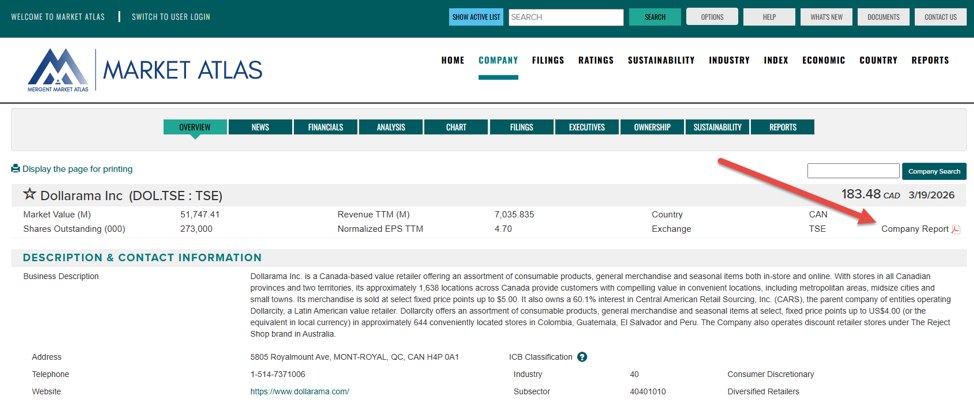
<li>Profiles for each company are organized in the following sections: overview, news, financials, analysis, chart, filings, executives, ownership, sustainability, and reports.   </li>


<li>Select <strong>Company Report</strong> to view and download the Mergent report for this company.</li>
</ol>


<figure class="wp-block-image size-full"><img loading="lazy" width="974" height="400" src="https://blogs.tpl.ca/wp-content/uploads/2025/05/Screenshot-of-a-company-profile-with-red-arrow-pointing.png" alt="Screenshot of a company profile with red arrow pointing the location of the Mergent company report on the right hand side, under the current stock price. " class="wp-image-77043" /></figure>


<h4 class="wp-block-heading">Search by Company Characteristics </h4>


<p class="wp-block-paragraph">Search for global companies based on characteristics of location, stock exchange, industry classification, revenue, number of employees or many other criteria.&#160;</p>


<p class="wp-block-paragraph">For example: Let’s create a list public companies located in Canada, that are in the telecommunications industry and have a revenue of over 10 million:</p>


<ol class="wp-block-list">
<li>Under Country of Incorporation, select <strong>Canada</strong>.</li>


<li>Under Industry Classification, leave ICB (Industry Classification Benchmark) selected.</li>


<li>Under Sector/Industry, select <strong>Telecommunications</strong></li>


<li>Under Set search criteria for selected variables, leave Revenue as the Data Item and enter <strong>100</strong> under Minimum.</li>


<li>Select <strong>View Results</strong>.</li>
</ol>


<figure class="wp-block-image size-full"><img loading="lazy" width="904" height="449" src="https://blogs.tpl.ca/wp-content/uploads/2025/05/creenshot-of-a-company-search-by-characteristics.png" alt="screenshot of a company search by characteristics with each search criteria identified by the number from the example. " class="wp-image-77046" /></figure>


<p class="wp-block-paragraph">This will generate a list of companies.   The list can be printed (A) or exported (B). </p>


<figure class="wp-block-image size-full"><img loading="lazy" width="866" height="291" src="https://blogs.tpl.ca/wp-content/uploads/2025/05/Screenshot-of-list-of-companies-in-the-earch-results.png" alt="Screenshot of list of companies in the earch results. The tools for printing and exporting are identified.  " class="wp-image-77048" /></figure>


<h4 class="wp-block-heading">Compare companies</h4>


<p class="wp-block-paragraph">Compare two companies side by side examining raw financial data, financial ratios, business classification and descriptions. </p>


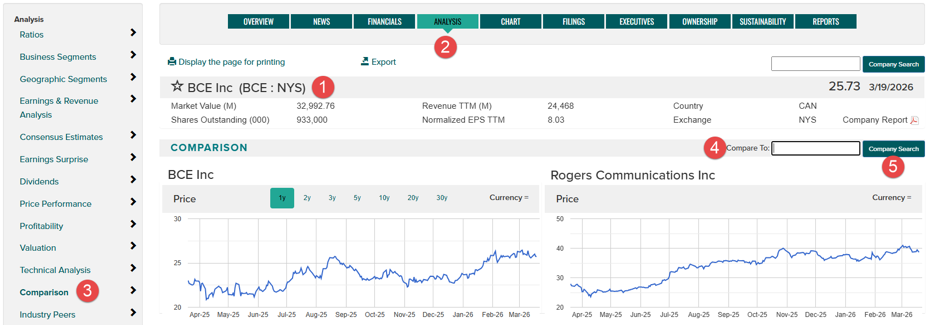
<p class="wp-block-paragraph">For example: Let’s compare Bell Canada to Rogers</p>


<ol class="wp-block-list">
<li>Search for BCE:NYS and display the company profile. </li>


<li>Select the <strong>Analysis</strong> tab to display that section of the company profile.</li>


<li>Select <strong>Comparison</strong> in the column on the left</li>


<li>Enter RCI:NYS in the box next to &#8220;Compare to:&#8221; </li>


<li>Select <strong>Company Search</strong></li>
</ol>


<figure class="wp-block-image size-full"><img loading="lazy" width="931" height="325" src="https://blogs.tpl.ca/wp-content/uploads/2025/05/screenshot-of-result-of-the-compare-comapnies-function.png" alt="screenshot of result of the compare comapnies function in the analysic tab with the different steps identified.  " class="wp-image-77051" /></figure>


<p class="wp-block-paragraph">This report can be printed or exported.</p>


<h4 class="wp-block-heading">Industry Search</h4>


<p class="wp-block-paragraph">Explore and compare key comparisons and other industry characteristics based on Industry Classification Benchmark (ICB) classifications.</p>


<p class="wp-block-paragraph"><strong>TIP</strong>:&#160; A company&#8217;s industry is listed on the Overview screen in the company profile.</p>


<p class="wp-block-paragraph">For example: Let’s view the characteristics of the Telecommunications industry</p>


<ol class="wp-block-list">
<li>Select <strong>Industry</strong> in the menu bar.</li>


<li>Select <strong>Characteristics</strong></li>


<li>Select the drop-down to display the list of industry groups and select <strong>Telecommunications</strong></li>
</ol>


<figure class="wp-block-image size-full"><img loading="lazy" width="908" height="385" src="https://blogs.tpl.ca/wp-content/uploads/2025/05/Screenshot-of-the-industry-comparison-feature.png" alt="" class="wp-image-77053" /></figure>


<p class="wp-block-paragraph">For related resources, have a look at <a href="https://tpl.ca/resource/financial-post-advisor/">Financial Post (FP) Advisor</a>, <a href="https://tpl.ca/resource/mergent-intellect/">Mergent Intellect</a>, <a href="https://tpl.ca/resource/marketline/">MarketLine</a> and <a href="https://tpl.ca/resource/value-line/">Value Line</a>.</p>


<h3 class="wp-block-heading">Need more help?</h3>


<ul class="wp-block-list">
<li>Select <strong>Help</strong> in the toolbar at the top of the page for detailed information on using Mergent Market Atlas</li>


<li>Schedule a <a href="https://tpl.ca/using-the-library/services/book-a-librarian/">Book a Librarian</a> appointment at a local branch.</li>


<li><a href="https://tpl.ca/contact/">Contact Us</a> with your questions.</li>
</ul>
</div>
</content>
        <summary>Mergent Market Atlas provides information for investors on more than 50,000 U.S., Canadian and international public companies.  Create custom reports for an individual company or compare reports of multiple companies.  How to Access Mergent Market Atlas Go to Mergent Market Atlas  or (https://tpl.ca/resource/mergent-market-atlas/ ) Select Mergent Market Atlas&gt;&gt; (the title) Enter your username or your...</summary>
    </entry>
        <entry>
        <title>Getting Started with Biography in Context</title>
        <link href="https://blogs.tpl.ca/database-guides/2025/03/getting-started-with-biography-in-context/" />
        <id>https://blogs.tpl.ca/database-guides/2025/03/getting-started-with-biography-in-context/</id>
        <updated>2025-09-29T23:46:43Z</updated>
        <published>2025-03-20T00:12:33Z</published>
        <category term="database-guides" label="Getting Started with Online Services &amp; Databases" />
        <author>
            <name>Information Services Team</name>
        </author>
        <content type="xhtml" xml:lang="en-CA" xml:base="https://blogs.tpl.ca/">
<div xmlns="http://www.w3.org/1999/xhtml"><p><img loading="lazy" class="alignnone size-medium wp-image-76095" src="https://blogs.tpl.ca/wp-content/uploads/2025/09/galebio-300x128.png" alt="" width="300" height="128" /></p>
<p><a title="Biography in Context" href="https://www.torontopubliclibrary.ca/detail.jsp?Entt=RDMEDB0015&amp;R=EDB0015" target="_blank" rel="noopener">Biography in Context</a> is a comprehensive database of biographical information covering people from around the world, throughout history, and across all disciplines and professions and subject areas. It includes over 700,000biographical entries, videos, audio selections, images, primary sources, and articles from major periodicals and newspapers. The database includes full-text articles from nearly 250 periodicals on notable individuals from both the past and present. Search for people based on one or more personal facts such as birth and death years and places, nationality, ethnicity, occupation or gender, or combine criteria to customize a search.</p>
<p>.</p>
<h2>How to Access</h2>
<ol>
<li>Go to <a title="tpl.ca" href="https://www.torontopubliclibrary.ca/" target="_blank" rel="noopener">tpl.ca</a></li>
<li>Type &#8220;Biography in Context&#8221; in the search box<br />
OR go to the menu bar &gt; eResources &amp; Research &gt; <a title="A-Z List of Databases" href="https://www.torontopubliclibrary.ca/databases/" target="_blank" rel="noopener">A-Z List of Databases</a> &gt; <a title="Biography in Context " href="https://www.torontopubliclibrary.ca/detail.jsp?Entt=RDMEDB0015&amp;R=EDB0015" target="_blank" rel="noopener">Biography in Context </a></li>
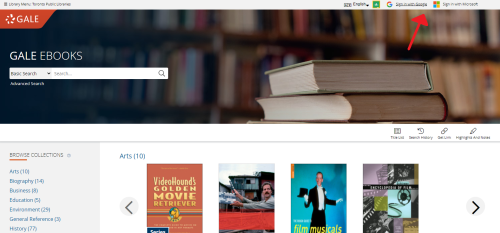
<li>Click <a title="Access Online" href="https://www.torontopubliclibrary.ca/accessonline?recordId=EDB0015&amp;urlRequest=https%3A%2F%2Fezproxy.torontopubliclibrary.ca%2Flogin%3Furl%3Dhttps%3A%2F%2Flink.gale.com%2Fapps%2FBIC%3Fu%3Dtplmain" target="_blank" rel="noopener">Access Online</a></li>
<li>Enter your Library card number (14 digits) and Password/PIN</li>
<li>Select Continue</li>
</ol>
<h2>Searching</h2>
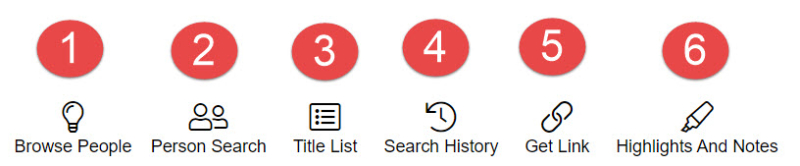
<p>The following icons are available on the top right hand side of the main page to start a search or browse the database: or perform other activities.</p>
<p><a class="asset-img-link" style="display: inline" href="https://blogs.tpl.ca/.a/6a00e5509ea6a1883402c8d3c95a0e200c-pi"><br />
</a> <a class="asset-img-link" style="display: inline" href="https://blogs.tpl.ca/wp-content/uploads/2025/08/6a00e5509ea6a1883402c8d3c95a2b200c-800wi.jpg"><img class="asset  asset-image at-xid-6a00e5509ea6a1883402c8d3c95a2b200c image-full img-responsive" title="Biography In Context Main Page Icons" src="https://blogs.tpl.ca/wp-content/uploads/2025/08/6a00e5509ea6a1883402c8d3c95a2b200c-800wi.jpg" alt="Biography In Context Main Page Icons" border="0" /></a></p>
<ol>
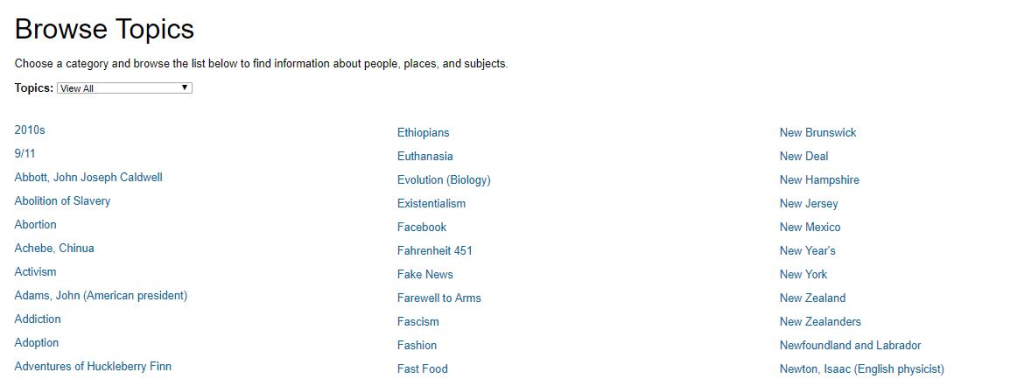
<li class="p1">Browse People &gt; takes you to a page where you selectTopics: from a drop-down menu and browse the result list to find biographical information.</li>
<li class="p1">Person Search &gt; allows for specific person search and use of Search Limiters: Ethnicity, Gender, Nationality,Occupation, Place of birth/death, and Date of birth/death.</li>
<li class="p1">Search History &gt; lists all searches performed in the Gale InContext database.</li>
<li class="p1">Get Link &gt; produces a url to the current page you are working on- use the link to return to the page.</li>
<li class="p1">Highlights and Notes &gt; keeps track of any descriptions written, thoughts recorded, concepts highlighted, or searches documented within the resource</li>
</ol>
<p class="p2">You can also click on Gale&#8217;s featured People of Interest on the middle of the main page or scroll further down toBrowse People by selecting a category and clicking on one of the suggested people under each category.</p>
<h3>Basic Search</h3>
<ol>
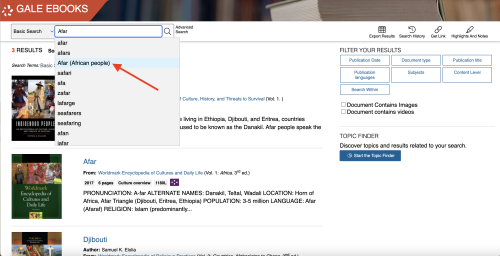
<li class="p1">Enter the name of a person you are researching and the database will begin offering suggestions. Suggestions withPerson Guide indicate that there is a topic page on that person. If there is no topic page, your search will return results with all the information sources in the database that have been tagged with the name of the person your are searching.</li>
<li class="p1">select a suggested name</li>
</ol>
<p>If your results return a Topic page, then you will be provided with:</p>
<ol>
<li class="p1">a biographical overview of the individual including introductory details about the person&#8217;s life or career and quick facts (birth, occupation(s), nationality and other names).</li>
<li class="p1">an area with links to the different types of information sources tagged with that individual, along with the number of sources available in each category &#8211; including images, magazines, websites&#8217; biographies, videos, news, etc. as well as related topics.</li>
<li class="p1">Related Topics link to other individuals.</li>
</ol>
<p><img loading="lazy" class="aligncenter wp-image-76097 size-large" src="https://blogs.tpl.ca/wp-content/uploads/2025/09/lorne-michaels-1024x425.jpg" alt="Lorne Michaels Topic Page" width="1024" height="425" /></p>
<h3>Advanced Search</h3>
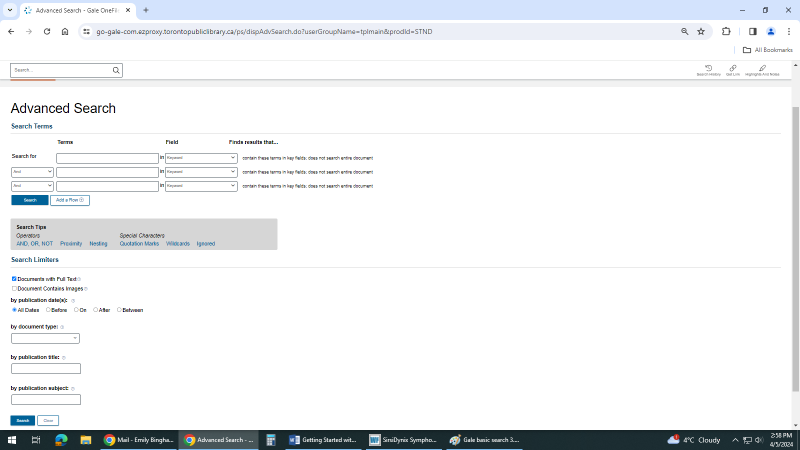
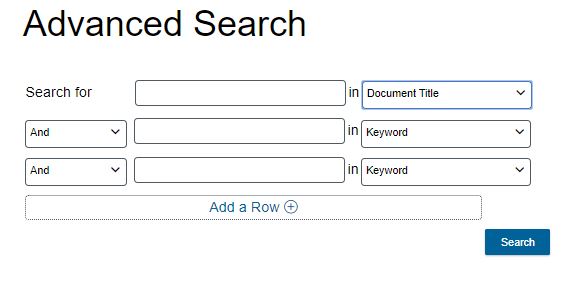
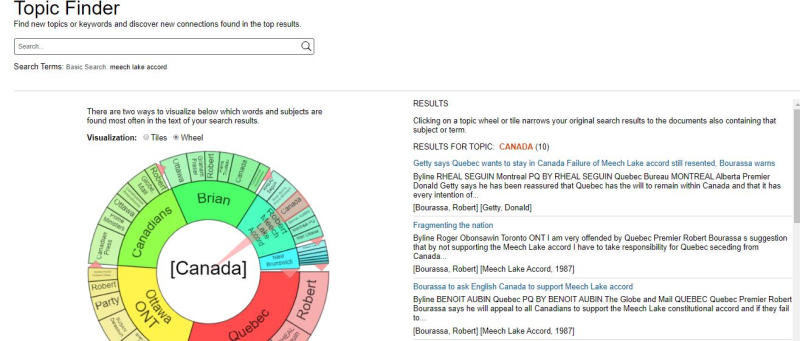
<p class="p2">To conduct an advanced search, locate the &#8220;AdvancedSearch&#8221; link near the main search box. The Advanced Search page provides search options for:</p>
<ul>
<li class="p2">Advanced Search &gt; where you can use the multiple search boxes and dropdown menus to specify your search criteria: keywords or phrases; and fields e.g. specify where the database should search for your terms (e.g., title, author, subject, full text) connecting each search boxes with Boolean Operators (AND, OR, NOT) to refine search results and/or apply Search Limiters (document type, publication date, content type, content level, etc.)</li>
<li class="p2">Person Search &gt; enter the name of the person you are looking for otherwise apply Search Limiters (Ethnicity,Gender, Nationality, Occupation, Place of Birth/Death, orDate of Birth/Death) to return results that match your search parameters.</li>
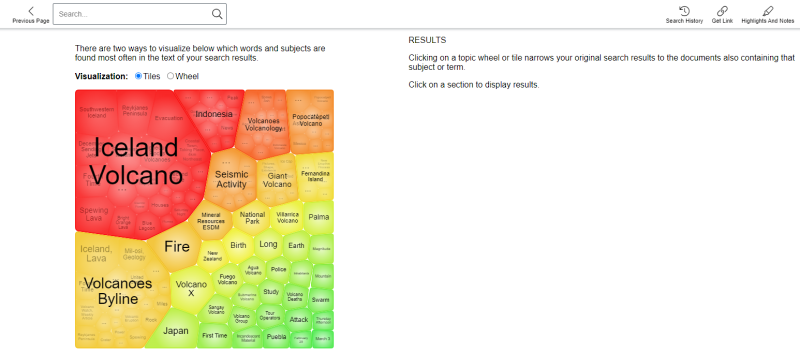
<li class="p2">Topic Finder is a quick visual tool of other subjects related to the your search topic. The visuals allow you to further explore related topics and their connections with each other. Search results are analyzed and represented in a graphical wheel or tile layout. This helps you to identify key themes and other areas to research. You can'toggle from Tiles or Wheel and clicking on a topic tile or wheel will narrow your original search results to the documents also containing that subject or term.</li>
</ul>
<p><a class="asset-img-link" style="display: inline" href="https://blogs.tpl.ca/wp-content/uploads/2025/08/6a00e5509ea6a1883402e860fa10d4200d-800wi.jpg"><img class="asset  asset-image at-xid-6a00e5509ea6a1883402e860fa10d4200d img-responsive" title="Lorne Michaels Topic Finder" src="https://blogs.tpl.ca/wp-content/uploads/2025/08/6a00e5509ea6a1883402e860fa10d4200d-800wi.jpg" alt="Lorne Michaels Topic Finder" border="0" /></a></p>
<h2>Search Results and Features</h2>
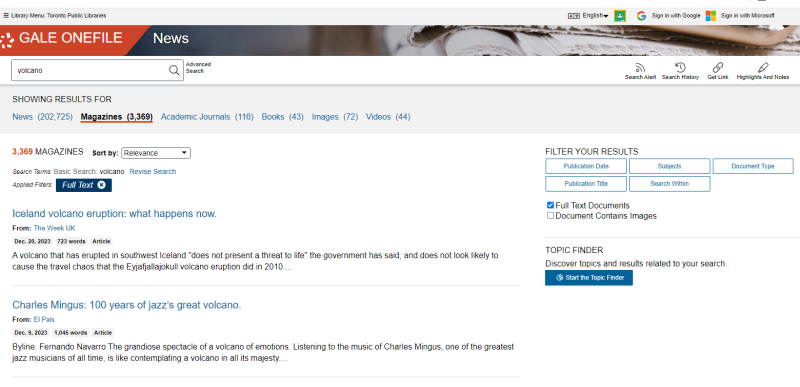
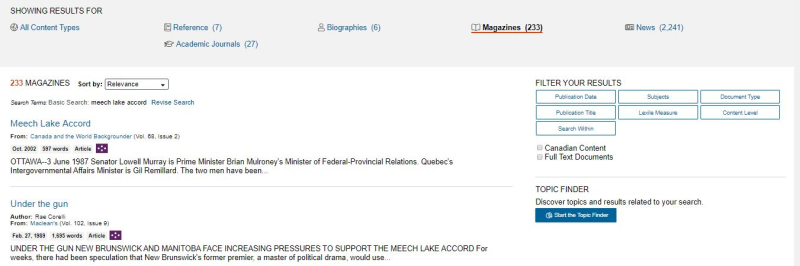
<p>Search results can be:</p>
<ol>
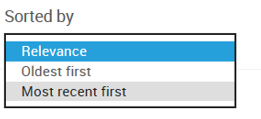
<li class="p1">sorted by: Relevance, Newest, Document Type, or ContentLevel</li>
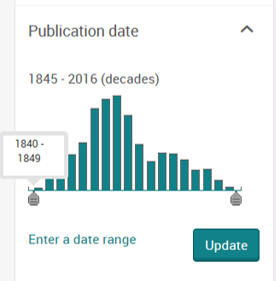
<li class="p1">filtered by: Publication Date/Title; Subjects; DocumentType; Content Level; etc.</li>
<li class="p1">searched within the results</li>
</ol>
<p><a class="asset-img-link" style="display: inline" href="https://blogs.tpl.ca/wp-content/uploads/2025/08/6a00e5509ea6a1883402e860fa1898200d-800wi.jpg"><img class="asset  asset-image at-xid-6a00e5509ea6a1883402e860fa1898200d image-full img-responsive" title="Search Results" src="https://blogs.tpl.ca/wp-content/uploads/2025/08/6a00e5509ea6a1883402e860fa1898200d-800wi.jpg" alt="Search Results" border="0" /></a></p>
<p class="p2">Search results have Content Level indicated by coloured dice-like icons. Each document is assigned a content level based on their Lexile measure, or target audience if there is no Lexile measure.</p>
<p><a class="asset-img-link" style="display: inline" href="https://blogs.tpl.ca/wp-content/uploads/2025/08/6a00e5509ea6a1883402c8d3cc6825200c-800wi.jpg"><img class="asset  asset-image at-xid-6a00e5509ea6a1883402c8d3cc6825200c img-responsive" title="Content Levels" src="https://blogs.tpl.ca/wp-content/uploads/2025/08/6a00e5509ea6a1883402c8d3cc6825200c-800wi.jpg" alt="Content Levels" border="0" /></a></p>
<p class="p2">Click on a search result and the document / article will open where you can:</p>
<p class="p2">find information about the article: author; date; publisher, etc.</p>
<ol>
<li class="p2">translate the article</li>
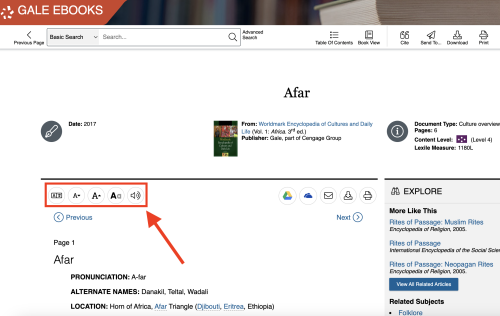
<li class="p2">increase/decrease the font size</li>
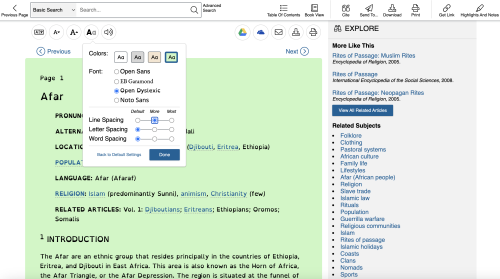
<li class="p2">display options to make the article more visually accessible</li>
<li class="p2">listen to the article being read</li>
<li class="p2">export the article to Google Drive</li>
<li class="p2">export the article to OneDrive</li>
<li class="p2">email the article with option to send as .pdf or citation</li>
<li class="p2">download the article</li>
<li class="p2">print the article to .pdf</li>
<li class="p2">explore more for similar articles or click for related articles or subjects</li>
</ol>
<p><a class="asset-img-link" style="display: inline" href="https://blogs.tpl.ca/wp-content/uploads/2025/08/6a00e5509ea6a1883402c8d3cc7029200c-800wi.jpg"><img class="asset  asset-image at-xid-6a00e5509ea6a1883402c8d3cc7029200c img-responsive" title="Search Result-Features" src="https://blogs.tpl.ca/wp-content/uploads/2025/08/6a00e5509ea6a1883402c8d3cc7029200c-800wi.jpg" alt="Search Result-Features" border="0" /></a></p>
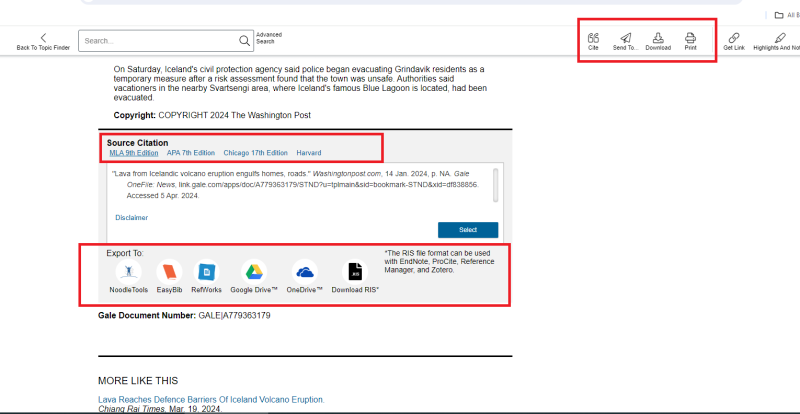
<p class="p2">At the end of the article, you have a number of citationoptions (APA, MLA, etc.) that can be exported to various citation tools (EasyBib, RefWorks, etc.)</p>
<p><a class="asset-img-link" style="display: inline" href="https://blogs.tpl.ca/wp-content/uploads/2025/08/6a00e5509ea6a1883402e860e31154200b-800wi.jpg"><img class="asset  asset-image at-xid-6a00e5509ea6a1883402e860e31154200b img-responsive" title="Search Result-Citation" src="https://blogs.tpl.ca/wp-content/uploads/2025/08/6a00e5509ea6a1883402e860e31154200b-800wi.jpg" alt="Search Result-Citation" border="0" /></a></p>
<h2>Other</h2>
<p class="p2">The main page of the eResources has the following helpful links:</p>
<ol>
<li class="p2">Educator Resources has tip sheets, tutorials, and short recorded webinars</li>
<li class="p2">Help provides explanation to all the Help Contents of theeResource (searching, document tools, reading levels, etc.)</li>
<li class="p2">Dictionary is where you can search for the definitions of specific terms in Merriam-Webster&#8217;s Collegiate Dictionary.The Dictionary is accessed through Highlights and Notes or in the page footer,</li>
</ol>
<p><a class="asset-img-link" style="display: inline" href="https://blogs.tpl.ca/wp-content/uploads/2025/08/6a00e5509ea6a1883402e860e31156200b-800wi.jpg"><img class="asset  asset-image at-xid-6a00e5509ea6a1883402e860e31156200b image-full img-responsive" title="Main Page Helpful Links" src="https://blogs.tpl.ca/wp-content/uploads/2025/08/6a00e5509ea6a1883402e860e31156200b-800wi.jpg" alt="Main Page Helpful Links" border="0" /></a></p>
<p>For more information or for help, please contact our <a title="link to information about Answerline" href="https://www.torontopubliclibrary.ca/contact/">Answerline</a> service.</p>
<hr />
<p>Revised: March 17, 2025</p>
<p class="p2">Your Toronto Public Library card gives you access to a variety of <span class="s1">subscription online services</span>.</p>
<p class="p2">Use these guides developed by library staff to help you get started or learn more.</p>
</div>
</content>
        <summary>Biography in Context is a comprehensive database of biographical information covering people from around the world, throughout history, and across all disciplines and professions and subject areas. It includes over 700,000biographical entries, videos, audio selections, images, primary sources, and articles from major periodicals and newspapers. The database includes full-text articles from nearly 250 periodicals on...</summary>
    </entry>
        <entry>
        <title>Getting Started with Canadian Newsstream</title>
        <link href="https://blogs.tpl.ca/database-guides/2025/02/getting-started-with-canadian-newsstream/" />
        <id>https://blogs.tpl.ca/database-guides/2025/02/getting-started-with-canadian-newsstream/</id>
        <updated>2025-02-20T15:44:37Z</updated>
        <published>2025-02-20T15:44:37Z</published>
        <category term="database-guides" label="Getting Started with Online Services &amp; Databases" />
        <author>
            <name>Information Services Team</name>
        </author>
        <content type="xhtml" xml:lang="en-CA" xml:base="https://blogs.tpl.ca/">
<div xmlns="http://www.w3.org/1999/xhtml"><p><a class="asset-img-link" href="https://blogs.tpl.ca/wp-content/uploads/2025/08/6a00e5509ea6a1883402c8d3cc7d91200c-800wi.png" style="display: inline"><img alt="Canadian Newsstream Logo" border="0" class="asset  asset-image at-xid-6a00e5509ea6a1883402c8d3cc7d91200c img-responsive" src="https://blogs.tpl.ca/wp-content/uploads/2025/08/6a00e5509ea6a1883402c8d3cc7d91200c-800wi.png" title="Canadian Newsstream Logo" /></a></p>
<p><a href="https://www.torontopubliclibrary.ca/detail.jsp?Entt=RDMEDB0196&amp;R=EDB0196" rel="noopener" target="_blank">Canadian Newsstream </a>provides current full text articles from major Canadian newspapers and several Toronto community newspapers. Canadian news content are from over 400 news sources. Content is updated daily and contains older issues with some newspapers going back to the late 1970s. Access to full-text newspaper include The Globe and Mail and Toronto Star along with numerous newswires and broadcast transcripts.</p>
<p>How to Access Canadian Newsstream<br />1. Go to <a href="https://www.torontopubliclibrary.ca/" rel="noopener" target="_blank">tpl.ca</a> and enter Canadian Newsstream directly into the search box<br />2. Click on &quot;Access Online&quot; <br />3. Enter your library card number and PIN<br />4. Click on &quot;Continue&quot;</p>
<h2>Searching Canadian Newsstream</h2>
<h3>Basic Search</h3>
<p>Type a word or phrase into the search box. A search using more than one word (e.g. electric vehicles) will return all records containing either search word.</p>
<p>For an exact search use quotation marks (“electric vehicles”). This narrows the search, only returning records with that specific term.</p>
<p>Select the “full text option” box below the search feature to return full text results.</p>
<p>Special characters and terms to refine your search can be found here: Lib Guide to Boolean Operators.</p>
<h3>Advanced Search</h3>
<p>Use a search form customized with search field and search operator dropdown to create a search as precise as required.</p>
<h2>Search Results</h2>
<p>Following a search, Canadian Newsstream returns a list of matching documents called your search results. Results are sorted by relevance by default. You may change this to the oldest publication first or the most recent publication first.</p>
<p>Search results can be narrowed by selecting from the filters available on the left hand panel including: source type, publication date, publication title, document type, subject, company/organization, location, person or language.</p>
<p>To view the content or details of the search result, click on the button below the entry.</p>
<h3>Translate Search Results</h3>
<p>When available, a document’s abstract and full text can be translated into 18 different languages using machine-generated text. <br />Click Translate under the abstract and select a language.</p>
<h3>Search Result Features</h3>
<p>Search results can be cited, emailed and printed. Select ‘All Options’ for a full list of save and export options.</p>
<h2>Publication Search</h2>
<p>Over 700 publications are listed alphabetically in Canadian Newsstream. To find a specific one, use the Publication Search. A pull down menu allows you to choose to search In title, Title begins with, In publication summary and In subject. <br />Your search will return both current and historical publication titles. The results details include the coverage (full text and citation/abstract) and the date range.<br />Source type filter on the left hand side can narrow a search further.</p>
<p>To search within one publication, select the publication title and use either a basic or advanced search.</p>
<p>To browse a particular issue, select a year and month and issue using the drop down menu options. Click on the Show issue contents. Articles from the chosen issue are displayed sorted by page order.</p>
<p>&#160;</p>
<p>For more information or for help, please contact our&#160;<a href="https://www.torontopubliclibrary.ca/contact/" rel="noopener" target="_blank" title="link to information about Answerline">Answerline</a>&#160;service.</p>
<hr />
<p>Revised: February 20, 2025</p>
</div>
</content>
        <summary>Canadian Newsstream provides current full text articles from major Canadian newspapers and several Toronto community newspapers. Canadian news content are from over 400 news sources. Content is updated daily and contains older issues with some newspapers going back to the late 1970s. Access to full-text newspaper include The Globe and Mail and Toronto Star along...</summary>
    </entry>
        <entry>
        <title>Getting Started with Gale OneFile: News</title>
        <link href="https://blogs.tpl.ca/database-guides/2025/02/getting-started-with-gale-onefile/" />
        <id>https://blogs.tpl.ca/database-guides/2025/02/getting-started-with-gale-onefile/</id>
        <updated>2025-02-18T15:20:28Z</updated>
        <published>2025-02-18T15:20:28Z</published>
        <category term="database-guides" label="Getting Started with Online Services &amp; Databases" />
        <author>
            <name>Information Services Team</name>
        </author>
        <content type="xhtml" xml:lang="en-CA" xml:base="https://blogs.tpl.ca/">
<div xmlns="http://www.w3.org/1999/xhtml"><p><img loading="lazy" alt="Cover image of Gale OneFile: News" height="117" src="https://www.torontopubliclibrary.ca/images/edbs/MC/EDB0086.png" width="92" /></p>
<div class="description">
<div class="text">Full-text articles from International and Canadian newspapers.</div>
</div>
<h2>How to access:</h2>
<p>1. Start from the <a href="https://www.torontopubliclibrary.ca/books-video-music/downloads-ebooks/digital-newspapers.jsp">Digital Newspapers</a> section on the Toronto Public Library website.<br />2. Under Article Databases click on <a href="https://www.torontopubliclibrary.ca/detail.jsp?Entt=RDMEDB0086&amp;R=EDB0086">Gale OneFile: News</a> <br />3. Click the Access Online button.<br />4. Sign in with your library card number and PIN.<br />5. Gale OneFile: News can be accessed in library or at home.</p>
<h2>E-Resource Content</h2>
<ul>
<li>Gale OneFile: News provides full text articles from Canadian and International Newspapers</li>
<li>Gale OneFile: News has full-text articles from multilingual publications as well as issue archives of available publications</li>
<li>Gale OneFile: News allows searching by topic, keyword or publication</li>
<li>Gale OneFile: News does not include photos with articles. But you can filter your search for images only.</li>
</ul>
<h2>Searching Gale OneFile News</h2>
<p>From the homepage Gale OneFile: News offers multiple searching options. <br />There is a basic keyword search bar as well as an Advanced search button. There are also links to their Topic Finder, Subject Guide Search and Publication search. <br />Use the top right menu to see other Gale Resources through Title List, keep track of your Search History, get a web link to your current page through Get Link, and Highlight text.</p>
<h3><a class="asset-img-link" href="https://blogs.tpl.ca/.a/6a00e5509ea6a1883402c8d3acb5ea200c-pi" style="display: inline"> </a> <a class="asset-img-link" href="https://blogs.tpl.ca/wp-content/uploads/2025/08/6a00e5509ea6a1883402c8d3b078e7200b-800wi.png" style="display: inline"><img alt="Image-GaleOneFile News Search" border="0" class="asset  asset-image at-xid-6a00e5509ea6a1883402c8d3b078e7200b image-full img-responsive" src="https://blogs.tpl.ca/wp-content/uploads/2025/08/6a00e5509ea6a1883402c8d3b078e7200b-800wi.png" title="Image-GaleOneFile News Search" /></a><a class="asset-img-link" href="https://blogs.tpl.ca/.a/6a00e5509ea6a1883402c8d3acb5ea200c-pi" style="display: inline"><br /></a></h3>
<h3>Basic Search</h3>
<p><a class="asset-img-link" href="https://blogs.tpl.ca/wp-content/uploads/2025/08/6a00e5509ea6a1883402c8d3b078f0200b-800wi.png" style="display: inline"><img alt="Image-Basic Search screen" border="0" class="asset  asset-image at-xid-6a00e5509ea6a1883402c8d3b078f0200b image-full img-responsive" src="https://blogs.tpl.ca/wp-content/uploads/2025/08/6a00e5509ea6a1883402c8d3b078f0200b-800wi.png" title="Image-Basic Search screen" /></a></p>
<p>The search bar on the home page allows for basic keyword searching through the database. You can use the top bar to filter what news sources you’d like to see results from. Gale OneFile: News will default to magazine articles. You can use the side panel to filter your results further.</p>
<p><a class="asset-img-link" href="https://blogs.tpl.ca/wp-content/uploads/2025/08/6a00e5509ea6a1883402dad0c092d2200d-800wi.png" style="display: inline"><img alt="Image-Search results and filter" border="0" class="asset  asset-image at-xid-6a00e5509ea6a1883402dad0c092d2200d image-full img-responsive" src="https://blogs.tpl.ca/wp-content/uploads/2025/08/6a00e5509ea6a1883402dad0c092d2200d-800wi.png" title="Image-Search results and filter" /></a></p>
<p>Search Alert subscribes you by email or RSS feed to any additions to the search topic.</p>
<p><a class="asset-img-link" href="https://blogs.tpl.ca/wp-content/uploads/2025/08/6a00e5509ea6a1883402c8d3acb618200c-800wi.png" style="display: inline"><img alt="Image-Search Alert" border="0" class="asset  asset-image at-xid-6a00e5509ea6a1883402c8d3acb618200c image-full img-responsive" src="https://blogs.tpl.ca/wp-content/uploads/2025/08/6a00e5509ea6a1883402c8d3acb618200c-800wi.png" title="Image-Search Alert" /></a></p>
<h3>Search Results</h3>
<p>Once you find an article that you want to read, click the link and you will be taken to the page with the text from the article with your keyword highlighted as well as information about the publication date, publication source and the document type and length.</p>
<p>&#160;</p>
<p><a class="asset-img-link" href="https://blogs.tpl.ca/wp-content/uploads/2025/08/6a00e5509ea6a1883402dad0c092db200d-800wi.png" style="display: inline"><img alt="Image-icons for font, print, email, etc." border="0" class="asset  asset-image at-xid-6a00e5509ea6a1883402dad0c092db200d image-full img-responsive" src="https://blogs.tpl.ca/wp-content/uploads/2025/08/6a00e5509ea6a1883402dad0c092db200d-800wi.png" title="Image-icons for font, print, email, etc." /></a></p>
<p>The page also features on the left above the article accessibility features to alter text language, text size and colour as well as the option of having the text read aloud. On the right above the article are options for exporting the text to your Google drive, iCloud and email as well as downloading a PDF version and printing.</p>
<p>Scrolling to the bottom of the page allows further options for citation including&#160; links to different citation formats, exporting the citation to common applications such as EasyBib. The top search bar also allows a quick link to the article citation, an option to send the article to other applications and email as well as a download and print button.</p>
<h3><a class="asset-img-link" href="https://blogs.tpl.ca/wp-content/uploads/2025/08/6a00e5509ea6a1883402c8d3acb628200c-800wi.png" style="display: inline"><img alt="Image-Citations options" border="0" class="asset  asset-image at-xid-6a00e5509ea6a1883402c8d3acb628200c image-full img-responsive" src="https://blogs.tpl.ca/wp-content/uploads/2025/08/6a00e5509ea6a1883402c8d3acb628200c-800wi.png" title="Image-Citations options" /></a>
<p>Advanced Search</p></h3>
<p>The advanced search feature involves more parameters for searching and includes a drop down menu of phrases to include or not include in your search.</p>
<p><a class="asset-img-link" href="https://blogs.tpl.ca/wp-content/uploads/2025/08/6a00e5509ea6a1883402c8d3acb631200c-800wi.png" style="display: inline"><img alt="Image-Advanced Search" border="0" class="asset  asset-image at-xid-6a00e5509ea6a1883402c8d3acb631200c image-full img-responsive" src="https://blogs.tpl.ca/wp-content/uploads/2025/08/6a00e5509ea6a1883402c8d3acb631200c-800wi.png" title="Image-Advanced Search" /></a></p>
<p>You can change your search from keyword to other search fields through the drop down menu.</p>
<p><a class="asset-img-link" href="https://blogs.tpl.ca/wp-content/uploads/2025/08/6a00e5509ea6a1883402c8d3acb62c200c-800wi.png" style="display: inline"><img alt="Image-Field search options" border="0" class="asset  asset-image at-xid-6a00e5509ea6a1883402c8d3acb62c200c image-full img-responsive" src="https://blogs.tpl.ca/wp-content/uploads/2025/08/6a00e5509ea6a1883402c8d3acb62c200c-800wi.png" title="Image-Field search options" /></a></p>
<p>Search tips using special characters and Boolean operators are provided. Clicking on each search tip will explain the function.</p>
<p><a class="asset-img-link" href="https://blogs.tpl.ca/wp-content/uploads/2025/08/6a00e5509ea6a1883402dad0c092f2200d-800wi.png" style="display: inline"><img alt="Image-Search tips" border="0" class="asset  asset-image at-xid-6a00e5509ea6a1883402dad0c092f2200d image-full img-responsive" src="https://blogs.tpl.ca/wp-content/uploads/2025/08/6a00e5509ea6a1883402dad0c092f2200d-800wi.png" title="Image-Search tips" /></a></p>
<h3>Topic Finder</h3>
<p>Topic Finder takes the titles, subjects, and approximately the first 100 words from a subset of your top results and feeds them into an algorithm. Keywords shown in the graphics are those found most often in the text with your search term.</p>
<p>You can'then click on the clusters to see more results in each as well as links to the articles that mention the topic.</p>
<p><a class="asset-img-link" href="https://blogs.tpl.ca/wp-content/uploads/2025/08/6a00e5509ea6a1883402c8d3b07922200b-800wi.png" style="display: inline"><img alt="Image-Topic Finder" border="0" class="asset  asset-image at-xid-6a00e5509ea6a1883402c8d3b07922200b image-full img-responsive" src="https://blogs.tpl.ca/wp-content/uploads/2025/08/6a00e5509ea6a1883402c8d3b07922200b-800wi.png" title="Image-Topic Finder" /></a></p>
<p>You can'then click on the clusters to see more results in each as well as links to the articles that mention the topic.</p>
<p><a class="asset-img-link" href="https://blogs.tpl.ca/wp-content/uploads/2025/08/6a00e5509ea6a1883402c8d3acb63d200c-800wi.png" style="display: inline"><img alt="Image-Topic Finder results for Iceland volcano" border="0" class="asset  asset-image at-xid-6a00e5509ea6a1883402c8d3acb63d200c image-full img-responsive" src="https://blogs.tpl.ca/wp-content/uploads/2025/08/6a00e5509ea6a1883402c8d3acb63d200c-800wi.png" title="Image-Topic Finder results for Iceland volcano" /></a></p>
<p>The same information can also be displayed in a wheel by clicking the wheel option in visualization.</p>
<h3>Subject Guide Search</h3>
<p>Subject Guide Search allows us to use keywords to find subject terms that are linked to articles as well as the number of results for each subject. It also suggests alternative subject terms related to your search term. For example, under volcano damage we can see a link to natural disaster damage.</p>
<p><a class="asset-img-link" href="https://blogs.tpl.ca/.a/6a00e5509ea6a1883402c8d3b07926200b-800wi" style="display: inline"><img alt="Image-Subject Guide Search Results" border="0" class="asset  asset-image at-xid-6a00e5509ea6a1883402c8d3b07926200b image-full img-responsive" src="https://blogs.tpl.ca/.a/6a00e5509ea6a1883402c8d3b07926200b-800wi" title="Image-Subject Guide Search Results" /></a></p>
<p>Under subject search you can see Subdivisions and Related Subjects, these both open further menus with subject terms that may be related to your initial keyword search.</p>
<p><a class="asset-img-link" href="https://blogs.tpl.ca/wp-content/uploads/2025/08/6a00e5509ea6a1883402c8d3acb643200c-800wi.png" style="display: inline"><img alt="Image-related searches" border="0" class="asset  asset-image at-xid-6a00e5509ea6a1883402c8d3acb643200c image-full img-responsive" src="https://blogs.tpl.ca/wp-content/uploads/2025/08/6a00e5509ea6a1883402c8d3acb643200c-800wi.png" title="Image-related searches" /></a></p>
<h3>Publication Search</h3>
<p>Publication Search allows you to filter your search to specific publications as well as allowing you to filter for fields such as format, dates, subject, language and country of publication.</p>
<p>Publication Search also allows you to see a full list of publications in the database by clicking on the “List All Publications” link above the search bar. <br />This will lead you to an alphabetical list of publications as well as filtering features on the right hand side of the screen</p>
<p>Clicking on a publication title will take you to their publication page with a searchable archive of issues as well as information about the publication itself. It also lets you know the coverage range that Gale OneFile: News has for the publication</p>
<p>From this page you can scroll through the news archive by year and date as well as subject searching only in the selected publication </p>
<p>If a publication has a range of time without coverage through Gale OneFile: News a clickable link called Show Coverage Exceptions will appear above the Full Text coverage box.</p>
<p>For other help not covered by this guide Gale OneFile: News has a bar at the bottom of every page showing their extended help features, privacy policy, accessibility policy and terms of use. It also shows on the bottom right when the database was last updated.</p>
<p>For more information or for help, please contact our&#160;<a href="https://www.torontopubliclibrary.ca/contact/" rel="noopener" target="_blank" title="link to information about Answerline">Answerline</a>&#160;service.</p>
<hr />
<p>Revised: January 16, 2025</p>
</div>
</content>
        <summary>Full-text articles from International and Canadian newspapers. How to access: 1. Start from the Digital Newspapers section on the Toronto Public Library website.2. Under Article Databases click on Gale OneFile: News 3. Click the Access Online button.4. Sign in with your library card number and PIN.5. Gale OneFile: News can be accessed in library or...</summary>
    </entry>
        <entry>
        <title>Getting Started with Gale eBooks</title>
        <link href="https://blogs.tpl.ca/database-guides/2025/02/getting-started-with-gale-ebooks/" />
        <id>https://blogs.tpl.ca/database-guides/2025/02/getting-started-with-gale-ebooks/</id>
        <updated>2025-02-18T15:19:03Z</updated>
        <published>2025-02-18T15:19:03Z</published>
        <category term="database-guides" label="Getting Started with Online Services &amp; Databases" />
        <author>
            <name>Information Services Team</name>
        </author>
        <content type="xhtml" xml:lang="en-CA" xml:base="https://blogs.tpl.ca/">
<div xmlns="http://www.w3.org/1999/xhtml"><p><a class="asset-img-link" href="https://blogs.tpl.ca/wp-content/uploads/2025/08/6a00e5509ea6a1883402b7517d8095200b-120wi.png" style="display: inline"><img alt="Gale eBooks logo" class="asset  asset-image at-xid-6a00e5509ea6a1883402b7517d8095200b img-responsive" src="https://blogs.tpl.ca/wp-content/uploads/2025/08/6a00e5509ea6a1883402b7517d8095200b-120wi.png" title="Gale eBooks logo" /></a></p>
<p><a href="https://www.torontopubliclibrary.ca/detail.jsp?Entt=RDMEDB0051&amp;R=EDB0051" title="Gale eBooks link">Gale eBooks</a> is a collection of resource and reference books covering a wide-range of subjects. This includes arts, business, medicine, science and social issues. On this easy-to-use site books can be searched at the title or text level, highlighted and marked with notes, downloaded or printed by chapter, and even directly exported to your Google Drive or OneDrive Account.</p>
<p><span style="font-size: 15pt">How to Access Gale eBooks</span></p>
<ol>
<li>Go to <a href="https://www.torontopubliclibrary.ca/" rel="noopener" target="_blank" title="tpl.ca">tpl.ca</a> and enter ‘Gale eBooks’ directly into the search box, or select ‘Gale eBooks’ from the <a href="https://www.torontopubliclibrary.ca/databases/" rel="noopener" target="_blank" title="A-Z List of Databases">A-Z List of Databases</a> or&#160; the <a href="https://www.torontopubliclibrary.ca/books-video-music/downloads-ebooks/ebooks.jsp" rel="noopener" target="_blank" title="eBooks and Audiobooks">eBooks and Audiobooks</a> section of the site</li>
<li>Click on Access Online under Gale eBooks</li>
<li>Enter your library card number and PIN</li>
</ol>
<p><span style="font-size: 15pt">The Landing Page</span></p>
<p>At the landing page indicated below, you may choose to log in with your Google Drive (if you have a gmail email address) or OneDrive (if you have an Outlook or Hotmail email address) account. This is useful if you want to export notes and highlights. The link to do that is found in the upper right corner of the page.</p>
<p><a class="asset-img-link" href="https://blogs.tpl.ca/wp-content/uploads/2025/08/6a00e5509ea6a1883402b751a1dcf7200c-500wi.png" style="display: inline"><img alt="Landing page" class="asset  asset-image at-xid-6a00e5509ea6a1883402b751a1dcf7200c img-responsive" src="https://blogs.tpl.ca/wp-content/uploads/2025/08/6a00e5509ea6a1883402b751a1dcf7200c-500wi.png" title="Landing page" /></a></p>
<p>To the left of the login options are page translations options, powered by Google. The language translation feature works rather well. Book titles do not translate, but all links and navigation panes do.</p>
<p><a class="asset-img-link" href="https://blogs.tpl.ca/.a/6a00e5509ea6a1883402b6853495f1200d-pi" style="display: inline"> </a><a class="asset-img-link" href="https://blogs.tpl.ca/wp-content/uploads/2025/08/6a00e5509ea6a1883402b75181596d200b-500wi.png" style="display: inline"><img alt="Translated main page" class="asset  asset-image at-xid-6a00e5509ea6a1883402b75181596d200b img-responsive" src="https://blogs.tpl.ca/wp-content/uploads/2025/08/6a00e5509ea6a1883402b75181596d200b-500wi.png" title="Translated main page" /></a><a class="asset-img-link" href="https://blogs.tpl.ca/.a/6a00e5509ea6a1883402b6853495f1200d-pi" style="display: inline"><br /></a></p>
<p><span style="font-size: 15pt">Reading an eBook</span></p>
<p>Access an eBook by clicking on the book&#039;s image. Here we have opened a book from the landing page titled &quot;Worldmark Encyclopedia of Cultures and Daily Life&quot; (searching for titles is covered near the end of this article).</p>
<p><a class="asset-img-link" href="https://blogs.tpl.ca/wp-content/uploads/2025/08/6a00e5509ea6a1883402c8d3b7dc40200c-500wi.png" style="display: inline"><img alt="Worldmark Encyclopedia of Cultures and Daily Life Table of Contents" class="asset  asset-image at-xid-6a00e5509ea6a1883402c8d3b7dc40200c img-responsive" src="https://blogs.tpl.ca/wp-content/uploads/2025/08/6a00e5509ea6a1883402c8d3b7dc40200c-500wi.png" title="Worldmark Encyclopedia of Cultures and Daily Life Table of Contents" /></a></p>
<p>Under the Table of Contents is a list of each item (such as the Cover and Title Pages) and alphabetical entries. We will select from the alpha list &quot;Afar.&quot;</p>
<p><a class="asset-img-link" href="https://blogs.tpl.ca/wp-content/uploads/2025/08/6a00e5509ea6a1883402dad0cbac08200d-500wi.png" style="display: inline"><img alt="Regular view of book" class="asset  asset-image at-xid-6a00e5509ea6a1883402dad0cbac08200d img-responsive" src="https://blogs.tpl.ca/wp-content/uploads/2025/08/6a00e5509ea6a1883402dad0cbac08200d-500wi.png" title="Regular view of book" /></a></p>
<p>Consider getting acquainted with the menu of viewing, saving, and note-taking options located in the top rght.</p>
<p><span style="font-size: 15pt">In-book menus</span></p>
<p>&#160;</p>
<p><span style="font-size: 12pt"><strong> <a class="asset-img-link" href="https://blogs.tpl.ca/wp-content/uploads/2025/08/6a00e5509ea6a1883402c8d3bba9e3200b-500wi.png" style="display: inline"><img alt="Tools" class="asset  asset-image at-xid-6a00e5509ea6a1883402c8d3bba9e3200b img-responsive" src="https://blogs.tpl.ca/wp-content/uploads/2025/08/6a00e5509ea6a1883402c8d3bba9e3200b-500wi.png" title="Tools" /></a><br /></strong></span></p>
<p>All of these tools relate to saving including saving or printing a copy of the chapter or entry you are reading, as well as changing what format you want to view (and then save) the chapter or entry in.</p>
<p>Below is a great example. Remember the Encyclopedia article on the Afar ethnic group that we saw above? It is easily readable and great for marking-up with highlights and notes (more on how to do that is below), but not as visually dynamic as the original print version with all of the graphic design, font, and layout components a print book has. That can be changed, if you wish, by a simple click on the view tool, changing it from text to book view.</p>
<p><span style="font-size: 12pt"><strong>&#160;<a class="asset-img-link" href="https://blogs.tpl.ca/wp-content/uploads/2025/08/6a00e5509ea6a1883402c8d3bba9fb200b-500wi.png" style="display: inline"><img alt="Book view" class="asset  asset-image at-xid-6a00e5509ea6a1883402c8d3bba9fb200b img-responsive" src="https://blogs.tpl.ca/wp-content/uploads/2025/08/6a00e5509ea6a1883402c8d3bba9fb200b-500wi.png" title="Book view" /></a><br /></strong></span></p>
<p>You can also download a PDF version of the book view. If you prefer the text version instead of the book view, that can be done by the bottom set of right-side tools. Simply select Google Drive or OneDrive. This is where being logged into one of these services comes in handy. But if you are not logged in, the icons still appear and you will be prompted to log in at this point.</p>
<p><span style="font-size: 12pt"><strong> <a class="asset-img-link" href="https://blogs.tpl.ca/wp-content/uploads/2025/08/6a00e5509ea6a1883402c8d3b807eb200c-500wi.png" style="display: inline"><img alt="Send to google drive" class="asset  asset-image at-xid-6a00e5509ea6a1883402c8d3b807eb200c img-responsive" src="https://blogs.tpl.ca/wp-content/uploads/2025/08/6a00e5509ea6a1883402c8d3b807eb200c-500wi.png" title="Send to google drive" /></a><br /></strong></span></p>
<p>Once you have selected &quot;Save to Google Drive&quot; or &quot;Save to OneDrive&quot;, you will get a message like this one, showing that the save was successful.&#160;</p>
<p><span style="font-size: 12pt"><strong> <a class="asset-img-link" href="https://blogs.tpl.ca/wp-content/uploads/2025/08/6a00e5509ea6a1883402c8d3b80953200c-500wi.png" style="display: inline"><img alt="Sent to google drive" class="asset  asset-image at-xid-6a00e5509ea6a1883402c8d3b80953200c img-responsive" src="https://blogs.tpl.ca/wp-content/uploads/2025/08/6a00e5509ea6a1883402c8d3b80953200c-500wi.png" title="Sent to google drive" /></a></strong></span></p>
<p>In your drive (example below) you will see that a new folder has automatically been created, titled &quot;Gale eBooks&quot;.</p>
<p><a class="asset-img-link" href="https://blogs.tpl.ca/wp-content/uploads/2025/08/6a00e5509ea6a1883402dad0cbdb85200d-500wi.png" style="display: inline"><img alt="Drive view" class="asset  asset-image at-xid-6a00e5509ea6a1883402dad0cbdb85200d img-responsive" src="https://blogs.tpl.ca/wp-content/uploads/2025/08/6a00e5509ea6a1883402dad0cbdb85200d-500wi.png" title="Drive view" /></a></p>
<p>Within that folder is the chapter or entry you just downloaded.</p>
<p><span style="font-size: 12pt"><strong> <a class="asset-img-link" href="https://blogs.tpl.ca/wp-content/uploads/2025/08/6a00e5509ea6a1883402dad0cbdba1200d-500wi.png" style="display: inline"><img alt="Entry in drive folder" class="asset  asset-image at-xid-6a00e5509ea6a1883402dad0cbdba1200d img-responsive" src="https://blogs.tpl.ca/wp-content/uploads/2025/08/6a00e5509ea6a1883402dad0cbdba1200d-500wi.png" title="Entry in drive folder" /></a></strong></span></p>
<p>Although it is only text view, there is a benefit to this type of saved format. You can edit the text. This is extremely handy if you are writing a school paper and need to directly copy text to cite in your work.</p>
<p><span style="font-size: 12pt"><strong> <a class="asset-img-link" href="https://blogs.tpl.ca/wp-content/uploads/2025/08/6a00e5509ea6a1883402c8d3bbaba3200b-500wi.png" style="display: inline"><img alt="Drive doc view" class="asset  asset-image at-xid-6a00e5509ea6a1883402c8d3bbaba3200b img-responsive" src="https://blogs.tpl.ca/wp-content/uploads/2025/08/6a00e5509ea6a1883402c8d3bbaba3200b-500wi.png" title="Drive doc view" /></a></strong></span></p>
<p>Other tools in the right-side top menu include:</p>
<ul>
<li>Printing &#8211; this will print whatever view, text or book, that you have selected</li>
<li>Sending a PDF &#8211; like downloading, this only sends a book view document</li>
<li>Getting a link to this place in the chapter or entry</li>
</ul>
<p>Send, download, and print are also repeated in the lower menu as simple icons beside the &quot;send to Google Drive&quot; and &quot;send to OneDrive&quot; icons.</p>
<p><a class="asset-img-link" href="https://blogs.tpl.ca/wp-content/uploads/2025/08/6a00e5509ea6a1883402b751a1a7ed200c-500wi.png" style="display: inline"><img alt="the saving options menu" class="asset  asset-image at-xid-6a00e5509ea6a1883402b751a1a7ed200c img-responsive" src="https://blogs.tpl.ca/wp-content/uploads/2025/08/6a00e5509ea6a1883402b751a1a7ed200c-500wi.png" title="the saving options menu" /></a></p>
<p>Two other tools in the menu are very helpful if you are writing a school paper or creating a bibliography. Lets first look at &quot;Cite&quot;, which will bring up the robust tool below that allows you to create a citation in several formats and/or export them to common tools used when creating a bibliography.</p>
<p><a class="asset-img-link" href="https://blogs.tpl.ca/wp-content/uploads/2025/08/6a00e5509ea6a1883402c8d3bbabb0200b-500wi.png" style="display: inline"><img alt="Citation tools" class="asset  asset-image at-xid-6a00e5509ea6a1883402c8d3bbabb0200b img-responsive" src="https://blogs.tpl.ca/wp-content/uploads/2025/08/6a00e5509ea6a1883402c8d3bbabb0200b-500wi.png" title="Citation tools" /></a></p>
<p>The last tool is &quot;Highlights and Notes&quot;. Using this feature is as easy as clicking and dragging your mouse over the text while in text view, just like you would in a word processing program. The dialogue box allowing you to choose your highlight colour and add any notes then pops up automatically.</p>
<p><a class="asset-img-link" href="https://blogs.tpl.ca/wp-content/uploads/2025/08/6a00e5509ea6a1883402c8d3bbabf5200b-500wi.png" style="display: inline"><img alt="Highlights" class="asset  asset-image at-xid-6a00e5509ea6a1883402c8d3bbabf5200b img-responsive" src="https://blogs.tpl.ca/wp-content/uploads/2025/08/6a00e5509ea6a1883402c8d3bbabf5200b-500wi.png" title="Highlights" /></a></p>
<p>The highlights are retained when you save a copy to your Google Drive or OneDrive, or if you navigate back from another chapter or entry. You can see a master list of all your highlights and notes across all books and chapters or entries by clicking on the &quot;Highlights and Notes&quot; tool in the menu bar. All highlights and notes delete when you leave the site. You must download a copy (available via the tool in the upper right) in order to save them.&#160;</p>
<p><a class="asset-img-link" href="https://blogs.tpl.ca/wp-content/uploads/2025/08/6a00e5509ea6a1883402b751a1a86e200c-500wi.png" style="display: inline"><img alt="how to save highlights and notes" class="asset  asset-image at-xid-6a00e5509ea6a1883402b751a1a86e200c img-responsive" src="https://blogs.tpl.ca/wp-content/uploads/2025/08/6a00e5509ea6a1883402b751a1a86e200c-500wi.png" title="how to save highlights and notes" /></a></p>
<p>The second collection of tools are those on the left side. All of these are dedicated to accessibility and language.</p>
<p><a class="asset-img-link" href="https://blogs.tpl.ca/wp-content/uploads/2025/08/6a00e5509ea6a1883402dad0cbdc2a200d-500wi.png" style="display: inline"><img alt="Accessibility and language tools" class="asset  asset-image at-xid-6a00e5509ea6a1883402dad0cbdc2a200d img-responsive" src="https://blogs.tpl.ca/wp-content/uploads/2025/08/6a00e5509ea6a1883402dad0cbdc2a200d-500wi.png" title="Accessibility and language tools" /></a></p>
<p>These tools allow you to change the language, increase or decrease font size, and have the chapter or entry read aloud. The text altering tool reveals several useful display options when you select it.&#160;</p>
<p><a class="asset-img-link" href="https://blogs.tpl.ca/wp-content/uploads/2025/08/6a00e5509ea6a1883402c8d3b809e2200c-500wi.png" style="display: inline"><img alt="Open dyslexic" class="asset  asset-image at-xid-6a00e5509ea6a1883402c8d3b809e2200c img-responsive" src="https://blogs.tpl.ca/wp-content/uploads/2025/08/6a00e5509ea6a1883402c8d3b809e2200c-500wi.png" title="Open dyslexic" /></a></p>
<p>The background colour, font, line spacing, letter spacing, and word spacing can all be altered, which is very helpful in increasing the accessibility of the eBooks in Gale&#039;s collection. Of particular note is the Open Dyslexic font.</p>
<p>All accessibility changes (colour, font size, font) do not show up in downloaded, printed, or saved to Google Drive/One Drive chapters and entries. Conversely, language changes will export to Google Drive/OneDrive, and will print, but will not download.</p>
<p><span style="font-size: 15pt">Searching</span></p>
<p><span style="font-size: 11pt">Searching, including a link to advanced search, is available from every page. Clicking on the expansion arrow beside &quot;Basic Search&quot; also gives you more specific options for searching.</span></p>
<p><a class="asset-img-link" href="https://blogs.tpl.ca/wp-content/uploads/2025/08/6a00e5509ea6a1883402b68534ac28200d-500wi.png" style="display: inline"><img alt="Search options" class="asset  asset-image at-xid-6a00e5509ea6a1883402b68534ac28200d img-responsive" src="https://blogs.tpl.ca/wp-content/uploads/2025/08/6a00e5509ea6a1883402b68534ac28200d-500wi.png" title="Search options" /></a></p>
<p>A general basic search will search titles (called &quot;publications&quot;) as well as entire documents. Below is a basic search for &quot;Afar&quot; that brings up the book we have been using as an example for most of this guide, as well as other works. Note that when you type &quot;Afar&quot; the smart search lets you focus in on &quot;African people&quot; as a narrowed-down option. This is helpful, since the word &quot;afar&quot; has other meanings as well.</p>
<p><a class="asset-img-link" href="https://blogs.tpl.ca/wp-content/uploads/2025/08/6a00e5509ea6a1883402dad0cbdc34200d-500wi.png" style="display: inline"><img alt="Basic search" class="asset  asset-image at-xid-6a00e5509ea6a1883402dad0cbdc34200d img-responsive" src="https://blogs.tpl.ca/wp-content/uploads/2025/08/6a00e5509ea6a1883402dad0cbdc34200d-500wi.png" title="Basic search" /></a></p>
<p>Clicking on the book image will bring up the entire book, whereas clicking on the chapter title will bring up the specific chapter cited as containing &quot;Afar.&quot;</p>
<p><a class="asset-img-link" href="https://blogs.tpl.ca/wp-content/uploads/2025/08/6a00e5509ea6a1883402dad0cbdc42200d-500wi.png" style="display: inline"><img alt="Search result_" class="asset  asset-image at-xid-6a00e5509ea6a1883402dad0cbdc42200d img-responsive" src="https://blogs.tpl.ca/wp-content/uploads/2025/08/6a00e5509ea6a1883402dad0cbdc42200d-500wi.png" title="Search result_" /></a></p>
<p>The initial instance of &quot;Afar&quot; is in blue font and is a link, as are related topics for which Gale has other books and articles. This makes associated information easier to find by simply clicking on that link.</p>
<p>For more information or for help, please contact our&#160;<a href="https://www.torontopubliclibrary.ca/contact/" rel="noopener" target="_blank" title="link to information about Answerline">Answerline</a>&#160;service.</p>
<hr />
<p>Revised: January 15, 2025</p>
</div>
</content>
        <summary>Gale eBooks is a collection of resource and reference books covering a wide-range of subjects. This includes arts, business, medicine, science and social issues. On this easy-to-use site books can be searched at the title or text level, highlighted and marked with notes, downloaded or printed by chapter, and even directly exported to your Google...</summary>
    </entry>
        <entry>
        <title>Getting Started with Directory of Open Access Journals</title>
        <link href="https://blogs.tpl.ca/database-guides/2025/02/getting-started-with-directory-of-open-access-journals-draft/" />
        <id>https://blogs.tpl.ca/database-guides/2025/02/getting-started-with-directory-of-open-access-journals-draft/</id>
        <updated>2025-02-18T15:10:46Z</updated>
        <published>2025-02-18T15:10:46Z</published>
        <category term="database-guides" label="Getting Started with Online Services &amp; Databases" />
        <author>
            <name>Information Services Team</name>
        </author>
        <content type="xhtml" xml:lang="en-CA" xml:base="https://blogs.tpl.ca/">
<div xmlns="http://www.w3.org/1999/xhtml"><p><strong><span style="font-size: 15pt"><img loading="lazy" height="86" src="https://blog.doaj.org/wp-content/uploads/2024/02/DOAJ_Black.svg" width="399" /></span></strong></p>
<p>The <a href="https://www.torontopubliclibrary.ca/detail.jsp?Entt=RDMEDB0176&amp;R=EDB0176" rel="noopener" target="_blank">Directory of Open Access Journals (DOAJ)</a> searches full-text scientific and scholarly articles from Open Access journals within its directory.&#160; It is also a directory for researchers to find the most appropriate Open Access journal to contribute to.&#160; To be included in the DOAJ, the journal must abide by the <a href="https://www.budapestopenaccessinitiative.org/" rel="noopener" target="_blank">Budapest Open Access Initiative</a>&#039;s definition of <a href="https://www.budapestopenaccessinitiative.org/read/">Open Access</a>.&#160; DOAJ is maintained by <a href="https://is4oa.org/" rel="noopener" target="_blank">Infrastructure Services for Open Access</a> (IS40A) who aims to promote Open Access journals to increase their usage and impact around the world.</p>
<p><strong><span style="font-size: 15pt">How to access the Directory of Open Access Journals</span></strong></p>
<p>DOAJ can be accessed either through our <a href="https://www.torontopubliclibrary.ca/databases/" rel="noopener" target="_blank">A-Z list of Databases</a> or via the method below.</p>
<ol>
<li>Go to <a href="https://torontopubliclibrary.ca" rel="noopener" target="_blank">tpl.ca</a> and enter &#039;Directory of Open Access Journals&#039; in the search box.</li>
<li>Click on <strong>Access Online</strong>, no library card needed.</li>
</ol>
<p><strong><span style="font-size: 15pt">Searching for articles for researching purposes</span></strong></p>
<p><a class="asset-img-link" href="https://blogs.tpl.ca/wp-content/uploads/2025/08/6a00e5509ea6a1883402e860da44ce200b-800wi.jpg" style="display: inline"><img alt="DOAJ Articles Search Bar" border="0" class="asset  asset-image at-xid-6a00e5509ea6a1883402e860da44ce200b img-responsive" src="https://blogs.tpl.ca/wp-content/uploads/2025/08/6a00e5509ea6a1883402e860da44ce200b-800wi.jpg" title="DOAJ Articles Search Bar" /></a></p>
<p>-select <span style="color: #ff4040">Articles</span> and type in keyword(s), the drop down menu on the right offers field filters for enhance searching.</p>
<p><a class="asset-img-link" href="https://blogs.tpl.ca/wp-content/uploads/2025/08/6a00e5509ea6a1883402c8d3c3c1cb200c-800wi.jpg" style="display: inline"><img alt="DOAJ Articles Search Result" border="0" class="asset  asset-image at-xid-6a00e5509ea6a1883402c8d3c3c1cb200c image-full img-responsive" src="https://blogs.tpl.ca/wp-content/uploads/2025/08/6a00e5509ea6a1883402c8d3c3c1cb200c-800wi.jpg" title="DOAJ Articles Search Result" /></a></p>
<p>-Access the article by selecting the article title in <strong>bold</strong> or click on the journal title in <span style="color: #ff0000">red</span> for other articles in the journal.</p>
<p>-Refine your search result by selecting the left checkbox for related subjects, publication year, and/or articles with a DOJA Seal.</p>
<p><strong><span style="font-size: 15pt">Searching for journals for article submission</span></strong></p>
<p><strong><span style="font-size: 15pt"> <a class="asset-img-link" href="https://blogs.tpl.ca/wp-content/uploads/2025/08/6a00e5509ea6a1883402e860f16976200d-800wi.jpg" style="display: inline"><img alt="DOAJ Journals Search Bar" border="0" class="asset  asset-image at-xid-6a00e5509ea6a1883402e860f16976200d img-responsive" src="https://blogs.tpl.ca/wp-content/uploads/2025/08/6a00e5509ea6a1883402e860f16976200d-800wi.jpg" title="DOAJ Journals Search Bar" /></a><br /></span></strong></p>
<p><span style="font-size: 11pt">-select <span style="color: #ff4040">Journals</span> and type in keyword(s), the drop down menu on the right offers field filters for enhance searching.</span></p>
<p><a class="asset-img-link" href="https://blogs.tpl.ca/.a/6a00e5509ea6a1883402c8d3c3c1dc200c-pi" style="display: inline"> </a><a class="asset-img-link" href="https://blogs.tpl.ca/wp-content/uploads/2025/08/6a00e5509ea6a1883402e860f169ba200d-800wi.jpg" style="display: inline"><img alt="DOAJ Journals Search Result" border="0" class="asset  asset-image at-xid-6a00e5509ea6a1883402e860f169ba200d image-full img-responsive" src="https://blogs.tpl.ca/wp-content/uploads/2025/08/6a00e5509ea6a1883402e860f169ba200d-800wi.jpg" title="DOAJ Journals Search Result" /></a><a class="asset-img-link" href="https://blogs.tpl.ca/.a/6a00e5509ea6a1883402c8d3c3c1dc200c-pi" style="display: inline"><br /></a>-Access the journal and its contents by clicking onto the title in <strong>bold.</strong></p>
<p>-Information on journal&#039;s country of origin, language, and journal subjects are below the journal title.</p>
<p>-DOAJ Seal, journal&#039;s last update, website, publishing price, and author&#039;s right appear on the lower right end of each result.</p>
<p><strong><span style="font-size: 15pt"> <a class="asset-img-link" href="https://blogs.tpl.ca/wp-content/uploads/2025/08/6a00e5509ea6a1883402e860da462c200b-800wi.jpg" style="display: inline"><img alt="DOAJ Seal" border="0" class="asset  asset-image at-xid-6a00e5509ea6a1883402e860da462c200b img-responsive" src="https://blogs.tpl.ca/wp-content/uploads/2025/08/6a00e5509ea6a1883402e860da462c200b-800wi.jpg" title="DOAJ Seal" /></a><br /></span></strong></p>
<p><strong><span style="font-size: 15pt">DOAJ Seal</span></strong></p>
<ul>
<li>Journals do not need to meet the DOAJ Seal criteria to be indexed into the Directory of Open Access Journals.</li>
<li>DOAJ Seal is awarded to journals that demonstrate the best practices in open access publishing by meeting DOAJ&#039;s <a href="https://www.doaj.org/apply/seal/" rel="noopener" target="_blank">7 criteria</a>.</li>
<li>Around 10% of journals indexed in DOAJ have been awarded with the Seal.</li>
</ul>
<p>&#160;</p>
<p>For more information or for help, please contact our&#160;<a href="https://www.torontopubliclibrary.ca/contact/" rel="noopener" target="_blank" title="link to information about Answerline">Answerline</a>&#160;service.</p>
<hr />
<p>Revised: January 15, 2025</p>
</div>
</content>
        <summary>The Directory of Open Access Journals (DOAJ) searches full-text scientific and scholarly articles from Open Access journals within its directory.  It is also a directory for researchers to find the most appropriate Open Access journal to contribute to.  To be included in the DOAJ, the journal must abide by the Budapest Open Access Initiative's definition...</summary>
    </entry>
        <entry>
        <title>Getting Started with Zoom-Staff</title>
        <link href="https://blogs.tpl.ca/database-guides/2025/01/getting-started-with-zoom-staff/" />
        <id>https://blogs.tpl.ca/database-guides/2025/01/getting-started-with-zoom-staff/</id>
        <updated>2025-01-03T16:53:34Z</updated>
        <published>2025-01-03T16:53:34Z</published>
        <category term="database-guides" label="Getting Started with Online Services &amp; Databases" />
        <author>
            <name>Information Services Team</name>
        </author>
        <content type="xhtml" xml:lang="en-CA" xml:base="https://blogs.tpl.ca/">
<div xmlns="http://www.w3.org/1999/xhtml"><p>&#160;</p>
<ul>
<li><span style="font-family: georgia, palatino;font-size: 11pt"><a href="#h_7842152711735972392436">What is Zoom</a></span></li>
<li><span style="font-family: georgia, palatino;font-size: 11pt"><a href="#h_919570008191735972402786">Log In / Profile / Settings / Scheduler</a></span></li>
<li><span style="font-family: georgia, palatino;font-size: 11pt"><a href="#h_513667958401735972411314">Setting up a Meeting, Webinar, Event &amp; Session</a></span></li>
<li><span style="font-family: georgia, palatino;font-size: 11pt"><a href="#h_452303870581735972421574">Joining a Meeting, Webinar</a></span></li>
<li><span style="font-family: georgia, palatino;font-size: 11pt"><a href="#h_292557558731735972430976">Hosting and Host Controls</a></span></li>
<li><span style="font-family: georgia, palatino;font-size: 11pt"><a href="#h_829199467891735972446165">Roles: Panelist, Participants</a></span></li>
<li><a href="#h_553855800111737526240188"><span style="font-family: georgia, palatino;font-size: 11pt">Practice Sessions</span></a></li>
<li><span style="font-family: georgia, palatino;font-size: 11pt"><a href="#h_2211246231041735972469385">Recordings &amp; Transcripts / Clips</a></span></li>
<li><span style="font-family: georgia, palatino;font-size: 11pt"><a href="#h_246575447391735972358484">Reports</a></span></li>
<li><span style="font-family: georgia, palatino;font-size: 11pt"><a href="#h_2012925561161735972497049">Troubleshooting</a></span></li>
<li><span style="font-family: georgia, palatino;font-size: 11pt"><a href="#h_601158999201735972345927">Resources</a></span></li>
</ul>
<h2 id="h_7842152711735972392436"><span style="font-family: georgia, palatino">What is Zoom</span></h2>
<p><span style="font-family: georgia, palatino;font-size: 11pt">Zoom is an online communications platform that allows staff to connect with video, audio, phone, and chat. Using Zoom requires an internet connection and a supported device. Most new users will want to start by creating an account and downloading the Zoom Client for Meetings. Others can review the variety of solutions offered by the <a href="https://support.zoom.com/hc/en/article?id=zm_kb&amp;sysparm_article=KB0059590" target="_blank" rel="noopener">Zoom platform</a> and determine which one best fits their needs.</span></p>
<p><span style="font-family: georgia, palatino">Zoom Meetings, Webinars, and Events &amp; Sessions are all virtual meeting options that differ in their intended use, the level of interaction, and the number of participants:&#160;</span></p>
<ul>
<li><span style="font-family: georgia, palatino">Zoom Meetings are ideal for small to large team discussions and collaboration. Meetings are designed for more interaction between attendees and hosts, and can include breakout rooms for smaller groups.&#160;</span></li>
<li><span style="font-family: georgia, palatino">Zoom Webinars are best for presenting polished content to a large audience. Webinars are designed to be more educational than interactive, with participants typically in a listen-only mode. Hosts can use Webinar Reactions to get real-time feedback from attendees.&#160;</span></li>
<li><span style="font-family: georgia, palatino">Zoom Events &amp; Sessions is a step up from Zoom Webinars and Meetings, Zoom Events are made up of multiple sessions distributed over several days. Each virtual room can have over 100 interactive video panelists. Hosts can create recurring sessions events with the same or mixed settings and information.</span></li>
</ul>
<p>There is a <a href="https://zoom.us/test" target="_blank" rel="noopener">test Zoom meeting</a> you can join to familiarize yourself with Zoom and test your microphone, speakers, and camera before joining a live Zoom meeting. For more information about this, go to <a href="https://support.zoom.com/hc/en/article?id=zm_kb&amp;sysparm_article=KB0063307" target="_blank" rel="noopener">Joining a Zoom test meeting</a>.&#160;</p>
<h2 id="h_919570008191735972402786"><span style="font-family: georgia, palatino">Log In / Profile / Settings / Scheduler</span></h2>
<p><span style="font-family: georgia, palatino;font-size: 11pt">Access the <a href="https://zoom.us/signin" target="_blank" rel="noopener">Web Portal</a> (<a href="https://zoom.us/signin" target="_blank" rel="noopener">https://zoom.us/signin</a>) when you need to view, change your profile and settings, gather data, reports, and recordings, or create a meeting, webinar, event or session.</span></p>
<p><span style="font-family: georgia, palatino;font-size: 11pt">Note: It is not necessary to have Zoom desktop client or Zoom mobile app to schedule/join meetings. The differences are seen in their feature-rich experiences e.g.:</span></p>
<ul>
<li><span style="font-family: georgia, palatino;font-size: 11pt">Web Portal is good for: changing meeting settings; updating your password; watching a cloud recording</span></li>
<li><span style="font-family: georgia, palatino;font-size: 11pt">Desktop or Mobile App is good for: chatting with another Zoom user; starting or joining a meeting with a couple of clicks; making a Zoom phone call</span></li>
</ul>
<h3><span style="font-family: georgia, palatino">Login</span></h3>
<p><span style="font-family: georgia, palatino;font-size: 11pt">Log in to the Zoom account using your designated service area email address and password.</span></p>
<ol>
<li><span style="font-family: georgia, palatino">go to <span style="font-size: 11pt"><a href="https://zoom.us/signin" target="_blank" rel="noopener">https://zoom.us/signin</a></span></span></li>
<li><span style="font-family: georgia, palatino">enter service area email address</span></li>
<li><span style="font-family: georgia, palatino">enter password</span></li>
<li><span style="font-family: georgia, palatino">click&#160; <strong>Sign In</strong></span></li>
</ol>
<p><span style="font-family: georgia, palatino"><a class="asset-img-link" style="display: inline" href="https://blogs.tpl.ca/.a/6a00e5509ea6a1883402e860dece4d200b-pi"> </a><a class="asset-img-link" style="display: inline" href="https://blogs.tpl.ca/wp-content/uploads/2025/08/6a00e5509ea6a1883402c8d3c83c9c200c-800wi.jpg"><img class="asset  asset-image at-xid-6a00e5509ea6a1883402c8d3c83c9c200c image-full img-responsive" alt="Log In to Zoom" title="Log In to Zoom" src="https://blogs.tpl.ca/wp-content/uploads/2025/08/6a00e5509ea6a1883402c8d3c83c9c200c-800wi.jpg" border="0" /></a><a class="asset-img-link" style="display: inline" href="https://blogs.tpl.ca/.a/6a00e5509ea6a1883402e860dece4d200b-pi"><br /></a></span></p>
<h3><span style="font-family: georgia, palatino">Profile</span></h3>
<ul>
<li><span style="font-family: georgia, palatino;font-size: 11pt">Set up your <strong>Profile</strong> (i.e. click <strong>Edit</strong>) which includes Name and Display Name (Service Department or Service Committee); Location; Company Name; Department; City/District; etc.</span></li>
</ul>
<p><span style="font-family: georgia, palatino"><a class="asset-img-link" style="display: inline" href="https://blogs.tpl.ca/wp-content/uploads/2025/08/6a00e5509ea6a1883402c8d3c835b1200c-800wi.jpg"><img class="asset  asset-image at-xid-6a00e5509ea6a1883402c8d3c835b1200c image-full img-responsive" alt="Zoom Profile" title="Zoom Profile" src="https://blogs.tpl.ca/wp-content/uploads/2025/08/6a00e5509ea6a1883402c8d3c835b1200c-800wi.jpg" border="0" /></a></span></p>
<p>&#160;</p>
<ul>
<li><span style="font-family: georgia, palatino;font-size: 11pt">Upload the TPL logo</span></li>
</ul>
<p><span style="font-family: georgia, palatino"><a class="asset-img-link" style="display: inline" href="https://blogs.tpl.ca/wp-content/uploads/2025/08/6a00e5509ea6a1883402c8d3c8363c200c-120wi.jpg"><img class="asset  asset-image at-xid-6a00e5509ea6a1883402c8d3c8363c200c img-responsive" alt="Profile Image Logo" title="Profile Image Logo" src="https://blogs.tpl.ca/wp-content/uploads/2025/08/6a00e5509ea6a1883402c8d3c8363c200c-120wi.jpg" /></a></span></p>
<h3><span style="font-family: georgia, palatino">Settings</span></h3>
<ul>
<li><span style="font-family: georgia, palatino;font-size: 11pt">Navigate to<strong> Settings</strong> and using the chevron icons, move to each of the tab options&#160; at the top to set your meeting/webinar/event and/or platform preferences:</span>
<ul>
<li><span style="font-family: georgia, palatino;font-size: 11pt">AI Companion &gt; should be locked and/or OFF</span></li>
<li><span style="font-family: georgia, palatino;font-size: 11pt">General &gt; allows you to change preferences related to starting or joining a meeting</span></li>
<li><span style="font-family: georgia, palatino;font-size: 11pt"><a href="https://support.zoom.com/hc/en/article?id=zm_kb&amp;sysparm_article=KB0058229" target="_blank" rel="noopener">Meeting</a> / <a href="https://support.zoom.com/hc/en/article?id=zm_kb&amp;sysparm_article=KB0057935" target="_blank" rel="noopener">Webinar</a> &gt; allows you to set advanced options for the session. When you change a setting that impacts the session experience while a session is in progress, the setting change will not take effect immediately &#8212; the session needs to be closed and reopened. When a session is running, and the host makes a change to a setting that impacts the in-session experience, they will receive a notification that alerts them that they must restart any running sessions to apply the setting to the session.</span></li>
<li><span style="font-family: georgia, palatino;font-size: 11pt">Recording &gt; allows you to set recording and permissions. Check out <a href="https://youtu.be/2csJz_Wo55g?si=UWRIGdxncfIuOKyO" target="_blank" rel="noopener">Enabling and starting local recordings</a>&#160;and <a href="https://youtu.be/9wjrQAAi0DU?si=4On81pysCScGSjvD" target="_blank" rel="noopener">Recording to the Cloud</a>&#160;</span></li>
<li><span style="font-family: georgia, palatino;font-size: 11pt">Mail &amp; Calendar &gt; should not be configured</span></li>
<li><span style="font-family: georgia, palatino;font-size: 11pt">Audio Conferencing &gt; is where you can enable different audio options such as:&#160; showing international numbers link (ON); choosing where most participants call into/from the meeting (CANADA); masking phone number in participant list (ON); and global dial-in (CANADA)</span></li>
<li><span style="font-family: georgia, palatino;font-size: 11pt"><a href="https://support.zoom.com/hc/en/article?id=zm_kb&amp;sysparm_article=KB0059804#:~:text=Zoom%20Apps%20can%20be%20opened,in%20what%20they%20can%20achieve." target="_blank" rel="noopener">Zoom Apps</a> &gt; allows access to productivity tools before, during, or after meetings. This is restricted by the presence of the meeting host, or the user that the meeting belongs to, rather than whichever participant currently has the host role.&#160;</span></li>
<li><span style="font-family: georgia, palatino;font-size: 11pt"><a href="https://support.zoom.com/hc/en/article?id=zm_kb&amp;sysparm_article=KB0059671" target="_blank" rel="noopener">Whiteboard</a>, <a href="https://support.zoom.com/hc/en/article?id=zm_kb&amp;sysparm_article=KB0057702" target="_blank" rel="noopener">Notes</a>, <a href="https://support.zoom.com/hc/en/article?id=zm_kb&amp;sysparm_article=KB0076439" target="_blank" rel="noopener">Docs</a> &gt; are collaboration tools that can be enabled depending on the purpose of the session</span></li>
<li><span style="font-family: georgia, palatino;font-size: 11pt"><a href="https://support.zoom.com/hc/en/article?id=zm_kb&amp;sysparm_article=KB0057723" target="_blank" rel="noopener">Clips</a> &gt; offer the ability to create, edit, share, and manage video recordings. Check out <a href="https://youtu.be/7h5T8yItJR4?si=BdLy0jUKwHCClngQ" target="_blank" rel="noopener">Zoom Clips Demo</a>.</span></li>
<li><span style="font-family: georgia, palatino;font-size: 11pt">Surveys &gt; allow the creation and management of surveys, polls, and quizzes, collecting responses through shared links or after meetings/webinars.&#160;</span></li>
</ul>
</li>
</ul>
<p><span style="font-family: georgia, palatino;font-size: 11pt"> <a class="asset-img-link" style="display: inline" href="https://blogs.tpl.ca/.a/6a00e5509ea6a1883402e860decdae200b-800wi"><img class="asset  asset-image at-xid-6a00e5509ea6a1883402e860decdae200b image-full img-responsive" alt="Zoomm Settings &amp; Tabs" title="Zoomm Settings &amp; Tabs" src="https://blogs.tpl.ca/.a/6a00e5509ea6a1883402e860decdae200b-800wi" border="0" /></a><br /></span></p>
<h3><span style="font-family: georgia, palatino">Scheduler</span></h3>
<p><span style="font-family: georgia, palatino;font-size: 11pt">Zoom Scheduler provides users with the ability to create timeslots of availability for attendees to then select a preferred time on both parties’ calendars. It supports connecting with Zoom Calendar, Google Calendar, or Microsoft 365 calendar. Users can schedule both one-off and recurring meetings, which can be one-on-one or one-to-many. Additionally, customizable email notifications can help remind, confirm, and follow-up with participants after the meeting. The feature leverages the Zoom platform to&#160;<a href="https://support.zoom.com/hc/en/article?id=zm_kb&amp;sysparm_article=KB0060774" rel="noopener" target="_blank">connect users to their calendar</a>, where they can&#160;<a href="https://support.zoom.com/hc/en/article?id=zm_kb&amp;sysparm_article=KB0058092" rel="noopener" target="_blank">generate slots of scheduled availability</a>&#160;for attendees to then select a preferred time on both parties’ calendars.&#160;</span></p>
<p><span style="font-family: georgia, palatino;font-size: 11pt">Check out <a href="https://support.zoom.com/hc/en/article?id=zm_kb&amp;sysparm_article=KB0058092" target="_blank" rel="noopener">Getting Started with Zoom Scheduler</a>.</span></p>
<h2 id="h_513667958401735972411314"><span style="font-family: georgia, palatino">Setting up a Meeting, Webinar, Event &amp; Session</span></h2>
<p><span style="font-family: georgia, palatino;font-size: 11pt">To&#160; help you decide whether to set up a meeting, webinar, event &amp; session, consider the purpose and level of interaction and the number of participants. For more information, check out:</span></p>
<ul>
<li><span style="font-family: georgia, palatino"><a href="https://support.zoom.com/hc/en/article?id=zm_kb&amp;sysparm_article=KB0062404" target="_blank" rel="noopener">Meetings and Webinar Comparison</a>&#160;</span></li>
<li><a href="https://support.zoom.com/hc/en/article?id=zm_kb&amp;sysparm_article=KB0062404#h_01FRGESVED1DKSK9AWNQEV240X" target="_blank" rel="noopener"><span style="font-family: georgia, palatino">Meeting and Webinar Feature Comparison</span></a></li>
<li><a href="https://support.zoom.com/hc/en/article?id=zm_kb&amp;sysparm_article=KB0065520" target="_blank" rel="noopener"><span style="font-family: georgia, palatino">Zoom Meetings and Webinars Comparison by Platform</span></a></li>
<li><a href="https://www.zoom.com/en/blog/when-to-use-meetings-vs-webinars/#:~:text=and%20unmute%20themselves.-,Plan%20your%20next%20virtual%20meet%2Dup%20with%20Zoom,all%20regions%20or%20industry%20verticals." target="_blank" rel="noopener"><span style="font-family: georgia, palatino">Zoom Meetings vs. Zoom Webinars Feature Comparison</span></a></li>
</ul>
<p>Note: Event &amp; Session is not part of the subscription so the decision is either Meeting or Webinar</p>
<h3><span style="font-family: georgia, palatino"><span style="font-size: 11pt">&#160;For </span><span style="font-size: 11pt">Meetings</span></span></h3>
<ul>
<li><span style="font-family: georgia, palatino"><a href="https://support.zoom.com/hc/en/article?id=zm_kb&amp;sysparm_article=KB0065026" target="_blank" rel="noopener"><span style="font-size: 11pt">Scheduling and customizing a meeting with registration</span></a></span>
<ul>
<li class="active"><span style="font-family: georgia, palatino"><a href="https://support.zoom.com/hc#h_01EDCWZHDR8ATR2ZC7ARGV9H3Z" rel="nofollow noopener" target="_blank">enable registration for a meeting</a></span></li>
<li class=""><span style="font-family: georgia, palatino"><a href="https://support.zoom.com/hc#h_01EDCWZNM0R30ERQ1C8MEXWWJ8" rel="nofollow noopener" target="_blank">customize registration options</a></span></li>
<li><span style="font-family: georgia, palatino"><a href="https://support.zoom.com/hc#h_01GK2J05TC990T6DYN3CMAKZCZ" rel="nofollow noopener" target="_blank">customize registration emails</a></span></li>
<li><span style="font-family: georgia, palatino"><a href="https://support.zoom.com/hc#h_01GK2J0EV6VRK80GMPT37JVWYC" rel="nofollow noopener" target="_blank">manage meeting registrants</a></span></li>
</ul>
</li>
</ul>
<h3><span style="font-family: georgia, palatino"><span style="font-size: 11pt">&#160;For </span><span style="font-size: 11pt">Webinars</span></span></h3>
<ul>
<li><a href="https://support.zoom.com/hc/en/article?id=zm_kb&amp;sysparm_article=KB0060481" target="_blank" rel="noopener">Scheduling a webinar without registration</a></li>
</ul>
<p>Check out:</p>
<ul>
<li><a href="https://support.zoom.com/hc/en/article?id=zm_kb&amp;sysparm_article=KB0060655" target="_blank" rel="noopener">Viewing upcoming meetings</a> or <a href="https://support.zoom.com/hc/en/article?id=zm_kb&amp;sysparm_article=KB0060655#h_01HD5P3A3495FDWGDSMNK2S417" target="_blank" rel="noopener">How to view your meetings</a></li>
</ul>
<h2 id="h_452303870581735972421574"><span style="font-family: georgia, palatino">Joining a Meeting, Webinar</span></h2>
<p><span style="font-family: georgia, palatino;font-size: 11pt">There are various ways participants can join a Zoom meeting.</span></p>
<ul>
<li><span style="font-family: georgia, palatino;font-size: 11pt">via Zoom desktop or mobile app</span></li>
<li><span style="font-family: georgia, palatino;font-size: 11pt">via web browser</span></li>
<li><span style="font-family: georgia, palatino;font-size: 11pt">via other methods (e.g. email or calendar invitation)</span></li>
</ul>
<p><span style="font-family: georgia, palatino;font-size: 11pt">Each Zoom meeting has a unique meeting ID that will be required.</span></p>
<p><span style="font-family: georgia, palatino;font-size: 11pt">If participants are joining the meeting by telephone, they will need the teleconferencing number.</span></p>
<ul>
<li><span style="font-family: georgia, palatino;font-size: 11pt">click the Zoom link from the email or calendar invitation OR copy/paste the Zoom link to the browser</span></li>
<li><span style="font-family: georgia, palatino;font-size: 11pt">click <strong>Open Zoom Meetings</strong></span></li>
</ul>
<p><span style="font-family: georgia, palatino;font-size: 11pt">Note:&#160;</span>By default, Zoom meeting invitations designate which dial-in numbers are toll-free by adding &#8220;Toll Free&#8221; in paren'theses after the number. If there is no paren'thesis after the dial-in number, then it is likely a toll number.&#160;When dialing-in, the Meeting ID and Passcode are required. <a href="https://zoom.us/zoomconference?m=OTYyNTE3OTQwNDc.T4Fw_7t7mhWpiUbwrUWlREwGjBLSzuQL" target="_blank" rel="noopener"></a></p>
<p><span style="font-family: georgia, palatino;font-size: 11pt">Check out:</span></p>
<ul>
<li><span style="font-family: georgia, palatino"><a href="https://support.zoom.com/hc/en/article?id=zm_kb&amp;sysparm_article=KB0058219" target="_blank" rel="noopener"><span style="font-size: 11pt">Registering for Zoom Sessions events</span></a></span></li>
<li><span style="font-family: georgia, palatino"><a href="https://support.zoom.com/hc/en/article?id=zm_kb&amp;sysparm_article=KB0058220" target="_blank" rel="noopener">Joining Zoom Sessions events</a></span></li>
<li><span style="font-family: georgia, palatino"><a href="https://support.zoom.com/hc?id=zm_kb&amp;sysparm_article=KB0059553" class="ng-binding" target="_blank" rel="noopener">Joining a Zoom meeting without an account</a></span></li>
<li><span style="font-family: georgia, palatino"><a href="https://support.zoom.com/hc?id=zm_kb&amp;sysparm_article=KB0067493" class="ng-binding" target="_blank" rel="noopener">Ensuring accessible dial-in numbers</a></span>
<ul>
<li class="active"><a href="https://support.zoom.com/hc#h_2a9c0052-59fb-4959-aa97-e2c65456f9be" rel="nofollow noopener" target="_blank">How to check what dial-in numbers are available to you as a host</a></li>
<li><a href="https://support.zoom.com/hc#h_2db3a9a8-20b1-4dcf-b0b9-47be0ef28a5b" rel="nofollow noopener" target="_blank">How to determine if your dial-in number is toll-free when you are a participant</a></li>
<li>Find your local number at <a href="https://zoom.us/zoomconference?m=OTYyNTE3OTQwNDc.T4Fw_7t7mhWpiUbwrUWlREwGjBLSzuQL" target="_blank" rel="noopener">Zoom International Dial-in numbers</a></li>
<li><a href="https://support.zoom.com/hc#mcetoc_1iesaeshu1f" rel="nofollow noopener" target="_blank">How charges are calculated if you decide to use a toll number</a></li>
</ul>
</li>
</ul>
<h2 id="h_292557558731735972430976"><span style="font-family: georgia, palatino">Hosting and Host Controls</span></h2>
<h3><span style="font-family: georgia, palatino;font-size: 11pt">For Meetings</span></h3>
<ul>
<li><span style="font-family: georgia, palatino;font-size: 11pt"><a href="https://youtu.be/02UmBR4UK58?si=R8Jompf9HQw6FSoI" target="_blank" rel="noopener">Basic in-meeting navigation</a></span></li>
<li><span style="font-family: georgia, palatino"><a href="https://support.zoom.com/hc?id=zm_kb&amp;sysparm_article=KB0061231" class="ng-binding" target="_blank" rel="noopener">Changing security settings in a Zoom meeting</a></span></li>
<li><span style="font-family: georgia, palatino;font-size: 11pt">Host</span>
<ul>
<li class="ng-scope"><span style="font-family: georgia, palatino"><a href="https://support.zoom.com/hc?id=zm_kb&amp;sysparm_article=KB0062728" class="ng-binding" target="_blank" rel="noopener">Signing in and claiming host during a meeting</a></span></li>
<li><span style="font-family: georgia, palatino"><a href="https://support.zoom.com/hc?id=zm_kb&amp;sysparm_article=KB0061821" class="ng-binding" target="_blank" rel="noopener">Starting or joining a meeting as the host</a></span></li>
<li class="ng-scope"><span style="font-family: georgia, palatino"><a href="https://support.zoom.com/hc?id=zm_kb&amp;sysparm_article=KB0062728" class="ng-binding" target="_blank" rel="noopener"></a><a href="https://support.zoom.com/hc/en/article?id=zm_kb&amp;sysparm_article=KB0065164" target="_blank" rel="noopener">Using host and co-host controls in a meeting</a><a href="https://support.zoom.com/hc?id=zm_kb&amp;sysparm_article=KB0062728" class="ng-binding" target="_blank" rel="noopener"></a></span></li>
<li class="ng-scope"><span style="font-family: georgia, palatino"><a href="https://support.zoom.com/hc?id=zm_kb&amp;sysparm_article=KB0057887" class="ng-binding" target="_blank" rel="noopener">Best practices for hosting large meetings</a><a href="https://support.zoom.com/hc/en/article?id=zm_kb&amp;sysparm_article=KB0065164" target="_blank" rel="noopener"></a></span></li>
<li class="ng-scope"><span style="font-family: georgia, palatino"><a href="https://support.zoom.com/hc?id=zm_kb&amp;sysparm_article=KB0068522" class="ng-binding" target="_blank" rel="noopener">Hosting multiple meetings simultaneously</a></span></li>
<li class="ng-scope"><span style="font-family: georgia, palatino"><a href="https://support.zoom.com/hc?id=zm_kb&amp;sysparm_article=KB0066640" class="ng-binding" target="_blank" rel="noopener">Enabling and adding a co-host</a></span></li>
<li><span style="font-family: georgia, palatino"><a href="https://support.zoom.com/hc?id=zm_kb&amp;sysparm_article=KB0067794" class="ng-binding" target="_blank" rel="noopener">Passing host controls to leave the meeting</a></span></li>
</ul>
</li>
<li class="ng-scope"><span style="font-family: georgia, palatino">Participants</span>
<ul>
<li class="ng-scope"><span style="font-family: georgia, palatino"><a href="https://support.zoom.com/hc?id=zm_kb&amp;sysparm_article=KB0063329" class="ng-binding" target="_blank" rel="noopener">Using waiting room</a><a href="https://support.zoom.com/hc?id=zm_kb&amp;sysparm_article=KB0068522" class="ng-binding" target="_blank" rel="noopener"></a></span></li>
<li><span style="font-family: georgia, palatino"><a href="https://support.zoom.com/hc?id=zm_kb&amp;sysparm_article=KB0068284" class="ng-binding" target="_blank" rel="noopener">Restricting meeting capacity</a></span></li>
<li><span style="font-family: georgia, palatino"><a href="https://support.zoom.com/hc?id=zm_kb&amp;sysparm_article=KB0065566" class="ng-binding" target="_blank" rel="noopener">Managing participants in a meeting</a></span></li>
<li><span style="font-family: georgia, palatino"><a href="https://support.zoom.com/hc?id=zm_kb&amp;sysparm_article=KB0066716" class="ng-binding" target="_blank" rel="noopener">Muting/unmuting participants in a meeting</a></span></li>
<li><span style="font-family: georgia, palatino"><a href="https://support.zoom.com/hc?id=zm_kb&amp;sysparm_article=KB0066300" class="ng-binding" target="_blank" rel="noopener">Spotlighting participants&#8217; videos</a></span></li>
<li class="ng-scope"><span style="font-family: georgia, palatino"><a href="https://support.zoom.com/hc?id=zm_kb&amp;sysparm_article=KB0066807" class="ng-binding" target="_blank" rel="noopener">Viewing participant attendance status in a meeting</a></span></li>
<li class="ng-scope"><span style="font-family: georgia, palatino"><a href="https://support.zoom.com/hc?id=zm_kb&amp;sysparm_article=KB0067474" class="ng-binding" target="_blank" rel="noopener">Reporting inappropriate behavior in a meeting</a></span></li>
</ul>
</li>
<li><span style="font-family: georgia, palatino"><a href="https://support.zoom.com/hc?id=zm_kb&amp;sysparm_article=KB0067966" class="ng-binding" target="_blank" rel="noopener">Understanding time limits for Zoom Meetings</a></span></li>
<li><span style="font-family: georgia, palatino"><a href="https://support.zoom.com/hc?id=zm_kb&amp;sysparm_article=KB0068002" class="ng-binding" target="_blank" rel="noopener">Understanding meeting participant limits</a></span></li>
<li class="ng-scope"><span style="font-family: georgia, palatino"><a href="https://support.zoom.com/hc?id=zm_kb&amp;sysparm_article=KB0067312" class="ng-binding" target="_blank" rel="noopener">Saving in-meeting chat</a></span></li>
</ul>
<h3><span style="font-family: georgia, palatino"><span style="font-size: 11pt">&#160;For </span><span style="font-size: 11pt">Webinars</span></span></h3>
<ul>
<li><span style="font-family: georgia, palatino"><a href="https://support.zoom.com/hc/en/article?id=zm_kb&amp;sysparm_article=KB0058201" target="_blank" rel="noopener"><span style="font-size: 11pt">Getting started as a Zoom Sessions host</span></a></span></li>
<li><span style="font-family: georgia, palatino"><a href="https://support.zoom.com/hc/en/article?id=zm_kb&amp;sysparm_article=KB0063276" target="_blank" rel="noopener">Managing webinar attendees and panelists</a></span></li>
<li><span style="font-family: georgia, palatino"><a href="https://support.zoom.com/hc#promote-attendee" rel="nofollow noopener" target="_blank">Promoting panelists or attendees</a></span></li>
<li><span style="font-family: georgia, palatino"><a href="https://support.zoom.com/hc#h_91d3912c-7bd8-4b99-bb0d-69f7485dc584" rel="nofollow noopener" target="_blank">Demoting panelists or attendees</a></span></li>
<li><span style="font-family: georgia, palatino"><a href="https://support.zoom.com/hc#mute-panelist" rel="nofollow noopener" target="_blank">Muting or unmuting participants</a></span></li>
<li><span style="font-family: georgia, palatino"><a href="https://support.zoom.com/hc#start-video" rel="nofollow noopener" target="_blank">Allowing panelist to start their video</a></span></li>
</ul>
<h2 id="h_829199467891735972446165"><span style="font-family: georgia, palatino">Roles: Panelist, Participant</span></h2>
<ul>
<li><span style="font-family: georgia, palatino"><a href="https://support.zoom.com/hc?id=zm_kb&amp;sysparm_article=KB0068350" class="ng-binding" target="_blank" rel="noopener">See My Video</a></span></li>
<li><span style="font-family: georgia, palatino"><a href="https://support.zoom.com/hc?id=zm_kb&amp;sysparm_article=KB0068477" class="ng-binding" target="_blank" rel="noopener">Hide My Video</a></span></li>
</ul>
<h3><span style="font-family: georgia, palatino"><span style="font-size: 11pt">&#160;For </span><span style="font-size: 11pt">Meetings</span></span></h3>
<ul>
<li><span style="font-family: georgia, palatino"><a href="https://support.zoom.com/hc?id=zm_kb&amp;sysparm_article=KB0061476" class="ng-binding" target="_blank" rel="noopener">Waiting for the host to start meeting/webinar</a></span></li>
<li><span style="font-family: georgia, palatino"><a href="https://support.zoom.com/hc/en/article?id=zm_kb&amp;sysparm_article=KB0062674" target="_blank" rel="noopener">Participant Controls in a Meeting</a></span></li>
<li class="ng-scope"><span style="font-family: georgia, palatino"><a href="https://support.zoom.com/hc?id=zm_kb&amp;sysparm_article=KB0065180" class="ng-binding" target="_blank" rel="noopener">Joining a meeting with the invite link</a></span></li>
<li class="ng-scope"><span style="font-family: georgia, palatino"><a href="https://support.zoom.com/hc?id=zm_kb&amp;sysparm_article=KB0058759" class="ng-binding" target="_blank" rel="noopener">Starting a meeting without the host present</a></span></li>
<li><span style="font-family: georgia, palatino"><a href="https://support.zoom.com/hc?id=zm_kb&amp;sysparm_article=KB0063788" class="ng-binding" target="_blank" rel="noopener">Joining a Zoom meeting anonymously</a></span></li>
<li><span style="font-family: georgia, palatino"><a href="https://support.zoom.com/hc?id=zm_kb&amp;sysparm_article=KB0065858" class="ng-binding" target="_blank" rel="noopener">Profile cards in Zoom Meetings and Team Chat</a></span></li>
</ul>
<h3><span style="font-family: georgia, palatino"><span style="font-size: 11pt">&#160;For </span><span style="font-size: 11pt">Webinars</span></span></h3>
<ul>
<li><span style="font-family: georgia, palatino"><a href="https://support.zoom.com/hc?id=zm_kb&amp;sysparm_article=KB0063365" class="ng-binding" target="_blank" rel="noopener">Sending a file in meetings and webinars</a></span></li>
<li><span style="font-family: georgia, palatino"><a href="https://support.zoom.com/hc?id=zm_kb&amp;sysparm_article=KB0064553" class="ng-binding" target="_blank" rel="noopener">Declining a meeting invite with a message</a></span></li>
</ul>
<p>&#160;</p>
<p><span style="font-family: georgia, palatino">Check out:</span></p>
<ul>
<li><span style="font-family: georgia, palatino"><a href="https://support.zoom.com/hc/en/article?id=zm_kb&amp;sysparm_article=KB0065937" target="_blank" rel="noopener">Zoom Events roles and permissions</a>&#160;</span></li>
<li><span style="font-family: georgia, palatino"><a href="https://support.zoom.com/hc/en/article?id=zm_kb&amp;sysparm_article=KB0058175" target="_blank" rel="noopener">Understanding Zoom Sessions roles</a></span></li>
<li><span style="font-family: georgia, palatino"><a href="https://support.zoom.com/hc/en/article?id=zm_kb&amp;sysparm_article=KB0058198" target="_blank" rel="noopener">Getting started as a Zoom Sessions attendee</a></span></li>
</ul>
<h2 id="h_553855800111737526240188">Practice Sessions</h2>
<p>Practice sessions are a way for the host and other panelists to rehearse a webinar or event before it goes live. When scheduling a Webinar, you can <strong>Enable Practice Session </strong>under <strong>Options</strong>. Practice sessions allow the host and panelists to:</p>
<ul>
<li>test settings and features</li>
<li>run through the webinar without attendees</li>
<li>perfect the webinar event</li>
<li>transition from practice mode into live broadcast mode&#160;</li>
</ul>
<p><a class="asset-img-link" style="display: inline" href="https://blogs.tpl.ca/.a/6a00e5509ea6a1883402c8d3c9dc3c200c-pi"></a> <a class="asset-img-link" href="https://blogs.tpl.ca/.a/6a00e5509ea6a1883402e860e07062200b-pi"></a> <a class="asset-img-link" style="display: inline" href="https://blogs.tpl.ca/wp-content/uploads/2025/08/6a00e5509ea6a1883402e860f7893b200d-800wi.jpg"><img class="asset  asset-image at-xid-6a00e5509ea6a1883402e860f7893b200d image-full img-responsive" alt="Enable Practice Session" title="Enable Practice Session" src="https://blogs.tpl.ca/wp-content/uploads/2025/08/6a00e5509ea6a1883402e860f7893b200d-800wi.jpg" border="0" /></a></p>
<p>Only the host, alternative host, or panelists can join a practice session in Zoom. Others cannot be in a practice session with you unless they are the host, alternative host, or panelist.&#160;</p>
<p>Attendees cannot join while the webinar is in practice mode. You must click <strong>Start webinar</strong>.</p>
<p><a class="asset-img-link" style="display: inline" href="https://blogs.tpl.ca/wp-content/uploads/2025/08/6a00e5509ea6a1883402e860e07057200b-800wi.jpg"><img class="asset  asset-image at-xid-6a00e5509ea6a1883402e860e07057200b img-responsive" alt="Start Webinar" title="Start Webinar" src="https://blogs.tpl.ca/wp-content/uploads/2025/08/6a00e5509ea6a1883402e860e07057200b-800wi.jpg" border="0" /></a></p>
<p>Check out: <a href="https://support.zoom.com/hc/en/article?id=zm_kb&amp;sysparm_article=KB0062566" target="_blank" rel="noopener">Using Webinar Practice Session</a></p>
<h2 id="h_2211246231041735972469385"><span style="font-family: georgia, palatino">Recordings &amp; Transcripts / Clips</span></h2>
<p>There are different ways to manage and store recordings in Zoom.</p>
<p>For computer recordings, users can use this feature to record meeting video and audio directly to their computer. The recordings are saved in the default Zoom recording folder on the system. Computer recording is not supported on iOS, iPad, or Android devices.</p>
<p>For cloud recording, the video, audio, and chat text are stored in the Zoom cloud. These cloud recordings can be downloaded to a computer or streamed from a browser.</p>
<p>Check out:</p>
<ul>
</ul><ul>
<li><a href="https://support.zoom.com/hc/en/article?id=zm_kb&amp;sysparm_article=KB0059819" target="_blank" rel="noopener">Providing Consent to be recorded</a></li>
<li><a href="https://youtu.be/zE8-nTBjpl4?si=_xmlsm244Qqb7Zsg" target="_blank" rel="noopener">Managing, Trimming, and Sharing Cloud Recordings</a></li>
<li><a href="https://youtu.be/7h5T8yItJR4?si=14irD-3l2_SNCAze" target="_blank" rel="noopener">Zoom Clips Demo</a></li>
<li><a href="https://support.zoom.com/hc/en/article?id=zm_kb&amp;sysparm_article=KB0063423" target="_blank" rel="noopener">Managing Computer Recordings</a></li>
<li><a href="https://support.zoom.com/hc/en/article?id=zm_kb&amp;sysparm_article=KB0064204" target="_blank" rel="noopener">Trimming Cloud Recordings</a></li>
<li><a href="https://support.zoom.com/hc/en/article?id=zm_kb&amp;sysparm_article=KB0066493" target="_blank" rel="noopener">Deleting Computer or Cloud Recordings</a></li>
</ul>

<p>&#160;</p>
<h2 id="h_246575447391735972358484"><span style="font-family: georgia, palatino">Reports</span></h2>
<p><span style="font-family: georgia, palatino">Various types of reports can be accessed via the Zoom web portal e.g. Usage Reports and User Activity Reports. These reports provide insights into meeting and webinar statistics, attendee lists, polling results, registration details, performance metrics, Q&amp;A sessions, and survey responses. Different reports can be generated e.g. meeting usage reports, registration reports, poll reports, survey reports, and attendee reports. Some reports can only be generated after the meeting or webinar has ended, while polling reports can be generated during a live session.</span></p>
<p><span style="font-family: georgia, palatino">Meeting reports (e.g. attendee lists and polling results) can be retrieved for the last 15 months, with a search range of up to one month at a time. If a meeting is not started in 30 days, expires, and is batch deleted by Zoom, the registration reports for the meeting are also deleted. When webinars are deleted, all associated reports remain.</span></p>
<p><span style="font-family: georgia, palatino">Check out:</span></p>
<ul>
<li><span style="font-family: georgia, palatino"><a href="https://support.zoom.com/hc/en/article?id=zm_kb&amp;sysparm_article=KB0060623" target="_blank" rel="noopener">Getting started with Zoom reporting</a></span></li>
<li><span style="font-family: georgia, palatino"><a href="https://support.zoom.com/hc/en/article?id=zm_kb&amp;sysparm_article=KB0065639" target="_blank" rel="noopener">Generating meeting reports for registration, Q&amp;A, polling, and surveys</a></span></li>
<li><span style="font-family: georgia, palatino"><a href="https://support.zoom.com/hc/en/article?id=zm_kb&amp;sysparm_article=KB0073594" target="_blank" rel="noopener">Accessing the meeting attendance report</a></span></li>
<li><span style="font-family: georgia, palatino"><a href="https://support.zoom.com/hc/en/article?id=zm_kb&amp;sysparm_article=KB0066245" target="_blank" rel="noopener">Generating webinar reports</a></span></li>
</ul>
<h2 id="h_2012925561161735972497049"><span style="font-family: georgia, palatino">Troubleshooting</span></h2>
<div><span style="font-family: georgia, palatino">To troubleshoot Zoom issues, you can: check your internet connection; ensure Zoom is updated; verify camera and microphone permissions; restart your device; try clearing your browser cache and cookies; try using the web client; and if necessary, reinstall the Zoom application; for sign-in issues, double-check your login credentials and/or check for network connectivity.</span></div>
<div>&#160;</div>
<h3><span style="font-family: georgia, palatino">Common Zoom issues and fixes</span></h3>
<ul>
<li><span style="font-family: georgia, palatino">Can&#8217;t join a meeting: check your meeting ID and password; Verify your internet connection is stable; or update the Zoom app to the latest version.&#160;</span></li>
<li><span style="font-family: georgia, palatino">Audio problems (no sound, echo): check your microphone settings in Zoom; ensure your microphone is selected as the correct input device; use headphones to avoid feedback loops.&#160;</span></li>
<li><span style="font-family: georgia, palatino">Video issues (camera not working): check if Zoom has permission to access your camera; select the correct camera from your device settings; restart your camera.&#160;</span></li>
<li><span style="font-family: georgia, palatino">Sign-in problems: double-check your login credentials; clear your browser cache and cookies; reset your Zoom password if needed.</span></li>
<li><span style="font-family: georgia, palatino">Poor video quality: adjust video settings in Zoom to lower resolution if necessary.; check your network bandwidth</span></li>
<li><span style="font-family: georgia, palatino">Meeting crashes or freezes: close unnecessary applications running in the background; restart your computer.</span></li>
</ul>
<div>&#160;</div>
<div><span style="font-family: georgia, palatino">Check out:</span></div>
<ul>
<li><span style="font-family: georgia, palatino"><a href="https://support.zoom.com/hc/en/category?id=kb_category&amp;kb_category=fdb2be128720391089a37408dabb3589" target="_blank" rel="noopener">Troubleshooting Zoom Meetings</a></span></li>
<li><span style="font-family: georgia, palatino"><a href="https://support.zoom.com/hc/en/article?id=zm_kb&amp;sysparm_article=KB0065255" target="_blank" rel="noopener">Troubleshooting sign-in issues&#160;</a></span></li>
</ul>
<h2 id="h_601158999201735972345927"><span style="font-family: georgia, palatino">Resources</span></h2>
<ul>
<li><span style="font-family: georgia, palatino;font-size: 11pt">TPL</span>
<ul>
<li><a href="https://torontopubliclibrary-my.sharepoint.com/:w:/r/personal/jgerroir_tpl_ca/_layouts/15/guestaccess.aspx?e=E8aoSF&amp;share=EVxb2rUL2KREi3zmakx-AbcBej20XIs9mSB3vljIvwWVDg" target="_blank" rel="noopener"><span style="font-family: georgia, palatino;font-size: 11pt">TPL Zoom Guidelines</span></a>&#160;</li>
<li><a href="https://www.torontopubliclibrary.ca/terms-of-use/library-policies/online-and-social-media-policy.jsp"><span data-contrast="none">Online and Social Media Policy</span></a><span data-ccp-props="{&quot;134233117&quot;:false,&quot;134233118&quot;:false,&quot;201341983&quot;:0,&quot;335559738&quot;:0,&quot;335559739&quot;:240,&quot;335559740&quot;:240}">&#160;</span></li>
<li><a href="https://www.torontopubliclibrary.ca/terms-of-use/library-policies/programming.jsp"><span data-contrast="none">Programming Policy</span></a><span data-ccp-props="{&quot;134233117&quot;:false,&quot;134233118&quot;:false,&quot;201341983&quot;:0,&quot;335559738&quot;:0,&quot;335559739&quot;:240,&quot;335559740&quot;:240}">&#160;</span></li>
</ul>
</li>
</ul>
<ul>
<li><span style="font-family: georgia, palatino;font-size: 11pt">Administration:</span>
<ul>
<li><span style="font-family: georgia, palatino"><a href="https://support.zoom.com/hc/en/article?id=zm_kb&amp;sysparm_article=KB0058204" target="_blank" rel="noopener">Getting started as a Zoom Sessions admin</a></span></li>
<li><span style="font-family: georgia, palatino"><a href="https://can01.safelinks.protection.outlook.com/?url=https%3A%2F%2Fgshlink.zoom.us%2Fls%2Fclick%3Fupn%3Du001.RT2dDodLqiMaMMhH8gmLcKbOydtYFKBekYxNTSLBQUHFa9MgzVQ3-2B18iIS3m5nxdlCl2HSVM15bQ5U50bVoMdpbh8eX0LOXzkHKfUbbGfZIHOFuYuOf-2FDz45MvB6jv8dZSk8P-2FvrOqLUAwIBzcEvqJHI8UpsWt34E9sYNBdSrGo-3DVBgF_xcIxVBFLlpJQJBwp14n7aRuunBvAsXuRONIaUidQHgvN2mQueev90JAUpCxzm6QMMvfNClG7ywW9MR3diJuepjeEN-2BJlIbBcvzbOmMERahHpER9UY9P88rgRTQjFR7EFiptZKyfC-2FOInbV5qHVPxFkep-2F4jQZ5PzpoLIlUZLTB2Xf9Dcn1tsk8EukNunq0HbBjK-2BQybtzMA2791zytmf-2BdO2UGOZxJhTkauDqx7OsAHFoJQcOJHsxpQZeFYlJXWch4cFU7aUtlrPny3E9syfRUqh1LJItj0j30CIUJtNCJK95QCBB-2B3M4f-2F553Z56JoyQknFuV0bdHBDlh6D0slNdv4OoWfC1jGQfT-2Bb9tkBDmGpr60z-2BSLe4jiKeWOlFfBKl-2F1gWSGiVQIk9J-2FGouXdWFyI8-2BlQ9KKVx7jBUFiq5r4fSWCkVep-2FSEgdtldQbDoYQvoUh6oTfzUJx6IDuJKqEJEt2lG7smH-2BttWeMBFOqsz-2BgNcorGk6zN21IPtHmtm-2F&amp;data=05%7C02%7Clfiore%40tpl.ca%7Cb2dcb4c101f44612363708dced2f036c%7C022601c4d2884d488353f8ac3be40d2f%7C1%7C0%7C638646033416385650%7CUnknown%7CTWFpbGZsb3d8eyJWIjoiMC4wLjAwMDAiLCJQIjoiV2luMzIiLCJBTiI6Ik1haWwiLCJXVCI6Mn0%3D%7C0%7C%7C%7C&amp;sdata=kczEj%2Byck20Gf%2FbpYH%2FdmWJEvbLm%2FX5Gy2tVXU9M7SI%3D&amp;reserved=0" target="_blank" rel="noopener"><span style="font-size: 11pt">Getting Started with Zooms Meetings Administration</span></a><span style="font-size: 11pt"><strong>&#160;–&#160;</strong>Learn more about managing settings for your account, users, and roles.&#160;</span></span></li>
<li><span style="font-family: georgia, palatino"><a href="https://learning.zoom.us/learn/catalog/view/50" target="_blank" rel="noopener"><span style="font-size: 11pt">Best Practices for Admins and Users</span></a></span></li>
</ul>
</li>
<li><span style="font-family: georgia, palatino;font-size: 11pt"><a href="https://support.zoom.com/hc/en/article?id=zm_kb&amp;sysparm_article=KB0062404" target="_blank" rel="noopener">Meeting or Webinar/Event</a>?</span></li>
<li><span style="font-family: georgia, palatino;font-size: 11pt">Meetings:</span>
<ul>
<li><span style="font-family: georgia, palatino;font-size: 11pt"><a href="https://can01.safelinks.protection.outlook.com/?url=https%3A%2F%2Fgshlink.zoom.us%2Fls%2Fclick%3Fupn%3Du001.RT2dDodLqiMaMMhH8gmLcKbOydtYFKBekYxNTSLBQUHFa9MgzVQ3-2B18iIS3m5nxdMd3uci7NDdnWUxcocbm-2FnK-2F0zUoNJPntx1ty23KyLRk-3D485x_xcIxVBFLlpJQJBwp14n7aRuunBvAsXuRONIaUidQHgvN2mQueev90JAUpCxzm6QMMvfNClG7ywW9MR3diJuepjeEN-2BJlIbBcvzbOmMERahHpER9UY9P88rgRTQjFR7EFiptZKyfC-2FOInbV5qHVPxFkep-2F4jQZ5PzpoLIlUZLTB2Xf9Dcn1tsk8EukNunq0HbBjK-2BQybtzMA2791zytmf-2BdO2UGOZxJhTkauDqx7OsAHFoJQcOJHsxpQZeFYlJXWch4cFU7aUtlrPny3E9syfRUqh1LJItj0j30CIUJtNCJK95QCBB-2B3M4f-2F553Z56JoyQknFuV0bdHBDlh6D0slNdv4OoWfC1jGQfT-2Bb9tkBDmGpr60z-2BSLe4jiKeWOlFfBKosYkOkowsgUtEnlDWxq3feEGEziN0xvm5LMeSSuWbqihe93oHgpGkvV-2BOZWVGHG-2FxGEifTbLMrfPs1-2Fe-2FE5vMqx7JmfBSsYvBipzlKy6Ibn0T34KmPMMI-2Bc7Aliqsjqf&amp;data=05%7C02%7Clfiore%40tpl.ca%7Cb2dcb4c101f44612363708dced2f036c%7C022601c4d2884d488353f8ac3be40d2f%7C1%7C0%7C638646033416397969%7CUnknown%7CTWFpbGZsb3d8eyJWIjoiMC4wLjAwMDAiLCJQIjoiV2luMzIiLCJBTiI6Ik1haWwiLCJXVCI6Mn0%3D%7C0%7C%7C%7C&amp;sdata=h%2FzTYkkfNUSSw4oATaauAKnUsNQ%2FOugNM%2BzX4EUrPQ0%3D&amp;reserved=0" target="_blank" rel="noopener">Before the Meeting</a><strong> &gt; </strong>preparing for a meeting, learning how to join and navigate a Zoom Meeting and understanding audio and video basics, and how to schedule a meeting.&#160;</span></li>
<li><span style="font-family: georgia, palatino;font-size: 11pt"><a href="https://can01.safelinks.protection.outlook.com/?url=https%3A%2F%2Fgshlink.zoom.us%2Fls%2Fclick%3Fupn%3Du001.RT2dDodLqiMaMMhH8gmLcKbOydtYFKBekYxNTSLBQUHFa9MgzVQ3-2B18iIS3m5nxdLSGDRbuO1FM71UPfvX02297YD5wUSUCvtBYEs-2FMHCFhZxR-2BIjCxKZ6b85-2FZKgOebS1jf_xcIxVBFLlpJQJBwp14n7aRuunBvAsXuRONIaUidQHgvN2mQueev90JAUpCxzm6QMMvfNClG7ywW9MR3diJuepjeEN-2BJlIbBcvzbOmMERahHpER9UY9P88rgRTQjFR7EFiptZKyfC-2FOInbV5qHVPxFkep-2F4jQZ5PzpoLIlUZLTB2Xf9Dcn1tsk8EukNunq0HbBjK-2BQybtzMA2791zytmf-2BdO2UGOZxJhTkauDqx7OsAHFoJQcOJHsxpQZeFYlJXWch4cFU7aUtlrPny3E9syfRUqh1LJItj0j30CIUJtNCJK95QCBB-2B3M4f-2F553Z56JoyQknFuV0bdHBDlh6D0slNdv4OoWfC1jGQfT-2Bb9tkBDmGpr60z-2BSLe4jiKeWOlFfBKJ-2FUy9HUq4942gAEjG39y73rwqIeTaDgBzIEziwarDHiuA837DbWmp4gOX-2Bp6fn8DJgJUPhoCEiRekO94KUGvrEwbZNVx56u99dX1Nl1nE1soJP4gcZY8FzQ-2BGps9nqVg&amp;data=05%7C02%7Clfiore%40tpl.ca%7Cb2dcb4c101f44612363708dced2f036c%7C022601c4d2884d488353f8ac3be40d2f%7C1%7C0%7C638646033416409124%7CUnknown%7CTWFpbGZsb3d8eyJWIjoiMC4wLjAwMDAiLCJQIjoiV2luMzIiLCJBTiI6Ik1haWwiLCJXVCI6Mn0%3D%7C0%7C%7C%7C&amp;sdata=lnSGZ%2FVbzigQz7d53O3C2uDXQ4J2FUCMeQ9EAFpsIcw%3D&amp;reserved=0" data-rte-link-token="" data-rte-link-uuid="48f22014-fceb-42ca-9a72-adb326d3d0ea" target="_blank" rel="noopener">During the Meeting</a> <strong>&gt; </strong>more on in-meeting chats, reactions, screen sharing, personalizing the meeting layout, and recording meetings&#160;</span></li>
</ul>
</li>
<li><a href="https://support.zoom.com/hc/en/category?id=kb_category&amp;kb_category=fdb2be128720391089a37408dabb3589" target="_blank" rel="noopener"><span style="font-family: georgia, palatino;font-size: 11pt">Troubleshooting</span></a></li>
<li><span style="font-family: georgia, palatino;font-size: 11pt"><a href="https://www.zoom.com/en/blog/?amp_device_id=b3f8b287-1730-4e38-83d8-99d13e166116&amp;amp_device_id=b3f8b287-1730-4e38-83d8-99d13e166116" target="_blank" rel="noopener">Zoom Blog</a> and <a href="https://support.zoom.com/hc/en/category?id=kb_category&amp;kb_category=d52a3eda8720391089a37408dabb3559" target="_blank" rel="noopener">Release Notes</a> (for new product and feature announcements)</span></li>
<li><span style="font-family: georgia, palatino"><a href="https://events.zoom.us/eo/AsYzl3IHh23-fHZCaCAq7tAwVZVBjH7fDi-INMUxOfsWixReLaR5~AggLXsr32QYFjq8BlYLZ5I06Dg" target="_blank" rel="noopener"><span style="font-size: 11pt">Zoom Events Hub</span></a> &#8211; on-demand and upcoming content</span></li>
<li><span style="font-family: georgia, palatino;font-size: 11pt"><a href="https://telsupport.brookes.ac.uk/articles/zoom-glossary/" target="_blank" rel="noopener">Zoom Glossary</a>&#160;</span></li>
<li><span style="font-family: georgia, palatino;font-size: 11pt"><a href="https://support.zoom.com/hc/en" target="_blank" rel="noopener">Zoom Knowledge Base and Support</a> (<a href="https://zoom.us/learningcenter?amp_device_id=0f21b9b6-9766-4d5e-9e62-57785ce358da" target="_blank" rel="noopener">Zoom Learning Centre</a>, <a href="https://zoom.us/zendesk/sso?return_to=https://support.zoom.us/hc/en-us/articles/206618765-Zoom-Video-Tutorials&amp;amp_device_id=0f21b9b6-9766-4d5e-9e62-57785ce358da" target="_blank" rel="noopener">Show Me Video Tutorials</a>, <a href="https://support.zoom.com/hc/en/category?id=kb_category&amp;kb_category=9bc6fed68720391089a37408dabb352b" target="_blank" rel="noopener">Zoom Sessions Support</a>)</span></li>
<li><span style="font-family: georgia, palatino"><a href="https://www.zoom.com/en/trust/privacy/" target="_blank" rel="noopener"><span style="font-size: 11pt">Zoom Privacy Statement</span></a></span></li>
<li><span style="font-family: georgia, palatino;font-size: 11pt"><a href="https://www.youtube.com/@Zoom" target="_blank" rel="noopener">Zoom Videos</a> on YouTube&#160;</span></li>
</ul>
<hr />
<p><span style="font-family: georgia, palatino">Revised: January 22, 2025</span></p>
</div>
</content>
        <summary>  What is Zoom Log In / Profile / Settings / Scheduler Setting up a Meeting, Webinar, Event &amp; Session Joining a Meeting, Webinar Hosting and Host Controls Roles: Panelist, Participants Practice Sessions Recordings &amp; Transcripts / Clips Reports Troubleshooting Resources What is Zoom Zoom is an online communications platform that allows staff to connect...</summary>
    </entry>
        <entry>
        <title>Getting Started with Britannica Library</title>
        <link href="https://blogs.tpl.ca/database-guides/2024/12/getting-started-with-britannica-library/" />
        <id>https://blogs.tpl.ca/database-guides/2024/12/getting-started-with-britannica-library/</id>
        <updated>2024-12-07T16:09:54Z</updated>
        <published>2024-12-07T16:09:54Z</published>
        <category term="database-guides" label="Getting Started with Online Services &amp; Databases" />
        <author>
            <name>Information Services Team</name>
        </author>
        <content type="xhtml" xml:lang="en-CA" xml:base="https://blogs.tpl.ca/">
<div xmlns="http://www.w3.org/1999/xhtml"><p><a href="https://www.torontopubliclibrary.ca/detail.jsp?Entt=RDMEDB0016&amp;R=EDB0016">Britannica Library</a> is an encyclopedia of articles, images and videos, biographies, as well as a country comparison tool, and a world atlas. The resource&#160; includes Britannica Library Children, Britannica Library Young Adult. and a link to <a href="https://blogs.tpl.ca/database-guides/2024/09/getting-started-with-encyclopædia-" rel="noopener" target="_blank">Encyclopaedia Universalis</a>.</p>
<h2>How to access Britannica Library</h2>
<ol>
<li>Go to<a href="tpl.ca"> tpl.ca</a> and enter &#039;Britannica Library&#039; in the search box</li>
<li>Click on Access Online under Britannica Library</li>
<li>Enter your library card number and PIN</li>
<li>Click on &#039;Continue&#039;</li>
</ol>
<h2>Searching in Britannica Library</h2>
<p>Begin by selection a reading level.</p>
<p>&#039;Children&#039; is recommended for researchers ages 9 and under, and will appear as Level 1 in Britannica Library. &#039;Young Adult&#039; is recommended for researchers that read at a Grade 6-8 level, which is referred to as Level 2 in Britannica Library. &#039;Reference Centre&#039; is recommended for the general adult reader, Level 3, and is suitable for researchers that read at the high school level and up.&#160;</p>
<p><a class="asset-img-link" href="https://blogs.tpl.ca/wp-content/uploads/2025/08/6a00e5509ea6a1883402dad0d064df200d-800wi.jpg" style="display: inline"><img alt="Image-Welcome to Britannica Library" border="0" class="asset  asset-image at-xid-6a00e5509ea6a1883402dad0d064df200d image-full img-responsive" src="https://blogs.tpl.ca/wp-content/uploads/2025/08/6a00e5509ea6a1883402dad0d064df200d-800wi.jpg" title="Image-Welcome to Britannica Library" /></a></p>
<p></p>
<h2>Children</h2>
<p>If you know what you are looking for, select the magnifying glass tool and type it in the search bar.</p>
<p>On the results page, you may select your reading level by clicking on either 1, 2 or 3. Changing the reading level will adjust the content and search results to suit beginner, intermediate or advanced readers.</p>
<p><a class="asset-img-link" href="https://blogs.tpl.ca/wp-content/uploads/2025/08/6a00e5509ea6a1883402c8d3a84d02200d-800wi.png" style="display: inline"><img alt="Image-Search for &quot;picasso&quot;" border="0" class="asset  asset-image at-xid-6a00e5509ea6a1883402c8d3a84d02200d image-full img-responsive" src="https://blogs.tpl.ca/wp-content/uploads/2025/08/6a00e5509ea6a1883402c8d3a84d02200d-800wi.png" title="Image-Search for &quot;picasso&quot;" /></a></p>
<p>Filter the search results by clicking between the categories e.g. Articles, Images, Videos, Dictionary, or Web’s Best Sites.</p>
<h4>Articles</h4>
<p>Select an article related to your search results.</p>
<p>You can change the reading level by clicking on the numbers that appear in the reading level bar. If only one number appears in the reading level bar, that article is available only at that reading level.</p>
<p><a class="asset-img-link" href="https://blogs.tpl.ca/wp-content/uploads/2025/08/6a00e5509ea6a1883402c8d3a3fbe0200c-800wi.png" style="display: inline"><img alt="Image-Reading Level 1" border="0" class="asset  asset-image at-xid-6a00e5509ea6a1883402c8d3a3fbe0200c img-responsive" src="https://blogs.tpl.ca/wp-content/uploads/2025/08/6a00e5509ea6a1883402c8d3a3fbe0200c-800wi.png" title="Image-Reading Level 1" /></a></p>
<p>Find a variety of support tools on the top left where you can navigate to sections of the article, change font sizes, cite, save, send, print, or get related resources (articles, items).</p>
<p><a class="asset-img-link" href="https://blogs.tpl.ca/wp-content/uploads/2025/08/6a00e5509ea6a1883402e860dc3d35200b-800wi.jpg" style="display: inline"><img alt="Navigation and Support Tools" border="0" class="asset  asset-image at-xid-6a00e5509ea6a1883402e860dc3d35200b img-responsive" src="https://blogs.tpl.ca/wp-content/uploads/2025/08/6a00e5509ea6a1883402e860dc3d35200b-800wi.jpg" title="Navigation and Support Tools" /></a></p>
<p>Double-click on unfamiliar words to see the definition. A pop-up box will appear with an explanation of the word’s meaning provided by Merriam-Webster Dictionary.</p>
<p><a class="asset-img-link" href="https://blogs.tpl.ca/wp-content/uploads/2025/08/6a00e5509ea6a1883402c8d3c5af0e200c-800wi.jpg" style="display: inline"><img alt="Dictionary Definition of &quot;Modern&quot;" border="0" class="asset  asset-image at-xid-6a00e5509ea6a1883402c8d3c5af0e200c img-responsive" src="https://blogs.tpl.ca/wp-content/uploads/2025/08/6a00e5509ea6a1883402c8d3c5af0e200c-800wi.jpg" title="Dictionary Definition of &quot;Modern&quot;" /></a></p>
<p>Click on the hyperlinked words to see articles on that subject.</p>
<p>&#160;</p>
<h4>Explore</h4>
<p>Browse the Britannica Library Children’s page and check out the sections on: Animal Kingdom: Canada in Focus; Explore (Biographies; Pictures &amp; Videos; Articles), Geography (World Atlas; Compare Countries; Geography Explorer); In the News!; Interactives; and Video of the Week.</p>
<h2>Young Adults</h2>
<p>If you know what you are looking for, select the magnifying glass tool and type it in the search bar.</p>
<p><a class="asset-img-link" href="https://blogs.tpl.ca/wp-content/uploads/2025/08/6a00e5509ea6a1883402c8d3a84f0a200d-800wi.png" style="display: inline"><img alt="Image-Search results for &quot;picasso&quot;" border="0" class="asset  asset-image at-xid-6a00e5509ea6a1883402c8d3a84f0a200d image-full img-responsive" src="https://blogs.tpl.ca/wp-content/uploads/2025/08/6a00e5509ea6a1883402c8d3a84f0a200d-800wi.png" title="Image-Search results for &quot;picasso&quot;" /></a></p>
<p>By default, the reading level will be set at 2. For Young Adult researchers, Primary Sources/E-Books and Year in Review are available as search categories by clicking <strong>More</strong> on the top tabs.</p>
<p>Use the Advanced Search tool to refine your search results.</p>
<p><a class="asset-img-link" href="https://blogs.tpl.ca/wp-content/uploads/2025/08/6a00e5509ea6a1883402c8d3a3fdc1200c-800wi.png" style="display: inline"><img alt="Image-Advanced Search" border="0" class="asset  asset-image at-xid-6a00e5509ea6a1883402c8d3a3fdc1200c img-responsive" src="https://blogs.tpl.ca/wp-content/uploads/2025/08/6a00e5509ea6a1883402c8d3a3fdc1200c-800wi.png" title="Image-Advanced Search" /></a></p>
<h4>Articles</h4>
<p>Features available when in article view include support tools on the top left where you can navigate to sections of the article, change font sizes, cite, save, send, print, or get related resources (articles, items). The forward/backward icons at the top of the article navigates to the images within the article and the down arrow jumps to the article containing the image. The article can be read aloud/rewind, play/stop or fast forward. &#160;</p>
<p><a class="asset-img-link" href="https://blogs.tpl.ca/wp-content/uploads/2025/08/6a00e5509ea6a1883402e860f35a68200d-800wi.jpg" style="display: inline"><img alt="YoungAdultToolBar" border="0" class="asset  asset-image at-xid-6a00e5509ea6a1883402e860f35a68200d img-responsive" src="https://blogs.tpl.ca/wp-content/uploads/2025/08/6a00e5509ea6a1883402e860f35a68200d-800wi.jpg" title="YoungAdultToolBar" /></a></p>
<p>Choose from a variety of auto-generated citation styles from the drop down menu.</p>
<p><a class="asset-img-link" href="https://blogs.tpl.ca/wp-content/uploads/2025/08/6a00e5509ea6a1883402c8d3a3fe92200c-800wi.png" style="display: inline"><img alt="Image-Cite options" border="0" class="asset  asset-image at-xid-6a00e5509ea6a1883402c8d3a3fe92200c img-responsive" src="https://blogs.tpl.ca/wp-content/uploads/2025/08/6a00e5509ea6a1883402c8d3a3fe92200c-800wi.png" title="Image-Cite options" /></a></p>
<p>&#160;</p>
<h4>Explore</h4>
<p>Browse the Britannica Library Young Adult’s page and check out Canada in Focus; Collections; Geography (Compare Countries and Territories; World Atlas); Did you Know?; Explore (Biographies; Pictures &amp; Videos; Articles); In the News!; Interactives; and Primary Sources.</p>
<h2>Translation to another Language (Children and Young Adult)</h2>
<p>Articles can be translated into over 80 languages. At the Tools section,</p>
<ol>
<li>switch to <strong>B</strong></li>
<li>click <strong>Translate</strong></li>
<li>choose a language from the <strong>Select Language</strong> menu to view a computer translated version of the page</li>
<li>click <strong>Done</strong></li>
<li>hover over the translated text and the original untranslated text will appear</li>
<li>toggle to another language by clicking the drop-down menu on the Google Translate toolbar OR&#160;</li>
<li>click <strong>Show Original</strong> to return to the original untranslated page</li>
</ol>
<p><a class="asset-img-link" href="https://blogs.tpl.ca/.a/6a00e5509ea6a1883402e860f59435200d-pi" style="display: inline"> </a> <a class="asset-img-link" href="https://blogs.tpl.ca/wp-content/uploads/2025/08/6a00e5509ea6a1883402e860f5944c200d-800wi.jpg" style="display: inline"><img alt="Britannica Library Translation Steps" border="0" class="asset  asset-image at-xid-6a00e5509ea6a1883402e860f5944c200d img-responsive" src="https://blogs.tpl.ca/wp-content/uploads/2025/08/6a00e5509ea6a1883402e860f5944c200d-800wi.jpg" title="Britannica Library Translation Steps" /></a><a class="asset-img-link" href="https://blogs.tpl.ca/.a/6a00e5509ea6a1883402e860f59435200d-pi" style="display: inline"></a></p>
<p></p>
<p><strong><em>Notes</em></strong>:</p>
<ul>
<li>Text with images is not translated.</li>
<li>Some features may not work properly after translation.</li>
<li>Translation may not accurately convey the intended meaning.</li>
<li>While translated, all tools except font up/font down will be unavailable &#8211; to re-enable them, close the Google Translate toolbar completely or click <strong>Show Original</strong>.</li>
</ul>
<h2>Reference Centre</h2>
<p>If you know what you are looking for, select the magnifying glass tool and type it in the search bar.</p>
<p>By default, the reading level is set to 3 for Britannica Library’s Reference Centre selection. Searching in Reference Centre will retrieve the highest number of search results, as well as the most comprehensive. Articles and entries in Reference Centre are broken up into subject headings, and listed in a Table of Content, as demonstrated below. While the same tools found in Young Adult search will appear in Reference Centre, changing the reading level will divert you out of the Reference Centre selection.</p>
<p><a class="asset-img-link" href="https://blogs.tpl.ca/wp-content/uploads/2025/08/6a00e5509ea6a1883402c8d3a3fead200c-800wi.png" style="display: inline"><img alt="Image-mobile telephone article" border="0" class="asset  asset-image at-xid-6a00e5509ea6a1883402c8d3a3fead200c image-full img-responsive" src="https://blogs.tpl.ca/wp-content/uploads/2025/08/6a00e5509ea6a1883402c8d3a3fead200c-800wi.png" title="Image-mobile telephone article" /></a></p>
<h4>Explore</h4>
<p>Browse the Britannica Library Reference Centre page and check out: Canada in Focus; Geography (Compare Countries; World Atlas; Explore (Biographies; Pictures &amp; Videos; Articles); Flash Facts; My Britannica / My Content where you can save articles and content for later and organize them; New &amp; Revised Articles; News of the Day; On this Day; Primary Sources; and Science in Pictures.</p>
<h2>My Britannica</h2>
<p>My Britannica allows users to save articles for future reference. Create an account by clicking on My Britannica.&#160;</p>
<p><a class="asset-img-link" href="https://blogs.tpl.ca/wp-content/uploads/2025/08/6a00e5509ea6a1883402c8d3aa8358200c-800wi.png" style="display: inline"><img alt="Image-Sign in to My Britannica" border="0" class="asset  asset-image at-xid-6a00e5509ea6a1883402c8d3aa8358200c img-responsive" src="https://blogs.tpl.ca/wp-content/uploads/2025/08/6a00e5509ea6a1883402c8d3aa8358200c-800wi.png" title="Image-Sign in to My Britannica" /></a></p>
<h2>Research Tools and Materials</h2>
<p>Access a selection of research guides and tools through the Research Tools and Materials link on the top right in Britannica Library’s Young Adult or Reference Centre pages. Here you will find tools to help you get ready for research, as well as guides on how to share your research.</p>
<p><a class="asset-img-link" href="https://blogs.tpl.ca/.a/6a00e5509ea6a1883402c8d3a3febc200c-pi" style="display: inline"> </a> <a class="asset-img-link" href="https://blogs.tpl.ca/wp-content/uploads/2025/08/6a00e5509ea6a1883402c8d3bc9ad9200c-800wi.jpg" style="display: inline"><img alt="Image-Research Tools and Materials" border="0" class="asset  asset-image at-xid-6a00e5509ea6a1883402c8d3bc9ad9200c image-full img-responsive" src="https://blogs.tpl.ca/wp-content/uploads/2025/08/6a00e5509ea6a1883402c8d3bc9ad9200c-800wi.jpg" title="Image-Research Tools and Materials" /></a><a class="asset-img-link" href="https://blogs.tpl.ca/.a/6a00e5509ea6a1883402c8d3a3febc200c-pi" style="display: inline"><br /></a></p>
<p>&#160;</p>
<p>Go to <a href="https://blogs.tpl.ca/database-guides/2024/09/getting-started-with-encyclopædia-universalis.html%20" rel="noopener" target="_blank" title="Getting Started with Encyclopædia Universalis">Getting Started with Encyclopædia Universalis</a> for information on how to access Encyclopædia Universalis.</p>
<p>&#160;</p>
<p>For more information or for help, please contact our&#160;<a href="https://www.torontopubliclibrary.ca/contact/" title="link to information about Answerline">Answerline</a>&#160;service.</p>
<hr />
<p>Revised: December 31, 2024</p>
<p>&#160;</p>
</div>
</content>
        <summary>Britannica Library is an encyclopedia of articles, images and videos, biographies, as well as a country comparison tool, and a world atlas. The resource  includes Britannica Library Children, Britannica Library Young Adult. and a link to Encyclopaedia Universalis. How to access Britannica Library Go to tpl.ca and enter 'Britannica Library' in the search box Click...</summary>
    </entry>
        <entry>
        <title>Getting Started with Encyclopædia Universalis</title>
        <link href="https://blogs.tpl.ca/database-guides/2024/12/getting-started-with-encyclopaedia-universalis/" />
        <id>https://blogs.tpl.ca/database-guides/2024/12/getting-started-with-encyclopaedia-universalis/</id>
        <updated>2025-09-29T23:42:19Z</updated>
        <published>2024-12-07T16:07:24Z</published>
        <category term="database-guides" label="Getting Started with Online Services &amp; Databases" />
        <author>
            <name>Information Services Team</name>
        </author>
        <content type="xhtml" xml:lang="en-CA" xml:base="https://blogs.tpl.ca/">
<div xmlns="http://www.w3.org/1999/xhtml"><p><a href="http://www.universalis-edu.com.ezproxy.torontopubliclibrary.ca/?tag64=L0dMT0JBTC1FQi80NjQ4OGEyODQxYjI5&amp;accountId=328958" rel="noopener" target="_blank" title="Encyclopædia Universalis">Encyclopædia Universalis</a> is a comprehensive French-language resource featuring 38,000 articles authored by over 6,400 respected individuals, including authors, historians, professors, and Nobel Prize winners. The content covers a wide range of subjects and includes 25,000 multimedia elements to aid in learning and engagement. The resource has an atlas, dictionary, encyclopedia and a country data comparison tool.</p>
<h2>How to access Encyclopaedia Universalis</h2>
<ol>
<li>Go to <a href="https://www.torontopubliclibrary.ca/index.jsp">tpl.ca</a> and enter &#039;Universalis&#039; in the search box or find &#039;Encyclopaedia Universalis&#039; in the <a href="https://www.torontopubliclibrary.ca/databases/">A to Z List of Databases</a>.&#160;</li>
<li>Click &quot;Access Online&quot;</li>
<li>Enter your library card number and PIN</li>
<li>Click &quot;Continue&quot;</li>
</ol>
<h2>Searching in Encyclopaedia Universalis</h2>
<p>Encyclopaedia Universalis is the French-language general encyclopedia available through Britannica Library. Encyclopaedia Universalis is intended for an advanced researcher audience featuring articles written by dedicated staff and expert contributors. Users can select between intermediate (Intermédiaire) and advanced (Avancé) resource content. Searching through the Avancé database will retrieve the highest number of search results, and is recommended.</p>
<p>Click on a linked search result to view the article in French. See the image below for an example of a search done through the Avancé database for &#039;monet&#039;.</p>
<p><a class="asset-img-link" href="https://blogs.tpl.ca/wp-content/uploads/2025/08/6a00e5509ea6a1883402c8d3ae4f13200b-800wi.png" style="display: inline"><img alt="Image-Search for &quot;monet&quot;" border="0" class="asset  asset-image at-xid-6a00e5509ea6a1883402c8d3ae4f13200b image-full img-responsive" src="https://blogs.tpl.ca/wp-content/uploads/2025/08/6a00e5509ea6a1883402c8d3ae4f13200b-800wi.png" title="Image-Search for &quot;monet&quot;" /></a></p>
<p>&#160;</p>
<h3>Articles</h3>
<p>Select an article within your search results.</p>
<p><a class="asset-img-link" href="https://blogs.tpl.ca/wp-content/uploads/2025/08/6a00e5509ea6a1883402c8d3aea31f200d-800wi.jpg" style="display: inline"><img alt="Image-Search results for &quot;monet&quot;" border="0" class="asset  asset-image at-xid-6a00e5509ea6a1883402c8d3aea31f200d image-full img-responsive" src="https://blogs.tpl.ca/wp-content/uploads/2025/08/6a00e5509ea6a1883402c8d3aea31f200d-800wi.jpg" title="Image-Search results for &quot;monet&quot;" /></a></p>
<p>&#160;</p>
<p>&#160;</p>
<p>You can change the reading level by selecting through &#039;Niveau&#039;.</p>
<p><a class="asset-img-link" href="https://blogs.tpl.ca/wp-content/uploads/2025/08/6a00e5509ea6a1883402c8d3aa81d3200c-800wi.jpg" style="display: inline"><img alt="Image-Reading Level 2" border="0" class="asset  asset-image at-xid-6a00e5509ea6a1883402c8d3aa81d3200c img-responsive" src="https://blogs.tpl.ca/wp-content/uploads/2025/08/6a00e5509ea6a1883402c8d3aa81d3200c-800wi.jpg" title="Image-Reading Level 2" /></a></p>
<p>Double-click on words in the article to read their definition provided by Cordial Dico.</p>
<p>Click on hyperlinked words to read related articles, or access related articles through Encyclopaedia Universalis&#039;s mind-map tool.</p>
<p>To access a visual mind-map related to your search topic, click on Carte Mentale.&#160;</p>
<p><a class="asset-img-link" href="https://blogs.tpl.ca/wp-content/uploads/2025/08/6a00e5509ea6a1883402c8d3aea353200d-800wi.jpg" style="display: inline"><img alt="Image-Carte mentale (mind map)" border="0" class="asset  asset-image at-xid-6a00e5509ea6a1883402c8d3aea353200d img-responsive" src="https://blogs.tpl.ca/wp-content/uploads/2025/08/6a00e5509ea6a1883402c8d3aea353200d-800wi.jpg" title="Image-Carte mentale (mind map)" /></a></p>
<p>Read articles related to your search topic by clicking on the links in the mind-map. The mind-map is a visual representation of each article&#039;s relation to the original search topic.&#160;</p>
<p><a class="asset-img-link" href="https://blogs.tpl.ca/wp-content/uploads/2025/08/6a00e5509ea6a1883402c8d3aea359200d-800wi.jpg" style="display: inline"><img alt="Image-Mind Map for &quot;Monet&quot;" border="0" class="asset  asset-image at-xid-6a00e5509ea6a1883402c8d3aea359200d image-full img-responsive" src="https://blogs.tpl.ca/wp-content/uploads/2025/08/6a00e5509ea6a1883402c8d3aea359200d-800wi.jpg" title="Image-Mind Map for &quot;Monet&quot;" /></a></p>
<p>Listen to articles by playing the audio file.</p>
<p><a class="asset-img-link" href="https://blogs.tpl.ca/wp-content/uploads/2025/08/6a00e5509ea6a1883402c8d3aa8202200c-800wi.jpg" style="display: inline"><img alt="Image-Listen icon" border="0" class="asset  asset-image at-xid-6a00e5509ea6a1883402c8d3aa8202200c image-full img-responsive" src="https://blogs.tpl.ca/wp-content/uploads/2025/08/6a00e5509ea6a1883402c8d3aa8202200c-800wi.jpg" title="Image-Listen icon" /></a></p>
<p>Access the search topic&#039;s classification information at the bottom of the article.</p>
<p><a class="asset-img-link" href="https://blogs.tpl.ca/wp-content/uploads/2025/08/6a00e5509ea6a1883402c8d3aea436200d-800wi.jpg" style="display: inline"><img alt="Image-Classification" border="0" class="asset  asset-image at-xid-6a00e5509ea6a1883402c8d3aea436200d image-full img-responsive" src="https://blogs.tpl.ca/wp-content/uploads/2025/08/6a00e5509ea6a1883402c8d3aea436200d-800wi.jpg" title="Image-Classification" /></a></p>
<p>Find citation information at the bottom of the article. Change the citation format by clicking on Formats de citation.</p>
<p><a class="asset-img-link" href="https://blogs.tpl.ca/wp-content/uploads/2025/08/6a00e5509ea6a1883402c8d3ae50b7200b-800wi.png" style="display: inline"><img alt="Image-Citation" border="0" class="asset  asset-image at-xid-6a00e5509ea6a1883402c8d3ae50b7200b image-full img-responsive" src="https://blogs.tpl.ca/wp-content/uploads/2025/08/6a00e5509ea6a1883402c8d3ae50b7200b-800wi.png" title="Image-Citation" /></a></p>
<p>Royalty-free images are also provided at the end of the article, including source information.</p>
<p><img alt="Image-example of royalty-free images" src="https://blogs.tpl.ca/wp-content/uploads/2025/08/6a00e5509ea6a1883402c8d3aa82af200c-800wi.png" /></p>
<h2>Mon Universalis Account</h2>
<p>You can save articles with a Mon Universalis account. Create an account to save articles for future reference by creating an account through the Mon Universalis tab.</p>
<p>&#160;</p>
<p><a class="asset-img-link" href="https://blogs.tpl.ca/wp-content/uploads/2025/08/6a00e5509ea6a1883402c8d3aea4b3200d-800wi.png" style="display: inline"><img alt="Image-Mon Universalis tab" border="0" class="asset  asset-image at-xid-6a00e5509ea6a1883402c8d3aea4b3200d image-full img-responsive" src="https://blogs.tpl.ca/wp-content/uploads/2025/08/6a00e5509ea6a1883402c8d3aea4b3200d-800wi.png" title="Image-Mon Universalis tab" /></a></p>
<p>&#160;</p>
<p>&#160;</p>
<p>Click on Mes Favoris to get to the login page. Click on Créer un compte to create an account.</p>
<p><a class="asset-img-link" href="https://blogs.tpl.ca/wp-content/uploads/2025/08/6a00e5509ea6a1883402c8d3aea4a2200d-800wi.png" style="display: inline"><img alt="Image-Create an account" border="0" class="asset  asset-image at-xid-6a00e5509ea6a1883402c8d3aea4a2200d image-full img-responsive" src="https://blogs.tpl.ca/wp-content/uploads/2025/08/6a00e5509ea6a1883402c8d3aea4a2200d-800wi.png" title="Image-Create an account" /></a></p>
<p>&#160;</p>
<p>For more information or for help, please contact our&#160;<a href="https://www.torontopubliclibrary.ca/contact/" title="link to information about Answerline">Answerline</a>&#160;service.</p>
<hr />
<p>Revised: January 29, 2025</p>
<p>&#160;</p>
</div>
</content>
        <summary>Encyclopædia Universalis is a comprehensive French-language resource featuring 38,000 articles authored by over 6,400 respected individuals, including authors, historians, professors, and Nobel Prize winners. The content covers a wide range of subjects and includes 25,000 multimedia elements to aid in learning and engagement. The resource has an atlas, dictionary, encyclopedia and a country data comparison...</summary>
    </entry>
        <entry>
        <title>Getting Started with Canadian Business and Current Affairs (CBCA)</title>
        <link href="https://blogs.tpl.ca/database-guides/2024/12/getting-started-with-canadian-business-and-current-affairs-cbca/" />
        <id>https://blogs.tpl.ca/database-guides/2024/12/getting-started-with-canadian-business-and-current-affairs-cbca/</id>
        <updated>2024-12-04T17:20:48Z</updated>
        <published>2024-12-04T17:20:48Z</published>
        <category term="database-guides" label="Getting Started with Online Services &amp; Databases" />
        <author>
            <name>Information Services Team</name>
        </author>
        <content type="xhtml" xml:lang="en-CA" xml:base="https://blogs.tpl.ca/">
<div xmlns="http://www.w3.org/1999/xhtml"><p><a class="asset-img-link" href="https://blogs.tpl.ca/wp-content/uploads/2025/08/6a00e5509ea6a1883402e860f33ba6200d-320wi.png" style="display: inline"><img loading="lazy" alt="CBCA Logo" class="asset  asset-image at-xid-6a00e5509ea6a1883402e860f33ba6200d img-responsive" height="259" src="https://blogs.tpl.ca/wp-content/uploads/2025/08/6a00e5509ea6a1883402e860f33ba6200d-320wi.png" title="CBCA Logo" width="204" /></a></p>
<p><a href="https://www.torontopubliclibrary.ca/detail.jsp?Entt=RDMEDB0019&amp;R=EDB0019"><strong>Canadian Business and Current Affairs (CBCA)</strong></a>&#160;is a daily-updated <em>Canadian </em>periodical collection covering current events, business, science and technology, medicine, humanities and the arts. It includes millions of full-text articles and records from 1933 to current, in a mix of formats (or “source types”) including: scholarly journals, trade publications, magazines, newspapers, encyclopedia &amp; reference works, dissertations &amp; theses, conference papers &amp; proceedings, radio and television transcripts, reports, books, working papers, news wire feeds, blogs, podcasts &amp; websites.</p>
<h2>How to Access CBCA</h2>
<ol>
<li>Go to <a href="https://www.torontopubliclibrary.ca/" rel="noopener" target="_blank">tpl.ca</a></li>
<li>Enter ‘Canadian Business and Current Affairs’ or ‘CBCA’ in the search box</li>
<li>Click on Access Online</li>
<li>Enter your library card number and PIN and click on Sign In</li>
<li>Click on Continue</li>
</ol>
<h2>How to search on CBCA</h2>
<p>Enter terms in the search box, and press ENTER on your keyboard. Alternatively, you may click on the magnifying glass.&#160;</p>
<p>Note: Click on “Search tips” for comprehensive searching instructions.&#160;</p>
<p>&#160;</p>
<p>Double quotation marks around search terms will bring up search results with that exact phrase.</p>
<p><a class="asset-img-link" href="https://blogs.tpl.ca/wp-content/uploads/2025/08/6a00e5509ea6a1883402e860dc5295200b-800wi.jpg" style="display: inline"><img alt="CBCA home page search box with search term &quot;general contractor&quot; inside double quotations" border="0" class="asset  asset-image at-xid-6a00e5509ea6a1883402e860dc5295200b image-full img-responsive" src="https://blogs.tpl.ca/wp-content/uploads/2025/08/6a00e5509ea6a1883402e860dc5295200b-800wi.jpg" title="CBCA home page search box with search term &quot;general contractor&quot; inside double quotations" /></a></p>
<p><a class="asset-img-link" href="https://blogs.tpl.ca/wp-content/uploads/2025/08/6a00e5509ea6a1883402e860dc5235200b-800wi.jpg" style="display: inline"><img alt="CBCA full text, peer-reviewed, and search tips checkbox" border="0" class="asset  asset-image at-xid-6a00e5509ea6a1883402e860dc5235200b image-full img-responsive" src="https://blogs.tpl.ca/wp-content/uploads/2025/08/6a00e5509ea6a1883402e860dc5235200b-800wi.jpg" title="CBCA full text, peer-reviewed, and search tips checkbox" /></a></p>
<ul>
<li>Select “Full text” to limit results to full-text articles.</li>
<li>Select “Peer reviewed” to limit to scholarly articles evaluated by people in the same field.</li>
</ul>
<p>&#160;</p>
<p>Your search will bring up results appearing from different Source Types (books, trade journals, newspapers, magazines, scholarly journals, etc.)</p>
<p><a class="asset-img-link" href="https://blogs.tpl.ca/wp-content/uploads/2025/08/6a00e5509ea6a1883402c8d3c5c5a6200c-800wi.png" style="display: inline"><img alt="Search results page sorted by most recent, highlighting source type, quick look, details, abstract details, and full-text" border="0" class="asset  asset-image at-xid-6a00e5509ea6a1883402c8d3c5c5a6200c image-full img-responsive" src="https://blogs.tpl.ca/wp-content/uploads/2025/08/6a00e5509ea6a1883402c8d3c5c5a6200c-800wi.png" title="Search results page sorted by most recent, highlighting source type, quick look, details, abstract details, and full-text" /></a></p>
<ol style="list-style-type: upper-alpha">
<li><strong>Source Type</strong> &#8211; the type of publication an article was published in.</li>
</ol><ol style="list-style-type: lower-alpha">
<li>e.g., Scholarly Journals, Books, Dissertations &amp; Theses, Newspapers, Magazines, Trade Journals, etc.</li>
</ol>
<li><strong>Quick Look</strong> – appears on each search where hovering your mouse over it. It opens a panel on the search results page where a user can see the full abstract &amp; subject indexing (where applicable). In the panel, select “See full document” or click on the title of the document to navigate to the document page.</li>
<li><strong>Details, Abstract/Details, and Full Text</strong> – below each record you will see links to view indexing details, abstract details (where applicable), and a link to the full-text record.</li>

<p><a class="asset-img-link" href="https://blogs.tpl.ca/wp-content/uploads/2025/08/6a00e5509ea6a1883402e860dc551b200b-800wi.png" style="display: inline"><img alt="Source Type, Publication Date, and Subject search filters on search results page" border="0" class="asset  asset-image at-xid-6a00e5509ea6a1883402e860dc551b200b image-full img-responsive" src="https://blogs.tpl.ca/wp-content/uploads/2025/08/6a00e5509ea6a1883402e860dc551b200b-800wi.png" title="Source Type, Publication Date, and Subject search filters on search results page" /></a></p>
<p>&#160;</p>
<p>&#160;</p>
<p>You can select the documents (check the box next to each item) to:</p>
<p><a class="asset-img-link" href="https://blogs.tpl.ca/wp-content/uploads/2025/08/6a00e5509ea6a1883402e860dc54ad200b-800wi.jpg" style="display: inline"><img alt="Check box to select search results, and three icons for creating citations, sending by e-mail, and saving to My Research account" border="0" class="asset  asset-image at-xid-6a00e5509ea6a1883402e860dc54ad200b img-responsive" src="https://blogs.tpl.ca/wp-content/uploads/2025/08/6a00e5509ea6a1883402e860dc54ad200b-800wi.jpg" title="Check box to select search results, and three icons for creating citations, sending by e-mail, and saving to My Research account" /></a></p>
<p><a class="asset-img-link" href="https://blogs.tpl.ca/wp-content/uploads/2025/08/6a00e5509ea6a1883402c8d3c5c5c8200c-800wi.png" style="display: inline"><img alt="All save and export options: RefWorks, EndNote, Citavi, Mendeley, etc., Noodle Tools, EasyBib, Print, PDF, Microsoft Excel Format, Microsoft Word Format, Text only" border="0" class="asset  asset-image at-xid-6a00e5509ea6a1883402c8d3c5c5c8200c img-responsive" src="https://blogs.tpl.ca/wp-content/uploads/2025/08/6a00e5509ea6a1883402c8d3c5c5c8200c-800wi.png" title="All save and export options: RefWorks, EndNote, Citavi, Mendeley, etc., Noodle Tools, EasyBib, Print, PDF, Microsoft Excel Format, Microsoft Word Format, Text only" /></a></p>
<p>&#160;</p>
<h2>How to look up NAICS codes</h2>
<p>NAICS or the North American Industry Classification System is an industry classification system developed by the statistical agencies of Canada, Mexico and the United States. NAICS codes help you efficiently identify an industry across a variety of data sources and databases.</p>
<p><a href="https://www23.statcan.gc.ca/imdb/p3VD.pl?Function=getVD&amp;TVD=1369825">North American Industry Classification System (NAICS) Canada 2022 Version 1.0</a></p>
<p>Click on Advanced Search</p>
<p><a class="asset-img-link" href="https://blogs.tpl.ca/wp-content/uploads/2025/08/6a00e5509ea6a1883402e860f370ce200d-800wi.png" style="display: inline"><img alt="CBCA home page with highlighting &quot;Advanced Search&quot;" border="0" class="asset  asset-image at-xid-6a00e5509ea6a1883402e860f370ce200d image-full img-responsive" src="https://blogs.tpl.ca/wp-content/uploads/2025/08/6a00e5509ea6a1883402e860f370ce200d-800wi.png" title="CBCA home page with highlighting &quot;Advanced Search&quot;" /></a></p>
<p>Click on Look up NAICS codes</p>
<p><a class="asset-img-link" href="https://blogs.tpl.ca/wp-content/uploads/2025/08/6a00e5509ea6a1883402c8d3c5c5dc200c-800wi.png" style="display: inline"><img alt="CBCA &quot;Look Up NAICS codes&quot;" border="0" class="asset  asset-image at-xid-6a00e5509ea6a1883402c8d3c5c5dc200c image-full img-responsive" src="https://blogs.tpl.ca/wp-content/uploads/2025/08/6a00e5509ea6a1883402c8d3c5c5dc200c-800wi.png" title="CBCA &quot;Look Up NAICS codes&quot;" /></a></p>
<p>Enter terms in the search box, or browse the list of NAICS codes.</p>
<p>Select a NAICS code by checking the box beside it.</p>
<p>Click on Add to Search.</p>
<p><a class="asset-img-link" href="https://blogs.tpl.ca/wp-content/uploads/2025/08/6a00e5509ea6a1883402c8d3c5c5ed200c-800wi.png" style="display: inline"><img alt="CBCA &quot;Look up NAICS codes&quot; search box and list" border="0" class="asset  asset-image at-xid-6a00e5509ea6a1883402c8d3c5c5ed200c image-full img-responsive" src="https://blogs.tpl.ca/wp-content/uploads/2025/08/6a00e5509ea6a1883402c8d3c5c5ed200c-800wi.png" title="CBCA &quot;Look up NAICS codes&quot; search box and list" /></a></p>
<p>Click on Search</p>
<p><a class="asset-img-link" href="https://blogs.tpl.ca/wp-content/uploads/2025/08/6a00e5509ea6a1883402c8d3c5c5fe200c-800wi.png" style="display: inline"><img alt="CBCA &quot;Look Up NAICS codes&quot; search button" border="0" class="asset  asset-image at-xid-6a00e5509ea6a1883402c8d3c5c5fe200c image-full img-responsive" src="https://blogs.tpl.ca/wp-content/uploads/2025/08/6a00e5509ea6a1883402c8d3c5c5fe200c-800wi.png" title="CBCA &quot;Look Up NAICS codes&quot; search button" /></a></p>
<p>&#160;</p>
<p>For more CBCA advance searching techniques, click <a href="https://proquest.libguides.com/proquestplatform/tips">ProQuest LibGuides Platform Features Search Tips</a> (e.g. search defaults, Boolean operators, truncation, wildcard, and range search, proximity operations, and operator precedence).</p>
<p>For more information or for help, please contact our <a href="https://www.torontopubliclibrary.ca/contact/" rel="noopener" target="_blank" title="Answerline">Answerline</a> service.&#160;</p>
<hr />
<p>Posted: December 9, 2024</p>
</div>
</content>
        <summary>Canadian Business and Current Affairs (CBCA) is a daily-updated Canadian periodical collection covering current events, business, science and technology, medicine, humanities and the arts. It includes millions of full-text articles and records from 1933 to current, in a mix of formats (or “source types”) including: scholarly journals, trade publications, magazines, newspapers, encyclopedia &amp; reference works, dissertations...</summary>
    </entry>
        <entry>
        <title>Getting Started with Zoom</title>
        <link href="https://blogs.tpl.ca/database-guides/2024/11/getting-started-with-zoom/" />
        <id>https://blogs.tpl.ca/database-guides/2024/11/getting-started-with-zoom/</id>
        <updated>2024-11-18T22:51:13Z</updated>
        <published>2024-11-18T22:51:13Z</published>
        <category term="database-guides" label="Getting Started with Online Services &amp; Databases" />
        <author>
            <name>Information Services Team</name>
        </author>
        <content type="xhtml" xml:lang="en-CA" xml:base="https://blogs.tpl.ca/">
<div xmlns="http://www.w3.org/1999/xhtml"><ul>
<li><a href="#h_11613693211735933619382">What is Zoom</a></li>
<li><a href="#h_88377896541735933625981">Joining a Zoom Meeting</a></li>
<li><a href="#h_47461878111736024482519">Dial-In</a></li>
<li><a href="#h_16012656121736988133837">Participating</a></li>
<li><a href="#h_90237822511737952002378">Recording / Replay</a></li>
<li><a href="#h_2012925561161735972497049">Troubleshooting</a></li>
<li><a href="#h_44111900561735933633713">Resources</a></li>
</ul>
<p>&#160;</p>
<h2 id="h_11613693211735933619382">What is Zoom</h2>
<p><span style="font-family: georgia, palatino;font-size: 11pt">Zoom is an online communications platform that allows you to connect with video, audio, phone, and chat. Using Zoom requires an internet connection and a supported device.&#160;</span></p>
<p><span style="font-family: georgia, palatino;font-size: 11pt">There is a <a href="https://zoom.us/test" target="_blank" rel="noopener">test Zoom meeting</a> you can join to familiarize yourself with Zoom and test your microphone, speakers, and camera before joining a live Zoom meeting. For more information about this, go to <a href="https://support.zoom.com/hc/en/article?id=zm_kb&amp;sysparm_article=KB0063307" target="_blank" rel="noopener">Joining a Zoom test meeting</a>.&#160;</span></p>
<h2 id="h_88377896541735933625981">Joining a Zoom Meeting</h2>
<p>There are various ways you can join a Zoom meeting.</p>
<ul>
<li>via Zoom desktop or mobile app</li>
<li>via web browser</li>
<li>via other methods (e.g. email or calendar invitation)</li>
</ul>
<p>Each Zoom meeting has a unique meeting ID that will be required.</p>
<p>If you are joining the meeting by telephone, you will need the teleconferencing number provided in the invitation.</p>
<ul>
<li>click the Zoom link from your email or calendar invitation OR copy/paste the Zoom link to your browser</li>
<li>click <strong>Open Zoom Meetings</strong></li>
</ul>
<p><strong> <a class="asset-img-link" style="display: inline" href="https://blogs.tpl.ca/wp-content/uploads/2025/08/6a00e5509ea6a1883402e860dec3d4200b-800wi.jpg"><img class="asset  asset-image at-xid-6a00e5509ea6a1883402e860dec3d4200b img-responsive" alt="Open Zoom Meetings" title="Open Zoom Meetings" src="https://blogs.tpl.ca/wp-content/uploads/2025/08/6a00e5509ea6a1883402e860dec3d4200b-800wi.jpg" border="0" /></a><br /></strong></p>
<p>Get the most out of your experience, check out:</p>
<ul class="paren&apos;t-category-articles article-list-ul chunk-1 active-chunk" data-value="1">
<li><a href="https://support.zoom.com/hc/en/article?id=zm_kb&amp;sysparm_article=KB0065180" target="_blank" rel="noopener">Joining a meeting with the invite link</a></li>
<li><a href="https://support.zoom.com/hc/en/article?id=zm_kb&amp;sysparm_article=KB0064143" target="_blank" rel="noopener">Joining and participating in Zoom Webinars</a></li>
<li><a href="https://support.zoom.com/hc?id=zm_kb&amp;sysparm_article=KB0062674" class="ng-binding" target="_blank" rel="noopener">Participant controls in a meeting</a></li>
<li class="ng-scope"><a href="https://support.zoom.com/hc?id=zm_kb&amp;sysparm_article=KB0068249" class="ng-binding" target="_blank" rel="noopener">Showing and hiding your video in a meeting</a></li>
<li class="ng-scope"><a href="https://support.zoom.com/hc?id=zm_kb&amp;sysparm_article=KB0010207" class="ng-binding" target="_blank" rel="noopener">Muting/unmuting yourself during a Zoom meeting</a></li>
<li class="ng-scope"><a href="https://support.zoom.com/hc?id=zm_kb&amp;sysparm_article=KB0061476" class="ng-binding" target="_blank" rel="noopener">Waiting for the host to start meeting/webinar</a></li>
</ul>
<h2 id="h_47461878111736024482519">Dial-In</h2>
<p>By default, Zoom meeting invitations designate which dial-in numbers are toll-free by adding &#8220;Toll Free&#8221; in paren'theses after the number. If you do not see a paren'thesis after the dial-in number, then it is likely a toll number. You can also confirm with the host if a dial-in number is toll-free.&#160;</p>
<p>When dialing-in, be sure to have the Meeting ID and Passcode ready. For more information, check out:</p>
<ul>
<li><a href="https://support.zoom.com/hc/en/article?id=zm_kb&amp;sysparm_article=KB0067493#h_2db3a9a8-20b1-4dcf-b0b9-47be0ef28a5b" target="_blank" rel="noopener">How to determine if your dial-in number is toll-free when you are a participant</a></li>
<li>Find your local number at <a href="https://zoom.us/zoomconference?m=OTYyNTE3OTQwNDc.T4Fw_7t7mhWpiUbwrUWlREwGjBLSzuQL" target="_blank" rel="noopener">Zoom International Dial-in numbers</a></li>
</ul>
<h2 id="h_16012656121736988133837">Participating</h2>
<h3>Zoom Webinar</h3>
<p>The icons at the top right and along the bottom of your screen provides information about the platform and/or are use for navigating and participating in sessions.</p>
<p><a class="asset-img-link" style="display: inline" href="https://blogs.tpl.ca/wp-content/uploads/2025/08/6a00e5509ea6a1883402e860f88af3200d-800wi.jpg"><img class="asset  asset-image at-xid-6a00e5509ea6a1883402e860f88af3200d image-full img-responsive" alt="Zoom Webinar Icons" title="Zoom Webinar Icons" src="https://blogs.tpl.ca/wp-content/uploads/2025/08/6a00e5509ea6a1883402e860f88af3200d-800wi.jpg" border="0" /></a></p>
<ol>
<li>You are alerted that this session is recorded or if recording is in progress.</li>
<li>Click the angled double arrows at the top right of the Zoom window space if you wish to expand your screen view.</li>
<li>Click the <strong>Chat</strong> to access the Chat box.</li>
<li>Access emojis through the <strong>React</strong> icon.</li>
<li>Click the <strong>Raise your Hand</strong> icon if you wish to speak/share; and click again to lower it.</li>
<li>Use the <strong>Q&amp;A</strong> if you have questions. You can also leave a comment on someone else’s question or upvote a question.</li>
<li>Closed Captioning is available at the <strong>Show Captions</strong> icon.</li>
<li>The chevrons beside selected icons offers more options or settings related to that icon.</li>
<li>Click <strong>Leave&#160;</strong>to exit the webinar.</li>
</ol>
<p>&#160;</p>
<p>Check out:</p>
<ul>
<li><a href="https://support.zoom.com/hc/en/article?id=zm_kb&amp;sysparm_article=KB0067761" target="_blank" rel="noopener">Chatting in Zoom Webinars</a></li>
<li><a href="https://support.zoom.com/hc/en/article?id=zm_kb&amp;sysparm_article=KB0064143#h_5e983a7a-c202-4a56-bcc9-b4fb033402ac" target="_blank" rel="noopener">How to use webinar attendee controls</a></li>
<li><a href="https://support.zoom.com/hc/en/article?id=zm_kb&amp;sysparm_article=KB0068290" target="_blank" rel="noopener">Raising your hand in webinars and meetings</a></li>
<li><a href="https://support.zoom.com/hc/en/article?id=zm_kb&amp;sysparm_article=KB0059395" target="_blank" rel="noopener">Using Webinar Reactions</a></li>
</ul>
<h2 id="h_90237822511737952002378">Recording / Replay</h2>
<p>Depending on the program, a recording may or may not be available. We encourage public to register for the program if instructed as details and instructions to access the recording is included.&#160; If you require assistance in finding a recording, email <a href="https://www.torontopubliclibrary.ca/contact/" title="link to information about Answerline">Answerline</a> to be redirected to the right department that hosted the program.</p>
<p><strong><em>Notes</em></strong>:</p>
<ul>
<li><a href="https://www.torontopubliclibrary.ca/search.jsp?Erp=25&amp;N=37867+38819&amp;Ns=p_pub_date_sort&amp;Nso=0&amp;Ntt=%22book+club%22&amp;view=grid" target="_blank" rel="noopener">Online Book Clubs</a> Meetings (e.g. Horror, Mystery, Nonfiction; Novel Novels) are not recorded.</li>
<li><a href="https://www.torontopubliclibrary.ca/search.jsp?Erp=25&amp;N=37867+38819&amp;Ns=p_pub_date_sort&amp;Nso=0&amp;Ntt=%22Talk+about+books%22&amp;view=grid" target="_blank" rel="noopener">Talk about Books</a> Webinars are recorded.</li>
</ul>
<h2 id="h_2012925561161735972497049"><span style="font-family: georgia, palatino">Troubleshooting</span></h2>
<div>To troubleshoot Zoom issues, you can: check your internet connection; ensure Zoom is updated; verify camera and microphone permissions; restart your device; try clearing your browser cache and cookies; for sign-in issues, double-check your login credentials and/or check for network connectivity.</div>
<h3>Common Zoom issues and fixes</h3>
<ul>
<li>Can&#8217;t join a meeting: check your meeting ID and password; Verify your internet connection is stable; or update the Zoom app to the latest version.&#160;</li>
<li>Audio problems (no sound, echo): check your microphone settings in Zoom; ensure your microphone is selected as the correct input device; use headphones to avoid feedback loops.&#160;</li>
<li>Video issues (camera not working): check if Zoom has permission to access your camera; select the correct camera from your device settings; restart your camera.&#160;</li>
<li>Sign-in problems: double-check your login credentials; clear your browser cache and cookies; reset your Zoom password if needed.</li>
<li>Poor video quality: adjust video settings in Zoom to lower resolution if necessary.; check your network bandwidth</li>
<li>Meeting crashes or freezes: close unnecessary applications running in the background; restart your computer.</li>
</ul>
<div>&#160;</div>
<div>Check out:</div>
<ul>
<li><a href="https://support.zoom.com/hc/en/category?id=kb_category&amp;kb_category=fdb2be128720391089a37408dabb3589" target="_blank" rel="noopener"><span style="font-family: georgia, palatino">Troubleshooting Zoom Meetings</span></a></li>
<li><a href="https://support.zoom.com/hc/en/article?id=zm_kb&amp;sysparm_article=KB0065255" target="_blank" rel="noopener">Troubleshooting sign-in issues&#160;</a></li>
</ul>
<h2 id="h_44111900561735933633713">Resources</h2>
<ul>
<li><a href="https://support.zoom.com/hc/en/article?id=zm_kb&amp;sysparm_article=KB0062404" target="_blank" rel="noopener">Meeting or Webinar/Event</a>?</li>
<li><a href="https://www.zoom.com/en/blog/?amp_device_id=b3f8b287-1730-4e38-83d8-99d13e166116&amp;amp_device_id=b3f8b287-1730-4e38-83d8-99d13e166116" target="_blank" rel="noopener">Zoom Blog</a></li>
<li><a href="https://support.zoom.com/hc/en" target="_blank" rel="noopener">Zoom Support</a> (<a href="https://zoom.us/learningcenter?amp_device_id=0f21b9b6-9766-4d5e-9e62-57785ce358da" target="_blank" rel="noopener">Zoom Learning Centre</a>, <a href="https://zoom.us/zendesk/sso?return_to=https://support.zoom.us/hc/en-us/articles/206618765-Zoom-Video-Tutorials&amp;amp_device_id=0f21b9b6-9766-4d5e-9e62-57785ce358da" target="_blank" rel="noopener">Show Me Video Tutorials</a>)</li>
<li><a href="https://www.zoom.com/en/trust/privacy/" target="_blank" rel="noopener">Zoom Privacy Statement</a></li>
<li><a href="https://www.youtube.com/@Zoom" target="_blank" rel="noopener">Zoom Videos</a> on YouTube&#160;</li>
</ul>
<p>&#160;</p>
<p>For more information or for help, please contact our&#160;<a href="https://www.torontopubliclibrary.ca/contact/" title="link to information about Answerline">Answerline</a>&#160;service.</p>
<hr />
<p>Revised: February 2, 2025</p>
</div>
</content>
        <summary>What is Zoom Joining a Zoom Meeting Dial-In Participating Recording / Replay Troubleshooting Resources   What is Zoom Zoom is an online communications platform that allows you to connect with video, audio, phone, and chat. Using Zoom requires an internet connection and a supported device.  There is a test Zoom meeting you can join to...</summary>
    </entry>
        <entry>
        <title>Getting Started with Mergent Intellect</title>
        <link href="https://blogs.tpl.ca/database-guides/2024/11/how-to-use-mergent-intellect/" />
        <id>https://blogs.tpl.ca/database-guides/2024/11/how-to-use-mergent-intellect/</id>
        <updated>2024-11-18T09:58:10Z</updated>
        <published>2024-11-18T09:58:10Z</published>
        <category term="database-guides" label="Getting Started with Online Services &amp; Databases" />
        <author>
            <name>Information Services Team</name>
        </author>
        <content type="xhtml" xml:lang="en-CA" xml:base="https://blogs.tpl.ca/">
<div xmlns="http://www.w3.org/1999/xhtml"><h2><img alt="Mergent Intellect logo" class="asset  asset-image at-xid-6a00e5509ea6a188340240a5023f4e200b img-responsive" src="https://blogs.tpl.ca/wp-content/uploads/2025/08/6a00e5509ea6a188340240a5023f4e200b-200wi.png" style="width: 200px" title="Mergent Intellect logo" /></h2>
<p><a href="https://www.torontopubliclibrary.ca/detail.jsp?Entt=RDMEDB0188&amp;R=EDB0188" title="Mergent Intellect">Mergent Intellect</a> is a directory of U.S., Canadian and international companies, both private (about 250,000,000 active companies) and public (about 29,000 active companies).</p>
<p>A company listing (or <a href="#Company_profiles">profile</a>) includes not only contact information (official name, address, etc.) but also information on operations, finances, executives, the family tree and links to <a href="#Industry_reports">industry reports</a>.</p>
<p>Additional company and industry information is in the Dun &amp; Bradstreet <a href="#Key_Business_Ratios">Key Business Ratios</a>.</p>
<p>Other information that Mergent Intellect provides is directories of new U.S. businesses and of U.S. residences; U.S. demographics and U.S. consumer data.</p>
<ul>
<li><a href="#How_to_access_Mergent_Intellect">How to access Mergent Intellect</a></li>
</ul>
<h2><a id="Company_profiles"></a>Company profiles</h2>
<ul>
<li><a href="#How_to_find_company_profiles">How to find company profiles</a></li>
<li><a href="#How_to_find_companies_by_industry">How to find companies by industry</a></li>
<li><a href="#How_to_find_companies_by_industry_and_location">How to find companies by industry and location</a></li>
</ul>
<h2><a id="Industry_reports"></a>Industry reports</h2>
<ul>
<li><a href="#How_to_find_industry_reports">How to find industry reports</a></li>
</ul>
<h2><a id="Key_Business_Ratios"></a>Key Business Ratios</h2>
<p>These are “industry benchmarks compiled from D&amp;B®’s database of public and private companies, featuring 14 key business ratios […] for public and private companies in 800 lines of business.”</p>
<ul>
<li><a href="#How_to_find_Key_Business_Ratios">How to find Key Business Ratios</a></li>
</ul>
<h2><a id="How_to_access_Mergent_Intellect"></a>How to Access Mergent Intellect</h2>
<ol>
<li>Go to tpl.ca and enter “mergent intellect” in the search box.</li>
<li>Click on Access Online under Mergent Intellect.</li>
<li>Enter your library card number and PIN.</li>
</ol>
<p><a class="asset-img-link" href="https://blogs.tpl.ca/wp-content/uploads/2025/08/6a00e5509ea6a1883402c1b25e870c200d-800wi.png" style="display: inline"><img alt="Library homepage search box" border="0" class="asset  asset-image at-xid-6a00e5509ea6a1883402c1b25e870c200d image-full img-responsive" src="https://blogs.tpl.ca/wp-content/uploads/2025/08/6a00e5509ea6a1883402c1b25e870c200d-800wi.png" title="Library homepage search box" /></a></p>
<h3><a id="How_to_find_company_profiles"></a>How to find company profiles</h3>
<ul>
<li><a href="#Finding_a_company">Finding a company</a></li>
<li><a href="#Filtering_search_results">Filtering search results</a></li>
<li><a href="#Changing_the_display_of_search_results">Changing the display of search results</a></li>
<li><a href="#Viewing_the_company_profile">Viewing the company profile</a></li>
<li><a href="#Downloading_and_emailing">Downloading and emailing</a></li>
</ul>
<h4><a id="Finding_a_company"></a>Finding a company</h4>
<p><a class="asset-img-link" href="https://blogs.tpl.ca/wp-content/uploads/2025/08/6a00e5509ea6a1883402c1b25e9dfa200d-800wi.png" style="display: inline"><img alt="Mergent Intellect homepage search box" border="0" class="asset  asset-image at-xid-6a00e5509ea6a1883402c1b25e9dfa200d image-full img-responsive" src="https://blogs.tpl.ca/wp-content/uploads/2025/08/6a00e5509ea6a1883402c1b25e9dfa200d-800wi.png" title="Mergent Intellect homepage search box" /></a></p>
<ol>
<li>Remove the tick mark from “Results will only include U.S. Companies” if the company isn’t a U.S. company.</li>
<li>Enter the company name, or part of it, or ticker (stock symbol), URL or trade style (name by which a business is known, other than its formal name).</li>
<li>Select the company name from the list of up to 10 names matching your entry to go to the profile of that company; or press enter for search results.</li>
</ol>
<h4><a id="Filtering_search_results"></a>Filtering search results</h4>
<p>Search results are in order of sales. Results may be filtered by volume of sales (e.g. $500 &#8211; less than $1000 m), number of employees (Employee Types), whether the company is public or private (Ownership Type), headquarters or branch (Location) and country.</p>
<p>Note: Search results may be filtered by additional geographical criteria (e.g. continent, province, city, area code) in Advanced Search. See <a href="#How_to_find_companies_by_industry_and_location">How to find companies by industry and location</a>.</p>
<p>Select one of the filters below, then select a criterion from the filter menu in the upper left.</p>
<p><a class="asset-img-link" href="https://blogs.tpl.ca/wp-content/uploads/2025/08/6a00e5509ea6a1883402c1b25e9e1f200d-800wi.png" style="display: inline"><img alt="Search results filter menu" border="0" class="asset  asset-image at-xid-6a00e5509ea6a1883402c1b25e9e1f200d image-full img-responsive" src="https://blogs.tpl.ca/wp-content/uploads/2025/08/6a00e5509ea6a1883402c1b25e9e1f200d-800wi.png" title="Search results filter menu" /></a></p>
<p>Select the Clear Filters symbol to clear the filters.</p>
<p><a class="asset-img-link" href="https://blogs.tpl.ca/wp-content/uploads/2025/08/6a00e5509ea6a1883402c1a6d2ddba200b-800wi.png" style="display: inline"><img alt="Clear filter icon" border="0" class="asset  asset-image at-xid-6a00e5509ea6a1883402c1a6d2ddba200b image-full img-responsive" src="https://blogs.tpl.ca/wp-content/uploads/2025/08/6a00e5509ea6a1883402c1a6d2ddba200b-800wi.png" title="Clear filter icon" /></a></p>
<h4><a id="Changing_the_display_of_search_results"></a>Changing the display of search results</h4>
<p>Select the Change View symbol to change the display of search results to Contact Short View, Tele-Marketing View and Condensed Profile View, from the default Single View. Email is required.</p>
<p><a class="asset-img-link" href="https://blogs.tpl.ca/wp-content/uploads/2025/08/6a00e5509ea6a1883402c1b25e9e41200d-800wi.png" style="display: inline"><img alt="Change view icon" border="0" class="asset  asset-image at-xid-6a00e5509ea6a1883402c1b25e9e41200d image-full img-responsive" src="https://blogs.tpl.ca/wp-content/uploads/2025/08/6a00e5509ea6a1883402c1b25e9e41200d-800wi.png" title="Change view icon" /></a></p>
<h4><a id="Viewing_the_company_profile"></a>Viewing the company profile</h4>
<p>Company profiles are organized by the following headings: Company Details, Financial Details, Industry Details, Executive Details and Family Tree.</p>
<p>The amount of information varies. E.g., sometimes Company Details includes competitors and nearby companies; sometimes no Financial Details are given. More financial details may be found through Key Business Ratios.</p>
<ol>
<li>Select the name of the company in the search results. Names in blue are active companies. Names in red are inactive companies.</li>
<li>Select the browser back button to return to the search results.</li>
</ol>
<h4><a id="Downloading_and_emailing"></a>Downloading and emailing</h4>
<h5>Downloading profiles</h5>
<p>Select the Build Files symbol to download or email a number of company profiles. Select companies by selecting the box to the left of the name of the company. Profiles may be customized.</p>
<p><a class="asset-img-link" href="https://blogs.tpl.ca/wp-content/uploads/2025/08/6a00e5509ea6a1883402c1b25e9e5a200d-800wi.png" style="display: inline"><img alt="Build files icon" border="0" class="asset  asset-image at-xid-6a00e5509ea6a1883402c1b25e9e5a200d image-full img-responsive" src="https://blogs.tpl.ca/wp-content/uploads/2025/08/6a00e5509ea6a1883402c1b25e9e5a200d-800wi.png" title="Build files icon" /></a></p>
<h5>Emailing search results</h5>
<p>Select the Export records symbol to email a maximum of 20,000 results, that is, the information shown in the search results display.</p>
<p><a class="asset-img-link" href="https://blogs.tpl.ca/wp-content/uploads/2025/08/6a00e5509ea6a1883402c1a6d2ddf9200b-800wi.png" style="display: inline"><img alt="Export records icon" border="0" class="asset  asset-image at-xid-6a00e5509ea6a1883402c1a6d2ddf9200b image-full img-responsive" src="https://blogs.tpl.ca/wp-content/uploads/2025/08/6a00e5509ea6a1883402c1a6d2ddf9200b-800wi.png" title="Export records icon" /></a></p>
<p><a href="#top">Back to top</a></p>
<h3><a id="How_to_find_companies_by_industry"></a>How to find companies by industry</h3>
<p><a class="asset-img-link" href="https://blogs.tpl.ca/wp-content/uploads/2025/08/6a00e5509ea6a1883402c1b25ea0f8200d-800wi.png" style="display: inline"><img alt="Mergent Intellect homepage industry search box" border="0" class="asset  asset-image at-xid-6a00e5509ea6a1883402c1b25ea0f8200d image-full img-responsive" src="https://blogs.tpl.ca/wp-content/uploads/2025/08/6a00e5509ea6a1883402c1b25ea0f8200d-800wi.png" title="Mergent Intellect homepage industry search box" /></a></p>
<ol>
<li>Remove the tick mark from “Results will only include U.S. Companies” if you don’t want only U.S. companies. Select Industry.</li>
<li>Enter a SIC or NAICS code* or a keyword. A drop-down menu of 10 results will appear. (SIC codes will appear in all menus.)</li>
<li>Select an item from the menu OR (when searching by SIC code or keyword) select View all results.**&#160;</li>
<li>Select View Results to see all companies in the industry.</li>
</ol>
<p>* SIC = Standard Industrial Classification, a system for classifying industries. It has been replaced by NAICS, but is still in use in the U.S. NAICS = North American Industry Classification System.</p>
<p>** When you select an item from the menu, results show the largest 10 companies by sales. When you select View all results, a list of all corresponding SIC codes will appear. Select a code. Results show the top 10 companies.</p>
<p><a href="#top">Back to top</a></p>
<h3><a id="How_to_find_companies_by_industry_and_location"></a>How to find companies by industry and location</h3>
<ol>
<li>Select Advanced Search (below the search box).&#160;</li>
<li>Add tick marks (by selecting) to Include Canada Companies and Include International Companies to include companies outside the U.S. in the results.</li>
<li>Select Industry. <a class="asset-img-link" href="https://blogs.tpl.ca/wp-content/uploads/2025/08/6a00e5509ea6a1883402c1b25ea14f200d-800wi.png" style="display: inline"><img alt="Advanced search page" border="0" class="asset  asset-image at-xid-6a00e5509ea6a1883402c1b25ea14f200d img-responsive" src="https://blogs.tpl.ca/wp-content/uploads/2025/08/6a00e5509ea6a1883402c1b25ea14f200d-800wi.png" title="Advanced search page" /></a></li>
<li>Select NAICS Code. Then select Secondary NAICS, if relevant.*</li>
<li>Select a code from the expandable NAICS Tree; or select NAICS Keyword search and select a code from the search results. <a class="asset-img-link" href="https://blogs.tpl.ca/wp-content/uploads/2025/08/6a00e5509ea6a1883402c1b25ea15e200d-800wi.png" style="display: inline"><img alt="Advanced search page NAICS selection" border="0" class="asset  asset-image at-xid-6a00e5509ea6a1883402c1b25ea15e200d img-responsive" src="https://blogs.tpl.ca/wp-content/uploads/2025/08/6a00e5509ea6a1883402c1b25ea15e200d-800wi.png" title="Advanced search page NAICS selection" /></a></li>
<li>Select Add to Criteria+.</li>
<li>Select Location to filter the results geographically, from continent to area. <a class="asset-img-link" href="https://blogs.tpl.ca/wp-content/uploads/2025/08/6a00e5509ea6a1883402c1b25ea177200d-800wi.png" style="display: inline"><img alt="Advanced search page Location selection" border="0" class="asset  asset-image at-xid-6a00e5509ea6a1883402c1b25ea177200d img-responsive" src="https://blogs.tpl.ca/wp-content/uploads/2025/08/6a00e5509ea6a1883402c1b25ea177200d-800wi.png" title="Advanced search page Location selection" /></a></li>
<li>Select a geographical descriptor.</li>
<li>Select Add to Criteria+.</li>
<li>Select Search to generate a list of companies matching the industry and location ciriteria.</li>
</ol>
<p>* Companies may be active in more than one class of industry. A primary NAICS code is for the activity that generates the highest revenue. Secondary NAICS codes are for all of the other industries the company is active in.</p>
<p><a href="#top">Back to top</a></p>
<h3><a id="How_to_find_industry_reports"></a>How to find industry reports</h3>
<p>Industry reports are from First Research, a Dun &amp; Bradstreet company; additional industry information is in Dun &amp; Bradstreet Key Business Ratios.</p>
<ol>
<li>Select Industry and find companies in that industry. See <a href="#How_to_find_companies_by_industry">How to find companies by industry</a>.</li>
<li>Select the name of a company.</li>
<li>Select Industry Details in the company profile. <a class="asset-img-link" href="https://blogs.tpl.ca/wp-content/uploads/2025/08/6a00e5509ea6a1883402b751b03d3d200c-800wi.png" style="display: inline"><img alt="Company profile industry details tab" border="0" class="asset  asset-image at-xid-6a00e5509ea6a1883402b751b03d3d200c image-full img-responsive" src="https://blogs.tpl.ca/wp-content/uploads/2025/08/6a00e5509ea6a1883402b751b03d3d200c-800wi.png" title="Company profile industry details tab" /></a></li>
<li>Select the icon for industry reports, then the PDF icon for the report. <a class="asset-img-link" href="https://blogs.tpl.ca/wp-content/uploads/2025/08/6a00e5509ea6a1883402c1a6d2e1a6200b-800wi.png" style="display: inline"><img alt="Company profile industry report icon" border="0" class="asset  asset-image at-xid-6a00e5509ea6a1883402c1a6d2e1a6200b img-responsive" src="https://blogs.tpl.ca/wp-content/uploads/2025/08/6a00e5509ea6a1883402c1a6d2e1a6200b-800wi.png" title="Company profile industry report icon" /></a></li>
</ol>
<p><a href="#top">Back to top</a></p>
<h3><a id="How_to_find_Key_Business_Ratios"></a>How to find Key Business Ratios</h3>
<ul>
<li><a href="#Finding_KBR_industry_reports">Finding industry reports</a></li>
<li><a href="#Finding_KBR_company_reports">Finding company reports</a></li>
<li><a href="#Finding_KBR_company_ratios_by_industry">Finding company ratios by industry</a></li>
</ul>
<p>Select Help on the Key Business Ratios page (top right) for detailed help in online and PDF guides.</p>
<h4><a id="Finding_KBR_industry_reports"></a>Finding industry reports</h4>
<ol>
<li>Scroll down and select Key Business Ratios on the <em>Mergent Intellect</em> homepage. <a class="asset-img-link" href="https://blogs.tpl.ca/wp-content/uploads/2025/08/6a00e5509ea6a1883402c1a6d2e3d8200b-800wi.png" style="display: inline"><img alt="Mergent Intellect homepage Key Business Ratios option" border="0" class="asset  asset-image at-xid-6a00e5509ea6a1883402c1a6d2e3d8200b image-full img-responsive" src="https://blogs.tpl.ca/wp-content/uploads/2025/08/6a00e5509ea6a1883402c1a6d2e3d8200b-800wi.png" title="Mergent Intellect homepage Key Business Ratios option" /></a></li>
<li>Select Reports. <a class="asset-img-link" href="https://blogs.tpl.ca/wp-content/uploads/2025/08/6a00e5509ea6a1883402c1a6d2e3ed200b-800wi.png" style="display: inline"><img alt="Key Business Ratios reports option" border="0" class="asset  asset-image at-xid-6a00e5509ea6a1883402c1a6d2e3ed200b img-responsive" src="https://blogs.tpl.ca/wp-content/uploads/2025/08/6a00e5509ea6a1883402c1a6d2e3ed200b-800wi.png" title="Key Business Ratios reports option" /></a></li>
<li>Specify the desired industry by entering a SIC code, a line of business or a NAICS code.*</li>
<li>Select a code or line of business from the drop-down menu.</li>
<li>Five years of ratios are displayed. Select Variance or Norms for the display of other information. <a class="asset-img-link" href="https://blogs.tpl.ca/wp-content/uploads/2025/08/6a00e5509ea6a1883402c1b25ea3d3200d-800wi.png" style="display: inline"><img alt="Key Business Ratios ratios variance norms menu" border="0" class="asset  asset-image at-xid-6a00e5509ea6a1883402c1b25ea3d3200d img-responsive" src="https://blogs.tpl.ca/wp-content/uploads/2025/08/6a00e5509ea6a1883402c1b25ea3d3200d-800wi.png" title="Key Business Ratios ratios variance norms menu" /></a></li>
</ol>
<p style="padding-left: 40px"><strong>Ratios.</strong> Hover over the book icon next to the name of a ratio for the description/formula of the ratio. The “Samples” number is the number of companies included in the calculations.</p>
<p style="padding-left: 40px"><strong>Variance.</strong> The Variance page compares the median value of one year with the median values of two previous years.</p>
<p style="padding-left: 40px"><strong>Norms.</strong> Five years of industry financial data averages are displayed on the Norms page.</p>
<p>* To find the NAICS code for an industry, search or browse the NAICS codes in Advanced Search, under Industry; or search by keyword on the Statistics Canada <a href="https://www23.statcan.gc.ca/imdb/p3VD.pl?Function=getVD&amp;TVD=1369825&amp;HPA=1" title="North American Industry Classification System">North American Industry Classification System</a> page.</p>
<p>For 10 years of ratios, select Ratios. Then specify the industry by entering a SIC code, line of business or NAICS code. The screen displays one kind of ratio at a time.</p>
<p><a class="asset-img-link" href="https://blogs.tpl.ca/wp-content/uploads/2025/08/6a00e5509ea6a1883402b751b03f7d200c-800wi.png" style="display: inline"><img alt="Key Business Ratios ratios option" border="0" class="asset  asset-image at-xid-6a00e5509ea6a1883402b751b03f7d200c img-responsive" src="https://blogs.tpl.ca/wp-content/uploads/2025/08/6a00e5509ea6a1883402b751b03f7d200c-800wi.png" title="Key Business Ratios ratios option" /></a></p>
<h4><a id="Finding_KBR_company_reports"></a>Finding company reports</h4>
<p>Note: there is more likely to be financial information for public companies than for private companies.</p>
<ol>
<li>Scroll down and select Key Business Ratios on the <em>Mergent Intellect</em> homepage.</li>
<li>Select Reports. <a class="asset-img-link" href="https://blogs.tpl.ca/wp-content/uploads/2025/08/6a00e5509ea6a1883402c1b25ea3e6200d-800wi.png" style="display: inline"><img alt="Key Business Ratios reports option" border="0" class="asset  asset-image at-xid-6a00e5509ea6a1883402c1b25ea3e6200d img-responsive" src="https://blogs.tpl.ca/wp-content/uploads/2025/08/6a00e5509ea6a1883402c1b25ea3e6200d-800wi.png" title="Key Business Ratios reports option" /></a></li>
<li>Select Company, under Reports (on the left). <a class="asset-img-link" href="https://blogs.tpl.ca/wp-content/uploads/2025/08/6a00e5509ea6a1883402c1b25ea3f0200d-800wi.png" style="display: inline"><img alt="Key Business Ratios company reports menu" border="0" class="asset  asset-image at-xid-6a00e5509ea6a1883402c1b25ea3f0200d img-responsive" src="https://blogs.tpl.ca/wp-content/uploads/2025/08/6a00e5509ea6a1883402c1b25ea3f0200d-800wi.png" title="Key Business Ratios company reports menu" /></a></li>
<li>Change the Company Type from Private to Public and enter the company name in the Company field. <a class="asset-img-link" href="https://blogs.tpl.ca/wp-content/uploads/2025/08/6a00e5509ea6a1883402c1b25ea402200d-800wi.png" style="display: inline"><img alt="Key Business Ratios Company type option" border="0" class="asset  asset-image at-xid-6a00e5509ea6a1883402c1b25ea402200d image-full img-responsive" src="https://blogs.tpl.ca/wp-content/uploads/2025/08/6a00e5509ea6a1883402c1b25ea402200d-800wi.png" title="Key Business Ratios Company type option" /></a></li>
<li>Select Search. <a class="asset-img-link" href="https://blogs.tpl.ca/wp-content/uploads/2025/08/6a00e5509ea6a1883402b751b03fad200c-800wi.png" style="display: inline"><img alt="Key Business Ratios search" border="0" class="asset  asset-image at-xid-6a00e5509ea6a1883402b751b03fad200c img-responsive" src="https://blogs.tpl.ca/wp-content/uploads/2025/08/6a00e5509ea6a1883402b751b03fad200c-800wi.png" title="Key Business Ratios search" /></a></li>
<li>Select Search at the top to return to the search page from a company report, either to do a new search or, if there were a number of search results, to return to these results. Select Clear all to do a new search. <a class="asset-img-link" href="https://blogs.tpl.ca/wp-content/uploads/2025/08/6a00e5509ea6a1883402c1b25ea425200d-800wi.png" style="display: inline"><img alt="Key Business Ratios return to search results" border="0" class="asset  asset-image at-xid-6a00e5509ea6a1883402c1b25ea425200d img-responsive" src="https://blogs.tpl.ca/wp-content/uploads/2025/08/6a00e5509ea6a1883402c1b25ea425200d-800wi.png" title="Key Business Ratios return to search results" /></a></li>
</ol>
<h4><a id="Finding_KBR_company_ratios_by_industry"></a>Finding company ratios by industry</h4>
<ol>
<li>Scroll down and select Key Business Ratios on the <em>Mergent Intellect</em> homepage.</li>
<li>Select Ratios. <a class="asset-img-link" href="https://blogs.tpl.ca/wp-content/uploads/2025/08/6a00e5509ea6a1883402c1a6d2e435200b-800wi.png" style="display: inline"><img alt="Key Business Ratios ratios option" border="0" class="asset  asset-image at-xid-6a00e5509ea6a1883402c1a6d2e435200b img-responsive" src="https://blogs.tpl.ca/wp-content/uploads/2025/08/6a00e5509ea6a1883402c1a6d2e435200b-800wi.png" title="Key Business Ratios ratios option" /></a></li>
<li>Select Company, under Reports (on the left). <a class="asset-img-link" href="https://blogs.tpl.ca/wp-content/uploads/2025/08/6a00e5509ea6a1883402c1b25ea447200d-800wi.png" style="display: inline"><img alt="Key Business Ratios company ratios option" border="0" class="asset  asset-image at-xid-6a00e5509ea6a1883402c1b25ea447200d img-responsive" src="https://blogs.tpl.ca/wp-content/uploads/2025/08/6a00e5509ea6a1883402c1b25ea447200d-800wi.png" title="Key Business Ratios company ratios option" /></a></li>
<li>Specify the industry by entering a SIC code, line of business or NAICS code.</li>
<li>Filter by year of report and/or by Company Type (private or public). <a class="asset-img-link" href="https://blogs.tpl.ca/wp-content/uploads/2025/08/6a00e5509ea6a1883402b751b03fd9200c-800wi.png" style="display: inline"><img alt="Key Business Ratios year and company type options" border="0" class="asset  asset-image at-xid-6a00e5509ea6a1883402b751b03fd9200c img-responsive" src="https://blogs.tpl.ca/wp-content/uploads/2025/08/6a00e5509ea6a1883402b751b03fd9200c-800wi.png" title="Key Business Ratios year and company type options" /></a>
</li>
</ol>
<p><a href="#top">Back to top</a></p>
<p>&#160;</p>
<hr />
<p>For more information or for help, please contact our <a href="https://www.torontopubliclibrary.ca/contact/">Answerline service</a>.</p>
</div>
</content>
        <summary>Mergent Intellect is a directory of U.S., Canadian and international companies, both private (about 250,000,000 active companies) and public (about 29,000 active companies). A company listing (or profile) includes not only contact information (official name, address, etc.) but also information on operations, finances, executives, the family tree and links to industry reports. Additional company and...</summary>
    </entry>
        <entry>
        <title>Getting Started with Toronto Public Library</title>
        <link href="https://blogs.tpl.ca/database-guides/2024/09/tpl/" />
        <id>https://blogs.tpl.ca/database-guides/2024/09/tpl/</id>
        <updated>2024-09-13T13:38:50Z</updated>
        <published>2024-09-13T13:38:50Z</published>
        <category term="database-guides" label="Getting Started with Online Services &amp; Databases" />
        <author>
            <name>Information Services Team</name>
        </author>
        <content type="xhtml" xml:lang="en-CA" xml:base="https://blogs.tpl.ca/">
<div xmlns="http://www.w3.org/1999/xhtml"><ul>
<li><a href="#h_64962787021726369759222" target="_blank" rel="noopener" title="Your Library Card">Your Library Card</a></li>
<li><a href="#h_23686090211726250745902">Books, DVDs &amp; Music</a></li>
<li><a href="#h_79064177751726250763377">eResources &amp; Research</a></li>
<li><a href="#h_1555918411726370248559" target="_blank" rel="noopener" title="eLearning">eLearning</a></li>
<li><a href="#h_98814126181726250771687">Programs and Events</a></li>
<li><a href="#h_717594248101726250786837">Library Services</a></li>
</ul>
<hr />
<p>Toronto Public Library (TPL) is the biggest and busiest public library system in North America, with more than 46 million annual visits to our branches and online. TPL has <a href="https://www.torontopubliclibrary.ca/hours-locations/" target="_blank" rel="noopener" title="100 branches and two bookmobiles">100 branches</a>&#160;and <a href="https://www.torontopubliclibrary.ca/bookmobiles/index.jsp" target="_blank" rel="noopener" title="two bookmobiles">two bookmobiles</a> that serve neighourhoods across the city; we also provide 24/7 access to collections and services through<a href="https://www.torontopubliclibrary.ca/hours-locations/" target="_blank" rel="noopener" title="tpl.ca"> tpl.ca</a>.</p>
<p>Our collections include 10.5 million items, such as <a href="https://www.torontopubliclibrary.ca/search.jsp?advancedSearch=true&amp;Ntk=Keyword_Anywhere&amp;Nso=1&amp;Ns=p_date_acquired_sort&amp;N=37906&amp;view=grid&amp;Erp=25" target="_blank" rel="noopener" title="books">books</a>, <a href="https://www.torontopubliclibrary.ca/search.jsp?Nso=1&amp;Ns=p_date_acquired_sort&amp;N=37927&amp;view=grid&amp;Erp=25" target="_blank" rel="noopener" title="CDs">CDs</a>, <a href="https://www.torontopubliclibrary.ca/search.jsp?advancedSearch=true&amp;Ntt=DVD+&amp;Ntk=Keyword_Anywhere&amp;Nso=1&amp;Ns=p_pub_date_sort&amp;N=37924&amp;view=grid&amp;Erp=25" target="_blank" rel="noopener" title="DVDs">DVDs</a> and <a href="https://www.torontopubliclibrary.ca/search.jsp?Erp=25&amp;N=37910&amp;Ntt=ebook&amp;view=grid" target="_blank" rel="noopener" title="eBooks">eBooks</a>, with over <a href="https://www.torontopubliclibrary.ca/books-video-music/your-language/" target="_blank" rel="noopener" title="40 languages">40 languages</a> represented. You can access online <a href="https://www.torontopubliclibrary.ca/books-video-music/downloads-ebooks/digital-magazines.jsp" target="_blank" rel="noopener" title="magazines">magazines</a>, <a href="https://www.torontopubliclibrary.ca/books-video-music/downloads-ebooks/digital-newspapers.jsp" target="_blank" rel="noopener" title="newspapers">newspapers</a>, or <a href="https://www.torontopubliclibrary.ca/books-video-music/downloads-ebooks/comics.jsp" target="_blank" rel="noopener" title="comics">comics</a>.</p>
<p>Check out what we have to offer.</p>
<p class="asset-video"></p>
<h2 id="h_64962787021726369759222">Your Library Card</h2>
<p>Your Toronto Public Library card is FREE. The following is what you can do with your library card.</p>
<ul>
<li>Borrow books, music, movies, magazines, newspapers, comics, and more</li>
<li>Place holds through the website to reserve materials and have them sent to your nearest branch</li>
<li>Download eBooks, digital magazines, movies and music</li>
<li>Use research databases to access magazine and newspaper archives, business directories, and other specialized content</li>
<li>Reserve computer time at any branch</li>
<li>Reserve a tpl:map pass for free access to Toronto museums and other venues</li>
<li>Access cutting-edge technology and workshops at the Digital Innovation Hubs</li>
<li>Renew a checked-out item (online or in-branch)</li>
<li>Change email address, telephone number, password/PIN, preferred name, home branch</li>
<li>Access electronic/eLearning resources (eBooks, eMagazines, databases, etc.) and online homework help.</li>
<li><a href="https://www.torontopubliclibrary.ca/books-video-music/recommend-a-title/" target="_blank" rel="noopener" title="recommend a title for purchase">Recommend a title for purchase</a></li>
</ul>
<p>For more information, go to <a href="https://www.torontopubliclibrary.ca/using-the-library/" target="_blank" rel="noopener" title="Using the Library">Using the Library</a>&#160;and <a href="https://www.torontopubliclibrary.ca/using-the-library/your-library-card/" target="_blank" rel="noopener">Your Library Card</a>.</p>
<h2 id="h_23686090211726250745902">Books, DVDs, &amp; Music</h2>
<p>The <a href="https://www.torontopubliclibrary.ca/books-video-music/" target="_blank" rel="noopener" title="Book, DVDs, &amp; Music">Books, DVDs, &amp; Music</a> page has links to what&#8217;s coming soon to the library. It is your gateway to finding what&#8217;s new in Adult <a href="https://www.torontopubliclibrary.ca/books-video-music/new-items.jsp?category=Adult+Fiction" target="_blank" rel="noopener" title="Fiction">Fiction</a> or <a href="https://www.torontopubliclibrary.ca/books-video-music/new-items.jsp?category=Adult+Nonfiction+All" title="Non-Fiction" target="_blank" rel="noopener">Non-Fiction</a> or other formats (<a href="https://www.torontopubliclibrary.ca/books-video-music/new-items.jsp?category=Adult%20Large%20Print" target="_blank" rel="noopener" title="Large Print">Large Print</a>, <a href="https://www.torontopubliclibrary.ca/books-video-music/new-items.jsp?category=adult+talking+books" target="_blank" rel="noopener" title="Talking Books">Talking Books</a>).</p>
<ul>
<li><a href="//www.torontopubliclibrary.ca/books-video-music/books/" title="Adult books" target="_blank" rel="noopener">Adult Books</a> &#8211; browse staff picks, explore recommendations for different genres or take part in our <a href="https://www.torontopubliclibrary.ca/readingchallenge/" target="_blank" rel="noopener" title="Reading Challenge">Reading Challenge</a>.&#160;</li>
<li><a href="https://www.torontopubliclibrary.ca/teens/books-and-reading.jsp" target="_blank" rel="noopener" title="Teen Books">Teen Books</a> &#8211; find recommended reads, check out The List or browse the latest teen fiction and graphic novels. Visit also the <a href="https://www.torontopubliclibrary.ca/teens/" target="_blank" rel="noopener" title="Teens">Teens</a> page.</li>
<li><a href="https://www.torontopubliclibrary.ca/books-video-music/books/childrens-books/" target="_blank" rel="noopener" title="Children&apos;s Books">Children’s Books</a> &#8211; find the right books for your child&#8217;s age and reading level. Visit also the <a href="https://kids.tpl.ca/" target="_blank" rel="noopener" title="Kids">Kids</a> page.&#160;</li>
<li><a href="https://www.torontopubliclibrary.ca/books-video-music/downloads-ebooks/" target="_blank" rel="noopener" title="eBooks and Online Content">eBooks and Online Content</a> &#8211; stream or download books, movies, music and magazines with your library card.</li>
<li><a href="https://www.torontopubliclibrary.ca/books-video-music/books/audio-books/" target="_blank" rel="noopener" title="Audiobooks">Audiobooks</a> &#8211; find the latest audiobooks, including those available in digital formats and on CD.</li>
<li><a href="https://www.torontopubliclibrary.ca/books-video-music/video/" target="_blank" rel="noopener" title="Movies and TV">Movies and TV</a>&#160;&#8211; find movies and TV shows to borrow on DVD or stream online.</li>
<li><a href="https://www.torontopubliclibrary.ca/books-video-music/music/" target="_blank" rel="noopener" title="Music">Music</a> &#8211; borrow CDs, stream music, find sheet music, or learn about the Sun Life Musical Instrument Lending Library.</li>
<li><a href="https://www.torontopubliclibrary.ca/francais/collections.jsp" target="_blank" rel="noopener" title="En français">En français</a> &#8211; découvrez les collections en français de la Bibliothèque publique de Toronto.</li>
<li><a href="https://www.torontopubliclibrary.ca/books-video-music/your-language/" target="_blank" rel="noopener" title="Material in Your Language">Material in Your Language</a> &#8211; get books, movies and music in over 40 languages.</li>
</ul>
<p>Borrow or stream for free with your <a href="https://www.torontopubliclibrary.ca/using-the-library/your-library-card/" target="_blank" rel="noopener" title="Toronto Public Library card">Toronto Public Library card</a>. In addition, with your library card, you can <a href="https://www.torontopubliclibrary.ca/books-video-music/recommend-a-title/" target="_blank" rel="noopener" title="recommend a title for purchase">recommend a title for purchase</a>.</p>
<p>Our <a href="https://www.torontopubliclibrary.ca/books-video-music/books/" target="_blank" rel="noopener" title="Books">Books</a> page feature staff curated shared list of titles (e.g. <a href="https://account.torontopubliclibrary.ca/shared/humorous-fiction/3zrZO8JQoNgXWkbyuS6aEJks8m43O91A584J7jp4brCh0Qkksq" target="_blank" rel="noopener" title="Humourous Fiction">Humourous Fiction,</a> <a href="https://www.torontopubliclibrary.ca/books-video-music/books/booklists/read-indigenous.jsp" target="_blank" rel="noopener" title="Indigenous">Indigenous</a>, <a href="https://account.torontopubliclibrary.ca/shared/mysteries-suspense-thrillers/G28NOa74Al4XaPrNagoxQCj9zQ2NhUvB2xbEHbntsNK2ArETXC" target="_blank" rel="noopener" title="Mysteries">Mysteries</a>, etc.) as well as <a href="https://www.torontopubliclibrary.ca/books-video-music/books/best-sellers/" target="_blank" rel="noopener" title="Best Sellers">Best Sellers</a> and <a href="https://www.torontopubliclibrary.ca/books-video-music/books/award-winners/" target="_blank" rel="noopener" title="Award Winners">Award Winners</a>.&#160;</p>
<p>The <a href="https://www.torontopubliclibrary.ca/books-video-music/books/booklists/read-indigenous.jsp" target="_blank" rel="noopener" title="Read Indigenous">Read Indigenous</a> page features titles written by Indigenous authors, writers, illustrators and Knowledge Keepers for all ages and have been selected with Toronto Public Library’s <a href="https://www.torontopubliclibrary.ca/about-the-library/advisory-council/#indigenousAdvisory" target="_blank" rel="noopener" title="Indigenous Advisory Council">Indigenous Advisory Council</a>.</p>
<p>We have the <a href="https://www.torontopubliclibrary.ca/books-video-music/specialized-collections/native-peoples.jsp" target="_blank" rel="noopener" title="Native Peoples Collections">Native Peoples Collections</a> at three locations: <a href="https://www.torontopubliclibrary.ca/detail.jsp?R=LIB086" target="_blank" rel="noopener" title="Spadina Road Library">Spadina Road Library</a>; <a href="https://www.torontopubliclibrary.ca/detail.jsp?R=LIB01" target="_blank" rel="noopener" title="North York Central Library">North York Central Library</a>; and <a href="https://www.torontopubliclibrary.ca/detail.jsp?R=LIB018" target="_blank" rel="noopener" title="Toronto Reference Library">Toronto Reference Library</a>. This collection includes books, CDs and DVDs, as well as language-learning kits, by and about the Native Peoples of North America with special emphasis on First Nations, Métis, and Inuit peoples in Canada.</p>
<h2 id="h_79064177751726250763377">eResources &amp; Research</h2>
<p>The <a href="https://www.torontopubliclibrary.ca/books-video-music/articles-online-research/" target="_blank" rel="noopener" title="Articles &amp; Online Research">Articles &amp; Online Research</a> page has information on a wide range of online services, including article databases, business directories, and practice tests. Access free with your <a href="https://www.torontopubliclibrary.ca/using-the-library/your-library-card/" target="_blank" rel="noopener" title="Toronto Public Library card">Toronto Public Library card</a>:</p>
<ul>
<li><a href="https://www.torontopubliclibrary.ca/books-video-music/articles-online-research/student-resources/" target="_blank" rel="noopener" title="Resources for Students">Resources for Students</a></li>
<li><a href="https://www.torontopubliclibrary.ca/books-video-music/articles-online-research/business-careers/" target="_blank" rel="noopener" title="Resources for Business and Careers">Resources for Business and Careers</a></li>
</ul>
<p>Check out our <a href="https://www.torontopubliclibrary.ca/databases/" target="_blank" rel="noopener" title="A-Z List of Databases">A-Z List of Databases</a>, accompanying <a href="https://blogs.tpl.ca/database-guides/getting-started-guide/" title="Getting Started Guides">Getting Started Guides</a>, and selected <a href="https://www.youtube.com/playlist?list=PLGUnZ-QOe4fZonEXAy3NVIMPXIAONqTDw" target="_blank" rel="noopener" title="Video Tutorials">Video Tutorials</a> to learn more.&#160;</p>
<p>Browse <a href="http://vc4kb8yf3q.search.serialssolutions.com/" target="_blank" rel="noopener" title="online magazines and newspapers">online magazines and newspapers</a> by title or subject or review our <a href="https://www.torontopubliclibrary.ca/books-video-music/articles-online-research/topics/" target="_blank" rel="noopener" title="databases and research tools">databases and research tools</a> by topics.</p>
<p>For help searching for a job, researching a paper or homework assignment, tech help, and more, <a href="https://www.torontopubliclibrary.ca/book-a-librarian/" target="_blank" rel="noopener" title="Book a Librarian">Book a Librarian</a> by making a free 30-60 minute appointment with a librarian at <a href="https://www.torontopubliclibrary.ca/branches/" target="_blank" rel="noopener" title="one of the TPL branches">one of the TPL branches</a> or fill out the <a href="https://www.torontopubliclibrary.ca/book-a-librarian/#book-a-librarian-form" target="_blank" rel="noopener" title="Book a Librarian Form">Book a Librarian Form</a>.</p>
<h2 id="h_1555918411726370248559">eLearning</h2>
<p>Our <a href="https://www.torontopubliclibrary.ca/elearning/" target="_blank" rel="noopener" title="eLearning">eLearning</a> page provides links to free access to online services that can help you learn new skills via online courses thorough eResouces such as:&#160;</p>
<ul>
<li><a href="https://www.torontopubliclibrary.ca/detail.jsp?Entt=RDMEDB0192&amp;R=EDB0192" target="_blank" rel="noopener" title="Gale Courses">Gale Courses</a> &#8211; instructor-led courses on accounting, college readiness, business, creative writing, and much more.</li>
<li><a href="https://www.torontopubliclibrary.ca/detail.jsp?Entt=RDMEDB0203&amp;R=EDB0203" target="_blank" rel="noopener" title="HSTalks">HSTalks</a> &#8211; lectures with slide presentations by leading experts on business, management, and biomedical and life sciences.</li>
<li><a href="https://www.torontopubliclibrary.ca/detail.jsp?Entt=RDMEDB0187&amp;R=EDB0187" target="_blank" rel="noopener" title="LinkedIn Learning">LinkedIn Learning</a> &#8211; video courses on software development, business, design, photography and more.</li>
<li><a href="https://www.torontopubliclibrary.ca/detail.jsp?Entt=RDMEDB0137&amp;R=EDB0137" target="_blank" rel="noopener" title="Mango Languages">Mango Languages</a> &#8211; interactive courses in 71 different languages, including Cherokee, and Potawatomi.</li>
<li><a href="https://www.torontopubliclibrary.ca/detail.jsp?Entt=RDMEDB0099&amp;R=EDB0099" target="_blank" rel="noopener" title="O&apos;Reilly Learning">O&#8217;Reilly Learning</a> &#8211; video courses and eBooks on technology and business topics.</li>
<li><a href="https://www.torontopubliclibrary.ca/detail.jsp?Entt=RDMEDB0205&amp;R=EDB0205" target="_blank" rel="noopener" title="Sage Video">Sage Video</a> &#8211; streaming video collections in the fields of business, management, counseling and psychotherapy, leadership and nursing. Developed with leading academics and practitioners.</li>
</ul>
<p><a href="https://www.torontopubliclibrary.ca/elearning/#learning-pathway" target="_blank" rel="noopener" title="Find a Guided Learning Pathway">Find a Guided Learning Pathway</a> or <a href="https://www.torontopubliclibrary.ca/elearning/#quiz" target="_blank" rel="noopener" title="Discover the Learning Pathway for you">Discover the Learning Pathway for you</a>.</p>
<h2 id="h_98814126181726250771687">Programs and Events</h2>
<p><span style="font-family: georgia, palatino">We offer a variety of <a href="https://www.torontopubliclibrary.ca/search.jsp?advancedSearch=true&amp;Ntk=Keyword_Anywhere&amp;Nso=0&amp;Ns=p_pub_date_sort&amp;N=37867&amp;view=grid&amp;Erp=25" target="_blank" rel="noopener" title="programs">programs</a> &#8211; storytime, computer classes, author events and more to all audience levels both <a href="https://www.torontopubliclibrary.ca/search.jsp?Erp=25&amp;N=37867+38819&amp;Ns=p_pub_date_sort&amp;Nso=0&amp;Ntk=Keyword_Anywhere&amp;advancedSearch=true&amp;view=grid" target="_blank" rel="noopener" title="online">online</a> or&#160;<a href="https://www.torontopubliclibrary.ca/search.jsp?Nso=0&amp;Ns=p_pub_date_sort&amp;N=37867&amp;view=grid&amp;Erp=25" target="_blank" rel="noopener" title="in-person">in-person</a>.</span></p>
<p><span style="font-family: georgia, palatino">Some programs include:<span style="color: #153b68"> <a href="https://www.torontopubliclibrary.ca/programs-and-classes/categories/authors.jsp"><span style="color: #005fc0">Author Talks &amp; Lectures</span></a>; <a href="https://www.torontopubliclibrary.ca/programs-and-classes/categories/book-clubs-writers-groups.jsp"><span style="color: #005fc0">Book Clubs &amp; Writers&#8217; Groups</span></a>; <a href="https://www.torontopubliclibrary.ca/programs-and-classes/categories/career-job-search.jsp"><span style="color: #005fc0">Career &amp; Job Search</span></a>; <a href="https://www.torontopubliclibrary.ca/programs-and-classes/categories/computers-library-training.jsp"><span style="color: #005fc0">Computer &amp; Library Training</span></a>; <a href="https://www.torontopubliclibrary.ca/programs-and-classes/categories/health-wellness.jsp"><span style="color: #005fc0">Health &amp; Wellness</span></a>; <a href="https://www.torontopubliclibrary.ca/programs-and-classes/categories/hobbies-crafts-games.jsp"><span style="color: #005fc0">Hobbies, Crafts &amp; Games</span></a>; <a href="https://www.torontopubliclibrary.ca/programs-and-classes/categories/newcomer-esl-programs.jsp"><span style="color: #005fc0">Newcomer &amp; ESL</span></a>; <a href="https://www.torontopubliclibrary.ca/personalfinance/"><span style="color: #005fc0">Personal Finance</span></a>; <a href="https://www.torontopubliclibrary.ca/smallbusiness/programs-seminars.jsp"><span style="color: #005fc0">Small Business</span></a></span>&#160;and the&#160;<span style="color: #153b68"><a href="https://www.torontopubliclibrary.ca/programs-and-classes/featured/"><span style="color: #0051b1">Program Series</span></a> (<a href="https://www.torontopubliclibrary.ca/programs-and-classes/featured/salon-series/"><span style="color: #002a95">Salon Series</span></a>; <a href="https://www.torontopubliclibrary.ca/programs-and-classes/featured/on-civil-society.jsp"><span style="color: #005fc0">On Civil Society</span></a>; <a href="https://www.torontopubliclibrary.ca/programs-and-classes/featured/fragile-planet.jsp"><span style="color: #005fc0">Our Fragile Planet</span></a>) as well as&#160;</span><span style="color: #153b68"><a href="https://www.torontopubliclibrary.ca/programs-and-classes/exhibits/" data-analytics-category="Programs" style="line-height: inherit;cursor: pointer"><span style="color: #0051b1">Exhibits &amp; Displays</span></a> (<a href="https://www.torontopubliclibrary.ca/programs-and-classes/exhibits/trl-exhibits.jsp"><span style="color: #005fc0">TD Gallery</span></a>)</span></span></p>
<p><a href="https://www.torontopubliclibrary.ca/email-newsletter" target="_blank" rel="noopener" title="Sign Up for Our eNewsletter">Sign Up for Our eNewsletter</a> for information on upcoming programs and events.</p>
<h2 id="h_717594248101726250786837">Library Services</h2>
<p>Check out the <a href="https://www.torontopubliclibrary.ca/services/" target="_blank" rel="noopener" title="A-Z listing">A-Z listing</a> of our services that includes:</p>
<ul class="no-bullet align-left services_spacing">
<li><a href="https://www.torontopubliclibrary.ca/services/dial-a-story.jsp" target="_blank" rel="noopener" title="Dial-a-Story">Dial-a-Story</a> where Kids and their families can listen to a story by phone any time of day for FREE by calling the library&#8217;s Dial-A-Story service at&#160;<a href="tel://1-416-395-5400">416-395-5400</a>.</li>
<li><a href="https://www.torontopubliclibrary.ca/job-help/" target="_blank" rel="noopener" title="Job and Career Help">Job and Career Help</a> where you can find tools and support you need to develop your skills and achieve your career goals.</li>
<li><a href="https://www.torontopubliclibrary.ca/onparkspass/" target="_blank" rel="noopener" title="Ontario Parks Pass">Ontario Parks Pass</a> &#8211; Borrow a free day use pass with your library card and plan a visit to one of over 100 provincial parks.</li>
<li><a href="https://www.torontopubliclibrary.ca/map/" target="_blank" rel="noopener" title="tpl:map Passes">tpl:map Passes</a> &#8211; Book your free pass with your adult library card and discover, explore and enjoy Toronto’s arts, cultural experiences, and attractions.&#160;</li>
<li><a href="https://www.torontopubliclibrary.ca/services/your-health-matters.jsp" target="_blank" rel="noopener" title="Your Health Matters">Your Health Matters</a> &#8211; library programs, recommended collections and services including <a href="https://www.toronto.ca/community-people/health-wellness-care/health-programs-advice/toronto-public-health-echat/" target="_blank" rel="noopener" title="Live eChat">Live eChat</a> online with a Public Health Nurse.</li>
</ul>
<p>&#160;</p>
<p>Questions? Need Assistance? Visit our <a href="https://www.torontopubliclibrary.ca/contact/" target="_blank" rel="noopener" title="contact us">Contact us</a> page or call Answerline, 416-397-5981.</p>
<hr />
<p>Revised: December 7, 2024</p>
</div>
</content>
        <summary>Your Library Card Books, DVDs &amp; Music eResources &amp; Research eLearning Programs and Events Library Services Toronto Public Library (TPL) is the biggest and busiest public library system in North America, with more than 46 million annual visits to our branches and online. TPL has 100 branches and two bookmobiles that serve neighourhoods across the city;...</summary>
    </entry>
        <entry>
        <title>Getting Started with CARDonline</title>
        <link href="https://blogs.tpl.ca/database-guides/2024/05/getting-started-with-cardonline/" />
        <id>https://blogs.tpl.ca/database-guides/2024/05/getting-started-with-cardonline/</id>
        <updated>2026-04-27T16:20:02Z</updated>
        <published>2024-05-08T11:13:54Z</published>
        <category term="database-guides" label="Getting Started with Online Services &amp; Databases" />
        <author>
            <name>Information Services Team</name>
        </author>
        <content type="xhtml" xml:lang="en-CA" xml:base="https://blogs.tpl.ca/">
<div xmlns="http://www.w3.org/1999/xhtml">
<p class="wp-block-paragraph"><a href="https://tpl.ca/resource/cardonline/"><strong>CARDonline</strong>&#160;</a>contains listings of Canada’s top media companies and their offerings.&#160; The listings include advertising rates, circulation, specifications, contact details and more. It is a helpful resource for business owners as well as media buyers, planners, researchers, and other industry professionals.&#160;&#160;</p>


<p class="wp-block-paragraph">While rates information is included for the vast majority of newspaper and magazines, some media with frequent pricing changes may not provide static rates.&#160; In this situation, direct contact information has been provided.</p>


<h3 class="wp-block-heading">How to Access CARDonline</h3>


<ol class="wp-block-list">
<li>Go to <a href="https://tpl.ca/resource/cardonline/">CARDonline</a> or <a href="https://tpl.ca/resource/cardonline/">https://tpl.ca/resource/cardonline/</a></li>


<li>Select <strong>CARDonline</strong>&gt;&gt; (the title)</li>
</ol>


<figure class="wp-block-image size-full"><img loading="lazy" width="762" height="87" src="https://blogs.tpl.ca/wp-content/uploads/2024/05/Cardonline-card-icon.png" alt="Screen shot of the CARD online access point with an arrow pointing the title." class="wp-image-77057" /></figure>


<ol start="3" class="wp-block-list">
<li>Enter your username or your 14-digit library card number (no spaces) and PIN/Password. Select <strong>Log in</strong>.&#160;</li>
</ol>


<figure class="wp-block-image size-large"><img src="https://blogs.tpl.ca/wp-content/uploads/2025/08/6a00e5509ea6a1883402c8d3b2e9c3200b-500wi.jpg" alt="screen shot of Card Online homepage" /></figure>


<p class="wp-block-paragraph"><a href="https://blogs.tpl.ca/wp-content/uploads/2025/08/6a00e5509ea6a1883402c8d3b2e9c3200b-500wi.jpg"><strong></strong></a><a href="https://blogs.tpl.ca/.a/6a00e5509ea6a1883402c8d3af2c6c200c-pi"><strong><br /></strong></a></p>


<p class="wp-block-paragraph">Please note: The &#8216;Sign in&#8217; button will continue to appear when logged into CARDonline through the library.&#160;</p>


<h3 class="wp-block-heading">Searching by keyword</h3>


<p class="wp-block-paragraph">The keyword search is useful to find a company by name.&#160; The keyword search looks for any of the words to appear anywhere in the individual listings.&#160;</p>


<ol class="wp-block-list">
<li><strong>Type</strong>&#160;<strong>the name</strong> of the media company of interest in the keyword search box.&#160;</li>


<li>Select&#160;the appropriate <strong>category</strong>.&#160; &#160;The categories include newspapers, advertising agencies, magazines, newspapers, radio, television and several others.&#160; Digital is a separate category.&#160;</li>


<li>Select&#160;the magnifying glass icon to start the search.&#160;</li>
</ol>


<p class="wp-block-paragraph">If needed, refine the search results using the filters on the left-hand side.&#160; After selecting a filter(s), select&#160;<strong>Filter results</strong>&#160;to display the updated results.&#160;&#160;</p>


<h3 class="wp-block-heading">Searching by category</h3>


<ol class="wp-block-list">
<li>Leave the keyword search box empty and&#160;select&#160;a <strong>Category</strong>. Select&#160;the magnifying glass icon to start the search.&#160;</li>


<li><strong>Select</strong>&#160;<strong>filters</strong> on the left-hand side to refine the results further.&#160; The filters available will vary depending on the search.&#160; They can include type, topics, market, format, publisher, language, city and several others.&#160;</li>


<li>Select&#160;<strong>Filter results</strong>&#160;to update the search results.</li>
</ol>


<p class="wp-block-paragraph">For example: To find French-language television stations in Montreal, search by the category Television, then limit to Television Stations (under Type), Montreal (under Market) and French (under Language).&#160;&#160;</p>


<figure class="wp-block-image size-large"><img src="https://blogs.tpl.ca/wp-content/uploads/2025/08/6a00e5509ea6a1883402c8d3b231dd200b-320wi.jpg" alt="Search results showing Montreal french-language television stations" /></figure>


<p class="wp-block-paragraph"><a href="https://blogs.tpl.ca/wp-content/uploads/2025/08/6a00e5509ea6a1883402c8d3b231dd200b-320wi.jpg"><strong></strong></a></p>


<h3 class="wp-block-heading">Viewing Listings</h3>


<ul class="wp-block-list">
<li>To view a listing from the search results,&#160;select&#160;the title of the listing.</li>


<li>Listings include general information, contacts, advertising rates, circulation and other information.&#160;&#160;To quickly jump to a specific section within a listing,&#160;select&#160;the link in the contents list.&#160;&#160;</li>


<li>To return to the search results, select&#160;<strong>Back to results</strong>.</li>
</ul>


<p class="wp-block-paragraph">Please note: The library&#8217;s subscription to CARDonline does not allow for custom lists.</p>


<h3 class="wp-block-heading">Need More Help?</h3>


<ul class="wp-block-list">
<li><a href="https://www.cardonline.ca/pdf/CARD_UserGuide_2018.pdf">CARDonline User Guide</a></li>


<li>Schedule a <a href="https://tpl.ca/using-the-library/services/book-a-librarian/">Book a Librarian</a> appointment at a local branch.</li>


<li><strong>&#160;</strong><a href="https://tpl.ca/contact/">Contact Us</a><strong> </strong>with your questions.</li>
</ul>


<p class="wp-block-paragraph"></p>
</div>
</content>
        <summary>CARDonline contains listings of Canada’s top media companies and their offerings.  The listings include advertising rates, circulation, specifications, contact details and more. It is a helpful resource for business owners as well as media buyers, planners, researchers, and other industry professionals.   While rates information is included for the vast majority of newspaper and magazines, some media...</summary>
    </entry>
        <entry>
        <title>Starting a Business. Additional Guides</title>
        <link href="https://blogs.tpl.ca/database-guides/2024/04/starting-a-business-additional-guides/" />
        <id>https://blogs.tpl.ca/database-guides/2024/04/starting-a-business-additional-guides/</id>
        <updated>2024-04-04T15:25:43Z</updated>
        <published>2024-04-04T15:25:43Z</published>
        <category term="database-guides" label="Getting Started with Online Services &amp; Databases" />
        <author>
            <name>Information Services Team</name>
        </author>
        <content type="xhtml" xml:lang="en-CA" xml:base="https://blogs.tpl.ca/">
<div xmlns="http://www.w3.org/1999/xhtml"><p>The Library’s series of guides, Starting a Business, follows the City of Toronto’s 9-step guide, <a href="https://www.toronto.ca/business-economy/new-businesses-startups/how-to-start-a-business/">How to Start a Business</a>. There are also a number of other step-by-step guides to starting a business. This guide lists some of them.</p>
<h3 style="padding-left: 40px">Table of Contents</h3>
<p style="padding-left: 40px"><a href="#Government_guides">Government Guides</a><br /><a href="#Other_guides">Other Guides</a><br /><a href="#Demographic_guides">Demographic Guides</a> <br /><a href="#University_and_College_Guides">University and College Guides</a></p>
<h2><a id="Government_guides"></a>Government Guides</h2>
<ul>
<li><a href="https://www.toronto.ca/business-economy/new-businesses-startups/">New Businesses &amp; Startups</a> (City of Toronto). Pages include, in addition to How to Start a Business:</li>
</ul>
<p style="padding-left: 40px">Funding for Small Businesses &amp; Competitions<br />Business Regulations, Licences &amp; Permits<br />Consultations &amp; Entrepreneur Supports</p>
<ul>
<li><a href="https://sbs-spe.feddevontario.canada.ca/en">Small Business Services</a> (FedDev Ontario). Collections of guides include:</li>
</ul>
<p style="padding-left: 40px">Business guide collection—“key business topics.” Includes Starting a business<br />How-to collection—industry-specific guides<br />Multilingual collection</p>
<ul>
<li><a href="https://www.ontario.ca/page/business/start">Start a business in Ontario</a> (Gov. of Ontario), a 10-step guide. Steps include:</li>
</ul>
<p style="padding-left: 40px">Conduct market research<br />Prepare business plan<br />Decide on the ownership structure for your business<br />Register your business online<br />Confirm licences and permits<br />Confirm if you need to charge HST<br />Understand your tax obligations<br />Consider business insurance<br />Understand the regulations<br />Get funding or more help</p>
<ul>
<li><a href="https://www.canada.ca/en/services/business/start.html">Starting a business</a> (Gov. of Canada), a 6-step guide. Steps include:</li>
</ul>
<p style="padding-left: 40px">Planning a business<br />Choosing a business name<br />Getting business support and financing<br />Free tax help for your business</p>
<p style="text-align: center">Back to top of <a href="#top">page</a></p>
<h2><a id="Other_guides"></a>Other Guides</h2>
<ul>
<li><a href="https://learn.marsdd.com/">MaRS Startup Toolkit</a>. In addition to topics such as Product, Market research, Marketing, Finance and Customer experience, Toolkit Bundles include:</li>
</ul>
<p style="padding-left: 40px">Market sizing toolkit<br />Product positioning toolkit</p>
<ul>
<li><a href="https://www.bdc.ca/en/articles-tools/start-buy-business/start-business">Start your business</a> (BDC), especially <a href="https://www.bdc.ca/en/articles-tools/start-buy-business/start-business/how-start-business-canada">Your ultimate guide to starting a business in Canada</a>, a [9]-step guide, Steps include:</li>
</ul>
<p style="padding-left: 40px">What business are you trying to build?<br />Choose a business structure<br />Choose a business name<br />Put together a business plan<br />Finance your new business<br />Choose a commercial space<br />Hire employees</p>
<p style="text-align: center">Back to top of <a href="#top">page</a></p>
<h2><a id="Demographic_guides"></a>Demographic Guides</h2>
<ul>
<li><a href="https://sbs-spe.feddevontario.canada.ca/2slgbtqi-business-guide">2SLGBTQI+ business guide</a> (FedDev Ontario). Sections include, in addition to Regulations, Financing and Taxation:</li>
</ul>
<p style="padding-left: 40px">Training and mentorship<br />Travelling abroad for business</p>
<ul>
<li><a href="https://sbs-spe.feddevontario.canada.ca/en/business-guide-newcomers-canada">Business guide for newcomers to Canada</a> (FedDev Ontario)</li>
<li><a href="https://sbs-spe.feddevontario.canada.ca/women-business-guide">Women in business guide</a> (FedDev Ontario)</li>
</ul>
<h3>Indigenous</h3>
<ul>
<li><a href="https://sbs-spe.feddevontario.canada.ca/indigenous-entrepreneur-guide-starting-business">Indigenous entrepreneur guide to starting a business</a> (FedDev Ontario)</li>
<li><a href="https://www.ontario.ca/page/business-and-economy#section-9">Indigenous resources</a> (Gov. of Ontario). Pages include:</li>
</ul>
<p style="padding-left: 40px">Indigenous business development toolkit<br />First Nations community economic development guide</p>
<h3>Youth</h3>
<ul>
<li><a href="https://www.futurpreneur.ca/en/resources/pathway/?path=pathway">Entrepreneurship Pathway</a> (futurpreneur), a [4]-step guide:</li>
</ul>
<p style="padding-left: 40px">Develop—a business idea<br />Explore—the market<br />Build—a plan. The pathway includes a Business Plan Writer<br />Launch—the business</p>
<p style="padding-left: 40px">See also the <a href="https://www.futurpreneur.ca/en/resources/library/">Library</a>. Topics of guides include:<br />Sales &amp; marketing skills<br />Know your market<br />Social purpose business<br />Operational &amp; financial planning</p>
<ul>
<li><a href="https://sbs-spe.feddevontario.canada.ca/youth-entrepreneurship-guide">Youth entrepreneurship guide</a> (FedDev Ontario)</li>
</ul>
<p style="text-align: center">Back to top of <a href="#top" style="text-align: center">page</a></p>
<h2><a id="University_and_College_Guides"></a>University and College Guides</h2>
<p>Though university and college guides have a lot of information resources that are accessible by students and faculty only, the guides often clarify one step or another of the startup process.</p>
<ul>
<li><a href="https://guides.lib.uwo.ca/entrepreneurship">Entrepreneurship &#8211; Starting Your Own Business</a> (Western Libraries). Sections include:</li>
</ul>
<p style="padding-left: 40px">Understand the Market<br />Create a Business Plan<br />Legal Considerations<br />Estimate Costs and Secure Funding<br />Pitch Your Idea<br />Market Your Business</p>
<ul>
<li><a href="https://subjectguides.uwaterloo.ca/entrepreneurs">Entrepreneurship &amp; Innovation</a> (University of Waterloo. Library). Sections include:</li>
</ul>
<p style="padding-left: 40px">Finding Published Market Research<br />Conducting Your Own Market Research</p>
<ul>
<li><a href="https://researchguides.library.brocku.ca/ENTR">Entrepreneurship</a> (Brock University. Library). Sections include:</li>
</ul>
<p style="padding-left: 40px">Data—Socioeconomic &amp; Demographic Data, Financial &amp; Economic Data, Market Data<br />Business Planning—Business Models, Business Plans, Feasibility Reports</p>
<ul>
<li><a href="https://researchguides.georgebrown.ca/entrepreneur">Entrepreneurship</a> (George Brown College. Library Learning Commons). Sections include:</li>
</ul>
<p style="padding-left: 40px">First Steps<br />Business Plans<br />Market Potential &amp; Research<br />Franchising<br />Not-for-profits &amp; Charities<br />Finances and Funding</p>
<p style="padding-left: 40px">See also industry-specific guides, such as:<br /><a href="https://researchguides.georgebrown.ca/fashion_entrepreneurship">Resources for starting a fashion business</a><br /><a href="https://researchguides.georgebrown.ca/c.php?g=625028&amp;p=4357060">Starting Your Own HVAC Business</a></p>
<p style="padding-left: 40px">See also:<br /><a href="https://researchguides.georgebrown.ca/demographics">Demographics, Statistics &amp; Consumer Behaviour</a><br /><a href="https://researchguides.georgebrown.ca/open_entrepreneurship">Research Tips for Entrepreneurs</a></p>
<ul>
<li><a href="https://learn.library.torontomu.ca/entrepreneurship">Entrepreneurship</a> (Toronto Metropolitan University Libraries). Sections include:</li>
</ul>
<p style="padding-left: 40px">Industry Analysis<br />Performance Benchmarking<br />Patent Searching<br />Importing &amp; Exporting</p>
<ul>
<li><a href="https://uottawa.libguides.com/entrepreneurship">Entrepreneurship</a> (University of Ottawa. Library)</li>
<li><a href="https://guides.library.utoronto.ca/entrepreneurship">Entrepreneurship</a> (University of Toronto Libraries. Gerstein Science Information Centre). Sections include, in addition to Market Research, Business Planning, and Patent Searching:</li>
</ul>
<p style="padding-left: 40px">Creative Arts Entrepreneurship<br />Social Entrepreneurship</p>
<ul>
<li><a href="https://guides.library.queensu.ca/entrepreneurship">Entrepreneurship and Innovation</a> (Queen&#039;s University Library). Sections include:</li>
</ul>
<p style="padding-left: 40px">Product Design<br />Intellectual Property<br />Standards and Codes<br />Market Research<br />Funding</p>
<p style="text-align: center">Back to top of <a href="#top">page</a><a class="asset-img-link" href="https://blogs.tpl.ca/.a/6a00e5509ea6a1883402c8d3afad25200b-pi" style="display: inline"></a></p>
</div>
</content>
        <summary>The Library’s series of guides, Starting a Business, follows the City of Toronto’s 9-step guide, How to Start a Business. There are also a number of other step-by-step guides to starting a business. This guide lists some of them. Table of Contents Government GuidesOther GuidesDemographic Guides University and College Guides Government Guides New Businesses &amp;...</summary>
    </entry>
        <entry>
        <title>Starting a Business. Other Considerations</title>
        <link href="https://blogs.tpl.ca/database-guides/2024/04/starting-a-business-other-considerations/" />
        <id>https://blogs.tpl.ca/database-guides/2024/04/starting-a-business-other-considerations/</id>
        <updated>2024-04-03T17:16:08Z</updated>
        <published>2024-04-03T17:16:08Z</published>
        <category term="database-guides" label="Getting Started with Online Services &amp; Databases" />
        <author>
            <name>Information Services Team</name>
        </author>
        <content type="xhtml" xml:lang="en-CA" xml:base="https://blogs.tpl.ca/">
<div xmlns="http://www.w3.org/1999/xhtml"><p>The Library’s series of guides, Starting a Business, follows the City of Toronto’s 9-step guide, <a href="https://www.toronto.ca/business-economy/new-businesses-startups/how-to-start-a-business/">How to Start a Business</a>:</p>
<p style="padding-left: 40px">Step 1: Conduct Market Research<br />Step 2: Prepare a Business Plan<br />Step 3: Create a Marketing Plan<br />Step 4: Choose a Business Structure<br />Step 5: Register Your Business<br />Step 6: Secure Your Financing<br />Step 7: Choose Your Business Location<br />Step 8: Apply for a Business License<br />Step 9: Determine Tax Requirements<br />Other Considerations</p>
<h3 style="padding-left: 40px">Table of Contents</h3>
<p style="padding-left: 40px"><a href="#If_You_Have_Employees">If You Have Employees</a><br /><a href="#Import_and_export">Import &amp; Export</a><br /><a href="#Health_Inspections_Regulations">Health Inspections &amp; Regulations</a><br /><a href="#Intellectual_Property_Rights">Intellectual Property Rights</a><br /><a href="#Ontario_Accessibility_Laws">Ontario Accessibility Laws</a><br /><a href="#Privacy_Protection">Privacy Protection</a><br /><a href="#Insurance">Insurance</a></p>
<h2><a id="If_You_Have_Employees"></a>If You Have Employees</h2>
<p>According to this subsection of the City of Toronto’s guide, How to Start a Business:</p>
<p style="padding-left: 40px">If you have employees, you are required to comply with all employment regulations including the Employment Standards Act, the Occupational Health and Safety Act and the Pay Equity Act (for over ten employees).</p>
<p>The subsection also refers business owners to the Employee Health Tax, Ontario Health Premium and the Workplace Safety and Insurance Board.</p>
<p style="padding-left: 40px"><a href="#Employment_Standards_Act">Employment Standards Act</a><br /><a href="#Occupational_Health_and_Safety_Act">Occupational Health and Safety Act</a><br /><a href="#Pay_Equity_Act">Pay Equity Act</a><br /><a href="#Employer_Health_Tax">Employer Health Tax</a><br /><a href="#Ontario_Health_Premium">Ontario Health Premium</a><br /><a href="#Workplace_Safety_and_Insurance_Board">Workplace Safety and Insurance Board</a></p>
<h4>Websites</h4>
<ul>
<li><a href="https://www.toronto.ca/business-economy/new-businesses-startups/business-regulations/">Business Regulations, Licences &amp; Permits</a> (City of Toronto)</li>
<li><a href="https://www.ontario.ca/page/business-and-economy#section-6">Workplace rules and regulations</a> (Gov. of Ontario)</li>
</ul>
<h3><a id="Employment_Standards_Act"></a>Employment Standards Act</h3>
<h4>Books (and eBooks)</h4>
<ul>
<li><a href="https://www.torontopubliclibrary.ca/search.jsp?Ntk=Subject_Search_Interface&amp;Ntt=Labor+laws+and+legislation--Ontario.&amp;view=grid&amp;Erp=25">Labor laws and legislation—Ontario</a></li>
</ul>
<h6>See also (call number, title):</h6>
<ul>
<li>344.71301 CON. <a href="https://www.torontopubliclibrary.ca/detail.jsp?Entt=RDM383650&amp;R=383650">Consolidated Ontario employment and labour statutes and regulations</a></li>
</ul>
<h4>Websites</h4>
<h6>Law and regulations</h6>
<ul>
<li><a href="https://www.ontario.ca/laws/statute/00e41">Employment Standards Act, 2000, S.O. 2000, c. 41</a> (Gov. of Ontario &gt; e-Laws)</li>
</ul>
<h6>Guide</h6>
<ul>
<li><a href="https://www.ontario.ca/document/your-guide-employment-standards-act-0">Your guide to the Employment Standards Act</a> (Gov. of Ontario)</li>
</ul>
<p style="padding-left: 40px">“This guide describes the rules about minimum wage, hours of work limits, termination of employment, public holidays, pregnancy and paren'tal leave, severance pay, vacation and more.”</p>
<h6>See also:</h6>
<ul>
<li><a href="https://stepstojustice.ca/legal-topic/employment-and-work/">Employment and Work</a> (Steps to Justice). For employees.</li>
<li><a href="https://www.legalline.ca/legal-answers/topic/employment-law/">Employment Law: Ontario</a> (Legal Line)</li>
</ul>
<h3><a id="Occupational_Health_and_Safety_Act"></a>Occupational Health and Safety Act</h3>
<h4>Books (and eBooks)</h4>
<ul>
<li><a href="https://www.torontopubliclibrary.ca/search.jsp?Ntk=Subject_Search_Interface&amp;Ntt=Industrial+hygiene--Law+and+legislation--Ontario.&amp;view=grid&amp;Erp=25">Industrial hygiene—Law and legislation—Ontario</a></li>
<li><a href="https://www.torontopubliclibrary.ca/search.jsp?Erp=10&amp;Ntt=Industrial+safety--Law+and+legislation--Ontario.&amp;Ntk=Subject_Search_Interface&amp;view=grid&amp;Erp=25">Industrial safety—Law and legislation—Ontario</a></li>
</ul>
<h6>See also (call number, title):</h6>
<ul>
<li>344.71304 POC. <a href="https://www.torontopubliclibrary.ca/detail.jsp?Entt=RDM222815&amp;R=222815">Pocket Ontario OH&amp;S Act &amp; regulations</a> [annual]</li>
<li>344.71304 ROB. <a href="https://www.torontopubliclibrary.ca/detail.jsp?Entt=RDM211651&amp;R=211651">Ontario Occupational Health and Safety Act: quick reference</a> [annual]</li>
</ul>
<h4>Websites</h4>
<h6>Law and regulations</h6>
<ul>
<li><a href="https://www.ontario.ca/laws/statute/90o01">Occupational Health and Safety Act, R.S.O. 1990, c. O.1</a> (Gov. of Ontario &gt; e-Laws)</li>
</ul>
<h6>Guides</h6>
<ul>
<li><a href="https://www.ontario.ca/document/guide-occupational-health-and-safety-act">Guide to the Occupational Health and Safety Act</a> (Gov. of Ontario)</li>
</ul>
<p style="padding-left: 40px">“This guide can assist you in understanding how to have a healthy and safe workplace. It explains what every worker, supervisor, employer, constructor and workplace owner needs to know about the Occupational Health and Safety Act […] and answers, in plain language, the questions that are most commonly asked about the Act.”</p>
<ul>
<li><a href="https://www.ontario.ca/page/occupational-health-and-safety-act-ohsa">Occupational Health and Safety Act (OHSA)</a> (Gov. of Ontario)</li>
</ul>
<p style="padding-left: 40px">“Learn about the Occupational Health and Safety Act and supporting regulations and how they protect workers.”</p>
<h6>Associations<br />For further information “on the OHSA and its requirements,” the above Guide refers users to:</h6>
<ul>
<li><a href="http://www.healthandsafetyontario.ca/HSO/Home.aspx">Health &amp; Safety Ontario</a></li>
<li><a href="https://www.whsc.on.ca/Home">Workers Health &amp; Safety Centre</a> (Workers Health &amp; Safety Centre) &gt; Employers.</li>
</ul>
<h6>See also:</h6>
<ul>
<li><a href="https://www.ontario.ca/page/health-and-safety-small-businesses">Health and safety for small businesses</a> (Gov. of Ontario)</li>
<li><a href="https://www.legalline.ca/legal-answers/health-and-safety-in-the-workplace/">Health and safety in the workplace</a> (Legal Line)</li>
<li><a href="https://stepstojustice.ca/legal-topic/employment-and-work/safety-work/">Safety at work</a> (Steps to Justice). For employees.</li>
<li><a href="https://www.ontario.ca/page/workplace-health-and-safety">Workplace health and safety</a> (Gov. of Ontario)</li>
</ul>
<p style="padding-left: 40px">“Find resources to help you improve your workplace’s health and safety and follow Ontario’s occupational health and safety laws.”</p>
<h3><a id="Pay_Equity_Act"></a>Pay Equity Act</h3>
<h4>Books (and eBooks)</h4>
<ul>
<li><a href="https://www.torontopubliclibrary.ca/search.jsp?Ntk=Subject_Search_Interface&amp;Ntt=Pay+equity--Law+and+legislation--Ontario.&amp;view=grid&amp;Erp=25">Pay equity—Law and legislation—Ontario</a></li>
</ul>
<h4>Website</h4>
<h6>Law and regulations</h6>
<ul>
<li><a href="https://www.ontario.ca/laws/statute/90p07">Pay Equity Act, R.S.O. 1990, c. P.7</a> (Gov. of Ontario &gt; e-Laws)</li>
</ul>
<h3><a id="Employer_Health_Tax"></a>Employer Health Tax</h3>
<h4>Website</h4>
<ul>
<li><a href="https://www.ontario.ca/document/employer-health-tax-eht">Employer Health Tax (EHT)</a> (Gov. of Ontario)</li>
</ul>
<p style="padding-left: 40px">“Find out if you need to pay EHT and how to register for an account, pay instalments and file a return.”</p>
<h3><a id="Ontario_Health_Premium"></a>Ontario Health Premium</h3>
<h4>Website</h4>
<ul>
<li><a href="https://www.ontario.ca/page/health-premium">Health premium</a> (Gov. of Ontario) &gt; <a href="https://www.ontario.ca/page/health-premium#section-2">For Employers</a>.</li>
</ul>
<p style="padding-left: 40px">“In most cases the premium is automatically deducted from your pay or pension. […] Employers can use the CRA’s <a href="https://www.canada.ca/en/revenue-agency/services/e-services/e-services-businesses/payroll-deductions-online-calculator.html">payroll deductions online calculator</a> and the <a href="https://www.canada.ca/en/revenue-agency/services/tax/businesses/topics/payroll/t4127-payroll-deductions-formulas-computer-programs.html">payroll deductions formulas for computer programs</a> to calculate the correct payroll deduction.”</p>
<h3><a id="Workplace_Safety_and_Insurance_Board"></a>Workplace Safety and Insurance Board</h3>
<h4>Books (and eBooks)</h4>
<ul>
<li><a href="https://www.torontopubliclibrary.ca/search.jsp?Ntk=Subject_Search_Interface&amp;Ntt=Ontario.+Workplace+Safety+and+Insurance+Act.&amp;view=grid&amp;Erp=25">Ontario. Workplace Safety and Insurance Act</a></li>
<li><a href="https://www.torontopubliclibrary.ca/search.jsp?Ntk=Subject_Search_Interface&amp;Ntt=Workers%27+compensation--Law+and+legislation--Ontario.&amp;view=grid&amp;Erp=25">Workers&#039; compensation—Law and legislation—Ontario</a></li>
</ul>
<h6>See the following title (call number, title):</h6>
<ul>
<li>344.71302 KNI. <a href="https://www.torontopubliclibrary.ca/detail.jsp?Entt=RDM559719&amp;R=559719">Ontario Workplace Safety and Insurance Act: quick reference</a></li>
</ul>
<h4>Website</h4>
<ul>
<li><a href="https://www.wsib.ca/en">WSIB Ontario</a> &gt; Businesses &gt; Small business</li>
</ul>
<p style="text-align: center">Back to top of <a href="#If_You_Have_Employees">section</a> or&#160;<a href="#top">page</a></p>
<h2><a id="Import_and_export"></a>Import &amp; Export</h2>
<p style="padding-left: 40px"><a href="#Import">Import</a><br /><a href="#Export">Export</a><br /><a href="#Additional_websites">Additional websites</a><br /><a href="#Additional_guides">Additional guides</a></p>
<h3><a id="Import"></a>Import</h3>
<h4>Websites</h4>
<ul>
<li><a href="https://www.cbsa-asfc.gc.ca/import/menu-eng.html">Importing goods into Canada</a> (Canada Border Services Agency). Pages include:</li>
</ul>
<p style="padding-left: 40px">Importing goods for personal use—Prohibited and restricted weapons, cannabis, animals and food, vehicles, boats, duties and more<br />Step-by-step guide to importing [=Importing commercial goods into Canada]—Preparing to import, classifying your goods, determining duties and taxes, shipping, examining, reporting, getting your goods released<br />Commercial importing reporting requirements—Regulatory requirements, D-Memoranda, customs notices, forms, resources</p>
<ul>
<li><a href="https://www.cbsa-asfc.gc.ca/import/guide-eng.html">Importing commercial goods into Canada</a> [=Step-by-step guide to importing] (Canada Border Services Agency). The steps are:</li>
</ul>
<p style="padding-left: 40px">1. Preparing to import<br />2. Classifying your goods<br />3. Determining duties and taxes<br />4. Shipping and reporting your goods<br />5. Getting your goods released<br />6. After your goods are released</p>
<h6>See also:</h6>
<ul>
<li><a href="https://www.bdc.ca/en/articles-tools/marketing-sales-export/export/importing-goods-canada">Starting an importing business—8 tips for dealing with foreign suppliers</a> (BDC)</li>
</ul>
<h3><a id="Export"></a>Export</h3>
<h4>Websites</h4>
<ul>
<li><a href="https://www.canada.ca/en/services/business/trade/export.html">Export from Canada</a> (Gov. of Canada). Headings on this page link to:</li>
</ul>
<p style="padding-left: 40px">Advice programs for exporters; and, filtered differently, Export financing programs &gt; <a href="https://innovation.ised-isde.canada.ca/innovation/s/?language=en_CA">Business Benefits Finder</a> (Gov. of Canada) <br />Business loans and financing solutions &gt; <a href="https://www.bdc.ca/en/financing">BDC Business loans</a><br />Get support from business consultants &gt; <a href="https://www.bdc.ca/en/consulting">BDC Advisory services</a>&#160;<br />Managing risk abroad &gt; EDC (Export Development Canada) &gt; <a href="https://www.edc.ca/">Our solutions</a><br />Selling to foreign governments &gt; Canadian Commercial Corporation &gt; <a href="https://www.ccc.ca/en/canadian-exporters/">For Canadian Businesses</a> <br />Support for exporters &gt; <a href="https://www.tradecommissioner.gc.ca/index.aspx?lang=eng">Trade Commissioner Service</a>&#160;</p>
<ul>
<li><a href="https://www.cbsa-asfc.gc.ca/services/export/menu-eng.html">Exporting commercial goods</a> (Canada Border Services Agency). Pages include:</li>
</ul>
<p style="padding-left: 40px">Exporters&#039; guide to reporting—How to ex-port commercial goods from Canada and submit export declarations to the CBSA.<br />Goods that may require export permits—List of goods that may need export permits, certificates or licences from other government departments.</p>
<h6>See also:</h6>
<ul>
<li><a href="https://www.edc.ca/en/about-exporting.html">About exporting</a> (EDC). Page organized by steps:</li>
</ul>
<p style="padding-left: 40px">Am I ready to export? <br />Build an export plan<br />Identify target markets<br />Finding customers<br />Entering target markets<br />Identify finance requirements<br />Managing risk<br />Sustaining growth</p>
<ul>
<li><a href="https://www.international.gc.ca/controls-controles/index.aspx?lang=eng">Export and import controls</a> (Global Affairs Canada). “Find information about exports and imports of controlled products.”</li>
<li><a href="https://www.tradecommissioner.gc.ca/index.aspx?lang=eng">Trade Commissioner Service</a>. Pages include:</li>
</ul>
<p style="padding-left: 40px">Get help exporting—Apply for funding, join a trade mission or event, and learn how to export.<br />Know your markets—Research your next market and learn about our trade agreements, tariffs and sanctions.</p>
<h3><a id="Additional_websites"></a>Additional websites</h3>
<p>The Import &amp; Export subsection of the City of Toronto’s guide, How to Start a Business, provides links to information on a number of topics:</p>
<p style="padding-left: 40px"><span style="text-decoration: underline">Importer/Exporter Number</span>: <a href="https://www.canada.ca/en/revenue-agency/services/tax/businesses/topics/registering-your-business/business-registration-online-overview.html">Business Registration Online – What you can do</a> (Gov. of Canada)<br /><span style="text-decoration: underline">Export and Import Controls</span>: <a href="https://www.international.gc.ca/controls-controles/index.aspx?lang=eng">Export and import controls</a> (Global Affairs Canada)<br /><span style="text-decoration: underline">Duties, Tariffs, Quotas and Restrictions</span>: <a href="https://www.cbsa-asfc.gc.ca/trade-commerce/tariff-tarif/menu-eng.html">Canadian customs tariff</a> (Canada Border Services Agency)<br /><span style="text-decoration: underline">Intelligence and Advice on Foreign Markets</span>: <a href="https://www.tradecommissioner.gc.ca/index.aspx?lang=eng">Trade Commissioner Service</a>&#160;<br /><a href="https://inspection.canada.ca/importing-food-plants-or-animals/food-imports/nisc/eng/1364059150360/1364059265637">National Import Service Centre</a> (Canadian Food Inspection Agency)<br />Customs and E-Business – Electronic Data Interchange (EDI) System: <a href="https://www.cbsa-asfc.gc.ca/eservices/overview-sommaire-eng.html">Overview of applications</a> (Canada Border Services Agency)<br /><a href="https://www.edc.ca/">Export Development Canada</a>&#160;<br /><a href="https://www.canada.ca/en/environment-climate-change/services/managing-pollution/evaluating-new-substances.html">New Substances Program</a> (Gov. of Canada)</p>
<h3><a id="Additional_guides"></a>Additional guides</h3>
<ul>
<li><a href="https://www.bdc.ca/en/articles-tools/marketing-sales-export/export">Export</a> (BDC) &gt; Filter by topic. Topics:</li>
</ul>
<p style="padding-left: 40px">Choosing a market<br />Entering a market<br />Exporting 101<br />Exporting online<br />Financing</p>
<ul>
<li><a href="https://sbs-spe.feddevontario.canada.ca/exporting-united-states">Exporting to the United States</a> (FedDev Ontario, Small Business Services)</li>
<li><a href="https://sbs-spe.feddevontario.canada.ca/exporting-world-markets">Exporting to world markets</a> (FedDev Ontario, Small Business Services)</li>
<li><a href="https://learn.library.torontomu.ca/entrepreneurship/ie">Importing &amp; Exporting</a>, in Entrepreneurship (Toronto Metropolitan University Libraries)</li>
<li><a href="https://sbs-spe.feddevontario.canada.ca/importing-guide">Importing guide</a> (FedDev Ontario, Small Business Services)</li>
<li><a href="https://www.ontario.ca/page/learn-how-to-sell-outside-canada">Learn how to sell outside of Canada</a> (Gov. of Ontario)</li>
</ul>
<p style="text-align: center">Back to top of <a href="#Import_and_export">section</a> or&#160;<a href="#top">page</a></p>
<h2><a id="Health_Inspections_Regulations"></a>Health Inspections &amp; Regulations</h2>
<p>This subsection of the City of Toronto’s guide, How to Start a Business, refers entrepreneurs to Toronto Public Health:</p>
<ul>
<li><a href="https://www.toronto.ca/community-people/health-wellness-care/">Health &amp; Wellness</a> (City of Toronto)</li>
</ul>
<h6>See also:</h6>
<ul>
<li><a href="https://www.ontario.ca/page/health-and-safety-small-businesses">Health and safety for small businesses</a> (Gov. of Ontario)</li>
<li><a href="https://www.toronto.ca/community-people/health-wellness-care/health-info-for-specific-audiences/health-info-for-businesses/">Health Information for Businesses</a> (City of Toronto)</li>
</ul>
<h4>Books (and eBooks)</h4>
<ul>
<li><a href="https://www.torontopubliclibrary.ca/search.jsp?Ntk=Subject_Search_Interface&amp;Ntt=Industrial+hygiene--Law+and+legislation--Canada.&amp;view=grid&amp;Erp=25">Industrial hygiene—Law and legislation—Canada</a></li>
<li><a href="https://www.torontopubliclibrary.ca/search.jsp?Ntk=Subject_Search_Interface&amp;Ntt=Industrial+hygiene--Law+and+legislation--Ontario.&amp;view=grid&amp;Erp=25">Industrial hygiene—Law and legislation—Ontario</a></li>
<li><a href="https://www.torontopubliclibrary.ca/search.jsp?Ntk=Subject_Search_Interface&amp;Ntt=Industrial+safety--Law+and+legislation--Canada.&amp;view=grid&amp;Erp=25">Industrial safety—Law and legislation—Canada</a></li>
<li><a href="https://www.torontopubliclibrary.ca/search.jsp?Ntk=Subject_Search_Interface&amp;Ntt=Industrial+safety--Law+and+legislation--Ontario.&amp;view=grid&amp;Erp=25">Industrial safety—Law and legislation—Ontario</a></li>
</ul>
<h6>See also these titles (call number, title):</h6>
<ul>
<li>344.047 C. <a href="https://www.torontopubliclibrary.ca/detail.jsp?Entt=RDM361700&amp;R=361700">Canadian employment safety and health guide</a></li>
<li>344.71304 POC. <a href="https://www.torontopubliclibrary.ca/detail.jsp?Entt=RDM222815&amp;R=222815">Pocket Ontario OH&amp;S Act &amp; regulations</a></li>
<li>344.71304 ROB. <a href="https://www.torontopubliclibrary.ca/detail.jsp?Entt=RDM211651&amp;R=211651">Ontario Occupational Health and Safety Act: quick reference</a></li>
</ul>
<h4>Websites</h4>
<ul>
<li><a href="https://www.ontario.ca/page/occupational-health-and-safety-inspections-and-investigations">Occupational health and safety inspections and investigations</a> (Gov. of Ontario)</li>
</ul>
<p style="padding-left: 40px">“What to expect when a health and safety inspector from the Ministry of Labour, Training and Skills Development visits your work-place, their powers and what to do if you disagree with their decision.”</p>
<h6>See also:</h6>
<ul>
<li><a href="https://www.ontario.ca/document/guide-occupational-health-and-safety-act">Guide to the Occupational Health and Safety Act</a> (ontario.ca)</li>
<li><a href="https://www.ontario.ca/laws/statute/90o01">Occupational Health and Safety Act, R.S.O. 1990, c. O.1</a> (Gov. of Ontario.ca &gt; e-Laws)</li>
<li><a href="https://www.ontario.ca/page/ontarios-occupational-health-and-safety-system">Ontario’s occupational health and safety system</a> (Gov. of Ontario)<br />“Learn about the organizations and commit-tees that work to keep Ontario workers safe.”</li>
<li><a href="https://www.ontario.ca/page/workplace-compliance-initiatives">Workplace compliance initiatives</a> (Gov. of Ontario)<br />“Get the schedules for proactive health and safety and employment standards inspections.”</li>
</ul>
<p style="text-align: center">Back to top of <a href="#Health_Inspections_Regulations">section</a> or&#160;<a href="#top">page</a></p>
<h2><a id="Intellectual_Property_Rights"></a>Intellectual Property Rights</h2>
<p>This subsection of the City of Toronto’s guide, How to Start a Business, refers entrepreneurs to:</p>
<ul>
<li><a href="https://ised-isde.canada.ca/site/canadian-intellectual-property-office/en">Canadian Intellectual Property Office</a> (Gov. of Canada). Pages include:</li>
</ul>
<p style="padding-left: 40px"><span style="text-decoration: underline">IP rights and services</span><br />Copyright<br />Industrial designs<br />Integrated circuit topographies<br />Intellectual property databases<br />Patents<br />Services for patent and trademark agents<br />Trademarks</p>
<p style="padding-left: 40px"><span style="text-decoration: underline">Education, tools, and resources</span><br />IP resources and financing<br />Learn about copyright<br />Learn about industrial designs<br />Learn about other types of IP<br />Learn about patents<br />Learn about trademarks<br />Manage and commercialize your IP<br />Stop IP infringement<br />Your IP abroad</p>
<h4>Books (and eBooks)</h4>
<ul>
<li><a href="https://www.torontopubliclibrary.ca/search.jsp?Ntt=Intellectual+property--Canada.&amp;view=grid&amp;Erp=25">Intellectual property—Canada</a></li>
</ul>
<h6>See also:</h6>
<ul>
<li><a href="https://www.torontopubliclibrary.ca/search.jsp?Ntk=Subject_Search_Interface&amp;Ntt=Copyright--Canada.&amp;view=grid&amp;Erp=25">Copyright—Canada</a></li>
<li><a href="https://www.torontopubliclibrary.ca/search.jsp?Erp=25&amp;N=37906&amp;Ntk=Subject_Search_Interface&amp;Ntt=industrial+design&amp;advancedSearch=true&amp;view=grid">Industrial design</a></li>
<li><a href="https://www.torontopubliclibrary.ca/search.jsp?Ntk=Subject_Search_Interface&amp;Ntt=Patent+laws+and+legislation--Canada.&amp;view=grid&amp;Erp=25">Patent laws and legislation—Canada</a></li>
<li><a href="https://www.torontopubliclibrary.ca/search.jsp?Ntk=Subject_Search_Interface&amp;Ntt=Trademarks--Law+and+legislation--Canada.&amp;view=grid&amp;Erp=25">Trademarks—Law and legislation—Canada</a></li>
</ul>
<h4>Websites</h4>
<ul>
<li><a href="https://learn.marsdd.com/collection/ip-agreements/">IP agreements</a>; <a href="https://learn.marsdd.com/collection/intellectual-property-ip/">Intellectual property (IP)</a> [scroll down]; and <a href="https://learn.marsdd.com/collection/ip-strategy/">IP strategy</a> (MaRS Startup Toolkit)</li>
</ul>
<h6>University and college</h6>
<ul>
<li><a href="https://guides.library.utoronto.ca/IPeducationprogram">Intellectual Property Resources</a> (University of Toronto Libraries)</li>
<li><a href="https://guides.library.queensu.ca/c.php?g=501887&amp;p=3436114">Intellectual Property</a>, in Entrepreneurship and Innovation (Queen&#039;s University Library)</li>
<li><a href="https://researchguides.library.brocku.ca/ENTR/legal-issues">Laws &amp; Regulations</a> &gt; Intellectual Property, in Entrepreneurship (Brock University. Library)</li>
<li><a href="https://guides.lib.uwo.ca/entrepreneurship/legalities">Legal Considerations</a> &gt; Intellectual Property, in Entrepreneurship &#8211; Starting Your Own Business (U of Western Ontario. Libraries)</li>
<li><a href="https://learn.library.torontomu.ca/entrepreneurship/patents">Patent Searching</a>, in Entrepreneurship (Toronto Metropolitan University Libraries)</li>
<li><a href="https://subjectguides.uwaterloo.ca/patents">Patents</a> (U of Waterloo. Library)</li>
</ul>
<p style="text-align: center">Back to top of <a href="#Intellectual_Property_Rights">section</a> or&#160;<a href="#top">page</a></p>
<h2><a id="Ontario_Accessibility_Laws"></a>Ontario Accessibility Laws</h2>
<p>This subsection of the City of Toronto’s guide, How to Start a Business, refers entrepreneurs to:</p>
<ul>
<li><a href="https://www.ontario.ca/page/about-accessibility-laws">About accessibility laws</a> (Gov. of Ontario)</li>
</ul>
<h6>See also:</h6>
<ul>
<li><a href="https://www.ontario.ca/page/accessibility-ontario-information-businesses">Accessibility in Ontario: information for businesses</a> (Gov. of Ontario). Guides and resources include:</li>
</ul>
<p style="padding-left: 40px">Accessibility is Good for Business<br />Accessible Workplaces<br />EnAbling Change for Retailers: Make your Store Accessible<br />Factsheet: Hiring People with Disabilities<br />How to make customer service accessible<br />How to train your staff on accessibility<br />Tips to stay accessible for customers</p>
<p style="text-align: center">Back to top of <a href="#Ontario_Accessibility_Laws">section</a> or&#160;<a href="#top">page</a></p>
<h2><a id="Privacy_Protection"></a>Privacy Protection</h2>
<p>This subsection of the City of Toronto’s guide, How to Start a Business, refers entrepreneurs to:</p>
<ul>
<li><a href="https://www.priv.gc.ca/en/privacy-topics/privacy-laws-in-canada/the-personal-information-protection-and-electronic-documents-act-pipeda/">The Personal Information Protection and Electronic Documents Act (PIPEDA)</a> (Office of the Privacy Commissioner of Canada). Pages include:</li>
</ul>
<p style="padding-left: 40px">PIPEDA in brief<br />Fair information principles<br />Legislation and related regulations<br />Which privacy law applies?<br />Investigations of businesses</p>
<p>The subsection also refers entrepreneurs to the following federal and provincial legislation:</p>
<ul>
<li><a href="https://fightspam-combattrelepourriel.ised-isde.canada.ca/site/canada-anti-spam-legislation/en">Canada&#039;s anti-spam legislation</a> (Gov. of Canada)</li>
<li><a href="https://www.ontario.ca/laws/statute/90f31">Freedom of Information and Protection of Privacy Act</a> (Gov. of Ontario &gt; e-Laws)</li>
<li><a href="https://www.ontario.ca/laws/statute/90m56">Municipal Freedom of Information and Protection of Privacy Act</a> (Gov. of Ontario &gt; e-Laws)</li>
<li><a href="https://www.ontario.ca/laws/statute/04p03">Personal Health Information Protection Act</a> (Gov. of Ontario &gt; e-Laws)</li>
<li><a href="https://www.priv.gc.ca/en/privacy-topics/privacy-laws-in-canada/the-privacy-act/">The Privacy Act</a> (Office of the Privacy Commissioner of Canada)</li>
</ul>
<p style="text-align: center">Back to top of or&#160;<a href="#top">page</a></p>
<h2><a id="Insurance"></a>Insurance</h2>
<h4>Websites</h4>
<ul>
<li><a href="https://www.canada.ca/en/financial-consumer-agency/services/financial-toolkit/insurance/insurance-2/10.html">Business insurance</a> (Financial Consumer Agency of Canada)</li>
<li><a href="https://www.ontario.ca/page/business/start/business-insurance">Consider business insurance</a> (Gov. of Ontario)</li>
</ul>
<p style="text-align: center">Back to top of or&#160;<a href="#top">page</a></p>
</div>
</content>
        <summary>The Library’s series of guides, Starting a Business, follows the City of Toronto’s 9-step guide, How to Start a Business: Step 1: Conduct Market ResearchStep 2: Prepare a Business PlanStep 3: Create a Marketing PlanStep 4: Choose a Business StructureStep 5: Register Your BusinessStep 6: Secure Your FinancingStep 7: Choose Your Business LocationStep 8: Apply...</summary>
    </entry>
        <entry>
        <title>Starting a Business. Step 9: Determine Tax Requirements</title>
        <link href="https://blogs.tpl.ca/database-guides/2024/03/starting-a-business-step-9-determine-tax-requirements/" />
        <id>https://blogs.tpl.ca/database-guides/2024/03/starting-a-business-step-9-determine-tax-requirements/</id>
        <updated>2024-03-30T12:41:28Z</updated>
        <published>2024-03-30T12:41:28Z</published>
        <category term="database-guides" label="Getting Started with Online Services &amp; Databases" />
        <author>
            <name>Information Services Team</name>
        </author>
        <content type="xhtml" xml:lang="en-CA" xml:base="https://blogs.tpl.ca/">
<div xmlns="http://www.w3.org/1999/xhtml"><p>The Library’s series of guides, Starting a Business, follows the City of Toronto’s 9-step guide, <a href="https://www.toronto.ca/business-economy/new-businesses-startups/how-to-start-a-business/">How to Start a Business</a>:</p>
<p style="padding-left: 40px">Step 1: Conduct Market Research<br />Step 2: Prepare a Business Plan<br />Step 3: Create a Marketing Plan<br />Step 4: Choose a Business Structure<br />Step 5: Register Your Business<br />Step 6: Secure Your Financing<br />Step 7: Choose Your Business Location<br />Step 8: Apply for a Business License<br />Step 9: Determine Tax Requirements<br />Other Considerations</p>
<p>See Step 9 of the City of Toronto’s guide, How to Start a Business for the four business accounts that Canada Revenue Agency issues a Business Number for.</p>
<h4>Books (and eBooks)</h4>
<ul>
<li><a href="https://www.torontopubliclibrary.ca/search.jsp?view=grid&amp;Erp=25&amp;Ntt=Business+enterprises--Taxation--Canada">Business enterprises—Taxation—Canada</a></li>
<li><a href="https://www.torontopubliclibrary.ca/search.jsp?Ntk=Subject_Search_Interface&amp;Ntt=Business+enterprises--Taxation--Canada--Textbooks.&amp;view=grid&amp;Erp=25">Business enterprises—Taxation—Canada—Textbooks</a></li>
<li><a href="https://www.torontopubliclibrary.ca/search.jsp?Ntt=Small+business--Taxation--Canada&amp;view=grid&amp;Erp=25">Small business—Taxation—Canada</a></li>
</ul>
<h6>See chapters in the following titles (call number, title):</h6>
<ul>
<li>336.24 CAN ED.78 2023. <a href="https://www.torontopubliclibrary.ca/detail.jsp?Entt=RDM4357603&amp;R=4357603">Canadian master tax guide, 2023</a>. Chap. iii, Income from business or property</li>
<li>343.71052 BEA. <a href="https://www.torontopubliclibrary.ca/detail.jsp?Entt=RDM274712&amp;R=274712">Introduction to federal income taxation in Canada</a>. Chap. 4, Income from business</li>
<li>343.71052 BUC. <a href="https://www.torontopubliclibrary.ca/detail.jsp?Entt=RDM4372696&amp;R=4372696">Canadian income taxation: planning and decision making</a>. Chap. 5, Income from business</li>
<li>343.71052 BYR. <a href="https://www.torontopubliclibrary.ca/detail.jsp?Entt=RDM144847&amp;R=144847">Byrd &amp; Chen&#039;s Canadian tax principles</a>. Chap. 6, Income or loss from a business</li>
<li>343.71052 CAN. <a href="https://www.torontopubliclibrary.ca/detail.jsp?Entt=RDM122763&amp;R=122763">Income tax act annotated</a></li>
<li>343.71052 PRE. <a href="https://www.torontopubliclibrary.ca/detail.jsp?Entt=RDM120554&amp;R=120554">Preparing your income tax returns</a>. Chap. 7, Business and professional income</li>
</ul>
<h4>Websites</h4>
<ul>
<li><a href="https://sbs-spe.feddevontario.canada.ca/en/taxation-guide">Taxation guide</a> (FedDev Ontario, Small Business Services)</li>
</ul>
<p style="padding-left: 40px">“This guide will give you an overview of the different taxes that may affect your business and provide you with information on tools, programs and services that can help you meet your business tax obligations.”</p>
<ul>
<li><a href="https://www.canada.ca/en/services/taxes.html">Taxes</a> (Gov. of Canada). Pages include:</li>
</ul>
<p style="padding-left: 40px"><span style="text-decoration: underline">Income tax</span>—Personal, corporation, trust, in-ternational and non-resident income tax, business, professional, and partnership income.</p>
<p style="padding-left: 40px"><span style="text-decoration: underline">GST/HST</span>—Register for the GST/HST, collect, file and remit the GST/HST, rebates, cred-its, and the GST/HST listing.</p>
<p style="padding-left: 40px"><span style="text-decoration: underline">Payroll</span>—Payroll accounts, deductions and contributions, information returns, and benefits and allowances.</p>
<p style="padding-left: 40px"><span style="text-decoration: underline">Business number</span>—When you need a num-ber or program account, how to register, make account changes, and other gov-ernment programs.</p>
<ul>
<li><a href="https://www.ontario.ca/page/taxes-and-benefits">Taxes and benefits</a> (Gov. of Ontario). Pages include:</li>
</ul>
<p style="padding-left: 40px"><span style="text-decoration: underline">Corporations Tax</span>—Learn about federal and Ontario corporate taxes for corporations carrying on business through a perma-nent establishment in Ontario.</p>
<p style="padding-left: 40px"><span style="text-decoration: underline">Filing a tax return: File and pay business taxes</span>—Businesses can use ONT-TAXS online to file tax returns, make payments and more.</p>
<p style="padding-left: 40px"><span style="text-decoration: underline">Filing a tax return: Business income tax</span>—Information on the types of income you must report on a personal income tax re-turn if you are self-employed, an unin-corporated business or in a partnership.</p>
<ul>
<li><a href="https://www.ontario.ca/page/business/start/tax-obligations">Understand your tax obligations</a> (Gov. of Ontario)</li>
</ul>
<p style="padding-left: 40px">Learn about the different taxes collected in Ontario, including corporations tax.<br />Find out if you need to register and pay Employer Health Tax.<br />Learn what items are subject to HST.<br />Find out if you&#039;re eligible for business tax credits.</p>
<h6>See also:</h6>
<ul>
<li><a href="https://www.legalline.ca/legal-answers/topic/tax-law/">Tax Law: Ontario</a> (Legal Line) &gt; Business Taxes. Pages include:</li>
</ul>
<p style="padding-left: 40px">Sole proprietorships<br />Partnerships<br />Corporations<br />Registration with Canada Revenue Agency (CRA)<br />Business expenses<br />Employers&#039; responsibilities for payroll taxes<br />Harmonized Sales Tax (HST) and Goods and Services Tax (GST)<br />Registering for HST and GST<br />Collecting and remitting HST and GST</p>
<h6>University and college</h6>
<ul>
<li><a href="https://guides.lib.uwo.ca/entrepreneurship/legalities">Legal Considerations</a> &gt; Taxes, in Entrepreneurship &#8211; Starting Your Own Business (U of Western Ontario. Libraries)</li>
</ul>
<p>&#160;</p>
</div>
</content>
        <summary>The Library’s series of guides, Starting a Business, follows the City of Toronto’s 9-step guide, How to Start a Business: Step 1: Conduct Market ResearchStep 2: Prepare a Business PlanStep 3: Create a Marketing PlanStep 4: Choose a Business StructureStep 5: Register Your BusinessStep 6: Secure Your FinancingStep 7: Choose Your Business LocationStep 8: Apply...</summary>
    </entry>
        <entry>
        <title>Starting a Business. Step 7: Choose Your Business Location</title>
        <link href="https://blogs.tpl.ca/database-guides/2024/03/starting-a-business-step-7-choose-your-business-location/" />
        <id>https://blogs.tpl.ca/database-guides/2024/03/starting-a-business-step-7-choose-your-business-location/</id>
        <updated>2024-03-30T11:53:04Z</updated>
        <published>2024-03-30T11:53:04Z</published>
        <category term="database-guides" label="Getting Started with Online Services &amp; Databases" />
        <author>
            <name>Information Services Team</name>
        </author>
        <content type="xhtml" xml:lang="en-CA" xml:base="https://blogs.tpl.ca/">
<div xmlns="http://www.w3.org/1999/xhtml"><p>The Library’s series of guides, Starting a Business, follows the City of Toronto’s 9-step guide, <a href="https://www.toronto.ca/business-economy/new-businesses-startups/how-to-start-a-business/">How to Start a Business</a>:</p>
<p style="padding-left: 40px">Step 1: Conduct Market Research<br />Step 2: Prepare a Business Plan<br />Step 3: Create a Marketing Plan<br />Step 4: Choose a Business Structure<br />Step 5: Register Your Business<br />Step 6: Secure Your Financing<br />Step 7: Choose Your Business Location<br />Step 8: Apply for a Business License<br />Step 9: Determine Tax Requirements<br />Other Considerations</p>
<p>See Step 7 of the City of Toronto’s guide, How to Start a Business:</p>
<p style="padding-left: 40px">Municipalities often place zoning restrictions on the location of certain types of business activity. Prior to leasing or purchasing a property, it is advisable to determine that the contemplated business use is permitted on the property.</p>
<p>Entrepreneurs are referred to two pages of the City website:</p>
<ul>
<li><a href="https://www.toronto.ca/services-payments/building-construction/preliminary-zoning-reviews-information/apply-for-a-zoning-review/zoning-review-for-business-licence/">Zoning Review for Business Licence</a></li>
<li><a href="https://www.toronto.ca/services-payments/building-construction/">Building &amp; Construction</a></li>
</ul>
</div>
</content>
        <summary>The Library’s series of guides, Starting a Business, follows the City of Toronto’s 9-step guide, How to Start a Business: Step 1: Conduct Market ResearchStep 2: Prepare a Business PlanStep 3: Create a Marketing PlanStep 4: Choose a Business StructureStep 5: Register Your BusinessStep 6: Secure Your FinancingStep 7: Choose Your Business LocationStep 8: Apply...</summary>
    </entry>
        <entry>
        <title>Starting a Business. Step 8: Apply for a Business License</title>
        <link href="https://blogs.tpl.ca/database-guides/2024/03/starting-a-business-step-8-apply-for-a-business-license/" />
        <id>https://blogs.tpl.ca/database-guides/2024/03/starting-a-business-step-8-apply-for-a-business-license/</id>
        <updated>2024-03-30T11:13:02Z</updated>
        <published>2024-03-30T11:13:02Z</published>
        <category term="database-guides" label="Getting Started with Online Services &amp; Databases" />
        <author>
            <name>Information Services Team</name>
        </author>
        <content type="xhtml" xml:lang="en-CA" xml:base="https://blogs.tpl.ca/">
<div xmlns="http://www.w3.org/1999/xhtml"><p>The Library’s series of guides, Starting a Business, follows the City of Toronto’s 9-step guide, <a href="https://www.toronto.ca/business-economy/new-businesses-startups/how-to-start-a-business/">How to Start a Business</a>:</p>
<p style="padding-left: 40px">Step 1: Conduct Market Research<br />Step 2: Prepare a Business Plan<br />Step 3: Create a Marketing Plan<br />Step 4: Choose a Business Structure<br />Step 5: Register Your Business<br />Step 6: Secure Your Financing<br />Step 7: Choose Your Business Location<br />Step 8: Apply for a Business License<br />Step 9: Determine Tax Requirements<br />Other Considerations</p>
<p>See Step 8 of the City of Toronto’s guide, How to Start a Business:</p>
<p style="padding-left: 40px">You may need a business license to operate a business in Toronto. Use the online business permits and licences service [below] to search for permits and licences (municipal, provincial and federal) you may need to start or grow your business.</p>
<h4>Websites</h4>
<ul>
<li><a href="https://bizpal.ca/">BizPal: Business Permit and Licence Information</a></li>
</ul>
<h6>See also:</h6>
<ul>
<li><a href="https://www.toronto.ca/services-payments/permits-licences-bylaws/">Permits &amp; Licences</a> (City of Toronto)</li>
<li><a href="https://www.canada.ca/en/services/business/permits.html">Permits, licences and regulations</a> (Gov. of Canada)</li>
</ul>
<p>&#160;</p>
</div>
</content>
        <summary>The Library’s series of guides, Starting a Business, follows the City of Toronto’s 9-step guide, How to Start a Business: Step 1: Conduct Market ResearchStep 2: Prepare a Business PlanStep 3: Create a Marketing PlanStep 4: Choose a Business StructureStep 5: Register Your BusinessStep 6: Secure Your FinancingStep 7: Choose Your Business LocationStep 8: Apply...</summary>
    </entry>
        <entry>
        <title>Starting a Business. Step 6: Secure Your Financing</title>
        <link href="https://blogs.tpl.ca/database-guides/2024/03/starting-a-business-step-6-secure-your-financing/" />
        <id>https://blogs.tpl.ca/database-guides/2024/03/starting-a-business-step-6-secure-your-financing/</id>
        <updated>2024-03-30T10:32:27Z</updated>
        <published>2024-03-30T10:32:27Z</published>
        <category term="database-guides" label="Getting Started with Online Services &amp; Databases" />
        <author>
            <name>Information Services Team</name>
        </author>
        <content type="xhtml" xml:lang="en-CA" xml:base="https://blogs.tpl.ca/">
<div xmlns="http://www.w3.org/1999/xhtml"><p>The Library’s series of guides, Starting a Business, follows the City of Toronto’s 9-step guide, <a href="https://www.toronto.ca/business-economy/new-businesses-startups/how-to-start-a-business/">How to Start a Business</a>:</p>
<p style="padding-left: 40px">Step 1: Conduct Market Research<br />Step 2: Prepare a Business Plan<br />Step 3: Create a Marketing Plan<br />Step 4: Choose a Business Structure<br />Step 5: Register Your Business<br />Step 6: Secure Your Financing<br />Step 7: Choose Your Business Location<br />Step 8: Apply for a Business License<br />Step 9: Determine Tax Requirements<br />Other Considerations</p>
<p>See Step 6 of the City of Toronto’s guide, How to Start a Business for a table showing Type of Funding Needed by Stage in Corporate Growth Cycle.</p>
<h4>Book (and eBooks)</h4>
<ul>
<li><a href="https://www.torontopubliclibrary.ca/search.jsp?Erp=25&amp;N=37906&amp;Ntk=Subject_Search_Interface&amp;Ntt=New+business+enterprises--Finance.&amp;view=grid">New business enterprises—Finance</a></li>
<li><a href="https://www.torontopubliclibrary.ca/search.jsp?Erp=25&amp;N=37906&amp;No=25&amp;Ntk=Subject_Search_Interface&amp;Ntt=Small+business--Canada--Finance.&amp;view=grid">Small business—Canada—Finance</a></li>
<li><a href="https://www.torontopubliclibrary.ca/search.jsp?Ntt=Small+business--Finance.&amp;Ntk=Subject_Search_Interface&amp;N=37906&amp;view=grid&amp;Erp=25">Small business—Finance</a></li>
</ul>
<h4>Database</h4>
<ul>
<li><a href="https://www.torontopubliclibrary.ca/detail.jsp?Entt=RDMEDB0020&amp;R=EDB0020">Grant Connect</a> [TPL database]. For non-profits.</li>
</ul>
<h4>Websites</h4>
<ul>
<li><a href="https://www.bdc.ca/en/articles-tools/money-finance/get-financing">Get financing</a> (BDC). Topics (under Filter by topic) are:</li>
</ul>
<p style="padding-left: 40px">Buying equipment<br />Financing an acquisition<br />Getting a loan<br />Types of financing</p>
<h6>Government</h6>
<ul>
<li><a href="https://innovation.ised-isde.canada.ca/innovation/s/?language=en_CA">Business Benefits Finder</a> (Gov. of Canada). Users complete a form in steps. E.g., in the first step, users select the kind of support they’re looking for:</li>
</ul>
<p style="padding-left: 40px">grants and funding<br />loans and capital investments<br />tax credits<br />wage subsidies and interns<br />expert advice<br />partnering and collaboration<br />researchers and facilities</p>
<ul>
<li><a href="https://sbs-spe.feddevontario.canada.ca/financing-business-guide">Financing a business guide</a> (FedDev Ontario, Small Business Services). Includes a list of financing programs.</li>
<li><a href="https://www.toronto.ca/business-economy/new-businesses-startups/funding-for-small-businesses/">Funding for Small Businesses &amp; Competitions</a> (City of Toronto). Table of 90+ funders can be sorted by industry and type of funding.</li>
<li><a href="https://www.ontario.ca/page/business-and-economy#section-2">Funding opportunities</a> (Gov. of Ontario)</li>
<li><a href="https://www.ontario.ca/page/business/start/get-funding-or-more-help">Get funding or more help</a> (Gov. of Ontario)</li>
</ul>
<h6>University and college</h6>
<ul>
<li><a href="https://guides.lib.uwo.ca/entrepreneurship/funding">Estimate Costs and Secure Funding</a>, in Entrepreneurship &#8211; Starting Your Own Business (U of Western Ontario. Libraries)</li>
<li><a href="https://researchguides.georgebrown.ca/entrepreneur/funding">Finances and Funding</a>, in Entrepreneurship (George Brown College. Library Learning Commons)</li>
<li><a href="https://guides.library.utoronto.ca/entrepreneurship/funding">Funding opportunities</a>, in Entrepreneurship (U of Toronto. Gerstein Science Information Centre)</li>
</ul>
<p>&#160;</p>
</div>
</content>
        <summary>The Library’s series of guides, Starting a Business, follows the City of Toronto’s 9-step guide, How to Start a Business: Step 1: Conduct Market ResearchStep 2: Prepare a Business PlanStep 3: Create a Marketing PlanStep 4: Choose a Business StructureStep 5: Register Your BusinessStep 6: Secure Your FinancingStep 7: Choose Your Business LocationStep 8: Apply...</summary>
    </entry>
        <entry>
        <title>Starting a Business. Step 5: Register Your Business</title>
        <link href="https://blogs.tpl.ca/database-guides/2024/03/starting-a-business-step-5-register-your-business/" />
        <id>https://blogs.tpl.ca/database-guides/2024/03/starting-a-business-step-5-register-your-business/</id>
        <updated>2024-03-30T10:08:36Z</updated>
        <published>2024-03-30T10:08:36Z</published>
        <category term="database-guides" label="Getting Started with Online Services &amp; Databases" />
        <author>
            <name>Information Services Team</name>
        </author>
        <content type="xhtml" xml:lang="en-CA" xml:base="https://blogs.tpl.ca/">
<div xmlns="http://www.w3.org/1999/xhtml"><p>The Library’s series of guides, Starting a Business, follows the City of Toronto’s 9-step guide, <a href="https://www.toronto.ca/business-economy/new-businesses-startups/how-to-start-a-business/">How to Start a Business</a>:</p>
<p style="padding-left: 40px">Step 1: Conduct Market Research<br />Step 2: Prepare a Business Plan<br />Step 3: Create a Marketing Plan<br />Step 4: Choose a Business Structure<br />Step 5: Register Your Business<br />Step 6: Secure Your Financing<br />Step 7: Choose Your Business Location<br />Step 8: Apply for a Business License<br />Step 9: Determine Tax Requirements<br />Other Considerations</p>
<p>See Step 5 of the City of Toronto’s guide, <a href="https://www.toronto.ca/business-economy/new-businesses-startups/how-to-start-a-business/">How to Start a Business</a>:</p>
<p style="padding-left: 40px">Businesses that operate under a name other than the owner’s need to register with the Ministry of Government and Consumer Services’ Ontario Business Registry.</p>
<h6>The City guide includes information on:</h6>
<ul>
<li>Business Name Registration: Sole Proprietorship, General and Limited Partnerships</li>
<li>Business Incorporation (Provincial/Federal)</li>
<li>Not-for-Profit Incorporation</li>
</ul>
<h4>Websites</h4>
<ul>
<li><a href="https://www.legalline.ca/legal-answers/topic/business-law/">Business &amp; Corporate Law</a> (Legal Line) &gt; Registering a sole proprietorship, How to register a business name, and Registering a partnership name</li>
<li><a href="https://guides.lib.uwo.ca/entrepreneurship/legalities">Legal Considerations</a>, in Entrepreneurship &#8211; Starting Your Own Business (U of Western Ontario. Libraries)</li>
</ul>
<p>&#160;</p>
</div>
</content>
        <summary>The Library’s series of guides, Starting a Business, follows the City of Toronto’s 9-step guide, How to Start a Business: Step 1: Conduct Market ResearchStep 2: Prepare a Business PlanStep 3: Create a Marketing PlanStep 4: Choose a Business StructureStep 5: Register Your BusinessStep 6: Secure Your FinancingStep 7: Choose Your Business LocationStep 8: Apply...</summary>
    </entry>
        <entry>
        <title>Starting a Business. Step 4: Choose a Business Structure</title>
        <link href="https://blogs.tpl.ca/database-guides/2024/03/starting-a-business-step-4-choose-a-business-structure/" />
        <id>https://blogs.tpl.ca/database-guides/2024/03/starting-a-business-step-4-choose-a-business-structure/</id>
        <updated>2024-03-30T10:00:27Z</updated>
        <published>2024-03-30T10:00:27Z</published>
        <category term="database-guides" label="Getting Started with Online Services &amp; Databases" />
        <author>
            <name>Information Services Team</name>
        </author>
        <content type="xhtml" xml:lang="en-CA" xml:base="https://blogs.tpl.ca/">
<div xmlns="http://www.w3.org/1999/xhtml"><p>The Library’s series of guides, Starting a Business, follows the City of Toronto’s 9-step guide, <a href="https://www.toronto.ca/business-economy/new-businesses-startups/how-to-start-a-business/">How to Start a Business</a>:</p>
<p style="padding-left: 40px">Step 1: Conduct Market Research<br />Step 2: Prepare a Business Plan<br />Step 3: Create a Marketing Plan<br />Step 4: Choose a Business Structure<br />Step 5: Register Your Business<br />Step 6: Secure Your Financing<br />Step 7: Choose Your Business Location<br />Step 8: Apply for a Business License<br />Step 9: Determine Tax Requirements<br />Other Considerations</p>
<p>“When starting a company, it’s essential to select the business structure that best supports your goals. Most of the time, business structures are chosen to comply with tax law, which treats each type of structure differently.” <a href="https://www.bdc.ca/en/articles-tools/start-buy-business/start-business/advantages-different-business-structures">How to choose the right structure for your business</a> (BDC)</p>
<p>“There are four types of business structures in Ontario: sole-proprietorship, partnerships, corporations and cooperatives.” <a href="https://sbs-spe.feddevontario.canada.ca/en/business-structure-which-one-right-you">Business structure: Which one is right for you?</a> (FedDev Ontario, Small Business Services)</p>
<p>“There are four types of business structures in Ontario and each of them serve different legal and tax needs.” <a href="https://www.ontario.ca/page/business/start/decide-ownership-structure">Decide on the ownership structure for your business</a> (Gov. of Ontario)</p>
<h4>Books (end eBooks)</h4>
<h6>Search the Library catalogue with the following subject headings:</h6>
<ul>
<li><a href="https://www.torontopubliclibrary.ca/search.jsp?view=grid&amp;Erp=25&amp;Ntt=Business+enterprises--Law+and+legislation--Canada">Business enterprises—Law and legislation—Canada</a></li>
<li><a href="https://www.torontopubliclibrary.ca/search.jsp?Ntk=Subject_Search_Interface&amp;Ntt=Business+enterprises--Law+and+legislation--Canada--Textbooks.&amp;view=grid&amp;Erp=25">Business enterprises—Law and legislation—Canada—Textbooks</a></li>
<li><a href="https://www.torontopubliclibrary.ca/search.jsp?Erp=25&amp;N=37906&amp;Ntk=Subject_Search_Interface&amp;Ntt=Commercial+law--Canada.&amp;view=grid">Commercial law—Canada</a></li>
<li><a href="https://www.torontopubliclibrary.ca/search.jsp?Ntk=Subject_Search_Interface&amp;Ntt=Corporation+law--Canada--Textbooks.&amp;view=grid&amp;Erp=25">Corporation law—Canada—Textbooks</a></li>
<li><a href="https://www.torontopubliclibrary.ca/search.jsp?Ntk=Subject_Search_Interface&amp;Ntt=New+business+enterprises--Law+and+legislation--Canada.&amp;view=grid&amp;Erp=25">New business enterprises—Law and legislation—Canada</a></li>
</ul>
<h6>See chapters on business structure or organization. E.g. (call number, title):</h6>
<ul>
<li>346.71065 BAR. <a href="https://www.torontopubliclibrary.ca/detail.jsp?Entt=RDM3951098&amp;R=3951098">A quick and dirty business start-up guide from the perspective of a tax lawyer and serial entrepreneur</a>. Chap. 3, Business structures and operations. Business structures and their taxation</li>
<li>346.71065 ROS. <a href="https://www.torontopubliclibrary.ca/detail.jsp?Entt=RDM1369983&amp;R=1369983">Business legal adviser</a>. Vol. 1, chap. 1, Choice of business form</li>
<li>346.71065 YAL. <a href="https://www.torontopubliclibrary.ca/detail.jsp?Entt=RDM3691670&amp;R=3691670">Business organizations: practice, theory and emerging challenges</a>. Chap. 1, An introduction to business organizations</li>
</ul>
<h4>Websites</h4>
<h5>Provincial</h5>
<ul>
<li><a href="https://sbs-spe.feddevontario.canada.ca/en/business-structure-which-one-right-you">Business structure: Which one is right for you?</a> (FedDev Ontario, Small Business Services). Gives the pros and cons, in separate tables, of:</li>
</ul>
<p style="padding-left: 40px">Sole-proprietorships and partnerships<br />Corporations<br />Co-operatives (for profit and not-for-profit)</p>
<ul>
<li><a href="https://www.legalline.ca/legal-answers/choosing-a-form-of-business-and-becoming-self-employed/">Choosing a form of business and becoming self-employed</a> (Legal Line)</li>
<li><a href="https://www.ontario.ca/page/business/start/decide-ownership-structure">Decide on the ownership structure for your business</a> (Gov. of Ontario). Gives the pros and cons, in separate tables, of:</li>
</ul>
<p style="padding-left: 40px">Sole proprietorships<br />Partnerships<br />Corporations<br />Co-operatives</p>
<h5>Federal</h5>
<ul>
<li><a href="https://www.canada.ca/en/revenue-agency/services/tax/businesses/small-businesses-self-employed-income/setting-your-business.html#bsnss_strctrs">Business structure</a> (Gov. of Canada)</li>
</ul>
<p style="padding-left: 40px">“The type of structure you choose for your business has a significant effect on the way you report your income. The business structure impacts the type of tax returns you file each year, and many other matters.” Gives the impacts of Sole proprietorships, Partner-ships and Corporations.</p>
<ul>
<li><a href="https://www.bdc.ca/en/articles-tools/start-buy-business/start-business/advantages-different-business-structures">How to choose the right structure for your business</a> (BDC). Gives tables summarizing the pros and cons of Sole proprietorships, Partnerships and Corporations under the headings:</li>
</ul>
<p style="padding-left: 40px">Legal status<br />Control<br />Profits<br />Debts<br />Taxation and Assets</p>
</div>
</content>
        <summary>The Library’s series of guides, Starting a Business, follows the City of Toronto’s 9-step guide, How to Start a Business: Step 1: Conduct Market ResearchStep 2: Prepare a Business PlanStep 3: Create a Marketing PlanStep 4: Choose a Business StructureStep 5: Register Your BusinessStep 6: Secure Your FinancingStep 7: Choose Your Business LocationStep 8: Apply...</summary>
    </entry>
        <entry>
        <title>Starting a Business. Step 3: Create a Marketing Plan</title>
        <link href="https://blogs.tpl.ca/database-guides/2024/03/starting-a-business-step-3-create-a-marketing-plan/" />
        <id>https://blogs.tpl.ca/database-guides/2024/03/starting-a-business-step-3-create-a-marketing-plan/</id>
        <updated>2024-03-30T09:31:09Z</updated>
        <published>2024-03-30T09:31:09Z</published>
        <category term="database-guides" label="Getting Started with Online Services &amp; Databases" />
        <author>
            <name>Information Services Team</name>
        </author>
        <content type="xhtml" xml:lang="en-CA" xml:base="https://blogs.tpl.ca/">
<div xmlns="http://www.w3.org/1999/xhtml"><p>The Library’s series of guides, Starting a Business, follows the City of Toronto’s 9-step guide, <a href="https://www.toronto.ca/business-economy/new-businesses-startups/how-to-start-a-business/" title="How to Start a Business">How to Start a Business</a>:</p>
<p style="padding-left: 40px">Step 1: Conduct Market Research<br />Step 2: Prepare a Business Plan<br />Step 3: Create a Marketing Plan<br />Step 4: Choose a Business Structure<br />Step 5: Register Your Business<br />Step 6: Secure Your Financing<br />Step 7: Choose Your Business Location<br />Step 8: Apply for a Business License<br />Step 9: Determine Tax Requirements<br />Other Considerations</p>
<h3 style="padding-left: 40px">Table of Contents</h3>
<p style="padding-left: 40px"><a href="#What_is_a_marketing_plan">What is a marketing plan?</a><br /><a href="#Learning_about_marketing_and_marketing_plans">Learning about marketing and marketing plans</a><br /><a href="#Creating_a_marketing_plan">Creating a marketing plan</a><br /><a href="#Sections_of_a_marketing_plan">Sections of a marketing plan</a></p>
<h2><a id="What_is_a_marketing_plan"></a>What is a marketing plan?</h2>
<p>“A marketing plan details the strategies that will be used to target and promote your business to potential customers.” <a href="https://www.toronto.ca/business-economy/new-businesses-startups/how-to-start-a-business/">How to Start a Business</a> (City of Toronto)</p>
<p>“A marketing plan is like a GPS for your business: it shows you the best way to reach your sales and revenue goals while avoiding any time-consuming and costly errors along the way.” <a href="https://www.bdc.ca/en/articles-tools/marketing-sales-export/marketing/5-no-nonsense-strategies-attract-customers">How to write a marketing plan</a> (BDC)</p>
<p>“Marketing takes time, money, and preparation. One of the best ways to stay on schedule and on budget is to make a marketing plan. It describes the actions you’ll take to persuade potential customers to buy your products or services.” <a href="https://www.sba.gov/business-guide/manage-your-business/marketing-sales">Marketing and sales</a> (U.S. Small Business Administration)</p>
<h2><a id="Learning_about_marketing_and_marketing_plans"></a>Learning about marketing and marketing plans</h2>
<h4>Books (and eBooks)</h4>
<p>Search the Library catalogue with the following subject headings.</p>
<ul>
<li><a href="https://www.torontopubliclibrary.ca/search.jsp?Erp=25&amp;N=37906&amp;Ntk=Subject_Search_Interface&amp;Ntt=Marketing--Management.&amp;view=grid">Marketing—Management</a></li>
<li><a href="https://www.torontopubliclibrary.ca/search.jsp?Erp=25&amp;N=37906&amp;Ntk=Subject_Search_Interface&amp;Ntt=Marketing--Planning.&amp;view=grid">Marketing—Planning</a></li>
<li><a href="https://www.torontopubliclibrary.ca/search.jsp?Erp=25&amp;N=37906&amp;Ntk=Subject_Search_Interface&amp;Ntt=Small+business+marketing.&amp;view=grid">Small business marketing</a></li>
</ul>
<h4>Periodicals</h4>
<ul>
<li><a href="https://www.torontopubliclibrary.ca/detail.jsp?Entt=RDMEDB0001&amp;R=EDB0001">Academic OneFile</a> [TPL database]</li>
</ul>
<p style="padding-left: 40px">Select Marketing.</p>
<ul>
<li><a href="https://www.torontopubliclibrary.ca/detail.jsp?Entt=RDMEDB0105&amp;R=EDB0105">Canada in Context</a> [TPL database]</li>
</ul>
<p style="padding-left: 40px">Select Business and Economics, under Browse Topics. Then select Marketing.</p>
<h4>Videos</h4>
<ul>
<li><a href="https://www.torontopubliclibrary.ca/detail.jsp?Entt=RDMEDB0203&amp;R=EDB0203">HSTalks</a> [TPL database]</li>
</ul>
<p style="padding-left: 40px">Select The Business &amp; Management Collection. Enter “marketing plan” in the search box. OR select Marketing &amp; Sales under Subject Areas.</p>
<p style="padding-left: 40px">For single lectures, select Lectures. For courses of lectures, select Series. Case studies analyze particular situations.</p>
<ul>
<li><a href="https://www.torontopubliclibrary.ca/detail.jsp?Entt=RDMEDB0187&amp;R=EDB0187">LinkedIn Learning</a> [TPL database]</li>
</ul>
<p style="padding-left: 40px">Enter “marketing plan” in the search box. OR Select Business under Browse, the select Marketing under Business Topics.</p>
<h6>See also:</h6>
<ul>
<li><a href="https://www.torontopubliclibrary.ca/detail.jsp?Entt=RDMEDB0192&amp;R=EDB0192">Gale Courses</a> [TPL database]</li>
</ul>
<p style="padding-left: 40px">Select Business, then Sales and Marketing. OR enter “marketing” in the search box.</p>
<ul>
<li><a href="https://www.torontopubliclibrary.ca/detail.jsp?Entt=RDMEDB0099&amp;R=EDB0099">O&#039;Reilly Learning</a> [TPL database]</li>
</ul>
<p style="padding-left: 40px">Select Topics, then Business, then Marketing. Select Course or Video from the Formats menu.</p>
<ul>
<li><a href="https://www.torontopubliclibrary.ca/detail.jsp?Entt=RDMEDB0205&amp;R=EDB0205">SAGE Video</a> [TPL database]</li>
</ul>
<p style="padding-left: 40px">Enter “marketing” in the search box.</p>
<h4>Websites</h4>
<ul>
<li><a href="https://learn.marsdd.com/topic/marketing/">Marketing</a> (MaRS Startup Toolkit)</li>
<li><a href="https://www.investopedia.com/marketing-essentials-4689814">Marketing Essentials</a> (Investopedia)</li>
<li><a href="https://www.bdc.ca/en/articles-tools/marketing-sales-export/marketing">Marketing</a> (BDC). Select “Filter by topic” for specific topics. Topics include:</li>
</ul>
<p style="padding-left: 40px">Branding<br />Customer loyalty<br />Digital marketing<br />Distribution channels<br />Market research<br />Marketing budget<br />Marketing plan<br />Measuring results<br />Optimizing strategy<br />Target market<br />Traditional marketing</p>
<p style="text-align: center">Back to top of <a href="#Learning_about_marketing_and_marketing_plans">section</a> or&#160;<a href="#top">page</a></p>
<h2><a id="Creating_a_marketing_plan"></a>Creating a marketing plan</h2>
<h5>Plan template</h5>
<ul>
<li><a href="https://www.bdc.ca/en/articles-tools/entrepreneur-toolkit/templates-business-guides/marketing-plan-template">Marketing plan template</a> (BDC)</li>
</ul>
<h4>Websites</h4>
<ul>
<li><a href="https://www.bdc.ca/en/articles-tools/marketing-sales-export/marketing/5-no-nonsense-strategies-attract-customers">How to write a marketing plan</a> (BDC)</li>
<li><a href="https://sbs-spe.feddevontario.canada.ca/marketing-plan-outline">Marketing plan outline</a> (FedDev Ontario). Sections of a marketing plan:</li>
</ul>
<p style="padding-left: 40px">Executive summary &#8211; what is my overall plan?<br />Your business<br />Describe the product or service<br />Identify your target market – who are your customers?<br />Know your competitors<br />How will I deliver my product to my cus-tomers?<br />Group your marketing activities<br />Plan for problems<br />Indicate your price or pricing strategy &#8211; how much should I charge?<br />Projections and long-term goals<br />Provide a review date</p>
<ul>
<li><a href="https://www.investopedia.com/terms/m/marketing-plan.asp">What Is a Marketing Plan? Types and How to Write One</a> (Investopedia):</li>
</ul>
<p style="padding-left: 40px">Types of Marketing Plans</p>
<p style="padding-left: 40px"><span style="text-decoration: underline">New Product Launch</span>: This is a marketing plan that outlines how a new product will enter the market, who it will target, and in what way advertising will be done.</p>
<p style="padding-left: 40px"><span style="text-decoration: underline">Social Media</span>: A social media marketing plan focuses on the advertising strategies on different social media platforms and how to engage with the users on these platforms.</p>
<p style="padding-left: 40px"><span style="text-decoration: underline">Time-Based</span>: Time-based marketing plans, such as those that are executed quarterly or annually, focus on the time of the year, the current condition of the business, and the best strategies in that period.</p>
<ul>
<li><a href="https://www.sba.gov/business-guide/manage-your-business/marketing-sales#id-make-a-marketing-plan">Make a marketing plan</a> (U.S. Small Business Administration):</li>
</ul>
<p style="padding-left: 40px">Use these sections in your marketing plan:<br />Target market<br />Competitive advantage<br />Sales plan<br />Marketing and sales goals<br />Marketing action plan<br />Budget</p>
<p style="text-align: center">Back to top of <a href="#Creating_a_marketing_plan">section</a> or&#160;<a href="#top">page</a></p>
<h2><a id="Sections_of_a_marketing_plan"></a>Sections of a marketing plan</h2>
<p>What sections a marketing plan has differs according to different resources. See the FedDev Ontario “Marketing plan outline” and the U.S. Small Business Administration “Make a marketing plan” above.</p>
<p>According to the City of Toronto’s guide, <a href="https://www.toronto.ca/business-economy/new-businesses-startups/how-to-start-a-business/">How to Start a Business</a>, marketing plans “typically consist of the following sections and information”:</p>
<p style="padding-left: 40px">Executive Summary<br />Market Research (see Step 1: Conduct Market Research)<br /><a href="#Target_market">Target Market</a><br /><a href="#Product">Product</a><br />Competition (see Step 1: Conduct Market Re-search)<br />Mission Statement<br /><a href="#Marketing_strategies">Marketing Strategies</a><br /><a href="#Pricing_positioning_branding">Pricing, Positioning and Branding</a><br /><a href="#Budget">Budget</a><br />Marketing Goals</p>
<h3><a id="Target_market"></a>Target market</h3>
<p>“A company’s <strong>target market</strong> is the set of customers it chooses to serve out of all the possible customers it could serve in a given area.” <a href="https://www.bdc.ca/en/articles-tools/entrepreneur-toolkit/templates-business-guides/glossary/target-market">Target market</a> (BDC)</p>
<p>“A target market is a group of people that have been identified as the most likely potential customers for a product because of their shared characteristics, such as age, income, and lifestyle.” <a href="https://www.investopedia.com/terms/t/target-market.asp">Target Market</a> (Investopedia)</p>
<p>“<strong>Market segmentation</strong> is a way of aggregating prospective buyers into groups or segments, based on demographics, geography, behavior, or psycho-graphic factors in order to better understand and market to them.” <a href="https://www.investopedia.com/terms/m/marketsegmentation.asp">Market Segmentation</a> (Investopedia)</p>
<p>“There are two general approaches to marketing: mass marketing and market segmentation. In the mass-marketing approach, businesses look at the total market as though all of its parts are the same and market accordingly. In the market-segmentation approach, the total market is viewed as being made up of several smaller segments, each different from the other.” “Market Segmentation,” Encyclopedia of Business and Finance (<a href="https://www.torontopubliclibrary.ca/detail.jsp?Entt=RDMEDB0051&amp;R=EDB0051">Gale eBooks</a>)</p>
<h4>Books (and eBooks)</h4>
<ul>
<li><a href="https://www.torontopubliclibrary.ca/search.jsp?Erp=25&amp;N=37906&amp;Ntt=target+marketing&amp;view=grid">Target marketing</a></li>
<li><a href="https://www.torontopubliclibrary.ca/search.jsp?Ntt=Market+segmentation.&amp;Ntk=Subject_Search_Interface&amp;N=37906&amp;view=grid&amp;Erp=25">Market segmentation</a></li>
</ul>
<h6>Encyclopedias</h6>
<ul>
<li>“Market Segmentation” and “Target Marketing” in Encyclopedia of Business and Finance. <a href="https://www.torontopubliclibrary.ca/detail.jsp?Entt=RDMEDB0051&amp;R=EDB0051">Gale eBooks</a> [TPL database]</li>
<li><a href="https://www.investopedia.com/terms/m/marketsegmentation.asp">Market Segmentation</a> and <a href="https://www.investopedia.com/terms/t/target-market.asp">Target Market</a> (Investopedia)</li>
</ul>
<h6>Sample target markets</h6>
<ul>
<li><em>Business Plans Handbook</em>, in <a href="https://www.torontopubliclibrary.ca/detail.jsp?Entt=RDMEDB0051&amp;R=EDB0051">Gale eBooks</a> [TPL database]</li>
</ul>
<p style="padding-left: 40px">Select Business, then <em>Business Plans Handbook</em>. Enter “target market” in the “Search within series” search box. Scroll down to the Target Market section in the plan.</p>
<ul>
<li>Encyclopedia of Major Marketing Strategies, in <a href="https://www.torontopubliclibrary.ca/detail.jsp?Entt=RDMEDB0051&amp;R=EDB0051">Gale eBooks</a> [TPL database]</li>
</ul>
<p style="padding-left: 40px">Select Business, then <em>Encyclopedia of Major Marketing Strategies</em>. Select Book Index, then select T (for Target markets) and scroll down to Target markets.</p>
<h4>Periodicals</h4>
<ul>
<li><a href="https://www.torontopubliclibrary.ca/detail.jsp?Entt=RDMEDB0220&amp;R=EDB0220">Business Source Complete</a> [TPL database]</li>
</ul>
<p style="padding-left: 40px">Select Thesaurus. Enter “target marketing” (or “market segmentation”) in the search box. Tick the box next to the subject heading, e.g. Target marketing. Select Add. Select Search.</p>
<ul>
<li><a href="https://www.torontopubliclibrary.ca/detail.jsp?Entt=RDMEDB0001&amp;R=EDB0001">Gale Academic OneFile</a> [TPL database]</li>
</ul>
<p style="padding-left: 40px">Select Marketing, then Target marketing (or Market segmentation). Filter by Article and Brief article under Document Type.</p>
<p style="padding-left: 40px">OR Select Subject Guide Search and enter “target marketing” in the search box. Select e.g. Methods under Subdivisions.</p>
<h6>Case studies</h6>
<ul>
<li><a href="https://www.torontopubliclibrary.ca/detail.jsp?Entt=RDMEDB0001&amp;R=EDB0001">Gale Academic OneFile</a> [TPL database]</li>
</ul>
<p style="padding-left: 40px">Select Subject Guide Search and enter “target marketing” in the search box. Select Case studies under Subdivisions.</p>
<h4>Videos</h4>
<ul>
<li><a href="https://www.torontopubliclibrary.ca/detail.jsp?Entt=RDMEDB0187&amp;R=EDB0187">LinkedIn Learning</a> [TPL database]</li>
</ul>
<p style="padding-left: 40px">Enter “target marketing” or “market segmentation” in the search box.</p>
<h4>Additional guides</h4>
<ul>
<li><a href="https://www.bdc.ca/en/articles-tools/marketing-sales-export/marketing">Marketing</a> &gt; Filter by topic = Target market (BDC)</li>
</ul>
<p style="text-align: center">Back to top of <a href="#Sections_of_a_marketing_plan">section</a> or&#160;<a href="#top">page</a></p>
<h3><a id="Product"></a>Product</h3>
<p>“In marketing, a product is an object, or system, or service made available for consumer use as of the consumer demand; it is anything that can be offered to a market to satisfy the desire or need of a customer.” <a href="https://en.wikipedia.org/wiki/Product_(business)">Product (business)</a> (Wikipedia)</p>
<h4>Books (and eBooks)</h4>
<ul>
<li><a href="https://www.torontopubliclibrary.ca/search.jsp?Ntt=New+products.&amp;Ntk=Subject_Search_Interface&amp;N=37906&amp;view=grid&amp;Erp=25">New products</a></li>
<li><a href="https://www.torontopubliclibrary.ca/search.jsp?Ntk=Subject_Search_Interface&amp;Ntt=Product+management.&amp;view=grid&amp;Erp=25">Product management</a></li>
</ul>
<h6>Encyclopedia</h6>
<ul>
<li>“Product Development” and “Product Management,” in <em>Encyclopedia of Business and Finance</em>. <a href="https://www.torontopubliclibrary.ca/detail.jsp?Entt=RDMEDB0051&amp;R=EDB0051">Gale eBooks</a> [TPL database]</li>
</ul>
<h4>Periodicals</h4>
<ul>
<li><a href="https://www.torontopubliclibrary.ca/detail.jsp?Entt=RDMEDB0220&amp;R=EDB0220">Business Source Complete</a> [TPL database]</li>
</ul>
<p style="padding-left: 40px">Select Thesaurus. Enter “product development” in the search box. Tick the box next to the subject heading, New product development. Select Add. Select Search.</p>
<ul>
<li><a href="https://www.torontopubliclibrary.ca/detail.jsp?Entt=RDMEDB0001&amp;R=EDB0001">Gale Academic OneFile</a> [TPL database]</li>
</ul>
<p style="padding-left: 40px">Select Marketing, then Product development. Filter by Article and Brief article under Document Type.</p>
<p style="padding-left: 40px">OR Select Subject Guide Search and enter “product development” in the search box. Select e.g. Methods under Subdivisions.</p>
<h4>Videos</h4>
<ul>
<li><a href="https://www.torontopubliclibrary.ca/detail.jsp?Entt=RDMEDB0187&amp;R=EDB0187">LinkedIn Learning</a> [TPL database]</li>
</ul>
<p style="padding-left: 40px">Enter “product marketing” in the search box.</p>
<p style="padding-left: 40px">OR select Business, then Product Manager. Scroll down to see topics under “Top Product Manager skills.”</p>
<ul>
<li><a href="https://www.torontopubliclibrary.ca/detail.jsp?Entt=RDMEDB0099&amp;R=EDB0099">O&#039;Reilly Learning</a> [TPL database]</li>
</ul>
<p style="padding-left: 40px">Enter “product” in the search box, then filter by Courses or Videos.</p>
<p style="padding-left: 40px">OR select Business, under Topics; then select Product Management; then select Course or Video, from the Formats menu.</p>
<ul>
<li><a href="https://www.torontopubliclibrary.ca/detail.jsp?Entt=RDMEDB0205&amp;R=EDB0205">SAGE Video</a> [TPL database]</li>
</ul>
<p style="padding-left: 40px">Enter “product” in the search box.</p>
<h4>Website</h4>
<ul>
<li><a href="https://learn.marsdd.com/topic/product/">Product</a> (MaRS Startup Toolkit)</li>
</ul>
<p style="text-align: center">Back to top of <a href="#Sections_of_a_marketing_plan">section</a> or&#160;<a href="#top">page</a></p>
<h3><a id="Marketing_strategies"></a>Marketing strategies</h3>
<p>According to the City of Toronto’s guide, <a href="https://www.toronto.ca/business-economy/new-businesses-startups/how-to-start-a-business/">How to Start a Business</a>, marketing and promotion strategies include:</p>
<p style="padding-left: 40px">Networking – go where your market is<br />Direct marketing – sales letters, brochures, flyers<br />Advertising – print media, directories<br />Seminars and training programs (to increase awareness)<br />Write articles (blog), give advice, become known as an expert<br />Direct/personal selling<br />Media – publicity/press releases<br />Trade shows, events and conferences<br />Website and social media</p>
<h4>Books (and eBooks)</h4>
<ul>
<li><a href="https://www.torontopubliclibrary.ca/search.jsp?advancedSearch=true&amp;Ntt=marketing+strategies&amp;N=37906&amp;view=grid&amp;Erp=25">Marketing strategies</a> (keyword search)</li>
</ul>
<h6>Subject headings</h6>
<ul>
<li><a href="https://www.torontopubliclibrary.ca/search.jsp?Erp=25&amp;N=37906+4294952073&amp;Ntk=Subject_Search_Interface&amp;Ntt=Advertising&amp;advancedSearch=true&amp;view=grid">Advertising</a></li>
<li><a href="https://www.torontopubliclibrary.ca/search.jsp?advancedSearch=true&amp;view=grid&amp;Erp=25&amp;Ntt=Business+networks&amp;N=37906+4294952073&amp;Ntk=Subject_Search_Interface">Business networks</a></li>
<li><a href="https://www.torontopubliclibrary.ca/search.jsp?advancedSearch=true&amp;view=grid&amp;Erp=25&amp;Ntt=Direct+marketing&amp;N=37906+4294952073&amp;Ntk=Subject_Search_Interface">Direct marketing</a></li>
<li><a href="https://www.torontopubliclibrary.ca/search.jsp?advancedSearch=true&amp;view=grid&amp;Erp=25&amp;Ntt=Direct+selling&amp;N=37906+4294952073&amp;Ntk=Subject_Search_Interface">Direct selling</a></li>
<li><a href="https://www.torontopubliclibrary.ca/search.jsp?advancedSearch=true&amp;view=grid&amp;Erp=25&amp;Ntt=Internet+advertising&amp;N=37906+4294952073&amp;Ntk=Subject_Search_Interface">Internet advertising</a></li>
<li><a href="https://www.torontopubliclibrary.ca/search.jsp?advancedSearch=true&amp;view=grid&amp;Erp=25&amp;Ntt=Internet+marketing&amp;N=37906+4294952073&amp;Ntk=Subject_Search_Interface">Internet marketing</a></li>
<li><a href="https://www.torontopubliclibrary.ca/search.jsp?advancedSearch=true&amp;view=grid&amp;Erp=25&amp;Ntt=Marketing+channels&amp;N=37906+4294952073&amp;Ntk=Subject_Search_Interface">Marketing channels</a></li>
<li><a href="https://www.torontopubliclibrary.ca/search.jsp?advancedSearch=true&amp;view=grid&amp;Erp=25&amp;Ntt=Mass+media+and+business&amp;N=37906+4294952073&amp;Ntk=Subject_Search_Interface">Mass media and business</a></li>
<li><a href="https://www.torontopubliclibrary.ca/search.jsp?advancedSearch=true&amp;view=grid&amp;Erp=25&amp;Ntt=Public+relations&amp;N=37906+4294952073&amp;Ntk=Subject_Search_Interface">Public relations</a></li>
<li><a href="https://www.torontopubliclibrary.ca/search.jsp?advancedSearch=true&amp;view=grid&amp;Erp=25&amp;Ntt=Seminars&amp;N=37906+4294952073&amp;Ntk=Subject_Search_Interface">Seminars</a></li>
<li><a href="https://www.torontopubliclibrary.ca/search.jsp?advancedSearch=true&amp;view=grid&amp;Erp=25&amp;Ntt=Special+events&amp;N=37906+4294952073&amp;Ntk=Subject_Search_Interface">Special events</a></li>
<li><a href="https://www.torontopubliclibrary.ca/search.jsp?advancedSearch=true&amp;view=grid&amp;Erp=25&amp;Ntt=Trade+shows&amp;N=37906+4294952073&amp;Ntk=Subject_Search_Interface">Trade shows</a></li>
</ul>
<h6>Encyclopedia</h6>
<ul>
<li><a href="https://www.investopedia.com/terms/m/marketing-strategy.asp">Marketing Strategy</a> (Investopedia)</li>
</ul>
<h6>Sample strategies</h6>
<ul>
<li><em>Encyclopedia of Major Marketing Strategies</em>. <a href="https://www.torontopubliclibrary.ca/detail.jsp?Entt=RDMEDB0051&amp;R=EDB0051">Gale eBooks</a> [TPL database]</li>
</ul>
<h4>Periodicals</h4>
<ul>
<li><a href="https://www.torontopubliclibrary.ca/detail.jsp?Entt=RDMEDB0001&amp;R=EDB0001">Gale Academic OneFile</a> [TPL database]</li>
</ul>
<p style="padding-left: 40px">Select Marketing, then Marketing strategy.</p>
<h4>Videos</h4>
<ul>
<li><a href="https://www.torontopubliclibrary.ca/detail.jsp?Entt=RDMEDB0203&amp;R=EDB0203">HSTalks</a> [TPL database]</li>
</ul>
<p style="padding-left: 40px">Select The Business &amp; Management Collection. Then select Marketing &amp; Sales. Enter “strategy” in the search box.</p>
<ul>
<li><a href="https://www.torontopubliclibrary.ca/detail.jsp?Entt=RDMEDB0187&amp;R=EDB0187">LinkedIn Learning</a> [TPL database]</li>
</ul>
<p style="padding-left: 40px">Select Business. Scroll down to Marketing (under Business Topics). Select Show All. Select a topic, e.g. Advertising and Promotion, Marketing Strategy.</p>
<p style="padding-left: 40px">For topics that aren’t listed, search by keywords, e.g. business networking.</p>
<h4>Websites</h4>
<ul>
<li><a href="https://www.bdc.ca/en/articles-tools/marketing-sales-export/marketing">Marketing</a> &gt; Filter by topic (BDC)</li>
<li><a href="https://www.bdc.ca/en/articles-tools/entrepreneurial-skills/improve-networking">Improve your networking</a> (BDC)</li>
</ul>
<p style="text-align: center">Back to top of <a href="#Sections_of_a_marketing_plan">section</a> or&#160;<a href="#top">page</a></p>
<h3><a id="Pricing_positioning_branding"></a>Pricing, positioning and branding</h3>
<p>“The sale price of the product reflects what consumers are willing to pay for it. Marketing professionals need to consider costs related to research and development, manufacturing, marketing, and distribution—otherwise known as cost-based pricing. Pricing based primarily on consumers&#039; perceived quality or value is known as value-based pricing.” <a href="https://www.investopedia.com/terms/m/marketing-mix.asp">Marketing Mix: The 4 Ps of Marketing and How to Use Them</a> (Investopedia)</p>
<h4>Books (and eBooks)</h4>
<ul>
<li><a href="https://www.torontopubliclibrary.ca/search.jsp?Ntt=Pricing.&amp;Ntk=Subject_Search_Interface&amp;N=37906&amp;view=grid&amp;Erp=25">Pricing</a></li>
<li><a href="https://www.torontopubliclibrary.ca/search.jsp?Ntk=Subject_Search_Interface&amp;Ntt=Positioning+(Advertising)&amp;view=grid&amp;Erp=25">Positioning (Advertising)</a>. See also <a href="https://www.torontopubliclibrary.ca/search.jsp?Ntt=Product+differentiation.&amp;Ntk=Subject_Search_Interface&amp;N=37906&amp;view=grid&amp;Erp=25">Product differentiation</a></li>
<li><a href="https://www.torontopubliclibrary.ca/search.jsp?Ntt=Branding+%28Marketing%29&amp;Ntk=Subject_Search_Interface&amp;N=37906&amp;view=grid&amp;Erp=25">Branding (Marketing)</a></li>
</ul>
<h6>Encyclopedias</h6>
<ul>
<li>“Brands and Branding” and “Pricing,” in Encyclopedia of Business and Finance, in <a href="https://www.torontopubliclibrary.ca/detail.jsp?Entt=RDMEDB0051&amp;R=EDB0051">Gale eBooks</a> [TPL database].</li>
</ul>
<p style="padding-left: 40px">Select Business, then select Encyclopedia of Business and Finance.</p>
<ul>
<li><a href="https://www.investopedia.com/terms/p/product_differentiation.asp">Product Differentiation</a> (Investopedia)</li>
<li><a href="https://www.investopedia.com/terms/f/four-ps.asp">4 Ps of Marketing</a> (Investopedia). The four Ps of marketing are: Product, Price, Promotion and Place.</li>
</ul>
<h4>Videos</h4>
<ul>
<li><a href="https://www.torontopubliclibrary.ca/detail.jsp?Entt=RDMEDB0203&amp;R=EDB0203">HSTalks</a> [TPL database]</li>
</ul>
<p style="padding-left: 40px">Select The Business &amp; Management Collection. Then select Marketing &amp; Sales. Enter “pricing” or “branding” in the search box.</p>
<ul>
<li><a href="https://www.torontopubliclibrary.ca/detail.jsp?Entt=RDMEDB0187&amp;R=EDB0187">LinkedIn Learning</a> [TPL database]</li>
</ul>
<p style="padding-left: 40px">For pricing and positioning (advertising), enter “pricing strategy” or “positioning (market-ing)” in the search box.</p>
<p style="padding-left: 40px">For branding (marketing), select Browse, then Business. Scroll down to Marketing, select Show All and then select Brand Management.</p>
<h4>Websites</h4>
<ul>
<li><a href="https://www.bdc.ca/en/articles-tools/marketing-sales-export/marketing/pricing-5-common-strategies">The 5 most common pricing strategies</a> (BDC):</li>
</ul>
<p style="padding-left: 40px"><span style="text-decoration: underline">Cost-plus pricing</span>. Calculate your costs and add a mark-up.</p>
<p style="padding-left: 40px"><span style="text-decoration: underline">Competitive pricing</span>. Set a price based on what the competition charges.</p>
<p style="padding-left: 40px"><span style="text-decoration: underline">Price skimming</span>. Set a high price and lower it as the market evolves.</p>
<p style="padding-left: 40px"><span style="text-decoration: underline">Penetration pricing</span>. Set a low price to enter a competitive market and raise it later.</p>
<p style="padding-left: 40px"><span style="text-decoration: underline">Value-based pricing</span>. Base your product or service’s price on what the customer believes it’s worth.</p>
<ul>
<li><a href="https://www.bdc.ca/en/articles-tools/marketing-sales-export/marketing">Marketing</a> &gt; Filter by topic = Branding (BDC)</li>
<li><a href="https://learn.marsdd.com/collection/product-positioning/">Product positioning toolkit</a> (MaRS Startup Toolkit)</li>
</ul>
<p style="text-align: center">Back to top of <a href="#Sections_of_a_marketing_plan">section</a> or&#160;<a href="#top">page</a></p>
<h3><a id="Budget"></a>Budget</h3>
<h4>Videos</h4>
<ul>
<li><a href="https://www.torontopubliclibrary.ca/detail.jsp?Entt=RDMEDB0187&amp;R=EDB0187">LinkedIn Learning</a> [TPL database]</li>
</ul>
<p style="padding-left: 40px">Search keywords = marketing budget.</p>
<h4>Website</h4>
<ul>
<li><a href="https://www.bdc.ca/en/articles-tools/marketing-sales-export/marketing">Marketing</a> &gt; Filter by topic = Marketing budget (BDC)</li>
</ul>
<p style="text-align: center">Back to top of <a href="#Sections_of_a_marketing_plan">section</a> or&#160;<a href="#top">page</a></p>
<p>&#160;</p>
</div>
</content>
        <summary>The Library’s series of guides, Starting a Business, follows the City of Toronto’s 9-step guide, How to Start a Business: Step 1: Conduct Market ResearchStep 2: Prepare a Business PlanStep 3: Create a Marketing PlanStep 4: Choose a Business StructureStep 5: Register Your BusinessStep 6: Secure Your FinancingStep 7: Choose Your Business LocationStep 8: Apply...</summary>
    </entry>
        <entry>
        <title>Starting a Business. Step 1: Conduct Market Research</title>
        <link href="https://blogs.tpl.ca/database-guides/2024/03/starting-a-business-step-1-conduct-market-research/" />
        <id>https://blogs.tpl.ca/database-guides/2024/03/starting-a-business-step-1-conduct-market-research/</id>
        <updated>2024-03-28T15:18:06Z</updated>
        <published>2024-03-28T15:18:06Z</published>
        <category term="database-guides" label="Getting Started with Online Services &amp; Databases" />
        <author>
            <name>Information Services Team</name>
        </author>
        <content type="xhtml" xml:lang="en-CA" xml:base="https://blogs.tpl.ca/">
<div xmlns="http://www.w3.org/1999/xhtml"><p>The Library’s series of guides, Starting a Business, follows the City of Toronto’s 9-step guide, <a href="https://www.toronto.ca/business-economy/new-businesses-startups/how-to-start-a-business/" title="How to Start a Business">How to Start a Business</a>:</p>
<p style="padding-left: 40px">Step 1: Conduct Market Research<br />Step 2: Prepare a Business Plan<br />Step 3: Create a Marketing Plan<br />Step 4: Choose a Business Structure<br />Step 5: Register Your Business<br />Step 6: Secure Your Financing<br />Step 7: Choose Your Business Location<br />Step 8: Apply for a Business License<br />Step 9: Determine Tax Requirements<br />Other Considerations</p>
<h3 style="padding-left: 40px">Table of Contents</h3>
<p style="padding-left: 40px"><a href="#What_is_market_research">What is market research?</a><br /><a href="#Primary_research">Primary research</a><br /><a href="#Secondary_research">Secondary research</a><br /><a href="#Additional_market_research_guides">Additional market research guides</a></p>
<h2><a id="What_is_market_research"></a>What is market research?</h2>
<p>“The main objective […] is to understand the customer and determine whether enough demand exists for a successful business venture.” <a href="https://www.toronto.ca/business-economy/new-businesses-startups/how-to-start-a-business/" title="How to Start a Business">How to Start a Business</a> (City of Toronto)</p>
<p>“Market research is information about customers, competitors and emerging trends that helps companies make strategic planning decisions about marketing and selling their products and services.” <a href="https://www.bdc.ca/en/articles-tools/entrepreneur-toolkit/templates-business-guides/glossary/market-research" title="Market research">Market research</a> (BDC)</p>
<p>“You need to conduct market research to help you understand the industry and market that you will be operating in.” <a href="https://www.ontario.ca/page/business/start/conduct-market-research" title="Conduct market research">Conduct market research</a> (Gov. of Ontario)</p>
<h2><a id="Primary_research"></a>Primary research</h2>
<p>”The market research process includes: <strong>Primary Market Research</strong> – using data collected through surveys, observation, opinion polls. <strong>Secondary Market Research</strong> – using existing data.” <a href="https://www.toronto.ca/business-economy/new-businesses-startups/how-to-start-a-business/" title="How to Start a Business">How to Start a Business</a> (City of Toronto)</p>
<p>“<strong>Primary research</strong> (or field research) refers to the gathering of original information, through inter-views and other first‑hand methods, specifically about your product or business. Data from <strong>secondary research</strong> will give you a high‑level overview of market opportunities. It typically consists of previously collected information on consumer demographics, industry trends, market share, etc.” <a href="https://www.bdc.ca/en/articles-tools/blog/how-conduct-market-research-small-businesses" title="A practical guide to market research to help you make better decisions">A practical guide to market research to help you make better decisions</a> (BDC)</p>
<p>A “few different types of primary research that might be relevant to entrepreneurs [are] Interviews, Focus Groups [and] Surveys.” <a href="https://subjectguides.uwaterloo.ca/entrepreneurs" title="Entrepreneurship &amp; Innovation">Entrepreneurship &amp; Innovation</a> (U of Waterloo. Library)</p>
<h4>Books (and eBooks)</h4>
<p>Search the Library catalogue with the following subject headings.</p>
<h6>Focus groups</h6>
<ul>
<li><a href="https://www.torontopubliclibrary.ca/search.jsp?Erp=25&amp;N=37906&amp;Nso=1&amp;Ntk=Subject_Search_Interface&amp;Ntt=Business+Research+Methodology&amp;advancedSearch=true&amp;view=grid">Business—Research—Methodology</a></li>
<li><a href="https://www.torontopubliclibrary.ca/search.jsp?advancedSearch=true&amp;view=grid&amp;Erp=25&amp;Ntt=Focus+groups&amp;N=37906&amp;Ntk=Subject_Search_Interface">Focus groups</a></li>
<li><a href="https://www.torontopubliclibrary.ca/search.jsp?Erp=25&amp;N=37906&amp;Ntk=Subject_Search_Interface&amp;Ntt=Qualitative+research+Methodology&amp;advancedSearch=true&amp;view=grid">Qualitative research—Methodology</a></li>
</ul>
<h6>Survey research</h6>
<ul>
<li><a href="https://www.torontopubliclibrary.ca/search.jsp?advancedSearch=true&amp;view=grid&amp;Erp=25&amp;Ntt=Sampling+%28Statistics%29&amp;N=37906&amp;Ntk=Subject_Search_Interface">Sampling (Statistics)</a></li>
<li><a href="https://www.torontopubliclibrary.ca/search.jsp?advancedSearch=true&amp;view=grid&amp;Erp=25&amp;Ntt=Social+surveys+Handbooks%2C+manuals%2C+etc.+&amp;N=37906&amp;Ntk=Subject_Search_Interface">Social surveys—Handbooks, manuals, etc.</a></li>
<li><a href="https://www.torontopubliclibrary.ca/search.jsp?advancedSearch=true&amp;view=grid&amp;Erp=25&amp;Ntt=Social+surveys+Methodology&amp;N=37906&amp;Ntk=Subject_Search_Interface">Social surveys—Methodology</a></li>
<li><a href="https://www.torontopubliclibrary.ca/search.jsp?advancedSearch=true&amp;view=grid&amp;Erp=25&amp;Ntt=Surveys+Methodology&amp;N=37906&amp;Ntk=Subject_Search_Interface">Surveys—Methodology</a></li>
</ul>
<h6>See also:</h6>
<ul>
<li><a href="https://www.torontopubliclibrary.ca/search.jsp?advancedSearch=true&amp;view=grid&amp;Erp=25&amp;Ntt=Questionnaires+Design&amp;N=37906&amp;Ntk=Subject_Search_Interface">Questionnaires—Design</a></li>
<li><a href="https://www.torontopubliclibrary.ca/search.jsp?advancedSearch=true&amp;view=grid&amp;Erp=25&amp;Ntt=Questionnaires+Methodology&amp;N=37906&amp;Ntk=Subject_Search_Interface">Questionnaires—Methodology</a></li>
<li><a href="https://www.torontopubliclibrary.ca/search.jsp?advancedSearch=true&amp;view=grid&amp;Erp=25&amp;Ntt=Research+Methodology&amp;N=37906&amp;Ntk=Subject_Search_Interface">Research—Methodology</a></li>
</ul>
<h6>Encyclopedia</h6>
<ul>
<li>“Marketing Research,” in Encyclopedia of Business and Finance. <a href="https://www.torontopubliclibrary.ca/detail.jsp?Entt=RDMEDB0051&amp;R=EDB0051">Gale eBooks</a> [TPL database]</li>
</ul>
<h4>Videos</h4>
<ul>
<li><a href="https://www.torontopubliclibrary.ca/detail.jsp?Entt=RDMEDB0187&amp;R=EDB0187">LinkedIn Learning</a> [TPL database]<br />Enter “primary marketing research” in the search box.</li>
</ul>
<h4>Website</h4>
<ul>
<li><a href="https://learn.marsdd.com/collection/primary-research/">Primary research</a> (MaRS Startup Toolkit)</li>
</ul>
<p style="text-align: center">Back to top of <a href="#Primary_research">section</a> or&#160;<a href="#top">page</a></p>
<h2><a id="Secondary_research"></a>Secondary research</h2>
<p style="padding-left: 40px"><a href="#Customers">Customers</a><br /><a href="#Competitors">Competitors</a><br /><a href="#Industry">Industry</a><br /><a href="#Sample_questions">Sample questions</a></p>
<h3><a id="Customers"></a>Customers</h3>
<h6>Toronto demographics</h6>
<ul>
<li><a href="https://www.toronto.ca/city-government/data-research-maps/neighbourhoods-communities/">Neighbourhoods &amp; Communities</a> (City of Toronto)</li>
<li><a href="https://www.toronto.ca/city-government/data-research-maps/toronto-at-a-glance/">Toronto at a Glance</a> (City of Toronto)</li>
</ul>
<h6>Ontario demographics</h6>
<ul>
<li><a href="https://www.ontario.ca/page/ontario-demographics">Ontario demographics</a> (Gov. of Ontario)</li>
</ul>
<h6>Canadian demographics</h6>
<ul>
<li><a href="https://www12.statcan.gc.ca/census-recensement/index-eng.cfm?MM=1">Census of Population</a> (Statistics Canada)</li>
</ul>
<p style="padding-left: 40px">Select Census Topics. Filter by place name.</p>
<p style="padding-left: 40px">See also: <a href="https://www.statcan.gc.ca/en/start">Statistics Canada</a> &gt; Subjects, which include: Families, households and marital status statistics; Income, pensions, spending and wealth; Population and demography; etc.</p>
<h6>U.S. demographics</h6>
<ul>
<li><a href="https://data.gov/">Data.gov</a>, the United States government&#039;s open data website.</li>
<li><a href="https://data.census.gov/">Explore Census Data</a> (United States Census Bureau)</li>
<li><a href="https://www.sba.gov/business-guide/plan-your-business/market-research-competitive-analysis#id-free-small-business-data-and-trends">Free small business data and trends</a> (U.S. Small Business Administration)</li>
</ul>
<h6>World demographics</h6>
<ul>
<li><a href="https://data.europa.eu/en">European data</a> (European Union)</li>
<li><a href="https://www.torontopubliclibrary.ca/detail.jsp?Entt=RDMEDB0079&amp;R=EDB0079">MarketLine</a> [TPL database]</li>
</ul>
<p style="padding-left: 40px">Select Databases, then Countries &amp; Cities, then Country Statistics or City Statistics. Select Overview. Filter by Indicator and Geographic area</p>
<ul>
<li><a href="https://data.un.org/">Popular statistical tables, country (area) and regional profiles</a> (UNdata)</li>
<li><a href="https://www.census.gov/programs-surveys/international-programs/about/related-sites.html">Related International Statistical Activities</a> (United States Census Bureau)</li>
</ul>
<p style="padding-left: 40px">Scroll down to the table of National Statistical Offices by Country or Area Name</p>
<ul>
<li><a href="https://data.worldbank.org/">World Bank Open Data</a> (The World Bank)</li>
</ul>
<p style="text-align: center">Back to top of <a href="#Secondary_research">section</a> or&#160;<a href="#top">page</a></p>
<h3><a id="Competitors"></a>Competitors</h3>
<p style="padding-left: 40px"><a href="#Finding_your_competitors">Finding your competitors</a><br /><a href="#Analyzing_your_competitors">Analyzing your competitors</a></p>
<p>Market research into competitors is finding them (in business directories) and analyzing them (by SWOT analysis or case study).</p>
<h4><a id="Finding_your_competitors"></a>Finding your competitors</h4>
<p>Look for competitors in business directories by industry, using NAICS codes (North American Indus-try Classification System). You can find competitors by e.g. product or service but the results of searching by NAICS code are more likely to be relevant and complete.</p>
<h6>To find a NAICS code:</h6>
<ol>
<li>Go to <a href="https://www.statcan.gc.ca/en/start">Statistics Canada</a> and scroll down to and select North American Industry Classification System (NAICS).</li>
<li>Enter a keyword in the search box.</li>
<li>Select a result to see if the description of the industry corresponds to the industry you’re looking for.</li>
</ol>
<h6>Business directories</h6>
<ul>
<li><a href="https://www.torontopubliclibrary.ca/detail.jsp?Entt=RDMEDB0188&amp;R=EDB0188">Mergent Intellect</a> [TPL database]. U.S., Canadian and international private companies.</li>
</ul>
<p style="padding-left: 40px">Select Advanced Search. Tick, Include Canada Companies. Select Industry. Select NAICS Code, then “NAICS Keyword search.” Enter the NAICS code. Select, Add to Criteria. Select Search.</p>
<ul>
<li><a href="https://www.torontopubliclibrary.ca/detail.jsp?Entt=RDMEDB0114&amp;R=EDB0114">Scott’s’ Directories</a> [TPL database]. Canadian businesses.</li>
</ul>
<p style="padding-left: 40px">Select NAICS under Firmographic. Select a subsector from the drop-down menu, then a more specific code. Transfer your selection to the Search window and select Search. Limit results with additional Search Criteria, if desired. E.g. by geographic area (city, postal code, census division, metro area, etc.)</p>
<h6>Note on Toronto as a geographic filter in <em>Scott&#039;s Directories</em>:</h6>
<ul>
<li>Under City, Toronto = Toronto before the 1998 amalgamation, i.e. excluding Etobicoke and Scarborough</li>
<li>Under Census Division, Toronto = Toronto after amalgamation.</li>
<li>Under Metro Area, Toronto = Greater Toronto Area</li>
</ul>
<h6>See also the following databases:</h6>
<ul>
<li><a href="https://www.torontopubliclibrary.ca/detail.jsp?Entt=RDMEDB0050&amp;R=EDB0050">FP Advisor</a> [TPL database]. Publicly-traded Canadian companies.</li>
</ul>
<p style="padding-left: 40px">Select Industry Reports, then an industry for businesses in the industry (from the top 450 publicly-traded Canadian companies).</p>
<ul>
<li><a href="https://www.torontopubliclibrary.ca/detail.jsp?Entt=RDMEDB0079&amp;R=EDB0079">MarketLine</a> [TPL database]. International businesses.</li>
</ul>
<p style="padding-left: 40px">Select Companies. Select, Industry &amp; Geography to filter search results by industry and geography.</p>
<ul>
<li><a href="https://www.torontopubliclibrary.ca/detail.jsp?Entt=RDMEDB0082&amp;R=EDB0082">Mergent Online</a> [TPL database]. International publicly-traded companies.</li>
</ul>
<p style="padding-left: 40px">Search by NAICS. Select name of company from search results, then select Competitors tab on company page.</p>
<ul>
<li><a href="https://www.torontopubliclibrary.ca/detail.jsp?Entt=RDMEDB0166&amp;R=EDB0166">Value Line</a> [TPL database]. International businesses.</li>
</ul>
<p style="padding-left: 40px">Select, Browse Research. Select an industry from the Industry Screens menu.</p>
<h6>See also:</h6>
<ul>
<li><a href="https://ised-isde.canada.ca/site/industrial-category/en/company-directories">Company Directories</a> (Gov. of Canada). List of directories for all sectors and by sector.</li>
</ul>
<h4><a id="Analyzing_your_competitors"></a>Analyzing your competitors</h4>
<h6>SWOT</h6>
<p>“SWOT (strengths, weaknesses, opportunities, and threats) analysis is a framework used to evaluate a company&#039;s competitive position and to develop strategic planning.” (<a href="https://www.investopedia.com/terms/s/swot.asp">Investopedia</a>)</p>
<h6>Case study</h6>
<p>“The case method of analysis involves studying actual business situations—written as an in-depth presentation of a company, its markets, and its strategic decisions” (&quot;Case Method of Analysis.&quot; Encyclopedia of Management, <a href="https://www.torontopubliclibrary.ca/detail.jsp?Entt=RDMEDB0051&amp;R=EDB0051">Gale eBooks</a> [TPL database].)</p>
<h5>Website</h5>
<ul>
<li><a href="https://www.bdc.ca/en/articles-tools/marketing-sales-export/marketing/how-evaluate-competition">How to conduct a competitive analysis</a> (BDC)</li>
</ul>
<h5>Database</h5>
<ul>
<li><a href="https://www.torontopubliclibrary.ca/detail.jsp?Entt=RDMEDB0079&amp;R=EDB0079">MarketLine</a> [TPL database] includes both SWOT analyses and case studies.</li>
</ul>
<p style="padding-left: 40px">To find your competitors in MarketLine, select Companies and filter under Industry &amp; Geography. Select the name of a company to go to the Company Profile. Select SWOT Analysis.</p>
<p style="padding-left: 40px">For “an analysis of successful and unsuccessful company strategies, product launches and innovation,” select Company Case Studies under Case Studies, under Analysis. Filter under Sector: select from the menu of sec-tors, subsectors and industries; or search the sector, subsector, etc. headings by keyword.</p>
<p style="padding-left: 40px">For comparisons of the largest companies in an industry, select Company Chartbooks under Chartbooks, under Analysis. Filter under Sector.</p>
<p style="text-align: center">Back to top of <a href="#Secondary_research">section</a> or&#160;<a href="#top">page</a></p>
<h3><a id="Industry"></a>Industry</h3>
<p>Industry research gives you broad industry data on your potential market, such as size, forecasted growth, profitability, key players, market share and market trends. <a href="https://www.bdc.ca/en/articles-tools/blog/how-conduct-market-research-small-businesses#:~:text=As%20an%20entrepreneur%2C%20conducting%20market,or%20launching%20a%20new%20product.">A practical guide to market research to help you make better decisions</a> (BDC)</p>
<h5>Industry reports</h5>
<ul>
<li><a href="https://www.torontopubliclibrary.ca/detail.jsp?Entt=RDMEDB0079&amp;R=EDB0079">MarketLine</a> [TPL database] for Industry Profiles.</li>
</ul>
<p style="padding-left: 40px">Select an industry from the Sectors menu. Filter results under Geography to find an Industry profile in a specific country. OR, enter a product or service in the search box.</p>
<p style="padding-left: 40px">For comparisons of an industry in different areas of the world, select Analysis, then Chartbooks, then Industry Chartbooks. Filter under the Sector menu on the left (not on the top) or by keyword.</p>
<ul>
<li><a href="https://www.torontopubliclibrary.ca/detail.jsp?Entt=RDMEDB0082&amp;R=EDB0082">Mergent Online</a> [TPL database] for “industry reports [that] cover 20 of the largest global industries.”</li>
</ul>
<p style="padding-left: 40px">Select Industry Analysis, then Reports, then (for North American reports including Canada) Mergent Reports. Select Download for a PDF of the report.</p>
<h6>See also:</h6>
<ul>
<li><a href="https://www.torontopubliclibrary.ca/detail.jsp?Entt=RDMEDB0050&amp;R=EDB0050">FP Advisor</a> [TPL database], a database of investment recommendations.</li>
</ul>
<p style="padding-left: 40px">Select Industry Reports for “analysis of 30 industries in which the top 450 publicly traded Canadian companies compete.”</p>
<ul>
<li><a href="https://www.torontopubliclibrary.ca/detail.jsp?Entt=RDMEDB0188&amp;R=EDB0188">Mergent Intellect</a> [TPL database]</li>
</ul>
<p style="padding-left: 40px">Select Advanced Search, then Industry. Select NAICS and either select from the NAICS Tree or search by keyword. Select and industry, then select Add to Criteria. Select Search. Select a company from the results to go to the company profile. Select Industry Details, then the report icon.</p>
<ul>
<li><a href="https://www.torontopubliclibrary.ca/detail.jsp?Entt=RDMEDB0166&amp;R=EDB0166">Value Line</a> [TPL database], a database of investment recommendations.</li>
</ul>
<p style="padding-left: 40px">Select Browse Research. Select an industry from the Industry Screens menu. Select Industry Analysis.</p>
<h4>Government, government agency and university industry profiles</h4>
<h6>Toronto</h6>
<ul>
<li><a href="https://www.toronto.ca/business-economy/industry-sector-support/">Industry Sector Support</a> (City of Toronto)</li>
</ul>
<h6>Ontario</h6>
<ul>
<li><a href="https://www.ontariocreates.ca/research/industry-profile">Industry Profiles</a> (Ontario Creates). Information “on the size and economic impact of each of the cultural media industries.”</li>
</ul>
<h6>Canada</h6>
<ul>
<li><a href="https://ised-isde.canada.ca/app/ixb/cis/search-recherche?lang=eng">Canadian Industry Statistics</a> (Gov. of Canada)</li>
<li><a href="https://ised-isde.canada.ca/site/industrial-category/en">Find your industry sector</a> (Gov. of Canada)</li>
</ul>
<h6>World</h6>
<ul>
<li><a href="https://globaledge.msu.edu/global-insights/by/industry">Get Insights By Industry</a> (globalEDGE)&#160;</li>
</ul>
<p style="text-align: center">Back to top of <a href="#Secondary_research">section</a> or&#160;<a href="#top">page</a></p>
<h3><a id="Sample_questions"></a>Sample questions</h3>
<p>According to <a href="https://sbs-spe.feddevontario.canada.ca/en/introduction-market-research">Introduction to Market Research</a> (FedDev Ontario), the following are examples of questions that can be addressed through secondary research:</p>
<p style="padding-left: 40px"><a href="#What_are_the_current_economic_conditions">What are the current economic conditions, and are they changing?</a><br />What are the industry trends? (see the <a href="#Industry">Industry section</a>)<br /><a href="#Are-there_international_markets">Are there international markets for my product or service?</a><br />Who are my customers? (Population, age group, income levels, where they live, etc.) (see the <a href="#Customers">Customers section</a>)<br /><a href="#What_is_the_state_of_the_labour_market">What is the state of the labour market?</a></p>
<h4><a id="What_are_the_current_economic_conditions"></a>What are the current economic conditions, and are they changing?</h4>
<h6>Toronto economy</h6>
<ul>
<li><a href="https://www.toronto.ca/city-government/data-research-maps/toronto-at-a-glance/">Toronto at a Glance</a> (City of Toronto). Scroll down to Economic Indicators.</li>
<li><a href="https://www.toronto.ca/city-government/data-research-maps/toronto-dashboard/">Toronto’s Dashboard</a> (City of Toronto)</li>
</ul>
<h6>Ontario economy</h6>
<ul>
<li><a href="https://budget.ontario.ca/">Ontario budget</a> (Gov. of Ontario). Scroll down to Economic and Fiscal Overview.</li>
<li><a href="https://www.ontario.ca/page/ontario-economic-update">Ontario Economic Update</a> (Gov. of Ontario)</li>
</ul>
<h6>Canadian economy</h6>
<ul>
<li><a href="https://www150.statcan.gc.ca/n1/en/catalogue/11-621-M">Analysis in Brief</a> (Statistics Canada). “The papers published in the Analysis in Brief analytical series shed light on current economic issues. Aimed at a general audience”.</li>
<li><a href="https://www150.statcan.gc.ca/n1/dai-quo/index-eng.htm?HPA=1">The Daily—In the news</a> (Statistics Canada)</li>
</ul>
<p style="padding-left: 40px">Select Indicators for Major economic releases. Or select Releases by subject, then Economic accounts.</p>
<ul>
<li><a href="https://www150.statcan.gc.ca/n1/en/catalogue/36280001">Economic and Social Reports</a> (Statistics Canada). “Includes in-depth research, brief analyses, and current economic updates on a variety of topics.”</li>
<li><a href="https://www.canada.ca/en/department-finance/services/publications/federal-budget.html">Federal Budget</a> (Gov. of Canada)</li>
</ul>
<p style="padding-left: 40px">View the budget for an Economic overview.</p>
<h6>See also the following newspapers:</h6>
<ul>
<li><a href="https://financialpost.com/">Financial Post</a>. Select Economy.</li>
</ul>
<p style="padding-left: 40px">See also <a href="https://www.torontopubliclibrary.ca/detail.jsp?Entt=RDMEDB0196&amp;R=EDB0196">Canadian Newsstream</a> [TPL database]. Select publications and enter “national post” in the search box. Select issue. Enter “economy” in the Search within search box.</p>
<ul>
<li><a href="https://www.theglobeandmail.com/">The Globe and Mail</a>. Select Business, then Economy.</li>
</ul>
<p style="padding-left: 40px">See also <a href="https://www.torontopubliclibrary.ca/detail.jsp?Entt=RDMEDB0001&amp;R=EDB0001">Academic OneFile</a> [TPL database]. Select Publication Search and enter “globe and mail” in the search box. Select issue. Select Business News from Sections menu.</p>
<h6>See also the following bank websites:</h6>
<ul>
<li><a href="https://economics.bmo.com/en/">BMO Economics</a></li>
</ul>
<p style="padding-left: 40px">Scroll down to and select EconoFACTS. Or scroll down to and select Forecasts &amp; Recent Releases, then select geographical area.</p>
<ul>
<li><a href="https://cibccm.com/en/insights/article-series/economics-reports/">CIBC Economics Reports </a></li>
<li><a href="https://thoughtleadership.rbc.com/economics/">RBC Economics</a></li>
<li><a href="https://www.scotiabank.com/ca/en/about/economics.html">Scotiabank Economics</a></li>
</ul>
<p style="padding-left: 40px">Under Quick Links, select Canada and US Economics, Provincial Analysis, etc.</p>
<ul>
<li><a href="https://www.td.com/economics/analysis/economics.jsp">TD Economics</a></li>
</ul>
<h6>U.S. economy</h6>
<ul>
<li><a href="https://www.bls.gov/eag/eag.us.htm">Economy at a Glance</a> (U.S. Bureau of Labor Statistics).</li>
</ul>
<h6>World economy</h6>
<ul>
<li><a href="https://www.oecd.org/">OECD</a> &gt; Countries.</li>
<li><a href="https://www.un.org/development/desa/dpad/document_gem/global-economic-monitoring-unit/world-economic-situation-and-prospects-wesp-report/">World Economic Situation and Prospects (WESP) report</a> (United Nations. Department of Economic and Social Affairs. Economic Analysis)</li>
<li><a href="https://wits.worldbank.org/">WITS: World Integrated Trade Solution</a> (World Bank).</li>
</ul>
<p style="padding-left: 40px">“Browse the Country profile section to obtain countries exports, imports and tariff statistics along with relevant development data.”</p>
<h6>See also:</h6>
<ul>
<li><a href="https://www.torontopubliclibrary.ca/detail.jsp?Entt=RDMEDB0079&amp;R=EDB0079">MarketLine</a> [TPL database]</li>
</ul>
<p style="padding-left: 40px">Select Analysis, then Countries &amp; Cities. Then either Country Profiles or City Profiles. City Profiles include five Canadian cities.</p>
<h4><a id="Are-there_international_markets"></a>Are there international markets for my product or service?</h4>
<ul>
<li><a href="https://www.edc.ca/en/country-info.html">Country and market info</a> (EDC)</li>
</ul>
<p style="padding-left: 40px">Scroll down to list of countries.</p>
<ul>
<li><a href="https://www.edc.ca/en/blog/how-to-find-market-for-your-product.html">How to find a market for your product or service</a> (EDC)</li>
<li><a href="https://www.international.gc.ca/world-monde/country-pays/index.aspx?lang=eng">Information by country and territory</a> (Gov. of Canada)</li>
</ul>
<p style="padding-left: 40px">Select “Doing business in…” guides. Scroll down to Market insights.</p>
<ul>
<li><a href="https://www.tradecommissioner.gc.ca/index.aspx?lang=eng#markets">Know your markets</a> (Trade Commissioner Service)</li>
<li><a href="https://ised-isde.canada.ca/site/trade-data-online/en">Trade Data Online</a> (Gov. of Canada)</li>
<li><a href="https://www.bdc.ca/en/articles-tools/marketing-sales-export/export/where-find-buyers-export-product">Where to find buyers to export my product?</a> (BDC)</li>
</ul>
<h4><a id="What_is_the_state_of_the_labour_market"></a>What is the state of the labour market?</h4>
<h6>Toronto labour market</h6>
<ul>
<li><a href="https://www.toronto.ca/city-government/data-research-maps/toronto-economy-labour-force-demographics/toronto-economic-dashboard/">Toronto Economic Dashboard</a> (City of Toronto). Select Labour.</li>
</ul>
<h6>Ontario labour market</h6>
<ul>
<li><a href="https://www.ontario.ca/page/labour-market">Ontario’s labour market</a> (Gov. of Ontario)</li>
</ul>
<h6>Canadian labour market</h6>
<ul>
<li><a href="https://www.jobbank.gc.ca/trend-analysis/job-market-reports">Explore the Canadian labour market</a> (Gov. of Canada. Job Bank)</li>
<li><a href="https://www.statcan.gc.ca/en/subjects-start/labour_">Labour statistics</a> (Statistics Canada)</li>
</ul>
<h6>U.S. labour market</h6>
<ul>
<li><a href="https://www.bls.gov/">U.S. Bureau of Labor Statistics</a>. Select Subjects.</li>
</ul>
<h6>World labour statistics</h6>
<ul>
<li><a href="https://ilostat.ilo.org/">International Labour Organization: ILOSTAT</a>. Select Country Profiles.</li>
</ul>
<p style="text-align: center">Back to top of <a href="#Secondary_research">section</a> or&#160;<a href="#top">page</a></p>
<h2><a id="Additional_market_research_guides"></a>Additional market research guides</h2>
<h5>Government guides</h5>
<ul>
<li><a href="https://www.ontario.ca/page/business/start/conduct-market-research">Conduct market research</a> (Gov. of Ontario)</li>
<li><a href="https://sbs-spe.feddevontario.canada.ca/en/introduction-market-research">Introduction to market research</a> (FedDev Ontario)</li>
<li><a href="https://www.sba.gov/business-guide/plan-your-business/market-research-competitive-analysis">Market research and competitive analysis</a> (U.S. Small Business Administration)</li>
</ul>
<h5>Other guides</h5>
<ul>
<li><a href="https://learn.marsdd.com/topic/market-research/">Market research</a> (MaRS Startup Toolkit).</li>
<li><a href="https://www.bdc.ca/en/articles-tools/blog/how-conduct-market-research-small-businesses#:~:text=As%20an%20entrepreneur%2C%20conducting%20market,or%20launching%20a%20new%20product.">A practical guide to market research to help you make better decisions</a> (BDC).</li>
</ul>
<h5>University and college guides</h5>
<ul>
<li><a href="https://researchguides.library.brocku.ca/c.php?g=99784&amp;p=5274631">Data</a>, including Socioeconomic &amp; Demo-graphic Data, Financial &amp; Economic Data and Market Data, in Entrepreneurship (Brock University Library)</li>
<li><a href="https://subjectguides.uwaterloo.ca/entrepreneurs/marketresearch">Finding Published Market Research</a> and <a href="https://subjectguides.uwaterloo.ca/c.php?g=695623&amp;p=5305206">Conducting Your Own Market Research</a>, in Entrepreneurship &amp; Innovation (University of Waterloo Library)</li>
<li><a href="https://researchguides.georgebrown.ca/entrepreneur/market">Market Potential &amp; Research</a>, in Entrepreneurship (George Brown College. Library Learning Commons)</li>
<li><a href="https://guides.library.utoronto.ca/entrepreneurship/market">Market Research</a>, in Entrepreneurship (University of Toronto Libraries. Gerstein Science Information Centre)</li>
<li><a href="https://guides.library.queensu.ca/c.php?g=501887&amp;p=3436110">Market Research</a>, in Entrepreneurship and Innovation (Queen&#039;s University Library).</li>
<li><a href="https://guides.lib.uwo.ca/entrepreneurship/marketoverview">Understand the Market</a>, in Entrepreneurship &#8211; Starting Your Own Business (Western Libraries).</li>
</ul>
<p style="text-align: center">Back to top of <a href="#Additional_market_research_guides">section</a> or&#160;<a href="#top">page</a></p>
</div>
</content>
        <summary>The Library’s series of guides, Starting a Business, follows the City of Toronto’s 9-step guide, How to Start a Business: Step 1: Conduct Market ResearchStep 2: Prepare a Business PlanStep 3: Create a Marketing PlanStep 4: Choose a Business StructureStep 5: Register Your BusinessStep 6: Secure Your FinancingStep 7: Choose Your Business LocationStep 8: Apply...</summary>
    </entry>
        <entry>
        <title>Starting a Business. Step 2: Prepare a Business Plan</title>
        <link href="https://blogs.tpl.ca/database-guides/2024/03/starting-a-business-step-2-prepare-a-business-plan/" />
        <id>https://blogs.tpl.ca/database-guides/2024/03/starting-a-business-step-2-prepare-a-business-plan/</id>
        <updated>2024-03-25T13:34:23Z</updated>
        <published>2024-03-25T13:34:23Z</published>
        <category term="database-guides" label="Getting Started with Online Services &amp; Databases" />
        <author>
            <name>Information Services Team</name>
        </author>
        <content type="xhtml" xml:lang="en-CA" xml:base="https://blogs.tpl.ca/">
<div xmlns="http://www.w3.org/1999/xhtml"><p>The Library’s series of guides, Starting a Business, follows the City of Toronto’s 9-step guide, <a href="https://www.toronto.ca/business-economy/new-businesses-startups/how-to-start-a-business/" title="How to Start a Business">How to Start a Business</a>:</p>
<p style="padding-left: 40px">Step 1: Conduct Market Research<br />Step 2: Prepare a Business Plan<br />Step 3: Create a Marketing Plan<br />Step 4: Choose a Business Structure<br />Step 5: Register Your Business<br />Step 6: Secure Your Financing<br />Step 7: Choose Your Business Location<br />Step 8: Apply for a Business License<br />Step 9: Determine Tax Requirements<br />Other Considerations</p>
<h3 style="padding-left: 40px">Table of Contents</h3>
<p style="padding-left: 40px"><a href="#What_is_a_business_plan">What is a business plan?</a><br /><a href="#Learning_about_business_plans">Learning about business plans</a><br /><a href="#Creating_a_business_plan">Creating a business plan</a><br /><a href="#Additional_business_plan_guides">Additional business plan guides</a></p>
<h2><a id="What_is_a_business_plan"></a>What is a business plan?</h2>
<p>“A solid business plan is a ‘road map’ for your business: it shows where you are going and how you will get there.” <a href="https://www.toronto.ca/business-economy/new-businesses-startups/how-to-start-a-business/">How to Start a Business</a> (City of Toronto)</p>
<p>“A business plan is a written document that describes your business, its objectives and strategies, the market you are targeting and your financial forecast. It […] helps you set realistic goals, secure external funding, measure your success, clarify operational requirements and establish reasonable financial forecasts.” <a href="https://sbs-spe.feddevontario.canada.ca/business-plan-guide">Business plan guide</a> (FedDev Ontario)</p>
<p>“A business plan explains your business idea, short and long-term business goals and what resources are available to start and operate your business.” <a href="https://www.ontario.ca/page/business/start/prepare-business-plan">Prepare business plan</a> (Gov. of Ontario)</p>
<h2><a id="Learning_about_business_plans"></a>Learning about business plans</h2>
<h4>Books (and eBooks)</h4>
<p>Search the Library catalogue with the following subject headings.</p>
<ul>
<li><a href="https://www.torontopubliclibrary.ca/search.jsp?Erp=25&amp;N=37906&amp;Ntk=Subject_Search_Interface&amp;Ntt=Business+planning.&amp;view=grid">Business planning</a></li>
<li><a href="https://www.torontopubliclibrary.ca/search.jsp?view=grid&amp;Erp=25&amp;Ntt=New+business+enterprises%E2%80%94Planning&amp;N=37906&amp;Ntk=Subject_Search_Interface">New business enterprises—Planning</a></li>
<li><a href="https://www.torontopubliclibrary.ca/search.jsp?view=grid&amp;Erp=25&amp;Ntt=Small+business%E2%80%94Planning&amp;N=37906&amp;Ntk=Subject_Search_Interface">Small business—Planning</a></li>
</ul>
<h5>See also:</h5>
<ul>
<li><a href="https://www.torontopubliclibrary.ca/search.jsp?Erp=25&amp;N=37906&amp;Ntk=Subject_Search_Interface&amp;Ntt=Business+writing.&amp;view=grid">Business writing</a></li>
<li><a href="https://www.torontopubliclibrary.ca/search.jsp?view=grid&amp;Erp=25&amp;Ntt=Proposal+writing+in+business&amp;N=37906&amp;Ntk=Subject_Search_Interface">Proposal writing in business</a></li>
</ul>
<h4>Videos</h4>
<ul>
<li><a href="https://www.torontopubliclibrary.ca/detail.jsp?Entt=RDMEDB0192&amp;R=EDB0192">Gale Courses</a> [TPL database]</li>
</ul>
<p style="padding-left: 40px">Enter “business plan” in the search box.</p>
<p style="padding-left: 40px">Courses include: Creating a Successful Business Plan. See also: Effective Business Writing; Business and Marketing Writing.</p>
<ul>
<li><a href="https://www.torontopubliclibrary.ca/detail.jsp?Entt=RDMEDB0187&amp;R=EDB0187">LinkedIn Learning</a> [TPL database]</li>
</ul>
<p style="padding-left: 40px">Select Business, then Business Development Manager, then scroll down and select Business Planning. Select Type to filter by Courses or Videos (sections of courses).</p>
<p style="padding-left: 40px">Courses include: Creating a Business Plan; The 45-Minute Business Plan. Videos include: Why you need a business plan?; Business plan pitfalls.</p>
<p style="padding-left: 40px">See also courses and videos on business writing. Enter “business writing” in the search box. Courses include: Business Writing Principles; Tips for Better Business Writing.</p>
<p style="text-align: center">Back to top of <a href="#top">page</a></p>
<h2><a id="Creating_a_business_plan"></a>Creating a business plan</h2>
<h5>Sample plans</h5>
<ul>
<li><a href="https://www.torontopubliclibrary.ca/detail.jsp?Entt=RDMEDB0051&amp;R=EDB0051">Gale eBooks</a> [TPL database]</li>
</ul>
<p style="padding-left: 40px">Select Business, under Browse Collections. Select Business Plans Handbook. Search for a kind of business in the “Search within series” search box.</p>
<h5>Plan templates</h5>
<ul>
<li><a href="https://www.torontopubliclibrary.ca/detail.jsp?Entt=RDMEDB0194&amp;R=EDB0194">LawDepot</a> [TPL database]</li>
</ul>
<p style="padding-left: 40px">Select Business, then Business Plan under Corporate Services and Documentation. OR enter “business plan” in the search box.</p>
<h6>See also:</h6>
<ul>
<li><a href="https://sbs-spe.feddevontario.canada.ca/en/sample-business-plans-and-templates">Sample business plans and templates</a> (FedDev Ontario)</li>
</ul>
<p style="text-align: center">Back to top of <a href="#top">page</a></p>
<h2><a id="Additional_business_plan_guides"></a>Additional business plan guides</h2>
<h5>Government guides</h5>
<ul>
<li><a href="https://sbs-spe.feddevontario.canada.ca/business-plan-guide">Business plan guide</a> (FedDev Ontario). Sections include:</li>
</ul>
<p style="padding-left: 40px">What is a business plan and why do I need one?<br />What should be included in a business plan?<br />&#160; &#160;The executive summary (business description)<br />&#160; &#160;Identifying your business opportunity<br />&#160; &#160;Marketing and sales strategy of a business plan<br />&#160; &#160;Your team<br />&#160; &#160;Operations<br />&#160; &#160;Financial forecasts of a business plan</p>
<ul>
<li><a href="https://www.ontario.ca/page/business/start/prepare-business-plan">Prepare business plan</a> (Gov. of Ontario)</li>
<li><a href="https://www.sba.gov/business-guide/plan-your-business/write-your-business-plan">Write your business plan</a> (U.S. Small Business Administration). Sections:</li>
</ul>
<p style="padding-left: 40px">Business plans help you run your business<br />Pick a business plan format that works for you<br />&#160; &#160;Traditional business plan format<br />&#160; &#160;Lean startup format</p>
<h5>Other guides</h5>
<ul>
<li><a href="https://www.bdc.ca/en/articles-tools/start-buy-business/start-business">Start your business</a> &gt; Filter by topic = Business plan (BDC). Articles include:</li>
</ul>
<p style="padding-left: 40px">How to avoid common mistakes when building your business plan<br />How to pitch your business plan<br />How to write a business plan</p>
<h5>University and college guides</h5>
<ul>
<li><a href="https://uottawa.libguides.com/entrepreneurship/plans">Business &amp; Marketing Plans</a>, in Entrepreneurship (University of Ottawa Library)</li>
<li><a href="https://guides.library.utoronto.ca/entrepreneurship/businessplans">Business Planning</a>, in Entrepreneurship (University of Toronto Libraries. Gerstein Science Information Centre)</li>
<li><a href="https://researchguides.georgebrown.ca/entrepreneur/bplans">Business Plans</a>, in Entrepreneurship (George Brown College Library Learning Commons)</li>
<li><a href="https://learn.library.torontomu.ca/entrepreneurship/plans">Business Plans</a>, in Entrepreneurship (Toronto Metropolitan University Libraries)</li>
<li><a href="https://researchguides.library.brocku.ca/c.php?g=99784&amp;p=646521">Business Plans</a>, in Entrepreneurship &gt; Business Planning (Brock University Library)</li>
<li><a href="https://guides.lib.uwo.ca/entrepreneurship/businessplan">Create a Business Plan</a>, in Entrepreneurship &#8211; Starting Your Own Business (Western University Libraries)</li>
</ul>
<p style="text-align: center">Back to top of <a href="#top">page</a></p>
</div>
</content>
        <summary>The Library’s series of guides, Starting a Business, follows the City of Toronto’s 9-step guide, How to Start a Business: Step 1: Conduct Market ResearchStep 2: Prepare a Business PlanStep 3: Create a Marketing PlanStep 4: Choose a Business StructureStep 5: Register Your BusinessStep 6: Secure Your FinancingStep 7: Choose Your Business LocationStep 8: Apply...</summary>
    </entry>
        <entry>
        <title>Getting Started with Chilton Library</title>
        <link href="https://blogs.tpl.ca/database-guides/2023/02/getting-started-with-chiltonlibrary/" />
        <id>https://blogs.tpl.ca/database-guides/2023/02/getting-started-with-chiltonlibrary/</id>
        <updated>2023-02-01T14:35:51Z</updated>
        <published>2023-02-01T14:35:51Z</published>
        <category term="database-guides" label="Getting Started with Online Services &amp; Databases" />
        <author>
            <name>Information Services Team</name>
        </author>
        <content type="xhtml" xml:lang="en-CA" xml:base="https://blogs.tpl.ca/">
<div xmlns="http://www.w3.org/1999/xhtml"><h2><a class="asset-img-link" href="https://blogs.tpl.ca/wp-content/uploads/2025/08/6a00e5509ea6a1883402af1c958973200d-800wi.png" style="display: inline"><img alt="" border="0" class="asset  asset-image at-xid-6a00e5509ea6a1883402af1c958973200d img-responsive" src="https://blogs.tpl.ca/wp-content/uploads/2025/08/6a00e5509ea6a1883402af1c958973200d-800wi.png" title="Chll-web" /></a></h2>
<p><em>Chilton Library</em>&#160;provides access to repair, maintenance and service information on many of the cars, trucks, vans and SUVs on the road today. This continuously updated resource provides step-by-step repair procedures, troubleshooting guides, diagnostic trouble codes, photos, illustrations, diagrams, and multimedia (videos and animations) to simplify even the most complicated tasks.</p>
<p>Chilton Library also includes ASE (Automotive Service Excellence) Technician Test preparation quizzes.&#160;&#160;</p>
<h2>How to access Chilton Library (Auto Repair)</h2>
<ol>
<li>Start from the <a href="https://www.torontopubliclibrary.ca/detail.jsp?Entt=RDMEDB0144&amp;R=EDB0144" title="Chilton Library (Auto Repair)">Chilton Library (Auto Repair)</a> webpage on the Toronto Public Library website.</li>
<li>Click the <strong>Access Online</strong> button.</li>
<li>Sign in with your library card number and PIN.</li>
</ol>
<h2>Find vehicle-specific repair and maintenance information</h2>
<p>Chilton Library provides vehicle-specific information in the following four categories, although not all categories are available for all vehicles:</p>
<ul>
<li>Repair manuals, including diagrams</li>
<li>Labour estimates for repair work</li>
<li>Maintenance schedules&#160;</li>
<li>Bulletins/recalls for vehicles</li>
</ul>
<p>In the Vehicle Search menu, select the year, make, and model of your car or truck.&#160; Click on the <strong>Select</strong> button.</p>
<p><a class="asset-img-link" href="https://blogs.tpl.ca/wp-content/uploads/2025/08/6a00e5509ea6a1883402af14abe0d9200b-800wi.jpg" style="display: inline"><img alt="Screen capture displaying the Vehicle Search feature" border="0" class="asset  asset-image at-xid-6a00e5509ea6a1883402af14abe0d9200b image-full img-responsive" src="https://blogs.tpl.ca/wp-content/uploads/2025/08/6a00e5509ea6a1883402af14abe0d9200b-800wi.jpg" title="Screen capture displaying the Vehicle Search feature" /></a></p>
<h3>Repair</h3>
<p>The repair section contains detailed instructions and diagrams for different vehicle parts and systems.&#160; Browse by the Table of Contents or enter keywords in the search box to find specific information.&#160; A breadcrumb trail is provided to help navigate through the different sections of the repair manual.&#160;</p>
<p>Tip: When working on your vehicle, use the Listen tool to have the information read aloud to you.&#160;</p>
<p><a class="asset-img-link" href="https://blogs.tpl.ca/wp-content/uploads/2025/08/6a00e5509ea6a1883402af148a4df3200c-800wi.jpg" style="display: inline"><img alt="Screen capture of specific repair information for a 2015 Toyota Rav4" border="0" class="asset  asset-image at-xid-6a00e5509ea6a1883402af148a4df3200c image-full img-responsive" src="https://blogs.tpl.ca/wp-content/uploads/2025/08/6a00e5509ea6a1883402af148a4df3200c-800wi.jpg" title="Screen capture of specific repair information for a 2015 Toyota Rav4" /></a></p>
<p>&#160;</p>
<h3>Maintenance</h3>
<p>The maintenance section provides information about scheduled maintenance intervals for your vehicle.&#160; Enter additional information including the submodel,<br />liters, fuel type, and number of cylinders of your vehicle to get more precise results.&#160; Select <strong>Full Chart List</strong> to see information for all submodels.&#160;</p>
<p><a class="asset-img-link" href="https://blogs.tpl.ca/wp-content/uploads/2025/08/6a00e5509ea6a1883402af148a4efd200c-800wi.jpg" style="display: inline"><img alt="Screen capture displaying full chart list in maintenace section" border="0" class="asset  asset-image at-xid-6a00e5509ea6a1883402af148a4efd200c image-full img-responsive" src="https://blogs.tpl.ca/wp-content/uploads/2025/08/6a00e5509ea6a1883402af148a4efd200c-800wi.jpg" title="Screen capture displaying full chart list in maintenace section" /></a></p>
<p>&#160;</p>
<h3>Labour Estimating</h3>
<p>Labour Estimating provides information on expected labour costs and time required to repair a specific problem with your vehicle.&#160; Browse by the Table of Contents or enter keywords in the search box to find specific information.&#160;</p>
<p>Choose between regular or severe service.&#160; Regular service identifies the labour times for most everyday normal use and wear on a vehicle. Severe service identifies labour time when more work is required due to factors such as heavy use, high mileage, dirty or rusted items. OEM (Original Equipment Manufacturer)/Dealer time is the recommended time for the repair from the manufacturers. The regular and severe times are calculated by Chilton Editors based on real world experience.&#160;</p>
<p><a class="asset-img-link" href="https://blogs.tpl.ca/wp-content/uploads/2025/08/6a00e5509ea6a1883402af148a4f39200c-800wi.jpg" style="display: inline"><img alt="Screen capture displaying labour estimating for a specific repair" border="0" class="asset  asset-image at-xid-6a00e5509ea6a1883402af148a4f39200c image-full img-responsive" src="https://blogs.tpl.ca/wp-content/uploads/2025/08/6a00e5509ea6a1883402af148a4f39200c-800wi.jpg" title="Screen capture displaying labour estimating for a specific repair" /></a></p>
<p>&#160;</p>
<p>&#160;</p>
<h3>Bulletins/Recalls</h3>
<p>If the Bulletins/Recalls section is available for your vehicle, find an up-to-date list of technical service bulletins (TSB) and recall notifications.&#160; Browse the list or search by keyword or TSB number.&#160; &#160;Use the advanced search to locate TSB and recalls by systems, symptoms and/or trouble codes.&#160;</p>
<p>&#160;</p>
<p><a class="asset-img-link" href="https://blogs.tpl.ca/wp-content/uploads/2025/08/6a00e5509ea6a1883402af148a4cf9200c-800wi.jpg" style="display: inline"><img alt="Screen capture displaying a search of the technical bulletins for this vehicle 2" border="0" class="asset  asset-image at-xid-6a00e5509ea6a1883402af148a4cf9200c image-full img-responsive" src="https://blogs.tpl.ca/wp-content/uploads/2025/08/6a00e5509ea6a1883402af148a4cf9200c-800wi.jpg" title="Screen capture displaying a search of the technical bulletins for this vehicle 2" /></a></p>
<h2>VIN Decoder</h2>
<p>To find content for your vehicle by the Vehicle Information Number (VIN), instead of year, make and model, use the VIN Decoder tool.&#160;</p>
<h2>Video Library</h2>
<p>The video library contains short video tutorials on many vehicle repairs and maintenance topics.&#160; Browse by the table of contents or use the search box to find videos on a specific topic.&#160; Videos are not specific to a particular vehicle make or model.&#160;</p>
<p><a class="asset-img-link" href="https://blogs.tpl.ca/wp-content/uploads/2025/08/6a00e5509ea6a1883402af148a50e3200c-800wi.jpg" style="display: inline"><img alt="Screen capture displaying the video library" border="0" class="asset  asset-image at-xid-6a00e5509ea6a1883402af148a50e3200c image-full img-responsive" src="https://blogs.tpl.ca/wp-content/uploads/2025/08/6a00e5509ea6a1883402af148a50e3200c-800wi.jpg" title="Screen capture displaying the video library" /></a></p>
<h2>ASE Test Prep Quizzes</h2>
<p>Chilton ASE Technician Test Preparation (TTP) Quizzes provide&#160; multiple choice questions to prepare for Automotive Service Excellence (ASE) exams.&#160;</p>
<h2>Help with Chilton Library</h2>
<ul>
<li><span class="asset  asset-generic at-xid-6a00e5509ea6a1883402af1c9595f2200d img-responsive"><a href="https://blogs.tpl.ca/wp-content/uploads/files/chilton-library-user-guide.pdf" title="Chilton Library User Guide">Chilton Library User Guide</a></span>. The User Guide is also available through Help section at the bottom of the Chilton Library webpage.</li>
<li><a href="https://www.torontopubliclibrary.ca/contact/" title="Contact us">Contact us</a></li>
</ul>
<p>&#160;</p>
<p>&#160;</p>
</div>
</content>
        <summary>Chilton Library provides access to repair, maintenance and service information on many of the cars, trucks, vans and SUVs on the road today. This continuously updated resource provides step-by-step repair procedures, troubleshooting guides, diagnostic trouble codes, photos, illustrations, diagrams, and multimedia (videos and animations) to simplify even the most complicated tasks. Chilton Library also includes ASE...</summary>
    </entry>
        <entry>
        <title>Getting Started with BBC Literary Adaptations in Video</title>
        <link href="https://blogs.tpl.ca/database-guides/2023/01/getting-started-with-bbc-literary-adaptations-in-video-draft/" />
        <id>https://blogs.tpl.ca/database-guides/2023/01/getting-started-with-bbc-literary-adaptations-in-video-draft/</id>
        <updated>2023-01-13T14:13:10Z</updated>
        <published>2023-01-13T14:13:10Z</published>
        <category term="database-guides" label="Getting Started with Online Services &amp; Databases" />
        <author>
            <name>Information Services Team</name>
        </author>
        <content type="xhtml" xml:lang="en-CA" xml:base="https://blogs.tpl.ca/">
<div xmlns="http://www.w3.org/1999/xhtml"><p><a class="asset-img-link" href="https://www.torontopubliclibrary.ca/detail.jsp?Entt=RDMEDB0216&amp;R=EDB0216" style="display: inline"><img alt="BBC Literary Adaptations in Video" border="0" class="asset  asset-image at-xid-6a00e5509ea6a1883402af1488dc55200c img-responsive" src="https://blogs.tpl.ca/wp-content/uploads/2025/08/6a00e5509ea6a1883402af1488dc55200c-800wi.jpg" title="BBC Literary Adaptations in Video" /></a></p>
<p>BBC Literary Adaptations in Video offers over 165 BBC production titles of famous English literature.&#160; Watch how these timeless classics by Dickens, Shakespeare, Arthur Miller, Jane Austen and more come to life through well-known performers such as Mark Rylance, John Gielgud, Ian McKellen and Colin Firth. In addition, the collection includes face-to-face interviews with performers and producers involved to discuss their craft.</p>
<h2>How to access BBC Literary Adaptations in Video</h2>
<ol>
<li>Start from the <a href="https://www.torontopubliclibrary.ca/detail.jsp?Entt=RDMEDB0216&amp;R=EDB0216" rel="noopener" target="_blank">BBC Literary Adaptations in Video</a>&#160;page on the Toronto Public Library website.</li>
<li>Click the&#160;<strong>Access Online</strong>&#160;button.</li>
<li>Sign in with your library card number and PIN/password.</li>
</ol>
<h2>How to basic search</h2>
<p><img alt="Filter options" border="0" class="asset  asset-image at-xid-6a00e5509ea6a188340282e14ccb2b200b image-full img-responsive" src="https://blogs.tpl.ca/wp-content/uploads/2025/08/6a00e5509ea6a188340282e14ccb2b200b-800wi.jpg" title="Filter options" /></p>
<ol>
<li>&#160;If you know exactly what you are looking for, type it in the top search bar and click on the magnifying glass icon on the right to get the search result(s).</li>
</ol>
<h2>How to refine search</h2>
<p><a class="asset-img-link" href="https://blogs.tpl.ca/wp-content/uploads/2025/08/6a00e5509ea6a1883402af1c941cf1200d-800wi.jpg" style="display: inline"><img alt="Open Filter Menu" border="0" class="asset  asset-image at-xid-6a00e5509ea6a1883402af1c941cf1200d image-full img-responsive" src="https://blogs.tpl.ca/wp-content/uploads/2025/08/6a00e5509ea6a1883402af1c941cf1200d-800wi.jpg" title="Open Filter Menu" /></a></p>
<ol>
<li>Click on the funnel shape icon on the top centre to reveal filter options.</li>
<li>Filter options enable you to narrow down your search by subject, a person (actor, writer), content and release date.</li>
<li>Search result(s) will then be available below the X icon as image thumbnails with hyperlinks for video descriptions or related materials.</li>
</ol>
<h2><a class="asset-img-link" href="https://blogs.tpl.ca/wp-content/uploads/2025/08/6a00e5509ea6a1883402af14aa6dcc200b-800wi.jpg" style="display: inline"><img alt="Close filter selection and menu" border="0" class="asset  asset-image at-xid-6a00e5509ea6a1883402af14aa6dcc200b image-full img-responsive" src="https://blogs.tpl.ca/wp-content/uploads/2025/08/6a00e5509ea6a1883402af14aa6dcc200b-800wi.jpg" title="Close filter selection and menu" /></a>
<p>Streaming tools including transcript option</p></h2>
<ol>
<li>Streaming options such as pause, skipping, closed captioning, full screen, and settings are located at the bottom.</li>
<li>When streaming the video, click on the Transcript option on the top centre to reveal the transcript box on the right box.</li>
<li>Transcript writings will be highlighted in accordance with the actors&#039; dialogues.</li>
<li>Type in a keyword in the search transcript bar to go to sections of the video that contain the word.</li>
</ol>
<p><img alt="Transcript" border="0" class="asset  asset-image at-xid-6a00e5509ea6a188340282e1560483200b image-full img-responsive" src="https://blogs.tpl.ca/wp-content/uploads/2025/08/6a00e5509ea6a188340282e1560483200b-800wi.jpg" title="Transcript" /></p>
<h2>Transcript&#039;s translation option</h2>
<ol>
<li>During video play, click on the Transcript option at the top centre to open the transcript box on the right.</li>
<li>Click on the Translate option in the transcript box to choose from available languages.</li>
<li>Wait up to 30 seconds for the transcript to be fully translated.</li>
</ol>
<p><img alt="Transcript Translate" border="0" class="asset  asset-image at-xid-6a00e5509ea6a188340282e15604dc200b image-full img-responsive" src="https://blogs.tpl.ca/wp-content/uploads/2025/08/6a00e5509ea6a188340282e15604dc200b-800wi.jpg" title="Transcript Translate" /></p>
<h2>Create video clip web links to share</h2>
<ol>
<li>Click on the Clips option on the top centre to create personalized clips with web links to share.</li>
<li>You will then be asked to log in to your or to create a free account at Alexander Street, the distributor for BBC Literary Adaptations in Video.</li>
<li>After login, clip generator tools will appear at the bottom.</li>
<li>When your section is selected, name your clip, choose Public (seen by all) or Institution (seen within your institution) under the Visibility menu at the bottom centre, and click on Save Changes.&#160; Click on the share icon to retrieve the personalized clip&#039;s web link.</li>
</ol>
<p><a class="asset-img-link" href="https://blogs.tpl.ca/.a/6a00e5509ea6a1883402942fab3237200c-pi" style="display: inline"> </a><img alt="Create Account" border="0" class="asset  asset-image at-xid-6a00e5509ea6a188340278807d819e200d image-full img-responsive" src="https://blogs.tpl.ca/wp-content/uploads/2025/08/6a00e5509ea6a188340278807d819e200d-800wi.jpg" title="Create Account" /><a class="asset-img-link" href="https://blogs.tpl.ca/.a/6a00e5509ea6a1883402942fab3237200c-pi" style="display: inline"><br /></a></p>
<p><img alt="Cilp create" border="0" class="asset  asset-image at-xid-6a00e5509ea6a1883402942fab3254200c image-full img-responsive" src="https://blogs.tpl.ca/wp-content/uploads/2025/08/6a00e5509ea6a1883402942fab3254200c-800wi.jpg" title="Cilp create" /></p>
<h2>Related resources:</h2>
<p>Check out the Toronto Public Library&#039;s Theatre, Performance and Design Collection for other similar resources:</p>
<ol>
<li>On Toronto Public Library homepage, select eBooks &amp; Online Content from the top bar.</li>
<li>Choose Digital Video and Music from the drop down menu.</li>
</ol>
<p><img alt="Digital Video &amp; Music" border="0" class="asset  asset-image at-xid-6a00e5509ea6a1883402a30d3e6818200b image-full img-responsive" src="https://blogs.tpl.ca/wp-content/uploads/2025/08/6a00e5509ea6a1883402a30d3e6818200b-800wi.jpg" title="Digital Video &amp; Music" /></p>
<p>&#160;</p>
<p>Check out the video tutorial on this eResource</p>
<p class="asset-video"></p>
<hr />
<p>For more information or for help, please contact our <a href="https://www.torontopubliclibrary.ca/contact/">Answerline</a> service.</p>
</div>
</content>
        <summary>BBC Literary Adaptations in Video offers over 165 BBC production titles of famous English literature.  Watch how these timeless classics by Dickens, Shakespeare, Arthur Miller, Jane Austen and more come to life through well-known performers such as Mark Rylance, John Gielgud, Ian McKellen and Colin Firth. In addition, the collection includes face-to-face interviews with performers...</summary>
    </entry>
        <entry>
        <title>Getting Started with CPS Drug Information</title>
        <link href="https://blogs.tpl.ca/database-guides/2022/11/getting-started-with-cps-drug-information/" />
        <id>https://blogs.tpl.ca/database-guides/2022/11/getting-started-with-cps-drug-information/</id>
        <updated>2026-05-27T16:35:26Z</updated>
        <published>2022-11-15T13:00:31Z</published>
        <category term="database-guides" label="Getting Started with Online Services &amp; Databases" />
        <author>
            <name>Information Services Team</name>
        </author>
        <content type="xhtml" xml:lang="en-CA" xml:base="https://blogs.tpl.ca/">
<div xmlns="http://www.w3.org/1999/xhtml">
<p class="wp-block-paragraph">The Compendium of Pharmaceuticals and Specialties (CPS) is the Canadian standard for information on pharmaceuticals. <a href="https://tpl.ca/resource/cps-drug-information/"><strong>CPS Drug Information</strong></a> includes monographs and patient information reports for prescription drugs, vaccines, natural health products and medical devices. CPS Drug Information also includes several tools, including the Lexi-Interact drug interaction checker and a pill identifier.</p>


<h3 class="wp-block-heading">How to Access CPS Drug Information</h3>


<ol class="wp-block-list">
<li>Go to <a href="https://tpl.ca/resource/cps-drug-information/">CPS Drug Information</a> or <a href="https://tpl.ca/resource/cps-drug-information/">https://tpl.ca/resource/cps-drug-information/</a>  </li>


<li>Select <strong>CPS Drug Information &gt;&gt;</strong> (the title)</li>
</ol>


<figure class="wp-block-image size-full is-resized"><img loading="lazy" width="416" height="35" src="https://blogs.tpl.ca/wp-content/uploads/2022/11/cps-drug-info-arrow-1.png" alt="" class="wp-image-77119" /></figure>


<ol start="3" class="wp-block-list">
<li>Enter your username or your 14-digit library card number (no spaces) and PIN/Password. Select <strong>Log in</strong>. </li>


<li>On CPhA Hub homepage, select <strong>Open CPS</strong>.</li>
</ol>


<figure class="wp-block-image size-full"><img loading="lazy" width="849" height="502" src="https://blogs.tpl.ca/wp-content/uploads/2022/11/cpha-hub-homepage.png" alt="" class="wp-image-77123" /></figure>


<h3 class="wp-block-heading">Search for a monograph or patient information report on a specific medication</h3>


<p class="wp-block-paragraph">A <strong>monograph</strong> is a detailed scientific document on a drug that describes the properties, claims, indications and conditions of use of the drug and any other information that may be required for optimal, safe and effective use of that drug. For more information on drug monographs, have a look at Health Canada&#8217;s <a href="https://www.canada.ca/en/health-canada/services/drugs-health-products/drug-products/applications-submissions/guidance-documents/product-monograph/frequently-asked-questions-product-monographs-posted-health-canada-website.html"><strong>Product (drug) monographs FAQ</strong></a>. The <strong>patient information report</strong> is an information package written specifically for patients who may be taking the medication.</p>


<h3 class="wp-block-heading">To find information on a specific medication:</h3>


<ol class="wp-block-list">
<li>Type in the drug or brand name of the medication in the search box. For example, we can search for semaglutide, the name of a drug prescribed for diabetes.</li>
</ol>


<figure class="wp-block-image size-full"><img loading="lazy" width="974" height="50" src="https://blogs.tpl.ca/wp-content/uploads/2022/11/semaglutide.png" alt="" class="wp-image-77126" /></figure>


<ol start="2" class="wp-block-list">
<li>The search results will show the number of monograph and patient information reports that include this drug.  It also includes any reports on conditions that mention this medication.</li>


<li>Select the monograph and/or patient information report for the drug of interest.</li>


<li>Scroll down to read the full report or use the keyword search to find a specific piece of information.  The monographs will include a table of contents on the left to provide quick access to a specific section of the report.</li>


<li>Monographs and patient information reports can be printed.</li>
</ol>


<p class="wp-block-paragraph"><strong>Please note</strong>: Selected favourites and search history will be cleared at the end of the session.</p>


<h3 class="wp-block-heading">Lexi-Interact &#8211; Drug Interaction Information</h3>


<p class="wp-block-paragraph">Lexi-Interact is a tool for analyzing drug interactions. Use Lexi-Interact to find out if a medication interacts with an allergy or to view a list of medications that may interact with a specific drug.</p>


<ol class="wp-block-list">
<li>Select Lexi-Interact in the menu</li>
</ol>


<figure class="wp-block-image size-full"><img loading="lazy" width="614" height="56" src="https://blogs.tpl.ca/wp-content/uploads/2022/11/lexi-interact.png" alt="" class="wp-image-77128" /></figure>


<ol start="2" class="wp-block-list">
<li>To search for interactions for a specific drug, type in the name of a drug and then click on <strong>View Interactions</strong>. For example, a search for caffeine will provide a list of interacting medications.</li>


<li>To search for interaction with an allergy, type in both the name of the drug and the name of the allergy and click on <strong>Analyze</strong>. For example, a search of the drug Amoxicillin and the allergy to penicillin will result in a report of a drug-allergy interaction.</li>


<li>Select the link under Drug-Allergy Interactions in the Interaction Analysis tab to read about this interaction. </li>
</ol>


<figure class="wp-block-image size-full"><img loading="lazy" width="974" height="414" src="https://blogs.tpl.ca/wp-content/uploads/2022/11/cps-interactions.png" alt="" class="wp-image-77109" /></figure>


<h3 class="wp-block-heading">Pill Identifier Tool</h3>


<p class="wp-block-paragraph">Identify a pill based on the brand name, imprint (text stamped into the pill), form, shape, colour and/or scoring on the pill.</p>


<p class="wp-block-paragraph">For example, we will identify a yellow tablet that is oblong in shape and scored.</p>


<p class="wp-block-paragraph">To access this report, search for the drug by brand name and then and select Patient Medication Information in the filter on the left side. This information package can be printed (use Print to PDF in printer settings, if available, to save a digital copy). </p>


<ol class="wp-block-list">
<li>Select <strong>Tools</strong> in the menu then <strong>Pill Identifier</strong>.</li>


<li>Under Shape, select Oblong.</li>


<li>Under Select Colour, select yellow.</li>


<li>Under Scored?, select yes.</li>
</ol>


<p class="wp-block-paragraph">There are several pills that match this description.  Review the information provided (image, brand name, generic name, details) to assist with identification.</p>


<figure class="wp-block-image size-full"><img loading="lazy" width="766" height="412" src="https://blogs.tpl.ca/wp-content/uploads/2022/11/pill-identifier.png" alt="" class="wp-image-77112" /></figure>


<p class="wp-block-paragraph">For more information on prescription medications and interactions, speak with a pharmacist.</p>


<h3 class="wp-block-heading">Help with CPS Drug Information</h3>


<ul class="wp-block-list">
<li><a href="https://www-pharmacists-ca.onlineresources.tpl.ca/cps/en/contact-us/">Contact</a> the Canadian Pharmacists Association (CPhA) directly with questions.</li>


<li>Schedule a <a href="https://tpl.ca/using-the-library/services/book-a-librarian/">Book a Librarian</a> appointment at a local branch.</li>


<li><a href="https://tpl.ca/contact/">Contact Us</a> with your questions.</li>
</ul>
</div>
</content>
        <summary>The Compendium of Pharmaceuticals and Specialties (CPS) is the Canadian standard for information on pharmaceuticals. CPS Drug Information includes monographs and patient information reports for prescription drugs, vaccines, natural health products and medical devices. CPS Drug Information also includes several tools, including the Lexi-Interact drug interaction checker and a pill identifier. How to Access CPS Drug Information...</summary>
    </entry>
        <entry>
        <title>Getting Started with EasyBusiness</title>
        <link href="https://blogs.tpl.ca/database-guides/2022/11/getting-started-with-kompass-business-directories/" />
        <id>https://blogs.tpl.ca/database-guides/2022/11/getting-started-with-kompass-business-directories/</id>
        <updated>2022-11-15T09:23:03Z</updated>
        <published>2022-11-15T09:23:03Z</published>
        <category term="database-guides" label="Getting Started with Online Services &amp; Databases" />
        <author>
            <name>Information Services Team</name>
        </author>
        <content type="xhtml" xml:lang="en-CA" xml:base="https://blogs.tpl.ca/">
<div xmlns="http://www.w3.org/1999/xhtml"><p><img alt="EasyBusiness Logo" border="0" class="asset  asset-image at-xid-6a00e5509ea6a188340282e140459e200b img-responsive" src="https://blogs.tpl.ca/wp-content/uploads/2025/08/6a00e5509ea6a188340282e140459e200b-800wi.gif" title="EasyBusiness Logo" /></p>
<p><a href="https://www.torontopubliclibrary.ca/detail.jsp?Entt=RDMEDB0072&amp;R=EDB0072">EasyBusiness (formerly Kompass Business Directories)</a> includes information on international companies, products and services, trade names and executives with access to over 44 million companies in 70 countries.</p>
<h2>How to access EasyBusiness</h2>
<ol>
<li>Go to <a href="https://www.torontopubliclibrary.ca">tpl.ca</a> and enter &#039;EasyBusiness&#039; in the search box</li>
<li>Click on Access Online under EasyBusiness</li>
<li>Enter your library card number and PIN</li>
</ol>
<h2>New Search &amp; Company Lists</h2>
<ol>
<li>Click on &#039;New Search&#039; to begin a company list<br /><img alt="New Search" border="0" class="asset  asset-image at-xid-6a00e5509ea6a18834026bde9ff3a0200c img-responsive" src="https://blogs.tpl.ca/wp-content/uploads/2025/08/6a00e5509ea6a18834026bde9ff3a0200c-800wi.png" title="New Search" />&#160;</li>
<li>Build lists of companies according to country, product or service, etc.&#160;</li>
<li>Filter by “Location” for country or filter by “Activities” for product or service, etc.</li>
</ol>
<p><img alt="New Search" border="0" class="asset  asset-image at-xid-6a00e5509ea6a18834026bdea13582200c image-full img-responsive" src="https://blogs.tpl.ca/wp-content/uploads/2025/08/6a00e5509ea6a18834026bdea13582200c-800wi.png" title="New Search" /></p>
<h2>Location</h2>
<ol>
<li>Click on the “Location” sub-filter for companies in a country (or, for cities, the sub-filter “City”)</li>
<li>Click beside a country for smaller divisions—provinces in Canada; states and counties in the U.S. (cities for some European countries)</li>
<li>Tick the box beside a country, etc. to select it</li>
<li>Click the X in the upper right hand corner of the sub-filter window for the list of companies in the selected location(s)</li>
<li>Click on the &#039;+&#039; icon&#160;to further filter this list of companies<br /><img loading="lazy" alt="Plus icon" border="0" class="asset  asset-image at-xid-6a00e5509ea6a188340263e973d621200b img-responsive" height="38" src="https://blogs.tpl.ca/wp-content/uploads/2025/08/6a00e5509ea6a188340263e973d621200b-800wi.jpg" title="Plus icon" width="38" /></li>
</ol>
<p><img alt="Country filters" border="0" class="asset  asset-image at-xid-6a00e5509ea6a188340263e973da80200b image-full img-responsive" src="https://blogs.tpl.ca/wp-content/uploads/2025/08/6a00e5509ea6a188340263e973da80200b-800wi.png" title="Country filters" /></p>
<h2>Activities</h2>
<ol>
<li>Click on the &#039;+&#039; icon&#160;to filter “Activities,” then sub-filter “Kompass classification” to filter by product or service<br /><img loading="lazy" alt="Plus icon" border="0" class="asset  asset-image at-xid-6a00e5509ea6a188340263e973d621200b img-responsive" height="38" src="https://blogs.tpl.ca/wp-content/uploads/2025/08/6a00e5509ea6a188340263e973d621200b-800wi.jpg" title="Plus icon" width="38" /></li>
<li>Browse a classification for a product or service; or use the search window e.g. the words “solar panels” occur in several classifications</li>
<li>Tick boxes in the “All,” “Producer,” “Distributor” and/or “Service” columns</li>
<li>Click the X in the upper right hand corner of the sub-filter window for the previous list companies filter by the selected activities</li>
<li>Click on the trash-can icon to remove all filters and start again</li>
<li>Click on the X at the end of a filter line to remove one filter</li>
</ol>
<p><a class="asset-img-link" href="https://blogs.tpl.ca/.a/6a00e5509ea6a18834026bde9fa765200c-pi" style="display: inline"> </a> <img alt="Activities filtering" border="0" class="asset  asset-image at-xid-6a00e5509ea6a18834026be4201ce8200d image-full img-responsive" src="https://blogs.tpl.ca/wp-content/uploads/2025/08/6a00e5509ea6a18834026be4201ce8200d-800wi.png" title="Activities filtering" /><a class="asset-img-link" href="https://blogs.tpl.ca/.a/6a00e5509ea6a18834026bde9fa765200c-pi" style="display: inline"><br /></a></p>
<h2>Company Profiles</h2>
<p>Click on the name of a company for its profile. On the profile page, click on backwards or forwards arrows to view one profile at a time. Click on the magnifying glass&#160;to return to the list of companies.</p>
<p><img alt="Magnifying glass" border="0" class="asset  asset-image at-xid-6a00e5509ea6a188340263e9724e54200b img-responsive" src="https://blogs.tpl.ca/wp-content/uploads/2025/08/6a00e5509ea6a188340263e9724e54200b-800wi.png" title="Magnifying glass" /></p>
<p>&#160;</p>
<p class="asset-video"></p>
<hr />
<p>For more information or for help, please contact our <a href="https://www.torontopubliclibrary.ca/contact/">Answerline service</a>.</p>
</div>
</content>
        <summary>EasyBusiness (formerly Kompass Business Directories) includes information on international companies, products and services, trade names and executives with access to over 44 million companies in 70 countries. How to access EasyBusiness Go to tpl.ca and enter 'EasyBusiness' in the search box Click on Access Online under EasyBusiness Enter your library card number and PIN New...</summary>
    </entry>
        <entry>
        <title>Getting Started with JSTOR</title>
        <link href="https://blogs.tpl.ca/database-guides/2022/11/getting-started-with-jstor/" />
        <id>https://blogs.tpl.ca/database-guides/2022/11/getting-started-with-jstor/</id>
        <updated>2026-05-29T20:46:54Z</updated>
        <published>2022-11-15T09:22:27Z</published>
        <category term="database-guides" label="Getting Started with Online Services &amp; Databases" />
        <author>
            <name>Information Services Team</name>
        </author>
        <content type="xhtml" xml:lang="en-CA" xml:base="https://blogs.tpl.ca/">
<div xmlns="http://www.w3.org/1999/xhtml">
<img src="https://blogs.tpl.ca/wp-content/uploads/2026/05/jsor-logo-3.png" />
<p><a href="https://tpl.ca/resource/jstor/">JSTOR</a> is a full-text digital archive of scholarly books, journals and research reports. Subjects include area studies, arts, business and economics, history, humanities, law, medicine, science and mathematics and social sciences. JSTOR also includes access to many primary source and image collections.</p>
<h2>How to Access JSTOR</h2>
<ol>
<li>Go to <a href="https://tpl.ca/resource/jstor/ ">JSTOR</a> or <a href="https://tpl.ca/resource/jstor/">https://tpl.ca/resource/jstor/</a>.</li>
<li>Select JSTOR &gt;&gt; (the title).<br />
<img src="https://blogs.tpl.ca/wp-content/uploads/2026/05/jstore-icon-2.png" />
</li><li>Enter your username or your 14-digit library card number (no spaces) and PIN/Password. Select Log in.</li>
</ol>
<h2>JSTOR Books, Journals and Research Reports</h2>
<p>JSTOR provides access to academic books and top scholarly journals from countries around the world. Many of these archive journals are available from the first issue up to the most recent 2-5 years.  JSTOR also contains open access books and journals, with new content being added all the time.  More information on the <a href="https://about.jstor.org/librarians/books/">JSTOR Book</a> and the <a href="https://about.jstor.org/products/journals-and-primary-sources/">journal</a> collections is available on <a href="https://about.jstor.org/">About JSTOR</a>.</p>
<p>JSTOR&#8217;s Research Reports are collected from policy institutes around the world. They provide current analysis on many issues from a diversity of perspectives. More information is available on the <a href="https://about.jstor.org/products/jstor-platform/whats-on-jstor/open-and-free/#research-reports">Open Research Reports</a> webpage on the <a href="https://about.jstor.org/">About JSTOR</a> website.</p>
<h3>Searching JSTOR</h3>
<p>Enter keywords in the search box to search all content (including images).</p>
<img src="https://blogs.tpl.ca/wp-content/uploads/2026/05/jstor-search-2.png" />
<p>To narrow the search results, use the filters available under Refine Results. Use <strong>Search within results</strong> to enter additional search terms.  The other filters are content type, publication date, subject, language and access type.</p>
<p>Use <strong>Advanced Search</strong> to limit a search by a specific field (author, title, abstract or caption), item type (articles, books, reviews etc.), language, publication date, journal or book title, ISBN and journal discipline.</p>
<h4>Search tips:</h4>
<ul>
<li>Put the search terms in quotation marks to search for an exact phrase (e.g. &#8220;Winnipeg General Strike&#8221;).</li>
<li>Use the question mark (?) as a wildcard for one character (e.g. wom?n) or the asterisk (*) as a wildcard multiple characters  (e.g. pharmac* for pharmacy, pharmacist, or pharmaceutical).</li>
<li>Use Boolean operators (AND, OR, NOT) to construct complex searches (e.g. &#8220;tea trade&#8221; AND smuggling).</li>
<li>Search results default to &#8220;Content I Can Access&#8221;.  To include all JSTOR results, select &#8220;All Content.&#8221; Content not included in Toronto Public Library&#8217;s subscription is marked with an &#8216;x&#8217; next to the check box for that item.</li>
<li>A link to JSTOR <a href="https://support.jstor.org/hc/en-us/articles/115004701828-Searching-A-Practical-Overview">Search Help</a> is available through the Advanced Search.</li>
<li>Use the Browse menu to browse by subject, title, publisher, collection or images.</li>
</ul>
<h4>Working with the search results</h4>
<p>The search results are sorted by relevance by default. Select one of the items in the search results by clicking on the title. This will open the detail page for that specific item (book, article, chapter etc.).</p>
<ul>
<li>The journal article, report or book chapter will be available as a PDF. Use the arrows to page through the document.</li>
<li>Select <strong>Save</strong> to save the document to your Workspace. A free JSTOR account is required.</li>
<li>Select <strong>Cite</strong> to see the citation information in various formats, including MLA, Chicago and APA. The citation can be exported to reference manager software.</li>
<li>Select <strong>Download</strong> to save the article as PDF. Once the document is downloaded, it can be printed.</li>
<li>Browse other articles in the same journal issue using <strong>Previous item</strong>, <strong>Next item</strong> or <strong>Table of Contents</strong> under <strong>About this issue</strong>.</li>
<li>Click on the journal cover or the name to view all issues of the journal that are available in JSTOR.</li>
</ul>
<h2>JSTOR image collections</h2>
<p>Images are available through JSTOR&#8217;s Open Community Collections.   The Open Community Collections are from partnering institutions such as universities and museums as well as community and private collections. For this reason, image quality and size can vary.   Each image in JSTOR has a Rights Notes with information on the license restrictions for that specific image.</p>
<h3>Search tips:</h3>
<ul>
<li>To search only the image collections, select the <strong>Images</strong> tab in either the basic or advanced search box.</li>
<li>Use the advanced search to limit by specific fields (creator, title, subject, work type, style or period, location, culture, material), classification (drawings, paintings, prints etc.), by date range, country or collection.</li>
<li>To browse, select <strong>Images</strong> under the <strong>Browse</strong> menu. Browse by collections, classifications or geography.</li>
</ul>
<h2>Primary Source Collections</h2>
<p>JSTOR’s open access primary source collections include newspapers, programs, catalogues, pamphlets, promotional materials, and other documents from libraries, museums, archives, and historical societies around the world.</p>
<p>In addition to the open access collections, <a href="https://www.jstor.org/site/primary-sources/">JSTOR Primary Sources</a> collection is available through Toronto Public Library&#8217;s subscription. This collection consists of the 19th century British Pamphlets, Struggles for Freedom: South Africa and World Heritage Sites: Africa collections.</p><p>
<img src="https://blogs.tpl.ca/wp-content/uploads/2026/05/jstor-img1-2.jpg" style="width: 100px" />
</p><p><a href="https://www.jstor.org/site/primary-sources/19th-century-british-pamphlets/">19th Century British Pamphlets</a> collection contains thousands of the most significant 19th British pamphlets in the United Kingdom. It includes the <a href="https://www.jstor.org/site/primary-sources/19th-century-british-pamphlets/earl-grey-pamphlets-collection/">Earl Grey Pamphlets</a> collection. The 4th Earl Grey was a Governor-General of Canada. The Greys were particularly interested in parliamentary reform, colonial affairs and Catholic emancipation.  The <a href="https://www.jstor.org/site/primary-sources/19th-century-british-pamphlets/wilson-anti-slavery-collection/">Wilson Anti-Slavery Collection</a> has 19th-century anti-slavery pamphlets collected by Henry Joseph Wilson (1833-1914).</p>
<img src="https://blogs.tpl.ca/wp-content/uploads/2026/05/jstor-img2-2.jpg" />
<p><a href="https://www.jstor.org/site/struggles-for-freedom/southern-africa/">Struggles for Freedom: Southern Africa</a> focuses on the complex and varied liberation struggles in southern Africa, with an emphasis on Botswana, Mozambique, Namibia, South Africa, and Zimbabwe. There are dozen of collections available, including the <a href="https://www.jstor.org/site/struggles-for-freedom/southern-africa/anti-apartheid-movement-collection/">Anti-Apartheid Movement</a> collection, the <a href="https://www.jstor.org/site/struggles-for-freedom/southern-africa/canada-and-southern-africa/">Canada and Southern Africa</a> collection and the <a href="https://www.jstor.org/site/struggles-for-freedom/southern-africa/south-african-history-archive-posters/?searchkey=1661538251551&amp;pagemark=eyJwYWdlIjoyLCJzdGFydHMiOnsiSlNUT1JCYXNpYyI6MjV9fQ%253D%253D">South African History Archive Poster collection</a>.</p>
<img src="https://blogs.tpl.ca/wp-content/uploads/2026/05/jstor-img3-2.jpg" />
<p><a href="https://www.jstor.org/site/heritage/africa/">World Heritage Sites: Africa</a> links thousands of visual, contextual, and spatial documentation of African heritage sites for researchers in African studies, anthropology, archaeology, architecture, art history, Diaspora studies, folklore and literature, geography, history, and many other disciplines. It includes the <a href="https://www.jstor.org/site/heritage/africa/asante-ceremonies-collection/?searchkey=1661539180553">Asante Ceremonies Collection</a> from the University of Ghana, <a href="https://www.jstor.org/site/heritage/africa/earthen-architecture-of-mali-morocco-and-egypt/?searchkey=1661539074220">Earthen Architecture of Mali</a>, <a href="https://www.jstor.org/site/heritage/africa/earthen-architecture-of-mali-morocco-and-egypt/?searchkey=1661539074220">Morocco and Egypt collection</a> from the Getty Conservation Institute and the <a href="https://www.jstor.org/site/heritage/africa/timbuktu-manuscripts/">Timbuktu Manuscripts collection</a> from Mamma Haidara and Imam Essayouti Libraries in Timbuktu.</p>
<h3>Search JSTOR primary sources:</h3>
<p>To search, use the basic or advanced search to generate search results and then filter with the primary source content filters listed under Content Type.</p>
<p>To browse the primary source collections, click on <strong>Browse</strong> in the menu, then select <strong>Collections</strong>. Browse by selecting a contributor, using a keyword search to filter the collections or scroll down to view all the primary source collection available.</p>
<h2>Help with JSTOR</h2>
<ul>
<li><a href="https://support.jstor.org/hc/en-us">JSTOR Support</a> provides detailed information on using JSTOR, including video tutorials and guides.</li>
<li><a href="https://www.jstor.org/contact-us/">Contact JSTOR</a> with your questions.</li>
<li>Schedule a <a href="https://tpl.ca/using-the-library/services/book-a-librarian/">Book a Librarian</a> appointment at a local branch.</li>
<li><a href="https://tpl.ca/contact/">Contact Us </a>with your questions.</li>
</ul>
<p>Updated May 28, 2026</p>
</div>
</content>
        <summary>JSTOR is a full-text digital archive of scholarly books, journals and research reports. Subjects include area studies, arts, business and economics, history, humanities, law, medicine, science and mathematics and social sciences. JSTOR also includes access to many primary source and image collections. How to Access JSTOR Go to JSTOR or https://tpl.ca/resource/jstor/. Select JSTOR &gt;&gt; (the...</summary>
    </entry>
        <entry>
        <title>Getting Started with MIT Press Direct</title>
        <link href="https://blogs.tpl.ca/database-guides/2022/04/getting-started-with-mit-press-direct/" />
        <id>https://blogs.tpl.ca/database-guides/2022/04/getting-started-with-mit-press-direct/</id>
        <updated>2022-04-28T12:19:25Z</updated>
        <published>2022-04-28T12:19:25Z</published>
        <category term="database-guides" label="Getting Started with Online Services &amp; Databases" />
        <author>
            <name>Information Services Team</name>
        </author>
        <content type="xhtml" xml:lang="en-CA" xml:base="https://blogs.tpl.ca/">
<div xmlns="http://www.w3.org/1999/xhtml"><p><a href="https://www.torontopubliclibrary.ca/detail.jsp?Entt=RDMEDB0223&amp;R=EDB0223" title="MIT Press Direct link">MIT Press Direct</a> offers a selection of MIT Press scholarly eBooks covering topics such as economics, philosophy, science, technology, and society.&#160;</p>
<p>MIT Press Direct eBooks titles have been added to the TPL catalogue and will be included in catalogue search results.&#160;</p>
<h3>How to Access MIT Press Direct:</h3>
<ol>
<li>Go to <a href="https://www.torontopubliclibrary.ca/" title="www.tpl.ca">www.tpl.ca</a>, the Toronto Public Library website.</li>
<li>Type in &quot;MIT Press Direct&quot; into the search box.</li>
<li>Click on &quot;Access Online&quot; under MIT Press Direct.</li>
<li>Enter your library card number and PIN. Library cards must be in good standing (not expired or blocked).</li>
<li>Click on &quot;Continue&quot;.</li>
<li>Toronto Public Library will appear on the upper right-hand corner of the MIT Press Direct homepage. Please ignore &#039;Register&#039; and &#039;Sign In&#039;.&#160; Personal accounts are not available on the MIT Press Direct platform.&#160;</li>
</ol>
<h3>Searching MIT Press Direct:</h3>
<p>When searching MIT Press Direct, ensure &quot;All Books&quot; is selected.&#160; The library&#039;s subscription provides access to MIT Press eBooks, not journals.&#160;&#160;</p>
<p>MIT Press does offer several open access journal titles.&#160; Further information is available on the <a href="https://direct.mit.edu/journals/pages/open-access" title="Diamond Open Access journals">Diamond Open Access Journals</a> section on the MIT Press Direct website.&#160;</p>
<p><img alt="Search box" class="asset  asset-image at-xid-6a00e5509ea6a1883402942fa7f669200c img-responsive" src="https://blogs.tpl.ca/wp-content/uploads/2025/08/6a00e5509ea6a1883402942fa7f669200c-500wi.jpg" title="Search box" /></p>
<ul>
<li>Search by entering the subject, title, and/or author keyword in the search box.&#160;&#160;</li>
<li>The default relevancy is by the newest date but this can be changed by using the “Sort by” dropdown selection.</li>
<li>Results can be filtered by format, subject, book series, date and availability on the left-side bar.</li>
<li>Advanced Search allows for exact phrase searching, limits to author, and date range.&#160;</li>
</ul>
<h3>Opening, Reading and Saving MIT Press Direct eBooks:</h3>
<p>Each chapter/section of MIT Press Direct eBooks is available as a PDF file.</p>
<p><img alt="Preface" class="asset  asset-image at-xid-6a00e5509ea6a1883402942fa7f430200c img-responsive" src="https://blogs.tpl.ca/wp-content/uploads/2025/08/6a00e5509ea6a1883402942fa7f430200c-320wi.png" title="Preface" /></p>
<ol>
<li>To open, click on the title or cover image of any Book or Book Chapter from the search results.</li>
<li>The Table of Contents is displayed for the eBook with the PDF available below the name of each chapter/section.</li>
<li>Click on the PDF icon to open the chapter in a PDF reader which then can be read,&#160; downloaded or printed as a PDF file.</li>
</ol>
<h3>Citations</h3>
<p>Each book has citation formatting under the “Tools” drop-down menu. This can be found above the Table of Contents.&#160;</p>
<p><img alt="Tools" class="asset  asset-image at-xid-6a00e5509ea6a188340282e152cf31200b img-responsive" src="https://blogs.tpl.ca/wp-content/uploads/2025/08/6a00e5509ea6a188340282e152cf31200b-320wi.png" title="Tools" /></p>
<ul>
<li>Click on &quot;Tools&quot;</li>
<li>Click on “Cite” to copy or download the citation file</li>
</ul>
<h3>Rights and Permissions for Printing or Accessible Formats</h3>
<p>Users can submit requests for copyright, licensing, permissions and obtaining an accessible format.</p>
<ul>
<li>Click on &quot;Tools&quot;.</li>
<li>Click on “Permissions” for the permission to reprint form, contact information for classroom use and/or obtaining an accessible format for specific titles.</li>
</ul>
<p>&#160;</p>
<p>For more information or for help, please contact our <a href="https://www.torontopubliclibrary.ca/contact/" title="Answerline Service link">Answerline</a> service.</p>
</div>
</content>
        <summary>MIT Press Direct offers a selection of MIT Press scholarly eBooks covering topics such as economics, philosophy, science, technology, and society.  MIT Press Direct eBooks titles have been added to the TPL catalogue and will be included in catalogue search results.  How to Access MIT Press Direct: Go to www.tpl.ca, the Toronto Public Library website....</summary>
    </entry>
        <entry>
        <title>Getting Started with Financial Empowerment</title>
        <link href="https://blogs.tpl.ca/database-guides/2022/03/getting-started-with-financial-empowerment/" />
        <id>https://blogs.tpl.ca/database-guides/2022/03/getting-started-with-financial-empowerment/</id>
        <updated>2022-03-31T19:16:23Z</updated>
        <published>2022-03-31T19:16:23Z</published>
        <category term="database-guides" label="Getting Started with Online Services &amp; Databases" />
        <author>
            <name>Information Services Team</name>
        </author>
        <content type="xhtml" xml:lang="en-CA" xml:base="https://blogs.tpl.ca/">
<div xmlns="http://www.w3.org/1999/xhtml"><p>Financial empowerment is an approach to <a href="https://www.toronto.ca/city-government/accountability-operations-customer-service/long-term-vision-plans-and-strategies/poverty-reduction-strategy/" rel="noopener" target="_blank">poverty reduction</a> that focuses on improving the financial security of low-income people. It does this by introducing a set of interventions that together help low-income Canadians to grow their incomes, improve their credit scores, savings and debt levels, and build wealth through education, money management, and setting financial goals.&#160;Topics include:</p>
<ul>
<li>Banking</li>
<li>Benefits</li>
<li>Budgeting</li>
<li>Buying vs. renting</li>
<li>Credit and Credit cards, savings and asset building</li>
<li>Debt</li>
<li>Education funding</li>
<li>Financial Literacy</li>
<li>Frauds and scams and safe financial products</li>
<li>Insurance</li>
<li>Interest rates</li>
<li>Investing</li>
<li>Mortgages</li>
<li>Pensions, retirement planning</li>
<li>Taxes</li>
</ul>
<h2>Websites</h2>
<p>The following websites include not only information (e.g. articles, fact sheets) but also calculators and tools.</p>
<h3>The Canadian Encyclopedia</h3>
<p><a href="https://www.thecanadianencyclopedia.ca/en" rel="noopener" target="_blank">thecanadianencyclopedia.ca</a> provides updated information about Canadians and Canada, covering all branches of knowledge or aspects of a subject in one body of work dating back to 1728 in England.&#160;</p>
<p>Browse &gt; Things = Business &amp; Economics &gt; Finance <em>or</em> Money.</p>
<p><a class="asset-img-link" href="https://www.thecanadianencyclopedia.ca/en" rel="noopener" style="display: inline" target="_blank"><img alt="The Canadian Encyclopedia-Browse Business &amp; Economics" border="0" class="asset  asset-image at-xid-6a00e5509ea6a1883402942fa1d6ca200c image-full img-responsive" src="https://blogs.tpl.ca/wp-content/uploads/2025/08/6a00e5509ea6a1883402942fa1d6ca200c-800wi.gif" title="The Canadian Encyclopedia-Browse Business &amp; Economics" /></a></p>
<h3>CPA Canada</h3>
<p><a href="https://www.cpacanada.ca" rel="noopener" target="_blank">cpacanada.ca</a> issue guidance and publish professional literature on financial topics.</p>
<p>The CPA Profession &gt; Business and Accounting Resources &gt; Financial literacy resources &gt; <a href="https://www.cpacanada.ca/en/public-interest/financial-literacy/financial-literacy-resources/just-the-facts" rel="noopener" target="_blank">Just the facts</a> (PDF fact sheets). E.g.:</p>
<ul>
<li>Home Ownership and Renting a Home</li>
<li>Saving Strategies</li>
<li>Understanding Your Paycheque</li>
</ul>
<p>The “Financial literacy resources” page includes a “Financial wellness guide”—a questionnaire “about your current financial situation” leading to a “straightforward report that includes tools and information you can use to plan your next steps.”</p>
<p><a class="asset-img-link" href="https://www.cpacanada.ca/" rel="noopener" style="display: inline" target="_blank"><img alt="Financial Literary Resources" border="0" class="asset  asset-image at-xid-6a00e5509ea6a18834027880741829200d image-full img-responsive" src="https://blogs.tpl.ca/wp-content/uploads/2025/08/6a00e5509ea6a18834027880741829200d-800wi.gif" title="Financial Literary Resources" /></a></p>
<h3>Financial Consumer Agency of Canada</h3>
<p><a href="https://www.canada.ca/en/services/finance.html" rel="noopener" target="_blank">Money and finances</a> page has information on managing your money, debt and investments, planning for retirement and protecting yourself from consumer fraud.</p>
<p>Many services and information links on specific topics such as: <a href="https://www.canada.ca/en/services/finance/debt.html" rel="noopener" target="_blank">Debt and borrowing</a>; <a href="https://www.canada.ca/en/services/finance/educationfunding.html" rel="noopener" target="_blank">Education funding</a>; <a href="https://www.canada.ca/en/services/finance/tools.html" rel="noopener" target="_blank">Financial tools and calculators</a>; <a href="https://www.canada.ca/en/services/finance/manage.html" rel="noopener" target="_blank">Managing your money</a>; <a href="https://www.canada.ca/en/services/finance/pensions.html" rel="noopener" target="_blank">Pensions and retirement</a>; <a href="https://www.canada.ca/en/services/finance/fraud.html" rel="noopener" target="_blank">Protection from frauds and scams</a>; <a href="https://www.canada.ca/en/services/finance/savings.html" rel="noopener" target="_blank">Savings and investments</a>; <a href="https://www.canada.ca/en/services/taxes.html" rel="noopener" target="_blank">Taxes</a>&#160;</p>
<h3>Prosper Canada&#039;s Financial Empowerment page and Benefits Wayfinder/Disability Benefits Compass</h3>
<p>The <a href="https://prospercanada.org/Financial-Empowerment/Overview.aspx" rel="noopener" target="_blank">Financial Empowerment</a> page links to information on <a href="https://prospercanada.org/Financial-Empowerment/Financial-Literacy-and-Coaching.aspx" rel="noopener" target="_blank">financial literacy and coaching</a>, <a href="https://prospercanada.org/Financial-Empowerment/Taxes-and-Access-to-Benefits.aspx" rel="noopener" target="_blank">taxes and access to benefits</a>, <a href="https://prospercanada.org/Financial-Empowerment/Safe-Financial-Products.aspx" rel="noopener" target="_blank">safe financial products</a>, <a href="https://prospercanada.org/Financial-Empowerment/Savings-and-Asset-Building.aspx" rel="noopener" target="_blank">savings and asset building</a> and <a href="https://prospercanada.org/Financial-Empowerment/Consumer-Protection.aspx" rel="noopener" target="_blank">consumer protection</a>.</p>
<p><a class="asset-img-link" href="https://prospercanada.org/Financial-Empowerment/Overview.aspx" rel="noopener" style="display: inline" target="_blank"><img alt="Prosper Canada-Financial Empowerment" border="0" class="asset  asset-image at-xid-6a00e5509ea6a1883402b68536d39b200d image-full img-responsive" src="https://blogs.tpl.ca/wp-content/uploads/2025/08/6a00e5509ea6a1883402b68536d39b200d-800wi.gif" title="Prosper Canada-Financial Empowerment" /></a></p>
<p>The <a href="https://benefitswayfinder.org/">Benefits Wayfinder</a> is a simple, easy to use, plain language tool that helps people on low and modest incomes find and track benefits they could get. The information and resources provided are from federal, provincial, and territorial governments, updated on an ongoing basis as new information becomes available. Individuals can use the tool on their own or with the support of an agency staff person.&#160;</p>
<p><a class="asset-img-link" href="https://benefitswayfinder.org/" rel="noopener" style="display: inline" target="_blank"><img alt="Benefits Wayfinder" border="0" class="asset  asset-image at-xid-6a00e5509ea6a1883402b7517fd947200b image-full img-responsive" src="https://blogs.tpl.ca/wp-content/uploads/2025/08/6a00e5509ea6a1883402b7517fd947200b-800wi.gif" title="Benefits Wayfinder" /></a></p>
<p>The <a href="https://disability.benefitswayfinder.org/" rel="noopener" target="_blank">Disability Benefits Compass</a> is a new tool for people with disabilities, caregivers, family members, and organizations. Like the Benefits Wayfinder, the Disability Benefits Compass provides people with the information they need to apply for federal and provincial/territorial benefits. While the Benefits Wayfinder includes both disability and non-disability benefits, the Disability Benefits Compass focuses specifically on <a href="https://disability.benefitswayfinder.org/#four-key-disability-benefits" rel="noopener" target="_blank">four disability benefits</a> available in Canada.</p>
<p><a class="asset-img-link" href="https://disability.benefitswayfinder.org/" rel="noopener" style="display: inline" target="_blank"><img alt="Disability Benefits Compass" border="0" class="asset  asset-image at-xid-6a00e5509ea6a1883402b68536d438200d image-full img-responsive" src="https://blogs.tpl.ca/wp-content/uploads/2025/08/6a00e5509ea6a1883402b68536d438200d-800wi.gif" title="Disability Benefits Compass" /></a></p>
<h3>Get Smarter About Money</h3>
<p><a href="https://www.getsmarteraboutmoney.ca/" rel="noopener" target="_blank">Getting Smarter About Money</a> is an Ontario Securities Commission website of articles and calculators “to help you make better financial decisions.” Articles on various subjects are under the topics at the top of the page, e.g. <a href="https://www.getsmarteraboutmoney.ca/invest/" rel="noopener" target="_blank">Invest</a>, <a href="https://www.getsmarteraboutmoney.ca/plan-manage/" rel="noopener" target="_blank">Plan &amp; manage</a>, <a href="https://www.getsmarteraboutmoney.ca/life-events/" rel="noopener" target="_blank">Life events</a>, and <a href="https://www.getsmarteraboutmoney.ca/protect-your-money/" rel="noopener" target="_blank">Protect your Money</a>. Select <a href="https://www.getsmarteraboutmoney.ca/calculators/#" rel="noopener" target="_blank">Calculators &amp; tools</a> for a full list of calculators and tools. E.g.:</p>
<ul>
<li>Budget worksheet</li>
<li>Pay off Credit Cards and Debt Calculator</li>
<li>Spending Habits Calculator</li>
</ul>
<p><a href="https://www.getsmarteraboutmoney.ca/resources/" rel="noopener" target="_blank">Resources</a> page has more information to help you make better financial decisions. They include anti-fraud/consumer protection resources, introduction to investing and clear answers to investing questions. The videos are a series of fraud alerts on scams, fake government messages and warnings about your finances.&#160;</p>
<p><a class="asset-img-link" href="https://www.getsmarteraboutmoney.ca/" rel="noopener" style="display: inline" target="_blank"><img alt="Get Smarter About Money" border="0" class="asset  asset-image at-xid-6a00e5509ea6a188340282e14cc6f1200b image-full img-responsive" src="https://blogs.tpl.ca/wp-content/uploads/2025/08/6a00e5509ea6a188340282e14cc6f1200b-800wi.gif" title="Get Smarter About Money" /></a></p>
<h3>Steps to Justice</h3>
<p>“Step-by-step information, practical tools, such as checklists, fillable forms, and self-help guides.”</p>
<p><a href="https://stepstojustice.ca/" rel="noopener" target="_blank">stepstojustice.ca</a> &gt; Legal Topics &gt; Debt and Consumer Rights (e.g. Collection agencies and Payday loans) <em>or</em> Income Assistance.</p>
<p><a class="asset-img-link" href="https://stepstojustice.ca/" rel="noopener" style="display: inline" target="_blank"><img alt="Logo-Steps to Justice" border="0" class="asset  asset-image at-xid-6a00e5509ea6a18834027880741f2c200d img-responsive" src="https://blogs.tpl.ca/wp-content/uploads/2025/08/6a00e5509ea6a18834027880741f2c200d-800wi.gif" title="Logo-Steps to Justice" /></a></p>
<p>&#160;</p>
<h2>Additional information, etc. on specific topics</h2>
<h3>Banking</h3>
<p>“Banking in Canada,” The Canadian Encyclopedia. <a href="https://www.thecanadianencyclopedia.ca/en" rel="noopener" target="_blank">thecanadianencyclopedia.ca</a>.</p>
<p>Canadian Bankers Association. <a href="https://cba.ca/">cba.ca</a> &gt; Selection Category &gt; Banking Basics <em>or</em> Banking Industry <em>or</em> Financial Literacy.</p>
<p><a href="https://www.canada.ca/en/services/finance.html" rel="noopener" target="_blank">Money and finances</a> &gt; <a href="https://www.canada.ca/en/services/finance/manage.html" rel="noopener" target="_blank">Managing your money</a> &gt; <a href="https://www.canada.ca/en/financial-consumer-agency/services/banking.html" rel="noopener" target="_blank">Banking</a> includes bank accounts, debit cards, online banking</p>
<h3>Benefits</h3>
<p>“Benefits,” Government of Canada. <a href="https://www.canada.ca/en.html">canada.ca</a> &gt; Benefits. E.g.: Benefits by audience, Student aid and education planning and a Benefits Finder tool.</p>
<p>“Benefits and financial support,” Government of Ontario. <a href="https://www.ontario.ca/page/government-ontario">ontario.ca</a> &gt; Taxes and benefits.</p>
<h3>Credit and debt</h3>
<p><a href="https://www.canada.ca/en/services/finance.html" rel="noopener" target="_blank">Money and finances</a> &gt; <a href="https://www.canada.ca/en/services/finance/debt.html" rel="noopener" target="_blank">debt and borrowing</a> &gt; <a href="https://www.canada.ca/en/financial-consumer-agency/services/loans.html" rel="noopener" target="_blank">Loans and lines of credit</a> includes lines of credit, personal loans, payday loans, what to consider before you borrow.</p>
<p>Office of the Superintendent of Bankruptcy. “We license and regulate the insolvency profession”. <a href="https://www.ic.gc.ca/eic/site/bsf-osb.nsf/eng/home">ic.gc.ca/eic/site/bsf-osb.nsf/eng/home</a> &gt; You owe money.</p>
<h3>Education funding</h3>
<p><a href="https://www.canada.ca/en/services/finance/educationfunding.html" rel="noopener" target="_blank">Education funding</a>, Government of Canada. <a href="https://www.canada.ca/en.html" rel="noopener" target="_blank">canada.ca</a>. Information on scholarships, paying for education, RESPs, budgeting tips and paying off student debt</p>
<p>“Student aid,” Government of Ontario. <a href="https://www.ontario.ca/page/government-ontario">ontario.ca</a> &gt; Education and training.</p>
<p>“National Student Loans Service Centre,” Government of Canada. <a href="https://www.csnpe-nslsc.canada.ca/en/home">csnpe-nslsc.canada.ca</a>.</p>
<h3>Fraud</h3>
<p>Canadian Anti-Fraud Centre. <a href="https://antifraudcentre-centreantifraude.ca/scams-fraudes/index-eng.htm">antifraudcentre-centreantifraude.ca/scams-fraudes/index-eng.htm</a>.</p>
<p>Canadian Bankers Association. <a href="https://cba.ca/">cba.ca</a> &gt; Selection Category &gt; Fraud Prevention.</p>
<p>“Preventing Fraud,” Competition Bureau Canada. <a href="https://www.competitionbureau.gc.ca/eic/site/cb-bc.nsf/eng/home">competitionbureau.gc.ca</a>. Includes “The Little Black Book of Scams.”</p>
<p>Canadian Bankers Association. <a href="https://cba.ca/">cba.ca</a> &gt; Selection Category &gt; Fraud Prevention.</p>
<p>“Preventing Fraud,” Competition Bureau Canada. <a href="https://www.competitionbureau.gc.ca/eic/site/cb-bc.nsf/eng/home">competitionbureau.gc.ca</a>. Includes “The Little Black Book of Scams.”</p>
<h3>Insurance</h3>
<p>Canadian Life and Health Insurance Association Inc., “a not-for-profit, membership-based organization that represents 99% of Canada&#039;s life and health insurance companies.” <a href="https://www.clhia.ca/">clhia.ca</a> &gt; Consumer Information.</p>
<h3>Investing</h3>
<p>Canadian Securities Administrators. <a href="https://www.securities-administrators.ca/investortools.aspx?id=82">securities-administrators.ca</a> &gt; Investor Tools.</p>
<h3>Mortgages</h3>
<p>“Homebuying step by step,” Canada Mortgage and Housing Corporation. <a href="https://www.cmhc-schl.gc.ca/">cmhc-schl.gc.ca</a> &gt; Consumers &gt; Buying a home &gt; Buying guides.</p>
<p>“Understanding mortgages,” Financial Services Commission of Ontario. <a href="http://www.fsco.gov.on.ca/en/understanding-mortgages/Pages/index.html">fsco.gov.on.ca/en/understanding-mortgages/Pages/index.html</a>.</p>
<h3>Taxes</h3>
<p>“Personal income tax,” Government of Canada. <a href="https://www.canada.ca/en.html">canada.ca</a> &gt; Taxes &gt; Income tax.</p>
<p>“Taxes and charges,” Government of Ontario. <a href="https://www.ontario.ca/page/taxes-and-benefits">ontario.ca</a> &gt; Taxes and benefits.</p>
<p>“Property Tax,” City of Toronto. <a href="https://www.toronto.ca/services-payments/property-taxes-utilities/property-tax/">toronto.ca</a> &gt;&#160; Services &amp; Payments &gt; Property Taxes &amp; Utilities.</p>
<h2>Newsletters and newspapers</h2>
<p>Read the newsletters of two of the websites listed above:</p>
<ul>
<li><em>Financial Literacy Newsletter</em> (FCAC). <a href="https://www.canada.ca/en/financial-consumer-agency/news/newsletters.html" rel="noopener" target="_blank">canada.ca/en/financial-consumer-agency/news/newsletters.html</a></li>
<li><em>Investor News</em> (Get smarter about money). <a href="https://www.getsmarteraboutmoney.ca/resources/publications/investor-news/" rel="noopener" target="_blank">getsmarteraboutmoney.ca/resources/publications/investor-news/</a></li>
</ul>
<p>Read articles on personal finance in <em>The Globe and Mail</em> or <em>Toronto Star</em> newspapers in a TPL eResource:</p>
<ul>
<li><a href="https://www.torontopubliclibrary.ca/detail.jsp?Entt=RDMEDB0196&amp;R=EDB0196" rel="noopener" target="_blank">Canadian Newsstream</a></li>
<li><a href="https://www.torontopubliclibrary.ca/detail.jsp?Entt=RDMEDB0023&amp;R=EDB0023" rel="noopener" target="_blank">Canadian Periodicals Index (CPI.Q)</a></li>
<li><a href="https://www.torontopubliclibrary.ca/detail.jsp?Entt=RDMEDB0195&amp;R=EDB0195" rel="noopener" target="_blank">PressReader</a></li>
</ul>
<p>In <em>Canadian Newsstream</em>, do a “Publications” search. Select the title (not the “online” version.) Articles are listed by section. Scroll down to section B.</p>
<p>In <em>Canadian Periodicals Index (CPI.Q)</em>, do a “Publication Search.” Select the date of the current issue, then filter the results by Sections &gt; Business News.</p>
<h2>eLearning</h2>
<p>Search terms: personal finance; money management; debt / debt management; credit card; credit management</p>
<h3><a href="https://www.torontopubliclibrary.ca/detail.jsp?Entt=RDMEDB0192&amp;R=EDB0192" rel="noopener" target="_blank">Gale Courses</a> (Instructor-led online courses on a variety of topics)</h3>
<ul>
<li><a href="https://education.gale.com/l-tplmain/online-courses/where-does-all-my-money-go/?tab=detail">Where Does All My Money Go?</a> Learn how to get control of your money once and for all.</li>
<li><a href="https://education.gale.com/l-tplmain/online-courses/keys-to-successful-money-management/?tab=detail">Keys to Successful Money Management</a> is presented by a certified financial planner who shows you how most wealthy people build their fortunes.</li>
<li><a href="https://education.gale.com/l-tplmain/online-courses/personal-finance/?tab=detail">Personal Finance</a> session has information on how to protect your assets and discover how best to achieve all your financial goals.</li>
<li><a href="https://education.gale.com/l-tplmain/online-courses/stocks-bonds-and-investing-oh-my/?tab=detail">Stocks, Bonds, and Investing: Oh, My!</a> teaches how to make wise investment decisions so that you have enough money to live comfortably through your retirement.</li>
</ul>
<h3><span style="font-size: 12pt"><a href="https://www.torontopubliclibrary.ca/detail.jsp?Entt=RDMEDB0198&amp;R=EDB0198" rel="noopener" target="_blank">Kanopy</a> (On-demand streaming courses)</span></h3>
<ul>
<li><a href="https://torontopl.kanopy.com/video/money-management-skills">Money Management Skills</a> are a series of 12 episodes covering information you need to build a financial plan to achieve your goals from understanding your financial brain to putting your financial plan together.</li>
<li><a href="https://torontopl.kanopy.com/video/understanding-investments">Understanding Investments</a> are a series of 24 episodes on how to invest with skill and confidence so you can achieve your financial goals from the basics to financial planning to taking charge of your investments.</li>
</ul>
<h3><a href="https://www.torontopubliclibrary.ca/detail.jsp?Entt=RDMEDB0187&amp;R=EDB0187" rel="noopener" target="_blank">LinkedIn Learning</a> (Video tutorials led by experts in the field)</h3>
<ul>
<li><a href="https://www.linkedin.com/learning/budgeting-in-real-life?u=76281980">Budgeting in Real Life</a></li>
<li><a href="https://www.linkedin.com/learning/build-sustainable-wealth-and-get-out-of-debt?u=76281980">Build Sustainable Wealth and Get Out of Debt</a></li>
<li><a href="https://www.linkedin.com/learning/build-your-financial-literacy?u=76281980">Build Your Financial Literacy</a></li>
<li><a href="https://www.linkedin.com/learning/financial-basics-everyone-should-know?u=76281980">Financial Basics Everyone Should Know</a></li>
<li><a href="https://www.linkedin.com/learning/financial-wellness-for-couples-and-families?u=76281980">Financial Wellness for Couples and Families</a></li>
<li><a href="https://www.linkedin.com/learning/financial-wellness-managing-personal-cash-flow?u=76281980">Financial Wellness: Managing Personal Cash Flow</a></li>
<li><a href="https://www.linkedin.com/learning/managing-your-personal-finances-2021?u=76281980">Managing Your Personal Finances</a></li>
<li><a href="https://www.linkedin.com/learning/personal-finance-tips-and-tricks?u=76281980">Personal Finance Tips and Tricks</a></li>
<li><a href="https://www.linkedin.com/learning/paths/stay-ahead-in-personal-finance?u=76281980">Stay Ahead in Personal Finance</a></li>
<li><a href="https://www.linkedin.com/learning/the-dumb-things-smart-people-do-with-their-money?u=76281980">The Dumb Things Smart People Do with Their Money</a></li>
<li><a href="https://www.linkedin.com/learning/the-five-step-guide-to-mastering-your-money?u=76281980">The Five-step Guide to Mastering Your Money</a></li>
<li><a href="https://www.linkedin.com/learning/your-money-or-your-life-transforming-your-relationship-with-money-and-achieving-financial-independence?u=76281980">Your Money or Your Life: Transforming Your Relationship with Money and Achieving Financial Independence</a></li>
</ul>
<h2>Programs</h2>
<p>Periodically check for upcoming <a href="https://www.torontopubliclibrary.ca/search.jsp?Nso=0&amp;Ns=p_pub_date_sort&amp;N=37867&amp;Ntt=financial+empowerment&amp;view=grid&amp;Erp=25" rel="noopener" target="_blank">Financial Empowerment programs</a>. In addition, the <a href="https://www.torontopubliclibrary.ca/personalfinance/" rel="noopener" target="_blank">Personal Finance Programs</a> page on Toronto Public Library&#039;s website lists upcoming programs on personal finance to help public focus on maximizing their income through all stages of their life.</p>
<p>Past programs of interest that are available for replay on <a href="https://www.crowdcast.io/tplprograms" rel="noopener" target="_blank" title="Crowdcast">Crowdcast</a> (TPL Programs) includes:</p>
<ul>
<li><a href="https://www.crowdcast.io/e/tplbeatthebank/register" rel="noopener" target="_blank" title="Beat The Bank: The Canadian Guide to Simply Successful Investing">Beat The Bank: The Canadian Guide to Simply Successful Investing</a>, Nov 30, 2020</li>
<li><a href="https://www.crowdcast.io/e/tpl-tfsa-what-you-need-to-know/register" rel="noopener" target="_blank" title="TFSAs: What You Need To Know">TFSAs: What You Need To Know</a>, Jan 14, 2021</li>
<li><a href="https://www.crowdcast.io/e/wmwwwoyr/register" rel="noopener" target="_blank" title="Make Tax Your Hero">Make Tax Your Hero</a>, Jan 25, 2021</li>
<li><a href="https://www.crowdcast.io/e/tpl-tax-tips-for-freelancers/register" rel="noopener" target="_blank" title="Tax Tips for Freelancers">Tax Tips for Freelancers</a>, Feb 16, 2021</li>
<li><a href="https://www.crowdcast.io/e/basics-in-personal/register" rel="noopener" target="_blank" title="Basics in Personal Financial Literacy">Basics in Personal Financial Literacy</a>, Mar 17, 2021</li>
<li><a href="https://www.crowdcast.io/e/basics-in-investing-and/register" rel="noopener" target="_blank" title="Basics in Investing and How to Find Help">Basics in Investing and How to Find Help</a>, Mar 18, 2021</li>
<li><a href="https://www.crowdcast.io/e/what-can-i-do-if-i-have/register" rel="noopener" target="_blank" title="What Can I do if I have a Complaint about my Investments?">What Can I do if I have a Complaint about my Investments?</a>, Mar 22, 2021</li>
<li><a href="https://www.crowdcast.io/e/take-care-avoid/register" rel="noopener" target="_blank" title="Investing 101">Investing 101</a>, Mar 25, 2021</li>
<li><a href="https://www.crowdcast.io/e/take-care-avoid/register" rel="noopener" target="_blank" title="Take Care: Avoid Financial and Investment Scams &amp; Fraud">Take Care: Avoid Financial and Investment Scams &amp; Fraud</a>, Mar 20, 2021</li>
<li><a href="https://www.crowdcast.io/e/tpl-7-questions-to-ask-investment-advisor/register" rel="noopener" target="_blank" title="Seven Questions To Ask Your Investment Advisor">Seven Questions To Ask Your Investment Advisor</a>, Mar 31, 2021</li>
<li><a href="https://www.crowdcast.io/e/acx5vgb5/register" rel="noopener" target="_blank" title="Retiring Well: How to Protect Your Finances">Retiring Well: How to Protect Your Finances</a>, Jun 22, 2021</li>
<li><a href="https://www.crowdcast.io/e/fighting-fraud--avoiding/register" rel="noopener" target="_blank" title="Fighting Fraud: Avoiding Scams">Fighting Fraud: Avoiding Scams</a>, Jul 20, 2021</li>
<li><a href="https://www.crowdcast.io/e/effective-tax-strategies-2/register" rel="noopener" target="_blank" title="Effective Tax Strategies">Effective Tax Strategies</a>, Oct 19, 2021</li>
<li><a href="https://www.crowdcast.io/e/estate-planning-2/register" rel="noopener" target="_blank" title="Estate Planning">Estate Planning</a>, Nov 30, 2021</li>
<li><a href="https://www.crowdcast.io/e/tpl-rrsp-vs-tfsa/register" rel="noopener" target="_blank" title="RRSP vs TFSA: Where To Put Your Money">RRSP vs TFSA: Where To Put Your Money</a>, Feb 9, 2022</li>
<li><a href="https://www.crowdcast.io/e/tpl-conquer-debt/register" rel="noopener" target="_blank" title="How To Conquer Debt: 10 Ways To Improve Your Finances This Year with Enoch Omololu">How To Conquer Debt: 10 Ways To Improve Your Finances This Year with Enoch Omololu</a>, Mar 1, 2022</li>
<li><a href="https://www.crowdcast.io/e/tpl-stop-overspending/register" title="Intentional vs. Impulsive Spending: How To Stop Overspending">Intentional vs. Impulsive Spending: How To Stop Overspending</a>, Mar 16, 2022</li>
<li><a href="https://www.crowdcast.io/e/tpl-understanding-risk-investing/register" rel="noopener" target="_blank" title="Understanding Risk: What Investors Need To Know">Understanding Risk: What Investors Need To Know</a>, Mar 22, 2022</li>
<li><a href="https://www.crowdcast.io/e/protect-your-money/register" rel="noopener" target="_blank" title="Protect Your Money with the Ontario Securities Commission">Protect Your Money with the Ontario Securities Commission</a>, Nov 10, 2022</li>
<li><a href="https://www.crowdcast.io/e/planning-for-retirement-5/register" rel="noopener" target="_blank" title="Planning for Retirement on a Low Income">Planning for Retirement on a Low Income</a>, Nov 16, 2022&#160;</li>
<li><a href="https://www.crowdcast.io/e/introduction-to-the-14/register" rel="noopener" target="_blank">Introduction to the Stock Market and Stock Chart Analysis</a>, Jan 19, 2023</li>
<li><a href="https://www.crowdcast.io/e/investing-101-for/register" rel="noopener" target="_blank">Investing 101 for Younger Adults</a>, Feb 9, 2023</li>
<li><a href="https://www.crowdcast.io/e/tax-free-savings/register">Tax-Free Savings Accounts: What Everyone Should Know</a>, Mar 9, 2023</li>
<li><a href="https://www.crowdcast.io/e/paying-for-post/register?utm_source=profile&amp;utm_medium=profile_web&amp;utm_campaign=profile" rel="noopener" target="_blank">Paying for Post Secondary</a>, March 23, 2023</li>
<li><a href="https://www.crowdcast.io/e/mortgages-and-affordability/register?utm_source=profile&amp;utm_medium=profile_web&amp;utm_campaign=profile" rel="noopener" target="_blank">Mortgages and Home Affordability</a>, April 6, 2023</li>
</ul>
<p>Check TPL Programs channel on <a href="https://www.crowdcast.io/tplprograms" rel="noopener" target="_blank" title="Crowdcast">Crowdcast</a> periodically for upcoming Live &amp; Online Canada Revenue Agency (CRA) programs on topics such as: How To File a Simple Tax Return; Tax Benefits for People with Disabilities; and more. Recordings for these programs are available for replay for 72 hours after the programs have taken place.</p>
<h2>Books and eBooks</h2>
<p>Find books on the shelf under these Dewey numbers or books and eBooks in the TPL catalogue with these subject headings. <a href="https://www.torontopubliclibrary.ca/">torontopubliclibrary.ca</a> &gt; Advanced &gt; All fields = Subject.</p>
<table border="1" style="height: 306px;width: 86.5869%;border-collapse: collapse;margin-left: auto;margin-right: auto">
<thead>
<tr style="height: 18px">
<td style="width: 60.8963%;height: 18px;text-align: center"><strong>Topic(s)&#160;&#160;&#160;&#160;</strong></td>
<td style="width: 77.9554%;height: 18px;text-align: center"><strong>Dewey Call Number(s)</strong></td>
</tr>
</thead>
<tbody>
<tr style="height: 18px">
<td style="width: 60.8963%;height: 18px">Banks and banking</td>
<td style="width: 77.9554%;height: 18px">332.1</td>
</tr>
<tr style="height: 18px">
<td style="width: 60.8963%;height: 18px">Banks and banking &#8211; Canada</td>
<td style="width: 77.9554%;height: 18px">332.10971</td>
</tr>
<tr style="height: 18px">
<td style="width: 60.8963%;height: 18px">Budgets, Personal</td>
<td style="width: 77.9554%;height: 18px">332.024</td>
</tr>
<tr style="height: 18px">
<td style="width: 60.8963%;height: 18px">Debt</td>
<td style="width: 77.9554%;height: 18px">332.02402</td>
</tr>
<tr style="height: 18px">
<td style="width: 60.8963%;height: 18px">Electronic funds transfers</td>
<td style="width: 77.9554%;height: 18px">332.178</td>
</tr>
<tr style="height: 18px">
<td style="width: 60.8963%;height: 18px">Estate planning &#8211; Canada</td>
<td style="width: 77.9554%;height: 18px">332.02401, 346.71054</td>
</tr>
<tr style="height: 18px">
<td style="width: 60.8963%;height: 18px"><strong>Finance, Personal</strong></td>
<td style="width: 77.9554%;height: 18px"><strong>332.024</strong></td>
</tr>
<tr style="height: 18px">
<td style="width: 60.8963%;height: 18px">Financial security</td>
<td style="width: 77.9554%;height: 18px">332.024</td>
</tr>
<tr style="height: 18px">
<td style="width: 60.8963%;height: 18px">Income tax &#8211; Canada</td>
<td style="width: 77.9554%;height: 18px">336.24, 343.71052</td>
</tr>
<tr style="height: 18px">
<td style="width: 60.8963%;height: 18px">Inflation (Finance)</td>
<td style="width: 77.9554%;height: 18px">332.41</td>
</tr>
<tr style="height: 18px">
<td style="width: 60.8963%;height: 18px">Insurance</td>
<td style="width: 77.9554%;height: 18px">368</td>
</tr>
<tr style="height: 18px">
<td style="width: 60.8963%;height: 18px">Investments</td>
<td style="width: 77.9554%;height: 18px">332.63, 332.6322</td>
</tr>
<tr style="height: 18px">
<td style="width: 60.8963%;height: 18px">Money, Cryptocurrencies</td>
<td style="width: 77.9554%;height: 18px">332.4</td>
</tr>
<tr style="height: 18px">
<td style="width: 60.8963%;height: 18px">Real estate investment</td>
<td style="width: 77.9554%;height: 18px">332.6324</td>
</tr>
<tr style="height: 18px">
<td style="width: 60.8963%;height: 18px">Retirement income &#8211; Canada &#8211; Planning</td>
<td style="width: 77.9554%;height: 18px">332.02401</td>
</tr>
<tr style="height: 18px">
<td style="width: 60.8963%;height: 18px">Retirement &#8211; Canada &#8211; Planning</td>
<td style="width: 77.9554%;height: 18px">332.02401</td>
</tr>
</tbody>
</table>
<p>&#160;</p>
<p>Check out also the <a href="http://lists.tpl.ca/shared/financial-empowerment/EJajyQz8M5wbpwAZarjmHr6Wp1kSVG5dVxcoSqHatzkb0Q022o">Financial Empowerment</a> shared list for a list of recommended titles related to financial empowerment. Other lists includes OverDrive&#039;s&#160;<a href="https://toronto.overdrive.com/search?subject=111&amp;subject=27&amp;sortBy=newlyadded" rel="noopener" target="_blank" title="Finance eCollection">Finance eCollection</a>&#160;on <a href="https://toronto.overdrive.com/search?query=Financial%20Literacy" rel="noopener" target="_blank" title="Financial Literacy">Financial Literacy</a> and:</p>
<ul>
<li><a href="http://lists.tpl.ca/shared/personal-finance-must-reads/d0YvnCkLxRngZi3uO94EAVFsNmiy55DHyr0uAaL933UlTVal6X" rel="noopener" target="_blank" title="Personal Finance - Must Reads">Personal Finance &#8211; Must Reads</a></li>
<li><a href="http://lists.tpl.ca/shared/retirement-planning/TZa5oxkeevInyF98UVYcxBIEVMMjs19GDW0U8BsKleYyNAFTa9" rel="noopener" target="_blank" title="Retirement Planning">Retirement Planning</a></li>
<li><a href="http://lists.tpl.ca/shared/teen-financial-literacy/JN7R8gF5F0A29RoXVXtdja4FuIzRUF7JtFDCaBkUZMcBA4Y14z" rel="noopener" target="_blank" title="Teen Financial Literacy">Teen Financial Literacy</a></li>
<li><a href="https://account.torontopubliclibrary.ca/shared/toronto-based-financial-experts/AFXzkEIKS6iuqD0JiIWmziidZTaTivSAOfMpYAVTukw058Z2rX" rel="noopener" target="_blank" title="Toronto-based Financial Experts">Toronto-based Financial Experts</a></li>
</ul>
<p>Find eBooks and eAudiobooks in OverDrive eBooks &amp; eAudiobooks (<a href="https://toronto.overdrive.com/" rel="noopener" target="_blank" title="toronto.overdrive.com">toronto.overdrive.com</a>). Search terms = <a href="https://toronto.overdrive.com/search?query=personal+finance" rel="noopener" target="_blank" title="personal finance">personal finance</a>. Filter results with the subject <a href="https://toronto.overdrive.com/search?query=personal%20finance&amp;subject=27&amp;sortBy=relevance" rel="noopener" target="_blank" title="Finance">Finance</a>.</p>
<h2>Resources</h2>
<ul>
<li><a href="https://blogs.tpl.ca/business_personal_finance/2020/07/tpl-prosper-canada.html" rel="noopener" target="_blank" title="Toronto Public Library Partners with Prosper Canada">Toronto Public Library Partners with Prosper Canada</a> July 14, 2020</li>
<li><a href="https://www.torontopubliclibrary.ca/search.jsp?Erp=25&amp;N=38523&amp;Ns=p_pub_date_sort&amp;Nso=1&amp;Ntt=money+management&amp;view=grid" rel="noopener" target="_blank" title="TPL Blogs">TPL Blogs</a></li>
<li><a href="https://www.torontopubliclibrary.ca/financialempowerment/" rel="noopener" target="_blank" title="TPL Financial Empowerment">TPL Financial Empowerment</a> website</li>
</ul>
<hr />
<p>Revised: May 8, 2023</p>
</div>
</content>
        <summary>Financial empowerment is an approach to poverty reduction that focuses on improving the financial security of low-income people. It does this by introducing a set of interventions that together help low-income Canadians to grow their incomes, improve their credit scores, savings and debt levels, and build wealth through education, money management, and setting financial goals. Topics...</summary>
    </entry>
        <entry>
        <title>Getting Started with Webex Events</title>
        <link href="https://blogs.tpl.ca/database-guides/2022/02/getting-started-with-webex-events/" />
        <id>https://blogs.tpl.ca/database-guides/2022/02/getting-started-with-webex-events/</id>
        <updated>2022-02-22T08:54:42Z</updated>
        <published>2022-02-22T08:54:42Z</published>
        <category term="database-guides" label="Getting Started with Online Services &amp; Databases" />
        <author>
            <name>Information Services Team</name>
        </author>
        <content type="xhtml" xml:lang="en-CA" xml:base="https://blogs.tpl.ca/">
<div xmlns="http://www.w3.org/1999/xhtml"><p>&#160;</p>
<p><a class="asset-img-link" style="display: inline" href="https://blogs.tpl.ca/wp-content/uploads/2025/08/6a00e5509ea6a1883402942f9aade6200c-800wi.gif"><img class="asset  asset-image at-xid-6a00e5509ea6a1883402942f9aade6200c image-full img-responsive" alt="Image-WebexEvent" title="Image-WebexEvent" src="https://blogs.tpl.ca/wp-content/uploads/2025/08/6a00e5509ea6a1883402942f9aade6200c-800wi.gif" border="0" /></a></p>
<p>Webex Events are webinars with either an interactive and engaging experience, or a webcast view with attendee interactions, as well as many of the advanced features from Webex Meetings. The platform helps plan the event, engage the audience, follow up, and measure event success.</p>
<p>Webex Events allows for registration report, post-webinar survey, attendance report, destination URL after the webinar/event has ended, and recording access reports. Webex Events Hosts are able to:</p>
<ul>
<li>decide when to send event invites and who receives them</li>
<li>decide if all participants can view the attendee list or only allowing host, alternate hosts, presenter, and panelists</li>
</ul>
<h2><strong>Access</strong></h2>
<p>&#160;</p>
<h2><strong>Features</strong></h2>
<p>&#160;</p>
<h2><strong>How to Use</strong></h2>
<p>&#160;</p>
<h2><strong>Troubleshooting</strong></h2>
<p>&#160;</p>
<p>&#160;</p>
<p>&#160;</p>
<h2><strong>Resources</strong></h2>
<ul>
<li><a href="https://youtu.be/iQSSJYcrgIk" target="_blank" rel="noopener" title="Cisco WebEx Event Center Tutorial | As a Host, Panelist, or Attendee">Cisco WebEx Event Center Tutorial | As a Host, Panelist, or Attendee</a></li>
<li><a href="https://help.webex.com/en-us/landing/ld-7srxjs-WebexWebinars/Webex-Webinars" target="_blank" rel="noopener" title="Webex Events">Webex Events</a>&#160;| <a href="https://help.webex.com/en-us" target="_blank" rel="noopener" title="Webex Help Center ">Webex Help Center&#160;</a>&#160;</li>
</ul>
<p>&#160;</p>
<hr />
<p>Last Updated: February 22, 2022</p>
</div>
</content>
        <summary>  Webex Events are webinars with either an interactive and engaging experience, or a webcast view with attendee interactions, as well as many of the advanced features from Webex Meetings. The platform helps plan the event, engage the audience, follow up, and measure event success. Webex Events allows for registration report, post-webinar survey, attendance report,...</summary>
    </entry>
        <entry>
        <title>Getting Started with the Oxford English Dictionary</title>
        <link href="https://blogs.tpl.ca/database-guides/2021/12/getting-started-with-oxford-english-dictionary/" />
        <id>https://blogs.tpl.ca/database-guides/2021/12/getting-started-with-oxford-english-dictionary/</id>
        <updated>2021-12-21T22:07:58Z</updated>
        <published>2021-12-21T22:07:58Z</published>
        <category term="database-guides" label="Getting Started with Online Services &amp; Databases" />
        <author>
            <name>Information Services Team</name>
        </author>
        <content type="xhtml" xml:lang="en-CA" xml:base="https://blogs.tpl.ca/">
<div xmlns="http://www.w3.org/1999/xhtml"><p><img alt="OED logo" border="0" class="asset  asset-image at-xid-6a00e5509ea6a188340282e108d0b2200b img-responsive" src="https://blogs.tpl.ca/wp-content/uploads/2025/08/6a00e5509ea6a188340282e108d0b2200b-800wi.png" title="OED logo" /></p>
<p>The <a href="https://www.torontopubliclibrary.ca/detail.jsp?Entt=RDMEDB0096&amp;R=EDB0096" title="Oxford English Dictionary">Oxford English Dictionary</a> (OED) is a historical dictionary, providing not only the current meaning of over half a million words, but the history of individual words in chronological order by first use as well as pronunciation keys (British, U.S.). It is also a historical thesaurus. The OED is updated every three months.&#160;&#160;</p>
<h2>How to access the Oxford English Dictionary</h2>
<ol>
<li>Go to <a href="http://www.tpl.ca" title="Toronto Public Library&apos;s website"><strong>tpl.ca</strong></a> and enter <strong>Oxford English Dictionary</strong> in the search box&#160;</li>
<li>Click on <strong>Access Online</strong> under <strong>Oxford English Dictionary</strong></li>
<li>Enter your library card number and PIN&#160;</li>
</ol>
<h2>Searching</h2>
<p>Type the word or phrase you’re looking for in the <strong>Quick search</strong> box . The quick search finds main dictionary entries.&#160;</p>
<p><img alt="Quick Search Box-Main Page" border="0" class="asset  asset-image at-xid-6a00e5509ea6a1883402788061ce59200d image-full img-responsive" src="https://blogs.tpl.ca/wp-content/uploads/2025/08/6a00e5509ea6a1883402788061ce59200d-800wi.png" title="Quick Search Box-Main Page" /></p>
<p>If you are not on the main home page, the Quick Search box is on the top right of the page.</p>
<p><img alt="Quick Search Box-Top Of Page" border="0" class="asset  asset-image at-xid-6a00e5509ea6a188340282e13a63ad200b image-full img-responsive" src="https://blogs.tpl.ca/wp-content/uploads/2025/08/6a00e5509ea6a188340282e13a63ad200b-800wi.png" title="Quick Search Box-Top Of Page" /></p>
<p><strong>Lost for Words</strong> below the <strong>Quick search</strong> box will give you three random words to look up. New words appear if the page is refreshed.</p>
<h2>Browsing&#160;</h2>
<p>Near the <strong>Quick search</strong> box are several Browse options:</p>
<ul>
<li>Dictionary &#8211; browse the dictionary from A to Z</li>
<li>Categories &#8211; browse words by subject, usage, region, or language of origin</li>
<li>Timelines show as a bar graph the number of words recorded by the OED within various time periods or when words entered the English language</li>
<li>Sources provide details about the most frequently quoted authors or works in the OED</li>
<li>Historical Thesaurus is not only synonyms but the different words used for a particular concept or meaning over time&#160;&#160;</li>
</ul>
<h2>Anatomy of an Entry</h2>
<p><img alt="Entry example" border="0" class="asset  asset-image at-xid-6a00e5509ea6a18834027880306d6e200d image-full img-responsive" src="https://blogs.tpl.ca/wp-content/uploads/2025/08/6a00e5509ea6a18834027880306d6e200d-800wi.png" title="Entry example" /></p>
<p>This example of an entry for a word illustrates most of the types of categories and information the use may come across.&#160;&#160;</p>
<p>The word itself is in large red font at the top. The &#8220;n.&#8221; is the part of speech (noun) and the number listed along with it (“4”) indicates the chronological order of the definition of the word i.e. the definition of the word was introduced into the English language (in 1849) later than gully, n.1, n.2 and n.3.&#160; &#160;</p>
<p>Immediately below this are two options you can'toggle between:&#160;an <strong>Outline</strong> version, without quotations and with Forms and Etymology truncated; and a <strong>Full entry</strong>, which shows how the word is used historically and the context.&#160;</p>
<p>Following that, are brief notes on pronunciation, forms over time, frequency of use, origin and etymology.&#160;&#160;</p>
<p>The actual definition of the word (in this case “a narrow passage between buildings; a lane or alley”) floats in the middle of the page with white space around it so that it stands out to the eye.&#160;</p>
<p>After this, compound words or phrases containing the word are listed.&#160;</p>
<p>In the area surrounding the entry are several links and commands that includes:</p>
<ul>
<li><strong>Help on Dictionary Entry</strong></li>
<li><strong>Print</strong> reformats the page for printing</li>
<li><strong>Email</strong> gives a temporary sharable ink to the entry</li>
<li><strong>Cite </strong>allows user to select from various citation formats and export</li>
<li><strong>Save</strong> requires the creation a personal profile</li>
</ul>
<p>To the right are sidebar entries giving extra information about the OED entry and is useful as a navigation aid if the entry is long and complex. Links&#160; give user information on:</p>
<ul>
<li>when the entry was last updated</li>
<li>earlier states of the word and its context in the English language including visual representations in the form of timelines</li>
<li>a timeline of how the senses of the word have changed or developed&#160;</li>
</ul>
<h2>The Top Toolbar&#160;</h2>
<p><img alt="Top tool bar" border="0" class="asset  asset-image at-xid-6a00e5509ea6a18834026bded87fd1200c image-full img-responsive" src="https://blogs.tpl.ca/wp-content/uploads/2025/08/6a00e5509ea6a18834026bded87fd1200c-800wi.png" title="Top tool bar" /></p>
<p>The<strong>&#160;About</strong>&#160;page starts with a featured article, and then as you scroll down it reveals information on, and links to, OED Labs material, such as a Researcher API and Text Visualizer. There are also video guides and an interactive graphic about the OED’s&#160;mission to record all word stories, capturing their development as they continue to unfold.&#160;Lastly&#160;you’ll notice a&#160;resource centre, the history of the OED, and information on the print version (which has existed for over 100 years!)&#160;</p>
<p>The&#160;<strong>Blog</strong>&#160;is where you can read articles on the latest linguistic research, read quarterly updates from OED staff, and access information on OED Appeals. OED Appeals is a new&#160;part of OED’s website, but has been a part of OED since the very beginning. It is where OED editors ask for your help in uncovering the history of particular words and phrases.&#160;</p>
<p><strong>Community</strong>&#160;is where you can see more detailed information about OED Appeals and feel free to contribute.&#160;</p>
<p><strong>Access</strong>&#160;shows you the institution you are using to view and access all OED content (in our case, Toronto Public Library).&#160;</p>
<p><strong>Personal profile</strong>&#160;is where you can find all entries you save, organize them,&#160;and also&#160;access your personal&#160;preferences.&#160;&#160;</p>
<p><img alt="How to select your profile" border="0" class="asset  asset-image at-xid-6a00e5509ea6a188340282e108d0db200b img-responsive" src="https://blogs.tpl.ca/wp-content/uploads/2025/08/6a00e5509ea6a188340282e108d0db200b-800wi.png" title="How to select your profile" /></p>
<h2>Create a personal profile&#160;</h2>
<p>Creating a personal profile is optional, but it does allow the you to save entries and searches, as well as create, name, and manage folders of saved items. It also allows you to set personal preferences such as how many results they would like to see per page and whether they wish to view quotations, forms, and etymological information in contracted or expanded form by default.&#160;</p>
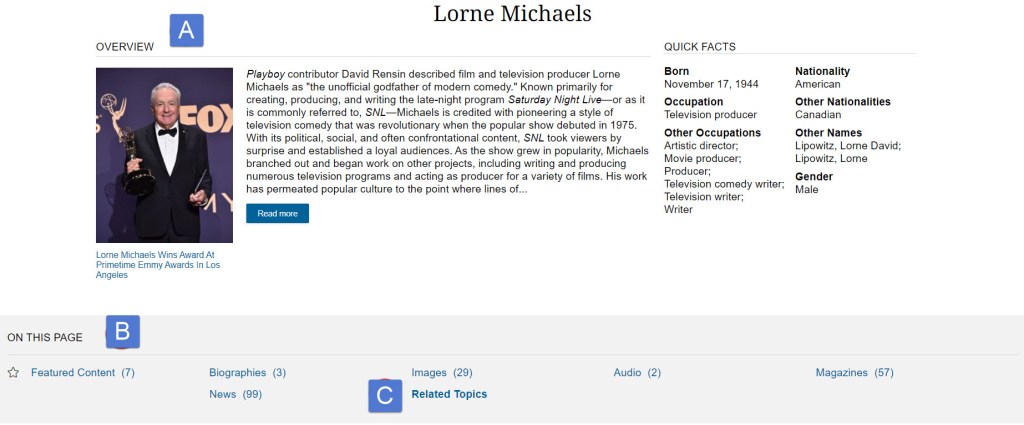
<p>A personal profile can only be created using a Microsoft web browser (Edge or Internet Explorer). However after it is created, any browser can be used to log in to the OED.<br /><img alt="Folders view" border="0" class="asset  asset-image at-xid-6a00e5509ea6a18834026bded87fe3200c img-responsive" src="https://blogs.tpl.ca/wp-content/uploads/2025/08/6a00e5509ea6a18834026bded87fe3200c-800wi.png" title="Folders view" /></p>
<h2>Mobile App&#160;</h2>
<p>OED does not have an official app. Third party developers have created a few apps, but they have paywalls and do not support the sign-in profile feature.</p>
<h2>OED Resources</h2>
<p>Helpful OED resources includes:</p>
<ul>
<li><a href="https://public.oed.com/how-to-use-the-oed/abbreviations/" title="Abbreviations used">Abbreviations used</a></li>
<li><a href="https://public.oed.com/how-to-use-the-oed/" title="How to use the OED">How to use the OED</a></li>
<li><a href="https://public.oed.com/how-to-use-the-oed/key-to-symbols-and-other-conventions/" title="Key to symbols and other conventions">Key to symbols and other conventions</a></li>
<li><a href="https://public.oed.com/how-to-use-the-oed/video-guides/" title="Video Guides">Video Guides</a>:
<ul>
<li><a href="https://public.oed.com/how-to-use-the-oed/video-guides/#quick-search" title="Quick search">Quick search</a></li>
<li><a href="https://public.oed.com/how-to-use-the-oed/video-guides/#advanced-search" title="Advanced search">Advanced search</a></li>
<li><a href="https://public.oed.com/how-to-use-the-oed/video-guides/#understanding-the-results-page" title="Understanding the results page">Understanding the results page</a></li>
<li><a href="https://public.oed.com/how-to-use-the-oed/video-guides/#navigating-an-entry" title="Navigating an entry">Navigating an entry</a></li>
<li><a href="https://public.oed.com/how-to-use-the-oed/video-guides/#understanding-the-sidebar" title="Understanding the sidebar">Understanding the sidebar</a></li>
<li><a href="https://public.oed.com/how-to-use-the-oed/video-guides/#categories" title="Categories">Categories</a></li>
<li><a href="https://public.oed.com/how-to-use-the-oed/video-guides/#htoed_research" title="Using the Historical Thesaurus of the OED in research">Using the Historical Thesaurus of the OED in research</a></li>
</ul>
</li>
</ul>
<p>For more information or for help, please contact our&#160;<a href="https://www.torontopubliclibrary.ca/contact/" title="link to information about Answerline">Answerline</a> service.</p>
</div>
</content>
        <summary>The Oxford English Dictionary (OED) is a historical dictionary, providing not only the current meaning of over half a million words, but the history of individual words in chronological order by first use as well as pronunciation keys (British, U.S.). It is also a historical thesaurus. The OED is updated every three months.   How to...</summary>
    </entry>
        <entry>
        <title>Getting Started with Academic OneFile</title>
        <link href="https://blogs.tpl.ca/database-guides/2021/11/getting-started-with-academic-onefile/" />
        <id>https://blogs.tpl.ca/database-guides/2021/11/getting-started-with-academic-onefile/</id>
        <updated>2021-11-12T11:59:15Z</updated>
        <published>2021-11-12T11:59:15Z</published>
        <category term="database-guides" label="Getting Started with Online Services &amp; Databases" />
        <author>
            <name>Information Services Team</name>
        </author>
        <content type="xhtml" xml:lang="en-CA" xml:base="https://blogs.tpl.ca/">
<div xmlns="http://www.w3.org/1999/xhtml"><p><img alt="Gale Academic OneFile" border="0" class="asset  asset-image at-xid-6a00e5509ea6a1883402788042dcb9200d img-responsive" src="https://blogs.tpl.ca/wp-content/uploads/2025/08/6a00e5509ea6a1883402788042dcb9200d-800wi.jpg" title="Gale Academic OneFile" /></p>
<p><a href="https://www.torontopubliclibrary.ca/detail.jsp?Entt=RDMEDB0001&amp;R=EDB0001" title="Gale Academic OneFile">Academic OneFile</a> is a periodicals database for mainly an academic audience, as compared to <a href="https://www.torontopubliclibrary.ca/detail.jsp?Entt=RDMEDB0086&amp;R=EDB0086" title="Gale OneFile: News">Gale OneFile: News</a>, a periodicals database for mainly a general one. In <em>Academic OneFile</em>, about 80% of the active, full-text magazines and journals are academic whereas, in <em>Gale OneFile</em>, only about 25% of them are.</p>
<p>Though journals and magazines are the most substantial part of <em>Academic OneFile</em>, the database also includes newspapers, newsletters, books and videos.</p>
<h2>How to access Gale Academic OneFile</h2>
<ol>
<li>Go to <a href="http://www.tpl.ca" title="Toronto Public Library&apos;s website">tpl.ca</a> and enter &#039;Academic OneFile&#039; in the search box&#160;</li>
<li>Click on Access Online under Academic OneFile<span style="font-family: georgia, palatino">&#160;</span></li>
<li>Enter your library card number and PIN</li>
<li>Click on &#039;Continue&#039;</li>
</ol>
<h3>Currency</h3>
<p>The latest available issue of a magazine or journal varies by title. Some titles have no embargo, some have embargos of a few weeks, a few months or a year. An &quot;embargo&quot; is the delay between appearing in print and appearing in <em>Academic OneFile.</em></p>
<h3>Subjects</h3>
<p>The subjects covered by the database are the sciences and social sciences. The sciences are biology, chemistry and environmental science. The social sciences are criminal justice, economics, history, marketing, political science and psychology.</p>
<p><img alt="Discipline selector" border="0" class="asset  asset-image at-xid-6a00e5509ea6a18834026bdeeaff79200c img-responsive" src="https://blogs.tpl.ca/wp-content/uploads/2025/08/6a00e5509ea6a18834026bdeeaff79200c-800wi.jpg" style="display: block;margin-left: auto;margin-right: auto" title="Discipline selector" /></p>
<p>Coverage of the social sciences will tend to represent a U.S. rather than a Canadian point of view. While about 34% of the active, full-text magazines and journals are published in the U.S., only about 3% are published in Canada.</p>
<h3>Related Resources</h3>
<p>Other Toronto Public Library periodicals databases for mainly an academic audience are <a href="https://www.torontopubliclibrary.ca/detail.jsp?Entt=RDMEDB0071&amp;R=EDB0071" title="JSTOR">JSTOR</a> (arts, sciences, social sciences and humanities) and <a href="https://www.torontopubliclibrary.ca/detail.jsp?Entt=RDMEDB0201&amp;R=EDB0201" title="SAGE Journals">SAGE Journals</a> (health sciences, social sciences and humanities, materials sciences and engineering, life and biomedical sciences).</p>
<h2>Searching</h2>
<h3>Basic Search</h3>
<p>You can do a Basic Search or an Advanced Search. When you do a basic search, results can be numerous and you need to filter them to make them manageable. Filtering can also make them more subject-focused.</p>
<p>Results are sorted by:</p>
<ol style="list-style-type: lower-alpha">
<li>audience (Academic Journals, Magazines) and format (Magazines, Books, News, Images, Videos), the default sort being Magazines; and</li>
<li>relevance or newest/oldest, the default sort being relevance&#160;</li>
</ol>
<p>You can filter by:</p>
<ul>
<li>Publication Date, entering a date range or selecting Past Week, Past Month or Past Year. This is useful when currency of information is especially important in the subject</li>
<li>Subjects, which are useful for improving the subject-focus of the results. See also the Topic Finder filter, which filters results by keyword; and the subject-searching possibilities in Advanced Search and in Subject Guide Search</li>
<li>Document Type, which is useful for limiting the results to a genre of information, e.g. Article, Brief article, Report</li>
<li>Publication Title, which could be useful for limiting results to a relevant point of view. E.g. if you&#039;re researching a science subject, you might select science titles rather than business titles</li>
<li>Search Within, which allows you to combine your original basic search with an additional basic search</li>
</ul>
<h4>Topic Finder</h4>
<p>Topic Finder is a visual alternative to using the Search Within. It can be especially useful when you can&#039;t think of additional words to filter with.</p>
<p>In the picture below, Topic Finder has been applied to a basic search for &quot;arctic warming.&quot;</p>
<p><img alt="Topic Finder" border="0" class="asset  asset-image at-xid-6a00e5509ea6a188340282e11b5b45200b img-responsive" src="https://blogs.tpl.ca/.a/6a00e5509ea6a188340282e11b5b45200b-800wi" style="display: block;margin-left: auto;margin-right: auto" title="Topic Finder" /></p>
<p>The differently coloured &quot;tiles&quot; represent keywords derived from the titles, subjects and first 100 words of your top results. When you select a tile, the tiles for subtopics under it show; or, if there aren&#039;t any subtopics, a short list of search results displays.</p>
<h3>Advanced Search</h3>
<p>When you do an advanced search, you can apply ahead of time many of the filters that you apply afterwards when you do a basic search (and that, in an advanced search, you can also apply afterwards).</p>
<p>One filter that is unique to advanced search is the Publication Subject filter (as opposed to the Subjects filter, which filters by article subject).</p>
<p>E.g. you can search &quot;keyword = arctic warming&quot; and, in Publication Subject, limit results to publications in a specific discipline, like Environmental science or Oceanography. Type the first few letters of the discipline. A list of options will appear:</p>
<p><img alt="Filtering by publication subject" border="0" class="asset  asset-image at-xid-6a00e5509ea6a18834027880436727200d img-responsive" src="https://blogs.tpl.ca/wp-content/uploads/2025/08/6a00e5509ea6a18834027880436727200d-800wi.jpg" style="display: block;margin-left: auto;margin-right: auto" title="Filtering by publication subject" /></p>
<p>But the great advantage of doing an advanced search is being able to do multiple searches at the same time, bring multiple searches into Boolean relations (AND, OR, NOT) and search specific fields (e.g. subject, title, author).&#160;</p>
<p>E.g. since arctic warming falls under both the subjects Climate change and Global warming, you can do an advanced search &quot;subject = Climate change OR subject = Global warming AND keyword = arctic warming&quot; to improve the subject-focus of the results.</p>
<h3>Subject Guide Search</h3>
<p>When you do a basic search, you can filter by the subjects assigned to an article and, when you do an advanced search, you can also filter by the subject of the publication. When you do a Subject Guide Search, you can filter by aspects of a subject.</p>
<p>E.g. &quot;keyword = arctic warming&quot; can be filtered, in a basic search, by the subject Climate change and, in an advanced search, by the publication subject Earth Sciences &gt; Climatology.</p>
<p>In a subject guide search, you can combine the subject Climate change with subdivisions like Causes of, Forecasts and trends, Models, Political aspects, and Research.&#160;</p>
<h3>Publication Search</h3>
<p>Publication search can be used to do search within a specific publication. But you can do this both in a basic search by applying a Publication Title filter and in an advanced search by searching &quot;keyword = arctic warming AND publication title = Nature.&quot;</p>
<p>Use Publication Search, instead, to find out when a title is full-text (<em>Nature</em> is full-text starting in 2000), what the embargo period is (365 days, for <em>Nature</em>), place of publication, frequency of publication, etc. Select an issue to see the contents. Contents are not, though, listed in page order.</p>
<p><img alt="Nature journal" border="0" class="asset  asset-image at-xid-6a00e5509ea6a18834027880436704200d img-responsive" src="https://blogs.tpl.ca/wp-content/uploads/2025/08/6a00e5509ea6a18834027880436704200d-800wi.jpg" style="display: block;margin-left: auto;margin-right: auto" title="Nature journal" /></p>
<h2>Browsing</h2>
<p>Browse publications by selecting Publication Search, then selecting List All Publications (above the search box). Filter the list by Publication Subject, audience, place of publication, language, etc. Note that here the publication subjects aren&#039;t as specific as they are in advanced search.</p>
<p>Browse the topics under a specific science (e.g. biology, chemistry) or social science (e.g. criminal justice, economics) by selecting a science or social science on the homepage, then a topic. This does a Topic Search, which is equivalent to searching by subject in advanced search.</p>
<h2>Tools</h2>
<p>These tools appear at the top left of the article.</p>
<p style="padding-left: 40px"><img alt="Tools: translation, change font size, listen" border="0" class="asset  asset-image at-xid-6a00e5509ea6a188340282e11be28d200b img-responsive" src="https://blogs.tpl.ca/wp-content/uploads/2025/08/6a00e5509ea6a188340282e11be28d200b-800wi.jpg" title="Tools: translation, change font size, listen" /></p>
<ol>
<li>Translate. Does a machine translation of the article into another language. Selecting this tool also enables you to change the interface language.</li>
<li>Decrease font size.</li>
<li>Increase font size.</li>
<li>Listen. Reads the article or highlighted parts of it aloud. Will not read an article longer than 190,000 characters, which is about 30,000 words. Will not read more than 1,000 words of highlighted text. Translated articles can also be read aloud. Audio may be downloaded from the audio dashboard to an MP3 file.</li>
</ol>
<p>These tools appear at the top right of the article.</p>
<p style="padding-left: 40px"><img alt="Features: Google Drive, Microsoft OneDrive, Email, Download, Print " border="0" class="asset  asset-image at-xid-6a00e5509ea6a18834027880436a14200d img-responsive" src="https://blogs.tpl.ca/wp-content/uploads/2025/08/6a00e5509ea6a18834027880436a14200d-800wi.jpg" title="Features: Google Drive, Microsoft OneDrive, Email, Download, Print " /></p>
<ol>
<li>Send to Google Drive.</li>
<li>Send to Microsoft OneDrive.</li>
<li>Email. The text of the article, with citation, is included in the body of the email.</li>
<li>Download. Downloads article as a PDF, which is sometimes a reproduction of the format of the journal or magazine and sometimes a machine-generated PDF.</li>
<li>Print.</li>
</ol>
<p>These tools appear at the top right of the screen.</p>
<p style="padding-left: 40px"><img alt="Cite, Send to, Download, Print, Get link, Highlights and notes" border="0" class="asset  asset-image at-xid-6a00e5509ea6a18834026bdeeb8c9b200c img-responsive" src="https://blogs.tpl.ca/wp-content/uploads/2025/08/6a00e5509ea6a18834026bdeeb8c9b200c-800wi.jpg" title="Cite, Send to, Download, Print, Get link, Highlights and notes" /></p>
<ol>
<li>Cite. Shows citation of the article, which is also visible at the bottom of the article when it&#039;s emailed, downloaded or printed.</li>
<li>Send to. Google Drive, Microsoft OneDrive or email.</li>
<li>Download.</li>
<li>Print.</li>
<li>Get Link. Shows URL for the page, which (copied into an email, for example) works even when you&#039;re no longer signed into <em>Academic OneFile</em>. This tool is also at the top right of the search-results screen.</li>
<li>Highlights and Notes. Shows highlighting and annotation you&#039;ve done. Select &quot;View All Highlights and Notes&quot; to display only highlighting and notes, with linked article title and citation. This tool is also at the top right of the search-results screen. Displayed will be the highlighting and annotation you&#039;ve done in the articles in the results. You may send, download or print the display.</li>
</ol>
<p>These tools appear at the bottom of the screen.</p>
<p><img alt="Footer navigation showing links" border="0" class="asset  asset-image at-xid-6a00e5509ea6a18834027880436ac2200d image-full img-responsive" src="https://blogs.tpl.ca/wp-content/uploads/2025/08/6a00e5509ea6a18834027880436ac2200d-800wi.jpg" title="Footer navigation showing links" /></p>
<ol>
<li>About the publisher.</li>
<li>Help. Context-specific, e.g. selected when you&#039;re on the homepage, the homepage is the topic; selected when you&#039;re on the Advanced Search page, Advanced Search is the topic.</li>
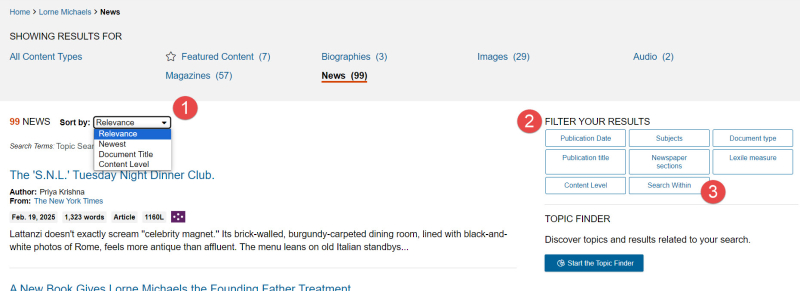
<li>Dictionary. Search box for <em>Merriam-Webster&#039;s Collegiate Dictionary</em> (2003). Selecting (double clicking) a word in an article will cause the definition to appear in a pop-up window. For words that have entered English later than 2003, consult the <a href="https://www.torontopubliclibrary.ca/detail.jsp?Entt=RDMEDB0096&amp;R=EDB0096" title="Oxford English Dictionary">Oxford English Dictionary</a>.</li>
<li>Contact Us. Leads to a <a href="https://assets.cengage.com/gale/docs/training/AONE_ResourceGuide.pdf" title="Resource guide">Resource guide</a> for <em>Academic OneFile</em>.</li>
</ol>
<hr />
<p>For more information or for help, please contact our&#160;<a href="https://www.torontopubliclibrary.ca/contact/" title="link to information about Answerline">Answerline</a> service.</p>
</div>
</content>
        <summary>Academic OneFile is a periodicals database for mainly an academic audience, as compared to Gale OneFile: News, a periodicals database for mainly a general one. In Academic OneFile, about 80% of the active, full-text magazines and journals are academic whereas, in Gale OneFile, only about 25% of them are. Though journals and magazines are the...</summary>
    </entry>
        <entry>
        <title>Getting Started with The Wall Street Journal</title>
        <link href="https://blogs.tpl.ca/database-guides/2021/09/getting-started-with-wall-street-journal/" />
        <id>https://blogs.tpl.ca/database-guides/2021/09/getting-started-with-wall-street-journal/</id>
        <updated>2021-09-20T17:14:06Z</updated>
        <published>2021-09-20T17:14:06Z</published>
        <category term="database-guides" label="Getting Started with Online Services &amp; Databases" />
        <author>
            <name>Information Services Team</name>
        </author>
        <content type="xhtml" xml:lang="en-CA" xml:base="https://blogs.tpl.ca/">
<div xmlns="http://www.w3.org/1999/xhtml"><p><em> <img alt="WSJ Logo for libraries" class="asset  asset-image at-xid-6a00e5509ea6a18834026bdef178ba200c img-responsive" src="https://blogs.tpl.ca/wp-content/uploads/2025/08/6a00e5509ea6a18834026bdef178ba200c-320wi.jpg" title="WSJ Logo for libraries" /><br /></em></p>
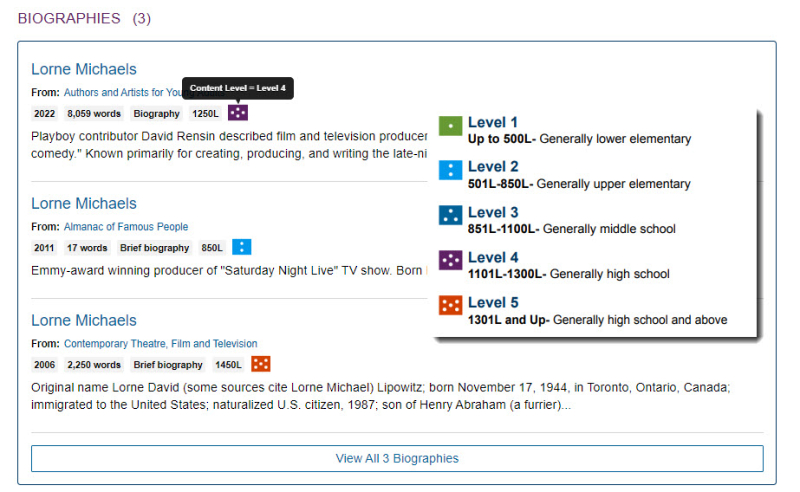
<p><em>The Wall Street Journal</em> provides full, unlimited and free access to the latest in-depth business and finance news from wsj.com.&#160; &#160;The <em>Wall Street Journal</em> online is available in English, Chinese and Japanese. The digital version of the print edition (e-replica) is also available.&#160;</p>
<p>The Toronto Public Library&#039;s <em>The Wall Street Journal</em> online subscription also provides access to a four-year archive for article searches, access to WSJ videos and podcasts.&#160; When accessing remotely, an account with wsj.com is required.&#160; Another benefit of the wsj.com account is the ability to save articles and to sign up for newsletters.&#160;&#160;</p>
<h3>What you need</h3>
<ul>
<li>A valid Toronto Public Library card</li>
<li>A computer, phone or tablet with an internet connection</li>
<li>A wsj.com account (for remote access) using a valid email address and password of your choice</li>
</ul>
<p><span style="font-size: 11pt"><em>The Wall Street Journal</em> (wsj.com) is a third-party service that is governed by its own privacy policy and practices, not the library&#039;s. We recommend that you consult their <a href="https://www.wsj.com/policy/subscriber-agreement" title="WSJ Subscriber Agreement and Terms of Use">Subscriber Agreement and Terms of Use</a>, <a href="https://www.dowjones.com/privacy-notice/?mod=WSJ" title="Dow Jones Privacy Policy">Privacy Policy</a> and <a href="https://www.dowjones.com/cookie-notice/?mod=DJnotice" title="Dow Jones Cookie Notice">Cookie Notice</a>.</span></p>
<h3>Accessing the Wall Street Journal on a library computer</h3>
<ol>
<li>On any library computer, open any browser and go to <a href="https://www.wsj.com/access/tpl" title="WSJ from library branch computers">tpl.ca/wsj</a> and start reading.&#160; &#160;No additional sign in steps are required.&#160;</li>
</ol>
<h3>Accessing The Wall Street Journal on a personal device</h3>
<p>To access The Wall Street Journal outside the library (or on the library&#039;s Wi-Fi), an account with wsj.com must be created.&#160; Customers who already have a wsj.com account should create a new one to use for access through the library.&#160;</p>
<ol>
<li>Open a browser and go to <a href="https://www.torontopubliclibrary.ca/" title="Toronto Public LIbrary website">tpl.ca</a> and search for <strong>Wall Street Journal</strong>.&#160; Click on the title and then on the <strong>Access Online</strong> button. Enter your valid library card number and PIN.&#160;</li>
<li>On the wsj.com <strong>Create Account</strong> page, enter your first and last name, your email and password.&#160; <strong>Click</strong> in the checkbox next to &quot;I agree to the Privacy Notice, Subscriber Agreement, Cookie Notice&quot;.&#160; Click on the <strong>Create</strong> button.&#160;</li>
<li>The email address used to create the account will need to be verified.&#160; Open the email account used and look for a verification email from WSJ.&#160; If it does not arrive in a few minutes, a request to verify your email address will most likely appear the next time you sign in to WSJ.&#160; The WSJ also sends a welcome email.&#160;
<p><img alt="WSJ Create Account" border="0" class="asset  asset-image at-xid-6a00e5509ea6a18834026bdef119cc200c image-full img-responsive" src="https://blogs.tpl.ca/wp-content/uploads/2025/08/6a00e5509ea6a18834026bdef119cc200c-800wi.png" title="WSJ Create Account" /></p>
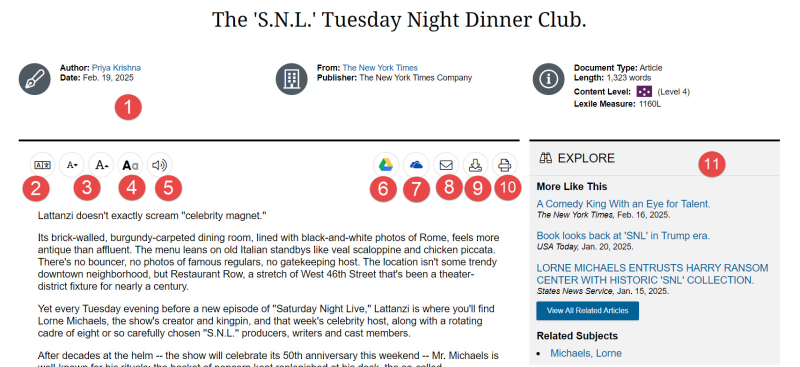
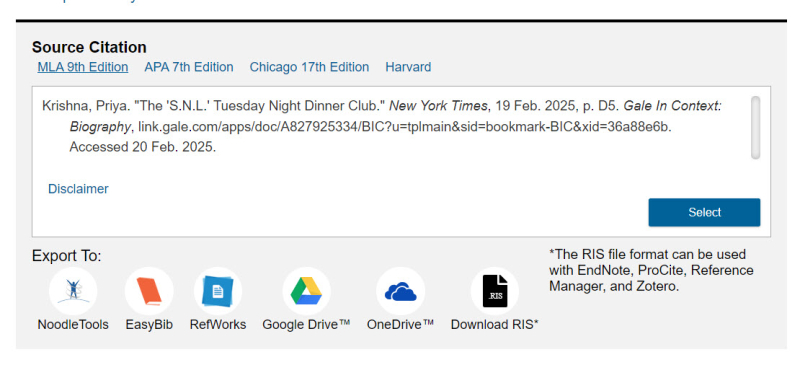
</li>
<li>You now have access to wsj.com for 3 days.&#160; &#160;After the pass has expired, sign in again through <a href="https://www.torontopubliclibrary.ca/" title="Toronto Public LIbrary website">tpl.ca</a>.&#160; &#160;Click on the <strong>Sign In</strong> button&#160; and use the email address and password combination used to create your wsj.com account during your first visit.&#160; You may need to click on the checkbox to agree to the Privacy Notice, Subscriber Agreement and Cookie Notice again.</li>
</ol>
<p><em>Please note:</em> While there are two mobile apps in the app stores for The Wall Street Journal, they are <span style="text-decoration: underline">not</span> compatible with the public library edition of WSJ online at this time.&#160; On a mobile device, access is available through a browser (Chrome, Firefox, Safari etc.) .&#160; The Journal&#039;s mobile site offers the same features and content as the apps.</p>
<h3>Accessing the digital version of the print edition</h3>
<p>Seven days worth of e-replica of the print edition are available.&#160;</p>
<ol>
<li>Sign into<strong> wsj.com</strong> using either of the methods above</li>
<li>Click on <strong>Print Edition</strong> located just under the masthead</li>
<li>Select the issue you wish to read</li>
</ol>
<p><img alt="WSJ Print Edition" border="0" class="asset  asset-image at-xid-6a00e5509ea6a188340282e1217143200b image-full img-responsive" src="https://blogs.tpl.ca/wp-content/uploads/2025/08/6a00e5509ea6a188340282e1217143200b-800wi.png" title="WSJ Print Edition" /></p>
<h3>Searching for Articles</h3>
<p>A basic article search will display content from the past 90 days, while an Advanced Search will display content from the past four years.&#160;</p>
<ol>
<li>Click on the search icon in the upper right hand corner of the website, at the end of the list newspaper sections.<br /><img alt="Search" class="asset  asset-image at-xid-6a00e5509ea6a188340278804b26fa200d img-responsive" src="https://blogs.tpl.ca/wp-content/uploads/2025/08/6a00e5509ea6a188340278804b26fa200d-120wi.png" title="Search" /></li>
<li>Type in keywords to find news articles, information on companies, stock quotes, videos and more.&#160;</li>
<li>Open the <span style="text-decoration: underline">Advanced Search</span> to narrow search results by Author, Subject, Source (area of the wsj.com website), to specify a date range or to expand the search up to four years.&#160;&#160;</li>
</ol>
<h3>Saving Articles</h3>
<ol>
<li>At the end of each article is the option to save the article.&#160; Click on the <strong>Save</strong> button.<br /><img alt="WSJ Save article button" border="0" class="asset  asset-image at-xid-6a00e5509ea6a18834027880495357200d img-responsive" src="https://blogs.tpl.ca/wp-content/uploads/2025/08/6a00e5509ea6a18834027880495357200d-800wi.png" title="WSJ Save article button" /><a class="asset-img-link" href="https://blogs.tpl.ca/.a/6a00e5509ea6a18834026bdef10995200c-pi" style="display: inline"><br /></a></li>
<li>To find the article later, click on your name in the upper right hand corner of the website and select<strong> Saved Content</strong> from the list.
<p><img alt="Wsj saved content with border" class="asset  asset-image at-xid-6a00e5509ea6a18834026bdef17cae200c img-responsive" src="https://blogs.tpl.ca/.a/6a00e5509ea6a18834026bdef17cae200c-320wi" title="Wsj saved content with border" /><a class="asset-img-link" href="https://blogs.tpl.ca/.a/6a00e5509ea6a188340282e121cf7b200b-pi" style="display: inline"><br /></a><a class="asset-img-link" href="https://blogs.tpl.ca/.a/6a00e5509ea6a1883402788048e267200d-pi" style="display: inline"><br /></a></p>
</li>
</ol>
<h3>Sharing Articles</h3>
<p>There are several options for sharing articles with others, including Facebook, Twitter, LinkedIn and Email.&#160; &#160;Articles can also be printed.&#160;</p>
<ol>
<li>If the options do not appear in a panel to the left of the title of an article, click on the <strong>Share</strong> button under the author&#039;s name to access the list.<br /><img alt="WSJ Share button" border="0" class="asset  asset-image at-xid-6a00e5509ea6a18834026bdef17bfe200c img-responsive" src="https://blogs.tpl.ca/wp-content/uploads/2025/08/6a00e5509ea6a18834026bdef17bfe200c-800wi.png" title="WSJ Share button" /></li>
</ol>
<h3>Subscribing to Newsletters</h3>
<ol>
<li>After signing into your <strong>wsj.com account</strong>, click on your name in the upper right-hand corner.</li>
<li>Select <strong>Email and Alerts</strong></li>
<li>Under Newsletters and Alerts, look through the list and move the slider to the right to subscribe.&#160;
<p>&#160;<img alt="WSJ Newsletters with border" class="asset  asset-image at-xid-6a00e5509ea6a188340282e121d01b200b img-responsive" src="https://blogs.tpl.ca/wp-content/uploads/2025/08/6a00e5509ea6a188340282e121d01b200b-320wi.png" title="WSJ Newsletters with border" /></p></li>
</ol>
<h3>Help with wsj.com</h3>
<ul>
<li>Visit the wsj.com Customer Center at <a href="https://customercenter.wsj.com/help" title="WSJ Customer Center">customercenter.wsj.com/help</a></li>
<li>Contact our <a href="https://www.torontopubliclibrary.ca/contact/">Answerline service</a></li>
</ul>
<p>&#160;</p>
<p>&#160;</p>
</div>
</content>
        <summary>The Wall Street Journal provides full, unlimited and free access to the latest in-depth business and finance news from wsj.com.   The Wall Street Journal online is available in English, Chinese and Japanese. The digital version of the print edition (e-replica) is also available.  The Toronto Public Library's The Wall Street Journal online subscription also provides...</summary>
    </entry>
        <entry>
        <title>Getting Started with LinkedIn Learning</title>
        <link href="https://blogs.tpl.ca/database-guides/2021/07/getting-started-with-lyndacom/" />
        <id>https://blogs.tpl.ca/database-guides/2021/07/getting-started-with-lyndacom/</id>
        <updated>2021-07-27T12:54:40Z</updated>
        <published>2021-07-27T12:54:40Z</published>
        <category term="database-guides" label="Getting Started with Online Services &amp; Databases" />
        <author>
            <name>Information Services Team</name>
        </author>
        <content type="xhtml" xml:lang="en-CA" xml:base="https://blogs.tpl.ca/">
<div xmlns="http://www.w3.org/1999/xhtml"><p><a class="asset-img-link" href="https://blogs.tpl.ca/.a/6a00e5509ea6a188340263e98a70bc200b-pi"></a><img alt="Cover image of LinkedIn Learning (formerly Lynda.com)" src="https://www.torontopubliclibrary.ca/images/edbs/LC/EDB0187.png" /></p>
<p><span style="font-size: 11pt"><strong><a href="https://www.torontopubliclibrary.ca/detail.jsp?Entt=RDMEDB0187&amp;R=EDB0187"><span style="font-size: 11pt">LinkedIn Learning</span></a></strong> is an </span>an eLearning platform that contains over 16,000 video tutorial courses led by experts in their fields on web design, software development, photography, project management, graphic design, audio and video editing, and more. All the courses on LinkedIn fall into four categories: Business, Creative, Technology, and Certifications. Tutorials are available in select languages (e.g. French, German, Japanese, Mandarin, Portuguese and Spanish).</p>
<h2>How to Access LinkedIn Learning</h2>
<ol>
<li><span style="font-size: 11pt">Go to <a href="http://www.tpl.ca"><strong>www.tpl.ca</strong></a>, the Toronto Public Library website.</span></li>
<li><span style="font-size: 11pt">Type in &quot;LinkedIn Learning&quot; into the search box.&#160;</span></li>
<li><span style="font-size: 11pt">Click on &quot;Access Online&quot; under LinkedIn Learning.<a href="http://www.tpl.ca/lynda"></a></span></li>
<li><span style="font-size: 11pt">Click &quot;Get Started&quot;.</span></li>
<li><span style="font-size: 11pt">Enter your library card number and PIN. Note: Library cards must be in good standing (not expired or blocked)</span></li>
<li><span style="font-size: 11pt">Click &quot;Continue&quot;.</span></li>
</ol>
<p><span style="font-size: 11pt"> <img alt="How To Access LinkedIn" border="0" class="asset  asset-image at-xid-6a00e5509ea6a188340278802a426e200d img-responsive" src="https://blogs.tpl.ca/wp-content/uploads/2025/08/6a00e5509ea6a188340278802a426e200d-800wi.png" title="How To Access LinkedIn" /><br /></span></p>
<h2>Personalizing your Learning Experience</h2>
<p>The first time you use LinkedIn Learning you have the option to select subjects/topics you are interested in. Indicating your interests allows the site to provide suggested courses and updates when new courses of interest have been added. It will also allow you to track your progress through your selected courses, manage saved courses and manage your certificates of completion. Certificates of completion are certificates that you may receive when you watch a course on LinkedIn Learning.</p>
<p>&#160;</p>
<p><span style="font-size: 11pt"><img alt="Welcome To LinkedIn Learning" class="asset  asset-image at-xid-6a00e5509ea6a188340278802a42d3200d img-responsive" src="https://blogs.tpl.ca/wp-content/uploads/2025/08/6a00e5509ea6a188340278802a42d3200d-320wi.png" title="Welcome To LinkedIn Learning" /></span></p>
<p><span style="font-size: 11pt">Click &quot;Sounds good&quot;.&#160;</span></p>
<p><span style="font-size: 11pt">After selecting topics you are interested in, click &quot;Continue&quot;</span></p>
<p><span style="font-size: 11pt">You have an option to set a weekly goal now or later and click &quot;Start learning&quot;.</span></p>
<p><span style="font-size: 11pt"><img alt="Set a Weekly Goal or Start Learning" border="0" class="asset  asset-image at-xid-6a00e5509ea6a188340278802a4317200d image-full img-responsive" src="https://blogs.tpl.ca/wp-content/uploads/2025/08/6a00e5509ea6a188340278802a4317200d-800wi.png" title="Set a Weekly Goal or Start Learning" /></span></p>
<h2>Navigating LinkedIn Learning</h2>
<ol style="list-style-type: upper-alpha">
<li>The navigation bar, at the top of the page stays constant throughout your experience. In contains the following features:
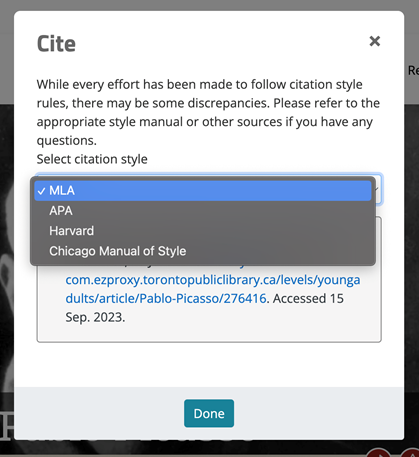
<ul>
<li>Browse</li>
<li>Search Box</li>
<li>Home button – return at any time to your LinkedIn Learning main page</li>
<li>My Learning – provides access to your “in progress” and “saved” courses, your learning history and your interested skills.</li>
<li>Notifications – updates and suggested content</li>
<li>Me – your personal account provides access to settings</li>
<li>EN – allows you to change the language of the website</li>
</ul>
</li>
<li>Quick access to “My Learning” courses that are in progress and saved.</li>
<li>Recommended courses based on the skills you are interested in learning</li>
</ol>
<h2><img alt="Navigating LinkedIn" border="0" class="asset  asset-image at-xid-6a00e5509ea6a188340278802a7581200d image-full img-responsive" src="https://blogs.tpl.ca/wp-content/uploads/2025/08/6a00e5509ea6a188340278802a7581200d-800wi.png" title="Navigating LinkedIn" /></h2>
<h2>Finding and Taking Courses</h2>
<p><span style="font-size: 11pt">There are several ways to find courses:</span></p>
<ol style="list-style-type: upper-alpha">
<li><span style="font-size: 14.6667px">Browse</span></li>
<li><span style="font-size: 14.6667px">Search Box</span></li>
<li><span style="font-size: 14.6667px">Suggested Courses</span></li>
</ol>
<h3>Browse</h3>
<p><span style="font-size: 11pt">Click the &quot;Browse&quot;&#039; icon at the top of the page. Scroll down for choices on Business Topics, Customer Service, Leadership and Management, Project Management, Training and Education, Software, and Learning Paths. Click &quot;Show All&quot; for more choices under the topics or sub-topics.&#160;</span></p>
<p><span style="font-size: 11pt">Move your cursor over the other sections, </span><span style="font-size: 11pt">Creative, or Technology for topics related to these areas.</span></p>
<p>You can browse for content under the business, creative, and technology sections based on subjects, software, and learning paths.</p>
<p><img alt="Browse Business  Creative  Technology" border="0" class="asset  asset-image at-xid-6a00e5509ea6a18834026bded28471200c image-full img-responsive" src="https://blogs.tpl.ca/wp-content/uploads/2025/08/6a00e5509ea6a18834026bded28471200c-800wi.png" title="Browse Business  Creative  Technology" /></p>
<h3>Search Box</h3>
<p><span style="font-size: 11pt">The search box is used to find content on a specific topic. Enter the keywords of the course you are looking for. This could be the name of the software, type of skill, or subject you wish to learn.</span></p>
<p><span style="font-size: 11pt">As you start typing, a drop down menu appears with a list of related items. You can select on one of these items or click the search icon (magnifying glass) or press &lt;Enter&gt;. A complete list of courses with your keywords will appear. To filter through your results use the filters on the left. Skill level, software, and time to complete are some popular filters. You can also sort by &quot;Best Match&quot;.</span></p>
<p><span style="font-size: 11pt"> <img alt="Filter Search Results" border="0" class="asset  asset-image at-xid-6a00e5509ea6a188340278802a444b200d image-full img-responsive" src="https://blogs.tpl.ca/wp-content/uploads/2025/08/6a00e5509ea6a188340278802a444b200d-800wi.png" title="Filter Search Results" /><br /></span></p>
<h3>Suggested Courses</h3>
<p>LinkedIn Learning provides course suggestions based on the skills you listed as being interested in when you created your account. At any time, these skills can be changed, added, or removed.</p>
<p>To change your skill selection:</p>
<ol>
<li>Click on “Me” in the top right hand corner of the screen</li>
<li>Scroll down to “Skills” in the drop down menu</li>
<li>Delete any of the skills in green by clicking on the “x”</li>
<li>To add a skill, type the skill “e.g. coding” into the add new skill search box</li>
</ol>
<p><img alt="Change Your Skill Selection" border="0" class="asset  asset-image at-xid-6a00e5509ea6a188340278802a75a4200d image-full img-responsive" src="https://blogs.tpl.ca/wp-content/uploads/2025/08/6a00e5509ea6a188340278802a75a4200d-800wi.png" title="Change Your Skill Selection" /></p>
<h2>Watching a Course</h2>
<p>Once you have found a course that you are interested in, click on it and it will open up the course page. The course page has several features:</p>
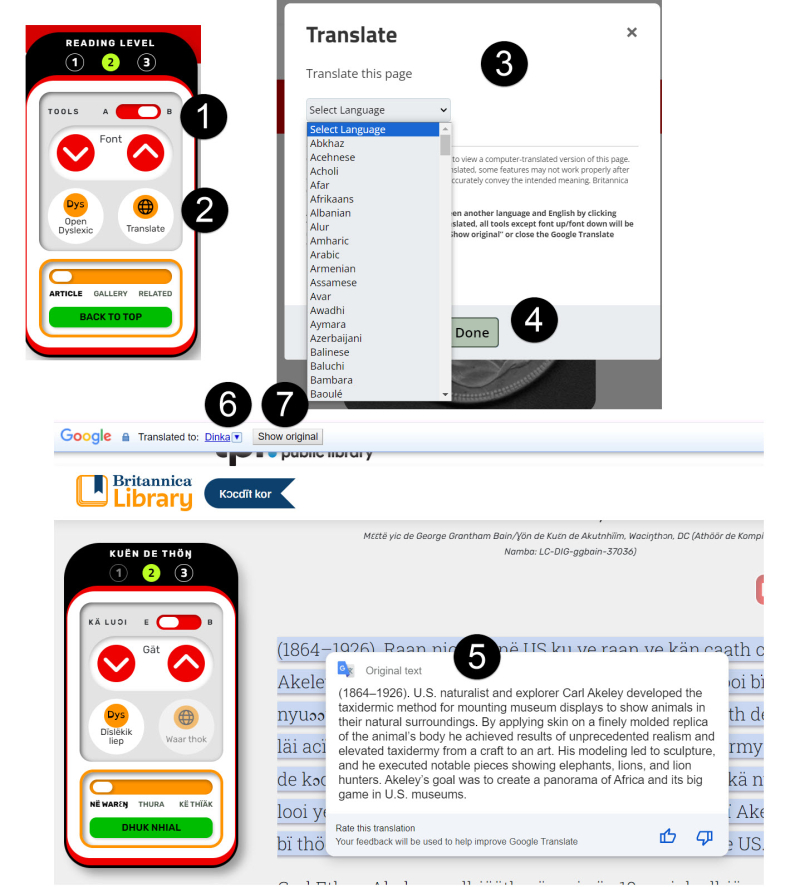
<ol style="list-style-type: upper-alpha">
<li>Course content</li>
<li>Video player controls</li>
<li>Course consumption page tabs &#8211; overview, notebook, transcript</li>
</ol>
<p><img alt="Watching a Course" border="0" class="asset  asset-image at-xid-6a00e5509ea6a188340282e102d6ec200b image-full img-responsive" src="https://blogs.tpl.ca/wp-content/uploads/2025/08/6a00e5509ea6a188340282e102d6ec200b-800wi.png" title="Watching a Course" /></p>
<h3>Course Content</h3>
<p>The table of contents for the course appears to the left of the video. Each chapter expands and you can see what the course covers and whether any course assessments, usually multiple choice quizzes (optional), are available. You can'take the whole course or just a specific lesson.&#160;</p>
<h3>Video Player Controls</h3>
<p><img alt="Video Player Controls" border="0" class="asset  asset-image at-xid-6a00e5509ea6a188340278802a75f0200d image-full img-responsive" src="https://blogs.tpl.ca/wp-content/uploads/2025/08/6a00e5509ea6a188340278802a75f0200d-800wi.png" title="Video Player Controls" /></p>
<p>Note that the Video Speed can be increased or decreased based on preference for talking speed.</p>
<h3>Course Consumption Page Tabs</h3>
<p>The Course Consumption Page Tabs is&#160;located below the video player controls:</p>
<ul>
<li>Overview provides an overview of the course, who the instructor is with a link to their LinkedIn bio, a course description and when the course was last updated and any additional files that the course instructor has provided (exercise files).&#160; Not all courses include exercise files, they are created and included at the discretion of the course instructor.&#160;</li>
<li>Notebook tab allows you to take notes during the course and saves them with a link to the specific part of the video you were watching when made that note. Click on the link above your note and it will take you back to that part of the video to review.&#160;</li>
</ul>
<p style="padding-left: 40px"><img alt="Notebook Tab" border="0" class="asset  asset-image at-xid-6a00e5509ea6a188340278802a7613200d image-full img-responsive" src="https://blogs.tpl.ca/wp-content/uploads/2025/08/6a00e5509ea6a188340278802a7613200d-800wi.png" title="Notebook Tab" /></p>
<p style="padding-left: 40px">&#160;</p>
<ul>
<li>Notes are saved within your saved course and can also be exported as plain text (.txt)&#160;</li>
<li>Transcripts are course notes that can be read online, copied and pasted into any text editor. Each course has a searchable transcript.</li>
</ul>
<p>&#160;</p>
<h2>Certificates of Completion</h2>
<p>Certificates of Completion are certificates that you may download when you have completed a course on LinkedIn Learning.</p>
<ol>
<li>Click on “<strong>My Learning</strong>” from the navigation bar</li>
<li>Click&#160;“<strong>Learning history”</strong></li>
<li>Locate the course or the learning path you’d like to save the certificate for, and click&#160;<strong>More</strong>.</li>
<li>Select&#160;<strong>Download certificate</strong> from the drop-down.</li>
</ol>
<h2><img alt="Certificates of Completion" border="0" class="asset  asset-image at-xid-6a00e5509ea6a188340282e102d749200b image-full img-responsive" src="https://blogs.tpl.ca/wp-content/uploads/2025/08/6a00e5509ea6a188340282e102d749200b-800wi.png" title="Certificates of Completion" /></h2>
<p>Note:</p>
<p>There is no opt-in feature to allow users of LinkedIn Learning for Library to connect to a LinkedIn profile so that courses taken can be updated automatically. Library customers with a LinkendIn profile can add certificates of completion to their profile manually. In addition, there is no retention of people’s names within LinkedIn Learning for Library and as a result, certificates of completion are not printed with library customers’ names.</p>
<h2>LinkedIn Learning app</h2>
<p>A wireless internet connection is needed to stream the content. Using cellular data is not recommended as streaming multimedia content can consume a lot of bandwidth. Wireless internet access is available at all Toronto Public Libraries. You take courses on your smartphone or tablet.</p>
<p><span style="font-size: 11pt">To use the LinkedIn Learning app:</span></p>
<ol>
<li><span style="font-size: 11pt">Download the LinkedIn Learning app from the App Store or Google Play</span></li>
<li><span style="font-size: 11pt">Click “Sign in” on the app</span></li>
<li><span style="font-size: 11pt">Select “Sign in with your library card”</span></li>
<li><span style="font-size: 11pt">Update the default custom invitation link, replacing libraryID with &#039;tpl&#039;.&#160; The correct link is: <a href="http://www.linkedin.com/learning-login/go/tpl">www.linkedin.com/learning-login/go/tpl</a></span></li>
<li><span style="font-size: 11pt">Enter library card and PIN</span></li>
</ol>
<p><img alt="LinkedIn Learning App screen" border="0" class="asset  asset-image at-xid-6a00e5509ea6a188340282e102a706200b img-responsive" src="https://blogs.tpl.ca/wp-content/uploads/2025/08/6a00e5509ea6a188340282e102a706200b-800wi.png" title="LinkedIn Learning App screen" /></p>
<p><span style="font-size: 11pt">Check out the library&#039;s blog post <a href="https://blogs.tpl.ca/digital-services/2021/04/lyndacom-is-becoming-linkedin-learning.html">Lynda.com is becoming LinkedIn Learning, and It&#039;s All Good</a></span><span style="font-size: 11pt">.</span></p>
<hr />
<p><span style="font-size: 11pt">For more information or for help, please contact our <a href="https://www.torontopubliclibrary.ca/contact/">Answerline</a> service.</span></p>
</div>
</content>
        <summary>LinkedIn Learning is an an eLearning platform that contains over 16,000 video tutorial courses led by experts in their fields on web design, software development, photography, project management, graphic design, audio and video editing, and more. All the courses on LinkedIn fall into four categories: Business, Creative, Technology, and Certifications. Tutorials are available in select...</summary>
    </entry>
        <entry>
        <title>Getting Started with Mergent Online</title>
        <link href="https://blogs.tpl.ca/database-guides/2021/06/getting-started-with-mergent-online/" />
        <id>https://blogs.tpl.ca/database-guides/2021/06/getting-started-with-mergent-online/</id>
        <updated>2021-06-06T13:18:49Z</updated>
        <published>2021-06-06T13:18:49Z</published>
        <category term="database-guides" label="Getting Started with Online Services &amp; Databases" />
        <author>
            <name>Information Services Team</name>
        </author>
        <content type="xhtml" xml:lang="en-CA" xml:base="https://blogs.tpl.ca/">
<div xmlns="http://www.w3.org/1999/xhtml"><p><strong><a class="asset-img-link" href="https://blogs.tpl.ca/.a/6a00e5509ea6a1883402788016136c200d-pi" style="display: inline"> </a> <img alt="Mergent Online logo" border="0" class="asset  asset-image at-xid-6a00e5509ea6a188340263e9915383200b img-responsive" src="https://blogs.tpl.ca/wp-content/uploads/2025/08/6a00e5509ea6a188340263e9915383200b-800wi.png" title="Mergent Online logo" /><span style="font-size: 11pt"><a class="asset-img-link" href="https://blogs.tpl.ca/.a/6a00e5509ea6a1883402788016136c200d-pi" style="display: inline"><br /></a></span><br /></strong></p>
<p><span style="font-size: 11pt"><a href="https://www.torontopubliclibrary.ca/detail.jsp?Entt=RDMEDB0082&amp;R=EDB0082" title="mergent online"><strong>Mergent Online</strong></a> provides information for investors on more than 10,000 publicly-traded U.S., Canadian and international companies, organized in company reports. Profiles for each company includes: financial details of companies; earnings estimates; stock information; business description; executives; competitors; and current headline news. The eResource includes industry profiles and analysis as well as country profiles.</span></p>
<p><span style="font-size: 11pt">Mergent Online provides the ability to create custom reports for a company, as well as compare reports of multiple companies.&#160;</span></p>
<p><span style="font-size: 11pt">For other investment eResources, check out <a href="https://www.torontopubliclibrary.ca/detail.jsp?Entt=RDMEDB0050&amp;R=EDB0050">Financial Post (FP) Advisor</a> and <a href="https://blogs.tpl.ca/database-guides/2019/12/getting-started-with-value-line.html">Value Line</a>.</span></p>
<p><span style="font-size: 11pt">Note: The Toronto Public Library does not subscribe to the D&amp;B private company database.</span></p>
<h2>How to Access Mergent Online</h2>
<ol>
<li>Go to <a href="https://www.torontopubliclibrary.ca/">tpl.ca</a></li>
<li>Enter &#039;Mergent Online&#039; in the search box</li>
<li>Select Access Online</li>
<li>Enter your library card number and PIN and select Sign In</li>
<li>Select Continue.</li>
</ol>
<h2>Basic Search</h2>
<p><span style="font-size: 11pt">In Basic Search there are three different search tools:</span></p>
<ol style="list-style-type: upper-alpha">
<li><span style="font-size: 11pt">Company Name Search</span></li>
<li><span style="font-size: 11pt">Classification Search</span></li>
<li><span style="font-size: 11pt">Country Profiles</span></li>
</ol>
<p><span style="font-size: 11pt"> <img alt="Page areas for basic search: A. Company Name Search, B. Classification Search, C. Country Profiles " border="0" class="asset  asset-image at-xid-6a00e5509ea6a18834026bdebea6fe200c image-full img-responsive" src="https://blogs.tpl.ca/wp-content/uploads/2025/08/6a00e5509ea6a18834026bdebea6fe200c-800wi.png" title="Page areas for basic search: A. Company Name Search, B. Classification Search, C. Country Profiles " /></span></p>
<p>&#160;</p>
<h3><span style="font-size: 11pt">A. Company Name Search&#160;</span></h3>
<p><span style="font-size: 11pt">To find a company by name or ticker symbol – use the “Company Search” box under the “Basic Search” tab. As you start to type the company name or ticker symbol, results will appear below the search box. Select one of these results to get that company’s report.</span></p>
<p><span style="font-size: 11pt"> <img alt="Company search demonstration" border="0" class="asset  asset-image at-xid-6a00e5509ea6a18834027880161279200d img-responsive" src="https://blogs.tpl.ca/wp-content/uploads/2025/08/6a00e5509ea6a18834027880161279200d-800wi.png" title="Company search demonstration" /></span></p>
<p><span style="font-size: 11pt">Alternatively, you can enter one or more letters to search for a string of company names and select &quot;GO&quot; for the &quot;total company matches&quot; and get a report by selecting a company from the list of search results.</span></p>
<p><span style="font-size: 11pt"> <img alt="Search results page" border="0" class="asset  asset-image at-xid-6a00e5509ea6a188340263e990e252200b image-full img-responsive" src="https://blogs.tpl.ca/wp-content/uploads/2025/08/6a00e5509ea6a188340263e990e252200b-800wi.png" title="Search results page" /></span></p>
<h4><span style="font-size: 11pt"><strong>Company Report Page</strong></span></h4>
<p><span style="font-size: 11pt">The company report page provides a detailed look at a company. At the top of all company report pages is a quick company summary, followed by detailed headings.</span></p>
<p><span style="font-size: 11pt"> <img alt="Company report page with highlighted features" border="0" class="asset  asset-image at-xid-6a00e5509ea6a18834026bdebeaa51200c image-full img-responsive" src="https://blogs.tpl.ca/.a/6a00e5509ea6a18834026bdebeaa51200c-800wi" title="Company report page with highlighted features" /></span></p>
<ol style="list-style-type: upper-alpha">
<li><span style="font-size: 11pt">To add the company to your &quot;Company Analysis List&quot; select <strong>+</strong></span></li>
<li><span style="font-size: 11pt">&quot;Change Company&quot; search box allows you to quickly search for another company name without returning to the basic search page.</span></li>
<li><span style="font-size: 11pt">Company reports are divided into tabs. &quot;Report Builder&quot; is a feature that allows you to quickly take the headings and sub-headings and generate your own report. The reports can be generated in Microsoft Word, Microsoft Excel, Adobe Acrobat PDF or HTML format. The Excel format is, of course, more suitable for numeric/financial data. The Word and PDF formats can be used for all data forms. Note: You will need the appropriate software installed on your computer to view these report formats.</span></li>
<li><span style="font-size: 11pt">Select the &quot;Download&quot; icon to save the page you are currently into Excel. Select the printer icon to have a printer friendly version of the page created.</span></li>
<li><span style="font-size: 11pt">&quot;My Mergent Tools&quot; is a feature that shows you how many companies/executives you have selected to compare and brings you to the comparison page when you have finished selecting. Note: The Company and Executive Alerts options is not activated for Toronto Public Library subscribers.</span></li>
</ol>
<h3><span style="font-size: 11pt">B. Classification Search</span></h3>
<p><span style="font-size: 11pt">To find a company or a list of companies by their Standard Industrial Classification (SIC), North American Industry Classification System (NAICS) or Industry Classification Benchmark (ICB) codes – use &quot;Classification Search<strong>&quot;</strong> under the &quot;Basic Search&quot; tab. This search feature allows you to generate a list of companies that can be downloaded to Excel.</span></p>
<ol style="list-style-type: upper-alpha">
<li><span style="font-size: 11pt">In &quot;Basic Search,&quot; under &quot;Classification Search,&quot; select the radio button next to the classification system you would like to use.</span></li>
<li><span style="font-size: 11pt">Enter the classification code or use the “code lookup”, to look it up.</span></li>
<li><span style="font-size: 11pt">Limit by exchange, index, or country.</span><br /><span style="font-size: 11pt"><strong>TIP</strong>: Enter the first part of a code to find all companies whose code starts with that part or separate multiple codes by commas.</span></li>
</ol>
<p><span style="font-size: 11pt"> <img alt="Classification search areas" border="0" class="asset  asset-image at-xid-6a00e5509ea6a18834026bdebeaac9200c img-responsive" src="https://blogs.tpl.ca/wp-content/uploads/2025/08/6a00e5509ea6a18834026bdebeaac9200c-800wi.png" title="Classification search areas" /></span></p>
<h3><span style="font-size: 11pt"><strong>C. Country Profiles</strong></span></h3>
<p><span style="font-size: 11pt">Country profiles provide statistical data and comprehensive country reports for over 100 countries on their economy, industry, Securities Trade, geography and history, people, government, communications, media, and transportation. To find the Country Profiles, look for the grey box on the Basic Search tab. Use the drop down menu to locate and select the country.&#160;</span></p>
<p><span style="font-size: 11pt"> <img alt="Country profile search" border="0" class="asset  asset-image at-xid-6a00e5509ea6a1883402788017ad8a200d img-responsive" src="https://blogs.tpl.ca/wp-content/uploads/2025/08/6a00e5509ea6a1883402788017ad8a200d-800wi.png" title="Country profile search" /></span></p>
<h2>Advanced Search</h2>
<p><span style="font-size: 11pt">To search for information within a company report, select the &quot;Advanced Search&quot; tab at the top of the main page. For example: to find out which company Taco Bell is a subsidiary of:</span></p>
<ol>
<li><span style="font-size: 11pt">Select the <strong>+</strong> sign in front of &quot;Subsidiary.&quot; This opens the subsidiary search box. </span></li>
<li><span style="font-size: 11pt">Enter &quot;taco bell&quot; (with quotations) into the search box that appears below</span></li>
<li><span style="font-size: 11pt">Select &quot;Submit&quot; </span></li>
<li><span style="font-size: 11pt">Then on &quot;View&quot;</span></li>
</ol>
<p><span style="font-size: 11pt">Note: If you do not place quotations on either side of “taco bell” advanced search will search for all companies with subsidiaries with Bell and Taco in their title.&#160;</span></p>
<p><span style="font-size: 11pt"> <img alt="Advanced search page with featured elements" border="0" class="asset  asset-image at-xid-6a00e5509ea6a18834027880168a40200d image-full img-responsive" src="https://blogs.tpl.ca/wp-content/uploads/2025/08/6a00e5509ea6a18834027880168a40200d-800wi.png" title="Advanced search page with featured elements" /></span></p>
<h2><span style="font-size: 11pt"><strong>Industry Reports</strong></span></h2>
<p><span style="font-size: 11pt">In Industry Analysis you can interactively explore Industry characteristics data through charts and tables as well as access PDF reports based on Industry Classification Benchmark (ICB) classifications.</span></p>
<ol style="list-style-type: upper-alpha">
<li><span style="font-size: 11pt">To find an industry report, select &quot;Industry Analysis<strong>&quot;</strong> tab on the banner at the top of the page.</span></li>
<li>Select &quot;Reports&quot;. There are three different types of reports that you can download:&#160;
<ul>
<li><span style="font-size: 11pt">Industry&#160;– Industry Classification Benchmark (ICB) Industry Reports display characteristics of a given Industry based on Russell 1000 index membership. </span></li>
<li><span style="font-size: 11pt">Supersector – Supersector Reports display characteristics of a given Supersector based on Russell 1000 index membership.&#160;</span></li>
<li>ESG <span style="font-size: 11pt">– </span> Environmental, Social and Governance (ESG) report measures an Industry&#039;s exposure to ESG issues through charts and tables.&#160;</li>
<li><span style="font-size: 11pt">Mergent Reports – Covers 20 of the largest global industries, with coverage for North America, Europe, Asia, and global geographic areas. Content includes: Current Environment, Industry Profile, Key Points, Key References, Market Trends &amp; Outlook. Each section reports separately on the U.S. and Canada</span></li>
</ul>
</li>
<li><span style="font-size: 11pt">Choose one or more reports and select &quot;Download&quot;.&#160;&#160;&#160;</span></li>
</ol>
<p>&#160;</p>
<p><img alt="Industry Reports Page" border="0" class="asset  asset-image at-xid-6a00e5509ea6a1883402788061d846200d image-full img-responsive" src="https://blogs.tpl.ca/wp-content/uploads/2025/08/6a00e5509ea6a1883402788061d846200d-800wi.png" title="Industry Reports Page" /></p>
<p><span style="font-size: 11pt"><strong>TIP</strong>: To find the industry that a company is part of, do a &quot;Company Search.&quot; The industry is listed under the company summary with (with SIC and NAICS codes).</span></p>
<hr />
<p><span style="font-size: 11pt">For more information or for help, please contact our <a href="https://www.torontopubliclibrary.ca/contact/">Answerline Service</a>.</span></p>
</div>
</content>
        <summary>Mergent Online provides information for investors on more than 10,000 publicly-traded U.S., Canadian and international companies, organized in company reports. Profiles for each company includes: financial details of companies; earnings estimates; stock information; business description; executives; competitors; and current headline news. The eResource includes industry profiles and analysis as well as country profiles. Mergent Online...</summary>
    </entry>
        <entry>
        <title>Getting Started with SAGE Video</title>
        <link href="https://blogs.tpl.ca/database-guides/2021/06/getting-started-with-sage-video/" />
        <id>https://blogs.tpl.ca/database-guides/2021/06/getting-started-with-sage-video/</id>
        <updated>2021-06-06T13:18:00Z</updated>
        <published>2021-06-06T13:18:00Z</published>
        <category term="database-guides" label="Getting Started with Online Services &amp; Databases" />
        <author>
            <name>Information Services Team</name>
        </author>
        <content type="xhtml" xml:lang="en-CA" xml:base="https://blogs.tpl.ca/">
<div xmlns="http://www.w3.org/1999/xhtml"><p><img alt="Sage Video logo" border="0" class="asset  asset-image at-xid-6a00e5509ea6a188340278807c3d38200d img-responsive" src="https://blogs.tpl.ca/wp-content/uploads/2025/08/6a00e5509ea6a188340278807c3d38200d-800wi.png" title="Sage Video logo" /></p>
<p><a href="https://www.torontopubliclibrary.ca/detail.jsp?Entt=RDMEDB0205&amp;R=EDB0205">SAGE Video</a> is a collection of streaming videos in the disciplines of business &amp; management, counseling &amp; psychotherapy, leadership, and nursing for university and college students.</p>
<h2>How to Access SAGE Video</h2>
<ol>
<li>Go to <a href="https://www.torontopubliclibrary.ca/">tpl.ca</a></li>
<li>Enter &#039;SAGE Video&#039; in the search box</li>
<li>Select Access Online</li>
<li>Enter your library card number and PIN and select Sign In</li>
<li>Select Continue</li>
</ol>
<p><img alt="Search results page" border="0" class="asset  asset-image at-xid-6a00e5509ea6a188340282e102a9b8200b image-full img-responsive" src="https://blogs.tpl.ca/wp-content/uploads/2025/08/6a00e5509ea6a188340282e102a9b8200b-800wi.png" title="Search results page" /></p>
<h2>Searching</h2>
<h3>Basic and Advanced</h3>
<p>In basic search, you search first and can filter the search results second. In advanced search, you can apply filters first. You don&#039;t need to filter by video content. Only videos appear in the results.&#160;</p>
<p>Advanced search also allows you to search by author, to confine a search to specific fields (e.g. title) and to construct Boolean searches. The author is the speaker in the video, often an academic or practitioner.</p>
<p>Note: When filtering by discipline, only filter for the disciplines listed above (business &amp; management, counseling &amp; psychotherapy, etc.). Filtering for videos in other disciplines will create a search result list of zero videos.&#160;</p>
<p><img alt="Basic search box with advanced search link" border="0" class="asset  asset-image at-xid-6a00e5509ea6a188340278802a471e200d image-full img-responsive" src="https://blogs.tpl.ca/wp-content/uploads/2025/08/6a00e5509ea6a188340278802a471e200d-800wi.png" title="Basic search box with advanced search link" /></p>
<p>To start a new search, select SAGE Video listed under <strong>Browse by Collections</strong>.</p>
<p><a class="asset-img-link" href="https://blogs.tpl.ca/wp-content/uploads/2025/08/6a00e5509ea6a1883402c1a6d021ea200b-800wi.jpg" style="display: inline"><img alt="Image displaying how to access SAGE Video under Browse Collections to start a new search" border="0" class="asset  asset-image at-xid-6a00e5509ea6a1883402c1a6d021ea200b image-full img-responsive" src="https://blogs.tpl.ca/wp-content/uploads/2025/08/6a00e5509ea6a1883402c1a6d021ea200b-800wi.jpg" title="Image displaying how to access SAGE Video under Browse Collections to start a new search" /></a></p>
<h3>Search Results</h3>
<p>The videos in the search results are either a single video or a part of a series. To see the other videos in the series, select the series name.&#160;</p>
<p>The type of the video (e.g. documentary, tutorial) appears next to SAGE Video logo above the title.&#160; Use the filter Content types &gt; Video to limit search results by type.</p>
<h2>Browsing</h2>
<p>Select Discipline on the home page to browse videos by subject within a discipline, e.g.:</p>
<ul>
<li>Entrepreneurship, Human Resource Management or Marketing within Business &amp; Management</li>
<li>Counseling Setting / Client Groups or Theory &amp; Approaches within Counselling &amp; Psychotherapy</li>
<li>Leadership Contexts, Characteristics And Traits or Leadership In Practice within Leadership</li>
<li>Nursing &amp; The Health Care Environment or Nursing Research, Scholarship &amp; Evidence-Based Practice within Nursing</li>
</ul>
<p>To browse all the videos, scroll down and select Browse all SAGE Video. You may sort the videos by title or publication date; or filter them, as with the results of a search.</p>
<p><img alt="Browse all videos tab" border="0" class="asset  asset-image at-xid-6a00e5509ea6a18834026bded7cc8f200c image-full img-responsive" src="https://blogs.tpl.ca/wp-content/uploads/2025/08/6a00e5509ea6a18834026bded7cc8f200c-800wi.jpg" title="Browse all videos tab" /></p>
<p>Check out the library&#039;s blog post <a href="https://blogs.tpl.ca/digital-services/2020/10/free-training-videos-for-professional-development.html">Free Training Videos for Professional Skills Development</a>.</p>
<hr />
<p><span style="font-size: 11pt">For more information or for help, please contact our <a href="https://www.torontopubliclibrary.ca/contact/">Answerline service</a>.</span></p>
</div>
</content>
        <summary>SAGE Video is a collection of streaming videos in the disciplines of business &amp; management, counseling &amp; psychotherapy, leadership, and nursing for university and college students. How to Access SAGE Video Go to tpl.ca Enter 'SAGE Video' in the search box Select Access Online Enter your library card number and PIN and select Sign In...</summary>
    </entry>
        <entry>
        <title>Getting Started with Road to IELTS</title>
        <link href="https://blogs.tpl.ca/database-guides/2020/12/getting-started-with-road-to-ielts-general-training/" />
        <id>https://blogs.tpl.ca/database-guides/2020/12/getting-started-with-road-to-ielts-general-training/</id>
        <updated>2020-12-18T10:26:22Z</updated>
        <published>2020-12-18T10:26:22Z</published>
        <category term="database-guides" label="Getting Started with Online Services &amp; Databases" />
        <author>
            <name>Information Services Team</name>
        </author>
        <content type="xhtml" xml:lang="en-CA" xml:base="https://blogs.tpl.ca/">
<div xmlns="http://www.w3.org/1999/xhtml"><p>&#160;</p>
<p><a class="asset-img-link" href="https://blogs.tpl.ca/wp-content/uploads/2025/08/6a00e5509ea6a1883402c1b25b956f200d-320wi.png" style="display: inline"><img alt="Road to IELTS logo - IELTS preparation and practice" class="asset  asset-image at-xid-6a00e5509ea6a1883402c1b25b956f200d img-responsive" src="https://blogs.tpl.ca/wp-content/uploads/2025/08/6a00e5509ea6a1883402c1b25b956f200d-320wi.png" title="Road to IELTS logo - IELTS preparation and practice" /></a></p>
<p>The International English Language Testing System, or IELTS, is an international standardized test of English language proficiency.</p>
<p>The <a href="https://www.torontopubliclibrary.ca/detail.jsp?Entt=RDMEDB0197&amp;R=EDB0197" title="Road to IELTS General Training">Road to IELTS General Training</a> module is suitable for secondary education, work experience or training programs. The English language test focuses on basic skills in reading, listening, speaking and writing in broad social and workplace contexts.</p>
<p>The <a href="https://www.torontopubliclibrary.ca/detail.jsp?Entt=RDMEDB0118&amp;R=EDB0118" title="Road to IELTS Academic Training">Road to IELTS Academic Training</a> module is suitable for those applying for higher education or professional registration in an English speaking environment. It features vocabulary that is familiar within an academic setting.&#160;</p>
<p>Both resources include interactive activities, test preparation tips, and practice test papers with answer keys.</p>
<h2>How to access Road to IELTS</h2>
<ol>
<li>Go to <a href="https://www.torontopubliclibrary.ca/" title="Toronto Public Library Website">www.tpl.ca</a></li>
<li>Enter &quot;IELTS&quot; or &quot;Road to IELTS&quot; in the search bar</li>
<li>Click on &quot;Access Online&quot; for the <strong>General Training</strong> or <strong>Academic Training</strong> module</li>
<li>Enter your library card number and PIN and click “Sign In”</li>
</ol>
<h2>Getting Started</h2>
<p>To track your progress&#160; through the practice activities and tests, select &quot;Sign in/Register&quot; to create an account .&#160; An email address is required.&#160; Otherwise, select &quot;Continue as a guest&quot;.</p>
<p><strong>Note</strong>: Road to IELTS runs on desktop, laptop, tablet and smartphones.&#160; It requires an up-to-date version of one of these browsers: Apple Safari, Google Chrome, Microsoft Edge, or Mozilla Firefox.</p>
<p>&#160;</p>
<p><a class="asset-img-link" href="https://blogs.tpl.ca/wp-content/uploads/2025/08/6a00e5509ea6a1883402c1b25b9588200d-320wi.jpg" style="display: inline"><img alt="Image of Road to IELTS sign in screen with buttons for selecting sign in or guest access" class="asset  asset-image at-xid-6a00e5509ea6a1883402c1b25b9588200d img-responsive" src="https://blogs.tpl.ca/wp-content/uploads/2025/08/6a00e5509ea6a1883402c1b25b9588200d-320wi.jpg" title="Image of Road to IELTS sign in screen with buttons for selecting sign in or guest access" /></a></p>
<h2>Test preparation and practice</h2>
<p>There are four skill areas: Reading, Listening, Speaking and Writing.&#160; The resources available for each skill area are in four key sections:</p>
<ol>
<li><strong>Starting Out:</strong> Contains information about each IELTS test and includes explanations of question types. The key facts are shared in a video and&#160; further details and information are available in the eBook.&#160;</li>
<li><strong>Advice and Tutorials:</strong> British Council experts explain the best strategies to prepare for IELTS.</li>
<li><strong>Practice Zone:</strong> Interactive activities modeled on IELTS question types. Select a set number (Set 1, Set 2 etc.) to view the activities available.&#160;</li>
<li><strong>Test Practice:</strong> Download mock papers and the answer key, or simulate the actual test where you will be timed as you respond.</li>
</ol>
<p><strong>Tip</strong>: Select the “Home” or skill area buttons within the software to move to a new set or different skill area.&#160; Avoid using the back button in your browser.</p>
<p><a class="asset-img-link" href="https://blogs.tpl.ca/wp-content/uploads/2025/08/6a00e5509ea6a1883402c1a6cfd8ac200b-320wi.jpg" style="display: inline"><img alt="Image of the four sections for each skill area" class="asset  asset-image at-xid-6a00e5509ea6a1883402c1a6cfd8ac200b img-responsive" src="https://blogs.tpl.ca/wp-content/uploads/2025/08/6a00e5509ea6a1883402c1a6cfd8ac200b-320wi.jpg" title="Image of the four sections for each skill area" /></a></p>
<h2>Check Your Progress and Additional Resources</h2>
<p>Select <strong>Progress Report</strong> at the top of the page to monitor your activities across sessions, your score details, and how your time is spent. The progress report is only available to users who are signed into an account.</p>
<p>The <strong>Resource Bank</strong> has a study planner, study guides, score calculator, test countdown, and other resources to help with test preparation.</p>
<p><strong>IELTS on Computer</strong> provides instructions on using practice tests on a computer and information on taking the IELTS tests on a computer instead of on paper.&#160;</p>
<p><a class="asset-img-link" href="https://blogs.tpl.ca/wp-content/uploads/2025/08/6a00e5509ea6a1883402c1a6cfd8c9200b-500wi.jpg" style="display: inline"><img alt="Image of icons for accessing the progress report, resource bank and IELTS on computer information" class="asset  asset-image at-xid-6a00e5509ea6a1883402c1a6cfd8c9200b img-responsive" src="https://blogs.tpl.ca/wp-content/uploads/2025/08/6a00e5509ea6a1883402c1a6cfd8c9200b-500wi.jpg" title="Image of icons for accessing the progress report, resource bank and IELTS on computer information" /></a></p>
<hr />
<p>For more information or for help, please contact our <a href="https://www.torontopubliclibrary.ca/contact/">Answerline service</a>.</p>
</div>
</content>
        <summary>  The International English Language Testing System, or IELTS, is an international standardized test of English language proficiency. The Road to IELTS General Training module is suitable for secondary education, work experience or training programs. The English language test focuses on basic skills in reading, listening, speaking and writing in broad social and workplace contexts....</summary>
    </entry>
        <entry>
        <title>Getting Started with Canada in Context</title>
        <link href="https://blogs.tpl.ca/database-guides/2020/12/getting-started-with-canada-in-context/" />
        <id>https://blogs.tpl.ca/database-guides/2020/12/getting-started-with-canada-in-context/</id>
        <updated>2020-12-15T15:35:12Z</updated>
        <published>2020-12-15T15:35:12Z</published>
        <category term="database-guides" label="Getting Started with Online Services &amp; Databases" />
        <author>
            <name>Information Services Team</name>
        </author>
        <content type="xhtml" xml:lang="en-CA" xml:base="https://blogs.tpl.ca/">
<div xmlns="http://www.w3.org/1999/xhtml"><p><img alt="Canada in Context logo" border="0" class="asset  asset-image at-xid-6a00e5509ea6a18834026bde94a95e200c img-responsive" src="https://blogs.tpl.ca/wp-content/uploads/2025/08/6a00e5509ea6a18834026bde94a95e200c-800wi.jpg" title="Canada in Context logo" /></p>
<p><a href="https://www.torontopubliclibrary.ca/detail.jsp?Entt=RDMEDB0105&amp;R=EDB0105">Canada in Context</a> includes full-text articles, videos, audio files, primary sources, interactive&#160; maps, and vetted websites on a broad range of topics, people, places and events from a Canadian perspective. The electronic resource is updated continuously.</p>
<h2>How to access Canada in Context</h2>
<ol>
<li>Go to <a href="https://www.torontopubliclibrary.ca/">tpl.ca</a> and enter &#039;Canada in context&#039; in the search box</li>
<li>Click on Access Online under Canada in Context</li>
<li>Enter your library card number and PIN</li>
</ol>
<p>&#160;</p>
<p style="background-color: transparen&#039;t;color: #000000;cursor: text;font-family: Georgia;font-size: 14px;font-style: normal;font-variant: normal;font-weight: 400;letter-spacing: normal;text-align: left;text-decoration: none;text-indent: 0px;text-transform: none;white-space: normal;word-spacing: 0px"><img alt="Basic search" border="0" class="asset  asset-image at-xid-6a00e5509ea6a188340263e96750f6200b image-full img-responsive" src="https://blogs.tpl.ca/wp-content/uploads/2025/08/6a00e5509ea6a188340263e96750f6200b-800wi.jpg" style="width: 970px" title="Basic search" /></p>
<h2>Browsing</h2>
<p>Topics pages are for frequently searched subjects and include an overview essay with background information.&#160; Click on Browse Topics to choose a category.</p>
<p><img alt="Browse Topics page" class="asset  asset-image at-xid-6a00e5509ea6a188340263e96751c2200b img-responsive" src="https://blogs.tpl.ca/wp-content/uploads/2025/08/6a00e5509ea6a188340263e96751c2200b-1024wi.jpg" style="width: 970px" title="Browse Topics page" /></p>
<h2>Searching</h2>
<h3>Basic Keyword</h3>
<p>Start typing your keywords in the search box. There is a search assist feature which shows possible topics.&#160;&#160;If your keywords are already featured topic pages, they will be bold in the list of possible topics.</p>
<h3>Advanced Search</h3>
<p>Advanced Search is useful when you have a lot of search results and want to narrow down the list with more limiting options. Click on Advanced Search under the basic keyword search box.</p>
<p><img alt="Advanced Search" border="0" class="asset  asset-image at-xid-6a00e5509ea6a188340263e9675166200b img-responsive" src="https://blogs.tpl.ca/wp-content/uploads/2025/08/6a00e5509ea6a188340263e9675166200b-800wi.jpg" title="Advanced Search" /></p>
<p>Advanced search allows you to refine a search by document title, publication title, author or subject. Use the Search Operators And, OR or NOT to connect your search terms.</p>
<h2>Search Results</h2>
<p>Click a content type such as Academic Journals or Magazines. Results can be limited to full text documents. Further filter results and apply limits based on Date Published, Subjects, Publication Title, Document Type and more.</p>
<p><img alt="Search results" border="0" class="asset  asset-image at-xid-6a00e5509ea6a18834026bde94ab0c200c image-full img-responsive" src="https://blogs.tpl.ca/wp-content/uploads/2025/08/6a00e5509ea6a18834026bde94ab0c200c-800wi.jpg" title="Search results" /></p>
<h3>Topic Finder</h3>
<p>Topic Finder, when available, provides an option to see a visual representation of search results in a tile or wheel view by topic and subtopic.</p>
<p><img alt="Topic Finder" border="0" class="asset  asset-image at-xid-6a00e5509ea6a18834026bde94b7fe200c image-full img-responsive" src="https://blogs.tpl.ca/wp-content/uploads/2025/08/6a00e5509ea6a18834026bde94b7fe200c-800wi.jpg" title="Topic Finder" /></p>
<p>&#160;</p>
<h3>Tools</h3>
<p>Print, cite, download or share articles with these features.&#160;</p>
<p><img alt="Tool icons, Google Drive, Microsoft OneDrive, Email, Download, Print" border="0" class="asset  asset-image at-xid-6a00e5509ea6a188340263e974b33a200b img-responsive" src="https://blogs.tpl.ca/wp-content/uploads/2025/08/6a00e5509ea6a188340263e974b33a200b-800wi.png" title="Tool icons, Google Drive, Microsoft OneDrive, Email, Download, Print" /></p>
<p>Send To tool allows you to email a full-text article or export a document to Google Drive or Microsoft OneDrive.</p>
<p>For citation , scroll down the page to the bottom of the article and select the Source Citation format: MLA, APA or Chicago.</p>
<p><img alt="Citation formatting and export" border="0" class="asset  asset-image at-xid-6a00e5509ea6a18834026be4201b93200d image-full img-responsive" src="https://blogs.tpl.ca/wp-content/uploads/2025/08/6a00e5509ea6a18834026be4201b93200d-800wi.png" title="Citation formatting and export" /></p>
<h2>Highlights and Notes</h2>
<ul>
<li>Select the text and click or tap the Highlight tool to choose a colour. Add notes if desired</li>
<li>To access Highlights and Notes during a current session, click or tap the Highlights and Notes icon from any page</li>
<li>Ensure that Highlights and Notes are sent by email, downloaded or printed before closing your browser or they will be lost</li>
</ul>
<p><img alt="Highlights and notes" border="0" class="asset  asset-image at-xid-6a00e5509ea6a18834026bdea134e4200c img-responsive" src="https://blogs.tpl.ca/wp-content/uploads/2025/08/6a00e5509ea6a18834026bdea134e4200c-800wi.png" title="Highlights and notes" /></p>
<hr />
<p>For more information or for help, please contact our <a href="https://www.torontopubliclibrary.ca/contact/">Answerline service</a>.</p>
<p>&#160;</p>
</div>
</content>
        <summary>Canada in Context includes full-text articles, videos, audio files, primary sources, interactive  maps, and vetted websites on a broad range of topics, people, places and events from a Canadian perspective. The electronic resource is updated continuously. How to access Canada in Context Go to tpl.ca and enter 'Canada in context' in the search box Click...</summary>
    </entry>
        <entry>
        <title>Getting Started with Grant Connect</title>
        <link href="https://blogs.tpl.ca/database-guides/2020/12/getting-started-with-grant-connect/" />
        <id>https://blogs.tpl.ca/database-guides/2020/12/getting-started-with-grant-connect/</id>
        <updated>2020-12-15T15:09:44Z</updated>
        <published>2020-12-15T15:09:44Z</published>
        <category term="database-guides" label="Getting Started with Online Services &amp; Databases" />
        <author>
            <name>Information Services Team</name>
        </author>
        <content type="xhtml" xml:lang="en-CA" xml:base="https://blogs.tpl.ca/">
<div xmlns="http://www.w3.org/1999/xhtml"><h2><img alt="Grant Connect logo" border="0" class="asset  asset-image at-xid-6a00e5509ea6a188340263e9557a55200b img-responsive" src="https://blogs.tpl.ca/wp-content/uploads/2025/08/6a00e5509ea6a188340263e9557a55200b-800wi.jpg" title="Grant Connect logo" /></h2>
<p><a href="https://www.torontopubliclibrary.ca/detail.jsp?Entt=RDMEDB0020&amp;R=EDB0020">Grant Connect</a> helps you find sources for funding charitable and non-profit ventures. It has 3,000+ Canadian grant-making foundations, 400+ corporations, government funding programs and U.S. foundations that support Canadian non-profits.</p>
<h2>How to access Grant Connect</h2>
<ol>
<li>Go to <a href="https://www.torontopubliclibrary.ca/">tpl.ca</a> and enter &#039;Grant Connect&#039; in the search box</li>
<li>Click on <strong>Access Online&#160;</strong>under Grant Connect</li>
<li>Enter your library card number and PIN</li>
</ol>
<h3>Find Funders</h3>
<p><img alt="Search bar" border="0" class="asset  asset-image at-xid-6a00e5509ea6a188340263ec2716e1200c image-full img-responsive" src="https://blogs.tpl.ca/wp-content/uploads/2025/08/6a00e5509ea6a188340263ec2716e1200c-800wi.jpg" title="Search bar" /></p>
<ol>
<li>Enter a <strong>Keyword or funder</strong> related to a charity’s work e.g. <em>RBC Foundation</em> and click the magnifying glass <span style="text-decoration: underline"><em>OR</em></span></li>
<li>Find funders by cause using <strong>All Causes</strong> drop-down menu and select a cause e.g. <strong>Health</strong> and click the magnifying glass. <br />Note: <strong>All Regions</strong> limits results (<strong>Keyword or funder</strong> or <strong>All Causes</strong>) by a region. Select a province or territory from the dropdown menu under All Regions. You can further limit to a specific area within the province or territory by clicking on the down arrow and selecting the area e.g. Markham/York under Ontario.<br /><img loading="lazy" alt="Drop-down" border="0" class="asset  asset-image at-xid-6a00e5509ea6a188340264e2e7ad33200d img-responsive" height="29" src="https://blogs.tpl.ca/.a/6a00e5509ea6a188340264e2e7ad33200d-800wi" title="Drop-down" width="20" /></li>
<li>Click the magnifying glass again to begin your search.</li>
</ol>
<h3>Refine Results</h3>
<p>Use the up arrow icon <img alt="Upward arrow" border="0" class="asset  asset-image at-xid-6a00e5509ea6a188340263e9557d7e200b img-responsive" src="https://blogs.tpl.ca/wp-content/uploads/2025/08/6a00e5509ea6a188340263e9557d7e200b-800wi.jpg" title="Upward arrow" /> to select a filter on the left to target specific causes, population served, type of support, category or headquarters of the organization.</p>
<p><img alt="Search results" border="0" class="asset  asset-image at-xid-6a00e5509ea6a188340264e2e7c98d200d image-full img-responsive" src="https://blogs.tpl.ca/wp-content/uploads/2025/08/6a00e5509ea6a188340264e2e7c98d200d-800wi.jpg" title="Search results" /></p>
<p>New results will refresh in the middle of the page.</p>
<p>You can sort results by funder’s next deadline or further refine by language or median gift.</p>
<p><img alt="Refine" border="0" class="asset  asset-image at-xid-6a00e5509ea6a188340264e2e7c9c9200d image-full img-responsive" src="https://blogs.tpl.ca/wp-content/uploads/2025/08/6a00e5509ea6a188340264e2e7c9c9200d-800wi.jpg" title="Refine" /></p>
<p>Click on the name of an organization for the profile. The profile has the following possible tabs:</p>
<p><img alt="Gift Analysis, Programs, About" border="0" class="asset  asset-image at-xid-6a00e5509ea6a188340263ec273684200c img-responsive" src="https://blogs.tpl.ca/wp-content/uploads/2025/08/6a00e5509ea6a188340263ec273684200c-800wi.jpg" title="Gift Analysis, Programs, About" /></p>
<ul>
<li><strong>About</strong>&#160;provides Mission/Philosophy, website, contact information, names of key officers and board members, phone numbers, gifts last year, median gift, median recipient size, financial data, amount of direct charitable activity, number of gifts, revenues and total gifts.</li>
<li><strong>Gift Analysis</strong> shows the names of recipients, the amount of the gift, the year provided and the charity size. Gift history can be filtered by year, causes or gift size.</li>
<li><strong>Programs</strong>&#160;provides information for some organizations, it shows the types of grants offered, eligible regions, eligible costs and application details.</li>
</ul>
<p>Use the back arrow on your browser to go back to the list of results.<br />Use the print option from your browser to print funder information.</p>
<h3>New Search</h3>
<p>Use the back button to return to your search. Click Reset to clear the search. If you have selected a region remove the X beside the name e.g. Markham/York.&#160;</p>
<p>To request a list of funders in an accessible format, call or email Imagine Canada at <a href="mailto:grantconnect@imaginecanda.ca">grantconnect@imaginecanda.ca</a> or 416-597-2293</p>
<p>&#160;</p>
<hr />
<p>For more information or for help, please contact our <a href="https://www.torontopubliclibrary.ca/contact/">Answerline service</a>.</p>
<p>&#160;</p>
</div>
</content>
        <summary>Grant Connect helps you find sources for funding charitable and non-profit ventures. It has 3,000+ Canadian grant-making foundations, 400+ corporations, government funding programs and U.S. foundations that support Canadian non-profits. How to access Grant Connect Go to tpl.ca and enter 'Grant Connect' in the search box Click on Access Online under Grant Connect Enter your library...</summary>
    </entry>
        <entry>
        <title>Getting Started with MarketLine</title>
        <link href="https://blogs.tpl.ca/database-guides/2020/12/getting-started-with-marketline/" />
        <id>https://blogs.tpl.ca/database-guides/2020/12/getting-started-with-marketline/</id>
        <updated>2020-12-15T14:57:12Z</updated>
        <published>2020-12-15T14:57:12Z</published>
        <category term="database-guides" label="Getting Started with Online Services &amp; Databases" />
        <author>
            <name>Information Services Team</name>
        </author>
        <content type="xhtml" xml:lang="en-CA" xml:base="https://blogs.tpl.ca/">
<div xmlns="http://www.w3.org/1999/xhtml"><p><img alt="Marketline logo" border="0" class="asset  asset-image at-xid-6a00e5509ea6a188340264e2e7d370200d img-responsive" src="https://blogs.tpl.ca/wp-content/uploads/2025/08/6a00e5509ea6a188340264e2e7d370200d-800wi.jpg" style="display: block;margin-left: auto;margin-right: auto" title="Marketline logo" /></p>
<p><a href="https://www.torontopubliclibrary.ca/detail.jsp?Entt=RDMEDB0079&amp;R=EDB0079">MarketLine</a> is an international collection of:</p>
<ul>
<li>Industry reports covering nearly 50 countries, 30 market sectors and 150 categories</li>
<li>Company reports including SWOT analysis, history, mergers and acquisitions, partnerships and agreements, news and product information</li>
<li>Country statistics with macro/socio-economic and demographic data</li>
</ul>
<h2>How to access MarketLine</h2>
<ol>
<li>Using a library computer at the Toronto Reference Library or North York Central Library, open a web browser and click on Articles and Online Resources.
<p><img alt="Articles and Online Resources" border="0" class="asset  asset-image at-xid-6a00e5509ea6a188340263e9568cf5200b image-full img-responsive" src="https://blogs.tpl.ca/wp-content/uploads/2025/08/6a00e5509ea6a188340263e9568cf5200b-800wi.jpg" title="Articles and Online Resources" /></p></li>
<li>Click on M or scroll down to MarketLine and click &#039;Access Online&#039;.</li>
</ol>
<p style="padding-left: 40px"><img alt="MarketLine page showing &quot;Sectors&quot; selected" border="0" class="asset  asset-image at-xid-6a00e5509ea6a188340263e9568d9e200b image-full img-responsive" src="https://blogs.tpl.ca/wp-content/uploads/2025/08/6a00e5509ea6a188340263e9568d9e200b-800wi.jpg" title="MarketLine page showing &quot;Sectors&quot; selected" /></p>
<h3>Sectors</h3>
<h3><img alt="Search refinements" border="0" class="asset  asset-image at-xid-6a00e5509ea6a188340263ec2829ef200c img-responsive" src="https://blogs.tpl.ca/wp-content/uploads/2025/08/6a00e5509ea6a188340263ec2829ef200c-800wi.jpg" title="Search refinements" /></h3>
<ul>
<li><strong> Browse</strong> by sector to find industry reports. The tree structure allows you to filter down to find the exact industry you are researching. The narrower categories can be found at the right of the screen. (e.g. <em>Transport and Logistics &gt; Passenger Transportation &gt; Air</em>)</li>
<li>Under <strong>Refine your search</strong>, narrow your results further by geography, company information or publication date. (e.g. <em>By Geography: North America &gt; Canada</em>)</li>
<li><strong>Keyword search</strong> is also available.</li>
</ul>
<h3>Companies</h3>
<p>MarketLine offers browsing and keyword searching. If you know the company name, you can search directly for it from the search box on the landing page. (e.g. <em>Air Canada</em>).</p>
<h3>Geographies</h3>
<p>MarketLine provides in-depth country analysis including information on the political, economic, social, technological, legal and environmental landscape for over 100 countries. Each section contains a summary, performance evaluation as well as the outlook in that sector.</p>
<h3>Results</h3>
<ul>
<li>Search results in MarketLine show related industries, companies, company news, case studies, financial deals and country reports where available.</li>
<li>Once you have found the desired report, click on the name to open a summary and table of contents.</li>
<li>The table of contents allows you to quickly glance through the main sections in your browser without having to download the full PDF file.</li>
</ul>
<h2>Print and Download</h2>
<p>Click <strong>Download full Report</strong> to save a PDF copy to your USB flash drive. The PDF file can also be printed or emailed.</p>
<h2>Navigation</h2>
<p>To go back to your list of search/browse results, press the back button on your browser. To return to the homepage, click on the MarketLine logo or Home underneath it.</p>
<p>&#160;</p>
<hr />
<p>For more information or for help, please contact:</p>
<ul>
<li>North York Central Library, Business, Science &amp; Technology Department, 416-395-5613</li>
<li>Toronto Reference Library, Business, Science &amp; Technology Department, 416-393-7149</li>
</ul>
</div>
</content>
        <summary>MarketLine is an international collection of: Industry reports covering nearly 50 countries, 30 market sectors and 150 categories Company reports including SWOT analysis, history, mergers and acquisitions, partnerships and agreements, news and product information Country statistics with macro/socio-economic and demographic data How to access MarketLine Using a library computer at the Toronto Reference Library or...</summary>
    </entry>
        <entry>
        <title>Getting Started with Naxos Music Library World</title>
        <link href="https://blogs.tpl.ca/database-guides/2020/12/getting-started-with-naxos-music-library-world/" />
        <id>https://blogs.tpl.ca/database-guides/2020/12/getting-started-with-naxos-music-library-world/</id>
        <updated>2020-12-15T14:50:43Z</updated>
        <published>2020-12-15T14:50:43Z</published>
        <category term="database-guides" label="Getting Started with Online Services &amp; Databases" />
        <author>
            <name>Information Services Team</name>
        </author>
        <content type="xhtml" xml:lang="en-CA" xml:base="https://blogs.tpl.ca/">
<div xmlns="http://www.w3.org/1999/xhtml"><p><a class="asset-img-link" href="https://www.torontopubliclibrary.ca/detail.jsp?Entt=RDMEDB0206&amp;R=EDB0206" style="display: inline"><img loading="lazy" alt="NML world" border="0" class="asset  asset-image at-xid-6a00e5509ea6a1883402c8d3c0ae4e200b img-responsive" height="261" src="https://blogs.tpl.ca/wp-content/uploads/2025/08/6a00e5509ea6a1883402c8d3c0ae4e200b-800wi.png" title="NML world" width="206" /></a></p>
<p><a href="https://www.torontopubliclibrary.ca/detail.jsp?Entt=RDMEDB0206&amp;R=EDB0206">Naxos Music Library World</a> is an online, streaming music library of traditional and contemporary music from over 32,000 artists from 150 countries. It also includes the complete ARC Music and Smithsonian Folkways catalogues.</p>
<h2>How to access Naxos Music Library World</h2>
<p>It can be accessed either through our&#160;<a href="https://www.torontopubliclibrary.ca/databases/">A-Z list of Databases</a> or via the method below.</p>
<ol>
<li>Go to <a href="https://torontopubliclibrary.ca">tpl.ca</a> and enter &#039;Naxos Music Library World&#039; in the search box.</li>
<li>Click on Access Online under Naxos Music Library (World).</li>
<li>Enter your library card number and PIN.</li>
</ol>
<h2>Searching</h2>
<p>Search by keyword(s) from an album, track title, artist, geographic area, or cultural group in the search box on the top right of the home page.&#160;</p>
<p><a class="asset-img-link" href="https://blogs.tpl.ca/wp-content/uploads/2025/08/6a00e5509ea6a1883402c8d3bd2886200c-800wi.png" style="display: inline"><img alt="Search bar" border="0" class="asset  asset-image at-xid-6a00e5509ea6a1883402c8d3bd2886200c image-full img-responsive" src="https://blogs.tpl.ca/wp-content/uploads/2025/08/6a00e5509ea6a1883402c8d3bd2886200c-800wi.png" title="Search bar" /></a></p>
<p>Use Advanced Search to restrict search terms to fields such as country/geographic area, cultural group, language, instrument, title, artist, performing group, composer, arranger, lyricist, label, genre, and music categories. You can also combine these fields in an Advanced Search.</p>
<p><a class="asset-img-link" href="https://blogs.tpl.ca/wp-content/uploads/2025/08/6a00e5509ea6a1883402c8d3bd28a0200c-500wi.png" style="display: inline"><img alt="Advanced search options" class="asset  asset-image at-xid-6a00e5509ea6a1883402c8d3bd28a0200c img-responsive" src="https://blogs.tpl.ca/wp-content/uploads/2025/08/6a00e5509ea6a1883402c8d3bd28a0200c-500wi.png" title="Advanced search options" /></a></p>
<h2>Browsing</h2>
<p>Browse by new &amp; news, people, geographic areas, cultural groups, labels, and curated playlists.</p>
<p><a class="asset-img-link" href="https://blogs.tpl.ca/wp-content/uploads/2025/08/6a00e5509ea6a1883402c8d3bd292c200c-800wi.png" style="display: inline"><img alt="Browsing options" border="0" class="asset  asset-image at-xid-6a00e5509ea6a1883402c8d3bd292c200c img-responsive" src="https://blogs.tpl.ca/wp-content/uploads/2025/08/6a00e5509ea6a1883402c8d3bd292c200c-800wi.png" title="Browsing options" /></a></p>
<p><strong>Labels</strong> &#8211; includes renowned labels such as Smithsonian Folkways, Warner, and ARC.&#160;</p>
<p><strong>Geographic area</strong> &#8211; browse geographic areas on a map by continent or select a specific country or use the alphabetical list of countries.</p>
<h3>To listen to an album:</h3>
<ol>
<li>Select or click on the artist/title line in the search results.</li>
<li>Choose Select All on the album page.</li>
<li>Choose &quot;Play&quot;.</li>
</ol>
<p><a class="asset-img-link" href="https://blogs.tpl.ca/wp-content/uploads/2025/08/6a00e5509ea6a1883402c8d3c0afd7200b-800wi.png" style="display: inline"><img alt="Album view" border="0" class="asset  asset-image at-xid-6a00e5509ea6a1883402c8d3c0afd7200b image-full img-responsive" src="https://blogs.tpl.ca/wp-content/uploads/2025/08/6a00e5509ea6a1883402c8d3c0afd7200b-800wi.png" title="Album view" /></a></p>
<h3>To listen to one or more tracks:</h3>
<ol>
<li>Tick the box(es) next to the track(s).</li>
<li>Choose &quot;Play&quot;.</li>
</ol>
<h3>Playlists &amp; Favourites</h3>
<p><a class="asset-img-link" href="https://blogs.tpl.ca/wp-content/uploads/2025/08/6a00e5509ea6a1883402dad0d0ef98200d-800wi.png" style="display: inline"><img alt="Where to find playlists" border="0" class="asset  asset-image at-xid-6a00e5509ea6a1883402dad0d0ef98200d img-responsive" src="https://blogs.tpl.ca/wp-content/uploads/2025/08/6a00e5509ea6a1883402dad0d0ef98200d-800wi.png" title="Where to find playlists" /></a></p>
<ol>
<li>Click on the Playlists tab.</li>
<li>Select Sign up at the top right of the page.</li>
<li>Enter your name, email address and password.</li>
<li>An email confirmation message will be sent.</li>
<li>Activate your account by clicking on the email confirmation link.</li>
<li>Login under the Playlists section.</li>
<li>Search or browse for albums.</li>
<li>On the album page, select one or more tracks.</li>
<li>Select Add to Playlist.</li>
<li>In the window that pops up, name the playlist you want the track(s) to be on or give the location of a playlist you have already created. Then when you select the Playlists tab, you will see the playlists you have made.</li>
</ol>
<p><a class="asset-img-link" href="https://blogs.tpl.ca/.a/6a00e5509ea6a1883402dad0d0efac200d-pi" style="display: inline"></a> <a class="asset-img-link" href="https://blogs.tpl.ca/wp-content/uploads/2025/08/6a00e5509ea6a1883402c8d3c0c688200b-800wi.png" style="display: inline"><img alt="Add to a playlist" border="0" class="asset  asset-image at-xid-6a00e5509ea6a1883402c8d3c0c688200b image-full img-responsive" src="https://blogs.tpl.ca/wp-content/uploads/2025/08/6a00e5509ea6a1883402c8d3c0c688200b-800wi.png" title="Add to a playlist" /></a></p>
<p>Favourites are created in the same manner, but by selecting the heart symbol instead. This can be found to the left of the add-to-playlist symbol.</p>
<h2>Mobile App</h2>
<p>Download the free iOS or Android NML World app. Sign in using the email address and password you used in your Playlists account.</p>
<p>Note: An Internet connection is required to stream the content. Using cellular data is not recommended as streaming multimedia content can consume a lot of bandwidth. Wi-Fi is available at all Toronto Public Library branches.&#160;</p>
<p>&#160;</p>
<hr />
<p>For more information or for help, please contact our <a href="https://www.torontopubliclibrary.ca/contact/">Answerline service</a>.</p>
<p>&#160;</p>
</div>
</content>
        <summary>Naxos Music Library World is an online, streaming music library of traditional and contemporary music from over 32,000 artists from 150 countries. It also includes the complete ARC Music and Smithsonian Folkways catalogues. How to access Naxos Music Library World It can be accessed either through our A-Z list of Databases or via the method below....</summary>
    </entry>
        <entry>
        <title>Getting Started with O&#039;Reilly Learning</title>
        <link href="https://blogs.tpl.ca/database-guides/2020/12/getting-started-with-oreilly-learning/" />
        <id>https://blogs.tpl.ca/database-guides/2020/12/getting-started-with-oreilly-learning/</id>
        <updated>2020-12-15T14:46:44Z</updated>
        <published>2020-12-15T14:46:44Z</published>
        <category term="database-guides" label="Getting Started with Online Services &amp; Databases" />
        <author>
            <name>Information Services Team</name>
        </author>
        <content type="xhtml" xml:lang="en-CA" xml:base="https://blogs.tpl.ca/">
<div xmlns="http://www.w3.org/1999/xhtml"><p><a class="asset-img-link" href="https://blogs.tpl.ca/.a/6a00e5509ea6a1883402dad0c5a383200d-pi" style="display: inline"> </a><a class="asset-img-link" href="https://blogs.tpl.ca/wp-content/uploads/2025/08/6a00e5509ea6a1883402c8d3b1c440200c-800wi.jpg" style="display: inline"><img alt="" border="0" class="asset  asset-image at-xid-6a00e5509ea6a1883402c8d3b1c440200c img-responsive" src="https://blogs.tpl.ca/wp-content/uploads/2025/08/6a00e5509ea6a1883402c8d3b1c440200c-800wi.jpg" title="O&apos;Reilly Logo" /></a><a class="asset-img-link" href="https://blogs.tpl.ca/.a/6a00e5509ea6a1883402dad0c5a383200d-pi" style="display: inline"><br /></a><a href="https://www.torontopubliclibrary.ca/detail.jsp?Entt=RDMEDB0099&amp;R=EDB0099">O&#8217;Reilly Learning</a> offers the latest streaming books and videos from major technology and business publishers covering topics such as web and software development, management, marketing and more. It includes over 50,000 books, videos, courses, audiobooks and playlists.&#160;</p>
<p>While the content cannot be downloaded for offline use, items are always available and multiple customers can access the same item at the same time. No checkouts or renewals needed. O&#8217;Reilly Learning can be enjoyed using an Internet browser on a personal computer or mobile device.</p>
<p>There are a few restrictions when using public library access:</p>
<ul>
<li>Any personalized features (e.g. playlists, highlights, language) used during a session will not be saved.</li>
<li>It is not compatible with the O&#8217;Reilly app.&#160; &#160;</li>
<li>Access to Live Events is not included.&#160;</li>
</ul>
<h2>How to Access O&#8217;Reilly Learning</h2>
<ol>
<li>Go to <a href="https://www.torontopubliclibrary.ca/">tpl.ca</a> and enter &#8220;o&#8217;reilly learning&#8221; in the search box</li>
<li>Click on Access Online under <a href="https://www.torontopubliclibrary.ca/detail.jsp?Entt=RDMEDB0099&amp;R=EDB0099">O&#8217;Reilly Learning</a></li>
<li>Enter your library card number and PIN</li>
</ol>
<p>&#160; <a class="asset-img-link" href="https://blogs.tpl.ca/wp-content/uploads/2025/08/6a00e5509ea6a1883402dad0c5994c200d-800wi.jpg" style="display: inline"><img alt="screenshot of O&apos;Reilly Learning homepage" border="0" class="asset  asset-image at-xid-6a00e5509ea6a1883402dad0c5994c200d image-full img-responsive" src="https://blogs.tpl.ca/wp-content/uploads/2025/08/6a00e5509ea6a1883402dad0c5994c200d-800wi.jpg" title="O&apos;Reilly homepage" /></a></p>
<p>A limited number of &#8220;seats&#8221; are available. If access to O’Reilly is not granted initially, check back in 15 &#8211; 30 minutes and a seat should then be available.</p>
<h2>How to Search O&#8217;Reilly Learning</h2>
<p>Enter a title, author, topic, publisher or keyword(s) in the search box and select Enter.&#160;</p>
<p><a class="asset-img-link" href="https://blogs.tpl.ca/wp-content/uploads/2025/08/6a00e5509ea6a1883402dad0c5998f200d-800wi.jpg" style="display: inline"><img alt="screenshot of O&apos;Reilly search box" border="0" class="asset  asset-image at-xid-6a00e5509ea6a1883402dad0c5998f200d img-responsive" src="https://blogs.tpl.ca/wp-content/uploads/2025/08/6a00e5509ea6a1883402dad0c5998f200d-800wi.jpg" title="O&apos;Reilly search box" /></a></p>
<p>English is the default language for search results in O&#8217;Reilly Learning.&#160; To includes items in another language in your search results, select My O&#8217;Reilly in the upper right corner and then select Settings. Select your preferred language(s) under Language Preferences.&#160;</p>
<p><a class="asset-img-link" href="https://blogs.tpl.ca/wp-content/uploads/2025/08/6a00e5509ea6a1883402c8d3b1c408200c-800wi.jpg" style="display: inline"><img alt="Screenshot showing Settings under My OReilly" border="0" class="asset  asset-image at-xid-6a00e5509ea6a1883402c8d3b1c408200c img-responsive" src="https://blogs.tpl.ca/wp-content/uploads/2025/08/6a00e5509ea6a1883402c8d3b1c408200c-800wi.jpg" title="Screenshot showing Settings under My OReilly" /></a></p>
<p><a class="asset-img-link" href="https://blogs.tpl.ca/wp-content/uploads/2025/08/6a00e5509ea6a1883402c8d3b58571200b-500wi.jpg" style="display: inline"><img alt="Language Preferences" class="asset  asset-image at-xid-6a00e5509ea6a1883402c8d3b58571200b img-responsive" src="https://blogs.tpl.ca/wp-content/uploads/2025/08/6a00e5509ea6a1883402c8d3b58571200b-500wi.jpg" title="Language Preferences" /></a></p>
<h3>Select a Format: Books, Courses, Videos, Audiobooks or Playlists</h3>
<p>Under Browse Format, select your preferred format. The search results can be filtered further by publisher, publication date or rating. The filter options are specific to the format chosen.&#160; A language filter will appear when more than one language has been selected in the Language Preferences setting.&#160;</p>
<p>Search results are sorted by relevance by default. You can change the sort to date added, publication date, rating or popularity.</p>
<p><a class="asset-img-link" href="https://blogs.tpl.ca/wp-content/uploads/2025/08/6a00e5509ea6a1883402c8d3b587ac200b-500wi.jpg" style="display: inline"><img alt="Screenshot of filter options" class="asset  asset-image at-xid-6a00e5509ea6a1883402c8d3b587ac200b img-responsive" src="https://blogs.tpl.ca/wp-content/uploads/2025/08/6a00e5509ea6a1883402c8d3b587ac200b-500wi.jpg" title="Search results filter options" /></a></p>
<h3>Select an item</h3>
<p>When you find a book, video, audiobook, course or playlist that interests you, select the title or cover image to begin.&#160;&#160;</p>
<p>The details page for O&#8217;Reilly titles includes the topic, publisher, publication date, and a description of the item. The &#8220;Time to Complete&#8221; is the average amount of time that is required to read, listen to or watch the content.&#160; It is provided for information only and does not indicate any kind of limitation of access to this title.&#160; &#160;</p>
<p>Select <strong>Start </strong>to open the item.</p>
<h4>Using books, videos, and audiobooks</h4>
<ul>
<li>Each chapter is a single page. Scroll down to read through the chapter.&#160;</li>
<li>To move through a book or video, use the arrows at the bottom to move to the next chapter or select the Table of Contents button on the right.&#160;</li>
<li>Select the search button on the right to search inside the title.&#160;</li>
<li>Select the settings button to change the font size or type and to change the background.</li>
<li>To enable captions in videos, select the Enable Captions button in the video player.&#160;</li>
<li>The audiobook player has an option to change the speed.&#160;</li>
</ul>
<h4>Using Playlists</h4>
<p>After searching, filter by playlists to find expert and public playlists. You can create a playlist, but it is only active during the current session.</p>
<h2>Browsing O&#8217;Reilly Learning</h2>
<p><a class="asset-img-link" href="https://blogs.tpl.ca/wp-content/uploads/2025/08/6a00e5509ea6a1883402dad0c59de5200d-500wi.jpg" style="display: inline"><img alt="Screenshot showing Topics option" class="asset  asset-image at-xid-6a00e5509ea6a1883402dad0c59de5200d img-responsive" src="https://blogs.tpl.ca/wp-content/uploads/2025/08/6a00e5509ea6a1883402dad0c59de5200d-500wi.jpg" title="Screenshot showing Topics option" /></a></p>
<h3>Explore Topics</h3>
<p>Select Topics to see the list of broad categories such as business, cloud computing, data engineering, data science, design and security.&#160; &#160;Select a broad topic to view more specific topics.&#160; Select one of the subtopics.&#160;&#160;</p>
<p>A page will open that provides a description of the topic, related topics and a list of popular O&#8217;Reilly content on that topic.&#160;</p>
<p><a class="asset-img-link" href="https://blogs.tpl.ca/wp-content/uploads/2025/08/6a00e5509ea6a1883402c8d3b1c2d0200c-800wi.jpg" style="display: inline"><img alt="Project management topic page screenshot" border="0" class="asset  asset-image at-xid-6a00e5509ea6a1883402c8d3b1c2d0200c image-full img-responsive" src="https://blogs.tpl.ca/wp-content/uploads/2025/08/6a00e5509ea6a1883402c8d3b1c2d0200c-800wi.jpg" title="Project management topic page screenshot" /></a></p>
<h3>O&#8217;Reilly Answers</h3>
<p>O&#8217;Reilly Answers is an advanced natural language processing engine that instantly scans thousands of titles to find and highlight the snippet that may answer your question.&#160; &#160;Select Answers under Start Learning to ask O&#8217;Reilly Learning a question.</p>
<p><a class="asset-img-link" href="https://blogs.tpl.ca/wp-content/uploads/2025/08/6a00e5509ea6a1883402c8d3b1c3d7200c-800wi.jpg" style="display: inline"><img alt="screenshot of O&apos;Reilly Answers" border="0" class="asset  asset-image at-xid-6a00e5509ea6a1883402c8d3b1c3d7200c img-responsive" src="https://blogs.tpl.ca/wp-content/uploads/2025/08/6a00e5509ea6a1883402c8d3b1c3d7200c-800wi.jpg" title="O&apos;Reilly Answers" /></a></p>
<p>&#160;</p>
<p>&#160;</p>
<hr />
<p>For more information or for help, please contact our <a href="https://www.torontopubliclibrary.ca/contact/">Answerline</a> service.&#160;</p>
<p><span style="font-size: 8pt"><em>Update June 3, 2024</em></span></p>
</div>
</content>
        <summary>O'Reilly Learning offers the latest streaming books and videos from major technology and business publishers covering topics such as web and software development, management, marketing and more. It includes over 50,000 books, videos, courses, audiobooks and playlists.  While the content cannot be downloaded for offline use, items are always available and multiple customers can access...</summary>
    </entry>
        <entry>
        <title>Getting Started with NoveList Plus</title>
        <link href="https://blogs.tpl.ca/database-guides/2020/12/getting-started-with-novelist-plus/" />
        <id>https://blogs.tpl.ca/database-guides/2020/12/getting-started-with-novelist-plus/</id>
        <updated>2020-12-15T13:47:33Z</updated>
        <published>2020-12-15T13:47:33Z</published>
        <category term="database-guides" label="Getting Started with Online Services &amp; Databases" />
        <author>
            <name>Information Services Team</name>
        </author>
        <content type="xhtml" xml:lang="en-CA" xml:base="https://blogs.tpl.ca/">
<div xmlns="http://www.w3.org/1999/xhtml"><p><img alt="NoveList Plus" class="asset  asset-image at-xid-6a00e5509ea6a18834026be425121c200d img-responsive" src="https://blogs.tpl.ca/wp-content/uploads/2025/08/6a00e5509ea6a18834026be425121c200d-320wi.png" title="NoveList Plus" /></p>
<p><a href="https://www.torontopubliclibrary.ca/detail.jsp?Entt=RDMEDB0091&amp;R=EDB0091">NoveList Plus</a> is a comprehensive reader’s advisory resource for fiction and nonfiction. It can help you find books similar to the ones you like and help you decide what to read next.</p>
<h2>How to Access NoveList Plus</h2>
<p><em> <img alt="TPL Search Box with &apos;novelist&apos;" border="0" class="asset  asset-image at-xid-6a00e5509ea6a18834026bdea62481200c image-full img-responsive" src="https://blogs.tpl.ca/wp-content/uploads/2025/08/6a00e5509ea6a18834026bdea62481200c-800wi.png" title="TPL Search Box with &apos;novelist&apos;" /><br /></em></p>
<ol>
<li>Go to tpl.ca and enter &quot;novelist&quot; in the search box</li>
<li>Select Access Online under <em>NoveList Plus: Your Guide to Reading</em></li>
<li>Enter your library card number and PIN and Continue</li>
</ol>
<h2>Browse</h2>
<p>From the NoveList home page, you can browse by:</p>
<ul>
<li>Appeal factors or mix and customize your own combination of appeal factors i.e. I&#039;m in the mood for books that are &#8230; character-drive and complex or bleak and compelling or romantic and funny, angst-filled and upbeat, witty and sardonic, etc..</li>
<li>Genres for the various audiences and ages (Adults, Teens, Ages 9-1, Ages 0-8) e.g. crime &amp; suspense, historical, horror and gothic fiction, realistic, fantasy &amp; science fiction, etc.</li>
<li>Keep up Pages that list the best NoveList resources about a genre and includes curated book lists, as well as articles and archived webinars about that genre</li>
<li>Featured Award Winners and the various popular awards for Adults, Teens, and Children</li>
<li>Recommended read lists for Fiction or Nonfiction for Adult, Teen, Ages 9-12 or Ages 0-8</li>
</ul>
<h2>Basic Search</h2>
<p>The search box appears on each page. Enter your search term(s) in the box. You can choose from the drop down menu and select Keyword, Title, Author, Series, or Narrator (for Audiobooks).</p>
<p><a class="asset-img-link" href="https://blogs.tpl.ca/.a/6a00e5509ea6a18834026be4251540200d-pi" style="display: inline"> </a> <img alt="NoveList Search Box and Search by Keyword selected" border="0" class="asset  asset-image at-xid-6a00e5509ea6a18834026be4251554200d image-full img-responsive" src="https://blogs.tpl.ca/wp-content/uploads/2025/08/6a00e5509ea6a18834026be4251554200d-800wi.png" title="NoveList Search Box and Search by Keyword selected" /><a class="asset-img-link" href="https://blogs.tpl.ca/.a/6a00e5509ea6a18834026be4251540200d-pi" style="display: inline"><br /></a></p>
<h3>Series Search</h3>
<p>To find books in a series, select Series from the drown down menu beside the search box and type the title e.g. Catching Fire. The result will list the books in the series in the order in which they were written.&#160;</p>
<h3>Search Results</h3>
<p>The search results include the title, author, description, genre, character, tone, writing style, and reading level. They also include a link to check if the Toronto Public Library catalog has a copy available for borrowing.&#160;</p>
<h2>Additional Features</h2>
<p>The menu bar above the search box has additional features:</p>
<ul>
<li>Browse By has a link to Audiobooks that included featured, recommended and new and forthcoming audiobooks</li>
<li>Especially For has a section on Readers Advisory Toolbox and Working with Youth</li>
<li>Quick Links has sections on Author Read-alikes; Book Club Resources; Book Display Ideas; Books to Movies, Curricular Connections; Genre Outlines; Grab and Go Book Lists; and Feature Articles that introduces a subgenre or topic.&#160;</li>
<li>How Do I? provides information on how to find read-alikes, search for books by appeal terms, genre and/or theme</li>
</ul>
<p>&#160;</p>
<p><img alt="NoveList Menu Bar" border="0" class="asset  asset-image at-xid-6a00e5509ea6a18834026be425156b200d image-full img-responsive" src="https://blogs.tpl.ca/wp-content/uploads/2025/08/6a00e5509ea6a18834026be425156b200d-800wi.png" title="NoveList Menu Bar" /></p>
<p>&#160;</p>
<p class="asset-video"></p>

<p>&#160;</p>
<hr />
<p>For more information or for help, please contact our <a href="https://www.torontopubliclibrary.ca/contact/">Answerline service</a>.</p>
</div>
</content>
        <summary>NoveList Plus is a comprehensive reader’s advisory resource for fiction and nonfiction. It can help you find books similar to the ones you like and help you decide what to read next. How to Access NoveList Plus Go to tpl.ca and enter "novelist" in the search box Select Access Online under NoveList Plus: Your Guide...</summary>
    </entry>
        <entry>
        <title>Getting Started with Crowdcast</title>
        <link href="https://blogs.tpl.ca/database-guides/2020/11/getting-started-with-crowdcast/" />
        <id>https://blogs.tpl.ca/database-guides/2020/11/getting-started-with-crowdcast/</id>
        <updated>2020-11-19T02:53:41Z</updated>
        <published>2020-11-19T02:53:41Z</published>
        <category term="database-guides" label="Getting Started with Online Services &amp; Databases" />
        <author>
            <name>Information Services Team</name>
        </author>
        <content type="xhtml" xml:lang="en-CA" xml:base="https://blogs.tpl.ca/">
<div xmlns="http://www.w3.org/1999/xhtml"><p><a class="asset-img-link" style="display: inline" href="https://www.crowdcast.io/" target="_blank" rel="noopener"><img loading="lazy" class="asset  asset-image at-xid-6a00e5509ea6a18834026be425195e200d img-responsive" alt="Crowdcast Logo" title="Crowdcast Logo" src="https://blogs.tpl.ca/wp-content/uploads/2025/08/6a00e5509ea6a18834026be425195e200d-800wi.png" border="0" width="296" height="246" /></a></p>
<p><a href="https://www.crowdcast.io/" target="_blank" rel="noopener">Crowdcas</a>t is a live video platform for webinars, Q&amp;As, courses, concerts, and online conferences. The platform is a place for people to join live events and connect with each other/the community.</p>
<p>Crowdcast works best on a laptop or desktop computer using the latest browsers:</p>
<ul>
<li><a href="https://www.google.com/chrome/" title="Google Chrome" target="_blank" rel="noopener">Google Chrome</a>: <a href="https://www.google.com/chrome/" rel="nofollow">https://www.google.com/chrome/</a></li>
<li><a href="https://www.mozilla.org/en-CA/firefox/new/" title="Mozilla Firefox" target="_blank" rel="noopener">Mozilla Firefox</a>: <a href="https://www.mozilla.org/en-CA/firefox/new/" rel="nofollow">https://www.mozilla.org/en-CA/firefox/new/</a></li>
</ul>
<p>Crowdcast events can be watched on an iPhone, iPad, or Android device right in the browser. No download is required for Android devices. However, it is recommended to download the iOS Crowdcast mobile app iPhone &amp; iPad (<a href="https://apps.apple.com/us/app/crowdcast-mobile/id1119071572" target="_blank" rel="noopener">https://apps.apple.com/us/app/crowdcast-mobile/id1119071572</a>)</p>
<hr />
<h2>Getting Started</h2>
<p>Each Crowdcast event is linked to a single URL. You use the same link to register, join, and watch live or watch a replay of the event.</p>
<p>Click the Cowdcast link to the event.&#160;</p>
<p>If this is your first Crowdcast event, follow the instructions to join, register, and take the tour.</p>
<p style="padding-left: 40px"><a class="asset-img-link" style="display: inline" href="https://blogs.tpl.ca/wp-content/uploads/2025/08/6a00e5509ea6a18834026bdea7dadf200c-320wi.png"><img class="asset  asset-image at-xid-6a00e5509ea6a18834026bdea7dadf200c img-responsive" alt="Join" title="Join" src="https://blogs.tpl.ca/wp-content/uploads/2025/08/6a00e5509ea6a18834026bdea7dadf200c-320wi.png" /></a></p>
<p style="padding-left: 40px"><a class="asset-img-link" style="display: inline" href="https://blogs.tpl.ca/wp-content/uploads/2025/08/6a00e5509ea6a188340263e97a8353200b-320wi.png"><img class="asset  asset-image at-xid-6a00e5509ea6a188340263e97a8353200b img-responsive" alt="Register" title="Register" src="https://blogs.tpl.ca/wp-content/uploads/2025/08/6a00e5509ea6a188340263e97a8353200b-320wi.png" /></a></p>
<p style="padding-left: 40px"><a class="asset-img-link" style="display: inline" href="https://blogs.tpl.ca/wp-content/uploads/2025/08/6a00e5509ea6a188340263e97a835d200b-320wi.png"><img class="asset  asset-image at-xid-6a00e5509ea6a188340263e97a835d200b img-responsive" alt="Take the Tour" title="Take the Tour" src="https://blogs.tpl.ca/wp-content/uploads/2025/08/6a00e5509ea6a188340263e97a835d200b-320wi.png" /></a></p>
<p>If this is not your first Crowdcast event, fill in the necessary information&#160; (email and password) at the <strong>Join Event</strong> window that pops up or click <strong>Email me a login link</strong>.</p>
<p style="padding-left: 40px"><a class="asset-img-link" style="display: inline" href="https://blogs.tpl.ca/wp-content/uploads/2025/08/6a00e5509ea6a18834026bdea7db1f200c-320wi.png"><img class="asset  asset-image at-xid-6a00e5509ea6a18834026bdea7db1f200c img-responsive" alt="Join Event" title="Join Event" src="https://blogs.tpl.ca/wp-content/uploads/2025/08/6a00e5509ea6a18834026bdea7db1f200c-320wi.png" /></a></p>
<p>When it is time, click on the login link in your email. You will be in the Audience. Feel free to say something in the Chat Area.</p>
<p>If you did not receive the login in link, check your junk/spam email box to make sure the link did not end up there.</p>
<hr />
<h2>How to use Crowdcast</h2>
<p>When you enter the Crowdcast event, the screen layout and features are as follows (from left to right):</p>
<ol style="list-style-type: upper-alpha">
<li>Event Information. This is where you find the date, time, and the URL for the event.</li>
<li>The name of the host of the program. You can click Follow to follow the host.</li>
<li>Green Follow button is to receive notification on the next time the host goes live.</li>
<li>Share opens up an window for you to share the event to Twitter, Facebook or LinkedIn.</li>
<li>Options allows you to turn event notifications off, un-register from the event, or add the event to a calendar.</li>
<li>Four square corner icon toggles the screen to full screen.</li>
<li>Status of the event &#8211; when it is starting, Speaker is Getting Ready, etc.</li>
<li>Green button is a link that can'take you to other information/site related to the event.</li>
<li>Ask a Question can be clicked on to ask a question, see other questions, and vote on a question listed. The question with the most votes will move to the top of the list. Note:&#160;Beside the Ask a Question may be a Poll that participants can'take part in.</li>
<li>Chat Area is where you can interact with others in the event when they say something in the Chat Area.</li>
<li>Emoticons has a number of emoticons you can use in your chat.</li>
</ol>
<p><a class="asset-img-link" style="display: inline" href="https://blogs.tpl.ca/wp-content/uploads/2025/08/6a00e5509ea6a18834026be426d267200d-800wi.png"><img class="asset  asset-image at-xid-6a00e5509ea6a18834026be426d267200d image-full img-responsive" alt="Crowdcast Event Screen Layout &amp; Features" title="Crowdcast Event Screen Layout &amp; Features" src="https://blogs.tpl.ca/wp-content/uploads/2025/08/6a00e5509ea6a18834026be426d267200d-800wi.png" border="0" /></a></p>
<hr />
<h2>Missed the Event?</h2>
<p>If the host did not archive the event or remove the video, you can navigate to the url you used to join/register for the event and watch the replay. You can also log in to your Crowdcast account and go to <strong>My Events </strong>and select the event to view.</p>
<hr />
<h2>Troubleshooting</h2>
<p>Most issues are resolved with refreshing/restarting the window or browser and navigate back to the event. Some Crowdcast troubleshooting issues includes:</p>
<p>The browser <br />Make sure you are using the latest version of Google Chrome or Edge. <a href="https://docs.crowdcast.io/en/articles/7257749-which-browsers-and-devices-are-compatible-with-crowdcast" target="_blank" rel="noopener">Review Browsers and Devices Compatible with Crowdcast</a>.&#160;</p>
<p>Did not receive the email link to join<br />Check your junk/spam email box to make sure the link is not there.</p>
<p>Hearing an echo<br />If you hear an echo, you may have two browser tabs or windows open. Close the duplicate browser tabs. Check also to see if you happened to have opened the Crowdcast event multiple times by accident and close all other Crowdcast pages.</p>
<p>Blurry Video&#160;<br />Make sure your Chrome browser is up to date. Also try to exit / log off the event and re-join again.</p>
<p>Connection issues<br />Check your Internet connection or WiFi. Move to an area where the WiFi signal is strongest. Review <a href="https://docs.crowdcast.io/en/articles/7223393-check-your-tech" target="_blank" rel="noopener">Check Your Tech</a>.</p>
<p>Cannot hear the speaker(s) or the speaker has gone silent<br />Make sure you are using the latest version of Google Chrome or Mozilla Firefox; refresh the page; check the Chat Area for any announcement from the host about the speaker experiencing any technical issues.</p>
<p>Video frozen/stuttering or audio is skipping<br />Check to see if broadcast is accidentally paused; exit/log off the event and re-join; refresh browser; enable Compatibility Mode.</p>
<hr />
<h2>Resources</h2>
<ul>
<li><a href="https://docs.crowdcast.io/en/" target="_blank" rel="noopener">Advice and Answers from the Crowdcast Team</a></li>
<li><a href="https://docs.crowdcast.io/en/articles/7231408-attendee-faqs" target="_blank" rel="noopener">Attendee FAQs</a> includes: <a href="https://docs.crowdcast.io/en/articles/7231408-attendee-faqs" target="_blank" rel="noopener">Troubleshooting FAQs</a></li>
<li><a href="https://docs.crowdcast.io/en/collections/112110-attendee-support" target="_blank" rel="noopener">Attendee Support</a> includes: <a href="https://docs.crowdcast.io/en/articles/7229812-how-to-edit-your-profile" target="_blank" rel="noopener">Editing Profile</a>; <a href="https://docs.crowdcast.io/en/articles/7229320-registering-for-a-crowdcast-event" target="_blank" rel="noopener">Registering for an Even</a>t; <a href="https://docs.crowdcast.io/en/articles/7231512-how-to-unregister-from-an-event" target="_blank" rel="noopener">Unregistering for an Event</a></li>
<li><a href="https://docs.crowdcast.io/en/articles/7876146-crowdcast-for-guest-speakers" target="_blank" rel="noopener">Crowdcast for Guest Speakers</a> includes: <a href="https://docs.crowdcast.io/en/articles/7231663-guest-checklist" target="_blank" rel="noopener">Checklist</a>; Joining Stage/Greenroom; Setting up Mic/Camera; <a href="https://docs.crowdcast.io/en/articles/7231904-an-overview-of-roles" target="_blank" rel="noopener">Roles</a>; <a href="https://docs.crowdcast.io/en/articles/7223298-in-event-tools-and-stage-layouts" target="_blank" rel="noopener">In-Event Tools and Stage Layouts</a>; FAQs and Troubleshooting</li>
<li><a href="https://www.crowdcast.io/privacy-policy" title="Crowdcast Privacy Policy" target="_blank" rel="noopener">Crowdcast Privacy Policy</a></li>
<li><a href="https://docs.crowdcast.io/en/articles/8751522-crowdcast-support-s-don-t-panic-checklist" target="_blank" rel="noopener">Crowdcast Support’s &#8220;Don’t Panic!&#8221; Checklist</a></li>
<li><a href="https://docs.crowdcast.io/en/articles/7224001-how-to-grant-browser-access-to-your-mic-or-camera" target="_blank" rel="noopener">How to Grant Browser Access to Your Mic or Camera</a></li>
</ul>
<p>&#160;</p>
<hr />
<p><strong>Last updated June 10, 2024</strong></p>
</div>
</content>
        <summary>Crowdcast is a live video platform for webinars, Q&amp;As, courses, concerts, and online conferences. The platform is a place for people to join live events and connect with each other/the community. Crowdcast works best on a laptop or desktop computer using the latest browsers: Google Chrome: https://www.google.com/chrome/ Mozilla Firefox: https://www.mozilla.org/en-CA/firefox/new/ Crowdcast events can be watched...</summary>
    </entry>
        <entry>
        <title>Getting Started with Webex</title>
        <link href="https://blogs.tpl.ca/database-guides/2020/11/getting-started-with-webex/" />
        <id>https://blogs.tpl.ca/database-guides/2020/11/getting-started-with-webex/</id>
        <updated>2020-11-19T02:01:20Z</updated>
        <published>2020-11-19T02:01:20Z</published>
        <category term="database-guides" label="Getting Started with Online Services &amp; Databases" />
        <author>
            <name>Information Services Team</name>
        </author>
        <content type="xhtml" xml:lang="en-CA" xml:base="https://blogs.tpl.ca/">
<div xmlns="http://www.w3.org/1999/xhtml"><p><a class="asset-img-link" style="display: inline" href="https://blogs.tpl.ca/wp-content/uploads/2025/08/6a00e5509ea6a188340263e978cb5c200b-800wi.png"><img class="asset  asset-image at-xid-6a00e5509ea6a188340263e978cb5c200b img-responsive" alt="Cisco Webex Logo" title="Cisco Webex Logo" src="https://blogs.tpl.ca/wp-content/uploads/2025/08/6a00e5509ea6a188340263e978cb5c200b-800wi.png" border="0" /></a></p>
<p>Cisco Webex is an online video conferencing platform. The free Cisco Webex Meeting mobile app allows you to meet anywhere from a smartphone or tablet.&#160;</p>
<p><a class="asset-img-link" style="display: inline" href="https://blogs.tpl.ca/wp-content/uploads/2025/08/6a00e5509ea6a18834026bdea7dde0200c-320wi.png"><img class="asset  asset-image at-xid-6a00e5509ea6a18834026bdea7dde0200c img-responsive" alt="App Store  Google Play" title="App Store  Google Play" src="https://blogs.tpl.ca/wp-content/uploads/2025/08/6a00e5509ea6a18834026bdea7dde0200c-320wi.png" /></a></p>
<ul>
<li><a href="https://apps.apple.com/us/app/cisco-webex-meetings/id298844386">Apple</a>:&#160; &#160; &#160;<a href="https://apps.apple.com/us/app/cisco-Webex-meetings/id298844386" rel="nofollow">https://apps.apple.com/us/app/cisco-Webex-meetings/id298844386</a></li>
<li><a href="https://play.google.com/store/apps/details?id=com.cisco.webex.meetings&amp;hl=en_CA">Android</a>: <a href="https://play.google.com/store/apps/details?id=com.cisco.webex.meetings" rel="nofollow">https://play.google.com/store/apps/details?id=com.cisco.webex.meetings</a></li>
</ul>
<p>In order to participate in a Webex session (e.g. <a href="https://help.webex.com/en-us/nrbgeodb/Join-a-Webex-Meeting#id_134856">Join a Webex Meeting</a>), you need to install a Webex application. This application can be downloaded anytime before the meeting starts. Once you download it for a specific browser, it will not need to be downloaded again for future sessions. However you must use the same computer and browser.</p>
<hr />
<h2>Getting Started</h2>
<h3>Join by Computer</h3>
<ul>
<li>If this is the first time you are joining a Webex meeting, Webex automatically downloads the app. Click the installer file to install the app.
</li>
<li>If you are using a desktop computer or laptop, open your email invite and click <strong>Join</strong>. Always check your Spam Folder for the email invite if you don&#8217;t see it in your mail.&#160;</li>
</ul>
<p style="padding-left: 40px"><a class="asset-img-link" style="display: inline" href="https://blogs.tpl.ca/wp-content/uploads/2025/08/6a00e5509ea6a188340263e97a85ce200b-800wi.png"><img class="asset  asset-image at-xid-6a00e5509ea6a188340263e97a85ce200b image-full img-responsive" alt="Join by Computer" title="Join by Computer" src="https://blogs.tpl.ca/wp-content/uploads/2025/08/6a00e5509ea6a188340263e97a85ce200b-800wi.png" border="0" /></a></p>
<ul>
<li>If you receive a link to join the Webex event, you will need to provide a first name, last name, and email address. For privacy, enter only your first name or a nickname, instead of your real name. Click Join Now.</li>
</ul>
<p style="padding-left: 40px"><a class="asset-img-link" style="display: inline" href="https://blogs.tpl.ca/wp-content/uploads/2025/08/6a00e5509ea6a188340263e97a85d8200b-800wi.png"><img class="asset  asset-image at-xid-6a00e5509ea6a188340263e97a85d8200b image-full img-responsive" alt="Join by Link" title="Join by Link" src="https://blogs.tpl.ca/wp-content/uploads/2025/08/6a00e5509ea6a188340263e97a85d8200b-800wi.png" border="0" /></a></p>
<p>&#160;</p>
<h3>Join by Browser</h3>
<p>The <strong>Join from your browser</strong> link appears on the middle of your email screen. Webex runs best on the latest versions of most browsers (Google Chrome, Microsoft Edge, Mozilla Firefox, Safari).</p>
<p><a class="asset-img-link" style="display: inline" href="https://blogs.tpl.ca/wp-content/uploads/2025/08/6a00e5509ea6a18834026be426d464200d-800wi.png"><img class="asset  asset-image at-xid-6a00e5509ea6a18834026be426d464200d image-full img-responsive" alt="Options to Join  Browser or App" title="Options to Join  Browser or App" src="https://blogs.tpl.ca/wp-content/uploads/2025/08/6a00e5509ea6a18834026be426d464200d-800wi.png" border="0" /></a></p>
<p>If you are using a mobile device, you must download the Cisco Webex Meetings application. Depending on your device, select the appropriate app:</p>
<ul>
<li><a href="https://apps.apple.com/us/app/cisco-webex-meetings/id298844386">Apple</a>: &#160;&#160; &#160;<a href="https://apps.apple.com/us/app/cisco-Webex-meetings/id298844386" rel="nofollow">https://apps.apple.com/us/app/cisco-Webex-meetings/id298844386</a></li>
<li><a href="https://play.google.com/store/apps/details?id=com.cisco.webex.meetings&amp;hl=en_CA">Android</a>: <a href="https://play.google.com/store/apps/details?id=com.cisco.webex.meetings" rel="nofollow">https://play.google.com/store/apps/details?id=com.cisco.webex.meetings</a></li>
</ul>
<h3>Join by Phone</h3>
<p>If you are calling in, an app is not needed. Callers will be displayed as &#8220;Call-in-user&#8221;. If you are concerned about your privacy, when calling in (before tapping the meeting phone number and password/PIN):</p>
<ul>
<li>tap *67 on a landline</li>
<li>deselect sharing name/number in settings on the cell phone</li>
</ul>
<p>Check your email link for local numbers.&#160; Other dial-in numbers are available if calling in from other regions. Callers can mute and unmute themselves by pressing *67 or tap the mute button on their smartphone.&#160;</p>
<ol>
<li>Click <strong>Join</strong> button in your email invite. For those who wish to call in, dial the number given. Note: If you are joining by Web Browser or Webex app you will have access to a variety of features such as Chat and viewing shared content. If you choose to call in, you will be limited to audio only.</li>
<li>Enter a name and email address. For privacy, enter only your first name or a nickname, instead of your real name.</li>
<li>Enter the password to the meeting if there is one. For those who are calling in, enter the access code to the meeting/event.</li>
<li>Click<strong> Allow access</strong> if your&#160; browser requests permission to access your computer&#8217;s camera and microphone. If you do not allow access to your microphone, you will not be able to verbally participate in the discussion.</li>
</ol>
<p>For Webex Meetings, a video preview will let you see how you will look to others before you join the meeting. Enable your camera if you wish but turning it off allows for better reception. The <strong>Use computer for audio</strong> is the default audio setting for using your computer speakers or attached headset. Confirm by clicking <strong>Join meeting</strong>.&#160;</p>
<p><a class="asset-img-link" style="display: inline" href="https://blogs.tpl.ca/wp-content/uploads/2025/08/6a00e5509ea6a18834026bdea7de10200c-800wi.png"><img class="asset  asset-image at-xid-6a00e5509ea6a18834026bdea7de10200c image-full img-responsive" alt="Audio and Video Settings" title="Audio and Video Settings" src="https://blogs.tpl.ca/wp-content/uploads/2025/08/6a00e5509ea6a18834026bdea7de10200c-800wi.png" border="0" /></a></p>
<hr />
<h2>What to Expect</h2>
<p>When you enter the Webex Meeting Room, Hosting staff will ensure there are no technical issues being experienced.</p>
<ul>
<li>You will receive a brief overview of the features of Webex Meeting or Webex Events.</li>
<li>Use the <strong>Chat</strong> if you are experiencing any issues.</li>
<li>Another Staff will monitor the chat for questions or comments about Webex throughout the meeting and assist with troubleshooting any technical issues.</li>
<li>Hosting Staff will monitor if there are participants who join by calling in and will try to accommodate by describing audibly questions in the chat and other visual events.</li>
</ul>
<hr />
<h2>How to use Webex</h2>
<p>Most icons appear at the bottom of the screen. You may or may not see the icon listed or have access to the features indicated as it depends on if the Webex you join is a meeting or an event and your role in the meeting or event (host; attendee/participant; co-host/co-instructor; presenter). Each icon in the image below is explained from left to right.</p>
<p><a class="asset-img-link" style="display: inline" href="https://blogs.tpl.ca/wp-content/uploads/2025/08/6a00e5509ea6a188340263e97a862a200b-800wi.png"><img class="asset  asset-image at-xid-6a00e5509ea6a188340263e97a862a200b image-full img-responsive" alt="Webex Screen Layout &amp; Features" title="Webex Screen Layout &amp; Features" src="https://blogs.tpl.ca/wp-content/uploads/2025/08/6a00e5509ea6a188340263e97a862a200b-800wi.png" border="0" /></a></p>
<ol style="list-style-type: upper-alpha">
<li><strong>Menu Items</strong> that includes:
<ul>
<li>File (Share, Poll Questions, Chat, Leave Meeting, etc.)</li>
<li>Edit (Font, Preferences)</li>
<li>Share (content, web browser, multimedia, meeting window)</li>
<li>View options for your screen</li>
<li>Audio (connection, speaker, microphone, camera, changing virtual background, connect to a device, etc.)</li>
<li>Participant (muting, entry and exit tone, invite and remind, copy meeting link, sharing, assigning privileges, changing role, etc.)</li>
<li>Meeting (information, recording and recorder settings, welcome message, meeting options, locking meeting)</li>
<li>Help</li>
</ul>
</li>
<li><strong>i</strong>: Meeting information</li>
<li><strong>Microphone</strong>: Click on the microphone icon to mute or unmute.</li>
<li><strong>Camera</strong>: Click on the camera icon to turn it on (black color) or off (red color).</li>
<li><strong>Share Content (Up Arrow)</strong>: Click on the icon when you want to share your content. You can select Screen 1 or any other screen from the list i.e. application (Word, Excel, .pptx, etc.) or browser you have open. The host can share content and has the ability to allow any or selected participants to share content. <a class="asset-img-link" style="display: inline" href="https://blogs.tpl.ca/wp-content/uploads/2025/08/6a00e5509ea6a188340263e97a8609200b-800wi.png"><img class="asset  asset-image at-xid-6a00e5509ea6a188340263e97a8609200b image-full img-responsive" alt="Select Screen to Share" title="Select Screen to Share" src="https://blogs.tpl.ca/wp-content/uploads/2025/08/6a00e5509ea6a188340263e97a8609200b-800wi.png" border="0" /></a></li>
<li><strong>Recorder</strong>: Click to record the meeting. Attendees/participants should be notified if a session is being recorded and why. The rationale for recording needs to respect everyone’s privacy and aligns with TPL’s policies.</li>
<li><strong>Participants</strong>: Click on the person icon to see the list of participants.</li>
<li><strong>Chat bubble</strong>: Click to open the chat area and type a question or comment. Everyone in the Webex will see your message. A red dot on the corner of the icon indicates that there are new chat messages. You can send a private chat to the Host or a participant by clicking the drop down icon <strong>V. <a class="asset-img-link" style="display: inline" href="https://blogs.tpl.ca/wp-content/uploads/2025/08/6a00e5509ea6a188340263e97a8612200b-800wi.png"><img class="asset  asset-image at-xid-6a00e5509ea6a188340263e97a8612200b image-full img-responsive" alt="Select Participant to Chat" title="Select Participant to Chat" src="https://blogs.tpl.ca/wp-content/uploads/2025/08/6a00e5509ea6a188340263e97a8612200b-800wi.png" border="0" /></a><br /></strong></li>
<li><strong>3–Dot Menu</strong>: This icon lists more options (lock meeting; invite and remind; copy meeting link; audio connections; speaker, microphone, and camera; and connect to a device). Do not change any of these settings. Settings should only be changed if technical troubleshooting is required.</li>
<li><strong>X</strong>: Click on the <strong>X</strong> icon to end or leave the meeting. Hosts should be sure to <strong>End meeting</strong> when program is completed. If <strong>Leave</strong> the meeting is selected, attendees/participants can continue without proper support.</li>
<li><strong>Icons for </strong><a href="https://help.webex.com/en-us/fkf15cb/Screen-Layouts-in-the-Cisco-Webex-Meetings-Virtual-Desktop-App#id_104968"><strong>screen layout views</strong></a><strong> available on the desktop app:</strong>
<ul>
<li>Single view—Displays a full-screen video of the speaker. The Single view is the video-only layout that is used in meetings between two people.</li>
<li>Overlay view—This is the default video-only layout and displays whoever is speaking in the primary video, while allowing you to see thumbnail views of other participants. You can see up to eight thumbnail videos of other participants. The order of the thumbnail videos is based on who has the host and presenter roles, who has spoken most recently, who is showing their video, and alphabetical order. The participants who have spoken most recently appear first, followed by participants who are showing their video.</li>
<li>Grid view—The grid view allows you to see up to 16 participants at the same time. The sort order of the thumbnail videos is based on who has the host and presenter roles, who has spoken most recently, who is showing their video, and alphabetical order. The participants who have spoken most recently appear first, followed by participants who are showing their video.</li>
</ul>
</li>
<li><strong>Floating Panel view</strong>: The Floating view allows you to make the view of the other speaker full-screen. You can change your self-view video preference and focus on the people who are showing video by hiding all the participants who aren&#8217;t on video.</li>
</ol>
<hr />
<h2>Troubleshooting</h2>
<p>Did not receive the email invitation<br />Check your Spam Folder.</p>
<p>Sharp echoing/pinging sounds<br />This is due to having more than one Webex session open and/or using more than one device to log into the Webex session. Close extra Webex session; mute microphone; log off extra devices; use only one device.</p>
<p>Camera and/or microphone does not work<br />Click on camera; click on microphone. Go to your device settings and allow (app) access to your camera and microphone. Try Webex on another browser.</p>
<p>Unable to hear when calling in / during a call<br />Check the volume on your device; tap the mute button if there is one; tap *6.<br />&#160;&#160;<br />Poor connection/loss connection<br />Move to a different spot from where you are i.e. where your WiFi signal is strongest; close any website windows that may be open; turn off camera.&#160;</p>
<p>Message &#8220;It looks like you&#8217;re using a browser we don&#8217;t support&#8221;<br />Check to see if you have the latest version of Google Chrome or Mozilla Firefox.</p>
<p>Message &#8220;You need the Webex app to join .. on your mobile … Download the App, etc.&#8221;<br />Download the appropriate app for your device.</p>
<hr />
<h2>Resources</h2>
<ul>
<li><a href="https://www.cisco.com/c/en_ca/about/legal/privacy-full.html" title="Cisco Online Privacy Policy">Cisco Online Privacy Policy</a></li>
<li><a href="https://help.webex.com/en-us/">Cisco Webex Help Center</a>&#160;</li>
<li><a href="https://help.webex.com/en-us/9eed9t/Get-Started-Joining-a-Meeting-Event-or-Training-Session-with-the-Webex-Web-App">Get Started Joining a Meeting, Event, or Training Session with the Webex Web App</a>&#160;</li>
<li><a href="https://help.webex.com/en-us/WBX9000018881/Troubleshooting-Meetings">Troubleshoot Meetings</a>&#160;</li>
</ul>
<p>&#160;</p>
<hr />
<p><strong>Last Updated April 30, 2021</strong></p>
</div>
</content>
        <summary>Cisco Webex is an online video conferencing platform. The free Cisco Webex Meeting mobile app allows you to meet anywhere from a smartphone or tablet.  Apple:     https://apps.apple.com/us/app/cisco-Webex-meetings/id298844386 Android: https://play.google.com/store/apps/details?id=com.cisco.webex.meetings In order to participate in a Webex session (e.g. Join a Webex Meeting), you need to install a Webex application. This application can be downloaded...</summary>
    </entry>
        <entry>
        <title>Getting Started with Toronto Star Historical Newspaper Archives</title>
        <link href="https://blogs.tpl.ca/database-guides/2020/10/getting-started-with-toronto-star-historical-newspaper-archives/" />
        <id>https://blogs.tpl.ca/database-guides/2020/10/getting-started-with-toronto-star-historical-newspaper-archives/</id>
        <updated>2020-10-05T13:16:11Z</updated>
        <published>2020-10-05T13:16:11Z</published>
        <category term="database-guides" label="Getting Started with Online Services &amp; Databases" />
        <author>
            <name>Information Services Team</name>
        </author>
        <content type="xhtml" xml:lang="en-CA" xml:base="https://blogs.tpl.ca/">
<div xmlns="http://www.w3.org/1999/xhtml"><p><img alt="Historical Newspapers Toronto Star" border="0" class="asset  asset-image at-xid-6a00e5509ea6a188340240a521108a200b img-responsive" src="https://blogs.tpl.ca/wp-content/uploads/2025/08/6a00e5509ea6a188340240a521108a200b-800wi.png" title="Historical Newspapers Toronto Star" /><a class="asset-img-link" href="https://www.torontopubliclibrary.ca/detail.jsp?Entt=RDMEDB0111&amp;R=EDB0111" style="display: inline" title="Toronto Star"></a></p>
<p><a href="https://www.torontopubliclibrary.ca/detail.jsp?Entt=RDMEDB0111&amp;R=EDB0111">The Toronto Star Historical Newspaper Archive</a> is the reproduction of the complete newspaper in PDF format from May 8, 1844 to approximately 3 years ago including classifieds, ads and birth, death and marriage notices as well as news stories and editorials, etc.</p>
<h2>How to access Toronto Star Historical Newspaper Archive</h2>
<ol>
<li>Go to&#160;<a href="http://www.tpl.ca">www.tpl.ca </a>and enter “Toronto star” in the search box</li>
<li>Click on Access Online and &quot;Toronto Star Historical Newspaper Archive&quot;</li>
<li>Enter your library card number and PIN</li>
</ol>
<p><img alt="TPL search with &apos;toronto star&apos;" border="0" class="asset  asset-image at-xid-6a00e5509ea6a188340240a4fc4f91200d image-full img-responsive" src="https://blogs.tpl.ca/wp-content/uploads/2025/08/6a00e5509ea6a188340240a4fc4f91200d-800wi.png" title="TPL search with &apos;toronto star&apos;" /></p>
<h2>Basic Search</h2>
<p>Type in a word or phrase.&#160; A search with all terms will be conducted.&#160; Use quotation marks to search for exact phrases. Separate terms with OR to find any of the words entered.</p>
<h2>Search Results</h2>
<p>The most recent article appears first.&#160; Use the “Sort” option on the left to alter the sort order.</p>
<p><img alt="Sorted by: Relevance, Oldest first, or Most recent first" border="0" class="asset  asset-image at-xid-6a00e5509ea6a18834025d9b470903200c img-responsive" src="https://blogs.tpl.ca/wp-content/uploads/2025/08/6a00e5509ea6a18834025d9b470903200c-800wi.png" title="Sorted by: Relevance, Oldest first, or Most recent first" /></p>
<p>Narrow results by date by clicking on a decade bar or using the sliders to select a range of decades and clicking on “Update.”</p>
<p><img alt="Publication date filter" border="0" class="asset  asset-image at-xid-6a00e5509ea6a18834025d9b47090c200c img-responsive" src="https://blogs.tpl.ca/wp-content/uploads/2025/08/6a00e5509ea6a18834025d9b47090c200c-800wi.png" title="Publication date filter" /></p>
<p>Narrow results by type of information—e.g. article, classified ad—under “Document type.”</p>
<p><img alt="Document type filter" border="0" class="asset  asset-image at-xid-6a00e5509ea6a188340240a4fc4fbd200d img-responsive" src="https://blogs.tpl.ca/wp-content/uploads/2025/08/6a00e5509ea6a188340240a4fc4fbd200d-800wi.png" title="Document type filter" /></p>
<h2>Viewing Results</h2>
<p>Click on the title or on “Full text – PDF” to view the result in isolation from the page it’s on. At the next screen, click on “Page view – PDF” to view it on the full page. Click on “Open with your PDF reader” to make this page occupy the entire screen.&#160;</p>
<p>Use &quot;minus&quot; or &quot;plus&quot; (on a floating Adobe toolbar in IE or Chrome and a fixed one in Firefox) to change the size of the image.</p>
<p><img alt="Zoom controls" border="0" class="asset  asset-image at-xid-6a00e5509ea6a188340240a4fc4fc4200d img-responsive" src="https://blogs.tpl.ca/wp-content/uploads/2025/08/6a00e5509ea6a188340240a4fc4fc4200d-800wi.png" title="Zoom controls" /></p>
<h2>Printing and Saving Results</h2>
<p>To print a result, click on the printer icon on the Adobe toolbar. To save one (as a PDF), click on the save icon in IE or Chrome (the picture of a diskette) or, in Firefox, the download icon.</p>
<h2>Printing Part of a Page&#160;</h2>
<ul>
<li>save the result and then open the saved PDF&#160;</li>
<li>click on “Edit,” then on “Take a Snapshot”&#160;</li>
<li>outline what you want to print with the cursor (now a cross-hair)&#160;</li>
<li>click on the printer icon to print it&#160;</li>
<li>use the print dialogue window to adjust the relationship between what you want to print and the sheet of paper</li>
</ul>
<h2>Finding Obituaries</h2>
<p>Click on “Advanced Search,” type the person’s name, last name, then first name in quotation marks, e.g. “Smith, John”, scroll down and select “Obituary” from the “Document type” menu. &#160;</p>
<h2>Browsing Specific Issues&#160;</h2>
<ul>
<li>click on “Publications” (above the search window) and select one of the following: “Evening Star (1894-1900),” “Toronto Daily Star (1900-1971)”, “Toronto Star (1971-2009)” , or &quot;Toronto Star (2010-2016)</li>
<li>scroll down to “Browse specific issues” and select a date&#160;</li>
<li>click on the page number or on “Page view – PDF” of the top result&#160;</li>
<li>use the left and right arrow buttons to page through the paper</li>
</ul>
<p><img alt="Page navigation options" border="0" class="asset  asset-image at-xid-6a00e5509ea6a188340240a4fc5014200d img-responsive" src="https://blogs.tpl.ca/wp-content/uploads/2025/08/6a00e5509ea6a188340240a4fc5014200d-800wi.png" title="Page navigation options" /></p>
<p>&#160;</p>
<p>&#160;</p>
<p></p>
<p>&#160;</p>
<p>&#160;</p>
<hr />
<p>For more information or for help, please contact our <a href="https://www.torontopubliclibrary.ca/contact/">Answerline service</a>.</p>
</div>
</content>
        <summary>The Toronto Star Historical Newspaper Archive is the reproduction of the complete newspaper in PDF format from May 8, 1844 to approximately 3 years ago including classifieds, ads and birth, death and marriage notices as well as news stories and editorials, etc. How to access Toronto Star Historical Newspaper Archive Go to www.tpl.ca and enter “Toronto...</summary>
    </entry>
        <entry>
        <title>Getting Started with Scott’s Canadian Business Directory</title>
        <link href="https://blogs.tpl.ca/database-guides/2020/10/getting-started-with-scotts-directories/" />
        <id>https://blogs.tpl.ca/database-guides/2020/10/getting-started-with-scotts-directories/</id>
        <updated>2026-03-06T19:09:36Z</updated>
        <published>2020-10-05T13:14:47Z</published>
        <category term="database-guides" label="Getting Started with Online Services &amp; Databases" />
        <author>
            <name>Information Services Team</name>
        </author>
        <content type="xhtml" xml:lang="en-CA" xml:base="https://blogs.tpl.ca/">
<div xmlns="http://www.w3.org/1999/xhtml"><p><img loading="lazy" class="alignnone size-full wp-image-76987" src="https://blogs.tpl.ca/wp-content/uploads/2020/10/scotts-logo.png" alt="" width="268" height="88" /></p>
<p><a href="https://tpl.ca/resource/scotts-canadian-business-directory/">Scott&#8217;s Canadian Business Directory</a> provides detailed information on Canadian manufacturers, industrial companies, wholesalers, distributors, and business services.</p>
<p>Company profiles include the company&#8217;s name, address, telephone numbers, website address, business type, products or services, number of employees, sales and year established. Contact profiles include name, job title, company name and profile.</p>
<h2>How to access Scott’s Canadian Business Directory</h2>
<ol>
<li>Go to <a href="https://tpl.ca/resource/scotts-canadian-business-directory/">Scott&#8217;s Canadian Business Directory</a> (<a href="https://tpl.ca/resource/scotts-canadian-business-directory/">https://tpl.ca/resource/scotts-canadian-business-directory/</a>)</li>
<li>Select <strong>Scott’s Canadian Business Directory&gt;&gt;</strong> (the title) on the Online Resource page.<br />
<img loading="lazy" class="alignnone wp-image-76981 size-full" src="https://blogs.tpl.ca/wp-content/uploads/2020/10/Scotts-Canadian-Business-Directory.png" alt="Screen capture showing link to Scott&apos;s Canadian Business Directory" width="763" height="106" /></li>
<li>Enter your username or library card number and your password/PIN and then select <strong>Log In</strong>.</li>
</ol>
<h2>Searching Scott’s Canadian Business Directories</h2>
<ul>
<li>To search by <strong>City</strong>, <strong>Postal Code </strong>or<strong> Census Division</strong>, first go to the <strong>Province</strong> filter and select the check box next to the associated Province (do <u>not</u> select Add). Next, select the <strong>City</strong>, <strong>Postal Code</strong> or <strong>Census</strong> filter to display the drop-down list of cities, postal codes or census divisions. Select the applicable check box for your search criteria and then select <strong>Add</strong>.</li>
<li>As one or more search criteria are added, the number of results with these criteria is updated in the filter area at the top of the page.</li>
<li><strong>Search by Contact</strong> results lists cannot be downloaded/exported.</li>
<li><strong>Search by Company</strong> results can be downloaded to PDF in Summary View through the Print Centre. They cannot be exported in another format.</li>
<li>Select <strong>Clear Criteria/Filters</strong> or select the Scott’s Directories logo to start a new search.</li>
</ul>
<h2>Search by Contact</h2>
<p>There are over 2 million business contacts in Scott’s Canadian Business Directory.  Add filters/criteria (name, job role, company name, industry etc.) in the text field boxes and/or select from a drop-down list.  Select <strong>Add</strong> to include your criteria to the filter area at the top of the page.</p>
<h4>Search by Contact example:</h4>
<p>Let’s search for people with the job title of Sales Manager in businesses with postal codes starting with M5H.</p>
<ol>
<li>Select <strong>Search By Contact</strong> from the left-hand menu</li>
<li>Select the Job Role filter, and type in Sales Manager in the search box for that filter.</li>
<li>Select the check box next to <strong>Select all</strong> to search all of the job roles listed. Select <strong>Add</strong> in the Job Role filter. The number of Contacts with these criteria will be updated at the top of the page.</li>
<li>In the <strong>Province</strong> filter, select Ontario. Do <u>not</u> select Add this time.</li>
<li>In the <strong>Postal Code</strong> filter, enter M5H and then select it from the list of options. Select <strong>Add</strong> in the Postal Code filter.</li>
<li>The number of contacts will be updated and the selected filters will be listed at the top of the page. Select <strong>See Results</strong> to view the list of individuals with profiles that meet these criteria.</li>
</ol>
<p><img loading="lazy" class="alignnone wp-image-76983 size-large" src="https://blogs.tpl.ca/wp-content/uploads/2020/10/Search-by-Contact-with-filters-1024x279.png" alt="Screen capture showing location of &quot;See Results&quot; button." width="1024" height="279" /></p>
<ol start="7">
<li>Select the <strong>Company Name</strong> to view the contact profile for an individual in the results list. Search by Contact results lists cannot be downloaded/exported.</li>
<li>Select <strong>Clear Criteria/Filters</strong> to start a new Search by Contact.</li>
</ol>
<h2>Search by Company</h2>
<p>There are approximately 1 million companies listed in Scott’s Canadian Business Directory.  Add company filters/criteria (name, location, estimated sales, number of employees, product/NAICS etc.) to the filter area at the top of the page to create a list of companies.</p>
<h4>Search by Company example:</h4>
<p>Let’s search for companies in Toronto with sales in the range of 10 – 25 million and with a minimum of 250 employees.</p>
<ol>
<li>Select <strong>Search By Company</strong> in the left-hand menu.</li>
<li>In the <strong>Province</strong> filter, select the check box for Ontario. Do <u>not</u> select Add.</li>
<li>In the <strong>City</strong> filter, start typing Toronto in the search box for that filter and then select the check box for Toronto, ON. Select <strong>Add</strong>.</li>
<li>Under Estimated Sales, select the check box next to <strong>10-25 Million</strong>. Select <strong>Add</strong>.</li>
<li>Under # of Employees, type 250 in the <strong>Min</strong> search box and then select <strong>Add</strong>.</li>
<li>Select <strong>See Results</strong> to view a list of company names in alphabetical order.</li>
</ol>
<p>The filters and the number of companies in the search results will display at the top of the search screen.</p>
<p><img loading="lazy" class="alignnone wp-image-76982 size-full" src="https://blogs.tpl.ca/wp-content/uploads/2020/10/Search-by-Company-with-filters.png" alt="Screen capture showing and example of filters." width="1856" height="502" /></p>
<h3>Search by product or NAICS Code</h3>
<p>Another useful criterion for searching is the North American Industry Classification (NAICS) Code.  To locate the NAICS code for a particular industry or product, use other criteria to locate some companies in this industry to find the appropriate NAICS Code(s).  Another option is to search the NAICS page of the <a href="https://www.statcan.gc.ca/en/subjects/standard/naics/2022/v1/index">Statistics Canada</a> website.</p>
<h4>Search by product and business type example:</h4>
<p>Let’s search for washing machine wholesalers in Canada.</p>
<ol>
<li>Make sure that <strong>Search By Company</strong> is selected in the left-hand menu.</li>
<li>Find the <strong>Products</strong> filter in the fourth group of filters and enter ‘washing machines’ in the search box. Select WASHING MACHINES from the list of options. Select <strong>Add</strong>.</li>
<li>Under <strong>Business Type</strong>, type in ‘wholesaler’ in the search box, then select the checkbox next to Wholesaler in the list of options. Select <strong>Add</strong>.</li>
<li>Select <strong>See Results</strong> to view the list of companies with these two criteria.</li>
</ol>
<p><img loading="lazy" class="alignnone wp-image-76985 size-large" src="https://blogs.tpl.ca/wp-content/uploads/2020/10/Search-by-product-and-business-type-1024x154.png" alt="" width="1024" height="154" /></p>
<p>&#160;</p>
<h4>Search by NAICS code example:</h4>
<p>To broaden the search to companies in the same industry classification, use the NAICS code.</p>
<ol>
<li>Continuing with the washing machine wholesaler example above, select one of the companies in the search results. Open the profile and review the <strong>NAICS</strong> listed for that company.  Note the code(s) that best matches the search.  For the example of washing machine wholesalers, the code 414220 – Household Appliance Merchant Wholesalers is the best match.</li>
<li>Select <strong>Clear Criteria/Filters</strong>.</li>
<li>Return to the <strong>Search by Company</strong> search screen. Under Primary NAICS Code, type 414000 in the search box for that filter.  Select 414000-Personal and Household Good Wholesaler-Distributor from the list.</li>
<li>Under NAICS Subcategory Code, type 414220 in the search box for that filter and select the check box for 414220-Household Appliance Merchant Wholesalers from the lists. Select <strong>Add</strong>.</li>
<li>Select <strong>See Results.</strong></li>
</ol>
<p><strong><img loading="lazy" class="alignnone wp-image-76984 size-full" src="https://blogs.tpl.ca/wp-content/uploads/2020/10/Search-by-NAICS.png" alt="" width="1717" height="273" /> </strong></p>
<h3>Viewing search results</h3>
<ul>
<li>Search results are limited to 20 records per page. View all companies in the list through the <strong>First</strong>, <strong>Previous</strong>, <strong>Next</strong> and <strong>Last</strong> buttons above of the results.</li>
<li>List the companies in alphabetical order, descending or ascending, by selecting the <strong>Company Name</strong>.</li>
<li>Group the companies by location (in alphabetical order of location) by selecting the <strong>City</strong></li>
<li>View a company profile by selecting the name of the company. Go from one profile to the next using the <strong>First</strong>, <strong>Previous</strong>, <strong>Next</strong> and <strong>Last</strong> buttons at the top right, above the company profile.</li>
<li>Select <strong>See Results</strong> or &lt;&lt;Back to return to the search results.</li>
<li>Select Search Criteria to add more filters to the search and limit the results further.</li>
</ul>
<h3>Printing Search by Company search results</h3>
<ul>
<li>Select <strong>Summary View</strong> for options for printing.</li>
<li>To print, select <strong>Summary View</strong>. Select <strong>Summary View Settings</strong> to choose the fields to appear in the Summary View. Select the <strong>Summary View Print </strong></li>
<li>Select <strong>Generate Document</strong>.</li>
<li>Enter the File Name of your choice and select <strong>Save</strong>. Note: Do <u>not</u> use personal information in the file name as this is a shared product.</li>
<li>Select <strong>Print Centre</strong> in the left-hand menu to find the file by file name when it is ready. Select the file name to download the PDF document.  Files in the Print Centre will be deleted at the end of the session.</li>
</ul>
<p><em>Please note</em>:  Printing is only available for Summary View in Search by Company.  Exporting of a Summary View list in another format is not available.</p>
<h3>Help</h3>
<ul>
<li><a href="https://tpl.ca/contact/">Contact Us</a> with your questions.</li>
<li>Schedule a <a href="https://tpl.ca/using-the-library/services/book-a-librarian/">Book a Librarian</a> session at a local branch.</li>
</ul>
<p>&#160;</p>
<p>&#160;</p>
</div>
</content>
        <summary>Scott's Canadian Business Directory provides detailed information on Canadian manufacturers, industrial companies, wholesalers, distributors, and business services. Company profiles include the company's name, address, telephone numbers, website address, business type, products or services, number of employees, sales and year established. Contact profiles include name, job title, company name and profile. How to access Scott’s Canadian Business...</summary>
    </entry>
        <entry>
        <title>Getting Started with Jitsi Meet</title>
        <link href="https://blogs.tpl.ca/database-guides/2020/05/getting-started-with-jitsi/" />
        <id>https://blogs.tpl.ca/database-guides/2020/05/getting-started-with-jitsi/</id>
        <updated>2020-05-06T23:32:54Z</updated>
        <published>2020-05-06T23:32:54Z</published>
        <category term="database-guides" label="Getting Started with Online Services &amp; Databases" />
        <author>
            <name>Information Services Team</name>
        </author>
        <content type="xhtml" xml:lang="en-CA" xml:base="https://blogs.tpl.ca/">
<div xmlns="http://www.w3.org/1999/xhtml"><p><a class="asset-img-link" style="display: inline" href="https://blogs.tpl.ca/wp-content/uploads/2025/08/6a00e5509ea6a188340263e97a8711200b-800wi.png"><img title="Jitsi Logo" class="asset  asset-image at-xid-6a00e5509ea6a188340263e97a8711200b img-responsive" alt="Jitsi Logo" src="https://blogs.tpl.ca/wp-content/uploads/2025/08/6a00e5509ea6a188340263e97a8711200b-800wi.png" border="0" /></a></p>
<p>Jitsi video conferencing platform, <a title="Jitsi Meet" href="https://meet.jit.si/" target="_blank" rel="noopener">meet.jit.si</a>&#160;is a free and open source video conference application. No additional software installation is required. Although it runs in most browsers (Google Chrome, Edge, Firefox, Safari), it works best in Google Chrome.</p>
<p>If you are using a mobile device, you must download the <a title="Jitsi App" href="https://jitsi.org/" target="_blank" rel="noopener">Jitsi app</a>. Depending on your device, select the appropriate app:</p>
<p><span style="font-family: arial,helvetica,sans-serif;font-size: 12pt;background-color: #ffffff"><span style="background-color: #ffffff"> <img title="Image: Jitsi Apps" class="asset  asset-image at-xid-6a00e5509ea6a188340263ec17b33d200c image-full img-responsive" alt="Image: Jitsi Apps" src="https://blogs.tpl.ca/wp-content/uploads/2025/08/6a00e5509ea6a188340263ec17b33d200c-800wi.png" border="0" /><br /></span></span></p>
<p><a title="Apple App for Jitsi" href="https://apps.apple.com/us/app/jitsi-meet/id1165103905" target="_blank" rel="noopener">Apple</a>:&#160; &#160; &#160;<a href="https://apps.apple.com/us/app/jitsi-meet/id1165103905" rel="nofollow">https://apps.apple.com/us/app/jitsi-meet/id1165103905</a><br /><a title="Android App for Jitsi" href="https://play.google.com/store/apps/details?id=org.jitsi.meet" target="_blank" rel="noopener">Android</a>: <a href="https://play.google.com/store/apps/details?id=org.jitsi.meet" rel="nofollow">https://play.google.com/store/apps/details?id=org.jitsi.meet</a><br /><a title="F-Droid App for Jitsi" href="https://f-droid.org/en/packages/org.jitsi.meet/" target="_blank" rel="noopener">F-Droid</a>:&#160; <a href="https://f-droid.org/en/packages/org.jitsi.meet/" rel="nofollow">https://f-droid.org/en/packages/org.jitsi.meet/</a></p>
<p>If calling in, an app is not needed. However, to ensure their name/phone number is not displayed, caller must (before tapping the meeting phone number and password/PIN):</p>
<ul>
<li>tap *67 on a landline</li>
<li>deselect sharing name/number in settings on the cell phone</li>
</ul>
<p>The number to join a meeting is 437-538-3987 (Canada). If needed, ask staff for more/other dial-in numbers.</p>
<p>&#160;</p>
<hr />
<h3>Instructions and Information for Participants</h3>
<p>Click on the Jitsi link or copy/paste the link to Google Chrome or Mozilla Firefox. &#160;</p>
<p>Remember to grant permission to use the microphone and video i.e. click <strong>Allow</strong> access if your browser request permission to access your computer&#8217;s camera and microphone. Video is optional but you will not be able to verbally participate in discussions if you do not allow access to your microphone.&#160;</p>
<p>Enter the password to the meeting if there is one, otherwise you will be taken t the <strong>Join meeting</strong> window:</p>
<p><a class="asset-img-link" style="display: inline" href="https://blogs.tpl.ca/wp-content/uploads/2025/08/6a00e5509ea6a1883402c8d39e31ca200b-800wi.gif"><img class="asset  asset-image at-xid-6a00e5509ea6a1883402c8d39e31ca200b image-full img-responsive" alt="Join Jitsi Meeting" title="Join Jitsi Meeting" src="https://blogs.tpl.ca/wp-content/uploads/2025/08/6a00e5509ea6a1883402c8d39e31ca200b-800wi.gif" border="0" /></a></p>
<ol>
<li>Enter your name &#8211; this name will appear on your profile</li>
<li>Toggle your <strong>Mic</strong> icon ON or OFF or click on the chevron/hat ( <strong>^ </strong>) icon to select the mic you are using</li>
<li>Toggle your <strong>Video</strong> icon ON or OFF and/or click on the&#160;chevron/hat ( <strong>^ </strong>) icon</li>
<li>Click the <strong>Video</strong> icon to adjust your video settings. Enable your camera if you wish &#8212; turning it off allows for better reception or all.&#160;</li>
<li>Click on the <strong>People</strong> icon if you wish to invite others to the meeting</li>
<li>Click on the <strong>Image</strong> icon to change your background</li>
<li>Click on J<strong>oin Meetin</strong>g to join the meeting. Note: Do not click on the chevron ( <strong>V</strong> ) icon &#8211; otherwise you will be joining the meeting without audio</li>
</ol>
<p>For those who wish to call in, dial the number given, then dial *67 on a landline first or deselect sharing name/number in settings on a cell phone to ensure your name/number is not displayed.&#160; For those who are calling in, enter the password/PIN to the meeting.</p>
<p>&#160;</p>
<hr />
<h3>What to expect</h3>
<ul>
<li>When you click on the Join meeting, the window <strong>Waiting for a moderator</strong> will appear. If you are the Moderator, go ahead and log in, otherwise wait for the moderator.&#160;</li>
</ul>
<p style="padding-left: 40px"><a class="asset-img-link" style="display: inline" href="https://blogs.tpl.ca/wp-content/uploads/2025/08/6a00e5509ea6a1883402c8d39e87ae200d-800wi.gif"><img class="asset  asset-image at-xid-6a00e5509ea6a1883402c8d39e87ae200d image-full img-responsive" alt="Jitsi Authentication 2023-08" title="Jitsi Authentication 2023-08" src="https://blogs.tpl.ca/wp-content/uploads/2025/08/6a00e5509ea6a1883402c8d39e87ae200d-800wi.gif" border="0" /></a></p>
<p style="padding-left: 40px">As of August 24, 2023, Jitsi no longer supports the anonymous creation of rooms on<a href="https://meet.jit.si/" target="_blank" rel="noopener"> meet.jit.si</a>, and will require the use of an account i.e. <a class="link-340" href="https://jitsi.org/blog/authentication-on-meet-jit-si/#:~:text=Starting%20on%20August%2024th%2C%20we,modify%20the%20list%20later%20on)" rel="nofollow noopener noreferrer" target="_blank" title="https://jitsi.org/blog/authentication-on-meet-jit-si/#:~:text=Starting%20on%20August%2024th%2C%20we,modify%20the%20list%20later%20on)"><span class="fui-Text ___olcmfo0 f1mo0ibp fjoy568 f1qumt79 flh3ekv fgusgyc f1w7gpdv f1hsm4ol f1ln0qer fa2wlxz f1t7rcut">Authentication on meet.jit.si</span></a>. They are currently supporting Google, GitHub and Facebook as a start.&#160;</p>
<ul>
<li>When you enter the Jitsi Meeting Room, Staff will ensure there are no technical issues experienced.</li>
<li>You will receive a brief overview of the features of Jitsi if needed.</li>
<li>Use the Chat Box or hand if you are experiencing any issues and would like to speak next.</li>
<li>Another Staff will monitor the chat for questions or comments about Jitsi throughout the meeting and assist with troubleshooting any technical issues.</li>
</ul>
<p>&#160;</p>
<hr />
<h3>How to use Jitsi Meet</h3>
<p>At the bottom of the screen in Jitsi you will see nine icons, see below for a screen shot. Each icon will be explained from left to right.</p>
<p><a class="asset-img-link" style="display: inline" href="https://blogs.tpl.ca/.a/6a00e5509ea6a18834026bdecad425200c-800wi"><img class="asset  asset-image at-xid-6a00e5509ea6a18834026bdecad425200c image-full img-responsive" alt="Jitsi Icons" title="Jitsi Icons" src="https://blogs.tpl.ca/.a/6a00e5509ea6a18834026bdecad425200c-800wi" border="0" /></a></p>
<ol style="list-style-type: upper-alpha">
<li><strong style="font-family: arial, helvetica, sans-serif;font-size: 12pt">Microphone:</strong><span style="font-family: arial, helvetica, sans-serif;font-size: 12pt"> Click on the microphone icon to mute or unmute yourself. When you are muted you will see a diagonal line through the icon. To unmute, click the icon again and the line will disappear.</span></li>
<li><span style="font-family: arial,helvetica,sans-serif;font-size: 12pt;background-color: #ffffff"><strong>Camera:</strong> Click on the camera icon to turn it on or off.</span></li>
<li><span style="font-family: arial,helvetica,sans-serif;font-size: 12pt;background-color: #ffffff"><strong>TV screen:</strong> Click on the icon when you want to share your screen.</span></li>
<li><span style="font-family: arial,helvetica,sans-serif;font-size: 12pt;background-color: #ffffff"><strong>Chat bubble</strong>: Click to type a question in the group chat. Everyone in the online call will see your message. A number by the chat bubble indicates that there are new chats to read.</span></li>
<li><span style="font-family: arial,helvetica,sans-serif;font-size: 12pt;background-color: #ffffff"><strong>Hand:</strong> Click on the hand to indicate you would like to say something/when you wish to speak.</span></li>
<li><span style="font-family: arial,helvetica,sans-serif;font-size: 12pt;background-color: #ffffff"><strong>Tiles:</strong> This icon toggle off tile view. This will shift the other participants to the left side of the screen so more of the middle part of the screen will be visible.</span></li>
<li><span style="font-family: arial,helvetica,sans-serif;font-size: 12pt;background-color: #ffffff"><strong>Invite People</strong>: This information icon shows the video conference information. You can copy the meeting invitation and information; share the meeting link via eMail; obtain the PIN to the meeting; get other dial-in phone numbers to join the meeting.</span></li>
<li><span style="font-family: arial,helvetica,sans-serif;font-size: 12pt;background-color: #ffffff"><strong>3 Dot Menu:</strong> This icon lists the Jitsi settings and more options. Do not change any of these settings.</span></li>
<li><span style="font-family: arial,helvetica,sans-serif;font-size: 12pt;background-color: #ffffff"><strong>Telephone</strong>: Click on the telephone icon to leave the meeting.</span></li>
</ol>
<p>&#160;</p>
<hr />
<h3>Troubleshooting</h3>
<p>Sharp echoing/pinging sounds<br />This is due to having more than one Jitsi meeting window open and/or using more than one device to log into the Jitsi meeting. Close extra Jitsi windows; mute microphone; log off extra devices; use only one device.</p>
<p>Camera and/or microphone does not work<br />Click on camera; click on microphone. Go to your device settings and allow (app) access to your camera and microphone. Try Jitsi on another browser.</p>
<p>Unable to hear when calling in / during a call<br />Check the volume on your device; tap the mute button if there is one; tap *6.</p>
<p>Message: Error obtaining microphone or camera permission: <br /><a class="asset-img-link" style="display: inline" href="https://blogs.tpl.ca/wp-content/uploads/2025/08/6a00e5509ea6a1883402788017f026200d-800wi.png"><img title="Error obtaining camera permission" class="asset  asset-image at-xid-6a00e5509ea6a1883402788017f026200d img-responsive" alt="Error obtaining camera permission" src="https://blogs.tpl.ca/wp-content/uploads/2025/08/6a00e5509ea6a1883402788017f026200d-800wi.png" border="0" /></a></p>
<p><a class="asset-img-link" style="display: inline" href="https://blogs.tpl.ca/wp-content/uploads/2025/08/6a00e5509ea6a1883402788017f02b200d-800wi.png"><img title="Error obtaining microphone permission" class="asset  asset-image at-xid-6a00e5509ea6a1883402788017f02b200d img-responsive" alt="Error obtaining microphone permission" src="https://blogs.tpl.ca/wp-content/uploads/2025/08/6a00e5509ea6a1883402788017f02b200d-800wi.png" border="0" /></a><br />This is a permission issue with the browser.&#160;<br />Click on the padlock icon to the left of the url address bar and open the Site settings OR click on the camera icon on the right side of the address bar and click Manage. Change camera and microphone to Allow.</p>
<p>Poor connection/loss connection<br />Move to a different spot from where you are i.e. where your WiFi signal is strongest; close any website windows that may be open; turn off camera.&#160;</p>
<p>Message &#8220;It looks like you&#8217;re using a browser we don&#8217;t support&#8221;<br />Use Google Chrome or Mozilla Firefox browsers. Note: TOR is OK to use.<br />&#160;<br />Message &#8220;You need Jitsi Meet to join .. on your mobile … Download the App, etc.&#8221;<br />Download the appropriate app for your device.&#160;</p>
<p>Meting members seem to be in a different ‘room’ despite using the same link<br />Close the Jitsi meeting i.e. click on the Telephone icon to leave the meeting, close the Chrome browser, then open another Chrome browser and paste the link. Check the link &#8211; if you see there is &#8220;%20&#8221; at the end, remove it.</p>
<p>&#160;</p>
<hr />
<h3>Resources</h3>
<ul>
<li><a title="How to Use Jitsi Meet" href="https://practicalhost.zendesk.com/hc/en-us/articles/360013465259-How-to-use-Jitsi-Meet">How to Use Jitsi Meet</a></li>
<li><a title="Jitsi Meet Privacy Policy" href="https://jitsi.org/meet-jit-si-privacy/">Jitsi Meet Privacy Policy</a></li>
<li>Techglimpse. 2021. Jitsi: Error obtaining Microphone/Camera permission on Google Chrome &#8211; Techglimpse. [online] Available at: &#160;&lt;<a href="https://techglimpse.com/jitsi-error-obtaining-camera-microphone-permission/">https://techglimpse.com/jitsi-error-obtaining-camera-microphone-permission/</a>&gt; [Accessed 25 February 2021].</li>
<li>Jitsi <a title="User FAQ" href="https://jitsi.org/user-faq/">User FAQ</a></li>
</ul>
<p>&#160;</p>
<hr />
<p><strong>Last updated&#160; September 24, 2023</strong></p>
<p>&#160;</p>
</div>
</content>
        <summary>Jitsi video conferencing platform, meet.jit.si is a free and open source video conference application. No additional software installation is required. Although it runs in most browsers (Google Chrome, Edge, Firefox, Safari), it works best in Google Chrome. If you are using a mobile device, you must download the Jitsi app. Depending on your device, select the...</summary>
    </entry>
        <entry>
        <title>Getting Started with Canadiana Online</title>
        <link href="https://blogs.tpl.ca/database-guides/2020/04/getting-started-with-canadiana-online/" />
        <id>https://blogs.tpl.ca/database-guides/2020/04/getting-started-with-canadiana-online/</id>
        <updated>2020-04-29T01:08:20Z</updated>
        <published>2020-04-29T01:08:20Z</published>
        <category term="database-guides" label="Getting Started with Online Services &amp; Databases" />
        <author>
            <name>Information Services Team</name>
        </author>
        <content type="xhtml" xml:lang="en-CA" xml:base="https://blogs.tpl.ca/">
<div xmlns="http://www.w3.org/1999/xhtml"><p><img alt="Canadiana Online" class="asset  asset-image at-xid-6a00e5509ea6a188340278807adf37200d img-responsive" src="https://blogs.tpl.ca/wp-content/uploads/2025/08/6a00e5509ea6a188340278807adf37200d-500wi.png" title="Canadiana Online" /></p>
<p><a href="https://www.torontopubliclibrary.ca/detail.jsp?Entt=RDMEDB0040&amp;R=EDB0040">Canadiana Online</a> is a digitized collection of books, periodicals, government publications, annuals and newspapers about Canada published from the time of European contact to the early 20th century. &#160;</p>
<h3>Monographs</h3>
<p>Topics from major historical events to the development of institutions, laws and science, from Canadian literature to philosophy, agriculture to politics and trade. Available in 47 languages, including 14 Indigenous languages.</p>
<h3>Periodicals</h3>
<p>Includes specialized journals (e.g. trade and industry journals, and mass-market magazines, city directories, and annual reports from churches, schools and corporations).</p>
<h3>Government publications</h3>
<p>Includes committee reports, royal commission reports, voters’ lists and treaties.</p>
<h2>How to access Canadiana Online</h2>
<p><img alt="TPL search box with &apos;canadiana online&apos; " border="0" class="asset  asset-image at-xid-6a00e5509ea6a188340263d6d1912d200b img-responsive" src="https://blogs.tpl.ca/wp-content/uploads/2025/08/6a00e5509ea6a188340263d6d1912d200b-800wi.jpg" title="TPL search box with &apos;canadiana online&apos; " /></p>
<ol>
<li>Go to the library&#039;s <a href="https://torontopubliclibrary.ca">home page</a>&#160;and enter “canadiana online” in the search window</li>
<li>Click on “Access Online” under “Canadiana Online”</li>
</ol>
<h2>Search</h2>
<ol>
<li>Enter term(s) in the search box for all collections.</li>
<li>Browse one of the three specific collections by accessing at the bottom of page: monographs, periodicals or government publications.</li>
<li>Click on &quot;?&quot; for helpful tips on how to search for an exact phrase or for alternate terms, etc.&#160;</li>
</ol>
<p>&#160;</p>
<h2>Results</h2>
<p>Results show the title and date of the document.</p>
<ol>
<li>Limit the search results with options on the left.</li>
<li>Add a term to your original search term(s).</li>
<li>Search in a particular field, e.g. Titles, Creator Names, Subjects.</li>
<li>Change the sort order of results from relevance to date of publication, from newest to oldest or the reverse.</li>
<li>Limit by date range and language.</li>
<li>Search within a specific collection; or, if you started by searching in a specific collection, expand the search to all collections.</li>
</ol>
<h2>Documents</h2>
<p>Click on the title in the results to go to the page viewer where you can:</p>
<ol style="list-style-type: lower-alpha">
<li>Search within the document (at the top of the screen) or jump to a specific image or page</li>
<li>Use the arrows to navigate through the document</li>
<li>Rotate the image (curved arrows)</li>
<li>Zoom in / out</li>
<li>Download and print a PDF copy if available.</li>
</ol>
<p><img alt="Document view with features highlighted" border="0" class="asset  asset-image at-xid-6a00e5509ea6a18834025d9b4b276f200c image-full img-responsive" src="https://blogs.tpl.ca/wp-content/uploads/2025/08/6a00e5509ea6a18834025d9b4b276f200c-800wi.jpg" title="Document view with features highlighted" /></p>
<p>The “About” tab gives bibliographic information about the document. Use the Creator names or Subjects to perform a name or subject search back on the search results page, to find similar documents.</p>
<p>&#160;</p>
<hr />
<p>For more information or for help, please contact our <a href="https://www.torontopubliclibrary.ca/contact/">Answerline service</a>.</p>
</div>
</content>
        <summary>Canadiana Online is a digitized collection of books, periodicals, government publications, annuals and newspapers about Canada published from the time of European contact to the early 20th century.   Monographs Topics from major historical events to the development of institutions, laws and science, from Canadian literature to philosophy, agriculture to politics and trade. Available in...</summary>
    </entry>
        <entry>
        <title>Getting Started with Naxos Music Library</title>
        <link href="https://blogs.tpl.ca/database-guides/2020/04/getting-started-with-naxos-music-library/" />
        <id>https://blogs.tpl.ca/database-guides/2020/04/getting-started-with-naxos-music-library/</id>
        <updated>2020-04-17T22:48:18Z</updated>
        <published>2020-04-17T22:48:18Z</published>
        <category term="database-guides" label="Getting Started with Online Services &amp; Databases" />
        <author>
            <name>Information Services Team</name>
        </author>
        <content type="xhtml" xml:lang="en-CA" xml:base="https://blogs.tpl.ca/">
<div xmlns="http://www.w3.org/1999/xhtml"><p><a href="https://www.torontopubliclibrary.ca/detail.jsp?Entt=RDMEDB0143&amp;R=EDB0143"><img alt="Naxos Music Library" class="asset  asset-image at-xid-6a00e5509ea6a188340240a521c1b0200b img-responsive" src="https://blogs.tpl.ca/wp-content/uploads/2025/08/6a00e5509ea6a188340240a521c1b0200b-320wi.png" title="Naxos Music Library" /></a></p>
<p><a href="https://www.torontopubliclibrary.ca/detail.jsp?Entt=RDMEDB0143&amp;R=EDB0143" title="Naxos Music Library">Naxos Music Library</a><span class="s1"> is an online, streaming music library that </span>allows you to l<span class="s1">isten to great music spanning medieval to modern, and find expert educational content. It boasts over 190,000 albums.</span></p>
<h2><span class="s1">How to access Naxos Music Library</span></h2>
<p>It can be accessed either through our&#160;<a href="https://www.torontopubliclibrary.ca/databases/">A-Z list of Databases</a> or via the method below.</p>
<ol>
<li>Go to&#160;<a href="https://blogs.tpl.ca/database-guides/2019/10/tpl.ca">tpl.ca</a> and enter <strong>Naxos Music Library</strong> in the search box</li>
<li>Click on <strong>Access Online</strong> under <strong>Naxos Music Library</strong></li>
<li>Enter your library card number and PIN</li>
</ol>
<h2>Searching</h2>
<p>Search by keyword(s) from album or track title, artist, composer, etc. in the search box on the top right of the home page.</p>
<p>Use <strong>Advanced Search</strong> to:</p>
<ul>
<li>Restrict search terms to fields (composer, artist, group, instrument, label, country) and combine these fields in a search; or</li>
<li>Search by instrument or by the country a composer was born, lived or worked in most of their life.</li>
</ul>
<h2>Browsing</h2>
<p>Browse by New &amp; News (recent additions, new releases, news), People (artist or composer), Categories (genres), or Labels.</p>
<p><a class="asset-img-link" href="https://blogs.tpl.ca/wp-content/uploads/2025/08/6a00e5509ea6a1883402c8d3bcdc0d200c-500wi.png" style="display: inline"><img alt="Browsing options" class="asset  asset-image at-xid-6a00e5509ea6a1883402c8d3bcdc0d200c img-responsive" src="https://blogs.tpl.ca/wp-content/uploads/2025/08/6a00e5509ea6a1883402c8d3bcdc0d200c-500wi.png" title="Browsing options" /></a></p>
<ul>
<li><strong>New &amp; News</strong> is subdivided at the top of the page into Recent Additions, New Releases, and News.</li>
<li><strong>People&#160;</strong>is divided into composers or artists.</li>
<li><strong>Categories</strong> include orchestral, concerto, opera, instrumental, chamber music, vocal, choral &#8211; sacred, choral &#8211; secular, vocal ensemble, ballet, operetta, wind ensemble/band music, film and TV music, contemporary instrumental, contemporary jazz, world, pop, rock, and Chinese music.</li>
<li><strong>Labels</strong>. There are hundreds from ABC Classics to Zig-Zag Territoires and include the catalogues of&#160; the likes of Warner, EMI, and others. You can find Naxos&#039; own labels here as well, such as Naxos AudioBooks, Naxos Rock Legends, and Naxos World Music.</li>
</ul>
<p><img alt="Browsing new releases" class="asset  asset-image at-xid-6a00e5509ea6a188340240a521c54d200b img-responsive" src="https://blogs.tpl.ca/wp-content/uploads/2025/08/6a00e5509ea6a188340240a521c54d200b-320wi.png" title="Browsing new releases" /></p>
<h2>&#160;</h2>
<h2>Listening</h2>
<p>Listen to an album by:</p>
<p><strong>1.</strong> Clicking on the album image or the artist/title line in the search results.</p>
<p><strong>2.</strong> Then click on “Select All” (on the album page).</p>
<p><strong>3.</strong> Then click on the play button.</p>
<p>To listen to one or more tracks:</p>
<p><strong>1.</strong> Tick the box(es) next to the track(s).</p>
<p><strong>2.</strong> Then click on the play button.</p>
<p><img alt="Select all or select individual tracks" class="asset  asset-image at-xid-6a00e5509ea6a188340240a4fd0461200d img-responsive" src="https://blogs.tpl.ca/wp-content/uploads/2025/08/6a00e5509ea6a188340240a4fd0461200d-500wi.png" title="Select all or select individual tracks" /></p>
<h2>&#160;</h2>
<h2>Playlists and Favourites</h2>
<p><a class="asset-img-link" href="https://blogs.tpl.ca/.a/6a00e5509ea6a18834025d9b47c155200c-pi" style="display: inline"> </a> <a class="asset-img-link" href="https://blogs.tpl.ca/wp-content/uploads/2025/08/6a00e5509ea6a188340263e9644830200b-500wi.png" style="display: inline"><img alt="Naxos Library Playlists  Favourites" class="asset  asset-image at-xid-6a00e5509ea6a188340263e9644830200b img-responsive" src="https://blogs.tpl.ca/wp-content/uploads/2025/08/6a00e5509ea6a188340263e9644830200b-500wi.png" title="Naxos Library Playlists  Favourites" /></a><a class="asset-img-link" href="https://blogs.tpl.ca/.a/6a00e5509ea6a18834025d9b47c155200c-pi" style="display: inline"><br /></a></p>
<p>To create a playlist:&#160;</p>
<ol>
<li>Find a track or album you would like to add to a playlist, then click on the add-to-playlist symbol.</li>
<li>If you do not yet have your own account, you will be asked to sign up for one (name, email, password) and log in.</li>
<li>In the window that pops up, create the playlist you want the track(s) to be on (or give the location of a playlist you’ve already created).</li>
<li>Click on the “Add to Playlist” button at the bottom of this window.</li>
</ol>
<p><img alt="Creating a playlist - select a track or select all and then click on the &apos;+&apos; icon" class="asset  asset-image at-xid-6a00e5509ea6a188340240a521c826200b img-responsive" src="https://blogs.tpl.ca/wp-content/uploads/2025/08/6a00e5509ea6a188340240a521c826200b-500wi.png" title="Creating a playlist - select a track or select all and then click on the &apos;+&apos; icon" /></p>
<p>Favourites are created in the same manner, but by selecting the heart symbol instead. This can be found to the left of the add-to-playlist symbol.</p>
<h2>&#160;</h2>
<h2>Resources and Dictionary</h2>
<p><a class="asset-img-link" href="https://blogs.tpl.ca/.a/6a00e5509ea6a188340240a4fd0750200d-pi" style="display: inline"> </a><a class="asset-img-link" href="https://blogs.tpl.ca/wp-content/uploads/2025/08/6a00e5509ea6a1883402c8d3bcdc6b200c-800wi.png" style="display: inline"><img alt="Resources and dictionary" border="0" class="asset  asset-image at-xid-6a00e5509ea6a1883402c8d3bcdc6b200c img-responsive" src="https://blogs.tpl.ca/wp-content/uploads/2025/08/6a00e5509ea6a1883402c8d3bcdc6b200c-800wi.png" title="Resources and dictionary" /></a><a class="asset-img-link" href="https://blogs.tpl.ca/.a/6a00e5509ea6a188340240a4fd0750200d-pi" style="display: inline"></a></p>
<p></p>
<p>The Resources section includes work <span style="font-weight: 400">analysis</span>, guided tours of different eras in music, musicological research and aural training exercises</p>
<p>The Dictionary section focuses on musical terms, composers and instruments. Many of the entries are enhanced with audio and manuscript examples..</p>
<h2>&#160;</h2>
<h2>Mobile App</h2>
<p>Download the free iOS or Android app. Sign in using the email and password you used in your Playlists account.</p>
<p>NOTE: An internet connection is required to stream the content. Using cellular data is not recommended as streaming multimedia content can consume a lot of bandwidth. Wi-Fi is available at all Toronto Public Library branches.</p>
<p>&#160;</p>
<hr />
<p>For more information or for help, please contact our <a href="https://www.torontopubliclibrary.ca/contact/">Answerline service</a>.</p>
</div>
</content>
        <summary>Naxos Music Library is an online, streaming music library that allows you to listen to great music spanning medieval to modern, and find expert educational content. It boasts over 190,000 albums. How to access Naxos Music Library It can be accessed either through our A-Z list of Databases or via the method below. Go to tpl.ca and...</summary>
    </entry>
        <entry>
        <title>Getting Started with Gale Literature</title>
        <link href="https://blogs.tpl.ca/database-guides/2020/04/getting-started-with-literary-sources-online/" />
        <id>https://blogs.tpl.ca/database-guides/2020/04/getting-started-with-literary-sources-online/</id>
        <updated>2020-04-16T14:21:02Z</updated>
        <published>2020-04-16T14:21:02Z</published>
        <category term="database-guides" label="Getting Started with Online Services &amp; Databases" />
        <author>
            <name>Information Services Team</name>
        </author>
        <content type="xhtml" xml:lang="en-CA" xml:base="https://blogs.tpl.ca/">
<div xmlns="http://www.w3.org/1999/xhtml"><p><a class="asset-img-link" href="https://www.torontopubliclibrary.ca/detail.jsp?Entt=RDMEDB0077&amp;R=EDB0077" style="display: inline" title="Gale Literature icon and link"><img loading="lazy" alt="EDB0077" class="asset  asset-image at-xid-6a00e5509ea6a1883402c8d3c062ce200b img-responsive" height="237" src="https://blogs.tpl.ca/wp-content/uploads/2025/08/6a00e5509ea6a1883402c8d3c062ce200b-320wi.png" title="EDB0077" width="187" /></a></p>
<p><a href="https://www.torontopubliclibrary.ca/detail.jsp?Entt=RDMEDB0077&amp;R=EDB0077">Gale Literature</a> can be used to research literary topics, authors and their works, as well as biographical information, reviews, and criticism. It includes the Merriam Webster’s Encyclopedia of Literature. The resource brings together Gale’s premier literary databases. In doing so, it allows researchers of all levels to find a starting point, search across a wide array of materials and points in time, and discover new ways to analyze information.</p>
<h2>How to access Gale Literature</h2>
<p>It can be accessed either through our <a href="https://www.torontopubliclibrary.ca/databases/">A-Z list of Databases</a> or via the method below.</p>
<ol>
<li>Go to <a href="https://www.torontopubliclibrary.ca/" title="Toronto Public Library website">tpl.ca</a> and enter “Gale Literature” in the search box.
<p><img alt="TPL Search Box" border="0" class="asset  asset-image at-xid-6a00e5509ea6a18834026be41067de200d image-full img-responsive" src="https://blogs.tpl.ca/wp-content/uploads/2025/08/6a00e5509ea6a18834026be41067de200d-800wi.png" title="TPL Search Box" /></p></li>
<li>Click on Access Online under Gale Literature.</li>
<li>Enter your library card number and PIN.</li>
</ol>
<h2>Basic Search</h2>
<p><span style="font-size: 11pt">Enter your search term(s) in the box. When you start typing a search assist feature shows possible term(s).</span></p>
<p><span style="font-size: 11pt"> <img alt="Gale Literature showing results for The Great Gatsby (Novel)" border="0" class="asset  asset-image at-xid-6a00e5509ea6a188340263e96449eb200b image-full img-responsive" src="https://blogs.tpl.ca/wp-content/uploads/2025/08/6a00e5509ea6a188340263e96449eb200b-800wi.png" title="Gale Literature showing results for The Great Gatsby (Novel)" /><br /></span></p>
<h3>&#160;</h3>
<h2>Search Results</h2>
<p>Essays (under “Literature Criticism”) are the first group of results.</p>
<p>To get to plot summaries, scroll down to “Topic &amp; Work Overviews” (or click on this category in the upper right, under “Content Types”).</p>
<p>To <strong>search </strong>for biographies of literary authors:</p>
<p><img alt="Gale Literature Person Search" border="0" class="asset  asset-image at-xid-6a00e5509ea6a18834026be4106822200d image-full img-responsive" src="https://blogs.tpl.ca/wp-content/uploads/2025/08/6a00e5509ea6a18834026be4106822200d-800wi.png" title="Gale Literature Person Search" /></p>
<ul>
<li>Click on “Person Search” (next to “Works Search”) and when prompted, enter the author’s name or parts of it.</li>
<li>Click on the search result on the next screen that matches the author.</li>
<li>Click on “Biographies” in the upper right (under “Content Types”).</li>
</ul>
<p>&#160;</p>
<h2>Viewing Results</h2>
<p>Click on the title of an article to get to the article.&#160; Some results show a PDF page view. Use the plus and minus icons to make the font easier to read, should you need to.</p>
<p><a class="asset-img-link" href="https://blogs.tpl.ca/wp-content/uploads/2025/08/6a00e5509ea6a1883402c8d3bcdbab200c-800wi.png" style="display: inline"><img alt="How to enlarge a pdf file" border="0" class="asset  asset-image at-xid-6a00e5509ea6a1883402c8d3bcdbab200c image-full img-responsive" src="https://blogs.tpl.ca/wp-content/uploads/2025/08/6a00e5509ea6a1883402c8d3bcdbab200c-800wi.png" title="How to enlarge a pdf file" /></a></p>
<p>&#160;</p>
<h2>To Cite, Email, Download, and Print</h2>
<p>Use the Tools menu on the top of the article to cite, email, download, or print the article.</p>
<p><img alt="Gale Literature icons for print save  etc." border="0" class="asset  asset-image at-xid-6a00e5509ea6a18834026bde919b74200c image-full img-responsive" src="https://blogs.tpl.ca/wp-content/uploads/2025/08/6a00e5509ea6a18834026bde919b74200c-800wi.png" title="Gale Literature icons for print save  etc." /></p>
<p>&#160;</p>
<h2>New Search</h2>
<p>Click on the Gale Literature logo at the top of the page.</p>
<p>&#160;</p>
<hr />
<p>For more information or for help, please contact our <a href="https://www.torontopubliclibrary.ca/contact/">Answerline service</a>.</p>
<p>&#160;</p>
</div>
</content>
        <summary>Gale Literature can be used to research literary topics, authors and their works, as well as biographical information, reviews, and criticism. It includes the Merriam Webster’s Encyclopedia of Literature. The resource brings together Gale’s premier literary databases. In doing so, it allows researchers of all levels to find a starting point, search across a wide...</summary>
    </entry>
        <entry>
        <title>Getting Started with the Globe and Mail Historical Newspaper Archive</title>
        <link href="https://blogs.tpl.ca/database-guides/2020/04/getting-started-with-globe-and-mail-historical-newspaper-archive/" />
        <id>https://blogs.tpl.ca/database-guides/2020/04/getting-started-with-globe-and-mail-historical-newspaper-archive/</id>
        <updated>2020-04-15T19:01:31Z</updated>
        <published>2020-04-15T19:01:31Z</published>
        <category term="database-guides" label="Getting Started with Online Services &amp; Databases" />
        <author>
            <name>Information Services Team</name>
        </author>
        <content type="xhtml" xml:lang="en-CA" xml:base="https://blogs.tpl.ca/">
<div xmlns="http://www.w3.org/1999/xhtml"><p><img alt="Globe and Mail logo" class="asset  asset-image at-xid-6a00e5509ea6a188340240a4fbf4f2200d img-responsive" src="https://blogs.tpl.ca/wp-content/uploads/2025/08/6a00e5509ea6a188340240a4fbf4f2200d-120wi.png" title="Globe and Mail logo" /></p>
<p><a href="https://www.torontopubliclibrary.ca/detail.jsp?Entt=RDMEDB0057&amp;R=EDB0057">The Globe and Mail Historical Newspaper Archive</a> is the reproduction of the complete newspaper in PDF format from May 8, 1844 to approximately 3 years ago including classifieds, ads and birth, death and marriage notices as well as news stories and editorials, etc.</p>
<h2>How to access Globe and Mail Historical Newspaper Archive</h2>
<ol>
<li>Go to <a href="http://www.tpl.ca" title="TPL">www.tpl.ca</a> and enter “globe and mail” in the search box</li>
<li>Click on Access Online and <em>Globe and Mail Historical Newspaper Archive&#160;</em></li>
<li>Enter your library card number and PIN</li>
</ol>
<p style="padding-left: 40px"><img alt="Globe and mail search" border="0" class="asset  asset-image at-xid-6a00e5509ea6a188340240a520b9b3200b image-full img-responsive" src="https://blogs.tpl.ca/wp-content/uploads/2025/08/6a00e5509ea6a188340240a520b9b3200b-800wi.png" title="Globe and mail search" /></p>
<p>Note: there is a video tutorial you can watch before using this resource</p>
<p><img alt="Video tutorial and access online" border="0" class="asset  asset-image at-xid-6a00e5509ea6a188340240a520ba84200b img-responsive" src="https://blogs.tpl.ca/wp-content/uploads/2025/08/6a00e5509ea6a188340240a520ba84200b-800wi.png" title="Video tutorial and access online" /></p>
<h2>Basic Search</h2>
<p>Type in a word or phrase.&#160; A search with all terms will be conducted.&#160; Use quotation marks to search for exact phrases. Separate terms with OR to find any of the words entered.</p>
<h2>Search Results</h2>
<p>The most recent article appears first.&#160; Use th<span style="background-color: #ffffff">e “Sort” option</span> on the left to alter the sort order. &#160;</p>
<p><img alt="Sorted by Relevance, Oldest first, and Most recent first" border="0" class="asset  asset-image at-xid-6a00e5509ea6a188340240a4fc4c59200d img-responsive" src="https://blogs.tpl.ca/wp-content/uploads/2025/08/6a00e5509ea6a188340240a4fc4c59200d-800wi.png" title="Sorted by Relevance, Oldest first, and Most recent first" /><a class="asset-img-link" href="https://blogs.tpl.ca/.a/6a00e5509ea6a188340240a4fc4c59200d-pi" style="display: inline"><br /></a>Narrow results by date by clicking on a decade bar or using the sliders to select a range of decades and clicking on “Update.”</p>
<p><img alt="Publication date filter" border="0" class="asset  asset-image at-xid-6a00e5509ea6a18834025d9b4705ce200c img-responsive" src="https://blogs.tpl.ca/wp-content/uploads/2025/08/6a00e5509ea6a18834025d9b4705ce200c-800wi.png" title="Publication date filter" /></p>
<p><span style="background-color: #ffffff">Narrow results by type of information—e.g.&#160; article, classified ad—under “Document type.” </span></p>
<p><span style="background-color: #ffffff"> <img alt="Document type filter" border="0" class="asset  asset-image at-xid-6a00e5509ea6a18834025d9b4706cd200c img-responsive" src="https://blogs.tpl.ca/wp-content/uploads/2025/08/6a00e5509ea6a18834025d9b4706cd200c-800wi.png" title="Document type filter" /><br /></span></p>
<h2>Viewing<span style="background-color: #ffffff"> Results </span></h2>
<p><span style="background-color: #ffffff">Click on the title or on “Full text – PDF” to view the result in isolation from the page it’s on. At the next screen, click on “Page view – PDF” to view it on the full page. Click on “Open with your PDF reader” to make this page occupy the entire screen.&#160;<br /></span></p>
<p>Use &quot;minus&quot; or &quot;plus&quot;<span style="background-color: #ffffff">&#160; (on a floating Adobe toolbar in IE or Chrome and a fixed one in Firefox) to change the size of the image.</span></p>
<p><span style="background-color: #ffffff"> <img alt="ZOOM" border="0" class="asset  asset-image at-xid-6a00e5509ea6a188340240a4fc4df1200d img-responsive" src="https://blogs.tpl.ca/wp-content/uploads/2025/08/6a00e5509ea6a188340240a4fc4df1200d-800wi.png" title="ZOOM" /><br /></span></p>
<h2><span style="background-color: #ffffff">Printing and Saving Results </span></h2>
<p><span style="background-color: #ffffff">To print a result, click on the printer icon on the Adobe toolbar. To save one (as a PDF), click on the save icon in IE or Chrome (the picture of a diskette) or, in Firefox, the download icon. </span></p>
<h2><span style="background-color: #ffffff">Printing Part of a Page&#160;</span></h2>
<ul>
<li><span style="background-color: #ffffff">save the result and then open the saved PDF&#160;</span></li>
<li><span style="background-color: #ffffff">click on “Edit,” then on “Take a Snapshot”&#160;</span></li>
<li><span style="background-color: #ffffff"> outline what you want to print with the cursor (now a cross-hair)&#160;</span></li>
<li><span style="background-color: #ffffff"> click on the printer icon to print it&#160;</span></li>
<li><span style="background-color: #ffffff">use the print dialogue window to adjust the relationship between what you want to print and the sheet of paper </span></li>
</ul>
<h2><span style="background-color: #ffffff">TIP: Finding Obituaries </span></h2>
<p><span style="background-color: #ffffff">Click on “Advanced Search,” type the person’s name, last name, then first name in quotation marks, e.g. “Smith, John”, scroll down and select “Obituary” from the “Document type” menu. &#160;</span></p>
<h2><span style="background-color: #ffffff">Browsing Specific Issues&#160;</span></h2>
<ul>
<li><span style="background-color: #ffffff">click on “Publications” (above the search window), then on either “The Globe (1844-1936)” or “The Globe and Mail (1936-2016)”</span></li>
<li><span style="background-color: #ffffff"> scroll down to “Browse specific issues” and select a date&#160;</span></li>
<li><span style="background-color: #ffffff">click on the top result, then on “Page view – PDF”&#160;</span></li>
<li><span style="background-color: #ffffff"> use the left and right arrow buttons to page through the</span> paper</li>
</ul>
<p><img alt="Page navigation" border="0" class="asset  asset-image at-xid-6a00e5509ea6a18834025d9b4707d5200c img-responsive" src="https://blogs.tpl.ca/wp-content/uploads/2025/08/6a00e5509ea6a18834025d9b4707d5200c-800wi.png" title="Page navigation" /></p>
<p>&#160;</p>
<p>&#160;</p>
<p class="asset-video"></p>

<p>&#160;</p>
<hr />
<p>For more information or for help, please contact our <a href="https://www.torontopubliclibrary.ca/contact/">Answerline service</a>.</p>
</div>
</content>
        <summary>The Globe and Mail Historical Newspaper Archive is the reproduction of the complete newspaper in PDF format from May 8, 1844 to approximately 3 years ago including classifieds, ads and birth, death and marriage notices as well as news stories and editorials, etc. How to access Globe and Mail Historical Newspaper Archive Go to www.tpl.ca...</summary>
    </entry>
        <entry>
        <title>Getting Started with Tense Buster</title>
        <link href="https://blogs.tpl.ca/database-guides/2020/03/getting-started-with-tense-buster/" />
        <id>https://blogs.tpl.ca/database-guides/2020/03/getting-started-with-tense-buster/</id>
        <updated>2020-03-26T12:48:29Z</updated>
        <published>2020-03-26T12:48:29Z</published>
        <category term="database-guides" label="Getting Started with Online Services &amp; Databases" />
        <author>
            <name>Information Services Team</name>
        </author>
        <content type="xhtml" xml:lang="en-CA" xml:base="https://blogs.tpl.ca/">
<div xmlns="http://www.w3.org/1999/xhtml"><p><a class="asset-img-link" href="https://blogs.tpl.ca/wp-content/uploads/2025/08/6a00e5509ea6a1883402c1b25bc0de200d-320wi.png" style="display: inline"><img alt="Tense Buster logo" class="asset  asset-image at-xid-6a00e5509ea6a1883402c1b25bc0de200d img-responsive" src="https://blogs.tpl.ca/wp-content/uploads/2025/08/6a00e5509ea6a1883402c1b25bc0de200d-320wi.png" title="Tense Buster logo" /></a></p>
<p><a href="https://www.torontopubliclibrary.ca/detail.jsp?Entt=RDMEDB0108&amp;R=EDB0108">Tense Buster</a> offers interactive lessons, exercises, and practice tests to help improve English grammar. Courses cover key grammar areas in 5 levels, from articles at Elementary level through to phrasal verbs at Advanced level and includes tips to improve reading, writing, listening, speaking, vocabulary and grammar.</p>
<h2>How to access Tense Buster</h2>
<ol>
<li>Go to <a href="https://www.torontopubliclibrary.ca/">tpl.ca</a> and enter “Tense Buster ” in the search window.</li>
<li>Click on Access Online under <a href="https://www.torontopubliclibrary.ca/detail.jsp?Entt=RDMEDB0108&amp;R=EDB0108">Tense Buster</a></li>
<li>Enter your library card number and PIN</li>
</ol>
<h2>Getting Started</h2>
<p>To track your progress, select &quot;Sign in/Register&quot; to create an account . An email address is required. Otherwise, select &quot;Continue as a guest&quot;.</p>
<p><a class="asset-img-link" href="https://blogs.tpl.ca/wp-content/uploads/2025/08/6a00e5509ea6a1883402c1b25bc0f2200d-320wi.jpg" style="display: inline"><img alt="Image of Tense Buster&apos;s sign in screen" class="asset  asset-image at-xid-6a00e5509ea6a1883402c1b25bc0f2200d img-responsive" src="https://blogs.tpl.ca/wp-content/uploads/2025/08/6a00e5509ea6a1883402c1b25bc0f2200d-320wi.jpg" title="Tense Buster&apos;s sign in screen" /></a></p>
<h2>Choose a grammar level</h2>
<p>Tense Buster has 5 grammar levels: Elementary, Lower Intermediate, Intermediate, Upper Intermediate or Advanced.</p>
<p>If you are not sure which level is right for you, select <strong>Take a level test.&#160; </strong>This test has 50 multiple choice questions that will help Tense Buster select the correct level.&#160; Otherwise, select <strong>Start Now!</strong></p>
<p>&#160;</p>
<p><img alt="Image of Grammar Levels icons - Elementary, Lower Intermediate, Intermediate, Upper Intermediate, Advanced " border="0" class="asset  asset-image at-xid-6a00e5509ea6a188340240a51ab302200b image-full img-responsive" src="https://blogs.tpl.ca/wp-content/uploads/2025/08/6a00e5509ea6a188340240a51ab302200b-800wi.jpg" title="Grammar Levels - Elementary, Lower Intermediate, Intermediate, Upper Intermediate, Advanced " /></p>
<p>Each grammar levels contains multiple units.&#160; Each unit includes:</p>
<ol>
<li>Introduction</li>
<li>The rule</li>
<li>Several practice modules with exercises</li>
<li>Test</li>
</ol>
<p><a class="asset-img-link" href="https://blogs.tpl.ca/wp-content/uploads/2025/08/6a00e5509ea6a1883402b751ad632c200c-320wi.jpg" style="display: inline"><img alt="Image displaying the 4 major sections in a unit" class="asset  asset-image at-xid-6a00e5509ea6a1883402b751ad632c200c img-responsive" src="https://blogs.tpl.ca/wp-content/uploads/2025/08/6a00e5509ea6a1883402b751ad632c200c-320wi.jpg" title="Image displaying the 4 major sections in a unit" /></a></p>
<h2>Navigation</h2>
<p style="text-align: justify"><strong>Tip</strong>: Select the “Home” or grammar level buttons within the software to move around.&#160; Avoid using the back button in your browser.</p>
<p style="text-align: justify">When working in a unit, there are several tools at the top of the page.&#160;&#160;</p>
<ul>
<li><strong>Scoring: </strong>See how well you’ve done and view the correct answers</li>
<li><strong>Start again: </strong>To work through the exercise again</li>
<li><strong>Previous: </strong>To go back to the previous exercise or page</li>
<li><strong>Next: </strong>To move to the next exercise or page</li>
</ul>
<p style="text-align: justify"><img alt="Image of Navigation icons" border="0" class="asset  asset-image at-xid-6a00e5509ea6a188340240a51ab4b7200b img-responsive" src="https://blogs.tpl.ca/wp-content/uploads/2025/08/6a00e5509ea6a188340240a51ab4b7200b-800wi.jpg" title="Navigation icons" /></p>
<p>Use the Recorder to practice your pronunciation.&#160;</p>
<p><a class="asset-img-link" href="https://blogs.tpl.ca/wp-content/uploads/2025/08/6a00e5509ea6a1883402b751ad6362200c-320wi.jpg" style="display: inline"><img alt="Image of the Recorder icon" class="asset  asset-image at-xid-6a00e5509ea6a1883402b751ad6362200c img-responsive" src="https://blogs.tpl.ca/wp-content/uploads/2025/08/6a00e5509ea6a1883402b751ad6362200c-320wi.jpg" title="Recorder icon" /></a></p>
<p><strong>Note</strong>: Tense Buster runs on desktop, laptop, tablet and smartphones. It requires an up-to-date version of one of these browsers: Apple Safari, Google Chrome, Microsoft Edge, or Mozilla Firefox</p>
<hr />
<p>For more information or for help, please contact our <a href="https://www.torontopubliclibrary.ca/contact/">Answerline service</a>.</p>
<p>&#160;</p>
</div>
</content>
        <summary>Tense Buster offers interactive lessons, exercises, and practice tests to help improve English grammar. Courses cover key grammar areas in 5 levels, from articles at Elementary level through to phrasal verbs at Advanced level and includes tips to improve reading, writing, listening, speaking, vocabulary and grammar. How to access Tense Buster Go to tpl.ca and...</summary>
    </entry>
        <entry>
        <title>Getting Started with SAGE Journals</title>
        <link href="https://blogs.tpl.ca/database-guides/2020/03/getting-started-with-sage-journals/" />
        <id>https://blogs.tpl.ca/database-guides/2020/03/getting-started-with-sage-journals/</id>
        <updated>2020-03-26T10:47:27Z</updated>
        <published>2020-03-26T10:47:27Z</published>
        <category term="database-guides" label="Getting Started with Online Services &amp; Databases" />
        <author>
            <name>Information Services Team</name>
        </author>
        <content type="xhtml" xml:lang="en-CA" xml:base="https://blogs.tpl.ca/">
<div xmlns="http://www.w3.org/1999/xhtml"><p><a href="https://www.torontopubliclibrary.ca/detail.jsp?Entt=RDMEDB0201&amp;R=EDB0201">SAGE Journals</a> offers full-text access from 1999 (dates of coverage vary) to over 900 peer-reviewed journals in the Health Sciences, Life &amp; Biomedical Sciences, Materials Sciences &amp; Engineering and Social Sciences &amp; Humanities disciplines.&#160;</p>
<p><a class="asset-img-link" href="https://blogs.tpl.ca/wp-content/uploads/2025/08/6a00e5509ea6a1883402c1b25d2a26200d-800wi.jpg" style="display: inline"><img alt="Image listing the four SAGE Journal disciplines" border="0" class="asset  asset-image at-xid-6a00e5509ea6a1883402c1b25d2a26200d image-full img-responsive" src="https://blogs.tpl.ca/wp-content/uploads/2025/08/6a00e5509ea6a1883402c1b25d2a26200d-800wi.jpg" title="Image listing the four SAGE Journal disciplines" /></a></p>
<h2>How to access SAGE Journals</h2>
<ol>
<li>Go to the library&#039;s <a href="https://torontopubliclibrary.ca">home page </a>and enter “Sage Journals” in the search box</li>
<li>Click on Access Online under <a href="https://www.torontopubliclibrary.ca/detail.jsp?Entt=RDMEDB0201&amp;R=EDB0201">SAGE Journals</a></li>
<li>Enter your library card number and PIN&#160;</li>
</ol>
<h2>Basic Search</h2>
<p>Use basic search for a keyword search in all parts of articles, including the abstract and text of the article.</p>
<p><a class="asset-img-link" href="https://blogs.tpl.ca/wp-content/uploads/2025/08/6a00e5509ea6a1883402c1b25d2a3a200d-500wi.jpg" style="display: inline"><img alt="Image of Basic search box" class="asset  asset-image at-xid-6a00e5509ea6a1883402c1b25d2a3a200d img-responsive" src="https://blogs.tpl.ca/wp-content/uploads/2025/08/6a00e5509ea6a1883402c1b25d2a3a200d-500wi.jpg" title="Image of Basic search box" /></a></p>
<h2>Search Results</h2>
<ul>
<li>Use sort to change the default sort from relevance to date, most cited or most downloaded.</li>
</ul>
<p style="padding-left: 40px"><img alt="Sort: Relevance Menu" border="0" class="asset  asset-image at-xid-6a00e5509ea6a18834025d9b408bd3200c img-responsive" src="https://blogs.tpl.ca/wp-content/uploads/2025/08/6a00e5509ea6a18834025d9b408bd3200c-800wi.jpg" title="Sort: Relevance Menu" />&#160;</p>
<ul>
<li>Filter by Article Type, Publication Date, and Subject on the left of the results.</li>
<li>Citations of articles not available through Toronto Public Library will be included in search results. To limit to articles available in full-text, select “Only content I have full access to” under Access on the search results page.</li>
</ul>
<p><a class="asset-img-link" href="https://blogs.tpl.ca/wp-content/uploads/2025/08/6a00e5509ea6a1883402c1a6d16c12200b-800wi.jpg" style="float: left"><img alt="Image of access available" border="0" class="asset  asset-image at-xid-6a00e5509ea6a1883402c1a6d16c12200b img-responsive" src="https://blogs.tpl.ca/wp-content/uploads/2025/08/6a00e5509ea6a1883402c1a6d16c12200b-800wi.jpg" style="margin: 0px 5px 5px 0px" title="Image of access available" /></a><br />The full text of the article is available through Toronto Public Library.&#160;</p>
<p><a class="asset-img-link" href="https://blogs.tpl.ca/wp-content/uploads/2025/08/6a00e5509ea6a1883402c1a6d16c3f200b-800wi.jpg" style="float: left"><img alt="Image of citation only label" border="0" class="asset  asset-image at-xid-6a00e5509ea6a1883402c1a6d16c3f200b img-responsive" src="https://blogs.tpl.ca/wp-content/uploads/2025/08/6a00e5509ea6a1883402c1a6d16c3f200b-800wi.jpg" style="margin: 0px 5px 5px 0px" title="Image of citation only label" /></a>&#160;Only citation is available. Access to full-text is restricted.&#160;</p>
<p><a class="asset-img-link" href="https://blogs.tpl.ca/wp-content/uploads/2025/08/6a00e5509ea6a1883402b751aece99200c-800wi.jpg" style="float: left"><img alt="Image of Open Access label" border="0" class="asset  asset-image at-xid-6a00e5509ea6a1883402b751aece99200c img-responsive" src="https://blogs.tpl.ca/wp-content/uploads/2025/08/6a00e5509ea6a1883402b751aece99200c-800wi.jpg" style="margin: 0px 5px 5px 0px" title="Image of Open Access label" /></a>The full text of the article has been made available by the publisher through Open Access.&#160;</p>
<p><a class="asset-img-link" href="https://blogs.tpl.ca/wp-content/uploads/2025/08/6a00e5509ea6a1883402c1b25d2ac5200d-120wi.jpg" style="float: left"><img alt="Image of PDF or ePUB download icon" class="asset  asset-image at-xid-6a00e5509ea6a1883402c1b25d2ac5200d img-responsive" src="https://blogs.tpl.ca/wp-content/uploads/2025/08/6a00e5509ea6a1883402c1b25d2ac5200d-120wi.jpg" style="margin: 0px 5px 5px 0px" title="Image of PDF or ePUB download icon" /></a>Select PDF/EPUB to download the article or book chapter.&#160;</p>
<p>&#160;</p>
<h2>Advanced Search</h2>
<ul>
<li>Use Advanced Search to build a search using a combination of the following fields: title, author, keywords, abstract and affiliation. Use the keyword field to search by subject terms.</li>
<li>The search can be further limited to a specific journal title and/or a specific date range.&#160;</li>
<li>Keywords have not been assigned to all articles. To see the keywords associated with an article, open the article and select &quot;Information, rights and permissions&quot; in the toolbar between the title and the content.&#160;</li>
</ul>
<h2>Browse Journals</h2>
<p>Browse to find a list of journals on a specific subject.&#160;</p>
<ul>
<li>Browse journals by clicking on “All SAGE Journals.”</li>
<li>Select a discipline then select a subject within that discipline.&#160; For example, select Life &amp; Biomedical Sciences discipline and then the subject Cell Biology. This will create a list of journals on the selected subject.&#160;</li>
<li>Select a journal title or cover image to browse within a journal.&#160; A description and further information about the selected journal is available.&#160;</li>
<li>Browse by the most recent articles, the current issue, the most read or the most cited articles.&#160; &#160;Select All Issues to find a specific issue.&#160;</li>
</ul>
<h2>My Profile</h2>
<p>To create a personal account to save searches and create alerts.</p>
<ul>
<li>Select “Access/Profile” next to the Toronto Public Library logo (top right hand corner).</li>
<li>Select Create Profile.</li>
<li>Complete the form and verify your email account when prompted.&#160;</li>
<li>Once signed into your account, select &quot;Access/Profile&quot; then &#039;View Profile&quot; to see your alerts and saved searches.</li>
</ul>
<p>&#160;</p>
<hr />
<p>For more information or for help, please contact our <a href="https://www.torontopubliclibrary.ca/contact/">Answerline service</a>.</p>
<p>Updated August 23, 2023</p>
</div>
</content>
        <summary>SAGE Journals offers full-text access from 1999 (dates of coverage vary) to over 900 peer-reviewed journals in the Health Sciences, Life &amp; Biomedical Sciences, Materials Sciences &amp; Engineering and Social Sciences &amp; Humanities disciplines.  How to access SAGE Journals Go to the library's home page and enter “Sage Journals” in the search box Click on...</summary>
    </entry>
        <entry>
        <title>Getting Started with HSTalks - The Business &amp; Management Collection (TBMC)</title>
        <link href="https://blogs.tpl.ca/database-guides/2020/03/getting-started-with-hstalks-the-business-management-collection-tbmc/" />
        <id>https://blogs.tpl.ca/database-guides/2020/03/getting-started-with-hstalks-the-business-management-collection-tbmc/</id>
        <updated>2020-03-10T11:26:41Z</updated>
        <published>2020-03-10T11:26:41Z</published>
        <category term="database-guides" label="Getting Started with Online Services &amp; Databases" />
        <author>
            <name>Information Services Team</name>
        </author>
        <content type="xhtml" xml:lang="en-CA" xml:base="https://blogs.tpl.ca/">
<div xmlns="http://www.w3.org/1999/xhtml"><h2 style="color: #000000;font-size: 21px;font-style: normal;font-variant: normal;font-weight: bold;letter-spacing: normal;text-align: left;text-decoration: none;text-indent: 0px;text-transform: none;white-space: normal;word-spacing: 0px"><span style="background-color: #ffffff"> <a class="asset-img-link" href="https://blogs.tpl.ca/wp-content/uploads/2025/08/6a00e5509ea6a188340240a5024189200b-320wi.png" style="display: inline"><img alt="Logo-HSTalks" class="asset  asset-image at-xid-6a00e5509ea6a188340240a5024189200b img-responsive" src="https://blogs.tpl.ca/wp-content/uploads/2025/08/6a00e5509ea6a188340240a5024189200b-320wi.png" title="Logo-HSTalks" /></a><br /></span></h2>
<p><span style="background-color: #ffffff">&#160; &#160;&#160; <br />Click <a href="https://blogs.tpl.ca/database-guides/2020/01/getting-started-with-hstalks-the-biomedical-life-sciences-collection-tblsc-.html%20" title="The Biomedical &amp; Life Sciences Collection">TBLSC</a> for The Biomedical &amp; Life Sciences Collection</span></p>
<h2 style="color: #000000;font-size: 21px;font-style: normal;font-variant: normal;font-weight: bold;letter-spacing: normal;text-align: left;text-decoration: none;text-indent: 0px;text-transform: none;white-space: normal;word-spacing: 0px"><span style="background-color: #ffffff">The Business &amp; Management Collection (TBMC)</span></h2>
<p style="color: #000000;text-align: left;text-decoration: none;text-indent: 0px;text-transform: none;white-space: normal;word-spacing: 0px"><span style="background-color: #ffffff">The Business &amp; Management Collection (TBMC) of <a href="https://www.torontopubliclibrary.ca/detail.jsp?Entt=RDMEDB0203&amp;R=EDB0203" title="HSTalks">HSTalks</a> contains over 1,100 specially commissioned, multi-media, online lectures and case studies by experts from academia, industry, and commerce. There are over 950 contributing editors, speakers and case study presenters and more than 30,000 informative slides. All content can be embedded in Moodle, Blackboard and other online learning environments.<br /></span></p>
<h2><span style="background-color: #ffffff">How to access The Business &amp; Management Collection (TBMC)</span></h2>
<ol style="color: #000000;text-align: left;text-decoration: none;text-indent: 0px;text-transform: none;white-space: normal;word-spacing: 0px">
<li><span style="background-color: #ffffff">Go to <strong><a href="https://www.torontopubliclibrary.ca/" title="Toronto Public Library Website">tpl.ca </a></strong>and enter “hstalks” in the search window.<a class="asset-img-link" href="https://blogs.tpl.ca/wp-content/uploads/2025/08/6a00e5509ea6a188340240a514edfa200b-320wi.png" style="float: right"><img loading="lazy" alt="select TBMC" class="asset  asset-image at-xid-6a00e5509ea6a188340240a514edfa200b img-responsive" height="401" src="https://blogs.tpl.ca/wp-content/uploads/2025/08/6a00e5509ea6a188340240a514edfa200b-320wi.png" style="margin: 0px 0px 5px 5px" title="select TBMC" width="211" /></a></span></li>
<li><span style="background-color: #ffffff">Click<strong> Access Online</strong> under <em>HSTalks</em>.</span></li>
<li><span style="background-color: #ffffff">Enter your library card number and PIN and click <strong>Sign In</strong> and <strong>Continue</strong>.
<p></p></span></li>
<li><span style="background-color: #ffffff">Click the drop down icon on the upper right click <strong>GO</strong> under The Business &amp; Management Collection.</span></li>
<li><span style="background-color: #ffffff">Choose one of the following to begin a search:</span>
<ul style="color: #000000;text-align: left;text-decoration: none;text-indent: 0px;text-transform: none;white-space: normal;word-spacing: 0px">
<li><span style="background-color: #ffffff"><strong>Search</strong> and enter search terms<br /></span></li>
<li>C<span style="background-color: #ffffff">lick <strong>Subjects</strong> to browse a list of subject areas</span></li>
<li><span style="background-color: #ffffff">Search for Talks or Articles </span></li>
</ul>
</li>
</ol>
<div style="color: #000000;text-align: left;text-decoration: none;text-indent: 0px;text-transform: none;white-space: normal;word-spacing: 0px"><span style="background-color: #ffffff"> <a class="asset-img-link" href="https://blogs.tpl.ca/wp-content/uploads/2025/08/6a00e5509ea6a188340240a4f049ac200d-500wi.png" style="display: inline"><img alt="Search TBMC" class="asset  asset-image at-xid-6a00e5509ea6a188340240a4f049ac200d img-responsive" src="https://blogs.tpl.ca/wp-content/uploads/2025/08/6a00e5509ea6a188340240a4f049ac200d-500wi.png" title="Search TBMC" /></a></span></div>
<div style="color: #000000;text-align: left;text-decoration: none;text-indent: 0px;text-transform: none;white-space: normal;word-spacing: 0px">&#160;</div>
<div style="color: #000000;text-align: left;text-decoration: none;text-indent: 0px;text-transform: none;white-space: normal;word-spacing: 0px">
<p>Click the HSTalks icon to return to the home screen.</p>
</div>
<div style="color: #000000;text-align: left;text-decoration: none;text-indent: 0px;text-transform: none;white-space: normal;word-spacing: 0px">&#160;</div>
<div style="color: #000000;text-align: left;text-decoration: none;text-indent: 0px;text-transform: none;white-space: normal;word-spacing: 0px">
<p>Search results will indicate the number of <strong>Talks</strong>, <strong>Series</strong>, <strong>Experts</strong> or <strong>Journals</strong> that you can click on to refine the results.</p>
</div>
<div style="color: #000000;text-align: left;text-decoration: none;text-indent: 0px;text-transform: none;white-space: normal;word-spacing: 0px">&#160;</div>
<div style="color: #000000;text-align: left;text-decoration: none;text-indent: 0px;text-transform: none;white-space: normal;word-spacing: 0px"><a class="asset-img-link" href="https://blogs.tpl.ca/wp-content/uploads/2025/08/6a00e5509ea6a188340240a4f04a34200d-500wi.png" style="display: inline"><img alt="Search Results for Management, Leadership &amp; Organization" class="asset  asset-image at-xid-6a00e5509ea6a188340240a4f04a34200d img-responsive" src="https://blogs.tpl.ca/wp-content/uploads/2025/08/6a00e5509ea6a188340240a4f04a34200d-500wi.png" title="Search Results for Management, Leadership &amp; Organization" /></a></div>
<p style="color: #000000;text-align: left;text-decoration: none;text-indent: 0px;text-transform: none;white-space: normal;word-spacing: 0px"><span style="background-color: #ffffff">Depending on the search, use <strong>Filters</strong> to narrow the results by:</span></p>
<p style="color: #000000;text-align: left;text-decoration: none;text-indent: 0px;text-transform: none;white-space: normal;word-spacing: 0px"><span style="background-color: #ffffff"> <a class="asset-img-link" href="https://blogs.tpl.ca/wp-content/uploads/2025/08/6a00e5509ea6a188340240a4f04adb200d-500wi.png" style="display: inline"><img alt="Filters for TBMC" class="asset  asset-image at-xid-6a00e5509ea6a188340240a4f04adb200d img-responsive" src="https://blogs.tpl.ca/wp-content/uploads/2025/08/6a00e5509ea6a188340240a4f04adb200d-500wi.png" title="Filters for TBMC" /></a><br /></span></p>
<ul style="color: #000000;letter-spacing: normal;text-align: left;text-decoration: none;text-indent: 0px;text-transform: none;white-space: normal;word-spacing: 0px">
<li><span style="background-color: #ffffff">Format</span></li>
<li><span style="background-color: #ffffff">Talk Duration</span></li>
<li><span style="background-color: #ffffff">Category</span></li>
<li><span style="background-color: #ffffff">Availability</span></li>
<li><span style="background-color: #ffffff">Date Published</span></li>
<li><span style="background-color: #ffffff">Subtitles (if any)<br /></span></li>
<li><span style="background-color: #ffffff">Case Studies</span></li>
</ul>
<div style="color: #000000;text-align: left;text-decoration: none;text-indent: 0px;text-transform: none;white-space: normal;word-spacing: 0px">
<p>To play a talk, click (1) <strong>Play</strong> or the (2) title or the (3) thumbnail image of the talk.</p>
</div>
<div style="color: #000000;text-align: left;text-decoration: none;text-indent: 0px;text-transform: none;white-space: normal;word-spacing: 0px">&#160;</div>
<div style="color: #000000;text-align: left;text-decoration: none;text-indent: 0px;text-transform: none;white-space: normal;word-spacing: 0px"><span style="background-color: #ffffff"> <a class="asset-img-link" href="https://blogs.tpl.ca/wp-content/uploads/2025/08/6a00e5509ea6a188340240a4f04af7200d-800wi.png" style="display: inline"><img alt="PlayTalk TBMC" border="0" class="asset  asset-image at-xid-6a00e5509ea6a188340240a4f04af7200d image-full img-responsive" src="https://blogs.tpl.ca/wp-content/uploads/2025/08/6a00e5509ea6a188340240a4f04af7200d-800wi.png" title="PlayTalk TBMC" /></a><br /></span></div>
<p>&#160;</p>
<p><span style="background-color: #ffffff">More Details option has the following features:</span></p>
<p><span style="background-color: #ffffff"> <a class="asset-img-link" href="https://blogs.tpl.ca/wp-content/uploads/2025/08/6a00e5509ea6a18834025d9b3ace38200c-800wi.png" style="display: inline"><img alt="MoreDetails TBMC" border="0" class="asset  asset-image at-xid-6a00e5509ea6a18834025d9b3ace38200c img-responsive" src="https://blogs.tpl.ca/wp-content/uploads/2025/08/6a00e5509ea6a18834025d9b3ace38200c-800wi.png" title="MoreDetails TBMC" /></a><br /></span></p>
<ul>
<li><span style="background-color: #ffffff">Topics Covered</span></li>
<li><span style="background-color: #ffffff">Slide Index</span></li>
<li><span style="background-color: #ffffff">Speaker&#039;s Bio</span></li>
<li><span style="background-color: #ffffff">LCSH (Library of Congress Subject Headings)</span></li>
</ul>
<div style="color: #000000;text-align: left;text-decoration: none;text-indent: 0px;text-transform: none;white-space: normal;word-spacing: 0px">&#160;</div>
<div style="color: #000000;text-align: left;text-decoration: none;text-indent: 0px;text-transform: none;white-space: normal;word-spacing: 0px">
<p>Available options and functions when viewing a talk:</p>
</div>
<div style="color: #000000;text-align: left;text-decoration: none;text-indent: 0px;text-transform: none;white-space: normal;word-spacing: 0px"><span style="background-color: #ffffff"> <a class="asset-img-link" href="https://blogs.tpl.ca/wp-content/uploads/2025/08/6a00e5509ea6a188340240a5024007200b-500wi.png" style="display: inline"><img alt="HSTalks-AvailableOptions" class="asset  asset-image at-xid-6a00e5509ea6a188340240a5024007200b img-responsive" src="https://blogs.tpl.ca/wp-content/uploads/2025/08/6a00e5509ea6a188340240a5024007200b-500wi.png" title="HSTalks-AvailableOptions" /></a><br /></span></div>
<ol style="color: #000000;text-align: left;text-decoration: none;text-indent: 0px;text-transform: none;white-space: normal;word-spacing: 0px">
<li><span style="background-color: #ffffff">Open a PDF of the slides in a format suitable for printing and making notes</span></li>
<li><span style="background-color: #ffffff">Jump to a selected slide</span></li>
<li><span style="background-color: #ffffff">View reflective questions on the talk (when available)</span></li>
<li><span style="background-color: #ffffff">View the topics covered in this talk</span></li>
<li><span style="background-color: #ffffff">View internal and external links</span></li>
<li><span style="background-color: #ffffff">View the talk’s citation (APA format)</span></li>
<li><span style="background-color: #ffffff">Control the playback speed of the video</span></li>
<li><span style="background-color: #ffffff">Add subtititles (when available)</span></li>
<li><span style="background-color: #ffffff">Embed the talk in a virtual learning system (e.g. Moodle, or Blackboard), a PowerPoint presentation, a Word document, or an email. </span></li>
</ol>
<div style="color: #000000;text-align: left;text-decoration: none;text-indent: 0px;text-transform: none;white-space: normal;word-spacing: 0px">&#160;</div>
<div style="color: #000000;text-align: left;text-decoration: none;text-indent: 0px;text-transform: none;white-space: normal;word-spacing: 0px">
<hr />
<p>For more information or for help, please contact our <a href="https://www.torontopubliclibrary.ca/contact/">Answerline service</a>.</p>
</div>
</div>
</content>
        <summary>     Click TBLSC for The Biomedical &amp; Life Sciences Collection The Business &amp; Management Collection (TBMC) The Business &amp; Management Collection (TBMC) of HSTalks contains over 1,100 specially commissioned, multi-media, online lectures and case studies by experts from academia, industry, and commerce. There are over 950 contributing editors, speakers and case study presenters and...</summary>
    </entry>
        <entry>
        <title>Getting Started with HSTalks - The Biomedical &amp; Life Sciences Collection (TBLSC)</title>
        <link href="https://blogs.tpl.ca/database-guides/2020/01/getting-started-with-hstalks-the-biomedical-life-sciences-collection-tblsc/" />
        <id>https://blogs.tpl.ca/database-guides/2020/01/getting-started-with-hstalks-the-biomedical-life-sciences-collection-tblsc/</id>
        <updated>2020-01-16T01:24:09Z</updated>
        <published>2020-01-16T01:24:09Z</published>
        <category term="database-guides" label="Getting Started with Online Services &amp; Databases" />
        <author>
            <name>Information Services Team</name>
        </author>
        <content type="xhtml" xml:lang="en-CA" xml:base="https://blogs.tpl.ca/">
<div xmlns="http://www.w3.org/1999/xhtml"><p><img alt="HSTalks logo" class="asset  asset-image at-xid-6a00e5509ea6a188340240a5024107200b img-responsive" src="https://blogs.tpl.ca/wp-content/uploads/2025/08/6a00e5509ea6a188340240a5024107200b-320wi.png" title="HSTalks logo" /></p>
<p>&#160;<br />Click <a href="https://blogs.tpl.ca/database-guides/2020/01/getting-started-with-hstalks-the-biomedical-life-sciences-collection-tblsc-.html%20" title="The Biomedical &amp; Life Sciences Collection">TBLSC</a> for The Biomedical &amp; Life Sciences Collection</p>
<h2>The Biomedical and Life Sciences Collection</h2>
<p>The Biomedical &amp; Life Sciences Collection (TBLSC) of <a href="https://www.torontopubliclibrary.ca/detail.jsp?Entt=RDMEDB0203&amp;R=EDB0203" title="HSTalks">HSTalks</a> contains over 2,500 specially commissioned, multi-media, online lectures by more than 2,000 contributing editors and speakers who are leading world experts from universities, research centres, medical schools, and pharmaceutical/biotech companies. The complete series of lectures covers both the fundamentals and the latest thinking and developments, complete course modules with full supporting material, multiple choice questions and suggested exam questions. New material is added every month and all content is regularly reviewed, updated and archived.</p>
<h2>How to access The Biomedical &amp; Life Sciences Collection (TBLSC)</h2>
<ol>
<li>Go to <strong><a href="https://www.torontopubliclibrary.ca/" title="Toronto Public Library Website">tpl.ca</a></strong> and enter &quot;hstalks&quot; in the search window.</li>
</ol>
<p style="padding-left: 40px"><img alt="&quot;HSTalks&quot; in the Search Box" class="asset  asset-image at-xid-6a00e5509ea6a188340240a4f046a4200d img-responsive" src="https://blogs.tpl.ca/wp-content/uploads/2025/08/6a00e5509ea6a188340240a4f046a4200d-500wi.png" title="&quot;HSTalks&quot; in the Search Box" /></p>
<ol>
<li>Click <strong>Access Online</strong> under <em>HSTalks</em>.</li>
<li>Enter your library card number and PIN and click <strong>Sign In</strong> and <strong>Continue</strong>.</li>
<li>Click the drop down icon on the upper right and click <strong>GO</strong> under The Biomedical &amp; Life Sciences Collection.<br /><img alt="Selecting The Biomedical and Life Science Collection" class="asset  asset-image at-xid-6a00e5509ea6a18834025d9b3ac9f8200c img-responsive" src="https://blogs.tpl.ca/wp-content/uploads/2025/08/6a00e5509ea6a18834025d9b3ac9f8200c-200wi.png" style="width: 200px" title="Selecting The Biomedical and Life Science Collection" /></li>
<li>Choose one of the following to begin a search:
<ul>
<li><strong>Search</strong> and enter search terms.</li>
<li>Click <strong>Subjects</strong> to select <strong>Categories</strong> or <strong>Therapeutic Areas</strong> to browse or use the&#160; search function options.</li>
<li>For <strong>Lectures</strong>, <strong>Series</strong>, and <strong>Experts</strong>, choose options at the top of each module or scroll down the page and select from what is presented.</li>
<li>Search for talks.</li>
</ul>
</li>
</ol>
<p>Click HSTalks icon to return to the home screen.</p>
<p>Search results will indicate the number of <strong>Talks</strong>, <strong>Series</strong>, or <strong>Experts</strong> that you can click on to refine the results.</p>
<p><img alt="Results filters: Talks, Series, Experts" class="asset  asset-image at-xid-6a00e5509ea6a188340240a4f04753200d img-responsive" src="https://blogs.tpl.ca/wp-content/uploads/2025/08/6a00e5509ea6a188340240a4f04753200d-320wi.png" title="Results filters: Talks, Series, Experts" /></p>
<p>Depending on the search, use <strong>Filters</strong> to narrow the results by:&#160;</p>
<p><img alt="Search Results-Filters" border="0" class="asset  asset-image at-xid-6a00e5509ea6a188340240a4f047a4200d image-full img-responsive" src="https://blogs.tpl.ca/wp-content/uploads/2025/08/6a00e5509ea6a188340240a4f047a4200d-800wi.png" title="Search Results-Filters" /></p>
<ul>
<li>Category</li>
<li>Education Level (Introductory; Intermediate/Advanced)</li>
<li>Therapeutic Area</li>
<li>Accrediation (CME is Continued Medical Education; CPC is Continuing Professional Development</li>
<li>Date Published</li>
<li>Talk Duration</li>
<li>Subtitle if any</li>
</ul>
<p>To play a talk, click (1) <strong>Play</strong> or the (2) Title or the (3) thumbnail image of the talk.</p>
<p><img alt="Play Talk Options" border="0" class="asset  asset-image at-xid-6a00e5509ea6a188340240a4f04773200d image-full img-responsive" src="https://blogs.tpl.ca/wp-content/uploads/2025/08/6a00e5509ea6a188340240a4f04773200d-800wi.png" title="Play Talk Options" /></p>
<p><strong>More Details</strong> option has the following features:</p>
<ul>
<li>Topics Covered</li>
<li>Slide Index</li>
<li>Speaker&#039;s Bio</li>
<li>MeSH (Medical Subject Headings)</li>
</ul>
<p>&#160;</p>
<p><a class="asset-img-link" href="https://blogs.tpl.ca/wp-content/uploads/2025/08/6a00e5509ea6a18834025d9b3aca2f200c-500wi.png" style="display: inline"><img alt="More Details - showin Topics Covered, Slide Index, Speaker&apos;s Bio, and MeSH" class="asset  asset-image at-xid-6a00e5509ea6a18834025d9b3aca2f200c img-responsive" src="https://blogs.tpl.ca/wp-content/uploads/2025/08/6a00e5509ea6a18834025d9b3aca2f200c-500wi.png" title="More Details - showin Topics Covered, Slide Index, Speaker&apos;s Bio, and MeSH" /></a></p>
<p>&#160;</p>
<p>Available options and functions when viewing a talk:</p>
<p><img alt="View Talk Options with numbers indicating the location of features" border="0" class="asset  asset-image at-xid-6a00e5509ea6a188340240a514ecc2200b image-full img-responsive" src="https://blogs.tpl.ca/wp-content/uploads/2025/08/6a00e5509ea6a188340240a514ecc2200b-800wi.png" title="View Talk Options with numbers indicating the location of features" /></p>
<ol>
<li>Open a PDF of the slides in a format suitable for printing and making notes</li>
<li>Jump to a selected slide</li>
<li>View the topics covered in this talk</li>
<li>View internal and external links</li>
<li>View the talk&#039;s citation (APA format)</li>
<li>Control the playback speed of the video</li>
<li>Add subtitles (when available)</li>
<li>Embed the talk in a virtual learning system (e.g. Moodle, or Blackboard), a PowerPoint presentation, a Word document, or an email. Once you choose an embed, you have the following options: embed as a link / thumbnail; embed talk as a video.&#160;</li>
</ol>
<p>&#160;</p>
<hr />
<p>For more information or for help, please contact our <a href="https://www.torontopubliclibrary.ca/contact/">Answerline service</a>.</p>
<p>&#160;</p>
</div>
</content>
        <summary> Click TBLSC for The Biomedical &amp; Life Sciences Collection The Biomedical and Life Sciences Collection The Biomedical &amp; Life Sciences Collection (TBLSC) of HSTalks contains over 2,500 specially commissioned, multi-media, online lectures by more than 2,000 contributing editors and speakers who are leading world experts from universities, research centres, medical schools, and pharmaceutical/biotech companies. The...</summary>
    </entry>
        <entry>
        <title>Getting Started with SAMS Technical Publishing (Schematics)</title>
        <link href="https://blogs.tpl.ca/database-guides/2019/12/getting-started-with-sams-technical-publishing-schematics/" />
        <id>https://blogs.tpl.ca/database-guides/2019/12/getting-started-with-sams-technical-publishing-schematics/</id>
        <updated>2019-12-19T11:07:46Z</updated>
        <published>2019-12-19T11:07:46Z</published>
        <category term="database-guides" label="Getting Started with Online Services &amp; Databases" />
        <author>
            <name>Information Services Team</name>
        </author>
        <content type="xhtml" xml:lang="en-CA" xml:base="https://blogs.tpl.ca/">
<div xmlns="http://www.w3.org/1999/xhtml"><p><img alt="SAMS logo" class="asset  asset-image at-xid-6a00e5509ea6a188340240a4b3693e200c img-responsive" src="https://blogs.tpl.ca/wp-content/uploads/2025/08/6a00e5509ea6a188340240a4b3693e200c-120wi.png" title="SAMS logo" /></p>
<p><a href="https://www.torontopubliclibrary.ca/detail.jsp?Entt=RDMEDB0170&amp;R=EDB0170">SAMS Technical Publishing (Schematics)</a> is a database of repair manuals for consumer electronics (e.g. TVs, radios and VCRs).</p>
<p>This eResource includes manuals published since 1946 by SAMS; manuals published 1925-1950 by John F. Rider (for radios only until 1946-when television was introduced) as The Perpetual Troubleshooter’s Manual; and OEM (“original equipment manufacturer”) manuals; and covering the latest in television, including HDTV, Plasma and LCD monitors.</p>
<p>SAMS Photofact© manuals include “complete sets of schematics with voltages, wave forms, component location guides, parts list and service adjustments.”</p>
<p>SAMS Quickfact manuals are “designed to help with the repair of newer TVs [and] include a power supply schematic, a board placement diagram with connector charts, component locations, service adjustments and parts list.”</p>
<p>OEM manuals vary in content. The service manuals “may contain some detailed drawings, diagrams, schematics or parts list.” The owners’ manuals “usually contain a small troubleshooting section” only.</p>
<h2>How to access SAMS</h2>
<p>Go to <a href="http://www.tpl.ca/">tpl.ca</a> and enter “sams” in the search window</p>
<p><img alt="Toronto Public Library search box with &apos;sams&apos; typed in" border="0" class="asset  asset-image at-xid-6a00e5509ea6a188340240a4d42c85200d image-full img-responsive" src="https://blogs.tpl.ca/wp-content/uploads/2025/08/6a00e5509ea6a188340240a4d42c85200d-800wi.png" title="Toronto Public Library search box with &apos;sams&apos; typed in" /></p>
<p>&#160;</p>
<p>Click on <strong>Access Online</strong> under SAMS Technical Publishing</p>
<p>Enter your library card number and PIN, then select &#039;Continue&#039; on the subsequent page.</p>
<p><img alt="Click on &apos;Continue&apos; to proceed" border="0" class="asset  asset-image at-xid-6a00e5509ea6a188340240a510ac38200b image-full img-responsive" src="https://blogs.tpl.ca/wp-content/uploads/2025/08/6a00e5509ea6a188340240a510ac38200b-800wi.png" title="Click on &apos;Continue&apos; to proceed" /></p>
<p>Search by the model or chassis number—or a portion of it (“containing”), then sort by brand or model/chassis number—for the best results. Searching by brand would require a lot of browsing. The SAMs and Item numbers are publication and database numbers.</p>
<p><img alt="Drop-down menu showing Model/Chassis selected" border="0" class="asset  asset-image at-xid-6a00e5509ea6a18834025d9b3679c3200c image-full img-responsive" src="https://blogs.tpl.ca/wp-content/uploads/2025/08/6a00e5509ea6a18834025d9b3679c3200c-800wi.png" title="Drop-down menu showing Model/Chassis selected" /></p>
<p>&#160;</p>
<p>Click the .pdf icon&#160; <img alt="Pdf" border="0" class="asset  asset-image at-xid-6a00e5509ea6a188340240a4d42ced200d img-responsive" src="https://blogs.tpl.ca/wp-content/uploads/2025/08/6a00e5509ea6a188340240a4d42ced200d-800wi.png" title="Pdf" />to open the manual. If the item is not available for instant download click the blue arrow icon <img alt="blue arrow icon" border="0" class="asset  asset-image at-xid-6a00e5509ea6a18834025d9b41f45b200c img-responsive" src="https://blogs.tpl.ca/wp-content/uploads/2025/08/6a00e5509ea6a18834025d9b41f45b200c-800wi.png" title="blue arrow icon" />to&#160;request that it be added to the resource. It takes 1-2 business days for the manual to be added.</p>
<p>Pages of manuals can be too small to read online and when printed. To enlarge the page online, click on the zoom button.</p>

<p>To print an enlarged section of the page—or print the page in sections—use the “Take a Snapshot” tool on the Edit menu to select the section then click on the area. In the print dialogue box, select “Selected graphic” and “Fit” before clicking on Print.</p>
<p>To rotate a page that’s on its side, use “Rotate View” on the View menu.</p>
<p>&#160;</p>
<p class="asset-video"></p>
<p>&#160;</p>
<hr />
<p>For more information or for help, please contact our <a href="https://www.torontopubliclibrary.ca/contact/">Answerline service</a>.</p>
</div>
</content>
        <summary>SAMS Technical Publishing (Schematics) is a database of repair manuals for consumer electronics (e.g. TVs, radios and VCRs). This eResource includes manuals published since 1946 by SAMS; manuals published 1925-1950 by John F. Rider (for radios only until 1946-when television was introduced) as The Perpetual Troubleshooter’s Manual; and OEM (“original equipment manufacturer”) manuals; and covering...</summary>
    </entry>
        <entry>
        <title>Getting Started with Naxos Music Library Jazz</title>
        <link href="https://blogs.tpl.ca/database-guides/2019/12/getting-started-with-naxos-music-library-jazz/" />
        <id>https://blogs.tpl.ca/database-guides/2019/12/getting-started-with-naxos-music-library-jazz/</id>
        <updated>2019-12-19T10:30:58Z</updated>
        <published>2019-12-19T10:30:58Z</published>
        <category term="database-guides" label="Getting Started with Online Services &amp; Databases" />
        <author>
            <name>Information Services Team</name>
        </author>
        <content type="xhtml" xml:lang="en-CA" xml:base="https://blogs.tpl.ca/">
<div xmlns="http://www.w3.org/1999/xhtml"><p><a class="asset-img-link" href="https://blogs.tpl.ca/.a/6a00e5509ea6a188340240a4f8d498200b-pi"> </a> <a class="asset-img-link" href="https://www.torontopubliclibrary.ca/detail.jsp?Entt=RDMEDB0179&amp;R=EDB0179" style="display: inline"><img loading="lazy" alt="Naxos logo" border="0" class="asset  asset-image at-xid-6a00e5509ea6a1883402c8d3c0c568200b img-responsive" height="239" src="https://blogs.tpl.ca/wp-content/uploads/2025/08/6a00e5509ea6a1883402c8d3c0c568200b-800wi.png" title="Naxos logo" width="188" /></a></p>
<p><a class="asset-img-link" href="https://blogs.tpl.ca/.a/6a00e5509ea6a188340240a4f8d498200b-pi"></a><a href="https://www.torontopubliclibrary.ca/detail.jsp?Entt=RDMEDB0179&amp;R=EDB0179" rel="noopener" target="_blank" title="Naxos Music Library Jazz">Naxos Music Library Jazz</a> is an online, streaming music library with over 32,000 albums in the following categories:</p>
<ul>
<li>Contemporary jazz from Scandinavia, the United States, Germany, Australia, and New Zealand</li>
<li>Pop and rock</li>
<li>Jazz legends (e.g. Louis Armstrong, Django Reinhardt, Stan Kenton, Bessie Smith, Teddy Wilson)</li>
<li>Contemporary instrumental ambient, soft jazz, Celtic and world music, combining both contemporary and traditional styles, mainly from New Zealand and Australia</li>
<li>Blues legends</li>
<li>Nostalgia (e.g. Bing Crosby, Frank Sinatra, Maurice Chevalier, Marlene Dietrich)</li>
</ul>
<h2><span class="s1">How to access Naxos Music Library Jazz</span></h2>
<p>It can be accessed either through our&#160;<a href="https://www.torontopubliclibrary.ca/databases/">A-Z list of Databases</a>&#160;or via the method below.</p>
<ol>
<li>Go to&#160;<a href="https://blogs.tpl.ca/database-guides/2019/10/tpl.ca">tpl.ca</a>&#160;and enter&#160;<strong>Naxos Music Library Jazz</strong>&#160;in the search box</li>
<li>Click on&#160;<strong>Access Online</strong>&#160;under&#160;<strong>Naxos Music Library Jazz</strong></li>
<li>Enter your library card number and PIN</li>
</ol>
<h2>Searching</h2>
<p>Search by keyword(s) from album or track title, artist, composer, etc. in the search box on the top right of the home page.</p>
<p>Use <strong>Advanced Search</strong> to:</p>
<ul>
<li>Restrict search terms to fields (composer, artist, group, instrument, label, country) and combine these fields in a search; or</li>
<li>Search by instrument or by the country a composer was born, lived or worked in most of his or her life.</li>
</ul>
<h2>Browsing</h2>
<p>Browse by recent additions (New &amp; News), people, categories, and labels.</p>
<p><a class="asset-img-link" href="https://blogs.tpl.ca/wp-content/uploads/2025/08/6a00e5509ea6a1883402c8d3bd403e200c-800wi.png" style="display: inline"><img alt="Browsing menu" border="0" class="asset  asset-image at-xid-6a00e5509ea6a1883402c8d3bd403e200c img-responsive" src="https://blogs.tpl.ca/wp-content/uploads/2025/08/6a00e5509ea6a1883402c8d3bd403e200c-800wi.png" title="Browsing menu" /></a></p>
<ul>
<li><strong>Labels</strong>. There are over 250 and include the catalogue of Warner Jazz, EMI, Fantasy and others.</li>
<li><strong>Categories</strong> are the categories listed at the beginning of this guide.</li>
<li><strong>Recent additions</strong> are listed by addition period (each 7-9 days long). News is also accessible in this section.</li>
</ul>
<p><a class="asset-img-link" href="https://blogs.tpl.ca/wp-content/uploads/2025/08/6a00e5509ea6a1883402dad0d104a8200d-800wi.png" style="display: inline"><img alt="Recent additions" border="0" class="asset  asset-image at-xid-6a00e5509ea6a1883402dad0d104a8200d image-full img-responsive" src="https://blogs.tpl.ca/wp-content/uploads/2025/08/6a00e5509ea6a1883402dad0d104a8200d-800wi.png" title="Recent additions" /></a></p>
<h2>Listening</h2>
<p>Listen to an album by:</p>
<p><strong>1.</strong> Clicking on the artist/title line in the search results.</p>
<p><strong>2.</strong> Then click on “Select All” (on the album page).</p>
<p><strong>3.</strong> Then click on “Play.”</p>
<p>To listen to one or more tracks:</p>
<p><strong>1.</strong> Tick the box(es) next to the track(s).</p>
<p><strong>2.</strong> Then click on “Play.”</p>
<p><a class="asset-img-link" href="https://blogs.tpl.ca/.a/6a00e5509ea6a1883402dad0d104cd200d-800wi" style="display: inline"><img alt="Playing an album" border="0" class="asset  asset-image at-xid-6a00e5509ea6a1883402dad0d104cd200d image-full img-responsive" src="https://blogs.tpl.ca/.a/6a00e5509ea6a1883402dad0d104cd200d-800wi" title="Playing an album" /></a></p>
<h2>Playlists &amp; Favourites</h2>
<p><a class="asset-img-link" href="https://blogs.tpl.ca/wp-content/uploads/2025/08/6a00e5509ea6a1883402dad0d104d5200d-800wi.png" style="display: inline"><img alt="Playlists location" border="0" class="asset  asset-image at-xid-6a00e5509ea6a1883402dad0d104d5200d img-responsive" src="https://blogs.tpl.ca/wp-content/uploads/2025/08/6a00e5509ea6a1883402dad0d104d5200d-800wi.png" title="Playlists location" /></a></p>
<p>To create a playlist:&#160;</p>
<ol>
<li>Find a track or album you would like to add to a playlist, then click on the add-to-playlist symbol.</li>
<li>If you do not yet have your own account, you will be asked to sign up for one (name, email, password) and log in.</li>
<li>In the window that pops up, create the playlist you want the track(s) to be on (or give the location of a playlist you’ve already created).</li>
<li>Click on the “Add to Playlist” button at the bottom of this window.</li>
</ol>
<p><a class="asset-img-link" href="https://blogs.tpl.ca/wp-content/uploads/2025/08/6a00e5509ea6a1883402c8d3c0c61b200b-500wi.png" style="display: inline"><img alt="Adding to a playlist" class="asset  asset-image at-xid-6a00e5509ea6a1883402c8d3c0c61b200b img-responsive" src="https://blogs.tpl.ca/wp-content/uploads/2025/08/6a00e5509ea6a1883402c8d3c0c61b200b-500wi.png" title="Adding to a playlist" /></a></p>
<p>Favourites are created in the same manner, but by selecting the heart symbol instead. This can be found to the left of the add-to-playlist symbol.</p>

<h2>Mobile App</h2>
<p>Download the free iOS or Android app. Sign in using the email and password you used in your Playlists account.</p>
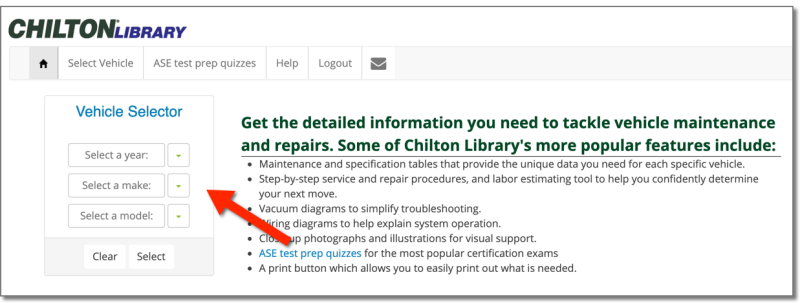
<p>NOTE: An internet connection is required to stream the content. Using cellular data is not recommended as streaming multimedia content can consume a lot of bandwidth. Wi-Fi is available at all Toronto Public Library branches.</p>
<p>&#160;</p>
<hr />
<p>For more information or for help, please contact our <a href="https://www.torontopubliclibrary.ca/contact/">Answerline service</a>.</p>
</div>
</content>
        <summary>Naxos Music Library Jazz is an online, streaming music library with over 32,000 albums in the following categories: Contemporary jazz from Scandinavia, the United States, Germany, Australia, and New Zealand Pop and rock Jazz legends (e.g. Louis Armstrong, Django Reinhardt, Stan Kenton, Bessie Smith, Teddy Wilson) Contemporary instrumental ambient, soft jazz, Celtic and world music,...</summary>
    </entry>
        <entry>
        <title>Getting Started with Career Cruising</title>
        <link href="https://blogs.tpl.ca/database-guides/2019/12/getting-started-with-career-cruising/" />
        <id>https://blogs.tpl.ca/database-guides/2019/12/getting-started-with-career-cruising/</id>
        <updated>2019-12-19T10:26:52Z</updated>
        <published>2019-12-19T10:26:52Z</published>
        <category term="database-guides" label="Getting Started with Online Services &amp; Databases" />
        <author>
            <name>Information Services Team</name>
        </author>
        <content type="xhtml" xml:lang="en-CA" xml:base="https://blogs.tpl.ca/">
<div xmlns="http://www.w3.org/1999/xhtml"><p><img alt="Career Cruising logo" class="asset  asset-image at-xid-6a00e5509ea6a188340240a5023ec4200b img-responsive" src="https://blogs.tpl.ca/wp-content/uploads/2025/08/6a00e5509ea6a188340240a5023ec4200b-320wi.png" title="Career Cruising logo" /></p>
<p><span style="background-color: #ffffff"><a href="https://www.torontopubliclibrary.ca/detail.jsp?Entt=RDMEDB0027&amp;R=EDB0027">Career Cruising</a> is a career exploration and planning tool to explore career and education options and develop a career plan that includes:</span></p>
<p><strong> <img alt="Main navigation showing Assessments, Careers, Education, and Employment links" border="0" class="asset  asset-image at-xid-6a00e5509ea6a188340240a4f8def2200b img-responsive" src="https://blogs.tpl.ca/wp-content/uploads/2025/08/6a00e5509ea6a188340240a4f8def2200b-800wi.png" title="Main navigation showing Assessments, Careers, Education, and Employment links" /><br /></strong></p>
<p><strong>1. ASSESSMENTS</strong>: use assessment tools to find careers that correspond to your interests and discover how you learn.</p>
<p><strong>2. CAREERS</strong>: explore career profiles with working conditions, earnings, education and training required, and related careers and<br />associations.</p>
<p><strong>3. EDUCATION</strong>: find college and university profiles, with contact information, by province and program; and apprenticeship profiles by apprenticeship and province.</p>
<p><strong>4. EMPLOYMENT</strong>: provides a guide to job searching (by position and location), resumé writing, interviewing, etc.&#160;</p>
<h2>How to access Career Cruising</h2>
<p>Go to <a href="https://www.torontopubliclibrary.ca/" title="Toronto Public Library website">www.tpl.ca</a> and enter ‘career cruising’ in the search box.</p>
<p><img alt="Toronto Public Library search box showing &apos;career cruising&apos; in box" border="0" class="asset  asset-image at-xid-6a00e5509ea6a188340240a4f8df5f200b image-full img-responsive" src="https://blogs.tpl.ca/wp-content/uploads/2025/08/6a00e5509ea6a188340240a4f8df5f200b-800wi.png" title="Toronto Public Library search box showing &apos;career cruising&apos; in box" /></p>
<p>Click on “Access Online” under Career Cruising.</p>
<p>Enter your library card number and PIN.</p>
<p><strong>1. Assessments</strong>. Click on “Assessments” on the menu at the top of the page. Register, then click on “Start Matchmaker” for&#160; questions about your likes and dislikes, resulting in a list of recommended careers and career clusters.</p>
<p><strong>2. Careers</strong>. Click on “Careers” on the menu at the top of the page. Search by keyword. Browse by name of career (index), school subjects that lead to different careers or by career cluster.</p>
<p><img alt="Keyword search box and browse by index " border="0" class="asset  asset-image at-xid-6a00e5509ea6a188340240a4f94b4f200b image-full img-responsive" src="https://blogs.tpl.ca/wp-content/uploads/2025/08/6a00e5509ea6a188340240a4f94b4f200b-800wi.jpg" title="Keyword search box and browse by index " /></p>
<p>Click on “Career Selector” tab at the top of the page or to the right to find careers by a combination of subject, cluster, education, core tasks, earnings and working conditions.</p>
<p><img alt="Career Selector tab" border="0" class="asset  asset-image at-xid-6a00e5509ea6a188340240a4fa52c8200b img-responsive" src="https://blogs.tpl.ca/wp-content/uploads/2025/08/6a00e5509ea6a188340240a4fa52c8200b-800wi.jpg" title="Career Selector tab" /><br /><a class="asset-img-link" href="https://blogs.tpl.ca/.a/6a00e5509ea6a188340240a4d59e37200d-pi" style="display: inline"></a></p>
<p>&#160;</p>
<p>Click on the name of a career to get to its profile. The profile table of contents (“At a Glance”) is on the left.</p>
<p><img alt="At a Glance links at the left side of profile, Education and Other Resources are highlighted" border="0" class="asset  asset-image at-xid-6a00e5509ea6a188340240a4d5aba2200d img-responsive" src="https://blogs.tpl.ca/wp-content/uploads/2025/08/6a00e5509ea6a188340240a4d5aba2200d-800wi.jpg" title="At a Glance links at the left side of profile, Education and Other Resources are highlighted" /></p>
<p>Click on:</p>
<ul style="list-style-type: square">
<li><strong>EDUCATION</strong> for related college and university programs, then click on a program for Ontario colleges and universities where it is offered</li>
<li><strong>OTHER RESOURCES</strong> for related websites, including associations and online periodicals</li>
<li><strong>JOB SEARCH</strong> (below the table of contents) for related job listings. A new tab will open in your browser with the option to search for jobs in <a href="https://ca.indeed.com/?r=us" title="Indeed">Indeed</a>&#160;</li>
</ul>
<p>&#160;</p>
<p><strong>3. Education.</strong> Click on “Education” on the menu at the top of the page. Search by the names of schools. Browse Canadian schools by map or program and U.S. schools by map or major.</p>
<p>Click on the “Apprenticeships” tab to search by apprenticeship or browse by apprenticeship cluster.</p>
<p><img alt="Apprenticeships tab highlighted" border="0" class="asset  asset-image at-xid-6a00e5509ea6a188340240a4fa52d6200b img-responsive" src="https://blogs.tpl.ca/wp-content/uploads/2025/08/6a00e5509ea6a188340240a4fa52d6200b-800wi.jpg" title="Apprenticeships tab highlighted" /></p>
<p>Choose a category to view related apprenticeship programs. Click on an apprenticeship name for more information including description.</p>
<p><img alt="Apprenticeships section with &apos;Local Offices&apos; and &apos;Other Resources&apos; highlighted" border="0" class="asset  asset-image at-xid-6a00e5509ea6a188340240a4ac8590200c img-responsive" src="https://blogs.tpl.ca/wp-content/uploads/2025/08/6a00e5509ea6a188340240a4ac8590200c-800wi.jpg" title="Apprenticeships section with &apos;Local Offices&apos; and &apos;Other Resources&apos; highlighted" /></p>
<p>Click on the “Provincial Profiles” tab for contact information for the apprenticeship offices in all provinces and territories.</p>
<p>Select the “Local Offices” link to the left to find an office in your area.</p>
<p>Select “Other Resources” for related websites, including ones for standards and grants.</p>
<p>&#160;</p>
<p><strong>4. Employment.</strong> Click on “Employment” on the menu at the top of the page.</p>
<ul style="list-style-type: square">
<li>click on EMPLOYMENT GUIDE for advice on numerous aspects of looking for a job, including résumés and job interviews</li>
<li>click on &#039;Find Jobs&#039; under job search to search for job listings by keyword and location &#8211; a new browser tab will open in <a href="https://ca.indeed.com/?r=us" title="Indeed">Indeed</a><br /><a class="asset-img-link" href="https://blogs.tpl.ca/wp-content/uploads/2025/08/6a00e5509ea6a188340240a4ac85b1200c-800wi.jpg" style="display: inline"><img alt="Find Jobs link" border="0" class="asset  asset-image at-xid-6a00e5509ea6a188340240a4ac85b1200c img-responsive" src="https://blogs.tpl.ca/wp-content/uploads/2025/08/6a00e5509ea6a188340240a4ac85b1200c-800wi.jpg" title="Find Jobs link" /></a></li>
</ul>
<p>Log in to “Build My Resumé” to build a resumé where you can add your education history, work experience, etc.</p>
<p>Add to the resumé by clicking on the pencil icon.</p>
<p>&#160;</p>
<p>&#160;</p>
<p class="asset-video"></p>
<p>&#160;</p>
<hr />
<p>For more information or for help, please contact our <a href="https://www.torontopubliclibrary.ca/contact/">Answerline service</a>.</p>
</div>
</content>
        <summary>Career Cruising is a career exploration and planning tool to explore career and education options and develop a career plan that includes: 1. ASSESSMENTS: use assessment tools to find careers that correspond to your interests and discover how you learn. 2. CAREERS: explore career profiles with working conditions, earnings, education and training required, and related...</summary>
    </entry>
        <entry>
        <title>Getting Started with Value Line</title>
        <link href="https://blogs.tpl.ca/database-guides/2019/12/getting-started-with-value-line/" />
        <id>https://blogs.tpl.ca/database-guides/2019/12/getting-started-with-value-line/</id>
        <updated>2019-12-19T10:23:49Z</updated>
        <published>2019-12-19T10:23:49Z</published>
        <category term="database-guides" label="Getting Started with Online Services &amp; Databases" />
        <author>
            <name>Information Services Team</name>
        </author>
        <content type="xhtml" xml:lang="en-CA" xml:base="https://blogs.tpl.ca/">
<div xmlns="http://www.w3.org/1999/xhtml"><p><img alt="Value Line" class="asset  asset-image at-xid-6a00e5509ea6a188340240a5023f0c200b img-responsive" src="https://blogs.tpl.ca/wp-content/uploads/2025/08/6a00e5509ea6a188340240a5023f0c200b-120wi.png" title="Value Line" /></p>
<p><a href="https://www.torontopubliclibrary.ca/detail.jsp?Entt=RDMEDB0166&amp;R=EDB0166">Value Line</a> is a resource of investment research and advice: rankings of large to mid-cap stocks, mutual funds, options, convertibles, and special situation investment opportunities; company, industry, and market reports and commentaries. It also includes educational articles, a glossary of investment terms and investment tools.</p>
<p>COVERAGE: over 6,000 stocks, 18,000 mutual funds, and 200,000 options and other securities. Rankings are based on the “Value Line universe” of approximately 1,700 stocks, including more than 500 non-U.S. stocks.</p>
<p>UPDATED throughout the day: stock quotes, with a 15-minute delay; and company news. Updated daily: P/E ratio, dividend yield, market cap and other vital statistics and overall performance of the U.S. Stock Exchange and global exchanges. Updated weekly: rankings and commentaries.</p>
<h2>How to&#160;access Value Line</h2>
<ol>
<li>Go to <a href="https://www.torontopubliclibrary.ca/" title="Toronto Public Library website">tpl.ca</a> and enter <strong>Value Line</strong> in the search box.</li>
<li>Click on <strong>Access Online</strong> under Value Line.</li>
<li>Enter your library card number and PIN.</li>
</ol>
<h2>Searching</h2>
<p>Type apple in the <strong>Search Box</strong> and select the appropriate entry. Do not click on the Quote button.</p>
<p><img alt="Search Box" class="asset  asset-image at-xid-6a00e5509ea6a188340240a4d42c6f200d img-responsive" src="https://blogs.tpl.ca/wp-content/uploads/2025/08/6a00e5509ea6a188340240a4d42c6f200d-500wi.png" title="Search Box" /></p>
<p>At the top of the report is a three-part banner of summary information. Click on the bars at the right end for the different parts:</p>
<p>• <span style="font-size: 12pt">1</span>st banner: snapshot of a stock’s key measures<br />• 2nd banner: estimates and projections<br />• 3rd banner: dividend and volatility information</p>
<p><img alt="1st Banner - Snapshot of a stock&apos;s key measures" class="asset  asset-image at-xid-6a00e5509ea6a188340240a4f8d17c200b img-responsive" src="https://blogs.tpl.ca/wp-content/uploads/2025/08/6a00e5509ea6a188340240a4f8d17c200b-500wi.png" title="1st Banner - Snapshot of a stock&apos;s key measures" /></p>
<p>Click on “PDF Reports” for the most recent four quarterly company reports.</p>
<h2>Reports</h2>
<p>To find company reports, select Company</p>
<p><img alt="Find a report drop-down - company selected" class="asset  asset-image at-xid-6a00e5509ea6a188340240a4d42cf5200d img-responsive" src="https://blogs.tpl.ca/wp-content/uploads/2025/08/6a00e5509ea6a188340240a4d42cf5200d-320wi.png" title="Find a report drop-down - company selected" /></p>
<h3>Industry Reports</h3>
<p>For quarterly <strong>INDUSTRY REPORTS</strong> of the company’s industry, click on “View more” under “PDF Reports,” then select from the “Find a report” menu.</p>
<p><img alt="Safety and Timeliness rankings from report" class="asset  asset-image at-xid-6a00e5509ea6a188340240a4d42d20200d img-responsive" src="https://blogs.tpl.ca/wp-content/uploads/2025/08/6a00e5509ea6a188340240a4d42d20200d-320wi.png" title="Safety and Timeliness rankings from report" /></p>
<p>The SAFETY and TIMELINESS RANKS are at the top left of the report.</p>
<p>The <strong>SAFETY RANK</strong> (1-5, highest to lowest) measures the total risk of a stock relative to the other stocks in the Value Line universe for the next 6-12 months.</p>
<p>It’s calculated from a FINANCIAL STRENGTH rating (top right of the report) and the stock’s PRICE STABILITY score.</p>
<p>• FINANCIAL STRENGTH (A++ to C) is based on an analysis of the company’s balance sheet. A strong balance sheet suggests that the stock price will be less volatile.<br />• PRICE STABILITY is based on a ranking of the standard deviation (a measure of volatility) of weekly percent changes in the price of a company’s stock over the last five years</p>
<p>The <strong>TIMELINESS RANK</strong> ranks the approximately 1,700 stocks in the Value Line universe relative to each other for price performance for the next 6-12 months.</p>
<p>“Stocks ranked 1 offer you the highest price growth potential [but] are often more volatile than the overall market. If you’re a conservative investor, you may want to select stocks with both high Timeliness and Safety Ranks, because stocks with high Safety Ranks are likely to be more stable.” (“<a href="https://www.valueline.com/uploadedFiles/Valueline/Tools/Small_and_Mid_Cap/Reading_VL_Report_WEB.pdf">How to Read a Value Line Report</a>”)</p>
<p>The blue squares under the safety and timeliness ranks represent companies in the same industry. Roll your cursor over a square for the company’s name. Click on a square to go to a company report.</p>
<p><strong>COMPANY REPORTS</strong> also include the sections:</p>
<p><span style="font-size: 11pt">• <strong>COMMENTARY</strong></span><br /><span style="font-size: 11pt">• financial data like valuation, earnings, sales</span><br /><span style="font-size: 11pt">• <strong>INDUSTRY ANALYSIS&#160;</strong>and&#160;<strong>BUSINESS OVERVIEWS</strong></span></p>
<p><img alt="Commentary toolbar" border="0" class="asset  asset-image at-xid-6a00e5509ea6a188340240a4f8d258200b image-full img-responsive" src="https://blogs.tpl.ca/wp-content/uploads/2025/08/6a00e5509ea6a188340240a4f8d258200b-800wi.png" title="Commentary toolbar" /></p>
<p>Roll your cursor over the title band of a section and click on the squares to increase or decrease the width of the section to 1/3, 2/3 or the entire width of the page.</p>
<p>• Click on &quot;Hide&quot; to remove the section.<br />• Roll your cursor onto the sidebar on the right side of the page to add hidden sections to the page.</p>
<p>The <strong>COMMENTARY</strong> section is an appraisal by Value Line analysts of financial statements, press releases and stock performance to find out “what is really going on” with a company and its stock. A company is fully reviewed four times a year.</p>
<p>• Supplementary reports are published after important company updates. To access the latest of these (also called “Research Notes”), click on the Dashboard tab, then on “Supplementary Reports” in the Quick Links box on the top right of the page.</p>
<p>The <strong>INDUSTRY ANALYSIS</strong> section is the most recent of the quarterly industry reports you get to by clicking on “PDF reports” at the top of the page. This section includes a list of, and comparison to, some of the other companies in the same industry.</p>
<p>For a complete list of companies in Value Line that are in the industry, click on the Browse Research tab at the top of the screen.</p>
<p><img alt="Browse research tab" border="0" class="asset  asset-image at-xid-6a00e5509ea6a188340240a4f8d27e200b image-full img-responsive" src="https://blogs.tpl.ca/wp-content/uploads/2025/08/6a00e5509ea6a188340240a4f8d27e200b-800wi.png" title="Browse research tab" /></p>
<p>Then select the industry from the alphabetical list of industries under “Industry Screens.”</p>
<p><img alt="Industry Screens dropdown, featuring an alphabetical list of industries to choose from" class="asset  asset-image at-xid-6a00e5509ea6a188340240a4ab089d200c img-responsive" src="https://blogs.tpl.ca/wp-content/uploads/2025/08/6a00e5509ea6a188340240a4ab089d200c-320wi.png" title="Industry Screens dropdown, featuring an alphabetical list of industries to choose from" /></p>
<p>Companies are listed alphabetically on industry screens. Click on a column heading to list them instead by <strong>SAFETY</strong> or <strong>TIMELINESS RANK</strong>, or by the values in any column. Use the “Customize Columns” button at the top left of the page to change the columns that display in the table.</p>
<h3>Industry Overviews</h3>
<p>For <strong>INDUSTRY OVERVIEWS</strong> (not the same as industry analyses), click on the Markets tab, then on the Industries tab. The overviews aren’t in alphabetical order. Nor is there one for every industry listed under “Industry Screens” on the Browse Research page.</p>
<p><img alt="Markets tab, expanded to show Overview, Daily Updates, Economic Calendar, Featured Commentaries, and Industries" class="asset  asset-image at-xid-6a00e5509ea6a188340240a4f935fe200b img-responsive" src="https://blogs.tpl.ca/wp-content/uploads/2025/08/6a00e5509ea6a188340240a4f935fe200b-500wi.png" title="Markets tab, expanded to show Overview, Daily Updates, Economic Calendar, Featured Commentaries, and Industries" /></p>
<p>On the Browse Research page, select a “screen” from under “Predefined Screens” for a customized list, e.g.:<br />• Small cap stocks with above average yields<br />• Companies with significant estimated dividend growth<br />• Best performing stocks<br />• High returns earned on total capital</p>
<p>To customize lists yourself, click on the Find Ideas tab, then on the <strong>Screener</strong> tab.</p>
<p>You can start with one of the “Predefined Screens” from the Browse Research page. They’re on the left of the Find Ideas page, under “Value Line Preset Screens.” Then add criteria from the menus below: “Basic Criteria,” “Annual Ratios,” “Balance Sheet,” etc. Or you can build a list from scratch.</p>
<p>Click on the <strong>Model Portfolio</strong> tab on the Find Ideas page for four models that “illustrate how various investment strategies can meet their goals.”</p>
<p><img alt="Find Ideas tab, showing Model Portfolio, Portfolio Tracker, Alerts Hub, Watchlist, and Special Situations links when expanded" class="asset  asset-image at-xid-6a00e5509ea6a188340240a4ab08e8200c img-responsive" src="https://blogs.tpl.ca/wp-content/uploads/2025/08/6a00e5509ea6a188340240a4ab08e8200c-500wi.png" title="Find Ideas tab, showing Model Portfolio, Portfolio Tracker, Alerts Hub, Watchlist, and Special Situations links when expanded" /></p>
<p>The original print publication—The Value Line Investment Survey (VLIS)—was published in three parts:</p>
<p>• Part 1, Summary &amp; Index<br />• Part 2, Selection &amp; Opinion <br />• Part 3, Ratings &amp; Reports</p>
<p>These parts, updated weekly, are available in the Quick Links box on the Dashboard page.</p>
<p><img alt="Navigation showing the Dashboard tab selected" border="0" class="asset  asset-image at-xid-6a00e5509ea6a188340240a4d42e43200d image-full img-responsive" src="https://blogs.tpl.ca/wp-content/uploads/2025/08/6a00e5509ea6a188340240a4d42e43200d-800wi.png" title="Navigation showing the Dashboard tab selected" /></p>
<p>Summary &amp; Index [pdf]. Includes screens not in the list of Predefined Screens on the Browse Research page, e.g. from “Industries, in order of Timeliness Rank” to “Highest Growth Stocks”; and financial data and industry analyses.</p>
<p>Selection &amp; Opinion [pdf]. Includes economic and stock market commentary; recent developments of model portfolios.</p>
<p>Ratings &amp; Reports is available as a web page by clicking on “VLIS Current Issue.”</p>
<p>&#160;</p>
<p class="asset-video"></p>
<p>&#160;</p>
<hr />
<p>For more information or for help, please contact our <a href="https://www.torontopubliclibrary.ca/contact/">Answerline service</a>.</p>
</div>
</content>
        <summary>Value Line is a resource of investment research and advice: rankings of large to mid-cap stocks, mutual funds, options, convertibles, and special situation investment opportunities; company, industry, and market reports and commentaries. It also includes educational articles, a glossary of investment terms and investment tools. COVERAGE: over 6,000 stocks, 18,000 mutual funds, and 200,000 options...</summary>
    </entry>
        <entry>
        <title>Getting Started with LearningExpress Library</title>
        <link href="https://blogs.tpl.ca/database-guides/2019/12/getting-started-with-learning-express-library/" />
        <id>https://blogs.tpl.ca/database-guides/2019/12/getting-started-with-learning-express-library/</id>
        <updated>2026-04-21T17:28:57Z</updated>
        <published>2019-12-19T10:06:30Z</published>
        <category term="database-guides" label="Getting Started with Online Services &amp; Databases" />
        <author>
            <name>Information Services Team</name>
        </author>
        <content type="xhtml" xml:lang="en-CA" xml:base="https://blogs.tpl.ca/">
<div xmlns="http://www.w3.org/1999/xhtml">
<p class="wp-block-paragraph"><a href="https://tpl.ca/resource/learning-express-library/">LearningExpress Library</a> provides test preparation, skill building, and career resources for students, educators, and adult learners.&#160; LearningExpress Library is organized into nine centers which are grouped into four categories.&#160;</p>


<ol class="wp-block-list">
<li><strong>Skill Building and Professional Development</strong>
<ul class="wp-block-list">
<li>Adult Core Skills&#160;has tutorials and practice sets on math, reading and writing, speaking and grammar for adults.</li>
</ul>
</li>


<li><strong>Career Development and Job Preparation</strong>
<ul class="wp-block-list">
<li>Career Preparation&#160;has information about careers, job searching and workplace skills and preparations for entrance and occupation exams for (e.g. cosmetology, firefighting and nursing).</li>
</ul>
</li>


<li><strong>Academic Skills and Test Preparation</strong>
<ul class="wp-block-list">
<li><strong>Citizenship, TOEIC®, and TOEFL® Center</strong>&#160;has practice test to help prepare for Canadian citizenship exams. It also had preparation for TOEIC and TOEFL iBT exams.</li>


<li><strong>College Admissions Test</strong>&#160;<strong>Preparation</strong> center has practice tests for ACT, AP, PSAT, SAT, TOEFL iBT exams and admission essays.</li>


<li><strong>College Students</strong>&#160;center has math, reading, writing, grammar and science for postsecondary students to help with preparation for graduate school admissions and college placement exams.</li>


<li><strong>GED® Test Prep Center</strong>&#160;has tools to prepare for GED exams. Please note that in Canada, the GED has been replaced by the Canadian Adult Education Credential (CAEC).</li>


<li><strong>Grades 4 – 8 Educator Resources</strong> center has support for learning math, reading and writing for elementary and middle school students.&#160; It includes practice exercises in algebra and patterns, data analysis and probability, geometry, grammar, reading and spelling and more.</li>


<li><strong>High School Students</strong> center has support for learning math, reading, science, social science and technology.&#160; It includes practice exercises in biology, calculus, chemistry, computing and information technology, grammar, reading comprehension, spelling, statistics, and more.</li>
</ul>
</li>


<li><strong>Spanish Language Resources</strong>
<ul class="wp-block-list">
<li><strong>Recursos Para Hispanohablantes (Resources for Spanish Speakers)</strong> center has learning, career and U.S. citizenship tools in Spanish.</li>
</ul>
</li>
</ol>


<h2 class="wp-block-heading">How to access LearningExpress Library</h2>


<ol class="wp-block-list">
<li>Go to&#160;<a href="https://tpl.ca/resource/learning-express-library/">LearningExpress Library</a> or <a href="https://tpl.ca/resource/learning-express-library/">https://tpl.ca/resource/learning-express-library/</a></li>


<li>Select <strong>LearningExpress Library &gt;&gt;</strong> (the title)</li>
</ol>


<figure class="wp-block-image size-full"><img loading="lazy" width="672" height="89" src="https://blogs.tpl.ca/wp-content/uploads/2019/12/learningexpress-step2.png" alt="screenshot of the LearningExpress Library online resource card on the library&apos;s website with an arrow indicating that access is through the title of the e-resource. " class="wp-image-77004" /></figure>


<ol start="3" class="wp-block-list">
<li>Enter your username or your 14-digit library card number (no spaces) and PIN/Password. Select <strong>Log in</strong>.&#160;</li>
</ol>


<h2 class="wp-block-heading">Create or Sign in to a LearningExpress Library account</h2>


<p class="wp-block-paragraph">LearningExpress Library requires an account to use the resources available through this service. &#160;The first time you access LearningExpress Library, you will need to create an account.</p>


<ol class="wp-block-list">
<li>To start, select <strong>Sign In/Register</strong>.</li>


<li>Select&#160;<strong>Register</strong>&#160;and fill in the required fields. Your email address will be used as your username.&#160; If you do not want to enter your email address, select <strong>Register without email</strong>. &#160;</li>


<li>Select <strong>Register</strong> to complete the account creation.</li>
</ol>


<h2 class="wp-block-heading">Search LearningExpress Library</h2>


<p class="wp-block-paragraph">Search&#160;across all centers for materials by entering a keyword or words in the search box at the top right of the page. For example, let’s search for resources on <strong>calculus</strong>.</p>


<figure class="wp-block-image size-full"><img loading="lazy" width="522" height="72" src="https://blogs.tpl.ca/wp-content/uploads/2019/12/what-do-you-want-to-learn-today.png" alt="image of the search box in LearningExpress Library" class="wp-image-77005" /></figure>


<p class="wp-block-paragraph">The Search results summary provides the number of test, tutorials, microlessons, ebooks, videos, articles, flashcards, modules and games available on that subject.&#160; Select and deselect filters to narrow your results to only specific types of resources.</p>


<figure class="wp-block-image size-full"><img loading="lazy" width="816" height="200" src="https://blogs.tpl.ca/wp-content/uploads/2019/12/search-results-toobar.png" alt="Image os the search results toolbar after a search for the keyword calculs.  It should the number of results for the different formats available in LearningExpress library. " class="wp-image-77006" /></figure>


<p class="wp-block-paragraph">Scroll down to find the resources available. Each one identifies the type of resource and includes a description to help you to select the best resources. Select the resource title or the blue button to get started.</p>


<figure class="wp-block-image size-full"><img loading="lazy" width="835" height="202" src="https://blogs.tpl.ca/wp-content/uploads/2019/12/search-results-for-calculus.png" alt="A screenshot from the search results for calculus showing two of the resources available. One is a calculus skills test and other is an ebook about learning calculus. " class="wp-image-77007" /></figure>


<h2 class="wp-block-heading">Browse LearningExpress Library</h2>


<p class="wp-block-paragraph">Selecting a Center under each Category will display a list of topics available in that center. Select a topic to see all the resources available for that topic.</p>


<p class="wp-block-paragraph">For example, under College Admissions Test Preparation, there are a list of resources for many different admissions tests. Select one of the resources to get started.</p>


<figure class="wp-block-image size-full"><img loading="lazy" width="912" height="758" src="https://blogs.tpl.ca/wp-content/uploads/2019/12/Screenshot-of-the-College-Admissions-Test-Preparation-Centre.png" alt="Screenshot of the College Admissions Test Preparation Centre showing some tests included in this center. It is displaying ACT, SAT and AP, with a list of the different AP tests with practice exams, videos and ebooks available. " class="wp-image-77008" /></figure>


<p class="wp-block-paragraph">For related resources, have a look at <a href="https://tpl.ca/resource/brainfuse/">Brainfuse</a>, <a href="https://tpl.ca/resource/career-cruising/">Career Cruising</a> and <a href="https://tpl.ca/resource/linkedin-learning/">LinkedIn Learning</a>.</p>


<h2 class="wp-block-heading">More help?</h2>


<ul class="wp-block-list">
<li>Select Help in the toolbar in LearningExpress Library to access the FAQs and other help resources.</li>


<li>Schedule a <a href="https://tpl.ca/using-the-library/services/book-a-librarian/">Book a Librarian</a> appointment at a local branch</li>


<li><a href="https://tpl.ca/contact/">Contact us</a> with your questions.</li>
</ul>
</div>
</content>
        <summary>LearningExpress Library provides test preparation, skill building, and career resources for students, educators, and adult learners.  LearningExpress Library is organized into nine centers which are grouped into four categories.  Skill Building and Professional Development Adult Core Skills has tutorials and practice sets on math, reading and writing, speaking and grammar for adults. Career Development and Job...</summary>
    </entry>
        <entry>
        <title>Getting Started with Consumer Reports Online</title>
        <link href="https://blogs.tpl.ca/database-guides/2019/10/guide-to-consumer-reports-online/" />
        <id>https://blogs.tpl.ca/database-guides/2019/10/guide-to-consumer-reports-online/</id>
        <updated>2019-10-23T11:42:00Z</updated>
        <published>2019-10-23T11:42:00Z</published>
        <category term="database-guides" label="Getting Started with Online Services &amp; Databases" />
        <author>
            <name>Information Services Team</name>
        </author>
        <content type="xhtml" xml:lang="en-CA" xml:base="https://blogs.tpl.ca/">
<div xmlns="http://www.w3.org/1999/xhtml"><h2><img alt="Consumer Reports Online logo" class="asset  asset-image at-xid-6a00e5509ea6a188340240a4dd9d88200d img-responsive" src="https://blogs.tpl.ca/wp-content/uploads/2025/08/6a00e5509ea6a188340240a4dd9d88200d-120wi.png" title="Consumer Reports Online logo" /></h2>
<p><a href="https://www.torontopubliclibrary.ca/detail.jsp?Entt=RDMEDB0142&amp;R=EDB0142">Consumer Reports Online</a> contains advice, ratings and recommendations on products and services:</p>
<ul>
<li>appliances</li>
<li>babies&#039; and kids&#039; products</li>
<li>cars</li>
<li>electronics</li>
<li>garden products</li>
<li>health</li>
<li>home products</li>
<li>money</li>
</ul>
<p>This online version of the magazine includes the product ratings from the magazine but only about half of the articles.&#160; Prices are in US dollars.&#160;</p>
<h2>How to access Consumer Reports Online</h2>
<ol>
<li>Go to <a href="tpl.ca" title="tpl.ca">tpl.ca</a> and enter &quot;consumer reports&quot; in the search box</li>
<li>Click on Access Online under <a href="https://www.torontopubliclibrary.ca/detail.jsp?Entt=RDMEDB0142&amp;R=EDB0142">Consumer Reports Online</a></li>
<li>Enter your library card number and PIN</li>
</ol>
<h2>Common tasks</h2>
<h3>Search</h3>
<p>Search using the search box at the top of the home page or product pages where the search box appears when you click on the magnifying glass.<br /><img alt="Consumer Reports Online Search Magnifying Glass" border="0" class="asset  asset-image at-xid-6a00e5509ea6a188340240a4e51e39200b img-responsive" src="https://blogs.tpl.ca/wp-content/uploads/2025/08/6a00e5509ea6a188340240a4e51e39200b-800wi.jpg" title="Consumer Reports Online Search Magnifying Glass" /></p>
<h3>Browse</h3>
<p>Browse by clicking on <strong>All Products A-Z</strong> to the right of Search for an index of products; or by rolling your cursor over <strong>Product Reviews&#160;</strong>at the top left for categories of products, e.g. Appliances, Cars, Electronics.</p>
<p><img alt="Product Reviews link" border="0" class="asset  asset-image at-xid-6a00e5509ea6a188340240a4c0773a200d img-responsive" src="https://blogs.tpl.ca/wp-content/uploads/2025/08/6a00e5509ea6a188340240a4c0773a200d-800wi.jpg" title="Product Reviews link" /></p>
<h3>Understanding product pages</h3>
<p>Information on the product pages is organized under the following tabs (though for some products only a Buying Guide is available, no ratings).</p>
<p><img alt="Ratings link" border="0" class="asset  asset-image at-xid-6a00e5509ea6a188340240a4973e43200c image-full img-responsive" src="https://blogs.tpl.ca/wp-content/uploads/2025/08/6a00e5509ea6a188340240a4973e43200c-800wi.jpg" title="Ratings link" /></p>
<p>Under&#160;<strong>Ratings&#160;</strong>or (<strong>Ratings &amp; Reliability</strong>) models are listed by rating &#8211; highest to lowest &#8211; with the results of specific tests on the right. Click on the&#160;<strong>Features &amp; Specs&#160;</strong>tab of the ratings chart to replace test results with specifications. Click&#160;<strong>Ratings</strong> to go back to test results.</p>
<h3>Print</h3>
<p>Print&#160;ratings by clicking on the print button in the upper left.<br /><img alt="Print icon" border="0" class="asset  asset-image at-xid-6a00e5509ea6a188340240a4e52088200b img-responsive" src="https://blogs.tpl.ca/wp-content/uploads/2025/08/6a00e5509ea6a188340240a4e52088200b-800wi.jpg" title="Print icon" /></p>
<h3>Compare Models</h3>
<p>To select models (maximum selection is 3) for side-by-side comparison;</p>
<ul>
<li>click &#039;Add to Compare&#039;&#160;under the model&#039;s <strong>Overall score</strong> box<br /><img alt="Add to compare" border="0" class="asset  asset-image at-xid-6a00e5509ea6a188340240a4e520af200b img-responsive" src="https://blogs.tpl.ca/wp-content/uploads/2025/08/6a00e5509ea6a188340240a4e520af200b-800wi.jpg" title="Add to compare" /></li>
<li>click on <strong>Compare</strong> at the top or bottom right corner of the chart&#160;</li>
</ul>
<h3>Car research</h3>
<p><strong>Search&#160;</strong>for specific models, new and used, by rolling your cursor over&#160;<strong>Product Reviews&#160;</strong>and clicking on&#160;<strong>Cars</strong>. Specify a make, model and year using the menus below.&#160;<strong>Select Year&#160;</strong>is the year of the newest model or years of used models that there are ratings for.</p>
<p><img alt="Select make and model" border="0" class="asset  asset-image at-xid-6a00e5509ea6a188340240a4e521b6200b image-full img-responsive" src="https://blogs.tpl.ca/wp-content/uploads/2025/08/6a00e5509ea6a188340240a4e521b6200b-800wi.jpg" title="Select make and model" /></p>
<p><strong>Browse&#160;</strong>by clicking on a category of a car such as SUVs under the above menu. To browse used cars in the selected category, click on&#160;<strong>Ratings &amp; Reliability</strong>, then &#039;Used&#039;&#160;on the left.<br /><img alt="Used" border="0" class="asset  asset-image at-xid-6a00e5509ea6a188340240a4974103200c img-responsive" src="https://blogs.tpl.ca/wp-content/uploads/2025/08/6a00e5509ea6a188340240a4974103200c-800wi.jpg" title="Used" /></p>
<p>New cars are listed by rating. Used cars are listed alphabetically by make.</p>
<hr />
<p>For more information or for help, please contact our <a href="https://www.torontopubliclibrary.ca/contact/">Answerline service</a>.</p>
<hr />
<p>Revised December 14, 2020</p>
<p>&#160;</p>
</div>
</content>
        <summary>Consumer Reports Online contains advice, ratings and recommendations on products and services: appliances babies' and kids' products cars electronics garden products health home products money This online version of the magazine includes the product ratings from the magazine but only about half of the articles.  Prices are in US dollars.  How to access Consumer Reports...</summary>
    </entry>
        <entry>
        <title>Getting Started with Chilton Library Auto Repair</title>
        <link href="https://blogs.tpl.ca/database-guides/2019/07/how-to-use-chiltons-auto-repair-2/" />
        <id>https://blogs.tpl.ca/database-guides/2019/07/how-to-use-chiltons-auto-repair-2/</id>
        <updated>2019-07-24T11:25:17Z</updated>
        <published>2019-07-24T11:25:17Z</published>
        <category term="database-guides" label="Getting Started with Online Services &amp; Databases" />
        <author>
            <name>TPL Staff</name>
        </author>
        <content type="xhtml" xml:lang="en-CA" xml:base="https://blogs.tpl.ca/">
<div xmlns="http://www.w3.org/1999/xhtml"><h2><img alt="Chilton Auto Repair Logo" class="asset  asset-image at-xid-6a00e5509ea6a188340240a5023f5e200b img-responsive" src="https://blogs.tpl.ca/wp-content/uploads/2025/08/6a00e5509ea6a188340240a5023f5e200b-120wi.png" title="Chilton Auto Repair Logo" /></h2>
<p><a href="https://www.torontopubliclibrary.ca/detail.jsp?Entt=RDMEDB0144&amp;R=EDB0144">Chilton Library Auto Repair</a> is an online database of information about car and truck maintenance and repair. It provides vehicle-specific information in the following four categories, though not all categories are available for all vehicles:</p>
<ul>
<li>repair</li>
<li>labour estimating</li>
<li>maintenance</li>
<li>bulletins/recalls</li>
</ul>
<p>Chilton&#039;s Auto Repair includes ASE (Automotive Service Excellence) Technician Test preparation Quizzes for a selection f the tests.&#160;</p>
<h2>How to access Chilton Library Auto Repair</h2>
<ol>
<li>Start from the <a href="https://www.torontopubliclibrary.ca/detail.jsp?Entt=RDMEDB0144&amp;R=EDB0144">Chilton&#039;s Auto Repair</a> page on the Toronto Public Library website.</li>
<li>Click the <strong>Access Online</strong> button.</li>
<li>Sign in with your library card number and PIN/password.</li>
</ol>
<h2>How to search for your vehicle</h2>
<p>Use the <strong>Vehicle Selector</strong> menu to choose the year, make, and model of your car or truck.</p>
<p><img alt="Chilton Vehicle Selector" border="0" class="asset  asset-image at-xid-6a00e5509ea6a188340240a48798b0200d image-full img-responsive" src="https://blogs.tpl.ca/wp-content/uploads/2025/08/6a00e5509ea6a188340240a48798b0200d-800wi.jpg" title="Chilton Vehicle Selector" /></p>
<p>Click <strong>Select</strong>.</p>
<p>Next, choose the type of information you want from the menu.</p>
<p><img alt="Chilton data menu" border="0" class="asset  asset-image at-xid-6a00e5509ea6a188340240a4ac1d40200b image-full img-responsive" src="https://blogs.tpl.ca/wp-content/uploads/2025/08/6a00e5509ea6a188340240a4ac1d40200b-800wi.jpg" title="Chilton data menu" /></p>
<h2>Types of information available</h2>
<h3>Repair</h3>
<p>This section contains repair manuals for different vehicle parts and systems. By drilling down through the menus (e.g., Brakes &gt; Hydraulic System &gt; Cleaning, Inspection, and Adjustment), you can find detailed instructions and diagrams for specific parts of the vehicle.</p>
<h3>Maintenance</h3>
<p>Click on “Maintenance” to get maintenance schedules in either of two ways.</p>
<ol>
<li>Use the <strong>Vehicle Configuration Filter</strong> to specify the vehicle.</li>
<li>Click on “full chart list.” Select a configuration by clicking on <strong>View Chart</strong>. Then select an <strong>operating condition</strong> (at the bottom) to get to the chart.</li>
</ol>
<p>Enter mileage in the search box above the maintenance chart or click on “Look ahead” to advance to the next maintenance period. This feature isn’t available for all vehicles.</p>
<h3>Labour Estimating</h3>
<p>Click on &quot;Labour Estimating&quot; to get manufacturer (&quot;OEM/Dealer&quot;) and Chilton time estimates for operations in either of two ways:</p>
<ol>
<li>Enter an operation in the search window.</li>
<li>Click on &quot;View Operations&quot; to select from a menu.</li>
</ol>
<h3>Bulletins/Recalls</h3>
<p>Click on &quot;Bulletins/Recalls&quot; for the first part of an unfiltered list of them, e.g.&#160; the number of matching items displayed. Filter this list in either of two ways:</p>
<p>Select from the &quot;Advanced Filter&quot; menu a filter on one of the drop-down menus of filters &#8211; <strong>ALL Systems</strong> or <strong>ALL Trouble Codes.</strong></p>
<p>Use the &quot;Quick Search&quot; menu to filter by bulleting number, keyword or recalls (i.e. click on &quot;Only show recalls&quot;).</p>
<p>&#160;</p>
<hr />
<p>For more information or for help, please contact our <a href="https://www.torontopubliclibrary.ca/contact/">Answerline service</a>.</p>
<p>&#160;</p>
</div>
</content>
        <summary>Chilton Library Auto Repair is an online database of information about car and truck maintenance and repair. It provides vehicle-specific information in the following four categories, though not all categories are available for all vehicles: repair labour estimating maintenance bulletins/recalls Chilton's Auto Repair includes ASE (Automotive Service Excellence) Technician Test preparation Quizzes for a selection...</summary>
    </entry>
    </feed>