Where to find online data for Canadian Warrants
It can challenging to find information on Canadian warrants.
Here are three web sites that may be helpful.
1.
Canadian Warrants provides information on all Canadian warrants trading on the TSX, Venture and CNQ exchanges.
The home page features Warrant News, Warrants Expiring, Warrants of the Week as well as Editorials and Commentaries.
On the left side of their home page, click on
Warrants – to obtain Company Name (number of warrants trading, company website and warrant PRs); Company News and Charts; Warrant CUSIP No.; Canadian Insider Info (Cdn Stock Symbol); Exercise Price Cdn$; Price of Common; Expiration Date; Approx Days left until Expiry; Intrinsic Value; Leverage; Canadian Warrant Symbol; Wts per Share; 1 month Historic Volatility Annualized; Warrant Price; Fair Market Value; and Comments.
Data can be sorted by Canadian Warrant Symbol; Expiry Dates; Intrinsic Values; Leverage; Price (Warrant Price); and Volatility. Other data available are Bargains; Market Cap; Navs for Funds; Insider Transactions; Expired Warrants since 1980; and Daily Prices.
Information – to read articles on warrants.
Education – for educational links.
Broker Information – to find Online Brokerage Firms, Online Commodity Brokers, and Brokers w/Exchanges.
CUSIP Numbers – by Company Name or CUSIP Number.
More information is available at this site.
2.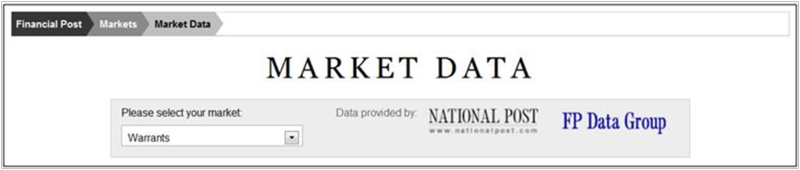
Free Canadian warrants information can be found at the Financial Post web site. On the top menu bar at the home page, click on the arrow to the right of Markets and select Market Data.
Under the header FP DataGroupTables, select Warrants (Monthly).
A list of current warrants is provided with the following data: Company Name, Stock Close, Warrant Symbol, Stock Exchange, Exercise Price, Recent Close, Bid/Ask, Intrinsic Value, Time Value, Leverage, Years Left, and Expiry Date.
Some company names are linked to the FP Infomart's Company Snaphot in FP's Infomart database. To access this database and its content for free, go to the Toronto Public Library web site. Click on Articles & Online Research and then select A-Z List of All Databases. Scroll to Financial Post (FP) Advisor and click on Access Online. An active Toronto Public Library card is required for access.
3.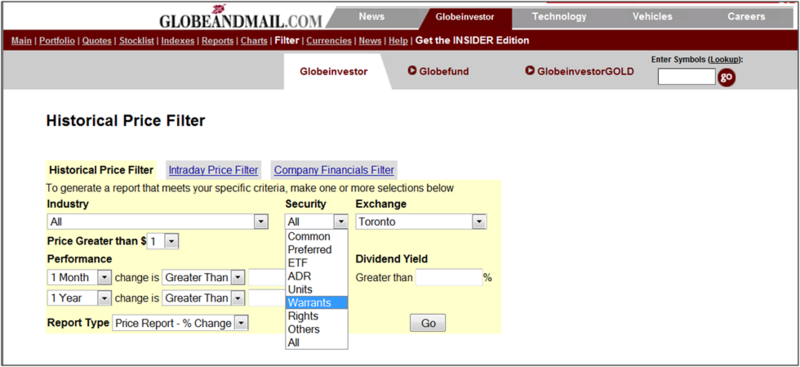
At GlobeInvestor, both the Historical Price Filter and the Intraday Price Filter allow you to select the Security; i.e. Warrants. Then, click on Go.
The Historical Price Reports include Company Name, Symbol, Latest Price, % Change as well as As of Current Trade Date for Prev. Close, Dividend Yield, and % Change for Week, Month, YTD, 1 Year, 3 Year, and 5 Year data.
The Intraday Price Reports include Company Name, Symbol, Latest Price, Net Change, % Change, Time, High, Low, Volume, and 52 Weeks High & Low.
2 thoughts on “Where to find online data for Canadian Warrants”
Christina: Thanks for putting this together. But each site had problems. 1) CanadianWarrants seems to be out of business. It was last updated in February. 2) I followed your instructions re the Financial Post, but when I clicked on warrants, no data came up at all. 3) The Globe and Mail worked, and worked well, but it has a shortcoming: it doesn’t indicate expiration date, which is so critical when evaluating a warrant. I still have hopes for the Financial Post and would appreciate any additional info you might have about that site and why the data on warrants doesn’t seem to come up.
Hi R. Karen:
The Financial Post’s web page on Market Data: Warrants includes the Expiry Date, Exercise Price, and more.
If the link to the Financial Post does not work on your browser, there may be a browser issue at the user end.
Some browsers require compatibility acknowledgement. If using Internet Explorer, go to Tools on your browser and click on Compatibility View Settings. Type in the URL: http://www.financialpost.com
After typing in the URL, click on Add and then Close.
If the above suggestion does not work, try copying and pasting the direct URL into your browser:
http://www.financialpost.com/markets/data/group-warrants.html
Hope these suggestions help.