A Mobile-Friendly Sign-in Page
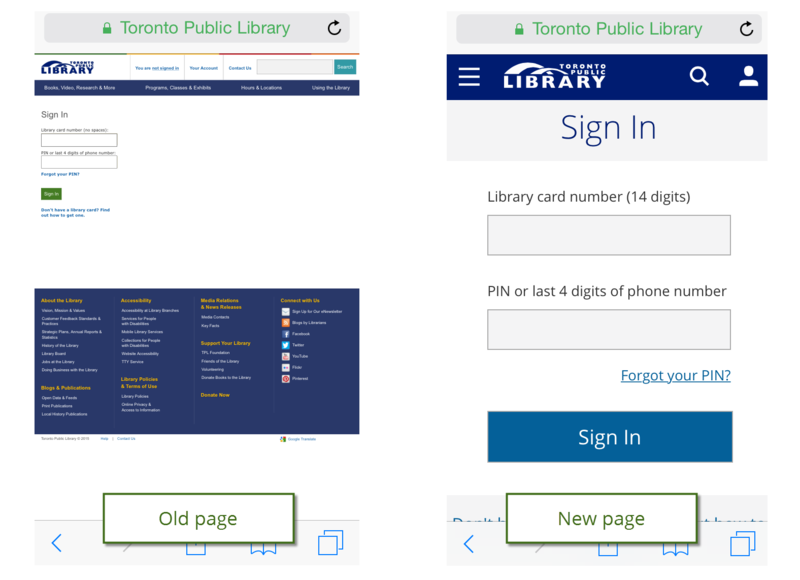
Starting today, when you sign in to your account on the library website, you may notice that the Sign In page looks a bit different. We have redesigned the page to make it easier to use on mobile devices.
One feature not included in this update is the option to stay signed in (the "keep me signed in" checkbox option you see on many other sites). We know many library users want this option, and we plan to add it as part of a future update once we have made some necessary back-end changes.
If you want the website to remember your library card number and PIN, you can use the built-in username/password management functionality in most web browsers to save your information. Here's how:
We plan to redesign more pages in the coming months to improve the website experience for mobile device users, so stay tuned.
6 thoughts on “A Mobile-Friendly Sign-in Page”
Great. Now can you remove that worthless auto-logout or at least have an option in your settings to disable it. It renders half the services to external sites, requiring a TPL login, like Naxos, OED, etc entirely useless.
I like the new login page. So far so good. Great work!
Great Work .. much cleaner design .. looking forward to your next refresh on the other pages of the site .. Improving the experience to the user to the site. Well Done !!
Good work!!
Will there ever be a mobile app?
Hi Maxine,
Our focus right now is on making the website mobile-friendly. Some of the library’s vendors offer apps for library services.