Read Today’s Newspaper Online with PressReader
If you like to keep up with world news check out PressReader. PressReader provides access to today's newspapers and magazines from over 100 countries in over 60 languages. You will find today's paper and archives up to 60 days, depending on the title. The papers appear in a full-colour, full-page format.
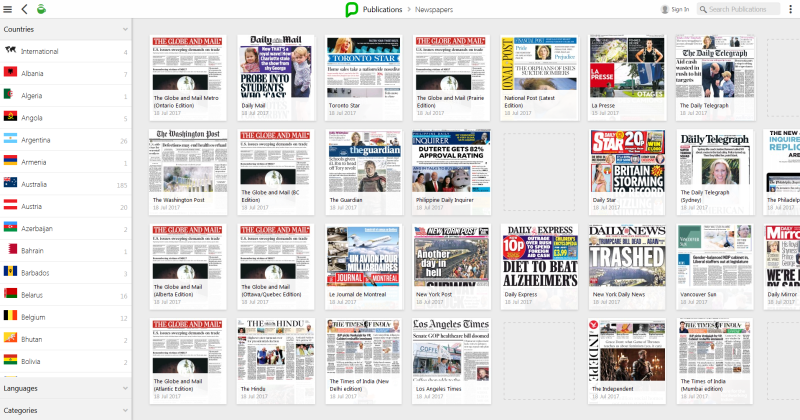
Getting started is easy. You can search by country or language. The creation of a personal account is entirely optional. It allows you to save personalized settings and download newspapers and magazines for offline reading through the PressReader app.
Here is a small sample of some available newspaper titles you will find in PressReader:
The Toronto Star, National Post, Toronto Sun, Le Devoir, The Guardian, The Daily Telegraph, Sunday Times, The Washington Post, Chicago Tribune and Los Angeles Times.
(EDIT: The Globe and Mail is now only available on a library computer and not remotely from home.)
Happy reading!
18 thoughts on “Read Today’s Newspaper Online with PressReader”
Amazing selection of newspapers, thanks for sharing!
So ecstatic that TPL finally subscribed to this service, been hoping for it since I learned York Region libraries had this service
Are you actually able to use your TPL card info and log on? I keep getting the message “Library is not available at the moment” please help.
Nice addition. Over two days now, having the same problem as the patron above with a “not available” error message after filling out the login form. From a desktop browser, linking from the TPL main site URL, the PressReader site welcomes readers with a 24 hour complimentary pass to use the service, but it prevents creating a permanent login. The Android app fails entirely. Looking forward to the service.
Thank you for the feedback. Here is a quick link to a Getting Started with PressReader guide:
http://www.torontopubliclibrary.ca/pressreader-help/
You can go through the library website tpl.ca/pressreader, click on Access Online and enter your library card number and PIN to read articles on your computer or through your device’s browser.
If you use the PressReader app for downloading and offline reading you need to create an account with your email address, password and name. You can’t use the Library Card option.
I hope this helps. Please let us know if you have any other questions.
Thank you for the feedback. Sorry you are having problems with the Android app. Perhaps you can let us know what type of device you are using and the version. We can investigate further if necessary. Here is a quick link to a Getting started guide:
http://www.torontopubliclibrary.ca/pressreader-help/
For your interest if you use the PressReader app for downloading and offline reading you need to create an account with your email address, password and name. You can’t use the Library Card option.
Sorry, I should have been clearer – the problem with the Android app is that it completely prevents creating a login and opening up any publications – otherwise the app seems to work fine.
By contrast, clicking from through the TPL link to the web browser site brings up a box that grants 24 hour “complimentary access” brought to me by TPL – routng through your link is recognized by PressReader. So I am allowed to select publications and open them. But the website’s box to create a regular user login has the same “not available” message that the app does (just confirmed again now.)
I want that regular permanent login so I can use the PressReader app on my Android tablet, which is my ereader for everything else. Thanks for the attention to this.
iOS app also not working with library login …
Thank you for your patience. Can you please ensure you are signed in to PressReader with your email address and password after you have entered your library card and PIN. Your name should appear at the top of the screen rather than the words “Sign In.” Look for the green tea cup (at the top or bottom of the app) which indicates that you are signed in.
Our Getting started guide has been updated with some new screenshots that will hopefully clarify the set up of the app. http://www.torontopubliclibrary.ca/pressreader-help/
Please let me know if this works.
Customers can also submit a request directly to PressReader at: https://care.pressreader.com/hc/en-us/requests/new
Thanks for YOUR patience. After “giving it a few days” I did finally create a personal login ID from the desktop site, and can log in to the Android app with it.
What fuddled me is users are treated differently if they enter the PressReader site from TPL links than if they access it “cold”. After accessing from TPL you get a “complimentary access” 24 hours box that permits selecting publications. Then when you hit the upper corner “Sign In” link you get another navigation box with several big bright buttons for choices, including one especially for libraries taht lets you pick a library. But down at the bottom is a link for new users. That smaller link is the way to go, and the big button for libraries causes the “not available” error – I suppose since TPL is aleady recognized by the web page. Maybe this will save some confusion for others.
I am glad it worked.
Thanks for the feedback. Were you able to take a look at the updated guide? http://www.torontopubliclibrary.ca/pressreader-help/
I hope you can access the app to read newspapers.
Great TPL for adding pressreader. Just a clarification, is this a complimentary access of only 1 day and 23 hours per month?
Thank you for the feedback. Once the PressReader app is authorized it gives you full access for 1 day and 23 hours. To get another window of access you will have to open your web browser, go to tpl.ca/pressreader and sign in with your library card number and PIN. Check that you are still logged in with your PressReader personal account. Now open the PressReader app. You should now have another window (1 day and 23 hours)of access. There is no monthly limit to the number of sessions available to you. You just have to sign in again.
Here is a link to a getting started guide:
http://www.torontopubliclibrary.ca/pressreader-help/
As of today, the pressreader won’t let me enlarge a page to be able to read it online unless I pay for the edition. I’m not trying to download it or read via an app. I just wanted to see selected pages online but large enough to read.
Has something changed with the TPL’s access?
Thank you for the feedback. Can you please let me know which specific newspaper title you are reading? I can investigate further. Are you accessing PressReader through your device’s browser at tpl.ca/pressreader?
Needs to be updated. Globe and Mail is no longer available offline if not in library hotspot.
Thank you for the comment. You are correct. The Globe and Mail has asked that access to their stories through PressReader be available to library customers only in a library branch.