The OverDrive App is Retiring

If you have been holding out and delaying the transition from the OverDrive app to Libby, the time has come to finally make the switch. The OverDrive app will officially be retiring on May 1st. The app was removed from app stores last year and is heading into the sunset for the newer and sleeker Libby.
The Libby app by OverDrive offers many features not available in the OverDrive app, including easy set up for new users, a single bookshelf for all loans and holds, push notifications and more customizable options like Dark Mode.
Luckily, moving from the OverDrive app to Libby is easy – and we’re here to help!
Note: if you use a Kobo that allows for direct downloads, nothing is changing for you. Anyone with the legacy OverDrive for Windows or OverDrive for Mac desktop programs can continue to download audiobooks. Hurrah!
Step-by-step guide for getting set up with Libby
1. Download Libby.
2. Get your library card.
3. Open Libby and answer “Yes” that you have a library card.
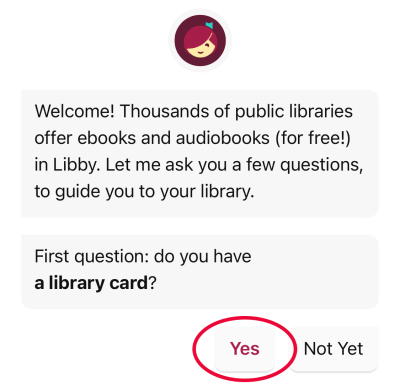
4. You can'then search for a library.
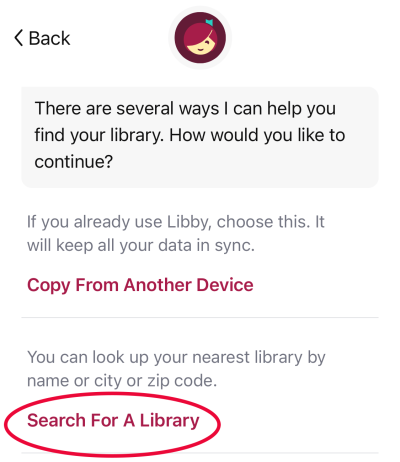
5. Simply type in “toronto” and TPL will come up. You do not need to choose a branch.

6. Then press “Sign In With My Card.”
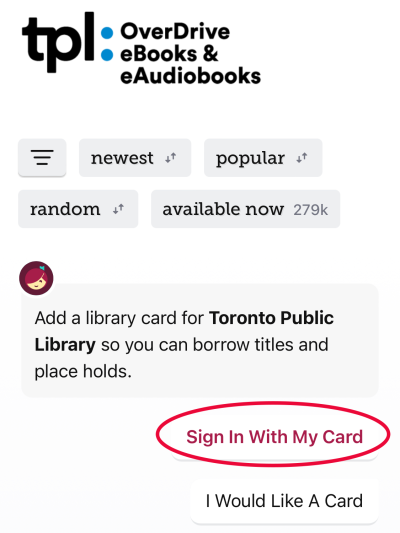
7. Enter your card number and PIN (usually the last four numbers of your phone number).
8. Libby will then give you the option to take any books saved in an OverDrive wish list and sync them to Libby in a tag. Learn more about adding wish lists to Libby.
9. You’re done! Time to start borrowing books and placing holds. And maybe reward yourself with a cookie.
Additional resources
If something didn’t work properly or you need more help, here are some resources that might help:
- The Libby Help website contains help videos that provide detailed information on using the Libby app.
- Upgrade to Libby has more information on making the switch from the OverDrive app to Libby.
- Libby FAQs can help answer other questions you may have on the switch to Libby.
- Monthly Getting Started with Libby webinars offered by OverDrive. Libby users from any library system can attend to learn how to use the app.
- For one-on-one help from Toronto Public Library staff, you can schedule a Book-A-Librarian appointment at a local branch. We also offer tech help programs at many library branches.
- If your device is not compatible with Libby, you can still have the Libby experience through libbyapp.com.
48 thoughts on “The OverDrive App is Retiring”
Well so far Libby has not performed nearly as well as Overdrive has. Why are you downgrading the service?
The decision to retire the app was made by OverDrive and impacts all public libraries they work with. To provide feedback to OverDrive about the Libby app, please use this form: https://survey.alchemer.com/…/OverDrive-Support-Form
Survey link provided is not operable. Perhaps a Libby-related product itself!
Apologies, that was my error in copying the link. This link should work: feedback form
Whoops, I copied the link incorrectly! Please use this link for the feedback form
We would like to buy an e-reader for a 11 yr old so that they have a device they can use to sign out books online. Could you please let us know which e-reader would best work for TPL/Libby? With this new change, some info on TPL’s website seems out of date so wanted to double check.
In an ideal world, she could sign out books herself, but not play games/go on youtube (I know many devices have the option to limit which apps are usable by children). In an even more ideal world, she could use a kindle because we’ve already purchased many audiobooks through kindle app.
Thanks in advance for the advice.
Hello GG! Many different devices can be used to read ebooks and audiobooks through OverDrive. You can find a list of compatible devices here: https://help.overdrive.com/en-us/devices.htm
Newer Kobos allow for direct downloads with no additional software required. These are not impacted by the retirement of the OverDrive app. These are ideal for someone who is mostly reading text-based books, not someone listening to audiobooks or reading different formats like graphic novels or manga.
Tablets or other mobile devices are more suitable for reading different formats. The Libby app can be downloaded on many different devices. You’ll be able to use the link above to see if a device is compatible. You would have to research which tablets have the paren’tal controls you are looking for.
TPL does not loan ebooks that are compatible with dedicated Kindle ereaders, unfortunately.
I hope this helps you make a decision about which device might be best for you!
so far the Libby app is working really well for me. I’m enjoying reading books & magazines on my device. Set up was easy. No muss, no fuss.
I have downloaded, and used, the Libby app on my iPhone. However, I almost universally use my MacBook computer to order an ebook, etc., from the Toronto system. As no app seems to exist for the MacBook computer, I wonder what might happen on May 1st?
Like Peter (comment above), I read ebooks exclusively through my laptop browser. Will the ability to do that via the OverDrive website disappear too? I keep looking for answers in multiple places (e.g.- TPL, OverDrive, Libby), but to no avail. Something explicitly addressing this would be great, since there are those of us that have never (and have no desire to ever) read ebooks via an “app”.
That’s great to hear!
For now, you will be able to continue to use the OverDrive website to order ebooks and audiobooks, read in browser and manage your holds/loans. The only feature that will no longer be available on this site as of May 1st is the ability to recommend books to the library – this is being replaced by the Notify Me tag in Libby.
You can also use libbyapp.com if you prefer the Libby app and want the same experience on your computer.
For now, you will be able to continue to use the OverDrive website to order ebooks and audiobooks, read in browser and manage your holds/loans. The only feature that will no longer be available on this site as of May 1st is the ability to recommend books to the library – this is being replaced by the Notify Me tag in Libby.
You can also use libbyapp.com if you prefer the Libby app and want the same experience on your computer.
One function currently missing from libbyapp.com is the ability to save books for offline reading. So if you’re reading on your laptop when you don’t have a network connection, sticking with the OverDrive website is the way to go!
Is there a way to copy over the History from Overdrive to Libby as I want to keep a record of what I’ve read?
Unfortunately, there is no way to copy your history to Libby, but this Help article explains how you can export your history so you will still have a record of what you have read: https://help.libbyapp.com/en-us/6250.htm
OMG Unclear Contradictory Incoherent
I started using Libby early this year to learn it prior to the retirement of Overdrive.
Whilst it has some good features it is unfortunately not terribly compatible with offline reading. Even if the book is ostensibly downloaded it won’t really open without a network or WiFi connection. Not terribly useful for a commute.
It seems to try to synch every time the app is opened, with no way to turn off this feature.
I tried getting help via the app but received no response so I’m not looking forward to May 1st.
I use it on an Android 10 phone
Yes, I want to read when I don’t have a network connection and in your reply to Liam you say “sticking with the Overdrive website is the way to go” for this. So … please clarify. We are all forced to switch to Libby or we aren’t. Yes or No? If not, then presumably the Overdrive website is going to remain active. Yes or No?
Hello MG! Sorry that you are having issues with offline reading. This is a known issue with the Libby app that OverDrive is working to fix. Some people have found that switching your device to airplane mode can help.
Sorry for any confusion! Yes, the OverDrive website will remain active past May 1 – it is only the OverDrive app that will stop working as of May 1. So if you currently use the OverDrive website for offline reading, nothing is changing.
I hope that clarifies things for you. Please let me know if you have any other questions.
Hi Mike.
I’m a simple, senior, techno-peasant. I didn’t realize that I was using the Overdrive *website* to read ebooks from the TPL. I don’t have a smartphone so I didn’t realize that I didn’t need the new Libby *app*. Nowhere is this made really clear for Luddites like me. I think that I realize now that I can continue to read ebooks in Overdrive on my PC laptop. Thanks for that.
However, if I decide to switch to the Libby website to read (and recommend ebooks for the TPL to buy), how do I import my Overdrive Wish List of ebooks to read to Libby? I think I saw how to do it somewhere but I’m very confused after going around in circles and can’t find the page I saw it on.
I do realize that you can’t export your Reading History unless you download the whole thing to your computer as an Excel file. Such a nuisance. I’ve already made my thoughts around this issue known to Overdrive. Much good it will do me.
Please advise on how to export to Libby my Overdrive Wish List of ebooks. Thanks.
My Samsung tablet won’t let me download the Libby app, but it works perfectly fine in all other aspects, so I can’t spend money on a new tablet and can no longer use Overdrive to download the books to my tablet to read.
I did find a way to read a book using the online Libby, so am satisfied for the moment. It did mean I had to read it fast, as there is a time limit for borrowing the book. We’ll see if that works. Definitely more comfortable to read sitting in a comfy chair vs a table large enough for the computer.
Not pleased that I can’t download the Libby app on an old Samsung notebook.
Hi Christine. My apologies for any confusion. I’ll do my best to help so you can import your wish lists.
You can use libbyapp.com to transfer your wish lists using the Libby website. The Libby website looks the same as the app, so these are the instructions to follow: https://help.libbyapp.com/en-us/6024.htm
I double-checked with my account and can confirm that the ability to sync wish lists is available through the Libby website.
Please let me know if you are able to sync your wish lists. If you experience any issues, you can also contact Answerline or your local branch.
Hi Liz, I understand your frustration and can offer some solutions so that you can continue being able to use your tablet to read ebooks.
If your tablet has a browser (possibly Google Chrome or Samsung Internet), you might be able to use tpl.ca/overdrive or libbyapp.com to read books through those websites.
This help article from OverDrive has more information about compatibility with for using OverDrive Read through the OverDrive website: https://help.overdrive.com/en-us/2061.html#aanchor50
Do you read books offline or are you always connected to the internet when you are reading? Offline reading is currently possible through the OverDrive website, but not the Libby website.
There is no difference in the time limit for borrowing books between OverDrive and Libby. Perhaps you had a Best Bet 7 day loan.
Let me know if this helps you get back to reading in your comfy chair!
Dear Mike,
Huzzah! I was able to copy my Overdrive Wish List to my new Libby website. It’s annoying that their layout is one book per line. Takes a lot of scrolling. If they have a grid layout similar to Overdrive’s, I haven’t found it yet.
Negotiating the Smart Tag to recommend a book for purchase by the TPL was like swimming in molasses in January. But, I eventually made it work.
Thanks, very much, grateful for your help. I imagine running this blog re the changeover is a thankless task.
I think you are trying to dress up a pig in telling us how great Libby is. The fact is that it won’t work with small mp3 players. The device must be connected to the internet to work. I hope the TPL is paying less for this service.
That’s great! I’m glad you were able to copy your list. Unfortunately, I don’t see a grid layout option either, but you can sort by newest, oldest, title or author.
Thank you for the kind comment. I’m happy to know that I was able to help.
If you have the legacy OverDrive for Windows or OverDrive for Mac desktop programs already downloaded, you can continue to use those with the OverDrive website to download audiobooks and transfer them to your mp3 player. These programs will continue to work after May 1 for anyone who is already using them.
As of this time, OverDrive does not plan for Libby to support downloading audiobooks to a desktop computer and transferring them to an MP3 player.
Mike from what I see there is no Libby for windows app which limits it to android . Correct me if I am wrong but there is no way to transfer audiobooks to an mp3 player with Libby unless I play the whole audiobook and record it and then transfer it to my mp3 player. Could you be more specific in explaining how I can get the file onto my mp3 player. Remember the mp3 player is not connected to the internet ever.
The only way to transfer files to an mp3 player from a Windows computer is if you have the legacy OverDrive for Windows program already downloaded on your computer. It is not possible through Libby and, as stated above, OverDrive does not plan on adding this feature to Libby.
If you need more support, I suggest reaching out to Answerline by phone or email.
Hi – how can I see my entire history of borrowed books that I read in Libby ?
Not having this list handy is my biggest pet-peeve – it was all readily available in overdrive,
Thanks
There are two ways to see you borrowing and reading history in Libby. This help article explains how the Timeline and Borrowed tag work in Libby: https://help.libbyapp.com/en-us/categories/reading-history.htm?TocPath=Home%7CReading%20history%7C_____0
I’m going to chime in to say that Libby is much worse than the Overdrive app. Overdrive is less cluttered, easier to browse and much better for finding things. With Overdrive I can look at all fiction books at once, with several books on display. Libby shows one book and the scrolling down is ridiculous. Don’t even get me started on trying to find the adult fiction books easily.
They’re also VERY obsessed with books that other people have on hold. It’s incredibly unpleasant to have books with a waiting list at the top of my checkouts with aggressive reminders that I should return it asap. Don’t lend books to people for 3 weeks if you don’t want them to have them for 3 weeks. I also care more about which books are due back first – those are my priority! If there’s a way to permanently sort my list I haven’t found it yet.
And yes. I’ve filled out the survey and given direct feedback (Libby staff do not care) and rated the app with a bad review. They. Don’t. Care.
TPL is a big enough system that you should have some pull with Libby. Or please consider finding someone with a better interface that works for EVERYONE. I’m so disappointed in my ebook experience with the Libby app. I’m using Overdrive until the last possible second. I’m also fairly tech savvy – I shouldn’t be struggling to use an app for reading books. I shouldn’t have to track down training websites to use it either.
Thank you for the detailed explanation of your experience with Libby. We will make sure OverDrive is aware of the feedback we receive about the Libby app in order to help them make improvements in the future.
Mike,
I use a KOBO Libra and borrow books from the library every week. Is anything going to change for KOBO users. Can I continue to use Overdrive?
Terry
Hi Terry, nothing is changing for people using a Kobo to read ebooks. The changes are just for those using the OverDrive app on a phone, tablet or mobile device.
Sometimes I would start the book in OverDrive and finish it in Libby, but I preferred OverDrive for the reasons that Cathy so well described above. One of most useuful things about Libby is that it lets you highlight any word or passages in the text and use different colours or insert a comment if you want.
Thanks, I will pass along the feedback that you agree with Cathy’s comments. Glad to know you’re also using the Libby-specific features!
Will Libby still be usable an older iPad (running iOS 9.3.5)? Just until last week, I was able to use Libby on an old iPad mini (that had the IRSG Root X1 certificate), and I was able to borrow and read books with no problems. Starting today, I have not been able to start up the app, it continues to say “check your internet connection” even though my internet connection is fine. I understand that the change is for Overdrive, but has this change effected those using Libby already?
According to OverDrive, the Libby app is compatible with iOS 10+. I don’t believe this has changed recently, so I’m not sure why it worked for you previously and then stopped.
Sometimes restarting the device can help. If you continue to experience issues, I recommend reaching out to OverDrive Support and Answerline.
In the meantime, you can use the OverDrive website or Libby website to read books. The Libby website does not have offline access, though.
Actually my Kobo isn’t allowing me to place a hold on Overdrive right now… any advice?
Did you try logging in and placing the hold through the OverDrive website? That would help figure out if it’s an issue with your account (eg. your card needs to be renewed or you have reached the maximum of 30 holds) or specific to your Kobo.
The next thing I would try is restarting your Kobo and seeing if that fixes the issue. If you still can’t place holds, please contact Answerline for further assistance.
In the states you can put Libby on your kindle, do you know when you’ll be able to do the same in Canada?
The agreement between OverDrive and Amazon that allows for borrowing and downloading library ebooks on a Kindle eReader is restricted to the United States. At this time, we are not aware of any plans to extend this agreement into Canada.
Hi Cathy,
Fellow library user here, thought I’d leave a reply in case it’s helpful to you or anyone else scrolling the comments. I agree that there’s a lot that’s clunky about Libby’s design choices and I only happened to stumble on the following unintuitive things.
In regards to your complaint about the Shelf putting books that have holds by other people on them (what the app calls “One Good Turn”) at the top of your checkouts:
-If you tap the little line in a square to the right of the list’s name you’ll have the option to hide the list. Then the books just become a regular part of your shelf.
-If you hide all the lists (like “Where You Left Off”), then your shelf is only sorted by due date.
-If you find the lists helpful, but still want to easily see which loans are due next (aka me), you can pin the “Due Next” filter under Loans.
Hope that helps until/if Libby makes changes. There’s a lot I enjoy about the app, but some of its recent design tweaks particularly in regards to browsing haven’t made any sense to me.
Is anyone familiar with https://thepalaceproject.org/ for its integration with either Overdrive (as a libbyapp replacement) or BiblioBoard (the indie author project)?
Or, for its free, open-access https://palacebookshelf.dp.la ebooks (both in-app and public web access, too)
I hope Digital Public Library of America (DPLA) is friendly with Canadian libraries.
Thanks, Sarah! It randomly changed my display so I don’t know if they switched something or I accidentally sorted it! So far I’ve been using the browser on my iPad, which is only good at home. I’m dreading being in the middle of a good book and HAVE to use Libby during my commute.
No real problem with Libby app on Android tablet, if anything I think display, navigation and alerts for subscribed magazines is better, though it takes too much clicking around to find, renew or retrieve material.
My concern is the loss of the OverDrive program on Windows PC, as it is the only way I can’transfer MP3 audiobooks from the PC to my small portable player, which otherwise does not have access to OverDrive. Getting a new PC I was fortunate to have saved a *.exe file with the OverDrive software, and after a bit of fiddling am able to use it. But hat is by way of a half-hidden selection to download to PC when accessing audiobook loans on the website – I worry the ability to use MP3s except on expensive full-featured smartphones will not be supported.