Photoshop Plugins & Action Sequences
Here's a scenario for you; you have a series of images you shot, and they need some serious retouching. You can head to Photoshop, and clean one image and save all the steps you did to it. Then apply that to the entire set. How can you do this? It's called Photoshop Actions.
Actions allow you to pre-record tasks that you can save and reuse anytime, like resizing, adjusting brightness or contrast. In addtion, you can also find hundreds of great effects, adjustments that you can apply to your photos, making what once seem a regular photo, suddenly seem stunning.
Have a look at a few of these examples:


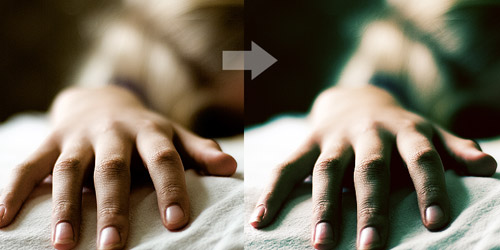

Photoshop actions have a .atn file extension. Simply place the .atn file into the Actions palette in an open Photoshop or in the actions folder on your hard drive.
Head to these website to start trying some cool effects on your work.
http://naldzgraphics.net/freebies/60-useful-photoshop-actions-to-enhance-your-photos-for-free/
Have fun!!
Comments