Moiré Patterns & Descreening Filters
When scanning certain publications for example magazines, textbooks and most notably newspapers. A certain pattern is picked up in the scanning process. Some would refer to this as digital interference, but the specific term is called Moiré.
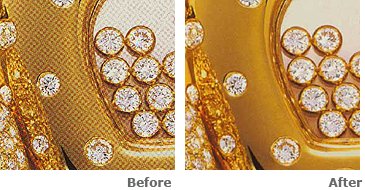
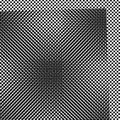 Moiré is an unsightly interference pattern that appears on images that have been scanned from a previously printed source such as a newspaper, magazine, or book. Moiré appears as a checkered pattern. The pattern is a result of the halftone screen process used in modern printing where patterns of small dots are overlayed to produce color and shading.
Typically moiré patterns from newspaper scans are the worst, compared to magazines, cards, brochures, and books. Scanning photos printed on any textured paper can also produce a moiré-like pattern, and though it is usually not as severe, the same removal methods can be used for both types of patterns.
Moiré patterns can be difficult to deal with. You can eliminate them in two simple processes. It is certainly easier and more advise to try and apply a filter at the time of scanning. Not all scanners come with tools and filters to eliminate the interference, but if yours does, it is suggested. It can add a minute of time to a single scan, but the results will always be worth it.

It is also a lot easier to use, a simple one click in a box to turn it on. It is always wise to eliminate the Moiré pattern, but sometimes you’ll still need to modify the image in a photo editing program. (Note: Sometimes scanning the image on an angle has shown a slight improvement).
That leads me to the second method of choice. It is also possible to eliminate Moiré in any advanced photo editing program. In GIMP and Adobe Photoshop there are a few different filters that can be applied to improve the image.
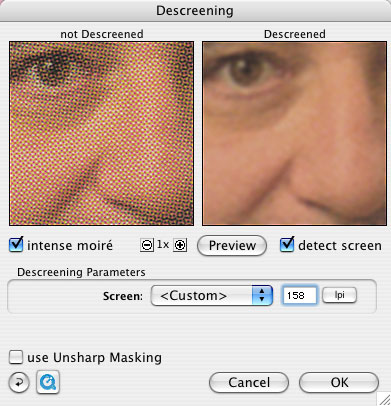

Try using any of the following filters and see how it applies to your image.
Despeckle
Noise
Unsharp Mask
Descreen has a blurring effect, that's the entire point of it. You do not need to use the Descreen filter when scanning photographs (exception to this rule is if you scanned matte photos).
Have fun!!!
Greg
Comments