Great News for Blackberry Users!
Blackberry users have a lot to cheer about lately.
Recently it was announced that OverDrive released a mobile app that was compatible with BlackBerry devices. OverDrive is the distributor of digital eBooks, audiobooks, music and more for Toronto Public Library customers. With the new OverDrive mobile app for BlackBerry, all you have to do is browse for a title you want, check it out, download, and enjoy.
Click here to read more, and to download the mobile app.
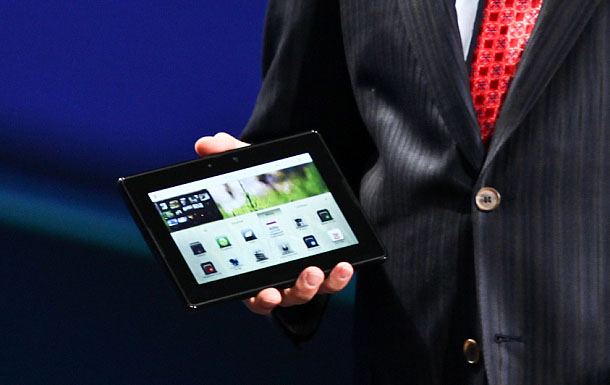
Yesterday also brought great news to Blackberry Playbook Users. The company released their new operating system for BlackBerry PlayBook tablets. With the release of OS 2.0, users of the tablet will expect to see new productivity enhancements, additional apps, downloadable video service and a way better enhanced experience.
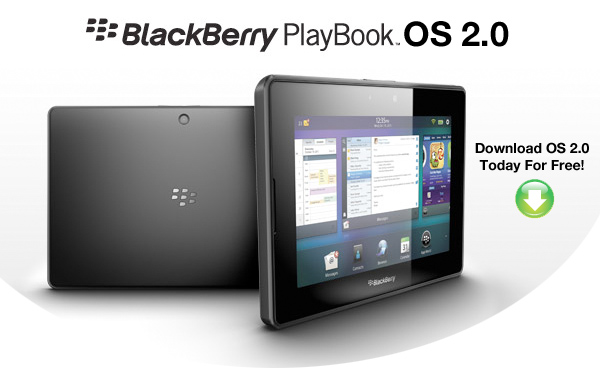
New BlackBerry PlayBook OS 2.0 features include:
- Integrated email client with a powerful unified inbox: With BlackBerry PlayBook OS 2.0 you have the option to use a unified inbox that consolidates all messages in one place, including messages from Facebook®, LinkedIn® and Twitter®, as well as personal and work email accounts.
- Social Integration with Calendar and Contacts apps: The built-in calendar harnesses information from social networks and makes it available where and when users need it. Contact cards are also dynamically populated with updated information from Facebook, Twitter, and LinkedIn to create a consolidated view of contacts.
- Updated BlackBerry Bridge app: BlackBerry® Bridge™ is a unique app that provides a Bluetooth® connection between your BlackBerry PlayBook and core apps on your BlackBerry® smartphone (including BBM™, Email, Contacts, Calendar and Browser) in order to let you view the content on the larger tablet display. With BlackBerry PlayBook OS 2.0, it’s easier and quicker than ever to take documents, web pages, emails and photos that appear on your BlackBerry smartphone and display them on your BlackBerry PlayBook for an optimized viewing and editing experience. The updated BlackBerry Bridge app also provides a new remote control feature that allows a BlackBerry smartphone to be used as a wireless keyboard and mouse for a BlackBerry PlayBook.
- Improved mobile productivity: Updated document editing functions, the new Print To Go app, and increased control and manageability of corporate data with BlackBerry® Balance ™ allow you to get more out of your BlackBerry PlayBook every day. Plus, an updated virtual keyboard with auto correction and predictive next word completion learns how you type to enable faster, more accurate typing.
- New apps and content: Thousands of new apps are being added to BlackBerry App World™ today (including a range of Android® apps that will run on the BlackBerry PlayBook). A new BlackBerry Video Store1 is launching today. Enhanced web browsing capabilities are also available with BlackBerry PlayBook OS 2.0.
2 thoughts on “Great News for Blackberry Users!”
My techy son says an easy way to download the new version (Playbook 2.0) is to go into Settings on the Playbook (little cog in the top right corner) – then choose Software Updates. It will say you have the latest installed but select “check for updates”. He has successfully updated his and he is a happy camper.
The Crackberry website has helpful screenshots on setting up your mail (Gmail, etc.)
http://crackberry.com/setting-accounts-blackberry-playbook-20
Just upgraded to 2.0! We also installed the Overdrive Media Console for the Playbook.
I tried a few ways to download eBooks from Overdrive with the Playbook – from the TPL search page for Overdrive books, from the Overdrive Media Console’s search for books (Get Books) and finally using the TPL search box on the homepage (tpl.ca) and limiting results by using the “Online / Downloads” limiter.
A tip from all this – use the Media Console’s search (browse, advanced, etc.) That works really well.
If you are searching the whole library (print, etc.) from tpl.ca homepage and then limiting by Online / Downloads, you can use the Access Online button for the ebook, and check out the book, but don’t download it from this screen. It seems to get lost somewhere. Instead, after checking out the book, open the Overdrive Media Console, pull down the hidden menu at the top of the screen, choose Get Books, select the library (TPL). In the next screen, choose My Overdrive Account and select My Bookshelf. You will then see the book on your bookshelf that you can download.
As you see, it is easier to do the whole operation through the Overdrive Media Console search!
I am a happy camper!