Free Feedback Form Wizard for your Website
It’s always good business practice to provide as much content
about yourself or business as possible.
That’s never been more true with the contact information. Providing your website users/customers with
multiple opportunities to get in touch with you is key. The customer might want to get in touch with
you by email, phone number and/or fax.
Another option is providing a feedback form, a method that has
many advantages to both the customer and the website owner. Feedback forms provide a simple and user friendly
method of receiving data from your visitors.
It’s a nice service that can lead
to inquiries, service requests, bookings and in the end, revenue for your
website.
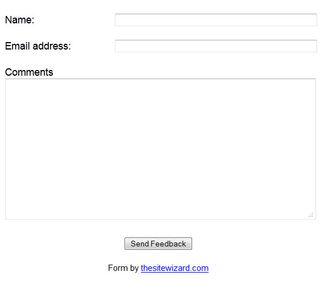
To add a feedback form and enhance the quality of your website,
you’ll need two things for it to successfully work the right way. The first item is the HTML form itself. It can be simple to design and can be developed
in various ways depending on your needs.
The second is the CSS/PHP script, more important in getting the info in
the right inbox.

To start creating your own form, thesitewizard.com
has offered a Free Customized Feedback Form Wizard that creates a FREE
feedback form for your website. This allows you to put a Feedback Form or
Contact Form on your site so that visitors can send you messages / email or
make comments.
- Plug and
Play: All the necessary code for the feedback form is generated for you.
Just plug and play. - Customizable:
You can customize your form to suit your site decor if you like. - Easy to
Create: Easy two-step procedure to get your Feedback Form. - Complete
Package: All the code (scripts and HTML code for the form itself)
necessary for the PHP and Perl versions to work are generated by this
Wizard. - The messages
sent by your visitors are delivered to an email address of your choice. - Compatibility:
The messages sent are decoded from the form and sent as an ordinary email
which you can read and reply to using your favourite email software or web
email. - PHP and Perl
versions available: You can choose to generate either the PHP version
(recommended) or the Perl CGI script version, depending on what your web
host allows you to run. - Free: What
else can I say? It's free. - No
Advertisements: on the PHP and Perl versions of the feedback form script. - And more.

Have a look at the demo online by clicking here.
PHP and HTML
code can seem a little confusing and scary at first, but what is really nice is
that Thesitewizard.com has provided all the necessary information in getting
the form created, all you’ll have to do is follow the steps below.
Step #1: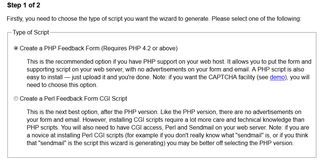
Step #2: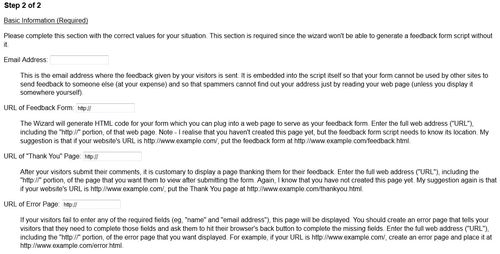
Step #3: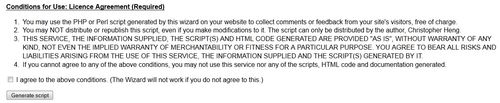
After you complete the two steps, your left with two types of
source code:
Source Code #1 PHP
(Feedback Form Script)
Copy and Paste the Scripts (Note: The website will generate more than one
script for you, remember to follow the instructions for both as they are both necessary
for the form to work properly.
Cut and paste everything in the
box below into an ASCII
text editor and save it as "feedback.php". Examples of ASCII text
editors include Notepad on Windows. Do not
use a wordprocessor. That is, do not
use programs like Wordpad, Microsoft Word or Office.
Then upload it to the same directory of
your website as your feedback form. Remember to upload it using ASCII mode and not
"Binary" or "Auto-detect".
Source Code #2 HTML
Code
Cut and paste the code
below into the portion of your web page where you want the feedback form to
appear. Save that page at the URL http://www.greg.ca/contact.html. Remember also to create your error
page at http://www.greg.ca/error.html and your Thank You page at http://www.greg.ca/thanks.html. Examples of what to say on the
Error and Thank You pages can be found on the Feedback Form Demo Site.
Note that you are free to
customize the HTML code below to suit your website's design. For example, you
may want to change the sizes of the various boxes, or you may want to change
the typeface (font) of the words, the background colour, etc. Changing the
appearance of the form will not affect the operation of the script (but be sure
you test everything just in case you accidentally modify something that causes
problems). Do not however, modify things like name="fullname", name="email" and name="comments". These are expected by the feedback
form script.
To get started on your own, click here.
Thanks to the Thesitewizard.com again for providing this amazing
tool.
Have fun!!
Greg
One thought on “Free Feedback Form Wizard for your Website”
Thanks Greg
Just what I needed and was looking for to correct some lacking required information from the contact form with error messages to prompt the user to enter data in the empty fields. Cool and it’s free stuff! Thanks for the Outstanding tips