VHS Conversion
Have you ever wanted to take a look at those old VHS tapes collecting dust? Maybe take some old home movies and preserve them for future generations to see? Maybe take a collection of them with the idea of editing and restoring them for a celebration? The Digital Innovation Hub at the Toronto Reference Library is happy to report that anyone can now do this thanks to some great resources in the space. Bring in any old VHS tape and use one of two digitizing tools that are available to capture your old videos.
The first device is the Diamond One Touch Video Capture. This device allows you to capture videos with the touch of a button. The One Touch Video Capture records video and audio from almost any device. Capture content from VCRs, camcorders, DVD players, or any device supporting video output through a S-Video or composite RCA connection.
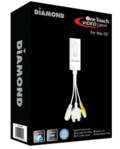
Image Courtesy of Diamond One Touch Video Capture
The other device is a much higher end video capturing tool named Black Magic Intensity Shuttle. The Shuttle is an HD/SD video capture/playback device that supports USB 3.0, and allows you to capture 10-bit HDMI or analog video directly from a camera or tape player. Use it for editing or for playback to watch old footage you haven’t seen in a very long time.
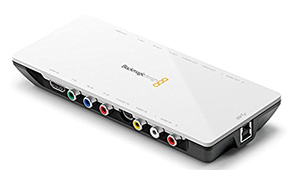
Image Courtesy of Blackmagic Shuttle
It’s compatible with many of the video editing applications such as iMovie, Final Cut Pro, After Effects and Premiere.
At the moment the Hub only has a VHS player and can only facilitate the conversion from that format. But in instances where your footage is filmed on a different format, be sure to bring the camcorder in that it was shot on for the sole purpose of playback.
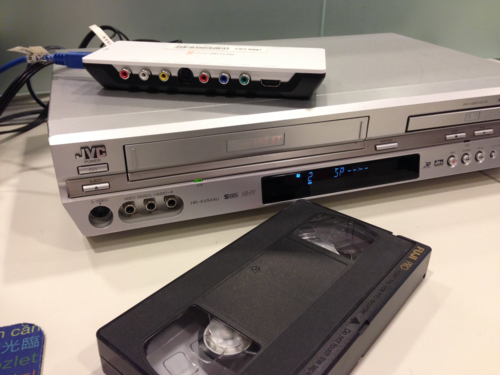
VCR Setup at the Digital Innovation Hub at Toronto Reference Library
Both systems are flexible and give the user options for resolution and a wide range of file formats. More importantly once your footage is digitized, you can easily convert it, edit and export it to any format you like. Maybe use one of the film editing software applications such as iMovie to cut it down and add music and photos to tell a story.
Have fun!!
Greg
8 thoughts on “VHS Conversion”
cool! this sounds useful.
does this require an appointment? Or are walk-in’s accepted?
How awesome is this !! … The ability to bring in your old VCR VHS tapes and convert them to work on the newest tech devices of today .. Save space and get a Free Upgrade … store them on CD and DVD …
1.Diamond One Touch Video Capture …2.
Black Magic Intensity Shuttle … convert it, edit and export it all at the your Toronto Public Library with the Digital Innovation Hub where helpful staff help you get it done .. Where learning of new tech happens .. for everyone with a interest at any skill level ..
Hi Christina,
Walk-ins are fine, but we do tend to be pretty busy.
We would recommend you book ahead.
To do so, please call us during open hours at
416-393-7007
Dawn
(who also works at the Hub!)
This is great. Now you need to get the equipment/software for record albums and cassette tapes!
Excellent post.
Thanks everyone for the wonderful comments. Just like Dawn said, walk-ins are totally fine, but the machines can get quite busy. It’s in your best interest to book a machine ahead.
Also, we’re in the process of being able to record from cassette tapes. I’ll try and give everyone an update about that shortly.
Greg
Thanks Sheilah,
that idea to be able to record from cassette tape and record albums sounds like a great additional service to be provided by the Digital Innovation Hub ..
Looking forward to the next update to this conversion services at our Library’s Digital Innovation Hubs
..Where making learning tech, fun and available to everyone from the newbies to tech savvy with helpful staff that make it that simple. Amazing ! You actually Did It Yourself !