Augmented Reality (AR) Design and Development Process

It’s been a few weeks into this residency, and I have been reflecting and really trying to hone in on explaining the design and development process of the various Augmented Reality (AR) projects that I have worked on over the last couple of years. Although each project is unique with its own set of challenges, there are a few common threads and tools that I have learned to use throughout the process. I hope these tools can be useful for anyone interested in AR, from those who may be just starting out to even the most veteran enthusiasts within the industry.
With client work at Patio Interactive Inc., we work collaboratively to understand what the challenges are then brainstorm to come up with a variety of ideas and the best way to technically execute them. My job as a designer is to create mock-ups, concept videos or anything else that can be used to help clearly communicate what the final experience is going to be like. Working with these initial designs, the whole team’s vision can be aligned as we test it out, break it and improve it.
My goal as a designer is to go beyond the initial novelty that technology presents and see how we can implement and integrate it to create lasting impact for the users.
The process of creating impactful AR experiences evolves differently for different projects. I am really excited to share some insights and case studies on the design and development process at the Designing for AR programs.
Below is a quick overview of some of the tools I use as part of conceptualizing AR experiences.
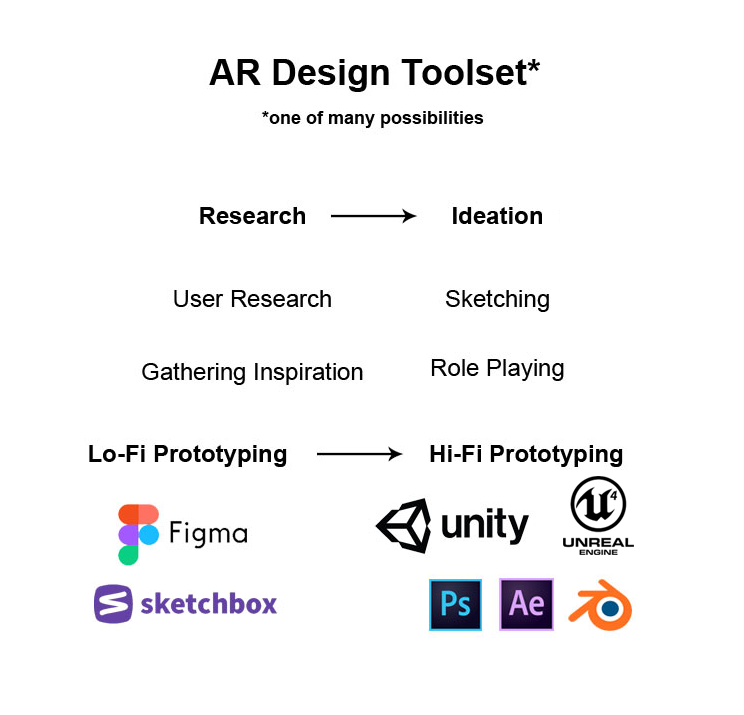
I'm always on the lookout to expand my toolkit but I find that sketching with paper has always been the fastest way to make sense of ideas initially. It's great for getting started and checking in with the team to see if we are going in the right direction. Currently I use Blender (which is open source and free) for simple 3D modelling and visualizations as well as Adobe Photoshop to create hi-fidelity storyboards/mockups. Sometimes I use Adobe After Effects to animate some components to really bring the concept to life and Figma (a browser-based design tool) to create basic interactive prototypes.
For prototyping more complex spaces that focus on spatial environment design, I find that it is helpful to design in virtual reality (VR) using tools such as Sketchbox, Tilt or Medium to get your point across. Especially when I need to get a feel of scale and placement, I find that sketching in VR using Sketchbox can be very helpful.
Although there is a bit of a learning curve, this is great for importing into a game engine or development environment like Unity or Unreal, which is free. This allows me to experiment and prototype more complex interactions all the way to production. Some of the frameworks used out there are mostly compatible with Unity or Unreal, such as Vuforia, ARkit for iOS devices and ARcore for android devices. Released within the last few years, they are also compatible for developing headset experiences.
It’s really interesting to see how these game engines have evolved to become almost the Swiss Army knife of development these days and I personally can’t wait to see what it is going to become. We are currently working on experimenting and refining this process at Patio Interactive and I hope to share some of those learnings at my upcoming workshops.
Post by Rui Jie Wang, our current Innovator in Residence.
Comments