Learning Express Library – Career & Job Search Help
By using the LearningExpressLibrary you can:
- Teach yourself how to write winning resumes, cover letters, and successfully handle a job interview.
- Practice instantly scored licensing, certification, and aptitude tests for careers in civil service, nursing real estate, and more.
- Improve your math, reading, writing, and grammar skills.
It's free!
You'll need a computer with internet access and a Toronto Public Library card.
How do I use the LearningExpressLibrary?
Read these easy instructions before you click on the link below to go directly to LearningExpressLibrary.
Once you click on the link, you must enter your Library card and PIN numbers in the boxes provided.
You will then be asked to register with the LearningExpressLibrary site. You can create your own username and password. Both your username and password must have at least six characters. Use your library card number if you are using LearningExpressLibrary from home.
Select the heading that interests you. For example, the second heading, Job and Career Success, brings you to a selection of tutorials on job searching and networking skills, resume/cover letter writing, interview and job success
Select the category you want from the on the left side of the page.
LearningExpressLibrary will create a "My Centre" for you. All of the tests and tutorials you choose to work on will be stored under "My Centre."
The categories that apply to job searchers are:
Job Search and Workplace Skills – In-depth tutorials on job search strategies, resume/cover letter writing, and handling job interviews. Each tutorial can'take up to two hours to complete.
Jobs & Careers – Practice tests for selected careers.
Skill Building for Adults – English (spoken and written) and math skills
Then click on the specific tutorial, test, or skill building topic that you want.
For example:
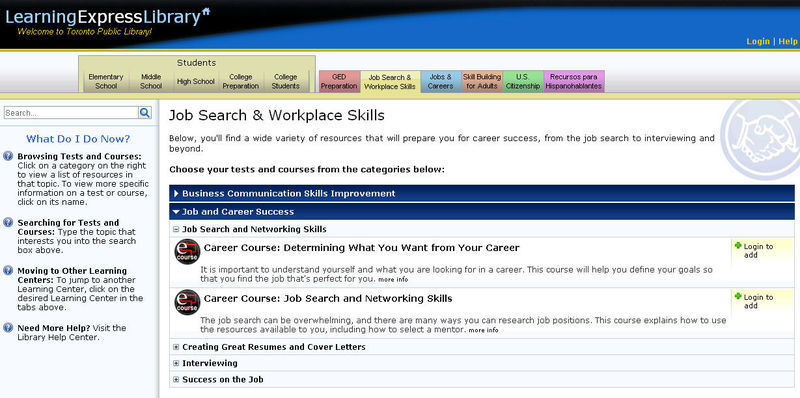
Clicking on Job Search and Workplace Skills brings you to this menu:
Business Communication Skills Improvement
Job and Career Success
What if I Can't Finish the Test or Tutorial in Two Hours?
Your test, with the information you have entered, will be saved under "My Centre." Click on the button Finish laterat the top of your screen. If you are doing a tutorial, simply exit the program and your tutorial, with your answers to that point, will be automatically saved under "My Centre."
"My Centre" is created when you register your username and password with the LearningExpressLibrary.
When you are ready to go back to the tutorial or test, click on "My Centre," select the test or tutorial title you were working on, and continue.
Visit the LearningExpressLibrary now by clicking on this link
(Please note that this link takes you to the Toronto Public Library login screen where you must enter your Library card and PIN numbers before proceeding to the LearningExpressLIbrary)
How do I access the Learning Express Library from the Toronto Public Library's website?
- Go to the Library's website at http://www.torontopubliclibrary.ca
- Click on the heading Find Articles in Magazines, Newspapers and More… (located on the menu bar on the left side of the page).
- Then select the heading List of Databases.
- Choose LearningExpressLibrary from the alphabetical list.
If you need help with using LearningExpressLibrary, or any other Toronto Public Library service, please call your local library branch for assistance.
Comments