Business Writing – Learn Online
Writing well is an important skill in most workplaces. When you are job hunting, it becomes an essential skill. Employers meet your resume before they meet you in person and you need to present yourself clearly and effectively.
If you want to write better resumes, e-mails or reports, check Toronto Public Library's new online writing course. There are sections on resumes and cover letters (Applying for a Job), emailing and report writing. The section on "case studies" has sample emails and letters.
Each topic has support materials for the exercises – model answers, study sheets, MP3 downloads and more. I thought the sections which emphasize the differences between formal and informal language would be useful for those who are new to business writing.
You can search for Business Writing in our new website. Just type in the title in the search box and click on the orange Access Online button in the record. You can also get to Business Writing through our pathfinder for jobs and careers It is featured in the right-hand column in the Market Yourself section.
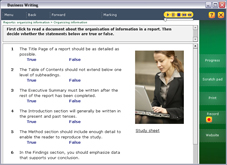
Or just click on the screen shot below.
You will need a Toronto Public Library site to use this premium content from home.
How to use Business Writing
There are different kinds of exercises in Business Writing. Here are the Help tips for completing the exercises.
- Gapfill: Click on the underlined gaps and type your answer. When you have finished, either press Enter to go to the next gap, or click on another gap with the mouse.
- Multiple choice: Click on the options next to a question to choose your answer. Click on any other option in the same question to change your mind.
- Dropdown: Click on the underlined gap (next to the little arrow). Select the correct answer from the list.
- Proofreading: Click on any word(s) that you think are wrong. You may be asked to correct the mistakes. If you click in a place where there is no mistake you will lose a mark.
- Target spotting: Follow the instructions to click on words in the text. As you click on each word you will get some feedback.
- Text reconstruction: Click in the box at the top of the screen and type a word that you think is in the text. Press Enter or click "Guess". If you are right, the word will appear in the text everywhere that it is used. The statistics list on the right will show you how many times the word was used.
- Drag and drop: Click on one of the words that the exercise says to drag, keep the mouse down and drag to a gap. When the mouse cursor is over the gap let go. You can drag a word many times so if you change your mind, just drag another word over the wrong one.
Tips:
Be sure to navigate the content of Business Writing using the Home and Back button in the website.
The site will remember your progress if you use the same login (same library card).
Hold down the CTRL key on your keyboard to get a dictionary definition for any word on the screen. In some exercises, holding down the CTRL key when you click on an answer or gap will give you a hint.
In some exercises, you can see feedback after marking by clicking the Feedback button or by clicking on the answers.
When a sound, animation or video is playing, you can pause or rewind it by clicking on the media controller on the screen.
Need more help? Ask staff in your local library branch.
Comments