Digitized Toronto Newspapers: Globe and Mail and Toronto Star
Getting Started
August 2015 – The Obituaries tab has been deleted from both databases.
The ProQuest Historical Newspapers Toronto Star and the Globe and Mail are two databases that allow users to search for words and phrases in complete issues of these newspapers. These databases display images of the newspapers as they were originally published, including news stories, editorials, photographs, advertisements, classifieds, and birth, marriage, and death notices.
Coverage: (usually stops at 3 years before the current year)
Globe and Mail starts in 1844; Toronto Star starts in 1894
Access to the databases from outside the library
Note: Valid Toronto Public Library card required. (Many Ontario Public Libraries also subscribe to these two databases)
- Select A – Z list of all databases on the Toronto Public Library website
- Scroll down and choose either Globe and Mail or Toronto Star
- Click the "Access Online" button.
- Sign in using your Toronto Public Library card and PIN number
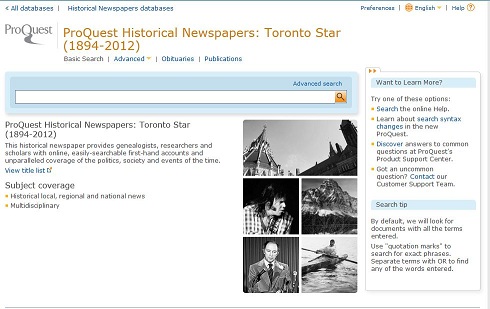
Searching
In the ProQuest search platform, the indexing is different for the Globe and Mail and the Toronto Star. The Globe is more detailed than the Star. Searching by document type is only available with the Globe and the page viewing options are more limited in the Star than the Globe. The Search Results page in the Globe is article specific and gives the title of the article. Only the page number is displayed in the Star search. Obituary/death notices searching, especially for a common name, can be difficult in both databases, despite the search tab labelled "Obituaries". (See separate searching instructions for obituaries).
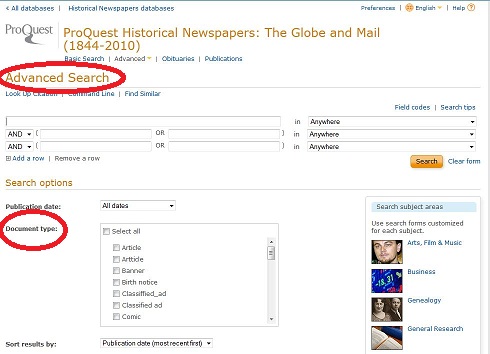
- Click on "Advanced Search"
- Enter search term(s) e.g. Hurricane Hazel or Heintzman piano
- Enter date or date range e.g. 1954
- For the Globe and Mail, select Document Type e.g. " Front page article" or "Display ad"
Obituary Searching
The "Obituaries" tab can be useful IF you are looking within a very narrow date range or for an uncommon name, because there is no reliable way to search for first and last names together. Enclosing within quotation marks does not work.
Since especially prominent people are more likely to have articles written about them rather than specific death notices or obituaries, it may be better to use "Advanced Search".
Death notices in the Globe can be searched by doing the following, also using "Advanced Search".
- Enter Last name in the first search box
- Choose a date range
- Under Document Type, select Obituary
In theory, if you first select the subject box on the right "Genealogy" before entering a name, it will search both the Globe and the Star simultaneously. However, in practice the vast majority of the results are from the Globe. It's best to try the Star separately.
Viewing the results of a search

- Results will appear most recent article first. (To change this, go to "sort results by" on the right side of the screen)
- Clicking on a result brings up a PDF version of the article [Globe] or the page [Star].
- Search terms should be highlighted. If not, try Ctrl-F (Find). (not always successful)
- From the PDF article in the Globe, there are additional options to see the entire newspaper page, "Page view PDF" or "Page view clickable". The "Page view" options allow browsing of the pages of the Globe. The Star also has "next page/previous page" options in the upper right of the newpaper page.
- Also at the top right of the screen are the commands to go to the Next search results, start a New Search, or go Back to results.
- To change the size of the image use the Adobe Toolbar and Click the + or – buttons.
Printing or Saving
To print a specific article (Globe only) or the whole newspaper page to fit on one piece of paper
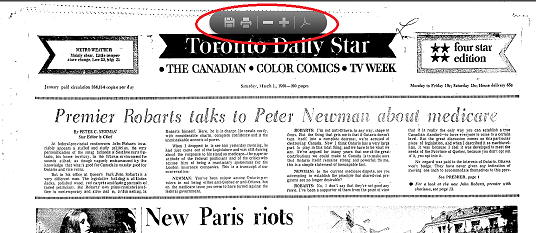
- Click on the printer icon
 in the Adobe toolbar
 - Cick Print
- Printout will also include the details of newspaper title, date and page number.
To save a page to a flash drive/memory stick (PDF format)
- insert a memory stick into the computer
- click the save
 or download icon in the Adobe toolbar
 - in the "save" box select the correct drive name for the flash drive
- give the file a meaningful name
- click "Save"
To copy or select part of a page
- From the Search Results, open the newspaper page in "PDF"
- When the page appears, click "Open in PDF Reader"
- Save as a PDF

- Open the saved PDF
- Click Edit on the Adobe Toolbar
- Scroll down and click "Take a Snapshot"

- Outline the desired article. It will be " copied to the clipboard" or "selected area has been copied"
- Click the printer icon
 on the Adobe Toolbar to print
To Save the selected item
- Use Copy command on the Edit menu of Adobe and Paste the selection e.g. to a Word document and then
- Save that document
Help
Try the "search tips" available from ProQuest on the upper right of the Search Screen.
Toronto Public Library contacts:
Answerline: 416-393-7131
answerline@torontopubliclibrary.ca
Humanitites and Social Sciences Department, Toronto Reference Library 416-393-7175
27 thoughts on “Digitized Toronto Newspapers: Globe and Mail and Toronto Star”
The digitized historic newspapers are a real plus for family history buffs–I use these two databases all the time! I find the search is not very reliable, unfortunately, but if I have a date to work around browsing is very successful. Would the library please consider subscribing to more historic newspaper collections, especially from Canada (how about Montreal?) and the United States? I would love more databases supporting genealogy at TPL. I sometimes go to the Canadiana department to used their microfilmed collections but digitization is just allows so much more access.
Thank you for your comments. If you are looking for Montreal records, please try our QuebecRecords database, available at North York Central and Toronto Reference libraries. Besides parish registers, it has recent newspaper obituaries and marriages and deaths up to 1996.
Some Ontario newspapers have been digitized at http://ink.ourontario.ca/ You can find links to other newspapers either digitized or indexed through our Recommended Websites-Genealogy-Newspaper Records at http://www.torontopubliclibrary.ca/search.jsp?N=37868+4293015065
PS Toronto Star obituaries for approximately the last 5 years can be searched at http://www.legacy.com/obituaries/thestar/ Hope this helps.
With any historical record, you have to understand that searching is only as good as the document microfilmed. The ink on early papers ran, the papers used might not have been in pristine condition, etc. Add to that, wording chosen for headlines, news and announcements were different to what we use now.
If I’m looking for a news story and I don’t know the date, I look for a similar incident for which I do know the date. e.g., a fire. When I find the headline, I take note of the words used and then I go back and search for the incident I’m researching using those words.
I also search both papers because sometimes the copy microfilmed was clearer with one than the other.
And finally, once I’ve found the article in one paper, then I use the date to browse other papers, both online and on microfilm, like the Telegram or Toronto World.
I have commented in the past at the degradation of the quality of the images since pro quest has taken the data base, I have been working with their technical staff trying to improve legibility, little progress to report. I have noticed of late that your access page for this has a note to the effect that improvements are coming, how is that going, I hope well as my research has slowed drastically
also the ability to snapshot or copy has been lost which make compilation and note taking much more tedious please advise.
thank you
barry slater
I am not from toronto and do not have a toronto library card how can i access these images?? I tried using my city library card but i wouldn’t accept it. I am a genealogy buff and have alot of family from down there id like to research
oops my city library card wasn’t accepted by the site
Though you do need a Toronto Public Library card to use the databases on our site, do try your local library. Many Ontario public libraries would have these newspaper databases, as might university and college libraries both in Ontario and elsewhere. Good luck!
Thanks for your excellent research tip! Knowing what words might have been in the headline is very important. For instance, an advanced search in the Globe for “Conflagration” in Document Title (choose DT from the in “anywhere” box) shows only 5 results for after 1958, but nearly 400 results for before 1930! Language does indeed matter.
Thanks for your comments. Regarding the ability to snapshot or copy, have you tried the following? Open up the page in PDF view and Save it as a PDF. Then open that document. You should then get the Adobe toolbar . Click on Edit and scroll down until you see ” Take a snapshot” which will allow you to select and copy the part of the page you want.
Hello,
I’m a dual citizen and live in the U.S.
May I join the library and then use this database?
Thank you.
Bev
Hello Bev. Though Toronto Public Library does have a fee-based out of town membership, registration for that card must be done in person. We do have a fee-based research service, called Intellisearch which might be of assistance. For details see http://www.torontopubliclibrary.ca/intellisearch/
If you are near the Ontario border, you could also see if a nearby Ontario community’s public library subscribes to these databases. You might also check academic libraries in your own area. Hope this helps.
So how can one living in Europe, with no possibility to travel to Toronto, access the Globe and Mail database for research purposes?
And no, my local library does not have access.
It’s a bit odd in this day and age with the internet connecting everything, to allow restrictions being such that it is virtually impossible to gain access if not living in Toronto, Canada.
Best regards
Hello Theo. While gratifying to know that our research advice is being read in Europe, I regret having to disappoint you. The library pays for these digitized newspaper subscriptions and often there are conditions that limit access to library members. We do have a fee-based research service, called Intellisearch which might be of assistance. For details see http://www.torontopubliclibrary.ca/intellisearch/
You might also want to go the the Globe directly via some kind of subscription at http://www.theglobeandmail.com/static/globeproducts/globe-subscriptions.html
You can also search birth and deaths back to about 1998 at e.g. http://v1.theglobeandmail.com/life/deaths/
You mention that your local library does not have the Globe and Mail. However, should it be an option for you, an academic library might have it, either in microfilm or as part of a database with other newspapers. Good luck.
Any suggestions for editing G&M images? Many of Proquest’s scans are such poor quality that they need tweaking – usually brightening. When I attempt this in Word, it changes my excerpted column to a distorted full newspaper page. I’ve been heading to the Archives of Ontario for good G&M images (particularly for the out-of-focus images), but it would be nice to do it at home using the service Toronto taxpayers have paid for through TPL.
Thank you for your comments. Unfortunately, poor quality images are a known issue with the Globe and TPL has been raising this problem with the vendor, Proquest. It is out of the library’s control.
Meanwhile an alternative is to visit a library that carries the Globe on microfilm, such as North York Central or Toronto Reference Library. You may also be able to improve PDF images, according to some users, if you have access to something like Photoshop.
https://forums.adobe.com/thread/1010936
Where can’the online database for the Toronto Telegram be accessed?
Unfortunately the Telegram (1876-1971) has never been digitized and is not online, except for some Telegram photos which have been digitized by York University. See details of Telegram availability in this blog post:
http://deantiquate.blog.yorku.ca/2012/05/13/torontotelegram_preservedwithhelpofcca/
Toronto Reference Library has a complete set of Telegram microfilm.
I am handicapped, and unfortunately can’t get to libraries that have access to these files. Is there a way that I can get access from my home online?
Good luck, indeed.
The Toronto Public Library simply doesn’t care about making its colletion accessible to people outside of Toronto.
Research advice? Yeah, while many libraries make their collections available to anyone in the world, (for example, Trove in Australia, or Papers Past in New Zealand), the Toronto Public Library prefers to play games and to finance its publicly funded collection with Proquest, (a subscription-paid collection, which claims copyright upon its products, despite the fact that it does this with everything, including public domain documents). Toronto Public Library simply doesn’t care about researchers outside of Toronto.
Maybe, the Toronto Public Library shouldn’t be giving this material to Proquest.
I used Proquest to get copies of the New York Times, today, and I’ve noted that eight of some thrity articles simply were not properly converted into Adobe Acrobat files images.
Proquest is only interested in making a profit; and, the Toronto Public Library simply does not care about problems with the lack of quality control provided regarding Proquest’s services, (or lack of service).
It’s a very poor excuse, when the library and provincial government show nothing but contempt to researchers seeking access to public domain copies of newspapers in their libraries. All that they care about is their profit and paycheques.
The Toronto Public Library provides the same level of non-service to the handicapped as it does to anyone else outside of the City of Toronto. Excuses, and pass the buck with a “good luck.
You might ask your local library for an interlibrary loan of microfilm copies”; but, I would warn you in advance that, even if your library does make an effort, it’s not very speedy and probably will include someone asking you to pay some fee for their expenses. In more than twenty years, I have not been able to get more than two books via interlibrary loan in Ontario, (via the Kingston Public Library).
There are plenty of provincial and federal grants to plant trees in celebration of “150 years of Canada”; but, a major public library cannot find it worthwhile to make its newspaper heritage available to the Canadian public. Makes one wonder what the priorities are for Wynne and Trudeau; but, for the Toronto Public Library, the first priority of its staff are their paycheques.
I attempted to access the archive for information on a relative who emigrated from Scotland to Canada but am unable to get a Toronto library card (or any other Canadian card!) as I live in,yep,Scotland. Restricting this kind of information to Toronto residents is to say the least ,disappointing. Do Canadian residents have this kind of difficulty accessing UK public archives?
Hello, Geoff
The library pays for these digitized newspaper subscriptions, which are provided by an external company, Proquest, and often there are conditions that limit access to library members. We do have a fee-based research service, called Intellisearch which might be of assistance. For details see http://www.torontopubliclibrary.ca/intellisearch/
Where do you find microfilm of the Toronto Telegram?
The Toronto Telegram microfilm is located in the Toronto Star Newspaper Room, on the basement level of Toronto Reference Library.
https://www.torontopubliclibrary.ca/torontoreferencelibrary/
Is anyone else having issues accessing the Toronto Star and Globe and Mail newspaper archive databases? I just got a new library card today and tried logging in with the card number and PIN multiple times only to get to a page with this message (even tried logging in on that page to no avail):
“This is loginbu.htm from the docs subdirectory. This file is sent if the username/password provided is not valid.
That username or password was incorrect. Please try again.
Please enter your username:
Please enter your password:”