Save Items and Make Lists on the Library Website
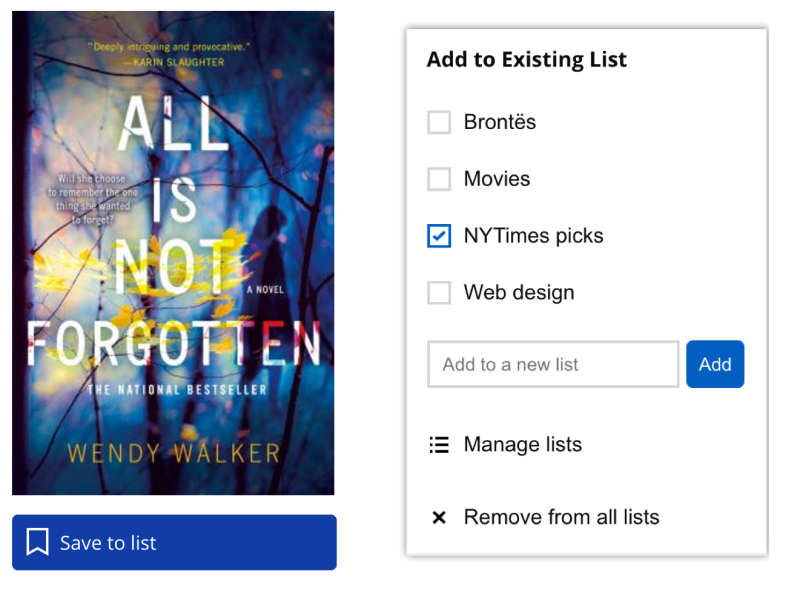
Good news: you can now save the books and other items you find while searching or browsing the TPL website.
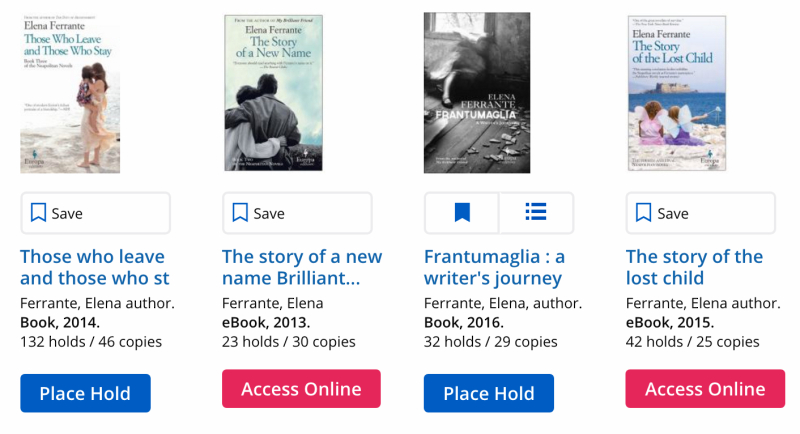
Just click the Save button beside any item that interests you. You’ll be prompted to sign in the first time you do it. After that, save more items with a single click.
If you’re signed in to the website, you’ll be able to see at a glance which items you’ve already saved.
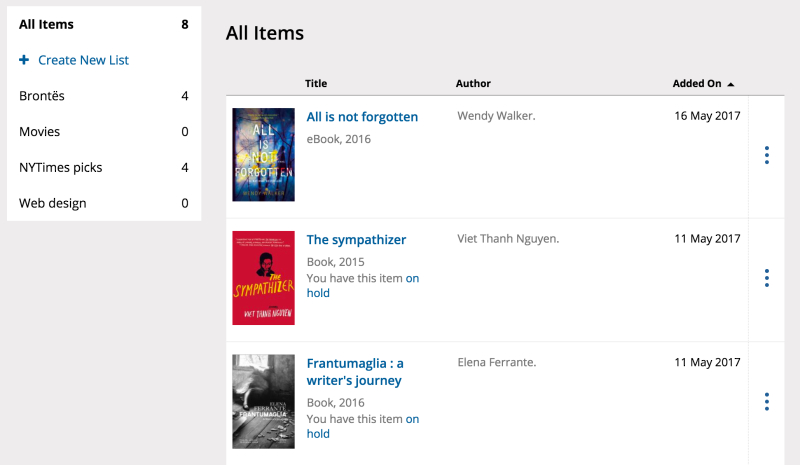
You can organize your saved items into lists and view and manage them in the new version of your account. Create as many lists as you like, and name them whatever you want!
Ready to get started? Search or browse the library website.
62 thoughts on “Save Items and Make Lists on the Library Website”
From the list, are patrons able to place the entire list on hold, or do they have to open each title up and place hold?
I have been playing with the lists for a couple of weeks, since I accidentally stumbled across the feature. I love them! I’m using them for keeping track of non-holdable books, so that I can look at those books when I am at the Reference Library (previously I tried to keep track by printing the listing, but those pages were never with me when I had some time and was near Yonge & Bloor)…
I am wondering if there are limits — you say “Create as many lists as you like” — is the number of lists truly without limit? And I’m also wondering if there is a limit on the number of books (or other items) which can be added to the lists?
Many thanks for a great feature!
What’s the difference between this and just putting an item on hold and setting it to inactive to “save an item”? Who is actually going to “make lists” here? This isn’t Pinterest. Why spend resources on a useless feature when there are more pressing issues. The system auto-logging you out makes services like Naxos all but useless.
Hi Joe,
You’re right that many people were using inactive holds as a substitute for lists. This wasn’t an ideal situation for a few reasons – there’s a limit to the number of holds you can have at one time; holds can only be placed on holdable items (e.g., no new feature DVDs or reference items); and the inactive holds often made the waiting list for an item appear much longer than it actually was. List functionality has been one of the most frequently-requested new website features for many years now.
You mention your frustration with session timeouts, and I agree that this has been a MAJOR pain point. The session timeout on the TPL website is becoming a thing of the past as we transition over to the new version of the account, but you may still encounter timeouts when using third-party services if they are imposed on the vendor’s site. I’ll follow up and find out what the situation is with Naxos.
Hi Stephanie,
You have to place each hold individually. We’re working on making this more seamless so you can place holds from within a list without having to click through to each item record. This option should be available very soon.
Hi Leaside Reader,
I’m glad to hear you’re finding the lists useful. There is a technical upper limit on data storage, but it isn’t measured in number of items or lists. Our intention is to have no limit, and we’ll be making adjustments in the near future to ensure you don’t encounter any restrictions.
Hi Joe! I don’t know about you, but I have a word document with a LONG list of books. Now when I hear of a book to add to my reading list, I can do it all on this website instead of consulting my word document every time. This will be so handy! If I happen to forget what one of the books is about I can just click through to the description! Although I see your point about the inactive setting. I never thought to do that before.
Hi,
I appreciate anyone’s help with using the list.
Firstly, it is a very useful feature, ‘wish list’ existed in the previous edition of on-line catalog, some 10-15 years ago. I am happy to see it again in a new format.
Secondly, I trying to put the items for different lists, and I have mistakenly created the same list twice and I don’t know how to delete one of them. Thanks for your help in advance.
Regards/Mark
Sirsi Dynix software usually allows for a way to print lists – wondering why your version does not facilitate emailing or printing saved lists?
When I put a Saved item on a List that I created, it stays on the “All Items” page. Is there any way to Move an item to a list, so that it no longer stays on the All Items list? It’s confusing to have the same item in two places. And the items on the All Items list don’t indicate whether they also exist on a separate List, or not, unless you click on the options link to the right of the item.
Any chance we can get the publishers showing again in this new catalogue? I like to read Canadian books when I can and that is one way I find them.
Hi Mark,
We’re going to post some more detailed help information about the lists soon. In the meantime, please contact us, and someone will help you with the problem you’re having.
Hi Lesley,
We’re not using SirsiDynix’s product for this functionality. A print-friendly layout and options for sharing lists will be coming in the near future.
Hi Charlie,
You can search by publisher from the Advanced Search screen.
Thanks for this new list feature. To add to Sandra’s reply to Joe: I’ve been using the holds feature as a list of books I want to read in future for quite awhile. I’ve repeatedly have books expire off my hold list. Assuming items we put on our list won’t expire after a certain deadline, this is an improvement over using the holds feature as a list of items you are interested in (and may not get to for quite a while.)
Hi Maureen,
That’s right – items saved to lists will not expire.
You can also see the publisher information on a book under the “more details” area.
good work
Thank you but I don’t want to have to remember all the Cdn publishers in order to search by them, I want to see it listed as part of the record. And Evan, in the new catalogue, I do NOT see the publisher listed.
Sorry, Charlie, I think I misunderstood your original comment. The publisher is displayed under “Details” on the book pages, so you do have to make an extra click to see that information.
Not sure why but I can’t see my DVD list. Does it have to be holdable/available to be on list?
Hi Sara,
The status of items (holdable, available) has no impact on whether or not they can be saved to lists. I think there may have been a temporary technical issue when you were trying to view your saved items. Please let us know if you encounter problems again.
I was just telling someone yesterday that I wished the TPL website has a “save this title” or “remember this book” feature – and it appeared! Thanks for making my wish come true.
The new list feature is a good idea. I’m already using the Wish Lists on Indigo and Amazon to keep track of books I want to read since I am near my limit with the library Hold list.
Just commenting to say I absolutely love this new feature! I have so many lists of to-read books lying around and it’ll be great to be able to see them all on my TPL account!
Thank you so much for this feature! I was using a combination of Amazon wishlists and a Word document to keep track of my reading lists, and now I can centralize it all here instead. Very convenient! Thank you!
I wish to up-vote this question.
Great work on adding lists, very useful feature.
I’ve been saving slips when want to check out the book again at later times.
if we can also have keychain barcode to checkout items, like Burlington library has it 🙂 that would be perfect!
Hi Alphonse and biljana,
Good point. We’re adding indicators showing which list(s) items are on. This change will be available shortly.
Is there a way that i can create a list in a specific order? I’d like to list the books based on their published date – so i can read them in that specific order?
Hi Bev,
Currently, lists can be sorted by title, author, or the date when you added each item. We don’t have publication date sort, but that’s something we could consider adding in future. Thank you very much for the feedback.
Tothe person who was concerned about items falling off their ‘holds’ lIST.
yOU CAN ADJUST THE EXPIRY DATE TO WHATEVER YOU WANT. jUST GO TO THE BOTTOM OF THE LIST AND CHANGE THE DATE. yOU CAN TICK OFF ALL YOUR ITEMS TO HAVE THEIR EXPIRY DATE CHANGED AT ONCE. yOU CAN MAKE IT 20 YEASRS IF YOU WANT! tHE ONLY THING IS THAT YOU HAVE TO REMEMBER TO DO THIS ONCE A YEAR OR SO TO MAKE SURE THAT NEW HOLDS ARE INCLUDED IN YOUR DESIREC EXPIRY DATTE. I DO THIS EVERY January – AND I HAVE IT ON MY CALENDAR TO DO IT.
I am hesitant to use this “Lists” format because there have been so many glitches with the library’s website, times when the site is not working (and thus lists are not accessible, I presume), etc. I am terrified of losing my lists. I have hundreds, if not thousands, of items on various lists on my own computer and it would take forever to switch them all to yours. Also, I like to add my own comments to the items on my list, especially the Reference items, and I presume there is no place to do that. Also, there are things that are important to me and so I have my own format. It is often tedious to collect the information I need from various places on the page of a given item. Must click to open a section, now with most recent format must look to left side of page for some things, and so on. Whoever designed this is not a heavy user.
There are two additional issues. First, if you have something on your “holds” list, and then the library loses or throws out its last copy, the item just disappears from your list without notification. I need to be able to retain all the items on the list even if the this library no longer carries them. I would move them to my ILL list. Unfortunately, the library has a habit of throwing out final copies of some books because they are worn, when they could often be repaired, which is very annoying as they are sometimes important books which can’t be re-ordered and a little glue would fix the situation. I used to send notes when I returned books asking that they be repaired, but I discovered that this just was a signal to the library to throw them out, so now I keep my mouth shut and they are not thrown out as rapidly.
Second problem: From time to time, items vanish from the catalogue even when the item still exists. I would not want this to also happen to items on my precious lists. Please don’t tell me this is not true. I know it’s true as I’ve seen it happen several times. I am a heavy user of library services, so I get to see more things than the average person perhaps. This has happened to me when I had it checked out an item personally and it was not overdue. If you don’t believe me, ask around. Some librarians are aware of this issue, but not all. It happened to me again a few months ago so I have no reason to think it’s been resolved.
So, I will wait a while, perhaps indefinitely, before I use the List system, although it’s a great idea in principle.
Please let us know when there are updates such as unlimited size to lists.
Also, can you add a section for Interlibrary Loan Lists?
Is there a mechanism to download the list on the tpl site to one’s own computer? If so, I could use it as temporary storage until I can move it to my existing lists.
Finally, can you change the font for these replies to something that is easier to read, for those of us with limited vision? Courier is terrible.
thx
I really appreciate this new feature. As someone who has been using ‘inactive hold’ to organize my books, this really helps to de-clutter lists, prioritize choices, and replace word files on my computer and paper on my desk! There are still a few glitches but on the whole this is a wonderful addition for library users. Thanks.
I’ve saved some items from the new DVD pages to my newly created saved list. They are not currently holdable. How will I know when that date comes? Then just how do I move them to my holds list in order to access them?
Hi Marilyn,
The date when each DVD will become holdable is indicated on the item record page, which you can get to by clicking the link from your list. On the date when the DVD becomes holdable, a “Place Hold” link will appear alongside the item on your list page – clicking this link will place a hold for you.
In terms of how to keep track of the dates, that’s really up to you. Some library users are grouping DVDs that interest them into multiple saved lists, with the date the DVDs will become holdable as the name of the list.
I placed four items on my saved list and they disappeared. I can’t remember all of the items. Any chance of getting the list back?
Hi Ian,
Sorry to hear you’re having problems with your list. Could you please contact us with your library card number so we can investigate further?
Awesome feature. Now i’ll have an incentive to go thru aaaallllllllllll of the receipts I’ve collected over the past decade or so. Time to see how many books i’ve actually read.
Question, is there a way to export these lists?
Glad you are enjoying the lists! Currently you are not able to export your lists, but we are going to add that feature soon.
I love this feature! Thank you for adding it, as it’s so much easier than the “inactive holds”option. I also appreciate the ability to categorize the list.
Hi Anne,
Thanks for letting us know and so glad you are enjoying the lists!
Are you able to make lists from the items you already have on hold? I would like to have two lists for items already on hold so I can separate my books from DVD’s. Is the saved list function only to keep track of books you are interested in?
Hi Cynthia,
Yes, you are able to add items you have on hold to your lists. If you add an item on hold to one of you lists, it will indicate that you also have it on hold.
HI Margot,
Apologies, I did not explain myself correctly. Is there way to create lists within your Hold requests? I would like to split that up into two, one for books and one for DVD’s.
Unfortunately you can’t organize the items you have on hold by material type, or create lists within your holds. The only thing you could do is to create two lists in your saved items, e.g. “Books on Hold” and “DVDs on Hold” and add the items to the appropriate lists from your holds.
Thank you. NICE feature!
I’d like to be able to make a list of books that I want to check back and see if they are part of the collection yet. Sometimes I hear of a new book, then check the tpl collection — but it is not added ( yet) . I have to keep checking back periodically….typing in the title every time. I would love to somehow be able to click on my own list….
Are there any plans to let us put music CDs on lists? I see they’re not listed in the list of listable materials.
Hi Midtowner,
Was there a specific item you were unable to save? If so, please let us know. You should be able to add any item to your lists, with the exception of items in our Digital Archive. Sorry if this wasn’t clear from our post!
So, how does one move all their inactive holds to the Lists area?
I’m appreciating the new look of for account services, but…
The images of each cover makes any list much longer on-screen. Where I could see several items, now I can see only three.
How about a toggle to show or hide images?
is there any option to see the list of all books that i borrowed in last 12 months ?
Hi Sandra,
I’m trying to save more items to my list but I don’t see the “save” feature button under any items anymore. Is there a glitch on the website? Great idea by the way.
Hi Rachel,
There was a temporary issue with our website first thing this morning, and the “save” buttons weren’t showing up. Everything should be back to normal now.
I love this feature! Thank you for adding it. I just wanted to echo Bev’s comment – it would be amazing to be able to order items by publication date, or even manually. Often long series of publications (e.g. comics) have lots of volumes, but the titles of individual volumes aren’t necessarily consistent so ordering by title is pretty random.
Publication date ordering might fix this, unless the library ends up with a mix of newer and older editions. This is a really minor nitpick of course, just having the feature is great.
Joe, there are other reasons for lists!! I have often wanted to make my own list of favourites linked to library holdings, to return to when wanted or to remind myself if I forget the details when I want to recommend to friends. So making a list will suit my purposes very well.
Great idea, as I’ve been using Amazon wish lists for years. Sometimes I also wish I could check to see which books I’ve borrowed from the library over the years, as I don’t always remember if I’ve previously read something!
if you save a book does it mean that it is on hold?
Hi Aneeka,
No, saving an item is not the same as placing it on hold. With a hold, you are requesting that the item be sent to your pickup branch or joining the waiting list if other people already have holds on it.
Saved lists are an additional way to keep track of items. You can use lists to save as many items as you want (whereas the maximum number of holds is 100), organize your items on multiple lists, save non-holdable items, or keep a record of items both before and after you borrow them.
Hope this helps.
Hello Moderator,
I’m new to the library and first time finding this feature on the website.
I wonder, does the TPL have a list of books that I’ve already borrowed, and if so, how do I retrieve it?
Is it something I can generate and / or save using the List feature?
Thanks for your service!
Is it no longer possible to ‘save’ items, or add to lists?
Hi Kevin,
Yes, it is still possible. Is there a specific item that you’re not seeing this option for, or is it everything? Are you on desktop or mobile?