Choosing an eReader – Review of the Amazon Kindle
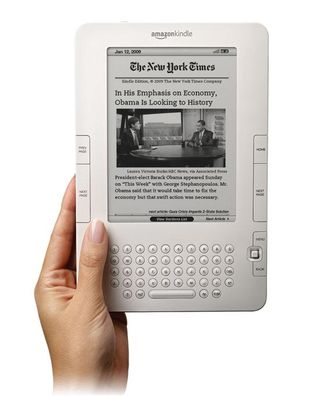
Amazon has recently made some improvements to the Kindle, including a new joystick that allows users to move the cursor around the text to select words and look up definitions at their leisure (the kindle will also say a word out loud for you, if you aren’t sure how to pronounce it). This also makes navigating newspapers much easier, as you can flip through headlines and jump to the desired article. Pushing down on the joystick also lists each newspaper section. As with the other e-readers, the text can be magnified to the desired size for easier reading.
Additionally, Kindle 2.0 also features unique text-to-speech capabilities that aren’t found on any other e-reader. This allows for items on the screen to be read out loud, a helpful tool for anyone with a visual or learning disability, or even ESL users. Speech can be played over the Kindle’s built-in speakers, or using stereo headphones. While this is a step in the right direction, users with visual disabilities should note that it is difficult to navigate the menus to activate this function without sighted help, and there are few controls to navigate through the text with this option enabled, aside from Play/Pause (so you cannot rewind through the text without difficulty). Additionally, the physical aspects of the device are small, somewhat cramped and can be hard to navigate for users with limited motion or significant visual disabilities. AccessWorld has an excellent review of the product from an accessibility standpoint here, which points out that, while potentially useful to users with low vision, the Kindle is not ideal for blind users.
The downside of the Kindle is that, while it does support the formats used by downloadable content from Toronto Public Library, it is not compatible with OverDrive, our download managing software, or Adobe Digital Editions, which is the software we use to manage digital rights on copyrighted materials (this is how your computer knows to delete a file after your one- or three-week loan period has elapsed). However, if you are comfortable purchasing your eBooks directly from Amazon, they can be uploaded very easily from your computer via USB, or downloaded directly from Amazon using the built-in wireless function. The kindle also features (limited) HTML browsing, and Facebook/Twitter access for passage-sharing.
Verdict: While the Kindle is definitely a cool device and unique in its use of text-to-speech functions, it is incompatible with e-content downloaded from TPL and still has a long way to go in terms of its accessibility functions.
10 thoughts on “Choosing an eReader – Review of the Amazon Kindle”
The Kobo isn’t from Barnes & Noble. BN does the Nook. So, both reviewed in next post?
Looking forward to your Kobo review. This works with TPL’s ePub books. http://www.torontopubliclibrary.ca/books-video-music/downloads-ebooks/
Sorry Helen, this was my mistake; I meant to type Borders instead of Barnes & Noble, thanks for checking the error. I will not be reviewing the Nook.
Is this review of the current generation Kindle? See amazon.com for the current device.
While other gadgets are able to read adobe format, Kindle can’t. It’s a big downside I guess. But Kindle is still great gadget for mobile person to read while traveling.
“While the Kindle is definitely a cool device and unique in its use of text-to-speech functions, it is incompatible with e-content downloaded from TPL and still has a long way to go in terms of its accessibility functions.” I agree 100% with you! Even though it’s incompatible, I still love my Kindle and wouldn’t trade it for anything!
I think it is a good idea to have the kindle say words or phrases out loud for hearing impaired people or if you do not know how to pronounce a word. I didn’t know you could connect headphones to them.
I really like the fact that the kindle will spell out words. This is a major feature and I am now thinking of buying this for my little brother. Do you guys think it’s a good idea, or should I look for something else?
Thx!
These kind of post are always inspiring and I prefer to read quality content so I happy to find many good point here in the post, writing is simply great, thank you for the post.
The new amazon kindle fire HD is more cheaper and it has attractive feature than previous series. Sorry my english is bad 🙂