How to request an eBook (plus a bonus staff pick)
The other day, a colleague recommended a book to me that wasn't available in eBook format. Concerned, I contacted our librarian, Maria, who gently reminded me that I could request the book myself if I wanted to. And so can you! Here's how:
In Overdrive, search for the title (or author, or subject) of the book you want. If we have it in the catalogue, great! If we don't, you'll see a screen that looks like this:
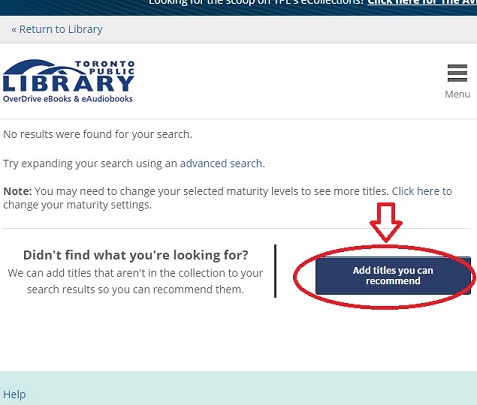
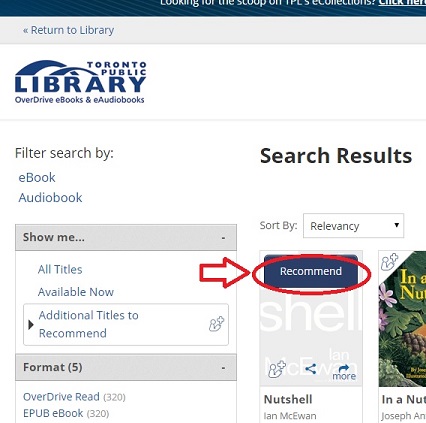
Click on the blue "Add Titles You Can Recommend" button. If there are any relevant titles in the collection, they will appear on the screen. If you hover your mouse over the item, a blue "Recommend" button appears.
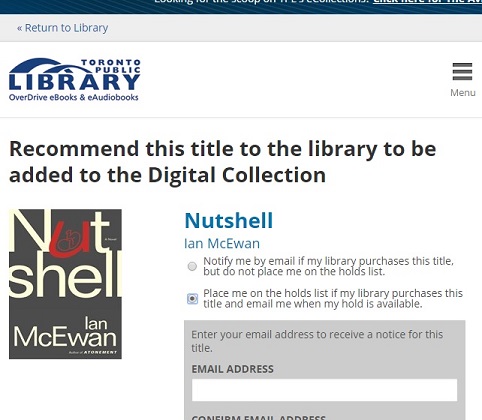
Click the button to recommend the book. Note that you have the option to be notified by email, and/or to have the book placed on hold for you automatically, when the item is purchased.
The catch: you can only recommend one book per month. This is to make sure that we can keep up with all of your requests (and that nobody abuses this tremendous power). So make your recommendations count!
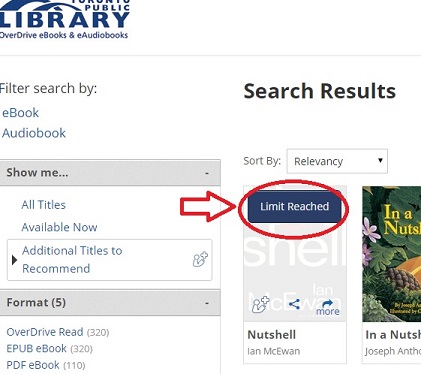
I overreached. 🙁
BONUS STAFF PICK:Here's the book that sent me off on this adventure of learning, as recommended by Alex K. from Accounting: Siberian Educationby Nicolai LilinThis book deals with "Russian" Siberian criminals and their way of life. Even though they could be viewed as unorthodox, they have strict laws which are followed and respect which is earned through their actions. (Note: As soon as we acquired Siberian Education, several people placed it on hold. Good call, Alex!)
|
 |
One thought on “How to request an eBook (plus a bonus staff pick)”
Boom!