Getting Started with Canadian Business and Current Affairs (CBCA)

Canadian Business and Current Affairs (CBCA) is a daily-updated Canadian periodical collection covering current events, business, science and technology, medicine, humanities and the arts. It includes millions of full-text articles and records from 1933 to current, in a mix of formats (or “source types”) including: scholarly journals, trade publications, magazines, newspapers, encyclopedia & reference works, dissertations & theses, conference papers & proceedings, radio and television transcripts, reports, books, working papers, news wire feeds, blogs, podcasts & websites.
How to Access CBCA
- Go to tpl.ca
- Enter ‘Canadian Business and Current Affairs’ or ‘CBCA’ in the search box
- Click on Access Online
- Enter your library card number and PIN and click on Sign In
- Click on Continue
How to search on CBCA
Enter terms in the search box, and press ENTER on your keyboard. Alternatively, you may click on the magnifying glass.
Note: Click on “Search tips” for comprehensive searching instructions.
Double quotation marks around search terms will bring up search results with that exact phrase.


- Select “Full text” to limit results to full-text articles.
- Select “Peer reviewed” to limit to scholarly articles evaluated by people in the same field.
Your search will bring up results appearing from different Source Types (books, trade journals, newspapers, magazines, scholarly journals, etc.)
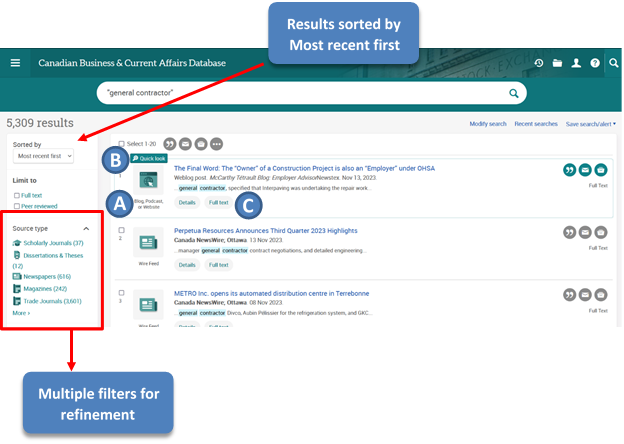
- Source Type – the type of publication an article was published in.
- e.g., Scholarly Journals, Books, Dissertations & Theses, Newspapers, Magazines, Trade Journals, etc.
- Quick Look – appears on each search where hovering your mouse over it. It opens a panel on the search results page where a user can see the full abstract & subject indexing (where applicable). In the panel, select “See full document” or click on the title of the document to navigate to the document page.
- Details, Abstract/Details, and Full Text – below each record you will see links to view indexing details, abstract details (where applicable), and a link to the full-text record.

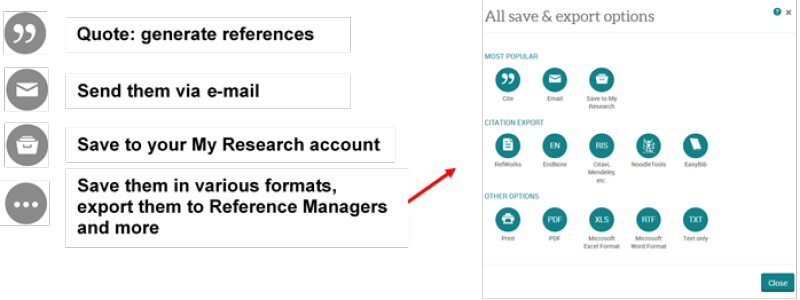
You can select the documents (check the box next to each item) to:

How to look up NAICS codes
NAICS or the North American Industry Classification System is an industry classification system developed by the statistical agencies of Canada, Mexico and the United States. NAICS codes help you efficiently identify an industry across a variety of data sources and databases.
North American Industry Classification System (NAICS) Canada 2022 Version 1.0
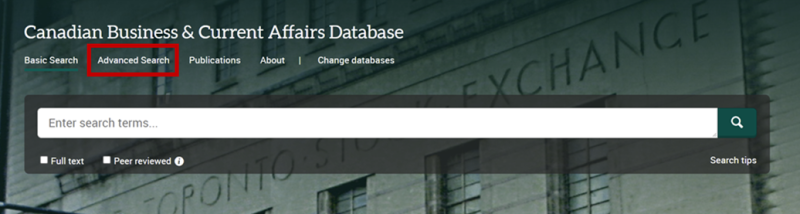
Click on Advanced Search
Click on Look up NAICS codes

Enter terms in the search box, or browse the list of NAICS codes.
Select a NAICS code by checking the box beside it.
Click on Add to Search.

Click on Search

For more CBCA advance searching techniques, click ProQuest LibGuides Platform Features Search Tips (e.g. search defaults, Boolean operators, truncation, wildcard, and range search, proximity operations, and operator precedence).
For more information or for help, please contact our Answerline service.
Posted: December 9, 2024
Comments