Getting Started with Mergent Market Atlas
Mergent Market Atlas provides information for investors on more than 50,000 U.S., Canadian and international public companies. Create custom reports for an individual company or compare reports of multiple companies.
How to Access Mergent Market Atlas
- Go to Mergent Market Atlas or (https://tpl.ca/resource/mergent-market-atlas/ )
- Select Mergent Market Atlas>> (the title)

- Enter your username or your 14-digit library card number (no spaces) and PIN/Password. Select Log in.
Company Search
Search by Company Name or Symbol
Search by company name/symbol in the search box on the home page or the search box at the top of every Market Atlas page. Select Home to return the homepage at any time.

For example: Let’s search for the company profile of Dollarama.
- Enter Dollarama in the search box and select Company Search.
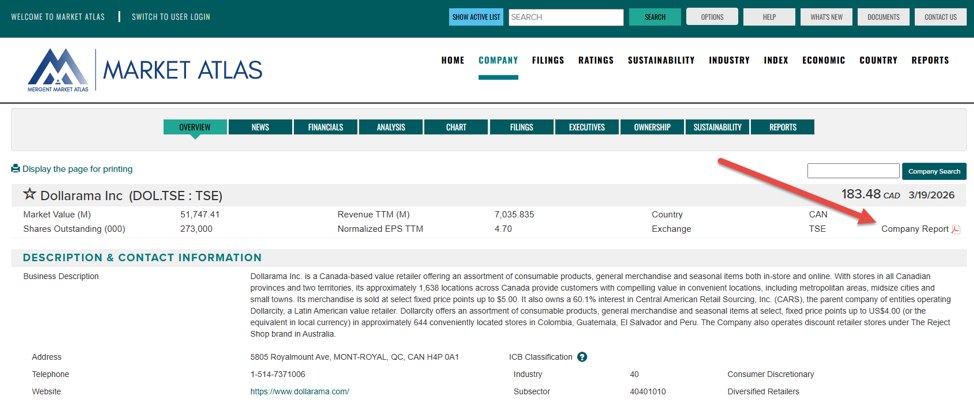
- In the search results, select Dollarama with the exchange ticker of DOL.TSE to view that company’s profile. Dollarama uses the ticker symbol DOL at the Toronto Stock Exchange (TSE).
- It is important to pay attention to the stock exchange to make sure you are selecting the correct company profile.

- Profiles for each company are organized in the following sections: overview, news, financials, analysis, chart, filings, executives, ownership, sustainability, and reports.
- Select Company Report to view and download the Mergent report for this company.
Search by Company Characteristics
Search for global companies based on characteristics of location, stock exchange, industry classification, revenue, number of employees or many other criteria.
For example: Let’s create a list public companies located in Canada, that are in the telecommunications industry and have a revenue of over 10 million:
- Under Country of Incorporation, select Canada.
- Under Industry Classification, leave ICB (Industry Classification Benchmark) selected.
- Under Sector/Industry, select Telecommunications
- Under Set search criteria for selected variables, leave Revenue as the Data Item and enter 100 under Minimum.
- Select View Results.

This will generate a list of companies. The list can be printed (A) or exported (B).

Compare companies
Compare two companies side by side examining raw financial data, financial ratios, business classification and descriptions.
For example: Let’s compare Bell Canada to Rogers
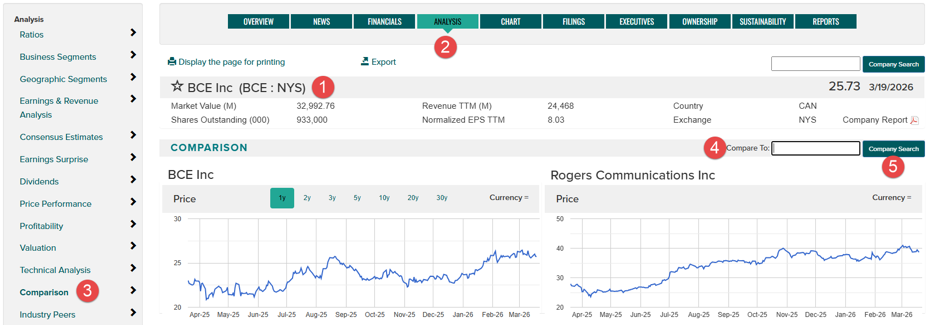
- Search for BCE:NYS and display the company profile.
- Select the Analysis tab to display that section of the company profile.
- Select Comparison in the column on the left
- Enter RCI:NYS in the box next to “Compare to:”
- Select Company Search
This report can be printed or exported.
Industry Search
Explore and compare key comparisons and other industry characteristics based on Industry Classification Benchmark (ICB) classifications.
TIP: A company’s industry is listed on the Overview screen in the company profile.
For example: Let’s view the characteristics of the Telecommunications industry
- Select Industry in the menu bar.
- Select Characteristics
- Select the drop-down to display the list of industry groups and select Telecommunications

For related resources, have a look at Financial Post (FP) Advisor, Mergent Intellect, MarketLine and Value Line.
Need more help?
- Select Help in the toolbar at the top of the page for detailed information on using Mergent Market Atlas
- Schedule a Book a Librarian appointment at a local branch.
- Contact Us with your questions.
Comments