Getting Started with Ancestry Library Edition
Ancestry Library Edition is a database of genealogical records and resources. It includes vital records (birth, marriage and death), census records, church records, immigration records (birth/death registrations), land and tax records, wills, selected military records, voting lists, and much more. In addition to the substantial collection of U.S. and Canadian records, it also includes UK and other international records.
The information you will be able to find in this e-resource will vary depending on where and when your ancestors lived, whether or not Ancestry has collected the relevant record collections and if the individual records survived long enough to be preserved.
How to Access Ancestry Library Edition
Access Ancestry Library Edition on a library computer or when signed into the library’s wireless network on a personal device. Access to this online service from outside library branches is not permitted.
- Go to Ancestry Library Edition or https://tpl.ca/resource/ancestry-library-edition/
- Select Ancestry Library Edition >> (the title)

- Start searching.
Please note:
If you are having trouble accessing Ancestry Library Edition using the Safari browser on an Apple device, you will need to turn off iCloud Private Relay to temporarily allow the website to see the IP address used by your device. Another option is to use a different web browser such as Chrome or Firefox.
Searching Ancestry Library Edition
General Search
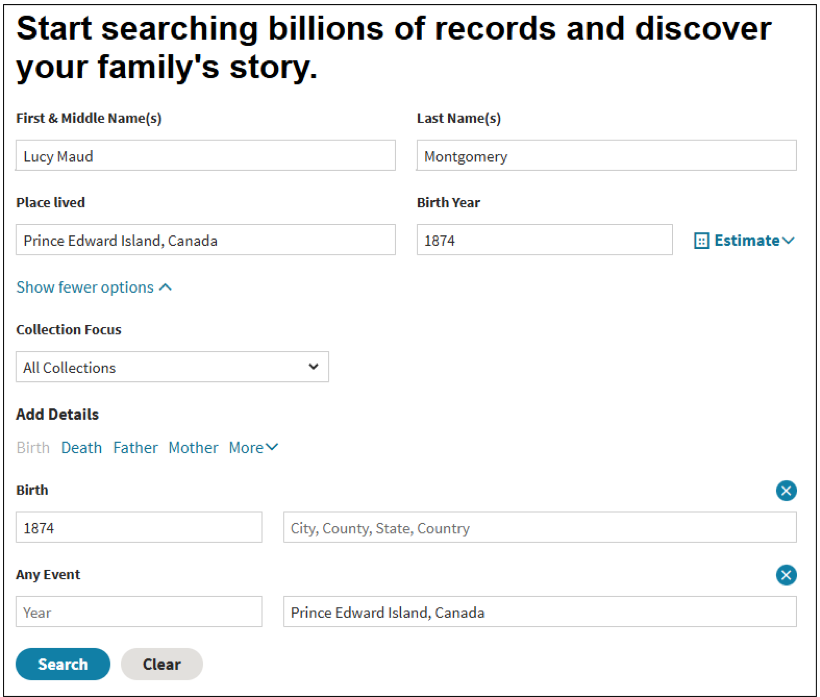
A general search on Ancestry does not limit the search to any one particular record set. Let’s use a general search to find records for Canadian author Lucy Maud Montgomery.
- In the search boxes for First & Middle Name(s) and Last Name(s), type in “Lucy Maud” and “Montgomery” respectively.
- In the search box for Place lived, type in “Prince Edward Island, Canada”
- In the search box for Birth Year, type in “1874”
- Click on the Search button.
Search results
The search results are organized into three tabs – People, Records and Photos. Not all search results will pertain to the person we are researching.
In the records tab, the essential information for each record is displayed. To see more information, select the title (1901 Census of Canada) or View records.

Ancestry provides any additional information transcribed from the record in the detail page.
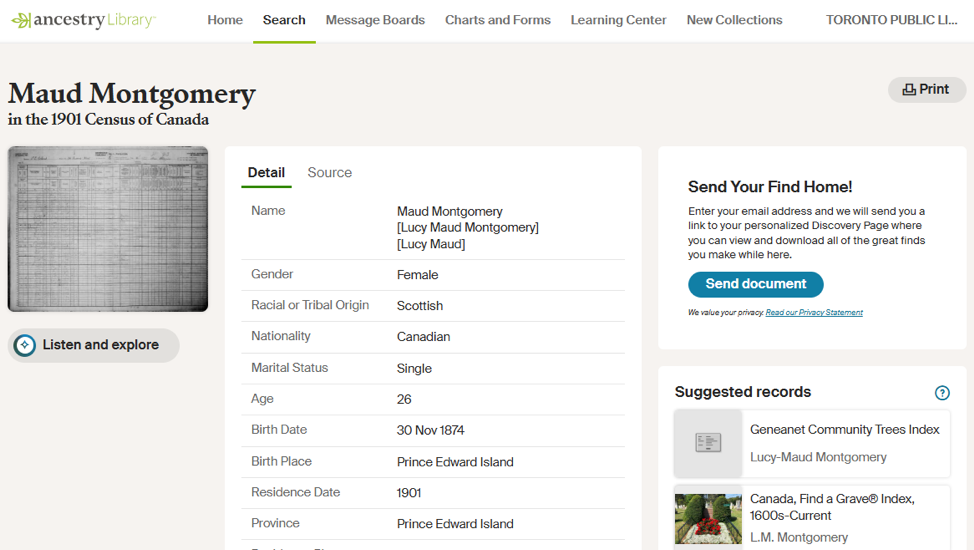
Select the thumbnail on the left side to view the image of the record.
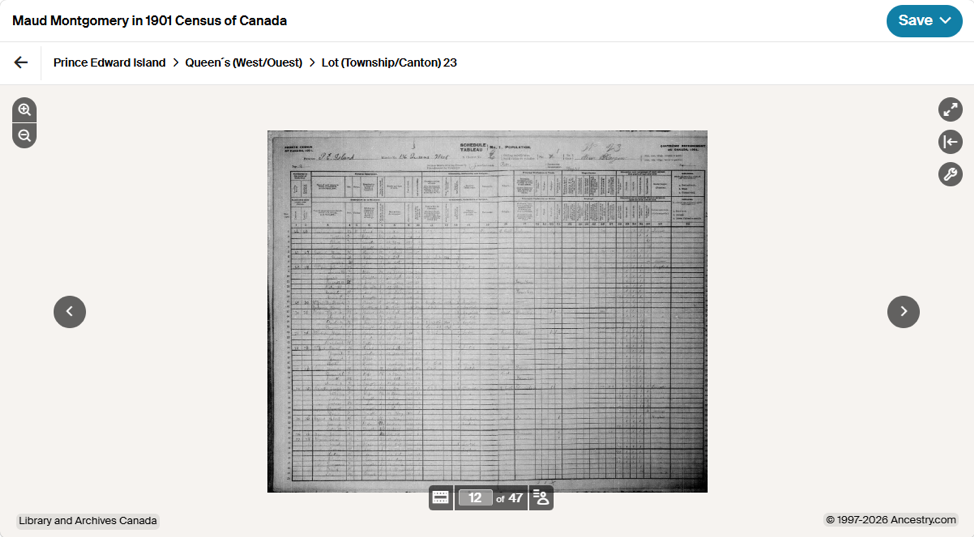
Using the Image Viewer
- Use the magnifying glass icons in the upper left corner to zoom in and out of the image.
- In the upper right corner are more tools. They are full screen, the information panel and tool menu. Select the tool menu to see options for printing, downloading and changing the image display (rotate, flip).
- Use the arrows to the sides of the images to view other images on this filmstrip.
- Below the image, select the Toggle filmstrip icon to display the filmstrip for this record. The numbers indicate the number of the current image and the total number of images available.
- Select Toggle index panel to see a list of other people included in this record.
Saving records
- Click the Save button at the top right
- Select Send image home or Save to this computer.
Send image home requires providing Ancestry Library Edition with your email address. The service will send an email with a link to your personal Discovery Page where you can view and download the saved records.
If you select Save to this computer on a library computer, please use Save As and save to a USB drive. Another option is to select Download under the tool menu.
Help
- Searching on Ancestry at a Library or School by Ancestry Library Edition.
- Local History & Genealogy for information on the other resources and services available from Toronto Public Library.
- Visit the Humanities and Social Sciences Department of the Toronto Reference Library or the Society and Recreation Department of the North York Central Library and ask staff for assistance.
- Schedule a Book a Librarian appointment at a local branch.
- Contact us with your questions.
Comments