Learn Online with Lynda.com – Now Free for TPL Cardholders
The online learning platform Lynda.com is now available for free to Toronto Public Library customers. Lynda.com offers over 3,500 video tutorial courses led by industry experts on topics including:
- Computer programming and web and app development, from beginner to advanced levels
- Business software, marketing and communications, leadership and project management
- Graphic design, illustration, typography, logos and branding
- Multimedia, including photography, video and audio production and editing, animation, 3D modeling and game design
Creating an account
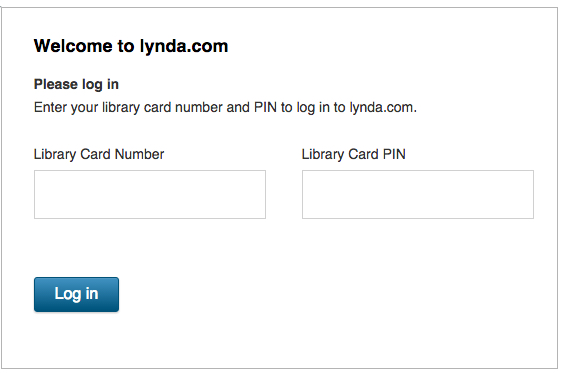
- Go to Toronto Public Library's Lynda.com page and select Access Online
- Sign in with your library card number* and PIN (usually the last four digits of your phone number)
* Note: a valid Toronto Public Library card is required.
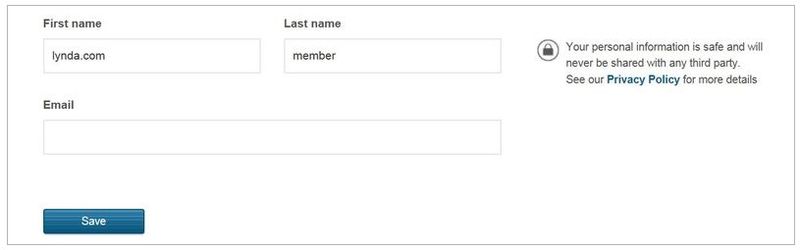
- Enter your first name, last name, and email address. Your personal account/profile will allow you to track your progress through your tutorials and manage your bookmarks and certificates of completion
Finding and taking courses
- Browse the library and choose a category such as Design, IT or Business
- Search for specific software or skills by typing term(s) in the search box
- Further filter courses by software version, skill level or topics
- Once you have found a course or video your're interested in watching, click on the title or thumbnail image
- The next time you visit Lynda.com, sign in with your library card number and PIN and resume learning where you left off
- If you complete an entire course, a certificate of completion will be automatically issued
Using Lynda.com on a mobile device
To use Lynda.com on your mobile phone or tablet, visit tpl.ca/lynda in the browser on your device and follow the steps outlined above.
The Lynda.com mobile apps are not available for use with the library version of the service.
Have fun learning!
42 thoughts on “Learn Online with Lynda.com – Now Free for TPL Cardholders”
“Permission denied
Your authentication was successful. However, you do not have access to this resource. If you believe you have arrived on this page in error, please contact your organization or school’s IT or help desk for further assistance.”
Jason, that’s because your library card has expired (or is going to soon). You need to get it renewed first.
This is great news!!
I was dreading the day I was out of college as it meant no more access to Lynda.com. Thanks for this wonderful resource. Now, if TPL could get pluralsights subscriptions for cardholders life would be perfect.
Oh! I was wondering if that might be the issue. Thanks 🙂
Thanks for the comment. We like to be aware of electronic resources that offer unique content and a model available to public libraries. Unfortunately, it doesn’t look like Pluralsight offers subscriptions for public libraries, but thanks for the suggestion.
Wow .. thanks for this posting.. What a great resource .. Our Library is the best and just gets better and better with updates like this ..Outstanding !!!
Absolutely phenomenal!
That is SO fantastic – THANKS, TPL! I’ve been eyeing a lynda.com subscription for a while but kept putting it off – now I’m SO glad I didn’t subscribe individually!
This is a wonderful resource, and impressive that the library is able to offer it for free. Does it include access to the course-related project files as well?
Congratulations on this offering!
Thanks for your comment. Are you referring to the exercise files? Some courses feature exercise files. If you are watching a tutorial you can follow the activity with downloadable pre-populated files.
I am beyond thrilled! Toronto Library is the best in the absolute best resource ever. And with Lynda.com, it just keeps getting and better!!!!!
THANK YOU!!!!!!
Thank you! Thank you! Thank you! This is fantastic news. TPL really does make learning accessible to everyone.
I’ve tried several times and keep getting this message: Your request could not be processed. Check your card and PIN and try again. If problems persist, contact your library.
Glenda, your library card may have expired. Library cards expire once a year. Please visit a library branch in person to renew your card. Once your card has been renewed you should be able to access Lynda.com through the library.
This is great – Thanks a lot TPL for making this accessible to everyone.
Many thanks TPL for this great resource!
Logged in very nicely and looks great. One question: I note the non-library commercial “plans” range from Basic to two Premium priced accounts, the difference seeming to be access to the downloadable elements of the courses.
Could you advise which “plan” level the TPL subscription is at, basic or better? Thanks for a really innovative service.
Thank you for the comment. We provide access to the Premium service but customers cannot create their own playlists or upload content for use without an Internet connection.
I tried logging in with my card number and pin, but i never get to step 3. It just immediately takes me to lynda.com and I’m not signed in or anything.
Thanks for the comment. Your library card may have expired. Library cards expire once a year. Please visit a library branch in person to renew your card. Once your card has been renewed you should be able to create a personal account to access Lynda.com through the library.
Hi. I made it past step 2 and I can watch Lynda.com videos. But I’m not sure how to create my personal account/profile. If I go to ‘Sign Up’ on the site, it asks me to choose from (paid) membership plans.
Any advice on creating a personal account/profile? It would be great to track my progress and certificates of completion. Thanks.
Thanks for the comment. Do you know if your library card has expired? If this is the case, please visit a library branch to renew your card. You should be able to create a personal account to access Lynda.com through the library once your card has been renewed.
thanks for the follow up. My library card has not expired. I have no fines. Again, when I follow the steps, I can’t get to #3: I can’t create a personal account on Lynda.com thru the library. It only offers me to choose from paid membership plans or 10 days free offer.
Is TPL’s free service only valid for 10 days?
Any other advice on how to create my personal account?
Sorry you are having problems creating a personal account. There have been intermittent issues with Internet Explorer. You could try clearing the cache and cookies or using another browser. If you are still having problems please email Technical Support at TS@lynda.com or contact Technical Support by phone at 1-888-335-9632. Thanks
Thank you for the additional follow up. I’ll email Lynda.com’s tech support. I’m sure this can be figured out 🙂 Excited to start my learning!
Hi. I want to share this update from Lynda.com’s tech support:
“I have been made aware of an ongoing issue with numerous IP authentication sites (libraries make up the largest number of these accounts). There is a fix scheduled to be deployed today that is supposed to correct this issue. Please test this later on in the day and advise us tomorrow if you are still having issues. Thank you for your patience as we try to resolve this issue for you.”
I’ll look forward to see if this has fixed the issue 🙂
Is there a limit as to how many hours of learning we get as TPL members on Lynda.com or is it completely unlimited?
Thank you for the comment. There is no limit to the number of courses or hours of learning.
I’ve tried to connect and I got this message:
Your request could not be processed. Check your card and PIN and try again. If problems persist, contact your library.
My card is new and I am not sure what is my PIN number…
Thank you for your comment. Your PIN is usually the last four digits of your telephone number. Perhaps you can’try again and let us know if it works.
Thanks for your reply, but it still doesn’t work… 🙁
Sorry you are having difficulty. I suggest you try calling our Answerline service at (416) 393-7131 — press 0 for Answerline. They can determine if there is an issue with the library card.
I just renewed my library card so that I could try this and I get a bad gateway error message. Anyone else?
Thank you for your comment. The vendor reports that they are experiencing temporary technical issues. They are working to resolve the problem. Hopefully it will be resolved soon.
I’m already a Premium member of lynda.com. I’ve got a couple of questions.
If I log-in to lynda.com through TPL, will the courses I complete be connected to my existing account?
Lynda.com offers exercise files to people with a Premium membership. Are these exercise files available to TPL users?
Thanks!
Thank you for your comment. The exercise files are available to TPL customers.
You could merge your profiles but then you would not be able to login with your existing username and password. You would have to use your library card number and PIN. You can email the customer service team at cs@lynda.com to assist with this process.
Please note that the lynda subscription for public libraries is a bit different: Customers can’t create their own playlists or use the lynda app.
I hope this helps.
This is absolutely amazing. Thank you TPL for offering this great and effective service. I have been using it to learn so many new skills and establishing my business. My design portfolio has become so much more classy and unique thanks to you and lynda. The courses in web design, web development, and online marketing are the best I could find on the internet. I just wish we could use the Lynda mobile app thru library as well. Any plans to add it to your services in future?
Thank you for the feedback. Access to the lynda mobile app is included in the personal subscription but not in the one for public libraries.
So stoked that I can use this for free! I am so excited! Thank you Toronto Public Library.
Absolutely LOVE having this resource available through the Library! Thank you!!!!
I get this message: This site can’t be reached
http://www.torontopubliclibrary.ca’s server DNS address could not be found.
Is the service discontinued? I’ve been using this just fine until a couple of days ago.
Thank you for the feedback. We experienced an Internet outage yesterday but access has been restored. Perhaps you can’try accessing this resource again and let us know if you are still experiencing any issues.