Bringing Ebooks and Print Closer Together on the Library Website
Are you an ebook reader, a print book reader, or both? For those of us who borrow both physical books and ebooks from the library, going back and forth between the main library website and the OverDrive ebook service can be inconvenient.
Why do we have to borrow ebooks through a separate site?
Like other libraries, TPL provides access to digital content through third-party vendors. These vendors (OverDrive, Hoopla, and others) negotiate rights with publishers and apply technical restrictions based on the licence agreements. This model places some limits on what libraries are able to do with their digital content.
The good news is that options for website integration exist, and we have started working on ways to take advantage of them.
One-stop search for electronic and print
One of our goals is to make it easier to find both print and ebooks through our main website search. We've always had catalogue records for both types of books, and we've recently done some additional work to make the search more useful.
Ebook availability: holds and copies
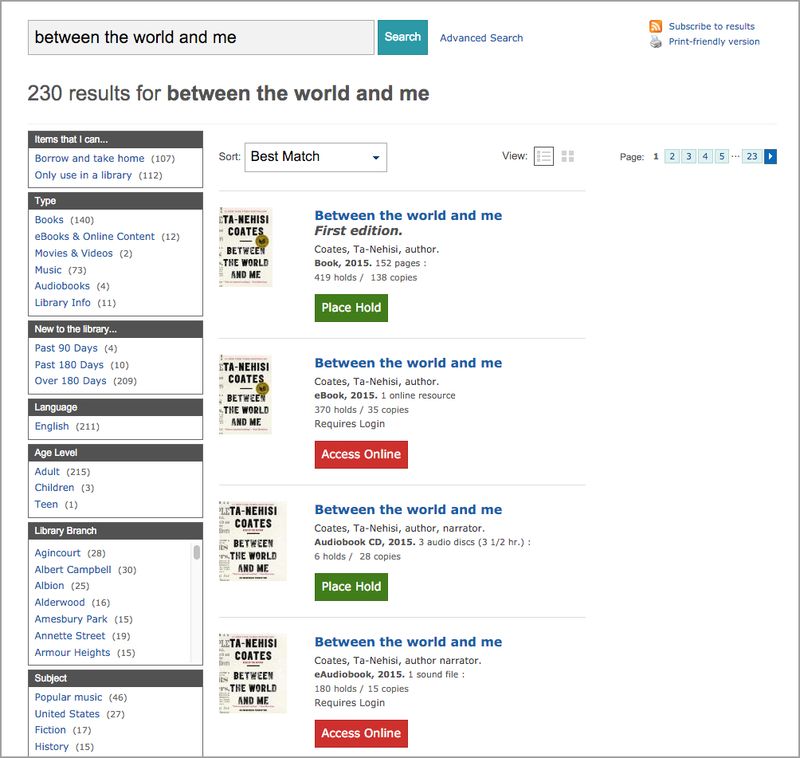
The first issue we tackled (in April 2015) was adding a key piece of missing information to our ebook records: the number of copies and the length of the waiting list (number of holds) for each title.

Having the holds and copies information right there on the search results page comes in very handy – you can easily see whether you'll be able to get the ebook right away, and you can compare waiting lists between the print and ebook versions.
Search relevance: bringing ebooks closer to the top of the results list
Another improvement we made this year involved adding data about ebook copies to our search engine's index. The number of copies the library owns helps determine which records appear at the top of your search results. When the search engine didn't know how many ebook copies we had, it would place the ebook records much lower down in results – below specialized formats like large print and talking book, and sometimes not even on the first page of results.
Now that the search engine has access to the number of ebook copies, ebooks turn up much closer to the top of the results – often right after the regular print version.
Future possibilities
These improvements are only the beginning. Future projects may include:
- A single sign-in, eliminating the extra step of signing in to OverDrive
- An integrated account where you can see all your physical and ebook checkouts and holds in one place
- An app that brings everything together – searching (print and electronic), managing your account (print and electronic), and downloading and reading ebooks all in one place
In the meantime, we appreciate hearing your feedback about using ebooks – it helps us set priorities for the future.
8 thoughts on “Bringing Ebooks and Print Closer Together on the Library Website”
Having the e-materials integrated into my lists of paper Checkouts and Holds would be a huge improvement. (Actually it’d be ideal to have them in both places.) Every time I finish a book and need to decide what to read next I need to see what is due next. Having to log into two places to check is inconvenient, in a first world problem kind of way. I’ve toyed with the idea of setting up my own list but that would be even more steps….
Is it possible to show the number of holds for an ebook title even when the user is next in line? Knowing how long it would take to get back on the waiting list and wait for a title would help me decide which book to read first. With the current system, this information disappears as soon as one reaches the front of the line, and one has to go back to the print catalogue to find out how many people are waiting for the book.
Hi LK,
Are you referring to the way holds display in your OverDrive account? We aren’t able to make changes to the OverDrive account design, but we can pass your feedback along to OverDrive. Thanks for commenting!
Integration is progress. Please bring that soon. As well, can you create a “wish list” function for paper books as well. This way one can create a to read list in the account and have it ready when looking for something new to read. With integration the wish lists should be integrated as well please.
And, an app for the library would be very helpful as well so no need to navigate to the website on devices like phones and tablets.
Thanks
Hi Jimmy,
A “wish list” is definitely on our wish list of improvements.
I’ve never been clear on whether TPL has access to “everything” on the OverDrive, Zinio etc. services or if it orders a subset of their catalogs based on local demand. For the first time recently I suggested an unavailable title on a form at the OverDrive site, assuming that suggestion goes into a bin with all of North American subscribers, not much hope.
I just checked the TPL “contact” page and didn’t see anything specific to suggesting new content, either digital or hardcopy. If TPL has its own input into what’s available from digital services, an interface for TPL patrons to suggest authors, titles, subjects, etc. would be helpful.
Hi Jeff,
Staff at Toronto Public Library select the content we offer through OverDrive and Zinio. When you submit a suggestion through the OverDrive site, it goes to TPL staff, who will decide whether or not to purchase the item. The TPL website has some information about suggesting titles for purchase, but you’re right that it is not easy to find.
Thanks for your comments.
Thanks – good to know OverDrive suggestions go to TPL rather than into a Trackless Sea. I might have some more.