10 Tips for Making a Movie with your Smartphone
For more than a century, the only way to make professional quality films was to use either 16mm or 35mm film cameras. They were big, they were heavy, and not to mention expensive. But things have changed. Over the last ten years, digital technology has started to catch up. DSLR’s are now the go-to cameras for indie filmmakers and have even replaced 16mm on a number of television productions. And now smartphones are catching up, and it is pretty exciting. Their improved camera resolutions, light weight and accessibility have opened up new doors to making films that could potentially be game changing.
With that said, there is still a lot to be desired when it comes to the features that come standard on most smartphones while shooting video. So here are ten tips for getting the most of out of your smartphone camera, and a few additional things you can do to get a more professional looking film on a low budget.
1. Landscape vs. Portrait
First thing’s first, always shoot landscape (when the phone is horizontal) as opposed to portrait (when the phone is vertical). Why you ask? Because although portrait is okay for stuff like Snapchat, Facetime and taking selfies, we’re trying to make a movie, so we want our footage to look as cinematic as possible. These days, it’s just about standard for screened devices such as TVs, computers, tablets, and smartphones, as well as online video players such as Youtube and Vimeo, to use a 16:9 aspect ratio when viewing content. It has also become standard for most smartphones to shoot video in 16:9 while in landscape. So, keep in mind how your content will be viewed and save yourself the headache of having to crop your image later.
Wait…Airplane mode? Isn’t that just for making sure I don’t cause a plane crash when flying? Perhaps, but in the case of filmmaking it helps ensure that an unexpected phone call, text, or social media alert doesn’t mess up your shot. The last thing you want is to be in the middle of shooting an amazing scene only to have it ruined by a text asking you to pick up some milk on your way home.
3. Resolution
Depending on which device you have, your resolution can range anywhere from 720p all the way up to 4K. But remember, the higher the resolution, the more storage space and battery it will eat up. In the camera settings, you can see what each resolution equates to in terms of storage space as seen in the pic below (taken from an iPhone 6s).
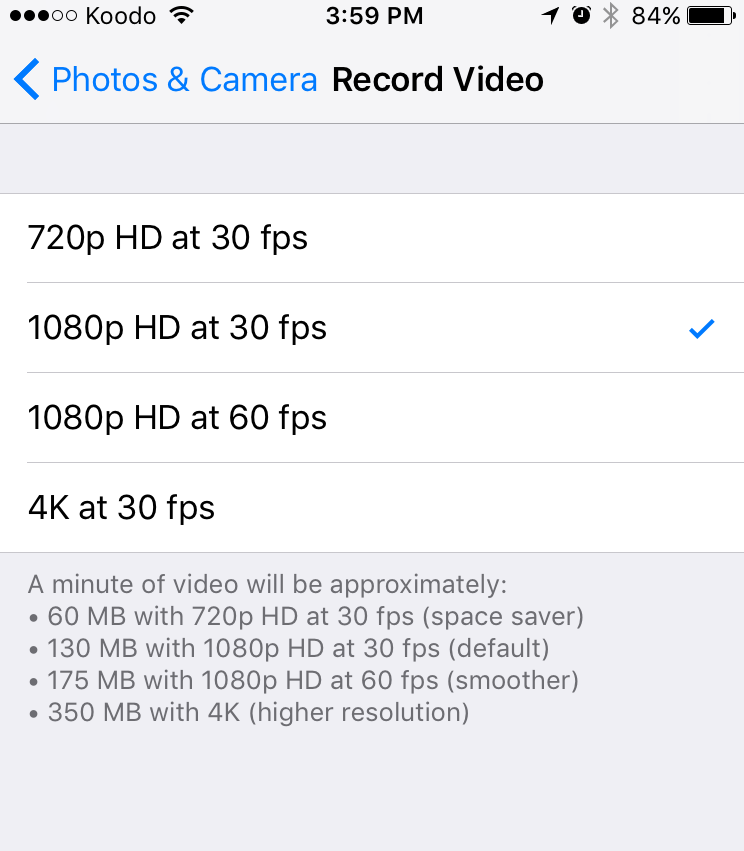
One thing to be aware of is how much storage you have on your device, and how much footage that will allow you to shoot at any given resolution. Do you have a backup if the battery dies or you run out of space? You also want to consider things like, how is this footage going to be seen? Is it being sent to a festival, or is it going up on Youtube. In any case, think of 1080p as your standard, and going up or down in resolution depending on your needs and available resources.
4. AE/AF Lock
For most smartphones, focus and exposure are the only features you will be able to control manually while shooting in video mode. Usually to lock focus, you just need to tap and hold for a couple of seconds on the main subject until you see AE/AF LOCK in a yellow box at the top of the screen. To unlock the focus point, tap anywhere on the screen. Sometimes there will be a little “lock” icon under the focus/exposure box.

So why do this if your device can adjust the focus and exposure of your shot automatically for you? Part of the answer is that smartphones tend to keep adjusting and refocusing, which can lead to jittery-looking footage, and can lead to the camera moving focus away from your main subject and messing up the shot. Having control over your exposure gives you more control over the aesthetics of your film and, to a degree, helps with continuity when you're splicing shots together in the editing process.
5. Control, You Must Learn Control!
As far as most smartphones go, the AE/AF Lock is about as much as we get in terms of manual features while in video mode, leaving a lot to be desired as a filmmaker. Other things we want to be able to control are:
- White Balance – Calibrating your camera what to recognize as true white, which will affect the colour temperature and colour tone of your shot. How this feature works can vary from app to app and camera to camera, but essentially you have someone hold up something white where your main subject will be, zoom in, and use the white balance feature to calibrate. Newer smartphones do a pretty good job of doing this for you automatically, but again, there are certain situations where the camera may make adjustments for you that you don’t want. So being able to calibrate the white balance manually is helpful.
- ISO – This is how sensitive the image sensor in your camera will be to light. The higher the ISO, the more sensitive, with 100 usually considered “normal.” So basically, it goes back to exposure. Even though we have the exposure lock on our smartphone’s camera, having an actual ISO feature allows us to know, and record specific settings, which is helpful if you need to use multiple devices, or need to film a scene across multiple days. So in other words, it can help with continuity.
- Frame Rates – Traditionally, film was shot at 24fps (frames per second), and video at 30fps. More recently, with the advent of HD video and digital cameras, some filmmakers have been shooting at 60fps, stating that it’s smoother and more natural. Though there are many who would disagree. Typically, your smartphone will give you the option of 30fps or 60fps for certain resolutions as we saw in the photo previously. But being able to choose beyond that gives you more say in the aesthetics of your film, which can be important for some filmmakers.
Luckily, getting these features, isn’t too difficult or costly. There are apps available for both iOS and Android that can range from as little as $3.99, up to as much as $25.99. Below is a list of some of the more popular ones:
- Filmic Pro (iOS and Android)
- Movie Pro (iOS and Android)
- Pro Movie (iOS)
- Cinema FV-5 (Android)
Some of these do have free versions, but the tradeoff is limited features, and/or a watermark on your footage unless you upgrade. They may also offer features that give you more options in terms of resolution, additional aspect ratios, audio settings and an onscreen leveller to make sure your camera is level.
Do you need these apps and the features they offer? No, but they can definitely help you to create a more cinematic and professional looking film. Remember, film is a visual storytelling medium, so the more control you have over the aesthetics, the more control you have over how your story is received by the audience.
6. Lighting
So far, we’ve looked at tools and features we can use on the smartphone itself to make our films look more cinematic, but there are some other things we can do beyond that. One of them is lighting.
Tree Point Lighting is a standard technique used in visual media. Filmmakers, photographers, animators, artists, we all use it. It’s simple and effective, and is a great starting point for understanding lighting and how effective it can be. So let’s take a look.
Basically, we use three lights. The key light, fill light and back light (also sometimes referred to as a rim light).
The Key Light is the main light and often the strongest with the most influence on the aesthetics of the scene. It is placed to one side of the camera/subject so that this side is well lit and the other side has some shadow.
The Fill Light is the secondary light used to fill in the shadow created by the key light and is located on the opposite side of the key. Typically, the fill light is softer and less bright than the key.
The Back Light is used to create definition around the outline of the subject separating it from the background to give a more three-dimensional look. And yep, you guessed it, it is located behind the subject.
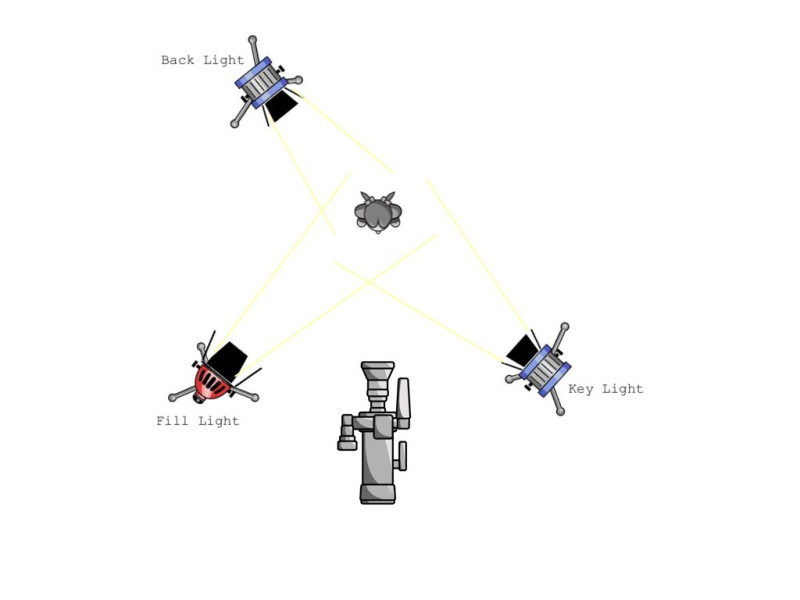
Don’t get stuck thinking of this as a hard rule. It isn’t. It is simply a useful tool to help make your footage more cinematic. If you only have one light available, use it as your key. If you only have two, use one as your key and the other as either the fill or back. Also, be aware of what resources you have and your environment. Are you shooting outside in the day time, or is there a great big window in the room letting in natural light? Right away in both those situations you have the sun as a light source. That could be all you need, or you can use reflector and bounce boards to create the fill and back.
Lighting can be fun and it doesn’t have to be expensive. Use what you have available, and play around with different setups. The important thing is just making sure your subject is well lit, and doing your best to create the overall look that you want.
7. The 180-Degree Rule
The composition of your shots is very important. It can affect the emotion and intensity of a scene. You also need to think ahead about how your shots are going to be edited together, and how that can affect the fluidity of your story, and how your audience responds to it. A useful guideline to help you with that is the 180-Degree Rule.
This basic guideline relates to the onscreen spatial relationship between characters and/or objects within a scene. Basically, an imaginary line called the axis or line of action, connects the characters. If you keep the camera on one side of this axis for every shot within a scene, the first character will always be frame right of the second character, and the second character will always be frame left of the first.
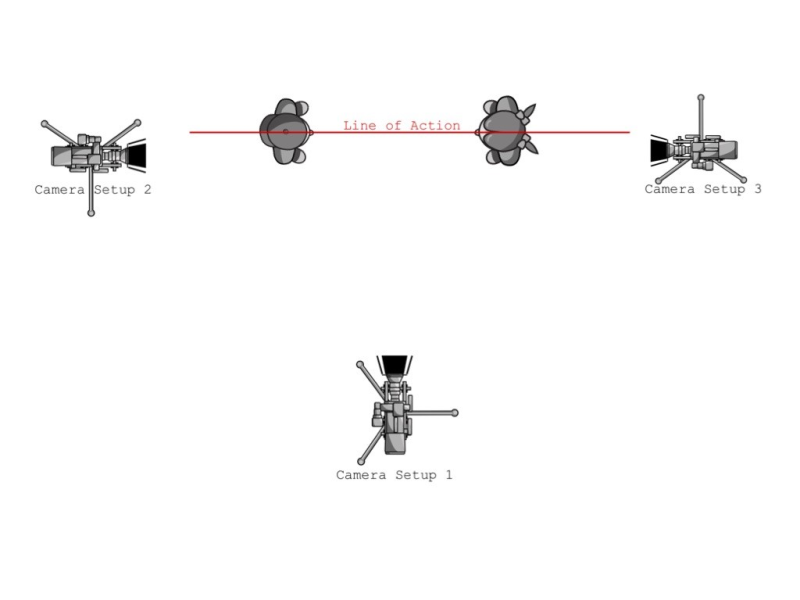
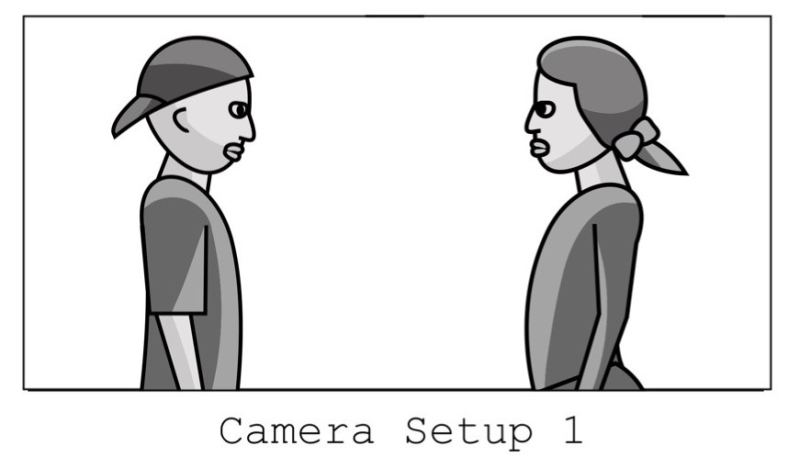
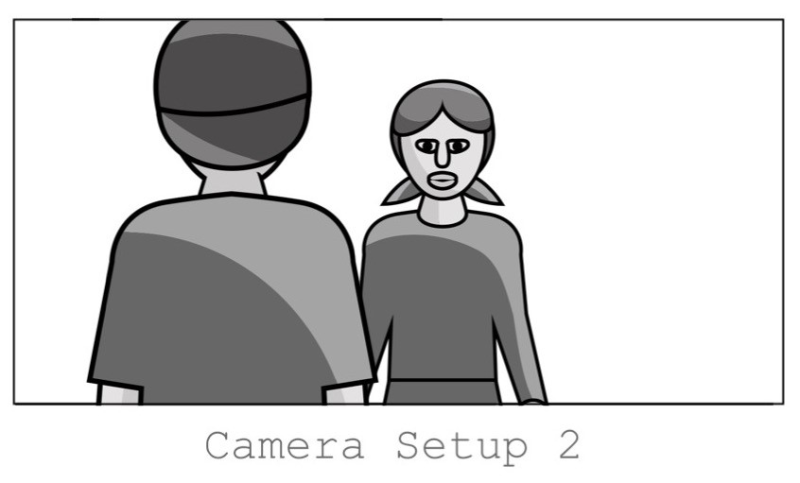
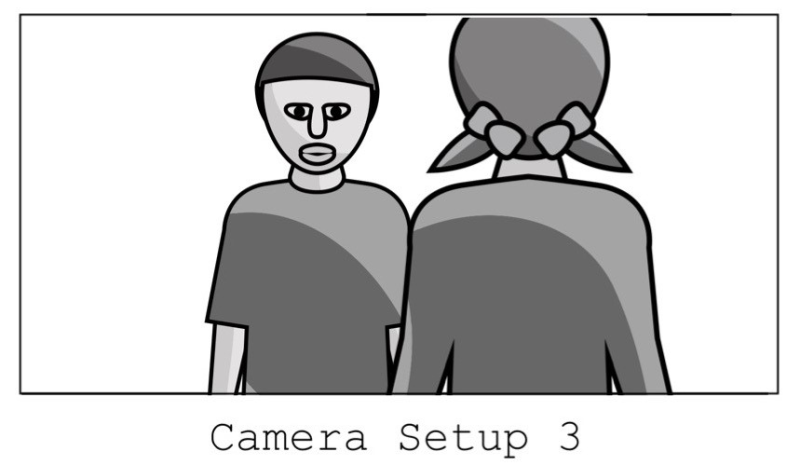
If the camera passes over the line of action, it creates a jump cut, which can create a feeling of distortion or confusion in your audience. As always, there may be instances where this may be what you want, but for the most part following the 180-Degree Rule will help create fluidity within a scene and keep your audience in the story.
8. Audio: Get Your Microphone Close to Your Subject
The microphones on smartphones these days are all well and good, but for filmmaking purposes the one fatal flaw with them is they are attached to the phone. To get good, clean audio, you always want the microphone as close to the subjects as possible. So how do we do that? Use whatever you can get.
Any external microphone whether it is a handheld, lapel, or shotgun mic will work great if you can afford it. But if those are outside your budget, try using the microphone on the earbuds that likely came with the phone. For this you will probably need some sort of extension cord though. Or, use a second smartphone and record the audio as a voice memo.
Whichever mic you end up using, you can use a broom stick, hockey stick, or even a selfie-stick as a boom pole to get the mic close to the subjects with getting them in the shot. The thing to remember though is to use some type of clapper at the beginning of each scene so that you can sync up the audio with the video later on. This can be as simple as someone just extending their arms out and clapping their hands together.
9. Tripods Are Your Friends
Like most digital cameras, smartphones will come with some type of image stabilization feature to help prevent shaky looking video, which makes shooting decent handheld footage a bit easier. But no matter how great these features are, or how steady your hands are, you are going to be prone to shaky video. In other words, tripods are your friends.
The great thing is that you don’t have to go out and get one of the expensive heavy-duty tripods. Even the cheaper (under $30) ones will work great, but it does mean having to get a tripod mount for your device. Luckily you can find them online at places like Amazon.ca and ebay.ca for around $5.
The key thing is that a tripod will guarantee a steady looking shot, and help provide consistency while shooting, which will in turn help with continuity during the editing process. And because smartphones are so light, you can even use a flexible gorilla pod (tripods with bendy legs) to mount your camera in ways that would have been difficult or impossible to do with traditional film cameras.
However, if you do need to shoot handheld, here are a few tips to help you stabilize your shot:
Keep the phone close to your body.
Rest your elbows on a nearby object.
Use your body to absorb bounces and shakes.
Another thing to keep in mind, is that the more you zoom in, the more noticeable the camera shake is going to be while going handheld.
10. Editing
Although there are a number of apps that allow you to edit your film directly on your smartphone, the features offered are very basic, and the touch screen won’t necessarily give you the precision needed for some of your cuts. In other words, do your editing in a desktop editing suite. Consumer level editors such as iMovie have a lot of nice features and can get the job done in many cases. If you have access to pro editing suites such as Final Cut or Adobe Premiere Pro even better. There is also free software such as Shotcut and Lightworks that will give you the necessary tools and features to edit your film together. Check out one our six Digital Innovation Hubs to access the film editing software and support you need!
In the end, movie making is an artistic form of visual storytelling. How you choose to tell that story is up to you as the filmmaker, and hopefully these tips help. But whether you use them or not, just remember that you have a portable, lightweight, high definition camera in your pocket so take advantage of it. If you can’t get access to some of the apps, or additional equipment mentioned earlier, don’t worry. Use what you have. Use the limitations you’ve been given to your advantage, even make it part of your story if you can. Just go out, experiment, and have fun.
Additional Resources:
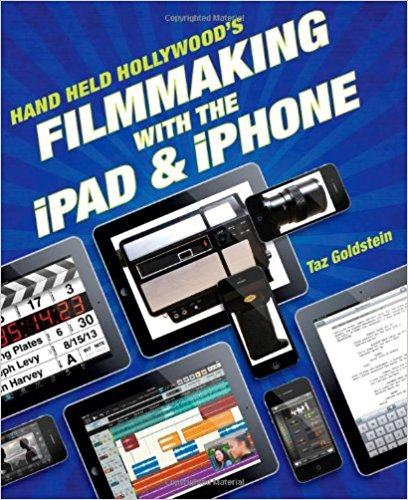
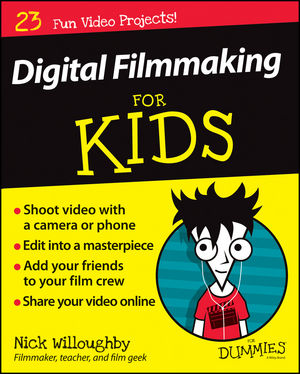

With thanks to: Nyima Huet, Digital Design Technician for the Pop-Up Learning Labs
Comments