Navigating the Toronto Reference Library with Wayfinder

November 20, 2015 | Nicole | Comments (5)

" "
You step into the Atrium of the Toronto Reference Library, you look up marveling at all the space, the levels, the 10 story plus sky-lit ceiling, and then you ask yourself: "how am I suppose to find anything in here?"

Locating staff and then telling them that you need assistance is ideal, but consulting wayfinder is also a good, quick and easy place to start.

Located around the corner to the left of the first floor elevators on two iPads, the wayfinder is a searchable map and directory of the Toronto Reference Library.
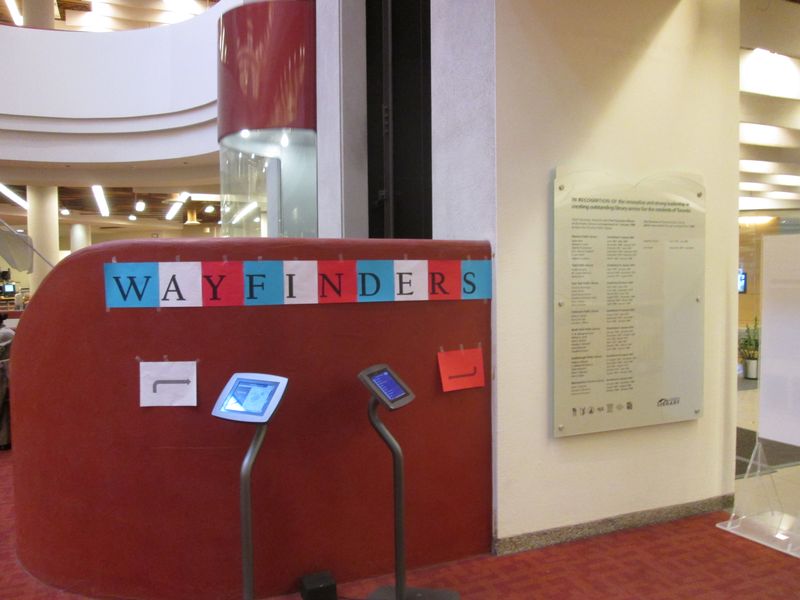
Wayfinder Sign

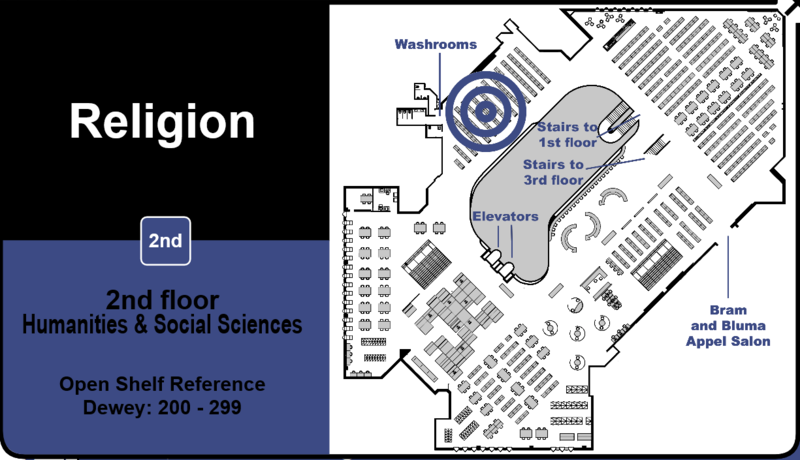
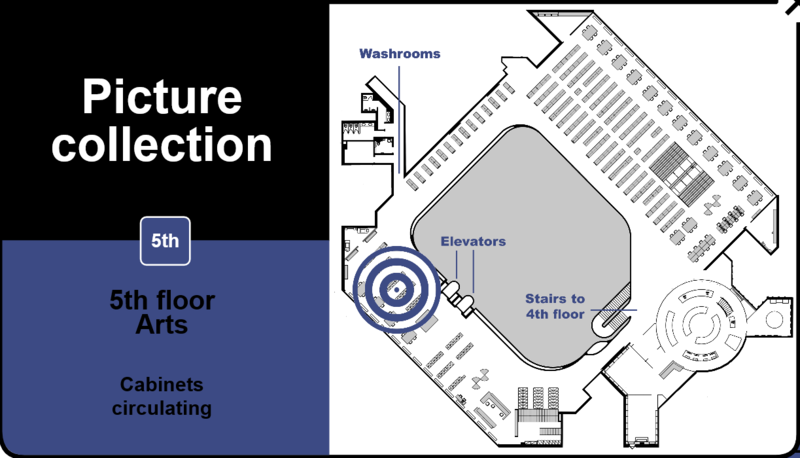
The wayfinder can direct you to specific locations, collections of material, and Dewey decimal ranges for browsing through the library's open-shelf collection.  Here are some examples – the blue and white spiral will animate to show you each location:

  • Genealogy collection (2nd Fl)

Genealogy

  • The Religion collection (2nd Fl)

Religion


  • Washrooms for each floor (1st to 5th Fl)
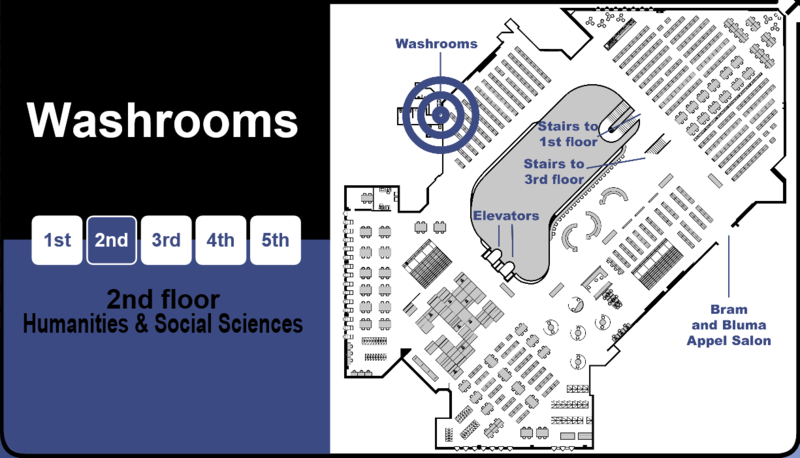
Washroom

  • Newspapers (English & Other Languages) (Basement Fl)

Newspapers

  • Picture Collection (5th Fl)

Picture Collection


Other Examples:

  • Colour printer and photocopier (1st & 5th Fl)
  • The ESL collection (4th Fl)
  • Asquith Press (1st Fl)
  • Oceanography (3rd Fl)
  • Computer RLPCP655 (2nd Fl)
  • Baldwin Room Collection (5th Fl)
  • Careers (3rd Fl)
  • Music scores (5th Fl)
  • Journalism (4th Fl)
  • Writers' Room (3rd Fl)
  • Water fountains (All)
  • And on, and on, and on . . .

The Wayfinder will get you to your start point, but it will also be useful for finding out about the library in toto.

And still can't find what you are looking for? . . . Ask Our Staff.

Next time you are waiting for an elevator, give wayfinder a try: you will be amazed by what is on offer!


Comments

5 thoughts on “Navigating the Toronto Reference Library with Wayfinder

  1. Not mentioned in this blog post: The rampant misspellings; the atrocious type (all Arial all the time); the fact that nobody with knowledge of computer interfaces seems to know who approved this disastrous miniproject (I asked).
    The tacked-up sheets of paper on the wall divider (ALL TIMES CAPS ALL THE TIME) are the icing on the cake.
    By the way, where’s the user testing and what are the results of it?
    Why does TRL run these little iPads on stands when staff patrol the ground floor in shifts bearing a clipboard with a giant Information logo and ready to answer questions?
    There are such things as standards and this abomination meets none of them.

    Reply
  2. Hi Mr. Clark:
    The Wayfinder project is intended to be another tool for assisting customers in looking up subjects as well as the location of services in the building. Customers are always welcome to ask staff, but some prefer to look things up themselves.
    Staff will monitor how the guide is used and improve it as possible. Thank you for your feedback.

    Reply
  3. Are there any plans to put this at a dedicated URL on the Library website, so people can bookmark it in their smartphone/tablet browsers and always have it accessible? Or is it not designed as a responsive web page/site?
    I think all the Library’s general information WWW offerings should be designed for all kinds of devices. My BlackBerry Z10 has a perfectly functional WWW browser supporting most mobile sites, but the Library catalogue website still renders as a “desktop” browser website. I believe the mobile version coming next year will be restricted to iPhone/Android users, and that’s unfortunate. Yes, those two account for 90% of the market, but why not be device agnostic from the outset?

    Reply
  4. Hi –
    Great questions and comments – Thanks.
    At present the app is designed for offline use at the stands only, however, future improvements will be considered.
    One current limitation is the variety of resolutions and proportions that exist with different devices, which would change how the information is displayed.
    You might be interested in joining our Website Advisory Group (https://blogs.tpl.ca/digital-services/about-the-website-advisory-group.html) The group is made up of Toronto Public Library customers who would like to share their opinions and help shape the future of the TPL website.
    I’m going to alert our Web Team to your comments in this post, but if you have anything that you’d like us to forward along, please send us an e-mail using the ‘Contact Us’ form (www.tpl.ca/contact).

    Reply
  5. Hi, Dara here from the web team. We will support Blackberries, Z10 and newer. Older Blackberry devices will not be supported. We initially were limiting beta testing to iPhone and Android devices because we had not done any testing on Blackberries, but we have now and you’re welcome to join the beta. Email feedback@torontopubliclibrary.ca for more information. Thanks!

    Reply

Leave a Comment

Your email address will not be published. Required fields are marked *

Navigating the Toronto Reference Library with Wayfinder

November 20, 2015 | Peggy | Comments (5)

" "
You step into the Atrium of the Toronto Reference Library, you look up marveling at all the space, the levels, the 10 story plus sky-lit ceiling, and then you ask yourself: "how am I suppose to find anything in here?"

Locating staff and then telling them that you need assistance is ideal, but consulting wayfinder is also a good, quick and easy place to start.

Located around the corner to the left of the first floor elevators on two iPads, the wayfinder is a searchable map and directory of the Toronto Reference Library.

Wayfinder Sign

The wayfinder can direct you to specific locations, collections of material, and Dewey decimal ranges for browsing through the library's open-shelf collection.  Here are some examples – the blue and white spiral will animate to show you each location:

  • Genealogy collection (2nd Fl)

Genealogy

  • The Religion collection (2nd Fl)

Religion


  • Washrooms for each floor (1st to 5th Fl)

Washroom

  • Newspapers (English & Other Languages) (Basement Fl)

Newspapers

  • Picture Collection (5th Fl)

Picture Collection


Other Examples:

  • Colour printer and photocopier (1st & 5th Fl)
  • The ESL collection (4th Fl)
  • Asquith Press (1st Fl)
  • Oceanography (3rd Fl)
  • Computer RLPCP655 (2nd Fl)
  • Baldwin Room Collection (5th Fl)
  • Careers (3rd Fl)
  • Music scores (5th Fl)
  • Journalism (4th Fl)
  • Writers' Room (3rd Fl)
  • Water fountains (All)
  • And on, and on, and on . . .

The Wayfinder will get you to your start point, but it will also be useful for finding out about the library in toto.

And still can't find what you are looking for? . . . Ask Our Staff.

Next time you are waiting for an elevator, give wayfinder a try: you will be amazed by what is on offer!


Comments

5 thoughts on “Navigating the Toronto Reference Library with Wayfinder

  1. Not mentioned in this blog post: The rampant misspellings; the atrocious type (all Arial all the time); the fact that nobody with knowledge of computer interfaces seems to know who approved this disastrous miniproject (I asked).
    The tacked-up sheets of paper on the wall divider (ALL TIMES CAPS ALL THE TIME) are the icing on the cake.
    By the way, where’s the user testing and what are the results of it?
    Why does TRL run these little iPads on stands when staff patrol the ground floor in shifts bearing a clipboard with a giant Information logo and ready to answer questions?
    There are such things as standards and this abomination meets none of them.

    Reply
  2. Hi Mr. Clark:
    The Wayfinder project is intended to be another tool for assisting customers in looking up subjects as well as the location of services in the building. Customers are always welcome to ask staff, but some prefer to look things up themselves.
    Staff will monitor how the guide is used and improve it as possible. Thank you for your feedback.

    Reply
  3. Are there any plans to put this at a dedicated URL on the Library website, so people can bookmark it in their smartphone/tablet browsers and always have it accessible? Or is it not designed as a responsive web page/site?
    I think all the Library’s general information WWW offerings should be designed for all kinds of devices. My BlackBerry Z10 has a perfectly functional WWW browser supporting most mobile sites, but the Library catalogue website still renders as a “desktop” browser website. I believe the mobile version coming next year will be restricted to iPhone/Android users, and that’s unfortunate. Yes, those two account for 90% of the market, but why not be device agnostic from the outset?

    Reply
  4. Hi –
    Great questions and comments – Thanks.
    At present the app is designed for offline use at the stands only, however, future improvements will be considered.
    One current limitation is the variety of resolutions and proportions that exist with different devices, which would change how the information is displayed.
    You might be interested in joining our Website Advisory Group (https://blogs.tpl.ca/digital-services/about-the-website-advisory-group.html) The group is made up of Toronto Public Library customers who would like to share their opinions and help shape the future of the TPL website.
    I’m going to alert our Web Team to your comments in this post, but if you have anything that you’d like us to forward along, please send us an e-mail using the ‘Contact Us’ form (www.tpl.ca/contact).

    Reply
  5. Hi, Dara here from the web team. We will support Blackberries, Z10 and newer. Older Blackberry devices will not be supported. We initially were limiting beta testing to iPhone and Android devices because we had not done any testing on Blackberries, but we have now and you’re welcome to join the beta. Email feedback@torontopubliclibrary.ca for more information. Thanks!

    Reply

Leave a Comment

Your email address will not be published. Required fields are marked *