Do you have a good password? (Part 1)
People can learn a lot about you from your choice of password, especially if it's easy to crack! The more time you spend online making use of various services such as web based e-mail, social networks, blogs wikis, and games -not to mention tax files, banking and other sensitive online services, the more passwords you will need to manage. It's extremely important to have good passwords, and it's equally important that these passwords be well protected.
One option is to test a passswordwith a password strength meter, or a search space calculator will do the trick. If you're like me -paranoid- you won't test your actual password but rather one that has similar characteristics. That is, it will have a similar ratio of letters in both upper and lower case to numbers and if possible, symbols.
This is from some guy in Bristol
Password Haystacks: How Well Hidden is Your Needle?
Both a strength meter and a search space calculator will give you an idea of how long a potential hacker using a brute force attack (running endless password combinations with a computer program until the right one comes up) needs before s/he will stumble across the right one. The only real difference is that a search space calculator does not factor in password strength. However the difference is moot with a few tips. There's no good reason you yourself can't tell if a password is going to be reasonably strong.
To be strong a password should meet three basic criteria
- it should have a large character set to draw from
- it should be reasonably long, and
- it should be decently random
Character Sets
There are 26 letters in the alphabet, so a character set of just 26 possibilities per character if the password is not case sensitive would be considered small. But add the possibility of upper case or lower case letters, and the possibilities double to 52. Throw in numerals and that becomes 62. Add characters and (depending on what's allowed) the possibilities approach or even exceed 100 possibilities per character space! Obviously the more characters to choose from, the harder it will be for even a high speed computer to crack your password.
Length
If your password is only a few characters long, it won't take a hacker with a standard desktop computer very long to crack it. I submitted a password of 6 lowercase characters to this web site to see what it would tell me: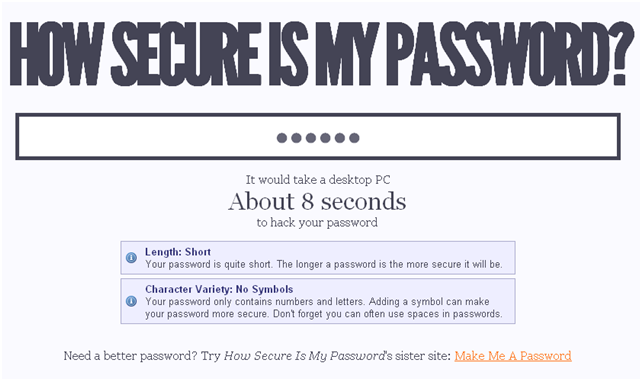
Eight seconds is pretty lousy. The problem here is that I failed to meet the first two criteria. There are too few types of characters and too few character places. Basically, I need a longer password that includes symbols.
Here is a nine character password using upper and lower cases, numerals and symbols
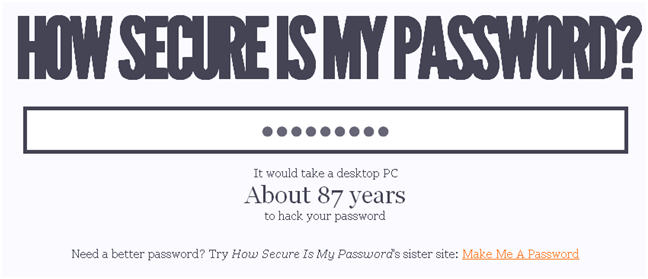
That's not bad, especially if I change my password at regular intervals of 8 decades or less. Still longer is better and I have tried some passwords that can stand up to a brute force attack for millions, billions or even trillions of years. Most security experts will tell you that a minimal password character length should at the very least be in the double digits.
The final consideration is randomness, and this is where a space calculator won't tell the same story as a strength meter. But this is also why humans are still smarter than computers at some things. The only real difference between a strength meter and a space calculator is that the former incorporates the contents of online dictionaries and also has up to date lists of common passwords. If you think that all nine character passwords incorporating upper and lowercase letters, numbers and symbols are equal, consider these two passwords.
u8#Ji"2zO or Pa55word!
The former is completely random. The latter is going to be among the first few thousand attempts a computer program would try. And these programs can'try thousands in a matter of minutes.
So if you want to make a strong password here are a few links you might want to click:
How to create strong passwords (from Microsoft)
How to create a strong password (from Google)
One thought on “Do you have a good password? (Part 1)”
Thanks for this post. I learned that all of my passwords are too weak!