Managing Accounts: Exporting a contacts list
Let's say that for whatever reason, you want to close an email account. And lets face it; wouldn't it be nice to free yourself -at least temporarily- from unsolicited e-mail promising enhancements to your personal anatomy? However that account also has a unique list of contacts you've made over the years and some of them you actually like. How do we throw out the bathwater of spam and keep the baby of our online connections we've made through this account.
One way is to export your address book to a CSV file. CSV stands for comma separated values and is an extremely simple file format that has been around as long as I have (which is to say well before personal computers) It's designed to store tabular data and thrives to this day as an excellent means of moving data between incompatible programs. An address book is easily rendered as a table for various headings such as name address e-mail phone # Nickname etc. A CVS file is to a spreadsheet what a text file is for a word processor: minimally formatted so as to be easily entered as data into a new program
In the picture below I have decided to export my address book I started this process by choosing the CONTACTS tab in my mail account. Then I selected the drop down menu under Actions, choosing Export All…

I then had to select a program to do this with. I decided to use Yahoo's built in CSV program (it's the third option down the list) Note, I could have moved it directly into a Microsoft Outlook account and there is also an option for Netscape or Thunderbird users.
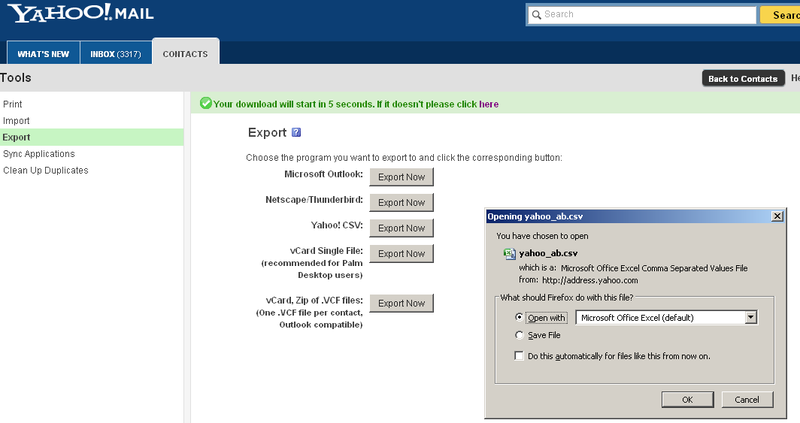
After being asked to fill in a CAPTCHA to prove I'm not some robot programmed to spam an account holder's contacts, the grey box above right opens up and asks me what program I want to open it with. Please note exporting a file is different from opening one. I used Yahoo CSV to export, but to open the newly exported file I am using Microsoft Excel. Any decent spreadsheet program will do however. Save this document with the file extension .csv -it should be the default. Now it can be imported into whatever email account you want to make a fresh start with.
As a last note, this process is not entirely glitch free. You may have to edit some of the address book entries, but it still beats reentering them all one after the other again.
It's possible to do this with most services. Here's Gmail's how to.
Comments