What’s New in the Cloud with Google and Microsoft?
Cloud computing
continues to evolve with recent service updates by Google and Microsoft to
their Google
Drive and Skydrive
services respectively. On February 8, 2013, Microsoft announced that its
Skydrive service (that allows users to store documents and files in the cloud) surpassed the
hosting of 1 billion documents. On the Inside Skydrive blog,
Sarah Filman, a Lead Program Manager for Skydrive, noted that users familiar
with the Office 2013 software suite will find it simple to save their documents
to Skydrive and get a link to enable sharing with other people, while individuals
will now be able to easily share and edit documents through the Office Web Apps
– without needing to sign into their Microsoft account. All recipients of the
link will have the means to edit the document, even simultaneously if desired.
However, control can be extended over who can edit the document by inviting
selected individuals via their email addresses and requiring those users to
sign in, if deemed desirable. Microsoft, in making this change, acknowledged
feedback from students who found it frustrating to be required to sign in to
make fast changes to a document.


Google
Drive provided instructions on how
to share files with one or more individuals by sending those individuals a
link or sharing the file by email address or a mailing list. After logging into
Google
Drive, check the box next to the file that one wishes to share and click
the Share icon
 , then choose the visibility option (i.e.
private, anyone with the link, or public on the web). Type in the email
addresses of the people that you wish to share the file with, and then select
the level of access (i.e. can view, can comment (Google documents and
presentations only), and can edit). Select share and save. One can also follow
a similar process to send a link to a shared file. One still has the option of
sending a file as an email attachment. Consult the “how
to share” page for further details. Don’t forget to let people know that
you are sharing something with them. If you are planning to share many files,
consider creating a folder first to host the files and then share the folder.
If you are sharing files with many individuals at once, consider creating a
Google Group.
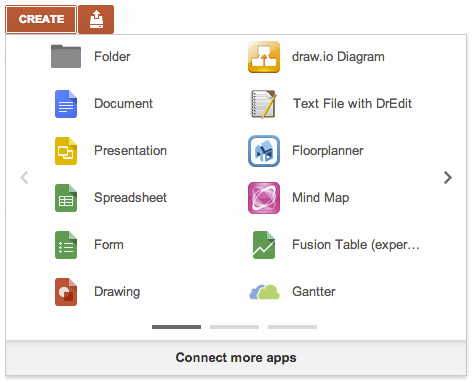
On
February 8, 2013, Google announced that the Google
Drive menu was placing “Drive-connected” apps on the same basis as Google apps
like docs and sheets, thereby ensuring easier access and visibility. The
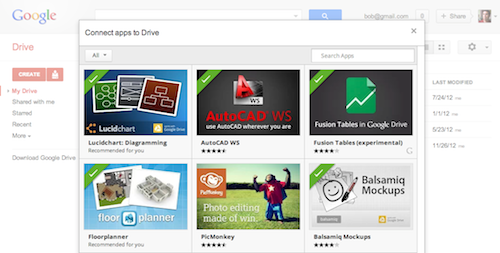
“Connect more apps” button allows users to add more apps. Google Drive users
can use the new “Connect apps to Drive” dialog to browse and select
Drive-enabled apps.
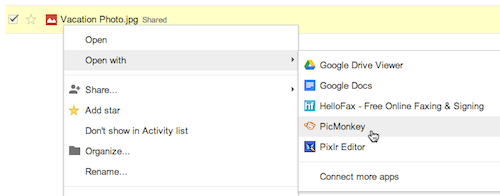
Users
can use a Drive app to create or open files from inside Google Drive.
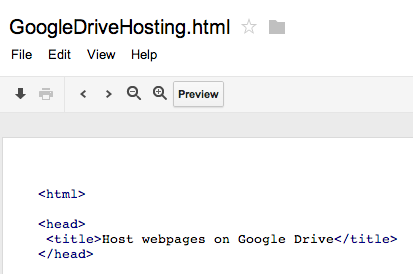
Google Drive announced on February 5, 2013 that users now have
the ability to create and share websites when one stored HTML, JavaScript, and
CSS in Google Drive. To host webpages on Google Drive, users should follow
these steps (also available on Google
Drive’s example webpage):
- Make a new
folder in Drive and share it as “Public
on the web”. - Users can
then upload CSS, HTML, and JavaScript files to the folder. - Open the
HTML file and look for the “Preview” button in the toolbar.
Share the URL (website address) that begins with
www.googledrive.com/host/…
from the preview window and anyone will be able to see the webpage.

Emil Protalinski, writing on The Next Web, acknowledged this step as
good for web developers and as a means for showcasing work but did not
necessarily recommend using Google Drive as the main hosting site. For Google account
holders using Google Drive, these additional options are a plus. Melanie
Pinola, writing on ITWorld.com, noted
that Google
had simplified the process of creating websites as the previous method and
accompanying instructions were more difficult to follow. RTT News described Google’s efforts as
intending to
convince cloud users to switch from competing services like Dropbox and
SkyDrive. Naturally, those wishing to develop dynamic websites might be
disappointed as Google
Drive’s web hosting service has limitations in that it does not employ ASP
(Active Server Pages) or PHP: Hypertext Preprocessor.
The cloud continues to evolve…What are the
competitors doing? Stay tuned!
One thought on “What’s New in the Cloud with Google and Microsoft?”
Thanks John! I’m going to have to look into that web hosting feature on Google Drive.