Email at Year-End 2013: Where Does One Go From Here? Part 2: Yahoo Mail
(Credit: YouTube – Enjoy the view with Yahoo Mail)
(Credit: YouTube – How to get tabs back in Yahoo Mail: Tabs are back in Yahoo Mail)
(Credit: YouTube – Restore Tabs feature in new Yahoo Mail)
(Credit: YouTube – What is wrong with Yahoo Mail now?)
Now that 2013 has drawn to a close, email users may wish to reflect upon what system they use in comparison with the alternatives, taking into consideration any recent developments. Many people use one of the big three web-based email options, viz.: Google’s Gmail, Microsoft’s Outlook.com (formerly Hotmail), and Yahoo’s Yahoo Mail. The competition between these three options remains strong with attempts to lure users away from one of them to one of the others. First of all, let me say that I have personal email accounts with each of the big three so I will try and remain objective as I write this. Since we already took a quick look at Gmail, now let us do the same for Yahoo Mail:
Yahoo Mail underwent some growing pains and changes in 2013, not always to the liking of their account holders. And, the recent outage that denied some 1% of Yahoo Mail account holder’s access to their accounts in December 2013 was an added frustration for those affected people. First of all, let us discuss the volte-face on “tabs”. In October 2013, Yahoo announced a revamping of its email service in an obvious attempt to compete with Gmail with the overview page emphasizing thematic views across devices and platforms, grouped conversations (similar to Gmail’s conversation view that was previously adopted by Hotmail/Outlook.com as well), large attachments (including the ability to preview documents without leaving one’s Yahoo Mail inbox and to share with Flickr and Dropbox accounts), powerful searching capabilities to find messages, contacts and attachments, enhanced security (with SSL encryption (already adopted by Gmail and Hotmail/Outlook.com) and second sign-in verification (similar to Gmail’s recommended 2-step verification)), and the ability to import contacts’ information from Gmail, Facebook and other services. Yahoo also expanded several services for free to all Yahoo Mail accounts that were previously only available to paid-for Mail Plus account holders, including:
- disposable email addresses when one does not want to give out one’s permanent email address
- use up to 200 filters to assist in sorting out incoming messages into the Inbox
- one can now forward email to another email account, Yahoo or otherwise (Yahoo is playing catch-up with Gmail and Hotmail/Outlook.com on this one)
- offline access with POP (Post Office Protocol) using desktop email applications such as the similarly-named Microsoft Outlook (NOT Outlook.com)
- 1 TB (terabyte) (or 1 trillion bytes) of storage space.
Yahoo Mail Plus users still retain advertisement-free email as a premium service.
Some of the changes implemented by Yahoo were not well-received, especially the removal of tabs. In fairness to Yahoo, their decision in October 2013 to remove tabs stemmed from the complaints of some Yahoo Mail users that it was difficult to navigate within the email account if a big number of tabs were open at the same time. A plea from a Yahoo Mail user on October 8, 2013 entitled “Please Bring Back Tabs” generated over 100,000 votes and resulted in the re-establishment of “tabs”, albeit smarter ones, in Yahoo Mail. Users have the choice of using Yahoo’s new “Recent View” or Tabs. If using “Tabs” is the preferred option, Yahoo Mail account holders must click on “View” in the upper right-hand corner of the Inbox, look for the “Multitasking” category and then select “Tabs”.
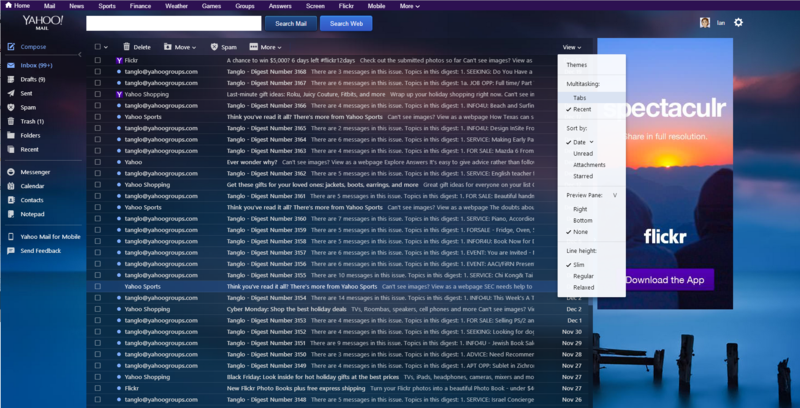
(Credit: Tabs return to Yahoo Mail – URL: http://www.pcworld.com/article/2082264/tabs-return-to-yahoo-mail.html – Enable tabs in Yahoo Mail by selecting View> Multitasking>Tabs.)
A tabbed inbox means that opening a new message, selecting contacts, calendar, or even compose will open in a new tab. For those users who might get frustrated at having too many tabs in use simultaneously, click on the downward facing arrow button on the far right side of the “Tabs” bar and select “Preview All” – this provides a nice visual synopsis of all Tabs in operation within a Yahoo Mail account at a given time. Yahoo calls this snapshot view “boss mode”. (Please see below.)
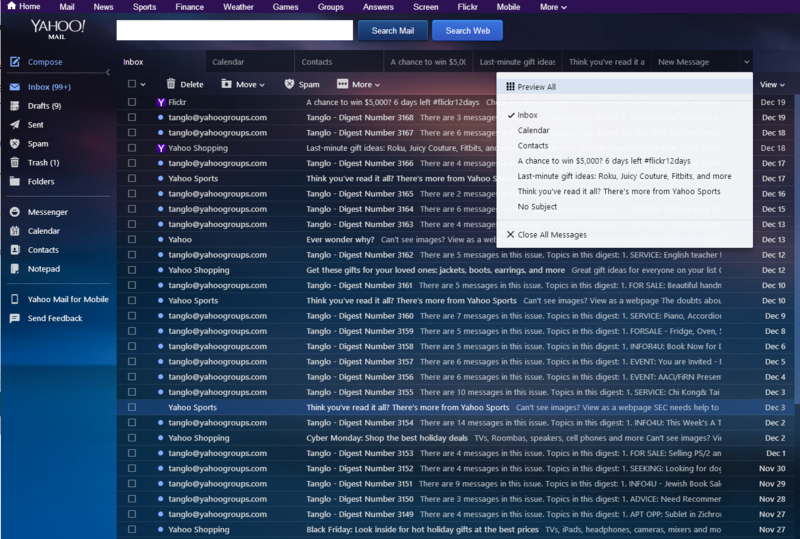
(Credit: Tabs return to Yahoo Mail – URL: http://www.pcworld.com/article/2082264/tabs-return-to-yahoo-mail.html – Select Preview All or tap the escape key to see all your open tabs at once)
Users can use the “boss mode” visual feature to guide them to the tab (and its accompanying content) of interest by clicking on it.
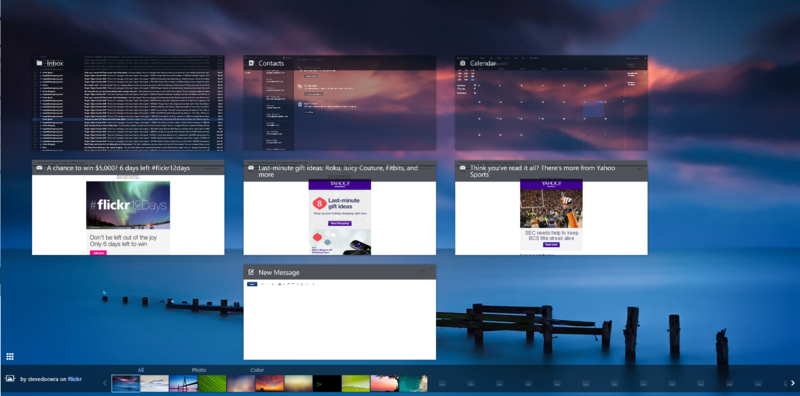
(Credit: Tabs return to Yahoo Mail – URL: http://www.pcworld.com/article/2082264/tabs-return-to-yahoo-mail.html – Yahoo Mail affectionately calls its all tabs view ‘boss mode.’)
What about the outage that affected about 1% (or about 1 million) of Yahoo Mail account holders’ accounts in December 2013? On December 13, 2013, Yahoo CEO Marissa Mayer used the Tumblr microblogging platform (recently bought by Yahoo) to offer an apology and “An Update on Yahoo Mail” that confirmed “a specific hardware outage” in one of Yahoo’s storage systems. Ms. Mayer stated that “the problem was a particularly rare one” but further acknowledged that “…we really let you down this week” and pledged that Yahoo “can…will, do better in the future.” Some reports on the Yahoo Mail outage criticized the company for its communications (or lack thereof) in dealing with or explaining the problem, for example, Kara Swisher (writing on AllThingsD on December 11, 2013) and David Murphy (writing on PCmag.com on December 14, 2013). Arguably, in a condemnatory indictment, Kara Swisher revealed in a November 24, 2013 article that an internal Yahoo memo confirmed that only 25% of Yahoo Mail employees made the switch to Yahoo Mail from the previous corporate choice of Microsoft Outlook. What does that say about Yahoo Mail? Who knows? Maybe some Yahoo employees like to know what the competition at Microsoft is doing. On that point, the next blog post will discuss Microsoft Outlook.com and its recent developments in 2013.
Finally, a literature search on the Internet found a December 18, 2013 blog article on Laptop.com entitled “How to Move from Yahoo Mail to Gmail” that outlined in textual and visual form the steps required to export contacts from a Yahoo Mail account to a Gmail account. Next time, let us look at what Microsoft is doing to lure Gmail and Yahoo Mail users to its Outlook.com email alternative.
For Toronto Public Library customers interested in enrolling in free Email Made Easy workshops, click on Programs, Classes & Exhibits on the Toronto Public Library website, then select Computer & Library Training and narrow the search to Email and Social Networking to find branch locations, dates and times. Otherwise, contact your local library branch staff for information.
(See also: Email at Year-End 2013: Where Does One Go From Here? Part 1: Gmail )
(See also: Email at Year-End 2013: Where Does One Go From Here? Part 3: Outlook.com Mail )
Comments