Remember To Reset Your Passwords!
Earlier this month, it was revealed that there was a bug in software that is supposed to provide secure communication online. Called the Heartbleed bug, it caused the Canadian Revenue Agency shut down their online services for several days and made all other online services review their own security software.
According to PC Magazine's Security Watch, the Heartbleed bug can leak information in a computer's memory. Unfortunately, there is no way to tell if malicious activity has occurred on a web server. It has been found that username and passwords, user information, and other information (such as credit card numbers) could be accessed by exploiting this flaw.
Here is a great comic from xkcd to explain how the Heartbleed works:
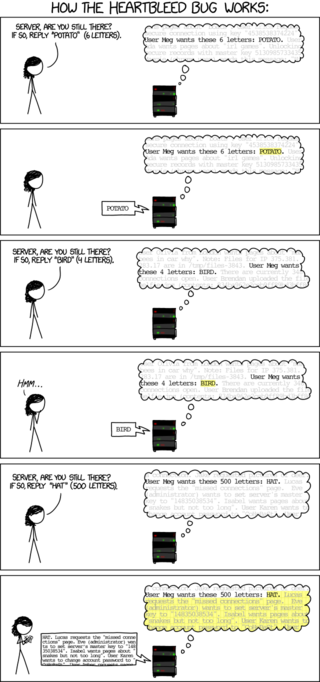
When using online services, we rely on companies and organizations to have strong security so that the information we provide to them is not accessed by unauthorized parties. Unfortunately, with the Heartbleed and other hacker attacks, it seems that this security is compromised more and more often.
New Passwords
In the aftermath of the Hearbleed bug, many security experts have recommended that users not only create new strong passwords for all their online accounts, but use unique passwords for each online service. This way, if the security of one service is comprised, all other services would still remain secure as your password would be different.
Of course, trying to remember a different password for each of your online services would be completely impossible. One way to have unique passwords for each online service is to use a password manager. PC Magazine recently published a review of the Best Password Managers available today.
Another option is to use Mozilla's elegant method, as explained in this video, for having unique password for each website, but still making them relatively easy to remember.
Remember, for a secure password, it should have a minimum of 8 characters, have at least one upper case, one lower case and one number. To make it even more secure (and where the web service will allow), it should also have at least one symbol.
Not sure if your new password is secure, test it at www.passwordmeter.com
2 thoughts on “Remember To Reset Your Passwords!”
This is very helpful post indeed. Thanks a lot.. Just reset my password…
You are very welcome! I’m happy that you found it useful.