Looking Ahead to Faceted Searching – Part 1
The web team's work at Toronto Public Library is a combination
of day-to-day maintenance (keeping our existing web and interactive
services working and their content updated) and longer-range projects
to improve, revise or replace existing services and resources, or
introduce completely new ones.
A major current project is
the introduction of faceted search capabilities for the website and the
library catalogue as part of the larger redesign of our website. To understand what this is and why it's a major thing for us we have to talk a little about the history of search, especially as it relates to libraries.
Pre-Electronic Search In Libraries
Before computerized catalogues the primary means of access to books was the card catalogue:
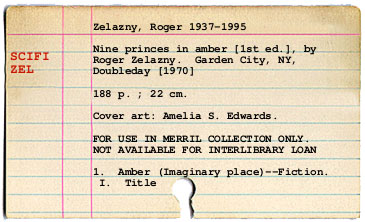
{made with the Catalog Card Generator}
Some of you may remember using card catalogues (perhaps even fondly). I can't claim total accuracy in the one above because I barely remember using them. They took up a tremendous amount of space to hold all those cards and were difficult to keep in good order! Many of the cards were cross-references to other cards to let you know things like:
- The correct spelling in the catalogue of an author's name, if there were variants
- The correct title of a book with variant titles
- The correct subject heading in the controlled vocabulary used to make sure synonyms and related terms (dog, canine, hound, puppy) were grouped together, usually the Library of Congress Subject Headings
Card catalogues relied on highly structured systems for organizing information that required a certain degree of expertise and experience to use. A major role of the librarian was to assist in the use of the catalogue to help you locate the book you wanted, as well as maintain it.
Because card catalogues took up so much space, they had very few access points by which you could search for information. Typically you had:
- AUTHOR cards, to let you find out which books the library had by a particular author
- SUBJECT cards, to locate books on a particular subject–as mentioned above, the synonym problem required the use of controlled vocabulary
- TITLE cards, to locate books by title
The Card Catalogue Goes Online
This glosses over an enormous amount of library history, but take a look at this screenshot from our current library catalogue:
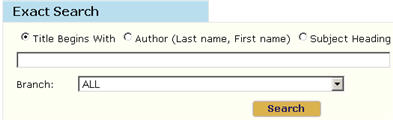
Notice anything familiar? Those same card catalogue access points are still there!
Partly this is because they're good access points. Most people looking for a book (or a film, or a CD, or another kind of recorded information) are looking for it by one of three broadly defined things:
- Who made it? (author)
- What's it called? (title)
- What's it about? (subject)
Past and Future of Library Searching
Libraries have been doing search technology for a very long time (long
before computerized search systems even became possible), and to really
understand why the modern-day library catalogue is the way it is, you
have to understand some of that history. The pre-amalgamation North
York Public Library began doing computerized cataloguing in 1982, quite
a few years before the World
Wide Web even came into existence, and the earliest forms of
computerized information storage for libraries basically just
replicated the card catalogue in computer form (and in many cases were
used only by the staff to maintain the catalogue and print new cards as
needed, not by the public).
Our existing catalogue records still
have a lot of value–it's hard to beat a library catalogue for
precision searching, but they're not always very easy to use. How do
we make use of that precision in our records while increasing usability
for our public?
As you've probably guessed one answer is faceted searching:
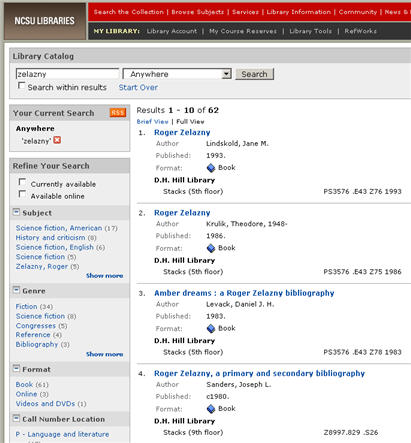
{Screen of the North Carolina State University Library catalogue, using faceted search}
In the next post we'll talk about what faceted searching is and how we envision it working at Toronto Public Library to improve the catalogue experience.
34 thoughts on “Looking Ahead to Faceted Searching – Part 1”
If you are able to create a catalogue portal as usable as the NCSU’s, I think most TPL patrons would be very pleased. It is compact in appearance (remember, most browsers today can magnify content for low vision users, so large type à la iBistro is not necessary) and provides abundant, clickable cues for quickly refining the search.
If you are able to create a catalogue portal as usable as the NCSU’s, I think most TPL patrons would be very pleased. It is compact in appearance (remember, most browsers today can magnify content for low vision users, so large type à la iBistro is not necessary) and provides abundant, clickable cues for quickly refining the search.
Hello Insert :),
NCSU’s catalogue was one of the first large libraries to incorporate faceted search into their catalogue, so to some extent they are a model for our own efforts.
More on what TPL in particular is planning in the follow-up post to this one (should be going up today).
Like your point about content magnification. We’re trying to adhere closely to current web standards in our redesign efforts (catalogue is a part of this), which makes it easier to provide a usable interface for a wide variety of users.
Hello Insert :),
NCSU’s catalogue was one of the first large libraries to incorporate faceted search into their catalogue, so to some extent they are a model for our own efforts.
More on what TPL in particular is planning in the follow-up post to this one (should be going up today).
Like your point about content magnification. We’re trying to adhere closely to current web standards in our redesign efforts (catalogue is a part of this), which makes it easier to provide a usable interface for a wide variety of users.
Can’t you also just open the TPL catalouge to the Google search spider? Even right now? Like, this week?
For example, all of the various categories in those software programs become very redundant and are counterproductive for those who know how to use Google advanced and Boolean searches.
They are not needed, and just eat up man hours.
Why not just ALSO open up the TPL catalouge to a local Google spider?
as of now, the TPL catalouge is blocked from Google, so one cannot do a site-specific search. Why is that?
site:catalogue.torontopubliclibrary.ca
Why not just open up the TPL catalouge to Google, like many other libraries?
Its free, its fast.
And all these fancy library software’s aren’t going to be as good as the Google algorithms, that indexes every single word.
(the raw keyword search that is there now is not the same, of course).
Please please please, open up the TPL catalouge to be indexed by Google.
It would take about 5 minutes, and it would be free, and it would start today, and it will work better than all the old-school tricks.
Then later once all the fancy software is added, and being debugged for 3 years, we can use the Google spider to instantly find anything we want.
Why is the TPL catalouge blocked from Google?
It doesn’t make any sense.
Can’t you also just open the TPL catalouge to the Google search spider? Even right now? Like, this week?
For example, all of the various categories in those software programs become very redundant and are counterproductive for those who know how to use Google advanced and Boolean searches.
They are not needed, and just eat up man hours.
Why not just ALSO open up the TPL catalouge to a local Google spider?
as of now, the TPL catalouge is blocked from Google, so one cannot do a site-specific search. Why is that?
site:catalogue.torontopubliclibrary.ca
Why not just open up the TPL catalouge to Google, like many other libraries?
Its free, its fast.
And all these fancy library software’s aren’t going to be as good as the Google algorithms, that indexes every single word.
(the raw keyword search that is there now is not the same, of course).
Please please please, open up the TPL catalouge to be indexed by Google.
It would take about 5 minutes, and it would be free, and it would start today, and it will work better than all the old-school tricks.
Then later once all the fancy software is added, and being debugged for 3 years, we can use the Google spider to instantly find anything we want.
Why is the TPL catalouge blocked from Google?
It doesn’t make any sense.
Hello Dude,
Interesting comments! I agree that the library catalogue should be indexable by Google, but currently this is not possible (at least, not within just 5 minutes). See discussions of “invisible/deep web” such as the one at http://www.lib.berkeley.edu/TeachingLib/Guides/Internet/InvisibleWeb.html for some idea of why this is. The last couple of years have seen database-driven sites making themselves increasing search-engine friendly, but there’s many of them that still aren’t.
That said–this post (and the one to follow it soon) focuses on the catalogue, but another result of the new search technology we’re implementing will be to open our catalogue data both to search engines and to other uses. So the ability to search our catalogue using Google or your preferred search engine is coming.
To address another point–I’m not sure how high the portion of our catalogue users who understand Google advanced and boolean searches is and I certainly agree that those who do should be able to use them. “Allow expertise, but don’t require it” is a favoured design philosophy of mine.
But we design for a very broad user base and the faceted search technology we’re implementing is a very well-established one in the general web world–it’s standard for a lot of e-commerce sites, for example (more on this in the Part 2 post).
General search engines power most search traffic these days, but there’s still a useful place for search technologies dealing with structured or semistructured data, or for things like the new http://www.wolframalpha.com/
Basically, I think the faceted search we’re introducing to the catalogue will be useful in many ways for many different users, and the underlying technologies are also going to enable the opening of our catalogue data to search engine indexing, remixing and repurposing, etc.
This comment probably deserves to be a separate post. 🙂
Hello Dude,
Interesting comments! I agree that the library catalogue should be indexable by Google, but currently this is not possible (at least, not within just 5 minutes). See discussions of “invisible/deep web” such as the one at http://www.lib.berkeley.edu/TeachingLib/Guides/Internet/InvisibleWeb.html for some idea of why this is. The last couple of years have seen database-driven sites making themselves increasing search-engine friendly, but there’s many of them that still aren’t.
That said–this post (and the one to follow it soon) focuses on the catalogue, but another result of the new search technology we’re implementing will be to open our catalogue data both to search engines and to other uses. So the ability to search our catalogue using Google or your preferred search engine is coming.
To address another point–I’m not sure how high the portion of our catalogue users who understand Google advanced and boolean searches is and I certainly agree that those who do should be able to use them. “Allow expertise, but don’t require it” is a favoured design philosophy of mine.
But we design for a very broad user base and the faceted search technology we’re implementing is a very well-established one in the general web world–it’s standard for a lot of e-commerce sites, for example (more on this in the Part 2 post).
General search engines power most search traffic these days, but there’s still a useful place for search technologies dealing with structured or semistructured data, or for things like the new http://www.wolframalpha.com/
Basically, I think the faceted search we’re introducing to the catalogue will be useful in many ways for many different users, and the underlying technologies are also going to enable the opening of our catalogue data to search engine indexing, remixing and repurposing, etc.
This comment probably deserves to be a separate post. 🙂
Thx for the info.
It is extremely unfortunate the TPL software can’t be opened up to the Google spider and robots easily. That is incredibly strange, it seems to me.
Can someone check into that, with whoever made the software TPL is using?
The software that the TPL chose to buy, it would seem was a very poor choice?
I recall when it first came out, I did some searches online for the name of that library software, and there were some libraries who literally broke their contract with the company, and dumped this software, it was so bad.
Honestly, its not the fault of the TPL people trying to run it, it seems to be very poorly designed, where changes cannot be made for the bugs and basic errors, even after months. (like the problem with the Log-in to Search screen).
But the TPL software has the 2 things needed for a Google search.
The KEYWORD search data, and the URL for the ITEM.
That is all that’s needed.
For the life of me I cannot imagine how a searching software, cannot be easily opened to Google indexing robots, which do all the work for free, in seconds?
for example here is a search for “Bruce Lee” at WorldCat.org
site:www.worldcat.org “Bruce Lee”
You get wonderful results, and keywords can be added and blocked using the basic Boolean operators. (just the basics are enough, nothing fancy needed) (+ – ” “)
One has to wonder how the contract with this particular library software company came about, as that appears to be the root of the problems?
I ain’t no software engineer, but it would seem to me if I were going to design a searching software, that I would make it open to “search engines” like Google, which are the most advanced in the world, which no one can compete with?
There is not point to trying to do anything other than make the entire text of the database open to Google, for example.
If whoever designed the database software that is behind the TPL didn’t do that, then it seems there are about 15 years behind the curve.
Maybe the entire software from this company should just be dumped?
And if they are getting a new one, please ask them to make sure that the entire thing is open to Google and other search spiders, which have technology buried in them worth billions of dollars!
The entire point of Google is doing away with all the manual keyword entering from the 1980’s.
I actually cannot believe that someone (not the TPL people) would “design” a library software, that is not open to the Google robots and spiders.
Maybe in 1995, but not 2009.
Isn’t that a “must” for any library software? Not an option?
Once the software is opened, you just enter the base-URL and let the robots do the work.
Submit a URL for inclusion in Google’s index.
http://www.google.com/addurl/?continue=/addurl
Submit a Sitemap through Webmaster Tools.
http://www.google.com/webmasters/tools
Thx for the info.
It is extremely unfortunate the TPL software can’t be opened up to the Google spider and robots easily. That is incredibly strange, it seems to me.
Can someone check into that, with whoever made the software TPL is using?
The software that the TPL chose to buy, it would seem was a very poor choice?
I recall when it first came out, I did some searches online for the name of that library software, and there were some libraries who literally broke their contract with the company, and dumped this software, it was so bad.
Honestly, its not the fault of the TPL people trying to run it, it seems to be very poorly designed, where changes cannot be made for the bugs and basic errors, even after months. (like the problem with the Log-in to Search screen).
But the TPL software has the 2 things needed for a Google search.
The KEYWORD search data, and the URL for the ITEM.
That is all that’s needed.
For the life of me I cannot imagine how a searching software, cannot be easily opened to Google indexing robots, which do all the work for free, in seconds?
for example here is a search for “Bruce Lee” at WorldCat.org
site:www.worldcat.org “Bruce Lee”
You get wonderful results, and keywords can be added and blocked using the basic Boolean operators. (just the basics are enough, nothing fancy needed) (+ – ” “)
One has to wonder how the contract with this particular library software company came about, as that appears to be the root of the problems?
I ain’t no software engineer, but it would seem to me if I were going to design a searching software, that I would make it open to “search engines” like Google, which are the most advanced in the world, which no one can compete with?
There is not point to trying to do anything other than make the entire text of the database open to Google, for example.
If whoever designed the database software that is behind the TPL didn’t do that, then it seems there are about 15 years behind the curve.
Maybe the entire software from this company should just be dumped?
And if they are getting a new one, please ask them to make sure that the entire thing is open to Google and other search spiders, which have technology buried in them worth billions of dollars!
The entire point of Google is doing away with all the manual keyword entering from the 1980’s.
I actually cannot believe that someone (not the TPL people) would “design” a library software, that is not open to the Google robots and spiders.
Maybe in 1995, but not 2009.
Isn’t that a “must” for any library software? Not an option?
Once the software is opened, you just enter the base-URL and let the robots do the work.
Submit a URL for inclusion in Google’s index.
http://www.google.com/addurl/?continue=/addurl
Submit a Sitemap through Webmaster Tools.
http://www.google.com/webmasters/tools
Hi Dude,
Because the catalogue software is session-based like a lot of database-driven web applications, it doesn’t by default generate the kind of static and permanent web content that can be indexed by search engines. This is an issue with many database-driven web applications, not just library catalogues.
A method does exist to generate static URLs from the catalogue (you see this in the “Link To This Page” button that displays on most catalogue pages), and we could use this to make the catalogue indexable by search engines, with some work. However, this same functionality and many more search improvements will soon be enabled once our Endeca-based searching is in place.
The web team does want to expand the ways in which people can use Toronto Public Library’s catalogue, including making it searchable via Google and other search engines, and we are working to make it happen as soon as we can.
Thanks for the comments.
Hi Dude,
Because the catalogue software is session-based like a lot of database-driven web applications, it doesn’t by default generate the kind of static and permanent web content that can be indexed by search engines. This is an issue with many database-driven web applications, not just library catalogues.
A method does exist to generate static URLs from the catalogue (you see this in the “Link To This Page” button that displays on most catalogue pages), and we could use this to make the catalogue indexable by search engines, with some work. However, this same functionality and many more search improvements will soon be enabled once our Endeca-based searching is in place.
The web team does want to expand the ways in which people can use Toronto Public Library’s catalogue, including making it searchable via Google and other search engines, and we are working to make it happen as soon as we can.
Thanks for the comments.
“All roads lead to Amber!”
Yes I am a nerd.
Great work TPL gang!
“All roads lead to Amber!”
Yes I am a nerd.
Great work TPL gang!
Hi web team …
it’s 11:38 pm on Aug 25, and the checkouts list in my account won’t sort correctly on due date; my brother reports the same problem …
Hi web team …
it’s 11:38 pm on Aug 25, and the checkouts list in my account won’t sort correctly on due date; my brother reports the same problem …
@not the previous adam, a different adam: I’ve checked in Firefox 3 and Internet Explorer 7 and the sorting by due date is working for in both for me. Which web browser are you using? I’ll report the issue, but knowing the browser will help in diagnosing it.
@not the previous adam, a different adam: I’ve checked in Firefox 3 and Internet Explorer 7 and the sorting by due date is working for in both for me. Which web browser are you using? I’ll report the issue, but knowing the browser will help in diagnosing it.
@not the previous adam, a different adam: Have consulted with colleagues–we’ve had several other customers report the same issue, it’s being looked into.
@not the previous adam, a different adam: Have consulted with colleagues–we’ve had several other customers report the same issue, it’s being looked into.
Thanks for the quick response.
My results:
Firefox 2 – due date sort fails – dates mixed up, can’t discern a pattern
IE 6 – due date sort works
Opera 9.64 – sort works, but checkouts and holds appear on one page, aren’t segregated
log in via Google Chrome hung, probably some temporary glitch.
Hope this helps.
Thanks for the quick response.
My results:
Firefox 2 – due date sort fails – dates mixed up, can’t discern a pattern
IE 6 – due date sort works
Opera 9.64 – sort works, but checkouts and holds appear on one page, aren’t segregated
log in via Google Chrome hung, probably some temporary glitch.
Hope this helps.
Just tried Firefox 3 on my laptop and can confirm that the due date sorting works with that browser.
First time to see a page that worked everywhere EXCEPT Ffx2.
Just tried Firefox 3 on my laptop and can confirm that the due date sorting works with that browser.
First time to see a page that worked everywhere EXCEPT Ffx2.
@same “different adam”:
Thanks, that’s useful information. I’m forwarding it to the appropriate people.
@same “different adam”:
Thanks, that’s useful information. I’m forwarding it to the appropriate people.
Hi, Alan –
As of 1:00 pm on Aug 27, due date sort is working for me in Ffx2.
Just logged in using Chrome 1.0.154, and it’s working there too.
But I have to retract what I said about Opera 9.64 working ok – I was fooled by the fact that the account opens with the checkouts in correct due date sequence.
In Opera, clicking “Your Account” in the nav displays the account summary, then the checkouts list, then the holds list, all on one long page. The column titles “Title/Author”, “Times Renewed”, “Due” look clickable, but clicking them has no effect and no sorting takes place. Clicking the “Checkouts”, “Holds”, or “Account Settings” tabs has no effect either, and the page continues to display the account summary at the top, then the checkouts list, then the holds list. But the due dates are in the right order.
Also, the “Renew” button under the checkouts list didn’t work, and the “Make Inactive” button under the holds list didn’t work.
Maybe the inability to open the “Checkouts”, “Holds”, and “Account Settings” tabs is the fundamental problem, and the other issues are side-effects.
I’m guessing no one uses Opera to access their TPL accounts.
Hi, Alan –
As of 1:00 pm on Aug 27, due date sort is working for me in Ffx2.
Just logged in using Chrome 1.0.154, and it’s working there too.
But I have to retract what I said about Opera 9.64 working ok – I was fooled by the fact that the account opens with the checkouts in correct due date sequence.
In Opera, clicking “Your Account” in the nav displays the account summary, then the checkouts list, then the holds list, all on one long page. The column titles “Title/Author”, “Times Renewed”, “Due” look clickable, but clicking them has no effect and no sorting takes place. Clicking the “Checkouts”, “Holds”, or “Account Settings” tabs has no effect either, and the page continues to display the account summary at the top, then the checkouts list, then the holds list. But the due dates are in the right order.
Also, the “Renew” button under the checkouts list didn’t work, and the “Make Inactive” button under the holds list didn’t work.
Maybe the inability to open the “Checkouts”, “Holds”, and “Account Settings” tabs is the fundamental problem, and the other issues are side-effects.
I’m guessing no one uses Opera to access their TPL accounts.
And as long as I’m reporting discrepancies: when you open a book detail page in Opera, the “Full Details” are already expanded (unlike the other browsers, which only expand if you click the “Full Details” link).
Just FYI. I’m sticking to Ffx2.
And as long as I’m reporting discrepancies: when you open a book detail page in Opera, the “Full Details” are already expanded (unlike the other browsers, which only expand if you click the “Full Details” link).
Just FYI. I’m sticking to Ffx2.
@different adam: Thanks again for the testing. This is all being forwarded on.
@different adam: Thanks again for the testing. This is all being forwarded on.
Hi there,
A couple of things…
1) How I see you can do the search is either enter the words [any: author, title, words of title] into the search-all box, or you can narrow down to one category and then search. Say you want Mozart operas on DVD: you’d enter Mozart in the search, and narrow the search to “Adult DVDs”. Would it be possible to include two or more categories? Let’s say you want to browse Mozart CDs and DVDs. Currently, and in the new Beta version, you have to do one and then the other. Can you allow multiple — or at least two — category searches? And yet I still wouldn’t want to do the general search with no category limits because the results will include every single book that has ‘Mozart’ in its title.
2) Once you place Hold in your Beta Catalogue, how can you go back to results of your original search? Let’s presume I didn’t create a new tab for the title I want and have one window only. The existing system has the Go Back button, and although it sometimes requires you to go through more than one page to get to your original search results, it’s still better than not having the opportunity to go back at all.
3) I think your item descriptions, once you find what you are looking for, contain less information in this new Beta version of the catalogue. Why? What’s wrong with having more information about the item?
Many thanks
Lydia
The Junction
Hi there,
A couple of things…
1) How I see you can do the search is either enter the words [any: author, title, words of title] into the search-all box, or you can narrow down to one category and then search. Say you want Mozart operas on DVD: you’d enter Mozart in the search, and narrow the search to “Adult DVDs”. Would it be possible to include two or more categories? Let’s say you want to browse Mozart CDs and DVDs. Currently, and in the new Beta version, you have to do one and then the other. Can you allow multiple — or at least two — category searches? And yet I still wouldn’t want to do the general search with no category limits because the results will include every single book that has ‘Mozart’ in its title.
2) Once you place Hold in your Beta Catalogue, how can you go back to results of your original search? Let’s presume I didn’t create a new tab for the title I want and have one window only. The existing system has the Go Back button, and although it sometimes requires you to go through more than one page to get to your original search results, it’s still better than not having the opportunity to go back at all.
3) I think your item descriptions, once you find what you are looking for, contain less information in this new Beta version of the catalogue. Why? What’s wrong with having more information about the item?
Many thanks
Lydia
The Junction