New features for managing your OverDrive eBook holds
Good news for users of OverDrive eBooks and eAudiobooks: two new options to help you manage your holds have just been released.
Suspending Holds
As with holds on physical library materials, suspending keeps your place in the waiting list, but allows you to:
- Make sure you don’t get all your holds at the same time
- Stop holds from coming in when you know you’ll be too busy to read them
Here’s how it works:
- Sign in to your OverDrive account.
- In your Holds list, choose the item you want to suspend and click on Options.
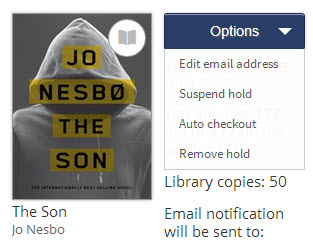
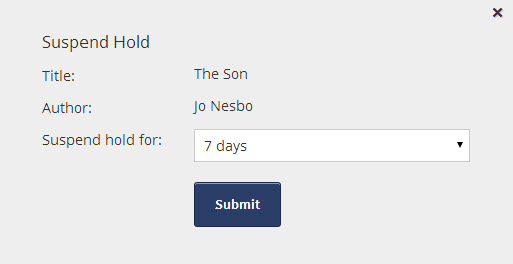
- Choose the time period for suspending the hold (from 7 to 90 days) and click Submit.
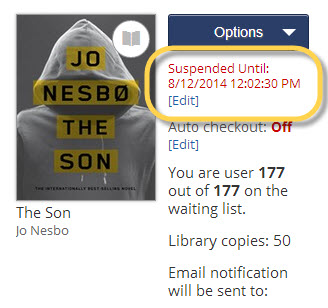
Your hold is now suspended. You can change the suspension dates or unsuspend the hold at any time by clicking the Edit link.
Automatic Checkout
OverDrive has also introduced an option to save you a step in the eBook borrowing process and help ensure you never miss your holds once they become available.
At the time you place a hold, you’ll see a checkbox labelled Automatically borrow this title when it becomes available.
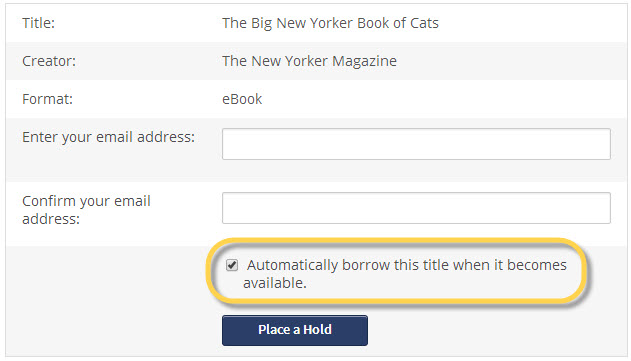
Note that the box is checked by default. If you leave it selected, OverDrive will automatically check the book out to your account as soon as it becomes available.
If you change your mind, you can'turn this setting on and off for individual holds by going to the Holds section of your account:
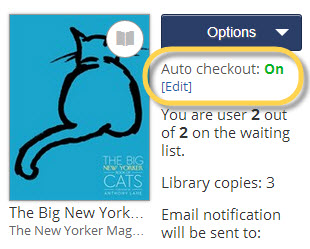
See OverDrive’s article on how automatic borrowing works for more details.
Ready to Place Some eBook Holds?
You can have up to 30 items on hold in OverDrive. Looking for some books to add to your holds list? Here are a few good places to start:
7 thoughts on “New features for managing your OverDrive eBook holds”
Do you still move up the hold queue while your hold is suspended?
Yes, you do.
Thanks for this post. Very useful.
If a book on hold becomes available, and auto checkout is off, can you use the suspend hold option to delay checking out the book (or do you need to suspend it before you are at the top of the wait list and it becomes available to you)?
Hi Barb,
Good question. The answer, however, is no – you can’t suspend a hold once it has become available for you to check out. You can only suspend a hold when you’re still on the waiting list for a book.
If you have a hold suspended, and receive a note that it will be checked out to you in a week due to the fact that you had it suspended for 7 days, can you unsuspend it at that time, and then get the book? Or, would you have to wait the 7 days before you could check it out?
Hi Stephen,
If I’m understanding your situation correctly, it sounds like a copy of the book is currently available, so yes, you should be able to check it out right away, without waiting 7 days.
Hope this helps.