Account summary screen: what do you want to see?
Since our last round of mobile testing at Bloor/Gladstone branch, we’ve continued moving forward on the redesign of the account section of the website.
We started with designing for mobile devices and have now run through several iterations and three rounds of testing with users. Up next: what should the new account look like on larger screens?
One of our goals is to provide a great experience on any type of device and deliver the full range of functionality in a usable way. Now that we’ve found a way to fit all the account features into a small screen design, we need to decide how to use the extra space that larger screens provide.
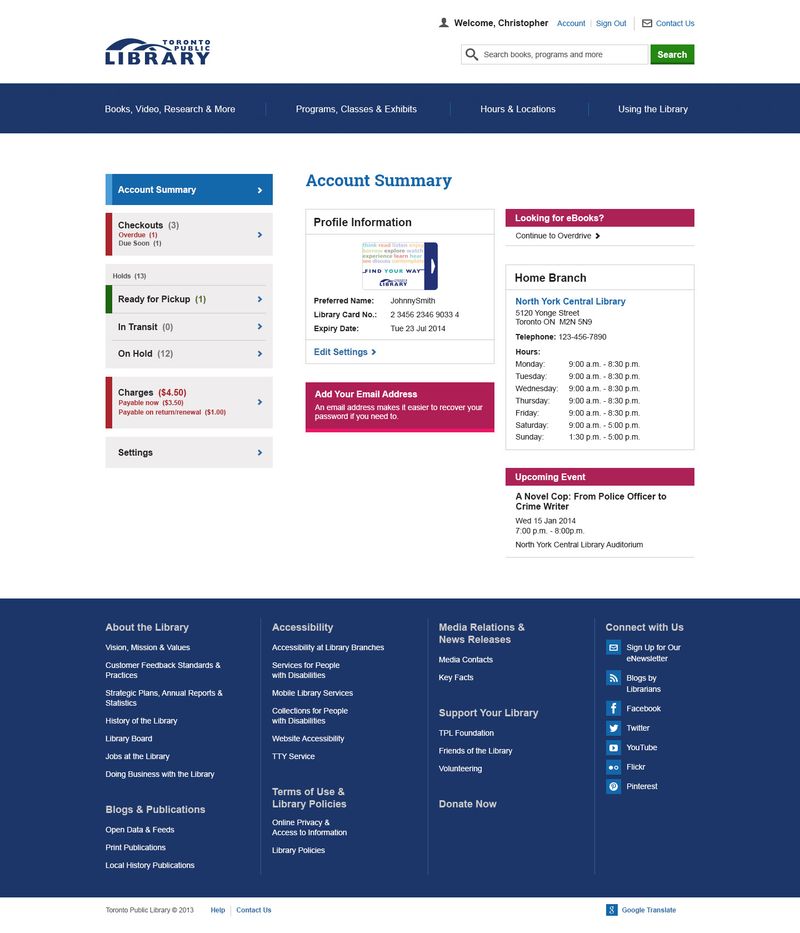
The account summary screen is a good example – its main purpose is to let you get a quick overview of the status of your account, but is there other information you’d like to see?
We’ve heard from a number of you who want branch information to be easier to find, so we added today’s hours for your home branch to our design, along with some basic profile information, a link to our eBook service, and a program promotion.
Take a look at the concept and let us know what you think! Is there information we’re missing? What would you like to see on the account summary screen?
29 thoughts on “Account summary screen: what do you want to see?”
The new design looks great and I look forward to using it, especially for mobile. The extra information for the big screen looks good — I would have suggested account number if you didn’t already have it, and my branch phone and hours is great.
One question: does “due soon” include “due today”? Is it possible to add a “due today” line dynamically, when there is something due today?
I agree with Madeleine. The account summary page looks great.
Similar to what she suggested, if possible, it would be great to know that there is an item that needs to be picked up today.
Both lines of due today and last day pickup should be in red.
Looking forward to the enhancements.
Great work!
I would like a wish list for future reading.
First, we need assurances that that the plan to present Cancel All Holds as the first and biggest button anyone can and of course will push in the mobile version has been strangled and held underwater till it died.
Next, you’re asking us to do your work for free. You just hired two people to carry out this enterprise.
Next, you’re really suggesting that this image above, which has no alignment or hierarchy and looks like three screenshot mockups of an iPhone view, is what you want to present to somebody with a 27-inch monitor?
need to add an advanced search capability on the screen.
Also, add a list of previously borrowed books – for example, the last 3 months. We can’then go to that list, and create a “favourites” list that we can go back to and reselect. AT that point we can empty out the “previously borrowed list” to free up memory.
The new design looks great and I am looking forward to being able to access my account via my mobile devices.
One thing that I was always thought was missing was an option to go back and look at the titles I’ve checked out in the past. This could assist people in reminding them of authors they’ve enjoyed and prompt them to take out more of their works.
Hi Madeleine,
That’s a great suggestion. Thanks for the feedback.
Lovely design!
I think I’d rather see a summary of books out (with due date) + my pick-ups available as the “home” instead of my account # and expiry date in the main container. Reduce the number of click-throughs via the side nav. But that’s a personal preference. Happy to work with the layout as it’s presented.
Hi all, Just a quick note that there are serious privacy concerns regarding a “past borrows” list. It was my understanding that past borrows records are purged. Is this the case?
I’m certainly not comfortable with anyone being able to pull up my past borrowing history (what if I’m a teenager who checked out books about abortion? Or I am checking out books about particular diseases/sexual orientations/anything else you can imagine that might be a sensitive topic?) I don’t want library staff or anyone to be able to trace the history of everything I’ve ever explored at the library.
Hi Joe,
First, let me assure you in the strongest possible terms that the giant “Cancel All Holds” button has indeed been strangled, drowned, and swept out to sea.
Re the image above, you’re right that the design needs a lot more work. We’re learning the hard way that “mobile first” doesn’t mean all your problems are solved once you’ve found a way to fit everything on a small screen.
What we’re hoping for is feedback about what content is important so we can decide how best to use the space available on larger screens. Once we’ve heard what people think, we’ll try iterating some more on the design.
Hi JoAnne,
That’s a good suggestion, and one we frequently hear from library users. This account redesign is a necessary first step that won’t include major new features, but we’re hoping options like wish lists will be part of a future phase.
I’m agreeing with Nancy N. and D. Cyr as I’ve always wanted a list of previously borrowed material. I don’t think it has to be visible to everyone in the TPL but it wouldn’t bother me that much. (I’d kinda like the authorities to know if someone was borrowing: “Home-made Bombs for Dummies”.)
You could make the list an account option and I’d like to have control over deleting, or downloading the list onto my home computer, too. That would solve the “privacy concerns” for me. I’m not quite that paranoid, yet.
Two comments:
T. MacMaster is correct re borrowing history being personal information that should not be retained by the library any longer than is necessary (i.e. once materials returned, fines paid…). There are lots of places on the web where people can keep lists of their reading.
Secondly, I don’t think the main central piece of the page should be “Profile Information” my name and card number. If I’ve logged in, I know my card number! I would eliminate that completely. It’s a privacy issue too, since people in public areas, like libraries, could be subjected to ‘shoulder surfing’ and have others learn their name. That whole part could and should be eliminated. But no need to hold it under water.
Hi! Lots of privacy and borrowing history comments, here’s a quick update. Right now, the library doesn’t keep a history of the items you’ve borrowed. But borrowing histories is the most requested website feature, so it’s coming. Rest assured that when we launch this feature, it will be available to everyone, but turned off by default. You will have to opt-in.
I can see the concern about privacy for displaying the card number automatically. Perhaps it could be on another screen rather than the default login screen. I’d like to have it somewhere in there because when I call a branch to resolve an issue, the first thing they need is my card number. Right now, I log out so I can get the login screen where my browser displays the number. I don’t keep my library card near my computer.
Three cheers for opt-in. And re the person who wants the authorities to know who is reading about making bombs, this is exactly why these lists should not be kept without people’s knowledge. Freedom to read is all about, well, freedom to read. Someone might be researching methodologies for “making” various types of things, from beds, to bombs. Or hoping one day to write her own “how to” book, and preparing by reading as many as she can find, no matter the topic. I just finished a book called Massacre Pond. Should I be arrested?
There are too many facebook updates, so a way to get only (ie:) upcoming programs would be useful on the account page.
I’m rather late in commenting, but here goes (in no particular order):
The type size seems large enough for touch screen devices, an important constraint, since a lot of people will be using it on tablets of one sort or another.
*But*, as with the current desktop site, there’s still a love affair with empty space doing nothing at all or filled with branding graphics, e.g. all that edge space or the large iconic library card.
A good exercise is to approach element spacing from the perspective of someone using one of those mouth styluses for quadriplegic people: is there enough space around active elements of the screen design so that slightly inaccurate aiming of the tablet user’s finger or the mouth stylus will not touch an unintended screen element?
As it stands now, a lot of space on larger screens is wasted that could be used for spacing between such active screen elements.
In the current design displayed above, consider dividing the screen into an upper and lower strip sandwiching a centre portion that progressively adds more information panels, e.g. a list of links to currently checked-out items in one extra panel, followed by a similar link panel for current fines, etc., as the screen gets wider.
Maybe the user profile panel can be compressed to a horizontal strip above these panels, since it only needs to be a display of the patron’s name and a link to the detailed profile information.
I still think all versions of the Library’s website should take advantage of geolocation techniques right from the start, and ask for the user’s permission to use their location. This can control the display of useful information such as listing the nearest branches (and using suitable traffic light colours to indicate branches closed now, closing in the next hour, and currently open), or listing nearby library branch events, etc. The Web team shouldn’t assume that the user will be always near their home branch and want information about it alone (e.g. they may want to return items to a branch closest to them right now).
Make the address tapable so it launches your device’s map app. that’s my only suggestion for now. Great work otherwise!
I like the new design, and the use of colours on the page. The contrasting colours really make areas of importance stand out.
There is one thing that I’s like to point out: it not really clear what the different settings choices are designed for. There is one settings option at the bottom on the left column, and another one below the account expiry date in the centre column.
If there needs to be two different settings areas, perhaps distinguishing between the two might be helpful? If they both to the same thing, why not just have one link to settings – it would free up more space on the page and make it all a little more tidy.
This is not a “design” in any comprehensible sense and “I like it” is no more helpful to this process than, say, “I don’t like the colour red” would be.
Please spend our tax dollars hiring real designers.
Is the ‘Up coming event’ section intelligent? Personalized? i.e. How is content being pulled in? Is it based on my borrowing habits? My home branch? I think that this section will only be useful if content is personalized rather than random. I would want to see events at my home branch or events based on a subject I’m interested in or author readings for an author I’ve read.
Nothing I see here is an improvement on the current system. I would get rid of all of the hyperlinks to twitter, facebook, etc. that web developers seem to be addicted to.
The main improvement I would like to see is the better performance for those of us using dail-up. The TPL website has been getting steadily worse in terms of both speed and reliability on slower systems with every new version.
Thanks for making the effort to get feedback. Here’s my 2 cents.
(1) There’s a mismatch between the title (Account Summary) and the content. I’d say the content is more like “profile settings”. The actual summary info is shown on the left, e.g, how many books on hold, checked out, etc.
(2) The content includes content that is not summary or profile info, including links to ebooks and upcoming branch info.
(3) There’s a visual design issue with the use of the purple areas. In particular, “Add your email” is an action (blue text) and not a title (purple background).
Thanks everyone for all your helpful feedback. We’re definitely back to the drawing board on the summary page.
Vitriolic critiques and broad value statements outlining a subjective opinion which is presented as fact doesn’t help.
It’s been a few months since last contact. Are there any new updates as to how this project is progressing?
Hi Kevin,
Thanks for nudging us – we have an update coming very soon!
What’s happening in this comments section is not a “critique” in any sense of the word. Nor is your contribution of any value. And at least I sign my name.