Getting Started with LearningExpress Library
LearningExpress Library provides test preparation, skill building, and career resources for students, educators, and adult learners. LearningExpress Library is organized into nine centers which are grouped into four categories.
- Skill Building and Professional Development
- Adult Core Skills has tutorials and practice sets on math, reading and writing, speaking and grammar for adults.
- Career Development and Job Preparation
- Career Preparation has information about careers, job searching and workplace skills and preparations for entrance and occupation exams for (e.g. cosmetology, firefighting and nursing).
- Academic Skills and Test Preparation
- Citizenship, TOEIC®, and TOEFL® Center has practice test to help prepare for Canadian citizenship exams. It also had preparation for TOEIC and TOEFL iBT exams.
- College Admissions Test Preparation center has practice tests for ACT, AP, PSAT, SAT, TOEFL iBT exams and admission essays.
- College Students center has math, reading, writing, grammar and science for postsecondary students to help with preparation for graduate school admissions and college placement exams.
- GED® Test Prep Center has tools to prepare for GED exams. Please note that in Canada, the GED has been replaced by the Canadian Adult Education Credential (CAEC).
- Grades 4 – 8 Educator Resources center has support for learning math, reading and writing for elementary and middle school students. It includes practice exercises in algebra and patterns, data analysis and probability, geometry, grammar, reading and spelling and more.
- High School Students center has support for learning math, reading, science, social science and technology. It includes practice exercises in biology, calculus, chemistry, computing and information technology, grammar, reading comprehension, spelling, statistics, and more.
- Spanish Language Resources
- Recursos Para Hispanohablantes (Resources for Spanish Speakers) center has learning, career and U.S. citizenship tools in Spanish.
How to access LearningExpress Library
- Go to LearningExpress Library or https://tpl.ca/resource/learning-express-library/
- Select LearningExpress Library >> (the title)

- Enter your username or your 14-digit library card number (no spaces) and PIN/Password. Select Log in.
Create or Sign in to a LearningExpress Library account
LearningExpress Library requires an account to use the resources available through this service. The first time you access LearningExpress Library, you will need to create an account.
- To start, select Sign In/Register.
- Select Register and fill in the required fields. Your email address will be used as your username. If you do not want to enter your email address, select Register without email.
- Select Register to complete the account creation.
Search LearningExpress Library
Search across all centers for materials by entering a keyword or words in the search box at the top right of the page. For example, let’s search for resources on calculus.

The Search results summary provides the number of test, tutorials, microlessons, ebooks, videos, articles, flashcards, modules and games available on that subject. Select and deselect filters to narrow your results to only specific types of resources.

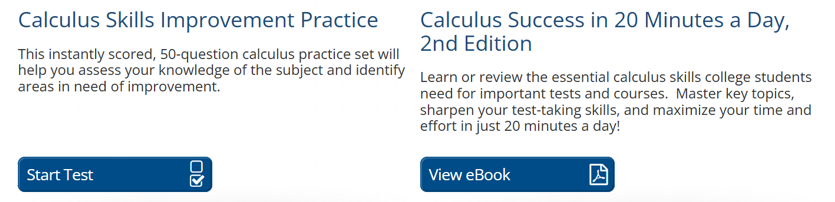
Scroll down to find the resources available. Each one identifies the type of resource and includes a description to help you to select the best resources. Select the resource title or the blue button to get started.
Browse LearningExpress Library
Selecting a Center under each Category will display a list of topics available in that center. Select a topic to see all the resources available for that topic.
For example, under College Admissions Test Preparation, there are a list of resources for many different admissions tests. Select one of the resources to get started.

For related resources, have a look at Brainfuse, Career Cruising and LinkedIn Learning.
More help?
- Select Help in the toolbar in LearningExpress Library to access the FAQs and other help resources.
- Schedule a Book a Librarian appointment at a local branch
- Contact us with your questions.
Comments