Getting Started with Naxos Music Library World
Naxos Music Library World is an online, streaming music library of traditional and contemporary music from over 32,000 artists from 150 countries. It also includes the complete ARC Music and Smithsonian Folkways catalogues.
How to access Naxos Music Library World
It can be accessed either through our A-Z list of Databases or via the method below.
- Go to tpl.ca and enter 'Naxos Music Library World' in the search box.
- Click on Access Online under Naxos Music Library (World).
- Enter your library card number and PIN.
Searching
Search by keyword(s) from an album, track title, artist, geographic area, or cultural group in the search box on the top right of the home page.

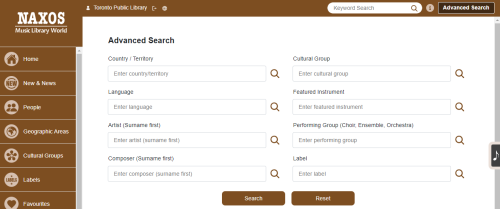
Use Advanced Search to restrict search terms to fields such as country/geographic area, cultural group, language, instrument, title, artist, performing group, composer, arranger, lyricist, label, genre, and music categories. You can also combine these fields in an Advanced Search.
Browsing
Browse by new & news, people, geographic areas, cultural groups, labels, and curated playlists.
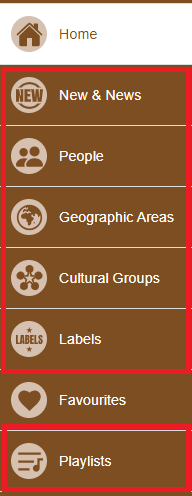
Labels – includes renowned labels such as Smithsonian Folkways, Warner, and ARC.
Geographic area – browse geographic areas on a map by continent or select a specific country or use the alphabetical list of countries.
To listen to an album:
- Select or click on the artist/title line in the search results.
- Choose Select All on the album page.
- Choose "Play".

To listen to one or more tracks:
- Tick the box(es) next to the track(s).
- Choose "Play".
Playlists & Favourites

- Click on the Playlists tab.
- Select Sign up at the top right of the page.
- Enter your name, email address and password.
- An email confirmation message will be sent.
- Activate your account by clicking on the email confirmation link.
- Login under the Playlists section.
- Search or browse for albums.
- On the album page, select one or more tracks.
- Select Add to Playlist.
- In the window that pops up, name the playlist you want the track(s) to be on or give the location of a playlist you have already created. Then when you select the Playlists tab, you will see the playlists you have made.

Favourites are created in the same manner, but by selecting the heart symbol instead. This can be found to the left of the add-to-playlist symbol.
Mobile App
Download the free iOS or Android NML World app. Sign in using the email address and password you used in your Playlists account.
Note: An Internet connection is required to stream the content. Using cellular data is not recommended as streaming multimedia content can consume a lot of bandwidth. Wi-Fi is available at all Toronto Public Library branches.
For more information or for help, please contact our Answerline service.
Comments